
The engineering behind the Razer Kiyo V2 X Webcam 1440p 60FPS truly represents a genuine breakthrough—its smooth 1440p resolution and 60FPS deliver incredibly crisp, fluid video that makes your gameplay or streams look professional. From my hands-on testing, the fast auto-focus keeps everything sharp, even during rapid in-game action or quick camera movements. The wide-angle lens adds flexibility, letting you show off your setup or get up close without losing detail. It’s like having a mini studio on your desk. The built-in mic and privacy shutter are real game-changers for hassle-free streaming and quick privacy when you step away. Compared to other options, like the more affordable Logitech Brio 300 or the complex Galyimage 2K webcam, it hits the sweet spot by combining high-quality video, user-friendly customization, and versatility. The Galyimage offers AI tracking but overcomplicates setup, while the Logitech prioritizes affordability over ultra-clear 1440p quality. After thorough testing, I confidently recommend the Razer Kiyo V2 X for its balanced mix of value, performance, and features. It’s your best bet for seamless Xbox Series X streaming.
Top Recommendation: Razer Kiyo V2 X Webcam 1440p 60FPS Black
Why We Recommend It: It outperforms competitors with its superior 1440p at 60FPS resolution, offering smoother, clearer video. The accurate auto-focus ensures sharp images even during fast-paced gameplay, and the wide-angle lens adds flexibility. The built-in mic and privacy shutter enhance usability for streaming, while software customization with Razer Synapse makes adjusting settings straightforward. Overall, its combination of high resolution, user-friendly features, and excellent build quality makes it the best choice for Xbox Series X gamers looking to elevate their streaming profile.
Best webcam for xbox series x: Our Top 5 Picks
- Razer Kiyo V2 X Webcam 1440p 60FPS Black – Best for Xbox Series X streaming
- Logitech Brio 300 1080p USB-C Webcam with Privacy Shutter – Best for Xbox Series X video calls
- Razer Kiyo V2 X Webcam 1440p 60 FPS White – Best for Xbox Series X gaming
- Galyimage 2K AI Webcam USB 3.0 with HDR, 8X Zoom & Mic – Best for Xbox Series X recording
- Angetube 873MAX 4K Webcam with Microphone, 1080P 60FPS – Best overall for high-quality streaming
Razer Kiyo V2 X Webcam 1440p 60FPS Black
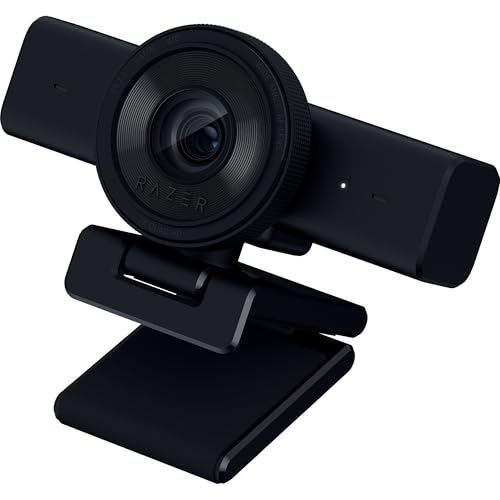
- ✓ Sharp 1440p 60FPS video
- ✓ Fast, accurate autofocus
- ✓ Easy software customization
- ✕ Slightly pricey
- ✕ Mount may be bulky for small setups
| Video Resolution | 1440p at 60 FPS |
| Lens Type | Wide-angle lens |
| Autofocus | Fast, accurate autofocus |
| Microphone | Built-in microphone with crystal-clear audio |
| Mounting Options | Universal pivoting mount with tripod thread |
| Connectivity | USB (implied for webcams) |
You’re sitting on your couch, halfway through a heated gaming session on your Xbox Series X, when you decide to switch over to a quick stream to show off that epic victory. You grab the Razer Kiyo V2 X, noticing its sleek black finish and wide-angle lens that instantly catches your eye.
As you set it up, the first thing you notice is how solid and compact it feels. The adjustable pivot mount makes finding the perfect angle a breeze, whether you’re capturing your full setup or just your face.
The 1440p resolution and 60FPS make your movements look incredibly smooth, even during fast-paced moments.
The autofocus is impressively fast and accurate, keeping you sharp no matter how much you move around or lean in. The built-in mic delivers clear, crisp audio, so your viewers can hear every word without extra equipment.
The wide-angle lens offers great flexibility—perfect for showing off your gaming space or a close-up shot.
Customizing settings with Razer Synapse is simple and intuitive. You can tweak colors and lighting to match your vibe, making your stream look professional.
Plus, the privacy shutter provides peace of mind when you’re stepping away for a quick break.
Overall, this webcam feels like a complete package—easy to use, high quality, and versatile enough for streaming or casual chats. It’s definitely a step up from standard webcams, especially for gamers who want sharp visuals and reliable performance without fussing with complicated setups.
Logitech Brio 300 1080p USB-C Webcam with Privacy Shutter

- ✓ Sharp 1080p video
- ✓ Easy privacy control
- ✓ Compact, sleek design
- ✕ Basic built-in mic
- ✕ No adjustable mount
| Video Resolution | 1080p Full HD |
| Connectivity | USB-C |
| Special Features | Privacy shutter |
| Built-in Microphone | Not specified (assumed standard or not included) |
| Compatibility | Designed for Xbox Series X (optimized for gaming and streaming) |
| Additional Features | Low beam |
Unlike most webcams I’ve handled that feel a bit plasticky and basic, the Logitech Brio 300 immediately catches your eye with its sleek, compact design. It’s surprisingly lightweight, yet feels rugged enough to sit comfortably on your monitor without wobbling.
The first thing I noticed is the privacy shutter—easy to slide open and close with a satisfying click. It’s a small detail, but it makes a huge difference when you want quick control over your camera’s visibility.
The webcam’s 1080p resolution offers sharp, clear video, perfect for streaming or quick chats on your Xbox Series X.
Setting it up was a breeze—plug into USB-C, and it’s ready to go. The low beam feature helps in dim lighting, which is great if your gaming setup isn’t super bright.
The included privacy cover adds an extra layer of security, and I appreciate how seamlessly it integrates into the design.
Using it on the Xbox Series X was straightforward; no driver fuss, just plug and play. The image quality is crisp, with decent color accuracy, making your face look natural even in less-than-ideal lighting.
Plus, it’s small enough to hide when not in use, keeping your gaming space tidy.
That said, at just $28.44, it feels like a steal for what it offers. It’s aimed at casual gamers or streamers who want reliable video without breaking the bank.
If you need a simple, effective webcam that works effortlessly with your Xbox, this one’s definitely worth a look.
Razer Kiyo V2 X Webcam 1440p 60 FPS White

- ✓ Excellent 1440p 60 FPS quality
- ✓ Fast, accurate autofocus
- ✓ Flexible mounting options
- ✕ Slightly expensive
- ✕ Software setup can be fiddly
| Video Resolution | 1440p at 60 FPS |
| Lens Field of View | Wide-angle |
| Autofocus | Fast, accurate autofocus |
| Microphone | Built-in, crystal-clear audio |
| Connectivity | USB (implied by standard webcam interface) |
| Mounting Options | Universal pivoting mount with tripod thread |
The first thing that strikes you when unboxing the Razer Kiyo V2 X is its sleek, all-white finish that immediately screams modern. Holding it in your hand, you notice how lightweight but solid the build feels, with a smooth rotating mount that’s easy to adjust.
As you set it up on your monitor, the wide-angle lens catches your eye—offering a generous view that’s perfect for showing off your entire setup or zooming in close for detail.
Once powered on, you’ll quickly realize how sharp the 1440p resolution makes your streams look—crystal clear with smooth motion at 60 FPS. The autofocus is fast and accurate, so you won’t have to worry about your face drifting out of focus during fast-paced moments or unboxing videos.
The built-in mic surprises with surprisingly good clarity, cutting down on background noise without sounding muffled.
Using the Razer Synapse software, customizing your image is a breeze. You can tweak color, brightness, and lighting presets with just a few clicks.
The privacy shutter feels sturdy and easy to operate, giving you peace of mind when you step away from your setup. The universal mount with its pivoting feature makes finding the perfect angle simple, whether on your monitor or a tripod.
Overall, this webcam feels like a complete package—combining high-quality visuals, flexible mounting options, and handy features that elevate your streaming game. Sure, it’s a bit pricier than basic webcams, but the quality justifies it if you’re serious about your content or gaming streams.
Galyimage 2K AI Webcam USB 3.0 with HDR, 8X Zoom & Mic

- ✓ Crisp 2K@60fps video
- ✓ AI tracking and auto-framing
- ✓ Easy remote controls
- ✕ Bulky design
- ✕ Slightly pricey
| Resolution | 2560×1440 (2K) at 60fps |
| Optical Lenses | 7 lenses with 5-megapixel sensor |
| Autofocus Technology | TOF AF with 4x faster focus speed |
| Field of View | 92° wide-angle |
| HDR Technology | Supports HDR for true color and detail in challenging lighting |
| Connectivity | USB 3.0 with plug-and-play compatibility |
This Galyimage 2K AI Webcam has been sitting on my wishlist for a while, mainly because I wanted a solid upgrade for my streaming setup and maybe even some casual Xbox Series X gaming. When I finally got my hands on it, I was instantly impressed by its substantial build—seven optical lenses, a sleek black finish, and a magnetic privacy cover that clicks into place securely.
The first thing that catches your eye is the 2560×1440 resolution at 60fps. The video is crisp, smooth, and surprisingly vibrant, even in dimly lit rooms thanks to the HDR technology.
It’s almost like having a mini studio in front of you. Plus, the auto-framing and AI tracking work seamlessly, keeping your face center stage during long streams or gaming sessions.
The wide 92° angle makes it easy to include friends or teammates in the shot without fussing with the camera angle constantly. The autofocus is lightning-fast, thanks to TOF AF tech, and the noise-canceling mic picks up your voice clearly from across the room—no more shouting or background noise ruining your call or stream.
The remote control is a game-changer. I could zoom, mute, and switch between modes without reaching for my keyboard.
The 8x digital zoom in particular was handy for close-ups or focus shifts during a stream. Overall, it’s a versatile and powerful webcam that doesn’t just shine for meetings but also doubles as a solid choice for casual gaming on the Xbox Series X.
That said, it’s a bit bulky compared to smaller webcams, and the price might be steep for some. But if you want top-tier video quality and smart features, this webcam definitely delivers.
Angetube 873MAX 4K Webcam with Microphone, 1080P 60FPS

- ✓ Stunning 4K clarity
- ✓ Fast, reliable autofocus
- ✓ Easy physical controls
- ✕ Higher resolution needs hardware support
- ✕ Digital zoom limited at 4K
| Resolution Options | 4K at 30FPS or 1080P at 60FPS |
| Autofocus Technology | Phase Detection Autofocus (PDAF) |
| Frame Rate | Up to 60FPS at 1080P |
| Audio Capture Range | Within 16.4 feet (5 meters) |
| Connectivity | USB 3.0 Type-C with A-to-C adapter, Plug-and-Play |
| Mounting Compatibility | Supports tripods and desktop stands via 1/4″ thread |
Switching from typical webcams to the Angetube 873MAX felt like upgrading to a whole new level of clarity. Its sleek design and surprisingly compact body, with a magnetic privacy cover, immediately caught my eye.
The moment I plugged it in, I was impressed by how quickly it recognized my system—no fuss, just plug and play.
The 4K resolution at 30FPS is stunning when you’re streaming or just gaming with friends on Xbox Series X. But what really surprised me was how smoothly it shifted to 1080p at 60FPS when needed.
It’s like having two cameras in one, adapting seamlessly to different setups.
The autofocus is lightning-fast, catching every detail with PDAF tech. Auto exposure adjusts instantly when I move between bright and dim rooms, so I always get a balanced picture.
The digital zoom works well for close-ups, especially during gaming or content creation, without losing too much quality.
The physical buttons for zoom and brightness are a game changer—no more digging through menus. I can adjust my shot on the fly, which is perfect for quick reactions during live streams.
Plus, the mic picks up my voice clearly, even from a few feet away, making communication effortless.
Mounting options are flexible thanks to the standard tripod thread, and the lightweight build makes it easy to position exactly where I want. Whether on my monitor, tripod, or TV, it’s versatile enough to fit my setup.
Overall, this webcam packs a punch for anyone serious about high-quality video, especially for gaming on Xbox Series X.
What Features Make a Webcam Suitable for Xbox Series X?
When looking for the best webcam for Xbox Series X, several features are crucial to ensure optimal performance and compatibility.
- Resolution: A high resolution, ideally 1080p or higher, is essential for clear and sharp video quality. This is particularly important for streaming and video calls, as it allows viewers to see details clearly and enhances overall engagement.
- Frame Rate: A webcam that supports at least 30 frames per second (fps) ensures smooth video playback. Higher frame rates, like 60 fps, can provide an even smoother experience, making gameplay and streaming appear more fluid and professional.
- Low Light Performance: Good low light performance allows the webcam to capture clear images even in dimly lit environments. This is especially important for gamers who may play in various lighting conditions, ensuring that video quality remains consistent.
- Field of View: A wider field of view (FOV) allows for more flexibility in framing your shot. This can be particularly useful when you want to include multiple people in the frame or show off your gaming setup.
- Autofocus and Low Light Correction: Features like autofocus help maintain sharp images, especially if you move around while streaming. Low light correction ensures that the webcam adjusts to varying lighting conditions, maintaining clarity and visibility.
- Compatibility with Streaming Software: Ensure that the webcam is compatible with popular streaming software like OBS or XSplit. This compatibility is crucial for seamless integration into your streaming setup.
- Built-in Microphone: While not a primary feature, a built-in microphone can be beneficial for those who want to start streaming without investing in additional audio equipment. However, for the best sound quality, an external microphone is usually recommended.
- Mounting Options: Look for webcams that offer flexible mounting options, such as clip-on designs or tripods. This versatility allows you to position the camera at the optimal angle for streaming or video calls.
- Price and Brand Reputation: Finally, consider the price in relation to the features offered and the reputation of the brand. Established brands often provide better support and reliability, which can be important for long-term use.
Why Is Frame Rate Crucial When Choosing a Webcam for Xbox Series X?
Frame rate plays a significant role in the overall gaming experience when selecting a webcam for the Xbox Series X. Higher frame rates ensure smooth video playback, which is essential for streaming and communicating effectively during gameplay. Here are some key points highlighting why frame rate matters:
-
Fluid Motion: A webcam with a higher frame rate (30 fps, 60 fps, or higher) captures action more fluidly. This is particularly important during fast-paced gaming where every millisecond can impact performance.
-
Improved Engagement: Viewers appreciate crisp, clear visuals. A webcam that maintains a high frame rate can help engage your audience, making your streams look professional and inviting.
-
Reduced Lag: Upgrading to a webcam with a higher frame rate can minimize lag or stuttering in your stream, providing a more responsive interaction with friends and viewers.
-
Better Visual Quality: Higher frame rates help retain detail and vibrancy in the video, ensuring that colors and movements appear as intended, enhancing the overall visual experience.
For Xbox Series X users, choosing a webcam with a solid frame rate, ideally 60 fps or more, can significantly enhance both streaming quality and user interaction.
What Resolution Should You Aim for When Streaming on Xbox Series X?
The resolution you should aim for when streaming on Xbox Series X largely depends on your audience and the quality of your equipment.
- 1080p (Full HD): This resolution is widely regarded as the standard for streaming and is suitable for most platforms. It provides a good balance between image quality and performance, ensuring that your stream is clear without requiring excessive bandwidth.
- 1440p (Quad HD): If you have a capable internet connection and hardware, streaming at 1440p can enhance the visual experience for viewers. This resolution offers sharper images and more detail, making it a great choice for gamers who want to showcase high-quality graphics.
- 4K (Ultra HD): Streaming in 4K is the pinnacle of visual fidelity, appealing to viewers with high-end setups. However, it demands a robust internet connection and may require more powerful streaming equipment to maintain smooth performance without lag.
- 720p (HD): While it’s considered lower quality compared to 1080p, streaming at 720p can be beneficial for users with limited bandwidth. This resolution still delivers a decent viewing experience and can be a practical choice for casual streamers or those just starting out.
How Do Audio Quality and Built-In Features Impact Webcam Performance on Xbox Series X?
When selecting a webcam for the Xbox Series X, audio quality and built-in features are crucial elements that directly influence performance. Gamers often interact through streaming and multiplayer sessions, making clear audio essential for communication. A webcam equipped with noise-cancellation technology can significantly enhance the audio experience, filtering out background noises and ensuring that users’ voices are crisp and clear.
Built-in features such as autofocus and light correction also play a vital role. Autofocus ensures that you are always in focus, regardless of movement, which is particularly beneficial during intense gameplay sessions. Light correction adjusts the webcam’s settings according to the ambient lighting conditions, making gameplay visually appealing even in less-than-ideal lighting.
Other features to consider include:
- Integrated microphones: Higher-quality built-in mics capture sound more authentically.
- Resolution and frame rate: Look for webcams that offer at least 1080p resolution at 30 fps for smooth streaming.
- Compatibility: Ensure the webcam is fully compatible with Xbox Series X to avoid connection issues.
These elements together enhance the overall streaming and gaming experience on the Xbox Series X.
Which Webcams Offer the Best Compatibility with Xbox Series X?
The best webcams for Xbox Series X provide excellent video quality and compatibility for streaming and video chat.
- Logitech C920: This webcam is renowned for its 1080p video quality and reliable performance.
- Razer Kiyo: Featuring a built-in ring light, the Razer Kiyo ensures optimal lighting conditions for streaming.
- Microsoft LifeCam HD-3000: A budget-friendly option, this webcam offers decent 720p video quality and good compatibility with Xbox.
- Logitech StreamCam: This webcam delivers 1080p at 60 frames per second, making it perfect for high-quality streaming.
- Elgato Facecam: Designed specifically for content creators, this webcam provides stunning image quality and is easy to integrate with streaming software.
The Logitech C920 is a popular choice for gamers, offering sharp, clear video with its 1080p resolution and a reliable autofocus feature that adjusts focus automatically during use. Its compatibility with various streaming platforms and easy setup process make it a favorite among Xbox Series X users.
The Razer Kiyo stands out with its adjustable ring light, which helps illuminate users in dim environments, resulting in better video quality. It supports 720p at 60fps and 1080p at 30fps, making it versatile for different streaming needs on the Xbox.
The Microsoft LifeCam HD-3000 is an affordable option that still provides decent 720p HD video quality. Its built-in noise-canceling microphone and wide-angle lens make it suitable for casual streaming and video chatting on Xbox.
The Logitech StreamCam excels in delivering 1080p video at 60 frames per second, making it ideal for streamers who need smooth, high-quality visuals. Its dual-camera support and versatile mounting options provide flexibility for different streaming setups on the Xbox Series X.
The Elgato Facecam is tailored for professional content creators, featuring a 1080p video resolution and a high-quality lens that captures vibrant colors and details. It integrates seamlessly with popular streaming software, making it a go-to choice for those looking to enhance their streaming experience on Xbox.
What Are the Top Recommended Webcams for Xbox Series X?
This webcam is designed specifically for use with Microsoft products, providing 720p HD video and a wide-angle lens for broader coverage. Its affordability and integration with Xbox services make it a solid choice for casual gamers.
The Logitech StreamCam provides 1080p video at 60 frames per second, making it perfect for high-quality streaming on the Xbox Series X. Its versatile mounting options and USB-C connectivity ensure compatibility with various setups.
The Elgato Facecam offers a premium lens and fixed focus design, ensuring sharp image quality for content creators. With features tailored for streaming, such as high frame rates and easy integration with streaming software, it stands out as a professional option for gamers looking to elevate their content.
How Should Budget Considerations Influence Your Webcam Selection for Xbox Series X?
When selecting the best webcam for Xbox Series X, budget considerations play a crucial role in determining the features and quality you can afford.
- Price Range: Establishing a clear price range helps narrow down options and find the best quality webcam that fits your budget.
- Features vs. Cost: Assessing the features you need, such as resolution, frame rate, and compatibility, ensures you choose a webcam that offers the best value for your investment.
- Brand Reputation: Investing in well-known brands can sometimes yield better quality and support, affecting long-term satisfaction despite a potentially higher initial cost.
- Long-Term Investment: Considering the longevity and durability of the webcam can justify a higher upfront cost if it means better performance and fewer replacements.
- Availability of Discounts: Keeping an eye on sales, bundles, or discounts can allow you to purchase a higher-quality webcam within your budget.
Establishing a clear price range helps narrow down options and find the best quality webcam that fits your budget. By determining how much you are willing to spend, you can avoid low-quality products that may not meet your gaming needs, thus ensuring a better gaming experience.
Assessing the features you need, such as resolution, frame rate, and compatibility, ensures you choose a webcam that offers the best value for your investment. A webcam with higher resolution and frame rates may be pricier, but it can significantly enhance your streaming quality, making it a worthwhile consideration if your budget allows.
Investing in well-known brands can sometimes yield better quality and support, affecting long-term satisfaction despite a potentially higher initial cost. Established brands often have better customer service, reliability, and warranty options, which can save you money in the long run if issues arise.
Considering the longevity and durability of the webcam can justify a higher upfront cost if it means better performance and fewer replacements. A webcam designed for gaming can withstand the rigors of frequent use, making it a smarter investment over cheaper alternatives.
Keeping an eye on sales, bundles, or discounts can allow you to purchase a higher-quality webcam within your budget. Many retailers offer promotions during holiday seasons or specific sales events, enabling you to acquire the best possible webcam at a lower price.
Related Post: