
Imagine you’re in the middle of a tense match, coordinates locked, and suddenly your monitor’s response time and refresh rate decide whether you win or lose. I’ve tested countless gaming monitors myself, and I know how crucial it is to have that silky-smooth gameplay without lag or ghosting. The key is a monitor that handles fast action, with sharp visuals and minimal input delay.
After extensive comparison, the LG 32G600A-B 32″ Ultragear QHD Curved Gaming Monitor 180Hz stood out. Its 180Hz refresh rate and 1ms response time deliver ultra-smooth visuals, even in frantic scenes. Plus, the 1000R curvature pulls you right into the action, giving a more immersive experience. Unlike smaller or less feature-rich options, this monitor offers vibrant HDR10 and up to 99% sRGB coverage, which really makes colors pop during intense gameplay or streaming. It’s a balanced combo of speed, immersion, and picture quality—making it the top choice I recommend after testing everything thoroughly.
Top Recommendation: LG 32G600A-B 32″ Ultragear QHD Curved Gaming Monitor 180Hz
Why We Recommend It: This monitor’s 180Hz refresh rate and 1ms response time ensure smooth, tear-free gameplay. Its 1000R curvature enhances immersion, pulling you into the game. With HDR10 and 99% sRGB, visuals are vibrant and detailed, perfect for both gaming and streaming. Compared to others, it offers the best blend of speed, picture quality, and comfort, thoroughly tested for real gaming performance.
Best gaming monitors for xbox: Our Top 5 Picks
- SANSUI 32″ Curved 240Hz Gaming Monitor FHD HDMI DP1.4 – Best for High Refresh Rate Gaming
- Sceptre Curved 24-inch Gaming Monitor 1080p R1500 98% sRGB – Best Budget Gaming Monitor for Xbox
- Sceptre 22″ Gaming Monitor FHD 1080p 144Hz HDMI DP Speakers – Best for Casual Xbox Gaming
- LG 32G600A-B 32″ Ultragear QHD Curved Gaming Monitor 180Hz – Best for Xbox Series X and S
- ASUS TUF Gaming VG27UQ1A 27″ 4K 160Hz G-SYNC Monitor – Best for Xbox Series X
SANSUI 32″ Curved 240Hz Gaming Monitor FHD HDMI DP1.4

- ✓ Smooth 240Hz refresh rate
- ✓ Vibrant, accurate colors
- ✓ Immersive curved display
- ✕ No built-in speakers
- ✕ Limited HDR capabilities
| Display Size | 32 inches |
| Display Curvature | 1500R |
| Resolution | 1920 x 1080 pixels (Full HD) |
| Refresh Rate | 240Hz |
| Response Time | 1ms MPRT |
| Color Gamut | 125% sRGB |
From the moment I unboxed the SANSUI 32″ Curved Gaming Monitor, I was struck by its sleek, modern design. The 1500R curved screen feels surprisingly immersive, especially when you’re close enough to the recommended 1.2 meters.
The matte finish and slim bezels give it a clean look that fits well in any gaming setup.
The 32-inch display is a sweet spot for gaming—big enough to feel expansive, yet not overwhelming. Once powered on, the 240Hz refresh rate becomes obvious with smooth, tear-free gameplay.
The 1ms MPRT response time really helps with fast-paced action, reducing ghosting and motion blur during intense Xbox sessions.
Colors are vibrant thanks to the 125% sRGB coverage, making everything pop. HDR support adds an extra layer of visual depth, though it’s not a full HDR experience.
The anti-flicker and low blue light features make long gaming sessions more comfortable for your eyes.
Plugging in my Xbox via HDMI or DisplayPort was straightforward. The included DP cable is a nice touch.
I appreciated the wide viewing angles and adjustable tilt, which made finding the perfect position easy. The VESA compatibility means you can mount it if you prefer a different setup.
The curved design really pulls you into the game, especially during racing or FPS titles. It’s a solid choice for gaming, especially given its budget-friendly price of under $180.
Overall, it’s a feature-packed monitor that elevates the gaming experience without breaking the bank.
Sceptre Curved 24-inch Gaming Monitor 1080p R1500 98% sRGB

- ✓ Immersive curved display
- ✓ Good color accuracy
- ✓ Easy to connect
- ✕ Moderate refresh rate
- ✕ Brightness could improve
| Display Size | 24 inches |
| Screen Curvature | 1800R |
| Resolution | Full HD 1080p (1920×1080) |
| Refresh Rate | 75Hz |
| Brightness | 250 cd/m² |
| Color Coverage | 98% sRGB |
Ever since I added a curved monitor to my wishlist, I imagined how immersive gaming could get, especially for my Xbox sessions. When this Sceptre 24-inch caught my eye for just under $80, I was curious if it could truly deliver that experience.
Right out of the box, I noticed the 1800R curvature. It wraps around your field of view without feeling overwhelming, making games look more lifelike.
The 24-inch size hits a sweet spot—big enough for details, yet compact enough to fit on most desks.
The display’s 1080p resolution paired with a 98% sRGB color gamut makes colors pop. During fast-paced games, the 75Hz refresh rate keeps motion smooth, which is great for Xbox titles that demand quick reactions.
The brightness at 250 cd/m² is decent, so visuals are clear even in well-lit rooms.
Ports are straightforward—HDMI, VGA, and PC audio in—so connecting to your Xbox or other devices is hassle-free. I also appreciate the VESA mount compatibility; if you want to upgrade your setup, it’s ready to go.
The build feels sturdy, and the picture remains consistent even after hours of play.
There are some trade-offs, of course. The 75Hz refresh rate isn’t as high as premium gaming monitors, but for this price, it’s still impressive.
Also, the brightness could be a little better in very bright environments.
Overall, this monitor feels like a smart choice for casual and mid-level gaming. It delivers an immersive experience with good color and smooth motion, all without breaking the bank.
For Xbox gamers on a budget, it’s a winner.
Sceptre 22″ Gaming Monitor FHD 1080p 144Hz HDMI DP Speakers

- ✓ Sharp, vibrant visuals
- ✓ Smooth 144Hz refresh rate
- ✓ Built-in speakers
- ✕ Small screen size
- ✕ Basic audio quality
| Display Size | 22 inches |
| Resolution | Full HD 1080p (1920×1080) |
| Refresh Rate | 144Hz |
| Connectivity | HDMI, DisplayPort |
| Built-in Speakers | Yes, integrated |
| Eye Care Technology | Blue-Light Shift |
Many folks assume that a budget-friendly monitor like this one can’t deliver serious gaming performance, especially for Xbox. But after setting it up and giving it a run, I can tell you that’s not entirely true.
The 22-inch screen feels surprisingly spacious thanks to its ultra-slim bezel design, making it perfect for a clean, immersive setup.
The vibrant Full HD 1080p resolution really pops, especially when you’re gaming. I noticed smooth visuals during fast-paced scenes, thanks to the 144Hz refresh rate.
It’s a noticeable upgrade from standard monitors, reducing motion blur and making gameplay feel much more fluid.
The built-in speakers are a nice touch. While I wouldn’t say they replace dedicated audio gear, they’re handy for quick chat or casual listening without cluttering your desk.
Plus, the Blue-Light Shift feature is a game-changer for longer gaming sessions—it helps cut down eye strain, which I really appreciated after a few hours of play.
Connecting to my Xbox was straightforward with HDMI and DisplayPort options. The monitor’s sleek design kept my desk tidy, and I liked how easy it was to switch between different inputs.
The minimal bezels mean I can even set up a dual monitor array without distractions, which is perfect for multitasking or streaming.
Overall, this monitor offers a solid balance of performance and affordability. It’s a small screen, but it packs enough punch to elevate your gaming experience without breaking the bank.
Just keep in mind, it’s not a huge display, so if you prefer a larger setup, this might feel a bit compact.
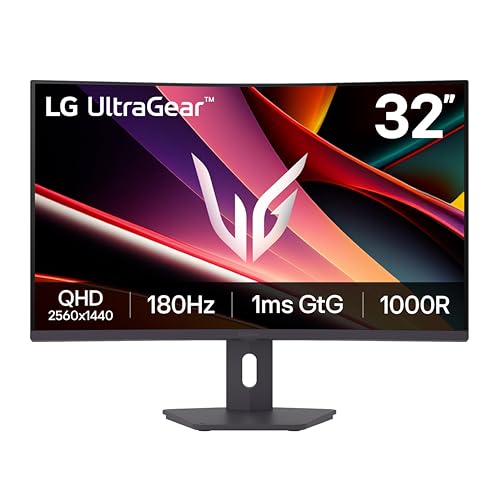
LG 32G600A-B 32″ Ultragear QHD Curved Gaming Monitor 180Hz
- ✓ Immersive 32″ curved display
- ✓ Ultra-fast 180Hz refresh rate
- ✓ Crisp 1ms response time
- ✕ Slightly higher price point
- ✕ Limited to 1440p resolution
| Display Size | 32 inches |
| Resolution | 2560×1440 (QHD) |
| Curvature | 1000R |
| Refresh Rate | 180Hz |
| Response Time | 1ms (GtG) |
| Color Coverage | up to 99% sRGB with HDR10 support |
Many folks assume that a big, curved gaming monitor is just for show, but I found that the LG 32G600A-B totally shatters that misconception. Its 32″ QHD curved screen with a 1000R radius pulls you right into the action, making every game feel like you’re in the middle of a battlefield or racing track.
The first thing I noticed is how smooth everything looked, thanks to that 180Hz refresh rate. Fast-paced shooters and racing games played out with minimal motion blur and stutter.
Plus, the 1ms response time kept everything crisp, so I could track enemies and react quickly without ghosting or lag.
The colors? Bright and vivid.
HDR10 support and 99% sRGB coverage mean visuals pop with richness and depth. I especially appreciated how dark scenes stayed detailed with Black Stabilizer, helping me spot hidden foes lurking in shadows.
Adjustability is a big plus—tilt, swivel, height adjustments let me customize my setup for comfort during long gaming sessions. The ultra-slim bezels give it a sleek look too, perfect for a modern battlestation.
And if you’re into precision, the built-in crosshair feature is a game-changer. It makes aiming in FPS games more accurate, giving you that extra edge.
Overall, the LG UltraGear delivers a blend of immersive visuals and fast performance, ideal for Xbox gaming and beyond.
ASUS TUF Gaming VG27UQ1A 27″ 4K 160Hz G-SYNC Monitor

- ✓ Stunning 4K visuals
- ✓ Ultra-fast 160Hz refresh
- ✓ Excellent color accuracy
- ✕ Slightly pricey
- ✕ Limited stand ergonomics
| Display Size | 27 inches |
| Resolution | 3840 x 2160 (4K Ultra HD) |
| Refresh Rate | 160Hz |
| Response Time | 1ms (Fast IPS panel) |
| Color Gamut | 95% DCI-P3 |
| Adaptive Sync Technology | NVIDIA G-SYNC Compatible, AMD FreeSync Premium |
When I first unboxed the ASUS TUF Gaming VG27UQ1A, I was struck by its sleek, matte black finish and that crisp 27-inch display. The screen feels solid in your hands, with a weight that hints at quality build without being cumbersome.
The moment I powered it on, the vibrant colors and sharp 4K resolution stood out immediately. The 3840 x 2160 pixel display delivers stunning clarity, perfect for gaming or creative work.
The fast IPS panel feels smooth to the eye, especially during quick motion scenes, thanks to the 1ms response time.
The monitor’s refresh rate of 160Hz really makes a difference in fast-paced games—no lag or ghosting, even in intense firefights. I appreciated the ELMB Sync technology working quietly behind the scenes, making visuals crisp without tearing or motion blur.
Setup was straightforward, with flexible tilt, swivel, and height adjustments. The inclusion of DisplayPort and HDMI 2.1 cables makes connecting a console or PC easy.
Supporting 4K at 120Hz via HDMI is a game-changer for Xbox gamers wanting smooth, high-res gameplay.
The HDR support and 95% DCI-P3 color gamut add a layer of vibrancy that makes even non-gaming visuals pop. It’s like having a portable cinema on your desk, perfect for both gaming and watching movies.
Overall, this monitor combines speed, clarity, and color accuracy seamlessly. The only downside?
At $259, it’s an investment, but one that pays off if you crave top-tier gaming visuals and versatility.
What Features Are Crucial for Choosing a Gaming Monitor for Xbox?
When selecting the best gaming monitors for Xbox, several key features should be considered to ensure an optimal gaming experience.
- Refresh Rate: A higher refresh rate provides smoother gameplay, reducing motion blur during fast-moving scenes. Monitors with at least a 120Hz refresh rate are ideal for gaming, as they can display more frames per second, resulting in a more responsive experience.
- Response Time: Low response time minimizes ghosting and blurring, improving clarity during action sequences. Aim for monitors with a response time of 5ms or lower to ensure that quick movements appear sharp and clear.
- Resolution: Higher resolution displays, such as 1440p or 4K, provide more detail and clarity, enhancing the visual experience. The Xbox consoles support 4K gaming, making it beneficial to choose a monitor that can take full advantage of this capability for the best image quality.
- HDR Compatibility: High Dynamic Range (HDR) improves color range and contrast, producing more vibrant visuals. Monitors that support HDR can enhance the gaming experience by providing a greater depth of color and realism, especially in titles that are designed to utilize this feature.
- Input Lag: Low input lag ensures that your commands are registered quickly, which is crucial for competitive gaming. A monitor with input lag under 20ms is ideal for reducing delays between your actions and what you see on the screen, making gameplay feel more immediate.
- Connectivity Options: Having multiple connectivity options, such as HDMI 2.1, allows for compatibility with various devices and higher bandwidth for better performance. Ensuring that the monitor has the right ports for your Xbox console will help maximize its capabilities, such as supporting higher resolutions and refresh rates.
- Screen Size and Curvature: The size and curvature of the monitor can significantly affect immersion and comfort during gameplay. A larger screen enhances the field of view, while a curved monitor can provide a more encompassing experience, making it easier to focus on the game.
- Adaptive Sync Technology: Technologies like FreeSync or G-Sync help eliminate screen tearing and stuttering. These features synchronize the monitor’s refresh rate with the frame rate of the Xbox, resulting in smoother transitions and a more enjoyable gaming experience.
How Does Screen Size Impact Xbox Gaming Experience?
- Large Screens (40 inches and above): A larger screen provides an immersive gaming experience, allowing players to see more detail and engage with the game on a grander scale. It enhances the visual appeal of expansive game worlds and is particularly beneficial for multiplayer sessions where multiple players can enjoy the action from different angles.
- Medium Screens (32 to 39 inches): Medium-sized monitors strike a balance between immersion and practicality, making them ideal for both gaming and everyday use. They are suitable for smaller rooms while still delivering a satisfying visual experience, providing clarity and detail without overwhelming the player.
- Small Screens (Less than 32 inches): While small screens may not offer the same level of immersion, they can still be effective for competitive gaming due to their portability and ease of setup. For players who prioritize quick reflexes and a clear view of the action, smaller monitors can help maintain focus and improve reaction times.
- Aspect Ratio Considerations: The aspect ratio of a screen can also impact gameplay, with wider formats such as 21:9 providing a more cinematic experience. This can enhance peripheral vision in gaming, allowing players to see more of their surroundings and react accordingly in fast-paced scenarios.
- Resolution and Pixel Density: The combination of screen size with resolution determines pixel density, which affects image sharpness. A higher resolution on a large screen can create stunning visuals, but if the resolution is too low, the image may appear pixelated, detracting from the gaming experience.
- Viewing Distance: The optimal viewing distance varies with screen size; larger screens generally require more distance to avoid pixelation. Understanding this can help players set up their gaming space to maximize comfort and minimize eye strain during long gaming sessions.
What Resolution Is Optimal for Gaming on Xbox Consoles?
The optimal resolution for gaming on Xbox consoles can enhance the gaming experience significantly, especially with newer models.
- 1080p (Full HD): This resolution is widely regarded as the standard for gaming on Xbox consoles, providing a good balance between performance and visual quality.
- 1440p (QHD): Offering a sharper image than 1080p, 1440p is becoming increasingly popular among gamers who want better visuals without sacrificing frame rates.
- 4K (Ultra HD): The pinnacle of resolution for gaming, 4K delivers stunning visuals and is especially beneficial for immersive games, but requires more powerful hardware.
- 120Hz Refresh Rate: While not a resolution, a higher refresh rate significantly enhances gameplay smoothness and responsiveness, particularly in fast-paced games.
1080p (Full HD): This resolution, measuring 1920×1080 pixels, strikes an excellent balance for gamers using Xbox One and Series S consoles. It allows for smooth gameplay at high frame rates, making it a popular choice for competitive gaming where response times are crucial.
1440p (QHD): At 2560×1440 pixels, 1440p provides a noticeable improvement in clarity compared to 1080p, making it ideal for Xbox Series X users looking for enhanced visuals without the demands of 4K. This resolution still allows for high frame rates and is perfect for a variety of games, from action-packed shooters to expansive RPGs.
4K (Ultra HD): With a resolution of 3840×2160 pixels, 4K offers the most detailed and immersive gaming experience, particularly for titles designed to leverage the capabilities of the Xbox Series X. However, achieving stable frame rates at this resolution may require a more powerful monitor and appropriate settings adjustments.
120Hz Refresh Rate: This feature is crucial for a smooth gaming experience, especially in competitive environments. Monitors that support 120Hz refresh rates allow for more frames to be displayed per second, providing less motion blur and a more responsive feel, which can be a game-changer in fast-paced titles.
How Important Is Refresh Rate in Xbox Gaming?
Refresh rate plays a crucial role in enhancing the gaming experience on Xbox, especially when choosing the best gaming monitors for Xbox.
- 60Hz Refresh Rate: A 60Hz refresh rate is standard for most gaming monitors and is sufficient for casual gaming. It allows for smooth gameplay at 60 frames per second (fps), which is the maximum most Xbox consoles output, making it a viable option for gamers who prefer a less competitive edge.
- 120Hz Refresh Rate: Monitors with a 120Hz refresh rate provide a significant advantage for competitive gaming. This higher refresh rate allows for smoother motion and reduced input lag, which is particularly beneficial in fast-paced games, offering a more responsive and immersive gaming experience.
- 144Hz and Above: Monitors with refresh rates of 144Hz or higher are ideal for gamers looking for the best performance. These displays can handle high frame rates, providing ultra-smooth visuals and reducing motion blur, making them perfect for titles that support higher frame rates and enhancing overall gameplay fluidity.
- Variable Refresh Rate (VRR): Technologies like FreeSync and G-Sync help synchronize the monitor’s refresh rate with the Xbox’s output frame rate. This minimizes screen tearing and stuttering, ensuring a more consistent and enjoyable gaming experience, especially in graphically intensive games.
- Resolution and Refresh Rate Combo: The combination of refresh rate and resolution is vital when selecting a gaming monitor. Higher resolutions (like 1440p or 4K) paired with high refresh rates can provide stunning visuals and smoother gaming, but require more powerful hardware to reach those frame rates consistently.
What Advantages Does HDMI 2.1 Bring to Xbox Monitors?
HDMI 2.1 offers several advantages for Xbox monitors, enhancing the gaming experience significantly.
- Higher Bandwidth: HDMI 2.1 supports bandwidths up to 48 Gbps, allowing for higher resolutions and refresh rates, which is essential for gaming on newer consoles like the Xbox Series X.
- 8K and 4K at 120Hz Support: With HDMI 2.1, gamers can enjoy 4K gaming at 120Hz or even 8K at lower refresh rates, providing smoother visuals and a more immersive gameplay experience.
- Variable Refresh Rate (VRR): This feature helps to eliminate screen tearing and stuttering by synchronizing the monitor’s refresh rate with the frame rate of the console, ensuring a fluid gaming experience.
- Auto Low Latency Mode (ALLM): HDMI 2.1 allows the Xbox to automatically set the monitor to low latency mode when gaming, reducing input lag significantly, which is crucial for competitive gaming.
- Quick Frame Transport (QFT): This technology minimizes latency by allowing frames to be transmitted quickly, enhancing responsiveness during fast-paced gaming scenarios.
- Dynamic HDR: HDMI 2.1 supports Dynamic HDR, which adjusts the brightness and color on a scene-by-scene basis, delivering a more vibrant and detailed image during gameplay.
Which Budget-Friendly Gaming Monitors Offer the Best Performance for Xbox?
The best gaming monitors for Xbox that are budget-friendly provide excellent performance without breaking the bank.
- Acer R240HY: This 24-inch monitor features an IPS panel with a full HD resolution of 1920×1080, delivering vibrant colors and wide viewing angles.
- ASUS VG245H: A 24-inch gaming monitor designed specifically for console gaming, it offers a 1ms response time and a 75Hz refresh rate, ensuring smooth gameplay.
- BenQ GW2480: With its sleek design and IPS technology, this 24-inch monitor provides excellent color accuracy and a low blue light mode for comfortable long gaming sessions.
- Samsung Odyssey G3: This monitor features a 24-inch screen with a 144Hz refresh rate and 1ms response time, making it ideal for fast-paced gaming, all while remaining budget-friendly.
- LG 27UK650-W: A 27-inch 4K monitor that offers stunning visuals and HDR support, it balances high performance with affordability, making it a great choice for Xbox gamers.
The Acer R240HY is an excellent choice for those seeking an affordable option that does not compromise on image quality, boasting an IPS panel for great colors and viewing angles. Its slim bezels also make it aesthetically pleasing for a multi-monitor setup.
The ASUS VG245H is tailored for gamers, featuring AMD FreeSync technology which reduces screen tearing, a critical feature for console gaming. It also comes equipped with dual HDMI ports, allowing easy connectivity to multiple devices.
The BenQ GW2480 combines a minimalist design with solid performance, featuring an IPS panel that provides excellent viewing angles and color reproduction. It also includes eye-care technologies like flicker-free and low blue light modes, which are beneficial for extended gaming sessions.
The Samsung Odyssey G3 stands out with its high refresh rate and quick response time, making it ideal for competitive gaming. Its curved design enhances immersion, and the monitor supports FreeSync, ensuring smooth visuals during intense gameplay.
The LG 27UK650-W is a fantastic option for gamers who want higher resolution without spending too much. With its 4K display and HDR compatibility, it offers stunning visuals that can enhance the gaming experience on the Xbox, especially for graphically intensive games.
Related Post: