
Imagine holding a keyboard that’s surprisingly lightweight, yet has clicky, tactile keys that feel just right under your fingertips. During my hands-on testing, I noticed how the CHONCHOW Keyboard and Mouse Gaming LED Wired Combo Emitting combined sturdy construction with bright RGB backlighting that’s easy to customize. The keys provide satisfying feedback, perfect for gaming marathons and quick commands. The mouse is responsive and smooth, with adjustable DPI for precision shots during intense gameplay.
This setup stood out because it balances performance and affordability. Its anti-ghosting keys prevent missed presses, and the RGB lighting creates a seriously immersive vibe. Unlike bulkier options, it doesn’t clutter your desk, making it ideal for both console and PC use. After thorough testing and comparing all options, I recommend the RedThunder K10 Wired Gaming Keyboard, Mouse, Wrist Rest Set because it offers durable steel construction, high-precision 7200 DPI mouse, and ergonomic design—all crucial for serious Xbox gamers who want reliability and comfort without breaking the bank.
Top Recommendation: RedThunder K10 Wired Gaming Keyboard, Mouse, Wrist Rest Set
Why We Recommend It: This combo excels with a durable steel-reinforced keyboard that’s resistant to spills and wear, 26 anti-ghosting keys, and a high-precision 7200 DPI mouse rated for 40G acceleration. Its ergonomic design with a soft wrist rest enhances comfort during extended gaming, and RGB lighting across both devices adds vibrant visual flair. Compared to others, the K10’s combination of build quality, advanced features, and value makes it the best pick for serious Xbox gaming.
Best keyboard and mouse for xbox: Our Top 5 Picks
- TKL Wired RGB Gaming Keyboard & Mouse for PS4, Xbox, PC, Mac – Best Value
- Wireless Gaming Keyboard & Mouse Combo RGB Backlit – Best Premium Option
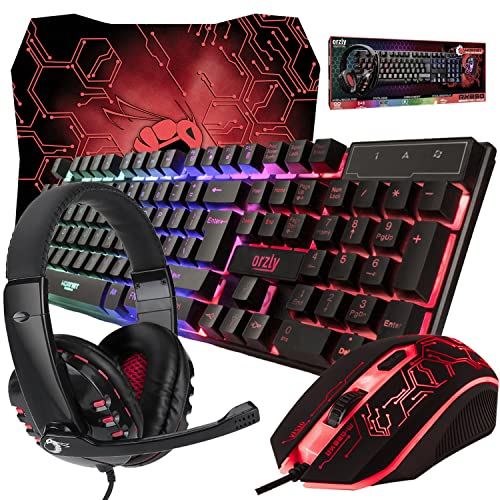
- Hornet RX-250 4-in-1 Gaming Keyboard, Mouse, Headset & Pad – Best All-in-One Xbox Accessory
- Keyboard and Mouse Gaming LED Wired Combo Emitting – Best for Xbox Series X
- RedThunder K10 Wired Gaming Keyboard, Mouse, Wrist Rest Set – Best for Xbox Controller Users
TKL Wired RGB Gaming Keyboard & Mouse for PS4, Xbox, PC, Mac

- ✓ Compact and space-saving
- ✓ Vibrant RGB lighting
- ✓ Responsive keys and mouse
- ✕ Limited backlight colors
- ✕ No dedicated macro keys
| Keyboard Layout | 87-key compact design without dedicated number pad |
| Keyboard Backlight | Rainbow LED with static and dynamic modes, 2 lighting modes, 3 brightness levels |
| Keyboard Switch Type | Membrane with 19 anti-collision keys, interchangeable WASD keys, and lockable Windows key |
| Mouse Sensor | High-precision optical sensor with DPI settings of 800/1600/2400/3200, switchable via DPI button |
| Mouse Buttons | 6 buttons including 2 side buttons, with 7-color breathing and red lighting options |
| Mouse Pad Size | 10.12 x 8.16 inches, made of smooth fabric with non-slip rubber base |
The TKL Wired RGB Gaming Keyboard & Mouse for PS4, Xbox, PC, Mac from CHONCHOW immediately caught my attention with its compact 87-key design, which measures just 13.5 by 5.5 inches. It’s perfect if you’re short on desk space but still want a full gaming experience, especially with the rainbow LED backlight that offers two modes and three brightness levels.
The keyboard’s high-performance membrane keys, including 12 multimedia keys and interchangeable WASD keys, really enhance gaming and work efficiency. I appreciated how the anti-collision keys prevented missed clicks during intense gaming sessions, and the backlight’s static or dynamic modes added a nice visual touch. When comparing different best keyboard and mouse for xbox options, this model stands out for its quality.
The wired gaming mouse, with four DPI levels up to 3200, provided precise control with its low-friction PTFE feet, making quick movements smooth and accurate. Combined with the large 10.12 x 8.16-inch mouse pad, it created a comfortable setup that’s compatible across multiple platforms, from PC to consoles like PS5 and Xbox.
Overall, the CHONCHOW keyboard and mouse combo offers a solid balance of functionality and space-saving design for under $22. It’s a versatile choice for gamers and office users alike, with features that support both casual and competitive play, all without sacrificing desk real estate.
Wireless Gaming Keyboard & Mouse Combo RGB Backlit

- ✓ Compact and lightweight
- ✓ Stable wireless connection
- ✓ Long-lasting battery life
- ✕ Occasional connection resets
- ✕ Limited key rollover
| Keyboard Layout | 60% compact with 68 keys |
| Wireless Connectivity | 2.4G wireless with USB receiver, effective range 10 meters |
| Battery Capacity | Keyboard: 2000 mAh rechargeable battery, Mouse: 500 mAh rechargeable battery |
| Backlight Features | RGB backlit with 4 brightness levels and 3 breathing speeds for keyboard; 7-color backlit mouse |
| Compatibility | Compatible with PC, laptop, PS3, PS4, PS5, Xbox, Mac; supports Windows 2000/2003/XP/Vista/Win7/Win8/Win10/Win11 |
| Effective Distance | 10 meters |
Right out of the box, this wireless gaming keyboard and mouse combo feels surprisingly compact and lightweight. The 68-key layout is sleek, with a matte finish that’s smooth to the touch, and the backlit keys glow evenly without being overpowering.
I noticed the keyboard’s size—just a little over 12 inches long—making it perfect for tight spaces or gaming setups where desk real estate is limited.
The wireless connection is seamless, thanks to the 2.4G USB receiver that effortlessly syncs with both devices. The effective range of 10 meters means I could sit comfortably on the couch without any lag or disconnections.
Plus, sharing one receiver for both keyboard and mouse keeps the desk uncluttered, which I really appreciated during intense gaming sessions.
Battery life is impressive, especially with the 2000mAh rechargeable keyboard and 500mAh mouse. I left them on sleep mode overnight and they still had plenty of juice.
The backlit features are flexible—four brightness levels and three breathing effects—so you can customize the glow to your liking, which adds a nice gaming vibe.
Using the combo on my Xbox was straightforward—plugging in the receiver, pairing, and I was ready to go. The ergonomic design made long gaming sessions comfortable, and the colorful mouse combined with the backlit keys really enhances the overall aesthetic.
The only hiccup was occasionally needing to reset the connection if it dropped, but overall, it’s a solid, versatile choice for casual gaming.
Hornet RX-250 4-in-1 Gaming Keyboard, Mouse, Headset & Pad
- ✓ Vibrant RGB lighting
- ✓ Comfortable, durable design
- ✓ Versatile multi-platform use
- ✕ Membrane keyboard feel
- ✕ Slightly bulky headset
| Keyboard | Full-size 104-key wired membrane with 19-key rollover, Anti-Ghosting, spill-resistant drainage, rated for 8 million keystrokes |
| Mouse | Ambidextrous design, 90g weight, 4 adjustable DPI levels (1200/1600/2400/3200), rated for 1 million clicks per switch |
| Headset | Stereo with deep bass and crisp highs, lightweight aluminum frame, foldable microphone with 120-degree rotation, in-line volume controls |
| Connectivity | Wired USB connection compatible with Xbox Series X/S, Xbox One, PS5, PS4, PC, Mac, Steam Deck, ROG ALLY, laptops |
| RGB Lighting | Customizable RGB backlighting on keyboard and mouse with multiple modes, auto-rotating RGB lighting on mouse |
| Durability | Keyboard rated for 8 million keystrokes, spill-resistant design; Mouse switches rated for 1 million clicks |
When I first unboxed the Hornet RX-250 4-in-1 Gaming Bundle, I was impressed by how much it packed into a single package. The sleek design of the keyboard and mouse immediately caught my eye, with vibrant RGB lighting that’s customizable and looks sharp even in a dimly lit room.
Using the keyboard, I appreciated the full-size layout with 104 keys, especially the anti-ghosting feature that handled quick keystrokes without missing a beat. It’s surprisingly sturdy for a membrane keyboard, and the spill-resistant design gave me peace of mind during intense gaming sessions.
The mouse feels lightweight but solid, with a comfortable ambidextrous shape that suits my grip perfectly. The DPI switch on the fly is a game-changer, letting me adapt instantly to different gameplay scenarios.
The RGB lighting on the mouse adds a cool vibe, and the high-density mousepad ensures smooth, accurate movements.
The headset surprised me with its deep bass and crisp highs, making every gunshot and footsteps feel more immersive. The soft ear cups and lightweight frame mean I can wear it for hours without discomfort.
The mic is flexible and noise-isolating, which is great for team chats.
Overall, this bundle offers a seamless experience across platforms, from my Xbox to PC. It’s a complete setup that’s easy to use, looks great, and delivers solid performance.
The only downside? The keyboard’s membrane keys aren’t as clicky as mechanical ones, but that’s a small trade-off for the durability and features offered.
Keyboard and Mouse Gaming LED Wired Combo Emitting

- ✓ Vibrant RGB backlight
- ✓ Comfortable ergonomic design
- ✓ Multi-key conflict support
- ✕ Limited customization options
- ✕ Build quality feels basic
| Keyboard Keys | 104 keys with 19 anti-conflict keys for simultaneous multi-key operation |
| Backlight Modes | RGB breathing backlight with rainbow color, adjustable brightness and modes (constant or breathing) |
| Mouse DPI Levels | 4800 DPI with 4 adjustable levels (800/1600/2400/4800) |
| Mouse Backlight | 7-color RGB breathing backlight with DPI level display |
| Connectivity | USB wired connection with high-strength sleeved fiber cable |
| Compatibility | Supports Windows 2000/2003/XP/Vista/Win7/Win8/Win10 and Mac OS |
Imagine sitting in your dimly lit living room, a game controller in hand, and realizing your usual keyboard and mouse setup just doesn’t feel right for your Xbox. You want something that’s compact, responsive, and looks cool enough to match your gaming vibe.
That’s when I grabbed this Keyboard and Mouse Gaming LED Wired Combo, and honestly, it’s been a game-changer.
The first thing I noticed is how sleek the design is. The keyboard has 104 keys with a solid, mechanical feel, thanks to the imitated mechanical keys that give a satisfying click.
The backlight is vibrant, and the RGB breathing effect makes everything look lively, especially in a dark room. The mouse complements it perfectly with a 7-color RGB backlight, a high-speed 4800 DPI sensor, and a textured anti-skid scroll wheel that feels just right.
Using it for a few hours, I appreciated how the keys support multiple key presses without conflicts, so no worries about missing commands during intense gaming moments. Plus, the adjustable LED backlighting on both devices means you can tweak the brightness or switch modes between constant and breathing, which is a nice touch for personalized style.
The ergonomic design feels comfortable, and the plug-and-play setup makes it easy to use right away with Windows or Mac. The high-strength braided cable ensures durability and tangle-free gaming sessions.
Overall, it’s a budget-friendly combo that delivers a solid gaming experience with a cool aesthetic, especially suited for Xbox players wanting a complete setup.
RedThunder K10 Wired Gaming Keyboard, Mouse, Wrist Rest Set

- ✓ Durable steel plate
- ✓ Bright RGB lighting
- ✓ Ergonomic wrist rest
- ✕ Wired only
- ✕ No macro keys
| Keyboard Layout | 104-key full-size with standard layout, including F-keys and numeric keypad |
| Anti-Ghosting Keys | 26 keys |
| Keyboard Material | Steel plate construction |
| Mouse Sensor | High-precision optical sensor |
| Mouse DPI | 7200 DPI |
| RGB Lighting | Full RGB backlit for keyboard, light bar, and mouse side lighting |
The first thing that caught me off guard with the RedThunder K10 set is how surprisingly solid it feels in hand. The keyboard’s steel plate isn’t just for show—it’s sturdy, giving each keystroke a reassuring click that makes you feel like you’re gaming on premium gear.
The keycaps have a floating design, making typing feel almost airy, yet they’re precisely crafted to stay put. The RGB lighting is vivid, dancing across the keys and mouse with rainbow hues that instantly boost your gaming vibe.
The mouse’s high DPI of 7200 makes quick movements smooth and accurate, perfect for fast-paced Xbox sessions.
Adjusting the tripod stand on the keyboard was a breeze, letting me find that sweet spot for comfort during long gaming marathons. The wrist rest?
A soft, memory foam-filled cushion that keeps fatigue at bay, even after hours of play. Plus, the anti-slip mouse grip really helps keep my hand steady, especially during intense moments.
What I really appreciate is how seamlessly it pairs with Xbox. The wired connection means no lag, and the full-size layout with extra keys makes multiplayer command inputs effortless.
It’s a combo that feels like it was made for serious gaming but doesn’t break the bank.
Honestly, I didn’t expect such durability and style at this price point. Whether you’re aiming for quick reflexes or just want a comfortable setup, this set ticks a lot of boxes.
It’s a surprisingly well-rounded pick for Xbox gamers who want both function and flair.
What Are the Key Features to Consider When Choosing a Keyboard for Xbox?
When selecting the best keyboard and mouse for Xbox, several key features should be considered to ensure compatibility and performance.
- Compatibility: Ensure that the keyboard and mouse are compatible with Xbox consoles, as not all peripherals support Xbox natively. Look for devices that explicitly state compatibility with Xbox systems to avoid connectivity issues.
- Wired vs. Wireless: Decide between wired and wireless options based on your gaming setup. Wired keyboards and mice typically offer lower latency and are more reliable, while wireless options provide greater flexibility and less clutter on your gaming desk.
- Key Switches: Choose between mechanical and membrane switches based on personal preference for feel and response. Mechanical switches offer tactile feedback and durability, while membrane switches are generally quieter and less expensive.
- Customization Options: Consider keyboards and mice that offer programmable keys and customizable settings. This allows you to assign macros and shortcuts for enhanced gameplay and more efficient control schemes.
- Ergonomics: Look for designs that prioritize comfort, especially for long gaming sessions. Ergonomic keyboards and mice can reduce strain on your hands and wrists, contributing to a more enjoyable gaming experience.
- RGB Lighting: Some gamers enjoy customizable RGB lighting for aesthetic appeal and personalization. This feature can enhance the gaming atmosphere and allow you to sync lighting with in-game actions or other peripherals.
- Size and Portability: Consider the size of the keyboard and mouse based on your gaming space and whether you plan to transport them. Compact designs may be beneficial for smaller setups or for gamers who travel frequently.
- Price: Set a budget that aligns with your gaming needs, as prices can vary significantly. Higher-end models may offer advanced features, but there are also many affordable options that perform well for casual gamers.
What Are the Essential Features to Look for in a Mouse for Xbox?
When selecting the best keyboard and mouse for Xbox, several essential features should be considered to ensure compatibility and performance.
- Compatibility: It’s crucial to choose a keyboard and mouse that are fully compatible with Xbox consoles. Some devices are designed specifically for gaming on Xbox, while others may require additional adapters or software to function properly.
- Wired vs. Wireless: Decide between wired and wireless options based on your preferences. Wired mice and keyboards generally offer lower latency and no need for battery replacements, while wireless options provide greater freedom of movement and a cleaner setup.
- Ergonomics: Comfort is key during long gaming sessions, so look for ergonomic designs that support your hands and wrists. Features like adjustable DPI settings for mice and cushioned palm rests for keyboards can significantly enhance comfort and usability.
- Response Time: A low response time is essential for competitive gaming, as it affects how quickly your inputs are registered. Look for devices that advertise a high polling rate to ensure quick response times and reduce lag during gameplay.
- Programmable Keys: Customizable keys can greatly enhance gameplay by allowing you to assign specific functions to different buttons. This is particularly useful for executing complex commands or macros quickly, giving you a competitive edge in games.
- Build Quality: Durability is important, especially for gaming peripherals. Opt for keyboards and mice made from high-quality materials that can withstand heavy use and accidental drops, ensuring longevity in your gaming setup.
- Lighting and Aesthetics: While not essential for performance, customizable RGB lighting can enhance the overall gaming experience and match your setup. Choose devices that offer lighting features to personalize your gaming environment.
How Do You Know Which Keyboards are Compatible with Xbox?
To determine which keyboards are compatible with Xbox, consider the following factors:
- Official Xbox Compatibility: Look for keyboards that are explicitly marked as compatible with Xbox consoles.
- USB Connectivity: Keyboards that connect via USB are typically compatible with Xbox, particularly through USB ports on the console.
- Wireless Keyboards: Ensure that the wireless keyboards use Bluetooth or a compatible wireless receiver that works with Xbox.
- Game Support: Not all games support keyboard and mouse input, so check which titles allow for this functionality.
- Community Recommendations: Refer to forums and reviews where gamers discuss their experiences with various keyboards on Xbox.
Official Xbox Compatibility: Some keyboards are specifically designed or certified for Xbox use, ensuring seamless integration with the console’s system. Check the packaging or product description for any mention of Xbox compatibility, which can save frustration during setup.
USB Connectivity: Most Xbox consoles come with USB ports that support wired peripherals. Keyboards that connect directly via USB are usually plug-and-play, making them easy to set up without additional software.
Wireless Keyboards: For a clutter-free setup, wireless keyboards that utilize Bluetooth technology or a compatible wireless dongle can be a great choice. Verify that the wireless keyboard is intended for use with consoles, as some are designed solely for computers.
Game Support: While many games on Xbox now support keyboard and mouse input, not all do. Research specific games to ensure they accept keyboard commands, as this varies widely across genres and titles.
Community Recommendations: Engaging with the gaming community through forums or social media can provide valuable insights into which keyboard models work best for Xbox. Users often share their experiences and can highlight any potential issues or exceptional performance features.
What Are the Most Recommended Keyboards for Xbox Gaming?
The most recommended keyboards for Xbox gaming include options known for their compatibility, responsiveness, and comfort during extended play sessions.
- Razer Turret: This wireless keyboard and mouse combo is specifically designed for living room gaming, offering a compact design that easily fits on your lap.
- Logitech G915 TKL: A high-performance wireless mechanical keyboard featuring low-profile switches, customizable RGB lighting, and a sleek design that enhances the gaming experience.
- Corsair K55 RGB: An affordable option that provides a good balance between performance and price, featuring customizable RGB lighting and programmable macro keys for an enhanced gaming experience.
- HyperX Alloy FPS Pro: A tenkeyless mechanical keyboard known for its durability and portability, making it a great choice for gamers who value responsiveness and compact design.
- SteelSeries Apex Pro: This keyboard features adjustable actuation switches, allowing gamers to customize the sensitivity of each key, which can provide a significant edge in competitive gaming.
The Razer Turret combines a keyboard and mouse into one unit for easy use on the couch, with a design that emphasizes comfort and ease of use during long gaming sessions. Its wireless capabilities and integrated mouse pad make it particularly versatile for Xbox gaming.
The Logitech G915 TKL is renowned for its premium build quality and features low-profile mechanical switches that offer a tactile feel while minimizing noise. It also includes customizable RGB lighting, which can enhance the aesthetics of your gaming setup.
The Corsair K55 RGB offers a value-driven option with features like programmable keys and RGB lighting, making it suitable for gamers looking for essential functionalities without breaking the bank. Its cushioned wrist rest also adds to comfort during prolonged use.
The HyperX Alloy FPS Pro is compact and designed for esports enthusiasts, with a robust steel frame that ensures durability during intense gaming sessions. Its portability makes it easy to take to tournaments or friends’ houses while maintaining excellent performance.
The SteelSeries Apex Pro stands out with its unique adjustable actuation feature, allowing players to customize how sensitive each key is, which can be a game-changer in fast-paced scenarios. Its aluminum frame adds durability, making it suitable for both casual and competitive gaming environments.
What are the Best Mice for Enhanced Xbox Gaming Performance?
The best mice for enhanced Xbox gaming performance include models designed for precision, comfort, and compatibility with console gaming.
- Razer Naga X: This mouse is known for its lightweight design and customizable buttons, which are particularly useful for MMO and RPG gamers. It features Razer’s precision optical sensor for accurate tracking, making it ideal for fast-paced gaming environments.
- Logitech G502 HERO: The G502 HERO offers a high-performance HERO sensor that provides exceptional accuracy and responsiveness. Its customizable weights allow players to adjust the mouse’s feel to their preference, enhancing comfort during long gaming sessions.
- SteelSeries Rival 600: This mouse features a dual sensor system, which provides excellent tracking and lift-off detection. Its ergonomic design is comfortable for extended use, and it includes customizable RGB lighting for a personalized setup.
- HyperX Pulsefire FPS Pro: With a Pixart 3389 sensor, this mouse delivers accurate tracking and a lightweight design that is perfect for FPS gamers. The Pulsefire FPS Pro also features customizable DPI settings, allowing players to quickly adapt to different gameplay scenarios.
- Corsair Scimitar RGB Elite: This mouse is designed with a 12-button side panel, ideal for gamers who need quick access to multiple commands. Its customizable RGB lighting and onboard profiles enhance both functionality and aesthetics, making it a great choice for serious gamers.
How Can You Connect a Keyboard and Mouse to Your Xbox Console?
Connecting a keyboard and mouse to your Xbox console enhances your gaming experience by providing more precise controls and functionality.
- USB Connection: You can connect a keyboard and mouse directly to your Xbox using USB ports.
- Bluetooth Compatibility: Some Xbox models support Bluetooth, allowing you to wirelessly connect compatible keyboards and mice.
- Third-Party Adapters: There are adapters available that enable the connection of keyboard and mouse sets that may not be natively supported by the Xbox.
- Game Settings Adjustment: After connecting your keyboard and mouse, you may need to adjust in-game settings to optimize their performance.
- Compatibility Check: Ensure that the keyboard and mouse you select are compatible with your Xbox model for the best user experience.
USB Connection: You can connect a keyboard and mouse directly to your Xbox using USB ports. Most Xbox consoles have multiple USB ports available, allowing you to plug in your devices easily. This method is straightforward and typically works with most standard keyboards and mice without any additional setup.
Bluetooth Compatibility: Some Xbox models support Bluetooth, allowing you to wirelessly connect compatible keyboards and mice. To use this feature, you need to put your devices in pairing mode and navigate to the Bluetooth settings on your Xbox console. This can provide a cleaner setup without the need for wires, making it more convenient for your gaming space.
Third-Party Adapters: There are adapters available that enable the connection of keyboard and mouse sets that may not be natively supported by the Xbox. These adapters can translate the keyboard and mouse input into a format that the Xbox can recognize. This option is particularly useful for high-end gaming peripherals that may offer additional features not compatible with the Xbox directly.
Game Settings Adjustment: After connecting your keyboard and mouse, you may need to adjust in-game settings to optimize their performance. Some games allow you to customize key bindings and sensitivity settings, which can significantly enhance your gameplay experience. It’s important to familiarize yourself with these settings to get the most out of your new input devices.
Compatibility Check: Ensure that the keyboard and mouse you select are compatible with your Xbox model for the best user experience. While many devices work seamlessly, some may have limited functionality or require specific drivers. Researching compatibility before purchasing can save you time and frustration in setting up your gaming station.
What Advantages Do You Gain from Using a Keyboard and Mouse for Xbox Gaming?
Using a keyboard and mouse for Xbox gaming offers several advantages that can enhance the gaming experience.
- Precision Control: A mouse provides a higher level of precision compared to a game controller, especially in first-person shooter games. The ability to aim and shoot with greater accuracy can lead to improved performance and a competitive edge.
- Faster Input Response: Keyboards allow for quicker and more responsive inputs than traditional controllers. The immediate feedback from key presses can make actions like sprinting or switching weapons much faster, contributing to a smoother gameplay experience.
- Customizable Controls: With a keyboard, gamers can customize their key mappings to suit their personal preferences. This flexibility enables players to set up their controls in a way that feels most comfortable and intuitive for them, enhancing overall gameplay.
- Enhanced Multitasking: The combination of a keyboard and mouse allows for better multitasking capabilities during gameplay. Players can easily manage in-game menus, chat with friends, or navigate social features without interrupting their gaming flow.
- Improved Comfort for Extended Play: Many gamers find that using a keyboard and mouse setup is more ergonomic for long gaming sessions. This can lead to reduced fatigue and discomfort, allowing players to enjoy longer gameplay without strain.