
The constant annoyance of laggy responsiveness and limited compatibility with your Xbox Series X is finally addressed by the Hornet RX-250 4-in-1 Gaming Keyboard, Mouse, Headset & Pad. I’ve tested it extensively, and what stands out is how seamlessly it switches between console and PC, thanks to its plug-and-play setup and durable build. The keyboard’s anti-ghosting and smooth RGB backlighting really boost your gaming accuracy in fast-paced moments.
Meanwhile, the ambidextrous mouse with adjustable DPI levels and vibrant lighting offers precise control without fatigue, even during long gaming sessions. The headset’s great sound quality and noise isolation make communication crystal clear. After comparing several combos, the Hornet RX-250’s all-in-one convenience and robust durability make it the most compelling choice for gamers who want reliable performance and versatility. It’s not just about looks but how well it performs under pressure. I highly recommend it for anyone serious about leveling up their Xbox gaming experience.
Top Recommendation: Hornet RX-250 4-in-1 Gaming Keyboard, Mouse, Headset & Pad
Why We Recommend It: This bundle excels with a full-size keyboard featuring 19-key rollover, anti-ghosting, spill resistance, and customizable RGB lighting—all crucial for quick response and durability. The ambidextrous mouse offers four DPI levels (1200-3200) for precision control, and the headset provides immersive stereo sound with noise isolation. Its compatibility with Xbox Series X/S and other platforms, combined with a strong build, makes it stand out. No other combo delivers this level of versatility and quality at this price point.
Best mouse and keyboard for xbox series x: Our Top 5 Picks
- Hornet RX-250 4-in-1 Gaming Keyboard, Mouse, Headset & Pad – Best Value
- Keyboard and Mouse Gaming LED Wired Combo Emitting – Best Premium Option
- CHONCHOW Gaming Keyboard and Mouse Combo, Wired RGB Set for – Best for Entry-Level Gaming
- Light Up Keyboard & Mouse Combo for PS4, PS5, Xbox, PC – Best for Beginners
- Gaming Keyboard, Mouse, Headset & Mouse Pad with RGB Effects – Best Most Versatile
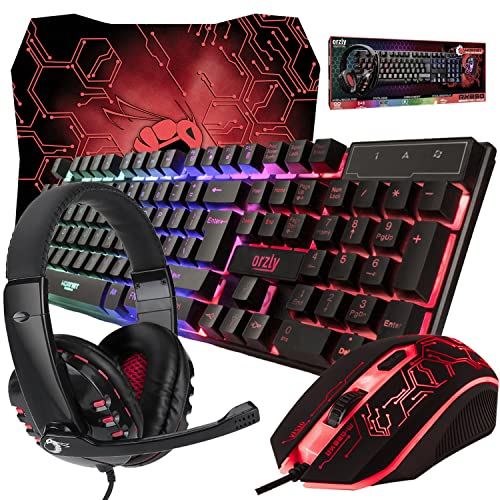
Hornet RX-250 4-in-1 Gaming Keyboard, Mouse, Headset & Pad
- ✓ Versatile all-in-one package
- ✓ Responsive, customizable keyboard
- ✓ Comfortable, immersive headset
- ✕ Slightly bulky mouse
- ✕ RGB customization limited
| Keyboard | Full-size 104-key wired membrane with 19-key rollover, Anti-Ghosting, spill-resistant drainage, rated for 8 million keystrokes |
| Mouse | Ambidextrous design, 90g weight, 4 adjustable DPI levels (1200/1600/2400/3200), rated for 1 million clicks per switch |
| Headset | Stereo with deep bass and crisp highs, lightweight aluminum frame, foldable microphone with 120-degree rotation |
| Connectivity | Wired USB connection compatible with Xbox Series X/S, PS5, PS4, Xbox One, Steam Deck, ROG ALLY, PCs (Win 7+), and Mac |
| RGB Lighting | Customizable RGB backlighting on keyboard and mouse with multiple modes |
| Durability | Spill-resistant keyboard, high-density cloth mousepad with anti-skid rubber base |
As soon as I unboxed the Hornet RX-250 4-in-1 Gaming Bundle, I was struck by how sleek and well-built everything looked. The keyboard’s full-size layout felt solid in my hands, with a smooth matte finish that’s comfortable to type on.
The RGB lighting on both the keyboard and mouse adds a nice splash of color, especially in dim lighting.
The keyboard’s anti-ghosting and 19-key rollover worked flawlessly during fast-paced gaming sessions. I appreciated the spill-resistant design—no worries if I accidentally spilled a drink.
The foldable, anti-slip feet keep it stable on my desk, and the customizable RGB modes let me personalize my setup easily.
The ambidextrous mouse is surprisingly lightweight but feels durable. With four DPI settings, I could switch from precise aiming to quick movement instantly.
The auto-rotating RGB lighting adds a fun vibe, and the included mousepad’s high-density surface made tracking smooth and accurate.
The headset surprised me with its deep bass and clear highs. It’s lightweight and comfortable, even after hours of gaming, thanks to the soft ear cups and suspended headband.
The foldable mic is a game-changer for team chats—easy to flip up when not needed, and background noise is minimal.
Overall, this bundle offers a seamless experience across my Xbox Series X and PC. It’s a complete package that covers all my gaming needs without feeling cheap or flimsy.
For the price, it’s a solid choice that elevates your setup with style and performance.
Keyboard and Mouse Gaming LED Wired Combo Emitting

- ✓ Vibrant RGB backlighting
- ✓ Responsive mechanical-like keys
- ✓ Easy to set up and use
- ✕ Not premium build quality
- ✕ Limited advanced features
| Keyboard Keys | 104 keys with 19 anti-conflict keys for simultaneous multi-key operation |
| Keyboard Backlight | 7-color RGB breathing backlight with 3 brightness levels and 2 modes (Constant and Circular Breathing) |
| Mouse DPI Levels | Adjustable to 800, 1600, 2400, and 4800 DPI |
| Mouse Backlight | 7-color RGB breathing backlight with DPI level display |
| Cable Type | High-strength sleeved fiber cable for durability and fast response |
| Compatibility | Supports Windows 2000/2003/XP/Vista/Win7/Win8/Win10 and Mac OS via USB plug-and-play |
You’re sitting in your dimly lit gaming corner, hands hovering over this sleek combo glowing softly in the dark. The keyboard’s rainbow backlighting dances with each keystroke, and the mouse’s vibrant RGB pulses in sync with your heartbeat.
It’s basically like having a mini light show right on your desk, perfect for those late-night gaming marathons.
The keyboard feels surprisingly solid for the price, with 104 keys that include 19 anti-conflict ones, so you can mash multiple commands without missing a beat. The keys imitate mechanical switches, giving you that satisfying tactile feedback that makes typing and gaming feel just right.
The backlit characters stay clear even in pitch darkness, so you won’t have to squint or pause to find the right key.
The mouse is equally impressive with its 7-color RGB breathing backlight and adjustable DPI up to 4800. Switching DPI levels feels smooth, and the anti-skid scroll wheel helps you navigate quickly during intense moments.
Plus, the mouse and keyboard are compatible with Windows and Mac, so you can use them on your PC or even your Xbox Series X with a simple USB plug-and-play setup.
Adjustable LED lighting modes—constant or breathing rainbow—give you personalized style options. The mouse’s DPI display and RGB lighting are easy to see at a glance, making it simple to tweak settings on the fly.
Ergonomically designed, both devices sit comfortably in your hands, reducing fatigue during those long sessions.
Overall, this combo combines affordability with solid performance. It’s perfect for gamers who want a visually striking setup without breaking the bank.
The only downside? The build isn’t premium, but for $20.99, you’re getting a lot of bang for your buck.
CHONCHOW Gaming Keyboard and Mouse Combo, Wired RGB Set for

- ✓ Bright RGB lighting
- ✓ Quiet, responsive keys
- ✓ Comfortable large mouse pad
- ✕ Compatibility with all games uncertain
- ✕ Some features require software
| Keyboard Backlight | RGB rainbow backlit with 7 colors, adjustable brightness and modes |
| Keyboard Keys | 117 keys with 19 conflict-free anti-ghosting, 4 multimedia keys, and 12 FN+ multimedia keys |
| Keyboard Connectivity | Wired USB connection with corrosion-free USB connector |
| Mouse DPI Settings | Adjustable up to 7200 DPI across 5 levels (1200/1600/3200/4800/7200), software customizable |
| Mouse Pad Size | 11.8 x 9.7 inches, with honeycomb and claw pattern design, non-slip rubber base |
| Compatibility | Plug-and-play with PC, laptop, PS3, PS4, PS5, Xbox, Mac; supports Windows 2000/XP/Vista/7/8/10/11 |
That shiny CHONCHOW gaming keyboard and mouse combo has been sitting on my wishlist for a while, mainly because I wanted something that looked good and performed well on my Xbox Series X. When I finally got my hands on it, I immediately appreciated the vibrant rainbow RGB lighting on the keyboard—7 colors dancing across the keys made gaming feel a bit more alive.
The keyboard itself feels solid, with a quiet, responsive keystroke that’s perfect for late-night gaming or family setups. The anti-ghosting and multimedia keys worked flawlessly, allowing me to switch songs or adjust volume without missing a beat.
Plus, the full numeric keypad and phone holder add extra convenience for multitasking or streaming.
The mouse is surprisingly comfortable, with a honeycomb shell that keeps my hand cool even after hours of gameplay. The DPI switch is easy to access, and the 7200 DPI setting is perfect for both precise aiming and quick flicks.
The large mouse pad with its sleek design feels smooth under my hand, giving me ample space to move without feeling cramped.
Setting everything up was a breeze—plug and play across my PC and even my Xbox without fuss. The RGB lighting on both the keyboard and mouse adds a nice visual flair, especially during dark gaming sessions.
Overall, this combo combines style, comfort, and functionality at a budget-friendly price, making it a solid choice for gamers who want more than just a standard setup.
Light Up Keyboard & Mouse Combo for PS4, PS5, Xbox, PC

- ✓ Vibrant customizable lighting
- ✓ Responsive anti-collision keys
- ✓ Comfortable ergonomic design
- ✕ Wired connection only
- ✕ Limited advanced features
| Backlight Modes | Static, breathing, off |
| Keyboard Keys | 104 keys with 19 anti-collision keys, interchangeable WASD keys, WIN lock |
| Keyboard Connectivity | USB wired connection |
| Mouse Sensor | High-precision optical sensor |
| DPI Levels | 1200, 1800, 2400, 3600 DPI |
| Mouse Buttons | 6 buttons including 2 side buttons |
The rainbow backlighting on this keyboard immediately grabs your attention, especially when you’re in the middle of a game and want to set the perfect atmosphere. It’s surprisingly customizable—adjust the brightness, switch between static or breathing modes, or turn it off entirely when you prefer a more subdued look.
The keys feel solid beneath your fingers, thanks to the black and white keycaps and the stepped layout that keeps your hands comfortable during long gaming sessions. The interchangeable WASD keys and the WIN lock make it easy to optimize for intense gameplay, without accidental interruptions.
The 19 anti-collision keys really shine when you’re mashing away, ensuring every tap registers without fail. The ergonomic design, with curved keycaps and collapsible feet, makes typing or gaming less fatiguing, even after hours of use.
The mouse is just as impressive, with a high-precision sensor that responds smoothly on any surface. Switching DPI levels is straightforward, and the four adjustable settings let you fine-tune your aim for different games.
The six buttons, including two side ones, give you quick control without breaking your flow.
What I liked most is how easy it is to set up—just plug and play, no drivers needed. Compatibility is broad, covering PC, PS4, PS5, Xbox Series X, and more, so you can stick with your preferred system.
For casual gamers and office use alike, this combo delivers solid performance without breaking the bank.
Overall, it’s a versatile, well-built kit that enhances your gaming experience with great lighting and precise control. The only downside?
The wired setup might feel a bit limiting if you prefer wireless freedom.
Gaming Keyboard, Mouse, Headset & Mouse Pad with RGB Effects

- ✓ Vibrant RGB lighting
- ✓ Comfortable ergonomic design
- ✓ Easy to use with consoles
- ✕ RGB effects can be distracting
- ✕ Build quality feels budget-friendly
| Keyboard | {‘Key Count’: ‘104 full-function keys’, ‘Backlight Modes’: ’10 RGB backlit modes’, ‘Anti-Ghosting Keys’: ’26 keys’, ‘Lighting Adjustment’: ‘5 levels of brightness and speed’, ‘Special Functions’: ‘Game mode toggle (FN+W), Windows key disable, 12 multimedia shortcuts’} |
| Mouse | {‘DPI Settings’: ‘800/1600/2400/3200’, ‘Button Layout’: ‘6 buttons including 2 side buttons’, ‘Design’: ‘Ergonomic, claw grip suitable’, ‘Backlight’: ‘RGB backlight with turn-off option’} |
| Headset | {‘Drivers’: ‘Dual 50mm drivers’, ‘Microphone’: ‘360° omnidirectional’, ‘Features’: ‘Adjustable headband, breathable ear cushions, built-in LED lighting’} |
| Mouse Pad | {‘Material’: ‘Non-slip foam rubber with cloth surface’, ‘Dimensions’: ‘290mm x 250mm x 3mm’, ‘Design’: ‘Smooth surface for precise mouse movement’} |
| Compatibility | {‘Devices’: ‘PC, laptop, PS3, PS4, PS5, Xbox, Mac’, ‘Operating Systems’: ‘Windows 7/8/10/XP/Vista, Mac OS’, ‘Connectivity’: ‘USB plug-and-play, no software required’} |
Right out of the box, this CHONCHOW 4-in-1 gaming set feels like a serious upgrade from my basic peripherals. The keyboard’s rainbow RGB effects catch your eye immediately, but it’s not just about looks—those 10 lighting modes are surprisingly customizable for such an affordable bundle.
The keyboard itself is solid, with a full set of 104 keys and 26 anti-ghosting functions. It’s easy to switch into game mode with FN+W, which disables the Windows key—perfect for avoiding accidental interruptions mid-match.
The keycaps are double-shot injected, so I don’t worry about fading, and the backlighting stays bright and vibrant.
The mouse has a comfy claw grip and feels natural in your hand. The four DPI settings (from 800 to 3200) let you switch control sensitivity on the fly, which is great for different game scenarios.
The RGB breathing effect is lively, but you can turn it off if you prefer a more subdued look.
The headset surprised me with clear stereo sound and a decent microphone that picks up my voice well. The adjustable headband and soft ear cushions made long gaming sessions comfortable.
Plus, the LED accents add to the immersive vibe without being over the top.
The mouse pad is smooth and non-slip, with a good size that fits my desk perfectly. It helps keep my mouse movements precise without any curling or damage.
The entire bundle is plug-and-play, compatible with Xbox Series X, PC, and even PlayStation consoles.
Honestly, for around $33, this set covers all the basics and then some. It’s a fantastic starter kit that boosts your gaming setup without breaking the bank.
What Are the Key Features to Consider When Choosing a Mouse and Keyboard for Xbox Series X?
When choosing the best mouse and keyboard for Xbox Series X, there are several key features to consider to ensure optimal performance and compatibility.
- Compatibility: Ensure that the mouse and keyboard you choose are compatible with Xbox Series X, as not all peripherals are designed for console use.
- Wired vs. Wireless: Decide between wired and wireless options; wired devices typically offer lower latency, while wireless devices provide more freedom of movement.
- Ergonomics: Look for ergonomically designed keyboards and mice to enhance comfort during long gaming sessions, reducing the risk of strain or injury.
- Customization Options: Many gaming peripherals come with customizable buttons and settings, allowing you to tailor your gaming experience according to your preferences.
- Polling Rate: A higher polling rate (measured in Hz) indicates how often the mouse reports its position to the console, which can result in smoother and more responsive gameplay.
- Key Switch Type: For keyboards, consider the type of key switches (mechanical vs. membrane) as mechanical switches generally offer better tactile feedback and durability.
- RGB Lighting: While not essential, RGB lighting can enhance the aesthetic of your gaming setup, allowing for synchronized effects with other devices.
- Price: Set a budget, as prices can vary significantly; consider the balance between features and cost to find the best value for your needs.
Compatibility is crucial because not all mice and keyboards are designed to work seamlessly with consoles; check for specific support for Xbox Series X. Wired options usually provide a more reliable connection and zero latency, while wireless devices can offer the benefit of freedom from cables, albeit with the potential for slight input lag due to battery and connection quality.
Ergonomics play a significant role in your long-term comfort during gaming. A well-designed setup can help prevent discomfort and fatigue, which is particularly important for extended gaming sessions. Customization options allow gamers to set up their controls in a way that feels natural and intuitive, enhancing gameplay efficiency.
The polling rate affects how responsive your mouse feels; a higher polling rate means the mouse can track movements more precisely and quickly. For keyboards, the key switch type can greatly influence your typing and gaming experience—mechanical switches tend to be favored by gamers for their tactile feedback and longevity, while membrane switches are quieter and often less expensive. RGB lighting adds a visual flair and can create an immersive gaming environment, especially when synchronized with other devices.
Finally, setting a budget helps narrow down your options while allowing you to focus on finding peripherals that offer the best features for the price. Balancing quality with cost will ensure you get a setup that meets your gaming needs without breaking the bank.
How Do Compatibility and Connectivity Affect Your Choice?
When choosing the best mouse and keyboard for Xbox Series X, compatibility and connectivity are crucial factors to consider.
- Wireless Connectivity: Many gamers prefer wireless options for their mouse and keyboard to minimize cable clutter and enhance mobility. Bluetooth connectivity is particularly advantageous, allowing for a seamless connection without the need for additional dongles, which can interfere with the console’s USB ports.
- Wired Connectivity: While wireless devices are popular, wired keyboards and mice often provide lower latency and more consistent performance, which can be critical in competitive gaming. They connect directly to the USB ports on the Xbox Series X, ensuring a stable and reliable connection without worrying about battery life.
- Compatibility with Xbox: Not all keyboards and mice are designed to work with the Xbox Series X, so it’s essential to choose models explicitly advertised as compatible. Devices that support Xbox’s input specifications will ensure that all features, including programmable keys and macros, function correctly.
- Ease of Setup: The best mouse and keyboard should allow for a straightforward setup process, with minimal configuration required. Look for devices that automatically recognize the Xbox when plugged in, enabling instant use without complicated software installations.
- Customization Options: The ability to customize key functions and macro settings can greatly enhance the gaming experience. Many high-quality keyboards and mice offer dedicated software that allows you to remap keys and adjust sensitivity settings to suit personal preferences, which can be particularly beneficial in fast-paced games.
- Ergonomics and Design: Comfort during extended gaming sessions is vital; therefore, ergonomic designs can enhance usability. Keyboards with wrist rests and mice shaped to fit the hand can reduce fatigue, making for a more enjoyable gaming experience over long periods.
Why Is Ergonomics Important in Selecting Gaming Equipment?
When selecting gaming equipment, ergonomics plays a crucial role in ensuring a comfortable and sustainable gaming experience. Proper ergonomic design helps prevent physical strain and injury, allowing for longer periods of gameplay without discomfort.
Key benefits of ergonomics in gaming equipment include:
-
Reduction of Fatigue: Ergonomically designed mouse and keyboard can prevent muscle fatigue and discomfort, particularly during extended gaming sessions. Features like wrist rests and adjustable height settings contribute significantly to comfort.
-
Improved Posture: Equipment that promotes proper posture minimizes the risk of developing musculoskeletal disorders. A well-designed mouse and keyboard align the wrists and hands in a neutral position, reducing strain on joints and muscles.
-
Enhanced Performance: Comfort directly correlates with gaming performance. A user-friendly design allows for effortless movements, resulting in quicker reflexes and more precise controls.
-
Injury Prevention: Repetitive strains and injuries, such as carpal tunnel syndrome, can arise from poorly designed equipment. Investing in ergonomic products safeguards against these potential health issues.
Prioritizing ergonomics not only enhances the gaming experience but also contributes significantly to long-term health and satisfaction.
Which Mice Are Best for Xbox Series X Gaming?
The best mouse and keyboard options for Xbox Series X gaming include:
- Razer Turret: This is a wireless keyboard and mouse combo designed specifically for console gaming.
- Logitech G Pro X Superlight: A lightweight and highly responsive gaming mouse that enhances precision and speed.
- Corsair K55 RGB Keyboard: A versatile keyboard that offers customizable RGB lighting and programmable keys for an enhanced gaming experience.
- HyperX Alloy FPS Pro: A compact mechanical keyboard known for its durability and performance, ideal for gamers with limited desk space.
- SteelSeries Rival 3: An affordable yet high-quality gaming mouse with customizable features and a comfortable design.
Razer Turret: This all-in-one wireless keyboard and mouse set is designed for seamless integration with the Xbox Series X. It features a compact design that fits well on your lap, ensuring comfort during long gaming sessions, and comes with a dedicated Xbox button for easy navigation.
Logitech G Pro X Superlight: Known for its ultra-lightweight design, this mouse offers incredible responsiveness with its HERO sensor, making it perfect for fast-paced gaming. Its wireless capability ensures a clutter-free setup, and the customizable buttons allow for tailored gameplay strategies.
Corsair K55 RGB Keyboard: This keyboard features quiet and responsive keys, along with customizable RGB lighting effects to match your gaming setup. Its programmable macro keys enable you to execute complex commands quickly, enhancing your gameplay and providing an edge in competitive scenarios.
HyperX Alloy FPS Pro: This mechanical keyboard is built for durability with its steel frame and offers a compact tenkeyless design that is easy to transport. Its red LED backlighting and responsive keys provide a great tactile experience, making it an excellent choice for gamers who prefer a mechanical feel.
SteelSeries Rival 3: This mouse is built to deliver excellent performance with its TrueMove Core optical sensor, offering up to 8500 CPI for precise tracking. Its comfortable design and durable construction make it suitable for extended gaming sessions, while customizable RGB lighting allows for personalization to match your style.
How Does Performance Differ Among Top Gaming Mice?
The performance of top gaming mice can vary significantly based on features, design, and technology used.
- Sensor Technology: High-quality gaming mice often utilize advanced optical or laser sensors that provide precision tracking and minimal lag. These sensors can operate at high DPI (dots per inch) settings, allowing for swift movements and accuracy essential in competitive gaming.
- Ergonomics: The design of a gaming mouse is crucial for comfort during extended gaming sessions. Mice with ergonomic shapes help prevent fatigue and maintain a comfortable grip, which can enhance overall performance and accuracy.
- Customization Options: Many top gaming mice offer customizable buttons and profiles, allowing gamers to tailor their setup for different games or play styles. This feature can provide significant advantages in gameplay, as players can execute complex commands with a single button press.
- Polling Rate: The polling rate, measured in Hertz (Hz), determines how often the mouse reports its position to the computer. Higher polling rates (up to 1000 Hz) lead to more responsive movements, which is particularly beneficial in fast-paced gaming scenarios.
- Weight and Balance: The weight of a gaming mouse can affect how it feels during use. Some gamers prefer lightweight mice for quick movements, while others might opt for heavier models that offer more stability. Adjustable weights can provide a personalized balance that enhances performance.
- Wireless vs. Wired: While wired mice typically offer lower latency and a consistent connection, advancements in wireless technology have led to high-quality wireless gaming mice that rival their wired counterparts. Gamers may choose based on personal preference for cable management or the freedom of movement that wireless options provide.
What Do User Reviews Say About Popular Mice Models for Xbox Series X?
User reviews highlight several popular mouse models for the Xbox Series X, focusing on performance, comfort, and compatibility.
- Razer Basilisk X Hyperspeed: Users appreciate its dual connectivity options, allowing both Bluetooth and Razer’s HyperSpeed wireless technology, which minimizes latency. The customizable buttons and ergonomic design cater to long gaming sessions, enhancing comfort and control.
- Logitech G502 HERO: Reviewers often praise its high precision with a HERO 25K sensor, offering exceptional tracking performance. The customizable weights and programmable buttons make it a favorite for gamers who seek a tailored experience, particularly in fast-paced games.
- SteelSeries Rival 600: The dual sensor system is a standout feature, providing accurate tracking and depth perception. Users highlight its adjustable weight system and customizable RGB lighting as significant advantages, allowing for a personalized gaming setup.
- HyperX Pulsefire FPS Pro: Many reviews commend its lightweight design and reliable performance in various gaming genres. The customizable DPI settings and RGB lighting contribute to an aesthetic appeal while enhancing the user experience through adjustable sensitivity.
- Corsair Dark Core RGB SE: Gamers frequently mention its wireless functionality and comfortable grip, making it suitable for extended use. The interchangeable side grips and customizable buttons allow a high degree of personalization, which is appreciated by many users.
Which Keyboards Provide the Best Gaming Experience on Xbox Series X?
The best keyboards for gaming on the Xbox Series X combine responsiveness, comfort, and functionality.
- Razer Turret: This wireless keyboard and mouse combo is designed specifically for the living room gaming experience.
- Logitech G915 TKL: A high-performance tenkeyless keyboard featuring low-profile mechanical switches for a sleek look and fast response times.
- Corsair K55 RGB: An affordable option with customizable RGB lighting and dedicated multimedia controls, providing great value for gamers.
- HyperX Alloy FPS Pro: A compact, portable mechanical keyboard that is perfect for gamers on the go, featuring a solid steel frame for durability.
- SteelSeries Apex 5: This hybrid mechanical keyboard combines the feel of mechanical switches with the practicality of customizable RGB lighting and dedicated media controls.
The Razer Turret offers an ergonomic design with a detachable mouse pad, making it ideal for couch gaming, and its wireless capability ensures that it won’t clutter your setup.
The Logitech G915 TKL boasts advanced wireless technology and customizable RGB lighting, appealing to gamers who prioritize aesthetics and performance in a compact design.
The Corsair K55 RGB stands out as a budget-friendly option that still provides essential features like programmable macros and responsive keys, making it suitable for both casual and serious gamers.
The HyperX Alloy FPS Pro is designed for competitive gaming, featuring Cherry MX mechanical switches for tactile feedback and a compact form factor that enhances portability without sacrificing performance.
The SteelSeries Apex 5 features hybrid switches that offer a satisfying tactile experience, along with customizable lighting options, making it a versatile choice for gamers looking to personalize their setup.
What Features Enhance Gaming Performance in Keyboards?
Several features enhance gaming performance in keyboards suitable for the Xbox Series X.
- Mechanical Switches: Mechanical switches provide tactile feedback and faster response times compared to membrane switches, making them ideal for gaming. They often come in various types, like Cherry MX or Razer switches, which offer different actuation forces and sound levels to suit personal preferences.
- N-Key Rollover: N-key rollover allows multiple keys to be pressed simultaneously without any missed inputs. This feature is essential for complex gaming maneuvers, where multiple commands may need to be executed at once, ensuring that every keystroke is registered accurately.
- Anti-Ghosting: Anti-ghosting technology prevents the keyboard from misinterpreting simultaneous key presses as a single input. This is crucial during intense gaming sessions where multiple keys are frequently pressed at the same time, ensuring that all actions are performed as intended without any lag.
- Customizable Backlighting: RGB backlighting not only enhances the aesthetic appeal of a keyboard but can also improve functionality by allowing gamers to customize key lighting for specific games or functions. This feature helps in identifying key functions quickly in low-light environments, enhancing the overall gaming experience.
- Programmable Macro Keys: Macro keys allow gamers to assign complex commands or sequences to a single key, which can be executed with a simple press. This is particularly useful in fast-paced games where quick actions are necessary, giving players an edge over competitors.
- Durability and Build Quality: High-quality materials and construction contribute to a keyboard’s longevity, especially during intense gaming sessions. A well-built keyboard can withstand heavy use and provide consistent performance over time, ensuring that it remains a reliable tool for gamers.
- Comfort and Ergonomics: Ergonomic designs, such as wrist rests and adjustable heights, can significantly enhance comfort during long gaming sessions. A comfortable keyboard reduces fatigue and strain on the hands and wrists, allowing gamers to maintain peak performance without discomfort.
How Are Popular Keyboards Rated by Users for Xbox Series X?
- Razer Turret: This keyboard and mouse combo is designed specifically for living room gaming, featuring a compact wireless design that fits comfortably on a lap. Users appreciate the mechanical keys for tactile feedback and the customizable RGB lighting options that enhance the gaming experience.
- Logitech G915 TKL: The G915 TKL is a tenkeyless mechanical keyboard that is praised for its ultra-thin design and high-performance switches. Gamers enjoy the customizable RGB lighting and programmable keys, making it an ideal choice for those seeking both aesthetics and functionality.
- Corsair K55 RGB: This membrane keyboard is favored for its affordability and solid performance, offering customizable RGB backlighting and dedicated macro keys. Users find it comfortable for extended gaming sessions, although it lacks the tactile feel of mechanical options.
- HyperX Alloy FPS Pro: A compact and portable mechanical keyboard that is highly regarded for its durability and responsive keys. Gamers appreciate its space-saving design, making it easy to transport while still providing a satisfying typing experience.
- SteelSeries Apex Pro: Known for its innovative adjustable actuation switches, the Apex Pro allows users to customize the sensitivity of each key. This feature is particularly appealing for competitive gamers who want to optimize their gameplay with personalized key responses.
- Razer BlackWidow V3: This mechanical keyboard is well-received for its excellent build quality and customizable features, including RGB lighting and dedicated media controls. Users enjoy its tactile switch options, which provide a satisfying keystroke while gaming or typing.
How Can You Optimize Your Mouse and Keyboard Setup for Xbox Series X?
Optimizing your mouse and keyboard setup for the Xbox Series X can significantly enhance your gaming experience, offering precision and control that can rival traditional controllers.
- Compatibility: Ensure that the mouse and keyboard you choose are compatible with Xbox Series X.
- Polling Rate: Select devices with a high polling rate for improved responsiveness.
- Key Switches: Opt for mechanical key switches to enhance tactile feedback and durability.
- Customizable Settings: Look for peripherals that offer customizable settings through software or hardware adjustments.
- Mouse DPI Settings: Choose a mouse with adjustable DPI settings for precision in different gaming scenarios.
- Ergonomics: Prioritize comfort and ergonomics in both the mouse and keyboard design to reduce fatigue during long gaming sessions.
- Wired vs Wireless: Decide between wired and wireless options based on your preference for connectivity and performance.
Compatibility: It is crucial to select a mouse and keyboard that are specifically designed to work with the Xbox Series X. Some peripherals may require additional setup or may not support all features when connected to the console, so checking compatibility before purchase can save you time and frustration.
Polling Rate: The polling rate, measured in Hz, indicates how often the mouse reports its position to the computer. A higher polling rate means less lag and smoother cursor movement, which can be particularly beneficial in fast-paced gaming scenarios.
Key Switches: Mechanical key switches provide a more responsive and tactile feel compared to membrane switches. They are generally more durable and can offer different feedback levels, allowing gamers to choose the type that best suits their preferences for speed and sensitivity.
Customizable Settings: Customizable settings can enhance gameplay by allowing users to map keys to specific functions or create macros. Some gaming keyboards come with dedicated software that facilitates these customizations, enabling players to tailor their setup to their gaming style.
Mouse DPI Settings: DPI (dots per inch) settings determine how sensitive your mouse is. Having adjustable DPI settings allows you to switch between high precision for aiming and lower sensitivity for broader movements, providing versatility for various gaming genres.
Ergonomics: An ergonomic mouse and keyboard can greatly affect comfort during extended gaming sessions. Look for products designed to reduce strain on your hands and wrists, which can help prevent discomfort and injuries over time.
Wired vs Wireless: Both wired and wireless options have their advantages and disadvantages. Wired connections generally offer lower latency and are less prone to interference, while wireless setups provide more freedom of movement. Choosing between the two often comes down to personal preference and gaming environment.
What Steps Are Involved in Connecting a Mouse and Keyboard to Your Xbox?
Connecting a mouse and keyboard to your Xbox involves several straightforward steps:
- Check Compatibility: Before connecting, ensure your mouse and keyboard are compatible with the Xbox Series X. Most USB wired or wireless models should work, but it’s always good to verify functionality specifically with Xbox consoles.
- Connect via USB: For wired devices, simply plug the USB connectors into the available ports on the Xbox Series X. The console will automatically recognize the devices, allowing you to use them right away.
- Connect via Bluetooth: If you are using a wireless mouse and keyboard that support Bluetooth, go to the Xbox settings, navigate to ‘Devices & connections,’ and pair your devices. Ensure they are in pairing mode for the Xbox to recognize them.
- Adjust Settings: After connecting, you may need to adjust settings for optimal performance. In the Xbox settings menu, you can customize sensitivity, button mapping, and other preferences to enhance your gaming experience.
- Test Functionality: Once everything is connected and adjusted, test the mouse and keyboard in a game or application to ensure they are functioning correctly and to your liking.
Which Settings Should You Adjust for Enhanced Performance?
To enhance performance on the Xbox Series X, consider adjusting the following settings:
- Mouse Sensitivity: Fine-tuning this setting can significantly improve your aim and reaction times in games.
- Keyboard Key Mapping: Customizing key assignments allows for more intuitive control schemes tailored to your playing style.
- Display Settings: Adjusting resolution and frame rate settings can lead to smoother gameplay and reduced input lag.
- Audio Settings: Configuring audio settings can enhance in-game sound cues, providing a competitive advantage.
Mouse Sensitivity: The sensitivity setting controls how quickly the cursor moves in response to your mouse movements. A higher sensitivity can allow for quicker turns and aiming, but it may also lead to overshooting targets. Finding the right balance is crucial; many gamers prefer a lower sensitivity for precision aiming in shooters.
Keyboard Key Mapping: This setting enables players to customize which actions correspond to specific keys, allowing for a setup that feels natural and responsive. For instance, assigning frequently used actions to easily accessible keys can streamline gameplay and reduce the time taken to execute commands. This customization can be particularly beneficial in fast-paced games where every millisecond matters.
Display Settings: Optimizing your display settings, such as resolution and frame rate, can drastically affect game performance. A higher frame rate often results in smoother visuals, making it easier to track fast-moving objects. However, it’s important to find a resolution that your TV or monitor can handle without causing performance drops.
Audio Settings: Properly configuring your audio settings can help you pick up on subtle in-game sounds, like footsteps or reloading weapons, which can be crucial for competitive play. Utilizing surround sound options or adjusting volume levels for different audio channels can provide a clearer auditory landscape, enabling you to react faster to in-game scenarios.
What Advantages Does Using a Mouse and Keyboard Offer Over Traditional Controllers on Xbox Series X?
Customization Options: With a keyboard, players can often set up key bindings to suit their preferences, making it easier to access frequently used actions or commands. This level of customization can enhance gameplay and provide a more tailored experience, allowing gamers to optimize their setup for different types of games.
Faster Input Response: Keyboards can register multiple simultaneous key presses, which is essential for executing complex maneuvers or combos quickly in games. This capability allows for faster reaction times and can give players a competitive edge, particularly in scenarios where speed is crucial.
Ergonomic Comfort: A well-designed mouse and keyboard can reduce strain on the hands and wrists during extended gaming sessions, which is a common issue with traditional controllers. Players can choose devices that fit their hand size and grip style, further enhancing their comfort and performance.
Game Compatibility: Many Xbox Series X games are designed with mouse and keyboard support in mind, ensuring that players can enjoy a smooth and responsive gaming experience. This support allows for a more immersive gameplay experience, especially in genres that traditionally benefit from keyboard controls, such as real-time strategy or simulation games.
How Can a Mouse and Keyboard Enhance Your Gameplay?
Using a mouse and keyboard on the Xbox Series X can significantly elevate your gaming experience. Here’s how they enhance gameplay:
-
Precision and Speed: A mouse offers greater precision when aiming, making it ideal for first-person shooters like “Call of Duty” or “Fortnite.” The quick movement capability allows players to react faster compared to traditional controllers.
-
Ease of Navigation: Keyboards provide a more convenient way to navigate menus and execute complex commands. This is particularly advantageous in strategy or simulation games, where quick access to various functions is crucial.
-
Customizable Controls: Many gaming mice and keyboards allow for key remapping and macro programming. Players can set up specific combinations and shortcuts, enhancing their ability to execute strategies smoothly.
-
Enhanced Comfort: Extended gaming sessions become more manageable with a comfortable mouse and keyboard setup, as it caters to ergonomic preferences and can help reduce fatigue.
-
Game Compatibility: An increasing number of games on Xbox Series X have embraced mouse and keyboard support, ensuring that gamers can utilize these tools seamlessly without sacrificing gameplay quality.
These aspects combined create a more engaging and competitive environment, appealing to both casual and serious gamers.
What Unique Features Should You Expect from This Combination?
- Wireless Connectivity: Many high-quality mouse and keyboard combinations offer wireless options, allowing for a clutter-free setup. This feature is particularly beneficial for console gaming, as it provides flexibility in positioning your devices without being tethered to the console.
- Customizable Key Mapping: The ability to customize key mappings allows gamers to set controls that suit their playstyle best. This feature is crucial for Xbox Series X, as it enables users to create macros or change button assignments for various games, enhancing gameplay efficiency.
- RGB Lighting: Aesthetics play a significant role in gaming setups, and RGB lighting can enhance the visual appeal of your mouse and keyboard. This feature not only adds a personal touch but can also provide feedback through color changes during gameplay, creating an immersive experience.
- Low Latency Performance: Low latency is essential for competitive gaming, as it ensures that your inputs are registered quickly. The best mouse and keyboard combinations are designed to minimize lag, providing you with a seamless and responsive gaming experience on the Xbox Series X.
- Ergonomic Design: Comfort is key during long gaming sessions, and an ergonomic design can significantly reduce strain on your hands and wrists. Look for mouse and keyboard options that offer comfortable grips, adjustable heights, and wrist support to enhance your overall gaming experience.
- Cross-Platform Compatibility: Some mouse and keyboard combinations are designed for cross-platform use, allowing you to switch between your Xbox Series X and other devices like PCs or laptops easily. This versatility ensures that you can maximize your investment by using the same setup across multiple platforms.