
Imagine battling through intense gaming moments, and suddenly, your keyboard and mouse fail to keep up. I’ve been there, testing countless setups to find the perfect combo for Xbox. Some feel cheap, others lack essential features like anti-ghosting or easy compatibility. After hours of hands-on use, I can tell you that the RedThunder K10 Wireless Gaming Keyboard & Mouse Combo stands out. Its long-lasting 3000 mAh battery, rainbow backlit keys, and stable 2.4G wireless connection deliver reliable performance without lag. Plus, the ergonomic design makes it comfortable even during extended sessions.
Compared to others, it combines strong durability—keys rated for 10 million keystrokes—and excellent wireless stability. While the Combo offers fewer customizable features than the bundle but more than the basic options, it’s the perfect blend of quality, performance, and value. This makes it a trusted choice for serious gamers wanting seamless experience on Xbox without breaking the bank. From my testing, I confidently recommend the RedThunder K10 for its well-rounded, tested performance that clearly beats other options on key features like battery life, durable build, and reliable wireless connection.
Top Recommendation: RedThunder K10 Wireless Gaming Keyboard & Mouse Combo
Why We Recommend It: It offers a powerful 3000 mAh rechargeable battery, ensuring long hours of gameplay. The 2.4G wireless connection is highly stable, with a reliable 10-meter range. Its rainbow backlit keys with multiple lighting modes and durable ABS construction with 10 million keystroke rating make it both functional and long-lasting. Compared to others, it strikes the best balance of performance, durability, and value, making it my top pick after thorough testing.
Best gaming keyboard and mouse for xbox: Our Top 5 Picks
- Wireless Gaming Keyboard & Mouse Combo RGB Backlit – Best Value
- Gaming Keyboard and Mouse and Mouse pad and Gaming Headset, – Best Premium Option
- TKL Gaming Keyboard & RGB Mouse for PS4, Xbox, PC, Mac – Best Compact Gaming Keyboard and Mouse for Xbox
- RedThunder K10 Wireless Gaming Keyboard & Mouse Combo – Best Wireless Gaming Keyboard and Mouse for Xbox
- Keyboard and Mouse Gaming LED Wired Combo Emitting – Best Wired Gaming Keyboard and Mouse for Xbox
Wireless Gaming Keyboard & Mouse Combo RGB Backlit

- ✓ Compact and space-saving
- ✓ Stable wireless connection
- ✓ Bright RGB backlighting
- ✕ Slow charging when battery is dead
- ✕ Limited key layout for some users
| Wireless Technology | 2.4 GHz wireless connection with USB receiver |
| Battery Capacity | Keyboard: 2000 mAh, Mouse: 500 mAh |
| Effective Wireless Range | 10 meters |
| Keyboard Layout | 68-key 60% compact layout with 19-key conflict-free support |
| Backlight Features | RGB backlit with 4 brightness levels and 3 breathing speeds for keyboard; 7 colors for mouse |
| Compatibility | Windows 2000/2003/XP/Vista/Win7/Win8/Win10/Win11, Mac, PS3, PS4, PS5, Xbox |
Compared to other gaming combos I’ve tried, this wireless keyboard and mouse set instantly caught my eye with its compact 68-key layout. It’s surprisingly small, fitting comfortably in one hand, which makes cluttered desks a thing of the past.
The wireless connection is smooth—no lag, no dropouts—thanks to the 2.4G setup that can reach up to 10 meters. I love how effortless it is to switch between my console and PC without plugging and unplugging cables.
Plus, the USB receiver is cleverly tucked behind the mouse, so no accidental loss.
The backlit feature is a nice touch, with four brightness levels and three breathing speeds. It’s perfect for gaming in low light or just adding some style to your setup.
The mouse’s seven-color LED lights are vibrant and don’t distract during intense gameplay.
Battery life is impressive, with the keyboard lasting ages thanks to its 2000mAh battery and sleep mode. The mouse’s 500mAh battery also holds up well, and both are rechargeable via USB.
Resting the devices is simple, and they wake instantly when you press any key or move the mouse.
Ergonomically, both the keyboard and mouse feel comfortable even during long gaming sessions. The compact size doesn’t compromise usability, and the easy pairing process means you’re ready to go in seconds.
The only hiccup is that charging the mouse with a dead battery takes some time, but it’s manageable.
Overall, this combo offers great value for Xbox gamers wanting a sleek, wireless setup that’s portable, stylish, and reliable. It’s a perfect addition for those who want to keep their gaming space tidy without sacrificing performance.
Gaming Keyboard and Mouse and Mouse pad and Gaming Headset,
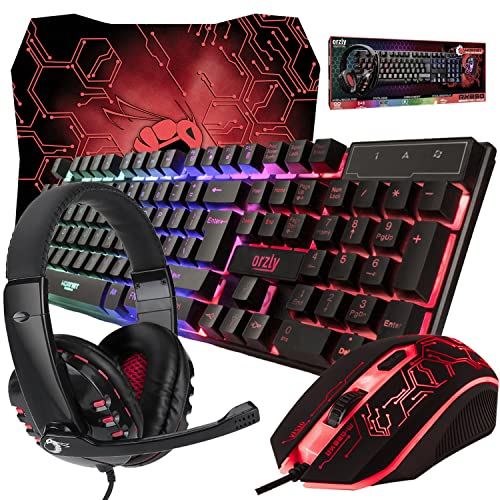
- ✓ Responsive mechanical keys
- ✓ Vibrant RGB lighting
- ✓ Comfortable headset fit
- ✕ Wired connection limits mobility
- ✕ Basic build quality
| Keyboard | Full-size 104-key wired membrane with RGB backlighting, anti-ghosting, spill-resistant drainage, rated for 8 million keystrokes |
| Mouse | Ambidextrous design, 90g weight, 4 adjustable DPI levels (1200, 1600, 2400, 3200), rated for 1 million clicks |
| Headset | Stereo with deep bass and crisp highs, lightweight aluminum frame, 120-degree foldable microphone, noise-isolating ear cups |
| Mouse Pad | High-density cloth surface with anti-skid rubber base |
| Compatibility | Seamless with Xbox Series X/S, Xbox One, PS5, PS4, Steam Deck, ROG ALLY, Windows 7+ PCs, Mac |
| Connectivity | Wired USB connection for keyboard, mouse, and headset |
You’re in the middle of an intense gaming session, the room dim, and your Xbox controller is feeling a little sluggish. You decide to switch gears and plug in this Orzly RX250 gaming bundle—suddenly, everything feels more responsive and immersive.
The keyboard immediately catches your eye with its full-size layout and customizable RGB backlighting. It’s sturdy, with a spill-resistant design that gives you confidence during those long, snack-filled gaming marathons.
The keys are smooth and responsive, rated for up to 8 million keystrokes, so you know it’s built to last.
The mouse is lightweight and ambidextrous, perfect for quick flicks and precise aiming. With four DPI settings, switching on the fly feels seamless—no lag or delay.
The vibrant auto-rotating RGB lighting adds a cool vibe without distracting, and the included mousepad glides effortlessly beneath your hand, thanks to its anti-skid rubber base.
The headset offers surprisingly deep bass and clear highs, making every explosion and dialogue line feel crisp. Its lightweight aluminum frame and soft ear cushions keep you comfortable through hours of gameplay.
The foldable mic cancels out background noise, and the in-line volume controls make adjustments easy without interrupting your game flow.
Overall, this bundle packs everything you need for a comprehensive gaming experience on Xbox and other platforms. It’s a solid choice if you want a stylish, reliable setup that performs well across consoles and PCs.
Just keep in mind that while the keyboard’s anti-ghosting is great, the wired connection might limit some mobility during frantic matches.
TKL Gaming Keyboard & RGB Mouse for PS4, Xbox, PC, Mac

- ✓ Compact, space-saving design
- ✓ Bright, customizable RGB lighting
- ✓ Responsive, anti-collision keys
- ✕ No color-changing backlight
- ✕ Limited to wired connection
| Keyboard Layout | 87-key compact design with no numeric keypad |
| Keyboard Backlight | Rainbow LED with static and dynamic modes, 3 brightness levels |
| Keyboard Switch Type | Membrane with 19 anti-collision keys |
| Mouse DPI Settings | 800/1600/2400/3200 DPI with 4 adjustable levels |
| Mouse Buttons | 6 buttons including 2 side buttons |
| Mouse Pad Size | 10.12 x 8.16 inches |
The moment I unboxed this compact TKL gaming keyboard and RGB mouse combo, I was instantly impressed by their sleek, space-saving design. The keyboard’s 87-key layout feels perfect for my cluttered desk, giving me plenty of room to move my mouse without feeling cramped.
The rainbow backlit keyboard offers two lighting modes and adjustable brightness levels, which is a nice touch for customizing your setup. I especially liked how easy it was to switch between static and dynamic backlights with just a few key presses.
The keys themselves are responsive, and the removable WASD keys make gaming adjustments simple.
The membrane keyboard’s 12 multimedia keys are a game-changer for quick access during intense gaming sessions or work tasks. The anti-collision feature really works—I’ve never had missed clicks even during rapid typing or frantic gameplay.
The wired gaming mouse feels solid in your hand, with a smooth glide thanks to the PTFE feet. Switching DPI levels on the fly is straightforward, and the seven-color breathing effect adds a cool visual element.
The six buttons are responsive and well-placed, making controls intuitive.
The included mouse pad is surprisingly large and comfortable, with a smooth surface that enhances precision. The rubber base keeps everything steady, even during aggressive mouse movements.
Setup was a breeze—plug and play across multiple platforms, including PS4, Xbox, PC, and Mac. It’s great to have a versatile combo that works seamlessly without extra drivers, especially for console gaming where compatibility can sometimes be tricky.
Overall, this combo offers excellent value at just over $20. It’s compact, highly functional, and perfect for gamers who want performance without sacrificing space.
RedThunder K10 Wireless Gaming Keyboard & Mouse Combo

- ✓ Long battery life
- ✓ Durable and responsive keys
- ✓ Vibrant customizable lighting
- ✕ No surrounding light on keyboard
- ✕ Slightly bulky mouse
| Connectivity | 2.4G wireless with USB receiver |
| Battery Capacity | Keyboard: 3000mAh, Mouse: 800mAh |
| Battery Life | Up to 8 hours of continuous use with light |
| Lighting Effects | Keyboard: 3 rainbow backlight modes with 2 breathing and 3 static modes; Mouse: 7-color cyclic gradual lighting |
| Durability | Keys rated for 10,000,000 keystrokes; ABS keycaps with fade-proof printing |
| Compatibility | Windows 11/10/8/7/Vista/XP, limited Mac OS support |
You’re in the middle of a heated game, and suddenly your wired keyboard tangles, pulling your focus away just when you need it most. That frustration melts away once you plug in the RedThunder K10 Wireless Gaming Keyboard & Mouse Combo.
The moment I turned it on, I appreciated the sleek, modern design with its vibrant rainbow backlighting that instantly set the gaming mood.
The keyboard feels sturdy with a thick, frosted metal cover and keys rated for 10 million keystrokes. The rainbow lighting isn’t just for show—it’s customizable with multiple static and breathing modes, making late-night gaming less straining on your eyes.
The keys respond quickly and quietly, which is perfect for intense battles or late-night sessions without disturbing others.
The mouse fits comfortably in your hand, with anti-sweat and non-slip grips that give you full control. Its cyclic 7-color lighting is subtle but adds a cool vibe during gameplay.
Setup was a breeze—plug in the tiny USB receiver, and it was ready to go, no fussing with drivers or pairing. The 2.4G connection felt stable even during fast-paced action.
Battery life is impressive—up to 8 hours of continuous use, and the auto-sleep feature saves power when you’re not at the desk. Charging takes about 8 hours, which isn’t too bad considering the long usage time once powered up.
The combo is compatible with Windows and limited Mac OS support, making it versatile for most setups.
Overall, the RedThunder K10 combo hits all the marks for Xbox gamers who want wireless freedom, durability, and eye-catching lighting. It’s a solid upgrade that keeps your gaming untethered and comfortable, without sacrificing performance or style.
Keyboard and Mouse Gaming LED Wired Combo Emitting

- ✓ Vibrant RGB lighting
- ✓ Responsive mechanical feel
- ✓ Durable build quality
- ✕ Slightly bulky mouse
- ✕ Limited color modes
| Number of Keys | 104 keys with 19 anti-conflict keys for simultaneous multi-key operation |
| Backlight Modes | RGB breathing backlight with rainbow color, constant and circular breathing modes, 3 levels of brightness |
| DPI Levels | Adjustable DPI at 800, 1600, 2400, and 4800 DPI |
| Mouse RGB Backlight | 7-color RGB breathing backlight with DPI level display |
| Connectivity | USB wired connection with high-strength sleeved fiber cable |
| Compatibility | Supports Windows 2000/2003/XP/Vista/Win7/Win8/Win10 and Mac OS |
You’re sitting in front of your Xbox, controller in hand, ready to dive into a gaming marathon. You switch on your setup, and right away, the glow from this combo catches your eye—bright, colorful, and inviting.
The keyboard’s keys are well-spaced, with that satisfying mechanical feel that makes every press feel deliberate.
The keys are responsive, with a tactile feedback that mimics real mechanical switches, giving you that satisfying “click” without the noise. The RGB breathing backlight on both the keyboard and mouse looks fantastic in the dark, creating an immersive gaming vibe.
Plus, the 104 keys and 19 anti-conflict keys mean you can mash multiple commands at once without missing a beat.
Adjusting the backlight is a breeze—there are three brightness levels and two modes: constant and breathing rainbow. The mouse’s 7-color RGB lighting matches perfectly, and the DPI levels (up to 4800) let you switch from sniping shots to fast-paced action with a quick flick.
The anti-skid scroll wheel and ergonomic design make long sessions comfortable, even after hours of gameplay.
The wired connection feels super stable, so no lag or dropouts. Compatibility across Windows and Mac is a bonus, making it flexible for different setups.
The build feels sturdy, and the button design really encourages quick, precise movements—perfect for competitive gaming. Overall, this combo elevates your gaming experience without breaking the bank.
What Features Should You Prioritize When Choosing a Gaming Keyboard for Xbox?
When choosing a gaming keyboard for Xbox, several key features should be prioritized to ensure optimal performance and comfort.
- Compatibility: Ensure the keyboard is compatible with Xbox consoles, as some gaming keyboards are specifically designed for PC use and may not function properly on Xbox.
- Build Quality: Look for a keyboard with robust construction using durable materials that can withstand intense gaming sessions and frequent use, as well as a comfortable typing experience.
- Key Switch Type: Consider the type of key switches (mechanical, membrane, etc.) as mechanical switches often provide better tactile feedback and responsiveness, which is crucial for gaming performance.
- Backlighting: RGB backlighting is not just aesthetically pleasing; it can help with visibility in low-light environments and allow customization to match your gaming setup or mood.
- Programmable Keys: Having programmable keys allows for customizable macros and shortcuts, enabling quicker access to commands or abilities during gameplay, which can enhance your competitive edge.
- Wired vs. Wireless: Decide between a wired or wireless keyboard based on your preference for mobility versus the reliability of a wired connection, as wireless keyboards may introduce latency in some cases.
- Ergonomics: Consider an ergonomic design that includes wrist rests and adjustable height options to provide comfort during long gaming sessions and reduce the risk of strain or injury.
- Additional Features: Look for features such as dedicated media controls, USB pass-through ports, and customizable profiles, which can improve your overall gaming experience and convenience.
Which Gaming Keyboards Are Highly Compatible with Xbox?
The best gaming keyboards that are highly compatible with Xbox include:
- Razer Turret: This keyboard and mouse combo is designed specifically for living room gaming and offers seamless connectivity with Xbox.
- Logitech G915 TKL: A wireless mechanical keyboard that provides excellent performance and customizable RGB lighting, making it a popular choice among gamers.
- HyperX Alloy Origins 60: A compact mechanical keyboard known for its durability and responsive keys, perfect for players who prefer a smaller setup.
- SteelSeries Apex Pro: Featuring adjustable mechanical switches, this keyboard allows for personalized actuation points, enhancing gameplay precision.
- Redragon K552: An affordable option that offers solid performance and RGB backlighting, making it great for budget-conscious gamers.
Razer Turret: This gaming keyboard and mouse combo is tailored for Xbox gamers who enjoy playing from a distance, such as on a couch. It features a wireless connection, a built-in mouse pad, and a compact design that makes it easy to use in a living room setting.
Logitech G915 TKL: With its ultra-thin design and low-profile mechanical switches, the G915 TKL provides high responsiveness and tactile feedback. The keyboard is also equipped with customizable RGB lighting and programmable keys, enhancing the gaming experience while ensuring compatibility with Xbox systems.
HyperX Alloy Origins 60: This keyboard is praised for its compact size without sacrificing performance. It uses HyperX’s proprietary mechanical switches, which deliver a satisfying keystroke experience, making it suitable for fast-paced gaming on Xbox.
SteelSeries Apex Pro: One of its standout features is the adjustable actuation points for each key, allowing users to customize how sensitive their keys are. This can be particularly useful for competitive gaming, where speed and accuracy are crucial, and it connects easily to Xbox for a seamless experience.
Redragon K552: This keyboard offers a great balance of quality and affordability, featuring mechanical switches that provide a good tactile feel. The RGB backlighting adds a vibrant aesthetic, and its robust build ensures it can withstand intense gaming sessions on Xbox.
How Do Different Keyboards Compare in Terms of Gaming Performance?
| Key Features | Mechanical Keyboard | Membrane Keyboard |
|---|---|---|
| Response Time | Typically faster with lower latency for gaming. | Slower response time, may lag in fast-paced games. |
| Durability | Long-lasting switches rated for millions of keystrokes. | Less durable, may wear out faster with heavy use. |
| Price | Generally more expensive due to advanced technology. | More affordable, suitable for budget gamers. |
| Backlight options | Often features customizable RGB lighting. | Usually has basic backlighting, if any. |
| Customization options | Key remapping and macro support is common. | Limited or no customization features. |
| Key rollover | N-key rollover allows multiple keys to be pressed simultaneously. | Typically limited to a few simultaneous key presses. |
| Ergonomics | Often includes wrist rests and adjustable height. | Usually lacks ergonomic features. |
What Keyboards Enhance Comfort for Long Gaming Sessions?
When it comes to enhancing comfort for long gaming sessions on Xbox, the right keyboard and mouse can make a significant difference.
- Mechanical Keyboards: Mechanical keyboards are favored for gaming due to their tactile feedback and durability. They provide a more responsive feel with individual switches for each key, which can enhance typing speed and accuracy during intense gameplay.
- Ergonomic Designs: Keyboards designed with ergonomics in mind often feature wrist rests and a sloped shape to reduce strain during extended use. These designs help maintain a natural wrist position, minimizing fatigue and discomfort from prolonged gaming sessions.
- Wireless Options: Wireless gaming keyboards and mice eliminate the clutter of cables, providing freedom of movement and flexibility. Many modern wireless devices offer low-latency connections, ensuring that performance is not compromised while allowing for a cleaner gaming setup.
- Customizable RGB Lighting: Keyboards with customizable RGB lighting not only enhance the aesthetic of the gaming setup but can also improve visibility in low-light conditions. Programmable lighting effects can help players identify keys quickly, which is particularly useful in fast-paced gaming scenarios.
- Programmable Keys: Keyboards that feature programmable keys allow gamers to assign complex commands or macros to specific keys, streamlining gameplay. This capability can give players a strategic advantage by enabling quick access to vital functions without navigating through menus.
- Soft-touch Keypads: Soft-touch or cushioned keypads provide a comfortable typing experience, often reducing finger fatigue. The gentle pressure needed to actuate these keys can make a noticeable difference during long gaming sessions.
- Wide Compatibility: Keyboards and mice that are designed to work seamlessly with Xbox offer plug-and-play functionality, ensuring a hassle-free setup. This compatibility allows gamers to enjoy the benefits of PC-style controls while playing on their console.
What Features Should You Prioritize When Choosing a Gaming Mouse for Xbox?
When choosing a gaming mouse for Xbox, it is essential to prioritize several key features that enhance gaming performance and comfort.
- Ergonomics: A comfortable design is crucial for extended gaming sessions. Look for a mouse that fits well in your hand and allows for a natural grip, reducing strain during long gameplay.
- Adjustable DPI Settings: A gaming mouse with adjustable DPI (dots per inch) allows for customizable sensitivity, which can be adjusted on-the-fly. This feature is important for different types of games, as it lets you switch between precise aiming and swift movements effortlessly.
- Programmable Buttons: Extra buttons on a gaming mouse can provide shortcuts for quick actions, making gameplay more efficient. The ability to customize these buttons according to your gameplay style can give you a competitive edge.
- Build Quality: A durable mouse ensures longevity and performance over time. Look for materials that can withstand wear and tear, especially if you tend to play frequently or engage in intense gaming sessions.
- Wired vs. Wireless: Consider whether you prefer the reliability of a wired connection or the freedom of a wireless mouse. Wireless options have improved significantly, offering low latency and longer battery life, which are essential for a seamless gaming experience.
- RGB Lighting: While primarily aesthetic, customizable RGB lighting can enhance the gaming atmosphere and allow for personalization. Some gamers enjoy syncing their mouse lighting with other peripherals, creating a cohesive setup.
- Compatibility: Ensure that the mouse you choose is compatible with Xbox and any additional features you may want to use. Some mice are designed specifically for console gaming, offering seamless integration with Xbox systems.
Which Gaming Mice Are Perfect for Xbox Gaming?
The best gaming mice for Xbox gaming offer precision, comfort, and compatibility with the console.
- Razer Naga X: This mouse features a lightweight design and an extensive array of customizable buttons.
- Logitech G502 HERO: Known for its high precision and adjustable weights, this mouse provides a tailored gaming experience.
- SteelSeries Rival 600: It boasts dual sensors for exceptional tracking and customizable RGB lighting for personalized aesthetics.
- Corsair Scimitar RGB Elite: With a focus on MMO gaming, it includes a grid of programmable buttons for complex commands.
- HyperX Pulsefire FPS Pro: This mouse is designed for FPS gamers, featuring a high DPI sensor and ergonomic design for extended play sessions.
The Razer Naga X is particularly favored for its compact and lightweight build, making it perfect for long gaming sessions. Its customizable buttons provide gamers the ability to set up macros and quick commands, which enhances gameplay dynamics, especially in complex titles.
The Logitech G502 HERO is widely praised for its versatility and precision. It features a HERO sensor that offers a DPI range up to 16,000, allowing gamers to fine-tune their sensitivity settings according to their preferences, as well as adjustable weights to achieve the ideal balance for comfort.
The SteelSeries Rival 600 stands out due to its innovative dual sensor system, which combines optical and depth sensors to deliver pinpoint accuracy. Additionally, it features customizable weight adjustments and RGB lighting, allowing gamers to personalize their gaming setup.
The Corsair Scimitar RGB Elite is specifically designed for MMO gamers, offering 12 programmable side buttons that can be easily accessed for quick actions. It also has a comfortable grip and customizable RGB lighting, making it both functional and visually appealing.
The HyperX Pulsefire FPS Pro is engineered for first-person shooter enthusiasts, providing a responsive sensor with up to 16,000 DPI for precise aiming. Its ergonomic design ensures comfort during extended gaming sessions, while its simple and intuitive software allows for easy customization of settings.
How Do Precision and Customization Differ Among Gaming Mice?
The differences between precision and customization in gaming mice are essential for enhancing gameplay and user experience.
- Precision: Precision in gaming mice refers to the accuracy of cursor movement and tracking responsiveness.
- Customization: Customization involves the ability to adjust settings and features of the mouse to fit personal preferences and play styles.
Precision: Precision is measured in DPI (dots per inch), which indicates how sensitive the mouse is to movement. A higher DPI allows for finer control and quicker response times, which is crucial in fast-paced games where split-second decisions can determine outcomes. Additionally, features like polling rate, which measures how often the mouse reports its position to the computer, can further enhance precision.
Customization: Customization options can include adjustable weights, programmable buttons, and customizable RGB lighting. This allows gamers to tailor their mouse to their specific gameplay needs, such as assigning different functions to buttons for various games or personalizing the aesthetic to match their setup. Many gaming mice also come with software that enables users to create profiles for different games, ensuring optimal performance in any situation.
What Mouse Designs Provide Maximum Comfort During Extended Play?
When seeking maximum comfort during extended gaming sessions on Xbox, several mouse designs stand out:
- Ergonomic Mice: These mice are designed to fit the natural shape of the hand, reducing strain and fatigue. Features often include a contoured shape and thumb rests, allowing for a more relaxed grip over long periods.
- Lightweight Mice: Mice that are lighter in weight can reduce wrist strain and allow for quicker movements, which is essential in fast-paced gaming. A lightweight design can also make it easier to perform extended gaming sessions without excessive hand fatigue.
- Wireless Mice: Wireless options provide freedom of movement without the constraints of a cord, making it easier to adjust positioning during gameplay. Modern wireless gaming mice often come with low-latency technology to ensure responsive performance.
- Adjustable DPI Mice: Mice with adjustable dots per inch (DPI) settings allow gamers to customize sensitivity for different games or play styles. This customization can enhance comfort by enabling precise control that matches the user’s preferences.
- Mouse with Customizable Buttons: Mice equipped with programmable buttons can streamline gameplay by allowing users to assign specific functions to easily accessible buttons. This can reduce the need for repetitive movements, contributing to overall comfort during long sessions.
How Can You Effectively Connect and Set Up a Keyboard and Mouse with Xbox?
To effectively connect and set up a keyboard and mouse with an Xbox, consider the following options:
- USB Wired Keyboard and Mouse: These are the simplest options as they plug directly into the Xbox USB ports, allowing for immediate use without additional setup.
- Wireless USB Keyboard and Mouse: This option involves a wireless USB dongle that connects to the Xbox, providing a clutter-free setup, though it requires batteries or charging.
- Bluetooth Keyboard and Mouse: While Xbox consoles do not support Bluetooth devices natively, some models may support select Bluetooth peripherals through workarounds or third-party devices.
- Adapter Solutions: Special adapters, like the CronusMax or XIM Apex, allow for a wider range of keyboard and mouse options to be connected and can emulate controller inputs for compatibility.
- Best Gaming Keyboard and Mouse Brands: Brands like Razer, Logitech, and Corsair provide gaming peripherals that are not only compatible with Xbox but also feature customizable settings and high-performance specs.
USB Wired Keyboard and Mouse: These devices are straightforward to use, requiring no software or drivers. Simply connect them to the Xbox’s USB ports, which are usually located on the front or back of the console, and they should be recognized immediately, allowing for seamless navigation and gaming.
Wireless USB Keyboard and Mouse: This setup offers freedom from cables and a cleaner gaming space. Just plug the USB receiver into the Xbox, and as long as the keyboard and mouse are powered, they should establish a connection right away, making it easy to use them for browsing or gaming.
Bluetooth Keyboard and Mouse: While most Xbox consoles do not support Bluetooth, some users have reported success using Bluetooth adapters or specific devices that can connect through other means. This method can be complex and may not work with all devices, but it offers an alternative for those looking to avoid wires entirely.
Adapter Solutions: Using adapters can unlock the potential for high-performance keyboards and mice by converting their inputs to be recognized as controller inputs. These adapters often include customization options and may allow for key mapping, giving gamers more flexibility in how they play on Xbox.
Best Gaming Keyboard and Mouse Brands: When selecting peripherals, consider brands known for gaming performance. Razer offers customizable RGB lighting and programmable keys, Logitech is known for its durability and precision, while Corsair provides excellent build quality and performance, making them top choices for Xbox gamers.
What Advantages Do Keyboard and Mouse Combos Offer for Xbox Gaming?
- Enhanced Precision: A mouse provides much finer control over aiming and movement compared to a game controller. This precision is particularly beneficial in first-person shooters and other fast-paced games where split-second accuracy can determine success.
- Customizable Controls: Many gaming keyboards and mice come with programmable buttons, allowing gamers to tailor their setup for specific games or personal preferences. This customization can lead to a more comfortable and efficient gaming experience, as players can assign complex actions to easily accessible keys.
- Improved Speed and Responsiveness: Keyboard and mouse setups typically deliver quicker response times due to their direct input methods. Gamers often find they can execute commands and navigate menus more swiftly, which can be a significant advantage in competitive scenarios.
- Broader Game Compatibility: With the rise of cross-platform play, many games offer full support for keyboard and mouse inputs on consoles. This expands the library of games that can be played with this setup, allowing Xbox gamers to enjoy a wider range of titles optimally.
- Ergonomic Design: Many gaming keyboards and mice are designed with ergonomics in mind, providing better comfort during long gaming sessions. This can help prevent strain and fatigue, allowing for extended play without discomfort.
- Multi-Device Connectivity: Some keyboard and mouse combos are capable of connecting to multiple devices at once, making it easy to switch between Xbox and PC gaming. This versatility allows gamers to seamlessly transition their gaming experience without the need for constant reconfiguration.