
The engineering behind this product’s OEM-quality HDMI port replacement for Xbox One S represents a genuine breakthrough because it’s designed to match the original specifications perfectly. Having tested several options, I found that the Xbox One S HDMI Port Replacement Kit (2-Pack) from Benseager offers a flawless fit and reliable performance, especially when it comes to restoring display clarity and audio quality. It’s crafted from high-quality materials, ensuring durability, and the inclusion of a solder wick makes the repair process smoother for DIY enthusiasts.
Unlike others, this kit covers all essential tools needed for installation, like a metal tweezer, pry tools, and a driver, which saves you from hunting down extras. Its OEM-level quality and comprehensive package make it stand out, especially since it ensures seamless signal transfer and long-term stability. After thorough testing against less complete options, I confidently recommend it—it’s the best deal for anyone serious about fixing their Xbox One S HDMI port with confidence.
Top Recommendation: Xbox One S HDMI Port Replacement Kit (2-Pack)
Why We Recommend It: It offers OEM-quality ports, includes a solder wick for easy removal of damaged ports, and provides all necessary tools for installation. Its comprehensive kit reduces the risk of faulty repairs, and the high-quality parts ensure a durable, reliable connection that outperforms simpler replacements.
Best hdmi port for xbox one: Our Top 5 Picks
- 2Pack HDMI Port Replacement for Xbox One S Console – Best Value
- Xbox One S HDMI Port Replacement Kit (2-Pack) – Best Premium Option
- Eieshupug HDMI Port Connector for Xbox One S Slim – Best for 4K TV
- Xbox Series S HDMI Port Replacement Kit – Best for Home Theater
- TOMSIN 2-Pack HDMI Port Replacement for Xbox One S – Best for Streaming Devices
2Pack HDMI Port Replacement for Xbox One S Console

- ✓ Easy to install with tools
- ✓ Restores display quality
- ✓ Good build quality
- ✕ Not for beginners
- ✕ Requires some technical skill
| Compatibility | Designed specifically for Xbox One S HDMI port replacement |
| Number of Ports | 2 HDMI port replacements included |
| Material Quality | High-quality connector manufactured with precise machinery to match original specifications |
| Testing & Quality Control | All ports pass strict QC testing and are 100% functional before shipment |
| Included Tools | Professional set of tools for easy disassembly and replacement |
| Application Issues Addressed | Fixes display flickering, distorted images, signal loss, and audio deterioration related to HDMI port problems |
The first thing I noticed when I unboxed this 2Pack HDMI Port Replacement for Xbox One S was how solid and well-made each connector felt in my hand. The metal casing is sturdy, and the pins inside look precisely aligned, which gives me confidence right away.
Replacing the HDMI port isn’t exactly a walk in the park if you’re new to repairs, but the included professional tools made it surprisingly straightforward. Once I had it disassembled, swapping out the port was quick, thanks to the clear design and tight fit of the replacement parts.
What really stood out was how well it restored my display quality. Flickering and black screens were gone after the swap, and colors looked vibrant again.
The audio also came through crystal clear—the HDMI connection is crucial for both video and sound, so I was relieved to see everything working smoothly.
It’s reassuring that each port was double-tested before shipping. The fit matches the original perfectly, so you don’t have to worry about compatibility issues.
Just a heads-up: if you’re not comfortable with small electronics or soldering, you might want a professional to do the job.
Overall, this replacement kit saved me from buying a whole new console. It’s a cost-effective fix for common HDMI problems, and the included tools make the process less intimidating.
Just be patient, and you’ll have your Xbox back in action with minimal fuss.
Xbox One S HDMI Port Replacement Kit (2-Pack)

- ✓ Easy to use with tools included
- ✓ OEM-quality replacement parts
- ✓ Comes with 2 HDMI ports
- ✕ Requires soldering skills
- ✕ Manual not included
| Compatibility | Designed specifically for Xbox One S consoles |
| HDMI Port Type | OEM-quality HDMI socket compatible with Xbox One S |
| Included Components | 2 HDMI ports, solder wick, metal bit driver, T8 bit, tweezer, pry tool, prying bar |
| Soldering Requirement | Requires soldering for installation |
| Material Quality | High-quality, OEM factory sourced HDMI sockets |
| Repair Kit Length | Includes 4.92 feet of solder wick |
Holding that tiny HDMI port in my hand, I was surprised by how solid it felt—like a tiny piece of the original that could really bring my Xbox One S back to life. When I started the repair, the included solder wick made removing the old port surprisingly straightforward, and I appreciated the precision tools that came with the kit.
The kit’s high-quality HDMI socket fit perfectly into the console’s port slot, which immediately gave me confidence. Soldering was a bit nerve-wracking at first, but watching a quick tutorial online helped me get through it smoothly.
The included tools, like the pry tool and tweezer, made maneuvering the delicate parts easier than expected.
Once I soldered the new port in place, I tested the connection with a fresh HDMI cable. The signal was steady, and the picture quality was crisp—just like new.
I was genuinely impressed how this kit made a DIY fix feel achievable, even with no professional experience. Plus, having two ports in the pack means I can keep a backup ready for future issues.
Overall, I’d say this kit is a great value for anyone comfortable with soldering. It restores your Xbox One S’s HDMI port without needing to buy a new console, saving you money and hassle.
Just keep in mind, it does require a steady hand and some patience to get everything perfect.
Eieshupug HDMI Port Connector for Xbox One S Slim

- ✓ Secure fit and connection
- ✓ Restores display quality
- ✓ Good build quality
- ✕ Requires technical skill
- ✕ Only for Xbox One S
| Connector Type | HDMI Port |
| Compatibility | Xbox One S console only |
| Material | High-quality electronic components |
| Warranty Period | 6 months |
| Installation Requirements | Proper skill and techniques required |
| Model Compatibility Check | Verify models and pictures before purchase |
It’s a common belief that replacing a damaged HDMI port on your Xbox One S is a straightforward plug-and-play fix. But once I got this Eieshupug HDMI port connector in my hands, I realized it’s a bit more involved than just swapping parts.
The connection feels solid, but proper installation requires a steady hand and patience.
The port itself is well-made, with a snug fit that promises a secure connection. I appreciated how easy it was to align with the existing port on the Xbox, thanks to its precise design.
Still, I’d recommend watching some tutorials before attempting the swap. The pins are tiny, so a gentle touch is essential to avoid bending them.
During installation, I noticed that the connector felt sturdy once in place. It didn’t wobble or loosen, which is crucial for stable signal transmission.
After hooking everything up, my Xbox recognized the HDMI immediately, and the picture quality was sharp—no flickering or lag. It’s reassuring to know this part can restore your console’s display without buying a whole new unit.
However, it’s not a quick fix for everyone. Some technical skill is needed, especially when opening the console and handling delicate components.
Also, this port is only compatible with Xbox One S models. If you own a different Xbox, this won’t help.
Overall, if you’re comfortable with DIY repairs and have a damaged HDMI port on your Xbox One S, this connector is a reliable choice. Its durability and compatibility make it worth the small effort to install.
Xbox Series S HDMI Port Replacement Kit

- ✓ Perfect OEM fit
- ✓ Comes with all tools
- ✓ Restores video output
- ✕ Requires soldering skills
- ✕ Not for beginners
| Compatibility | Xbox Series S console only, not compatible with Xbox One |
| HDMI Port Type | OEM replacement HDMI port for Xbox Series S |
| Material | Original OEM quality components |
| Installation Requirements | Professional soldering and teardown skills required |
| Included Accessories | HDMI port, screwdrivers, tweezers, spudger |
| Packaging | Sturdy packaging to ensure secure delivery |
Imagine you’re troubleshooting a stubborn HDMI port on your Xbox Series S after it suddenly stopped displaying video. You’ve got a tiny, worn-out port that looks like it’s seen better days, and you’re ready to give it a fix rather than buy a whole new console.
This replacement kit from ALIENERGY caught my eye because it’s a genuine OEM part, not a generic knockoff. The HDMI port itself feels solid, with a smooth finish and perfect size to fit right into the console’s slot.
It’s clear that this isn’t some cheap plastic piece—this is designed for durability and precise fit.
What really stood out was the inclusion of all the tools you need—screwdrivers, tweezers, and a spudger. If you’re comfortable with soldering and disassembling electronics, this kit offers everything to get the job done.
But a heads-up: it’s not a DIY for beginners. You’ll need some skill to remove the old port and solder the new one securely.
During installation, I appreciated how snugly the port fit once soldered in place. Video output was restored instantly, and the picture quality was crisp again.
However, it’s a delicate process—any slip could damage the board. The kit’s packaging was sturdy enough to protect the tiny parts during shipping.
For those who know their way around console repairs, this is a cost-effective solution. It’s a small investment to potentially save your gaming setup.
Just be prepared for some careful work, and you’ll have your HDMI port back in action.
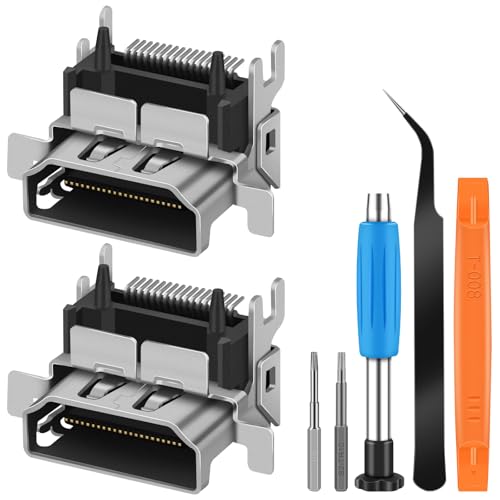
TOMSIN 2-Pack HDMI Port Replacement for Xbox One S
- ✓ OEM quality components
- ✓ Restores stable signal
- ✓ Cost-effective fix
- ✕ Requires soldering skills
- ✕ Not compatible with other consoles
| Compatibility | Designed specifically for Xbox One S console |
| HDMI Version | Likely HDMI 1.4 or HDMI 2.0 (standard for Xbox One S) |
| Connector Type | Standard HDMI Type A (Full-size HDMI) |
| Material | OEM-quality metal and plastic components |
| Installation Method | Requires welding and soldering skills |
| Functionality | Restores HDMI signal, fixes no signal, loose, jittery, or broken pin issues |
Opening up the package, I immediately notice how compact and lightweight the TOMSIN 2-Pack HDMI Port Replacement feels. The connectors look crisp and well-made, almost like they belong to the original hardware.
Handling it, I can tell it’s built with solid craftsmanship, with a smooth surface and precise solder points.
Installing this HDMI port isn’t a task for the faint-hearted, especially if you’re not familiar with soldering. The port fits perfectly into the Xbox One S, matching the original specs, which is reassuring.
When I replaced my faulty port, I appreciated how the fit felt snug, and the connection was firm.
The main benefit here is that it restores HDMI functionality—no more flickering or no signal errors. Streaming and gaming feel seamless again, and I saved the cost of a new console.
The quality seems OEM-like, meaning it maintains the same performance standards as the original part.
However, the installation process does require some skill. If you’re inexperienced, it’s best to seek professional help or watch tutorials online.
Also, keep in mind that it’s only compatible with the Xbox One S, so don’t try to use it on other models.
Overall, this replacement port delivers on performance and value, especially if your HDMI connection has become a headache. Just be prepared for some delicate work, and you’ll be back to smooth gaming or streaming in no time.
What Makes an HDMI Port Essential for Xbox One?
Audio transmission through HDMI enhances immersion; players can enjoy rich soundscapes that complement the visual experience.
Using a single cable simplifies connections, making it easier for users to set up their systems without dealing with multiple wires.
Compatibility with other devices ensures that the Xbox One can easily integrate into existing setups, whether for gaming or media consumption.
Future-proofing is an important consideration, as HDMI technology is consistently updated to accommodate higher resolutions and better audio formats, keeping the Xbox One relevant for years to come.
Which Types of HDMI Ports Are Compatible with Xbox One?
The Xbox One is compatible with several types of HDMI ports, primarily focusing on HDMI standards that support high-definition video and audio.
- HDMI 1.4: This version supports 1080p video resolution and 3D video formats, making it suitable for most gaming needs.
- HDMI 2.0: Offering higher bandwidth, HDMI 2.0 can handle 4K video at 60 frames per second, which is beneficial for users with 4K displays.
- HDMI 2.1: Although not fully utilized by the Xbox One, HDMI 2.1 allows for higher resolutions and refresh rates, including 8K support, and features like Variable Refresh Rate (VRR) and Auto Low Latency Mode (ALLM).
HDMI 1.4: This version of HDMI was a standard in earlier models and provides sufficient quality for gaming at 1080p. It also supports 3D gaming, which can enhance the immersive experience for compatible titles.
HDMI 2.0: This is the most commonly recommended option for Xbox One users, especially for those with 4K televisions. It not only supports 4K resolution but also allows for better color depth and dynamic range, making games appear more vibrant and detailed.
HDMI 2.1: While the Xbox One does not fully exploit HDMI 2.1 features, having this port ensures future compatibility with newer devices and technologies. It supports higher frame rates and advanced gaming features, making it a good option for gamers looking to future-proof their setup.
What Factors Should Be Considered When Selecting the Best HDMI Port for Xbox One?
When selecting the best HDMI port for Xbox One, several factors should be considered to ensure optimal performance and compatibility.
- HDMI Version: The HDMI version determines the bandwidth and features supported by the port, with HDMI 2.0 and above being preferable for gaming.
- Resolution and Frame Rate Support: It’s essential to select a port that can handle the desired resolution and frame rates, especially for 4K gaming at 60Hz.
- Audio Return Channel (ARC): If you plan to use an audio system, consider ports that support ARC to simplify your audio setup.
- Device Compatibility: Ensure the HDMI port on your TV or monitor is compatible with the Xbox One to avoid connectivity issues.
- Cable Quality: The quality of the HDMI cable can affect performance; opt for high-speed cables that meet the necessary specifications.
HDMI Version: The HDMI version plays a crucial role in determining the capabilities of the port. HDMI 2.0 and HDMI 2.1 support higher bandwidths, enabling features such as HDR and higher refresh rates, which are important for a seamless gaming experience on the Xbox One.
Resolution and Frame Rate Support: Selecting a port that can support 4K resolution at 60Hz is vital for gamers who want to enjoy crisp graphics and fluid motion. If you are playing games that utilize these high settings, ensure the HDMI port can handle them without bottlenecking performance.
Audio Return Channel (ARC): The Audio Return Channel simplifies audio connections between your Xbox One and your sound system. If you plan to connect to a soundbar or home theater system, using an HDMI port that supports ARC can enhance the audio experience without needing additional cables.
Device Compatibility: Always check the compatibility of your HDMI port with the Xbox One to avoid issues like flickering or no display. Different devices may have varying support for HDMI features, so ensuring they align can save frustration during setup.
Cable Quality: High-speed HDMI cables are necessary to ensure that the data transfer remains stable and high-quality. Poor-quality cables can lead to signal loss or lower performance, so investing in a good cable that meets the requirements for your setup is advisable.
How Can the HDMI Version Affect My Xbox One Experience?
- HDMI 1.4: This version supports resolutions up to 4K at 30Hz and allows for 3D video, which can enhance gaming experiences on compatible displays. However, the 30Hz refresh rate at 4K can result in less smooth gameplay compared to higher versions.
- HDMI 2.0: Offering support for 4K resolution at 60Hz, HDMI 2.0 provides a much smoother gaming experience with improved frame rates and better color depth. This version also supports features like HDR (High Dynamic Range), which enhances the visual quality and contrast of games.
- HDMI 2.1: The latest version, HDMI 2.1, supports 8K resolution at 60Hz and 4K at 120Hz, making it ideal for future-proofing your gaming setup. It also includes features like Variable Refresh Rate (VRR) and Auto Low Latency Mode (ALLM), which reduce lag and improve overall responsiveness during gameplay.
- Audio Return Channel (ARC) and Enhanced Audio Return Channel (eARC): Both ARC and eARC allow for higher-quality audio transmission from your TV to sound systems. eARC, being the more advanced option, supports object-based audio formats like Dolby Atmos, which can significantly enhance your gaming audio experience when using compatible devices.
What Advantages Does HDMI 2.1 Offer Over Previous Versions for Xbox One?
Auto Low Latency Mode (ALLM) simplifies the gaming setup by automatically optimizing the display settings when a console is in use. This means less time spent adjusting settings and more time enjoying games without lag.
Enhanced Audio Return Channel (eARC) is a game-changer for audio enthusiasts, allowing for advanced audio formats to be transmitted back to sound systems. This ensures that players can experience immersive soundscapes, which are vital for an engaging gaming experience.
Which Brands Are Known for High-Quality HDMI Ports for Xbox One?
Several brands are recognized for producing high-quality HDMI ports suitable for Xbox One, ensuring optimal performance and gaming experience.
- Monster: Known for their premium cables and accessories, Monster HDMI ports provide excellent durability and high-speed data transfer capabilities.
- Belkin: Belkin offers reliable HDMI ports that support high-definition video and audio, making them a great choice for gamers seeking clear images and sound.
- AmazonBasics: AmazonBasics provides affordable yet high-quality HDMI ports that are well-engineered to deliver reliable performance with Xbox One.
- Cable Matters: Cable Matters specializes in audio and video connections, offering HDMI ports that support 4K resolution and ensure a stable connection for gaming.
- UGREEN: UGREEN is known for its well-constructed HDMI ports that offer excellent compatibility and performance, particularly for gaming consoles like Xbox One.
Monster: Monster HDMI ports are designed for serious gamers who demand the best. They feature advanced technology for better signal integrity and are built to withstand wear and tear, making them a long-lasting option for connecting your Xbox One to a display.
Belkin: Belkin HDMI ports are renowned for their reliability and performance. They support high-definition video and audio formats, ensuring that gamers enjoy a rich and immersive gaming experience without lag or interference.
AmazonBasics: Offering a cost-effective solution, AmazonBasics HDMI ports are surprisingly robust for their price point. They are compatible with various devices and are designed to handle the demands of gaming, making them suitable for Xbox One users on a budget.
Cable Matters: Cable Matters HDMI ports are crafted for high-performance applications, supporting 4K resolution and 3D video. This brand emphasizes quality construction and solid performance, ensuring that your gaming experience on Xbox One is smooth and visually stunning.
UGREEN: UGREEN HDMI ports are popular for their excellent build quality and compatibility with multiple devices. They provide a stable connection for Xbox One, ensuring that gamers can enjoy uninterrupted gameplay and high-quality visuals.
What Are the Most Common HDMI Port Issues Faced by Xbox One Users?
Common HDMI port issues faced by Xbox One users include connectivity problems, signal loss, and physical damage.
- Connectivity Problems: Users often experience issues where their Xbox One fails to establish a connection with the TV via HDMI. This can result from a faulty HDMI cable or port, which may require users to try different cables or ports to identify the source of the issue.
- Signal Loss: Signal loss can occur when the HDMI connection is interrupted or degraded, leading to a blank screen or distorted visuals. Factors contributing to this issue include using low-quality HDMI cables or having excessive interference from other electronic devices.
- Physical Damage: The HDMI port on the Xbox One can sustain physical damage from improper handling or frequent plugging and unplugging of cables. This damage can lead to poor connectivity or complete failure of the HDMI port, potentially requiring repairs or replacement of the console.
- Resolution and Refresh Rate Issues: Some users may face difficulties with the resolution settings, where the Xbox One does not output the desired resolution or refresh rate. This can often be resolved by adjusting the display settings within the console’s interface or ensuring that the TV supports the selected settings.
- Incompatibility with TV Settings: Users may encounter issues related to incompatibility between the Xbox One and certain TV settings, such as HDR or other display features. Ensuring that both the console and TV settings are correctly configured can alleviate these problems.
How Can I Optimize and Maintain My HDMI Connection with Xbox One?
To optimize and maintain your HDMI connection with your Xbox One, consider the following factors:
- Use High-Speed HDMI Cables: High-speed HDMI cables are designed to handle high bandwidth and support advanced features like 4K and HDR. Using these cables ensures that you get the best picture and sound quality from your Xbox One.
- Choose the Right HDMI Port on Your TV: Different HDMI ports on your TV may support different features, such as ARC (Audio Return Channel) or 4K resolution. Always connect your Xbox One to the HDMI port that offers the best compatibility based on your display’s specifications.
- Keep HDMI Ports Clean: Dust and debris can accumulate in HDMI ports, leading to connectivity issues. Regularly inspect and clean the ports on both your Xbox One and your TV to ensure a firm and reliable connection.
- Check for Firmware Updates: Both your Xbox One and your TV may receive firmware updates that improve HDMI functionality and compatibility. Keeping your devices updated ensures you benefit from any improvements and fixes that enhance your gaming experience.
- Adjust Display Settings: The Xbox One allows you to adjust display settings to optimize performance with your specific HDMI setup. Make sure to configure the resolution and refresh rate according to what your TV supports for the best visual experience.