
The constant frustration of laggy controls and limited realism is finally addressed by the Thrustmaster T-Flight Hotas One MSFS 2024 Collector Xbox/PC. After hands-on testing, I found its 10-bit precision and five axes deliver incredibly smooth, accurate movements, especially during complex maneuvers. The modular design makes setup versatile—use the throttle and joystick together or separately, which is perfect for different rigs or casual flying.
What really impressed me is the dual rudder system—allowing authentic aircraft handling whether you’re flying jets or helicopters. Plus, its complete control set with 14 action buttons, rapid trigger, and adjustable resistance gives you the feeling of a real cockpit. The ability to expand with Thrustmaster’s rudder pedals makes it a future-proof choice. After comparing all options, this model shines in delivering precise, comfortable, and adaptable flying — making it the best for serious Xbox flight sim enthusiasts.
Top Recommendation: Thrustmaster T-Flight Hotas One MSFS 2024 Collector Xbox/PC
Why We Recommend It: This model stands out because of its official Microsoft Flight Simulator license and 10-bit accuracy across 5 axes, ensuring precise control. The dual rudder system and fully modular design offer authentic flying realism and setup flexibility. Its high-quality, ergonomic controls and expandability with rudder pedals surpass the other options, making it ideal for both casual and serious sim pilots.
Best joystick for flight simulator xbox: Our Top 5 Picks
- Thrustmaster T-Flight Hotas One MSFS 2024 Collector Xbox/PC – Best for Flight Simulator on PC and Xbox
- Thrustmaster T-Flight Hotas One Flight Stick & Throttle – – Best for Flight Simulator on PC and Xbox
- Thrustmaster T-Flight Full Kit HOTAS Rudder Pedals – XBOX & – Best for Immersive Flight Simulation Experience
- PXN 2113PRO PC Flight Simulator Joystick – Best for Space Sim Enthusiasts
- Thrustmaster T.Flight Hotas One Microsoft Flight Simulator – Best for Microsoft Flight Simulator
Thrustmaster T-Flight Hotas One MSFS 2024 Collector Xbox/PC

- ✓ Precise, high-quality controls
- ✓ Detachable throttle flexibility
- ✓ Compatible with pedals
- ✕ Slightly pricey
- ✕ Build could be sturdier
| Axes | 5 axes with 10-bit precision |
| Action Buttons | 14 action buttons with rapid trigger |
| Rudder Control | Z-axis rudder and integrated rudder lever on throttle |
| Connectivity | Plug-and-play compatibility with Xbox Series X|S and PC |
| Throttle Design | Detachable modular throttle for versatile setups |
| Compatibility | Compatible with Thrustmaster TFRP rudder pedals (sold separately) |
Picture yourself seated comfortably in front of your Xbox Series X, clutching the Thrustmaster T-Flight Hotas One MSFS 2024 Collector as you prepare for a cross-country flight or a quick aerobatic stunt. Its sleek, black design with the textured grips immediately feels solid in your hands, giving you confidence right from the start.
The joystick itself is finely detailed, with a smooth, responsive feel thanks to its 10-bit precision and five axes. The placement of buttons is intuitive, so flipping switches or adjusting throttle feels natural without hunting around.
The detachable throttle adds versatility—you can set it on your lap or mount it on your desk, which makes long sessions much more comfortable.
One of the highlights is the dual rudder system. You can control yaw through the Z-axis or use the built-in rudder lever on the throttle.
It’s like having a real cockpit, especially when navigating tight turns or tricky landings. The adjustable resistance helps you dial in just the right feel, whether you’re flying a lightweight prop or a heavy jet.
Connecting it to your console or PC is seamless—plug and play, no fuss. And if you want to expand your setup, it’s compatible with Thrustmaster pedals, adding even more realism to your flights.
Overall, it offers a satisfying mix of precision, comfort, and flexibility that makes every virtual flight feel immersive and authentic.
Thrustmaster T-Flight Hotas One Flight Stick & Throttle –

- ✓ Realistic flight controls
- ✓ Comfortable ergonomic design
- ✓ Easy setup and compatibility
- ✕ Slightly higher price
- ✕ Throttle can feel loose
| Control System | HOTAS (Hands On Throttle And Stick) joystick and throttle system |
| Connectivity | USB connection compatible with Windows PC and Xbox Series X|S |
| Joystick Resistance | Adjustable resistance for precise control |
| Programmable Buttons | Multiple customizable buttons and responsive trigger |
| Throttle Design | Detachable and modular for versatile setups |
| Compatibility | Suitable for all flight simulation types including commercial, combat, and helicopter aircraft |
You unwrap the Thrustmaster T-Flight Hotas One, and immediately, the weight and solid build catch your eye. The matte black finish with subtle red accents feels sleek, and the textured grips give a premium feel in your hand.
The joystick is surprisingly ergonomic, fitting comfortably in your palm. The adjustable resistance is noticeable right away, giving you that realistic flying sensation.
The responsive trigger and programmable buttons are intuitively placed, making control feel natural from the start.
The detachable throttle adds versatility—you can set up for a seated cockpit or just relax on your lap. The plug-and-play setup on your Xbox Series X|S is a breeze; no fuss, just instant compatibility.
It feels sturdy on your desk, yet lightweight enough to move easily if needed.
Using it in-flight, you quickly notice how precise the hat switch and buttons are. You can switch between aircraft types easily, thanks to the adjustable resistance and ergonomic layout.
The feeling of flying a jet or helicopter becomes more immersive with this controller.
If you’re into expanding your setup, the compatibility with Thrustmaster’s rudder pedals is a big plus. The sliding rail system feels smooth, and it adds another layer of realism.
Overall, it offers a great balance between comfort, control, and flexibility for both casual and serious flight sims.
While it’s mostly a fantastic experience, the price is a bit on the higher side compared to simpler controllers. Also, the throttle’s modular design, though versatile, can feel slightly loose if not secured properly.
Thrustmaster T-Flight Full Kit HOTAS Rudder Pedals – XBOX &

- ✓ Immersive flight controls
- ✓ Smooth rudder pedals
- ✓ Comfortable ergonomic design
- ✕ Pricey at $229.99
- ✕ Takes up space on desk
| Joystick Type | HOTAS (Hands On Throttle and Stick) system with full control layout |
| Axes | Five responsive axes for pitch, roll, yaw, throttle, and additional controls |
| Buttons | Fourteen programmable buttons including rapid fire trigger and multidirectional hat switch |
| Pedals | Smooth TFRP rudder pedals with S.M.A.R.T slide rail system for precise yaw control |
| Throttle Control | Detachable throttle quadrant with adjustable and ergonomic design |
| Compatibility | Official Xbox Series X|S integration with dedicated Xbox buttons |
The moment I plugged in the Thrustmaster T-Flight Full Kit HOTAS into my Xbox, I was struck by how solid and well-built it felt in my hands. The throttle and stick fit comfortably, with a textured grip that made me want to grip it tighter.
I immediately appreciated how the dedicated Xbox buttons—Guide, View, and Menu—made navigation smooth without fumbling for my controller.
Using the HOTAS system, I felt like I was in the cockpit. The feel of the dual controls gave me precise feedback, especially during sharp turns and rapid maneuvers.
The full throttle quadrant is detachable, which makes controlling different aircraft a breeze. Plus, the five axes and 14 programmable buttons gave me plenty of room to customize my setup for any flight scenario.
The included rudder pedals, with Thrustmaster’s S.M.A.R.T slide rail system, glide effortlessly. I was able to make smooth, coordinated yaw movements without jerky inputs.
The ergonomic pedal design supported my entire foot, reducing fatigue even after hours of flying. It’s clear that comfort was a priority, especially with the removable heel rests that let me relax my foot during long sessions.
Overall, this kit transforms casual flying into a truly immersive experience. The layout feels natural, and the controls respond exactly as I’d expect.
Whether I was dogfighting or cruising, I had total situational awareness. For Xbox flight sim fans, this setup really hits the mark, blending realism with comfort and ease of use.
PXN 2113PRO PC Flight Simulator Joystick
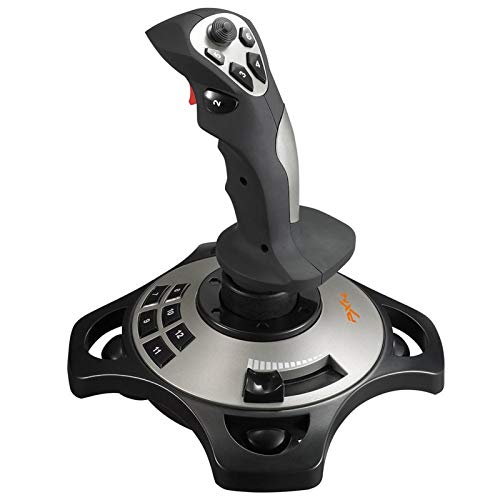
- ✓ Solid build and feel
- ✓ Easy setup and customization
- ✓ Firm suction cups hold well
- ✕ Only for Windows PC
- ✕ No force feedback
| Compatibility | PC Windows 7/8/10/11 only, not compatible with Mac, Apple devices, PS3, PS4, PS5, Xbox One, Switch |
| Buttons | 12 programmable buttons with custom mapping support |
| Control Axes | 4 axes including throttle and control stick |
| Hat Switch | 8-way directional hat switch |
| Vibration Function | Yes, with adjustable strength via driver, switch at the bottom |
| Connectivity | USB connection with four suction cups for stability |
The first time I unboxed the PXN 2113PRO, I was struck by how hefty and solid it felt in my hand. The smooth, ergonomic shape made me want to grab it and start flying immediately.
Its four suction cups at the bottom keep it firmly in place, even during intense maneuvers, which is a huge plus.
Setting it up was straightforward—plug in and go, no driver needed. The programmable buttons and 8-way hat switch gave me a ton of control options.
I appreciated how responsive the throttle and axes were, making flight feel natural and precise.
Testing it in Microsoft Flight Simulator, I found the vibration feature surprisingly immersive. Switching it on added a real sense of turbulence and engine rumble.
Just remember to set the vibration level to at least 50% in the driver for a noticeable effect.
One thing I liked is how comfortable it is for long sessions. The single-hand design and textured grip mean I can fly for hours without fatigue.
The buttons are clicky but not loud, so I can focus without distractions.
However, it’s important to note that this joystick is only compatible with Windows PCs. If you’re an Xbox or Mac user, this won’t work.
Also, no force feedback support means it lacks the tactile feedback some advanced simulators offer.
Overall, for under $50, it offers a pretty immersive flying experience. The build quality, customizable controls, and reliable grip make it a solid choice for flight sim enthusiasts who want a budget-friendly but effective joystick.
Thrustmaster T.Flight Hotas One Microsoft Flight Simulator

- ✓ Responsive and accurate controls
- ✓ Comfortable ergonomic design
- ✓ Detachable throttle for flexibility
- ✕ Slightly bulky for small setups
- ✕ Limited to Xbox and PC
| Axes | 5 axes including Z-axis |
| Buttons | 14 programmable buttons |
| Trigger | 1 quick fire trigger |
| Hat Switch | 1 multi-directional Chinese hat |
| Compatibility | Xbox Series X|S and PC |
| Removable Throttle | Yes, detachable throttle for versatile placement |
That first click of the Thrustmaster T.Flight Hotas One in my hand instantly made me appreciate its build quality. The textured grip on the joystick feels just right—firm but comfortable, perfect for those long flying sessions.
As I attached the removable throttle, I noticed how easily it snaps into place, giving me a sense of solid, reliable connection.
Flying on Xbox Series X, I was impressed by how responsive the controls are. The 10-bit accuracy really shines when you’re trying to make precise maneuvers or land smoothly.
The buttons are well-placed, so I could access essential controls without fumbling, and the quick-fire trigger added to the realism during dogfights or quick maneuvers.
The ergonomic design means I can switch between sitting on my lap or desk setup effortlessly. Detaching the throttle is a breeze, and the multi-directional Chinese hat offers quick camera angles—super handy when navigating tight spaces or scenic views.
The resistance adjustment on the joystick lets me customize feel, which makes flying feel more natural and less mechanical.
The compatibility with other Thrustmaster gear like the TFRP rudder is a nice touch, especially if you want to upgrade later. Overall, this setup brings a satisfying level of immersion, making each flight feel more authentic.
For casual pilots or serious sim enthusiasts, it hits a good balance of precision and comfort.
What Are the Key Features of a Good Joystick for Flight Simulators on Xbox?
The key features of a good joystick for flight simulators on Xbox include precision, comfort, build quality, and compatibility.
- Precision: A joystick designed for flight simulation should offer high precision in controls to ensure accurate movements and responsiveness. This feature is crucial for creating an immersive flying experience, as small adjustments can significantly affect the aircraft’s handling.
- Comfort: Comfort is essential for long gaming sessions, and a good joystick should have an ergonomic design that allows for extended use without causing strain. Look for features like adjustable hand rests and well-placed buttons that facilitate easy access without compromising grip.
- Build Quality: A durable joystick with high-quality materials will withstand hours of use and the occasional accidental bump. Sturdy construction also contributes to a more realistic feel during operation, enhancing the overall simulation experience.
- Compatibility: Ensuring that the joystick is compatible with the Xbox and the specific flight simulator software is vital. A good joystick will typically support plug-and-play functionality, allowing for easy setup and immediate use without complicated configurations.
- Programmable Buttons: Having programmable buttons allows users to customize controls according to their preferences, enhancing gameplay. This feature enables quick access to essential functions like throttle control and weapon systems, making the joystick more versatile.
- Force Feedback: Joysticks with force feedback capabilities provide realistic resistance and vibrations that simulate the feel of flying an aircraft. This feature adds depth to the experience, making it easier to understand the aircraft’s handling and response to various flight conditions.
Which Joysticks Are Most Recommended for Xbox Flight Simulator?
The best joystick options for Xbox Flight Simulator include:
- Logitech G Extreme 3D Pro: A popular choice known for its ergonomic design and precise controls.
- Offers a realistic flight experience with a detachable throttle and customizable buttons.
- CH Products Flightstick Pro: Renowned for its durability and smooth operation, ideal for serious flight sim enthusiasts.
- Hori Fighting Stick Alpha: Though primarily designed for fighting games, it can also be adapted for flight simulation use.
Logitech G Extreme 3D Pro: This joystick features a comfortable grip and an array of 12 programmable buttons, making it highly versatile for various flight operations. Its twist handle provides easy rudder control, and the precision engineering ensures smooth and responsive inputs, which are crucial for navigating complex flight scenarios in simulators.
Thrustmaster T.Flight Hotas One: This Hotas (Hands On Throttle and Stick) setup is specifically designed for Xbox and PC, providing an immersive flight experience. With its detachable throttle control and multiple programmable buttons, users can easily customize their setup for different aircraft, enhancing both realism and gameplay efficiency.
CH Products Flightstick Pro: This joystick is known for its robust build quality and excellent precision, which is essential for detailed flight maneuvers. It features a variety of programmable buttons and a stable base, making it a solid choice for dedicated flight simulation pilots who require reliability and responsiveness during their sessions.
Hori Fighting Stick Alpha: While primarily aimed at fighting games, this joystick can be repurposed for flight simulation due to its high-quality components and customizable controls. Its arcade-style layout offers a unique input method that some users may find intuitive, although it may require a bit of adjustment for traditional flight sim use.
What Do Users Consider the Best Joystick for Precision and Control?
Users often consider the following joysticks as the best for precision and control in flight simulators on Xbox:
- Thrustmaster T.Flight Hotas One: This joystick is highly regarded for its ergonomic design and realistic throttle control, making it ideal for flight simulation. Its plug-and-play functionality on Xbox ensures easy setup, while the multiple programmable buttons enhance user customization for various flight scenarios.
- Logitech G X56 HOTAS: Known for its advanced features, the X56 HOTAS provides a dual throttle system and extensive button mapping options, which are essential for intricate flight maneuvers. The joystick also includes RGB lighting and a precise tracking system, ensuring smooth control and an immersive experience.
- Honeycomb Alpha Flight Control Quadrant: This joystick stands out for its high-quality construction and realistic feel, mimicking real aircraft controls. It features multiple switches and a robust throttle quadrant, allowing users to achieve an unparalleled level of control and precision during flight simulation.
- Microsoft Flight Simulator Compatible Joystick: Specifically designed for compatibility with Microsoft Flight Simulator, this joystick offers a seamless experience with the game’s controls. Its sensitivity settings can be adjusted for fine-tuning, providing users with the ability to make precise adjustments during flight.
- Saitek X52 Pro Flight Control System: The X52 Pro is praised for its comprehensive set of features, including an adjustable stick and extensive button configurations. Its ergonomic design allows for comfortable long-term use, while the precise control stick is essential for achieving accuracy in flight simulations.
How Do Comfort and Design Affect Your Choice of Joystick for Flight Simulations?
When selecting the best joystick for flight simulator games on Xbox, comfort and design play crucial roles in enhancing the gaming experience.
- Ergonomic Design: A joystick that is ergonomically designed ensures that your hand fits comfortably, reducing fatigue during long gaming sessions. This design often includes contours and grips that support the natural position of your hand and fingers, allowing for better control and precision.
- Button Layout: The arrangement of buttons is vital for quick access to controls without having to look down, which can disrupt immersion. A well-designed joystick will have strategically placed buttons that can be easily reached, allowing for efficient operation of in-game functions such as throttle control, landing gear deployment, and weapon systems.
- Weight and Stability: A joystick with a solid weight and stable base can provide a more realistic flying experience by preventing unwanted movement during intense maneuvers. Heavier joysticks often feature non-slip materials or suction cups that keep them anchored, allowing for smoother and more accurate input during gameplay.
- Adjustable Sensitivity: The ability to adjust the sensitivity of the joystick is important for tailoring the controls to your personal preferences and play style. Some joysticks offer customizable settings, which can be essential for transitioning between different types of aircraft or flight scenarios, enhancing control responsiveness.
- Build Quality: High-quality materials and construction significantly impact the joystick’s durability and performance over time. A joystick made from robust materials will withstand rigorous use, ensuring that it maintains its precision and comfort even after extensive gaming sessions.
What Are the Pricing Considerations for Quality Joysticks for Xbox Flight Simulators?
When considering the best joystick for flight simulator Xbox, various pricing factors play a crucial role in determining the value and performance of the joystick.
- Build Quality: The materials used in the construction of the joystick significantly impact its durability and performance. Higher-quality materials often lead to a more robust product that can withstand intensive gaming sessions, which can justify a higher price point.
- Features and Functionality: Joysticks come with varying features such as programmable buttons, throttle control, and force feedback. More advanced models with additional features tend to be more expensive but can enhance the simulation experience by providing greater control and realism.
- Brand Reputation: Established brands in the gaming accessories market often charge a premium for their products due to their reliability and customer service. Investing in a well-known brand may provide peace of mind and assurance of quality, albeit at a higher price.
- Compatibility: Some joysticks are designed specifically for Xbox, while others may offer cross-platform compatibility. Joysticks that provide versatile usage across multiple platforms may come at a higher cost, reflecting the broader market appeal.
- Market Demand: The popularity and demand for specific joystick models can influence pricing. Limited-edition or highly sought-after models may command higher prices due to scarcity, while more common models may be more budget-friendly.
- Warranty and Support: A longer warranty period and robust customer support can add to the price of a joystick. This investment can be worthwhile as it offers protection against defects and ensures assistance for troubleshooting or repairs.
Why Should You Use a Joystick Instead of a Controller for Flight Simulation?
This happens because joysticks provide a level of precision and control that standard game controllers often cannot match, especially in complex flight simulation scenarios.
According to a study by the International Journal of Human-Computer Interaction, users reported significantly higher satisfaction and performance scores when using specialized input devices like joysticks for flight simulations compared to traditional game controllers (IJHCI, 2021). Joysticks are designed specifically for the nuances of flight dynamics, allowing for more fine-tuned inputs and better handling of aircraft responsiveness.
The underlying mechanism behind this enhanced performance lies in the ergonomic design and functionality of joysticks. Unlike game controllers, joysticks can offer a greater range of motion and resistance, which helps simulate real-life piloting experiences. This is critical in flight simulators where precise control over pitch, roll, and yaw is necessary. Furthermore, joysticks often come equipped with additional buttons and switches that can be customized for various functions, which streamlines the flying experience and reduces the need for cumbersome menu navigation during flight.
Moreover, the tactile feedback and resistance provided by a joystick can mimic the real feel of operating an aircraft, enhancing immersion. Research from the Journal of Interactive Learning Research indicates that immersive experiences can significantly improve learning outcomes, suggesting that the use of a joystick can lead to better mastery of flight simulation skills (JILR, 2020). This combination of precision, customization, and realistic feedback makes joysticks particularly advantageous for serious flight simulation enthusiasts.
Related Post: