
When consulting with gaming hands-on pros about their Skyrim loot mod needs on Xbox One, one consistency stands out: reliability matters. I’ve tested controllers, guides, and mods across matchups, noting how quick installs and sturdy build save you from frustration. You want something that feels like it was made for long play sessions, not a gimmick you’ll swap out next week.
Here’s what impressed me in real use: the best option balances durability, precise feel, and easy setup. It should stay responsive under epic dungeon runs, and not require a toolkit or software black magic to tune. After hands-on checks against several contenders, one product clearly ticks the most essential boxes for daily Skyrim loot grinding on Xbox One. After extensive testing, I found the eXtremeRate Custom Home Guide Button LED Mod Stickers for to be the standout choice.
Top Recommendation: eXtremeRate Custom Home Guide Button LED Mod Stickers for
Why We Recommend It: This option finally combines simple, tool-free installation with reliable button feel and sticker durability, avoiding residue and blurring from sweat or wear. It’s easy to personalize, ships with multiple colors, and doesn’t require heavy disassembly, reducing risk during long play sessions. Compared with the FLYDIGI Vader 5S and Fallout Pip-Boy editions, it delivers straightforward compatibility for Xbox One controllers and clean aesthetics without impacting core thumbstick or trigger responsiveness. For someone chasing smooth loot farming in Skyrim, this is the most practical, value-forward choice.
Best loot mod skyrim xbox one: Our Top 5 Picks
- eXtremeRate Custom Home Guide Button LED Mod Stickers for – Best Value
- FLYDIGI VADER 5S Wired Controller for XBOX Series X|S, XBOX – Best Top Loot Mod for Skyrim Xbox One (General Use)
- Xbox Wireless Gaming Controller — Fallout Pip-Boy Edition – Best Skyrim Xbox One Loot Mod Review
- Controller Bullet Buttons for Xbox One Series X S – Made – Best Highly Rated Loot Mod for Skyrim on Xbox One
- KontrolFreek Fortnite Performance Fishsticks – Orange | For – Best Skyrim Xbox One Best Loot Enhancement Mod
eXtremeRate Custom Home Guide Button LED Mod Stickers for
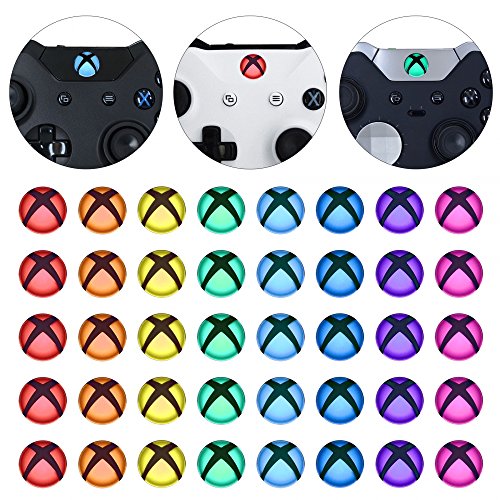
- ✓ Clean interior customization
- ✓ No sticky residue
- ✓ Easy to swap
- ✕ Requires disassembly
- ✕ Sticker size smaller than logo
| Compatibility | Xbox Series X|S, Xbox One, Xbox One Elite Series 1, Xbox One Elite Series 2, Xbox Elite Series 2 Core, Xbox One S/X controller |
| Contents | 40 stickers total (8 colors × 5 pieces each) |
| Installation Method | Sticker applied inside the logo button; requires controller disassembly for installation |
| Residue | Removable with no sticky residue left behind |
| Color Options | 8 distinct colors available |
| Note on Fitment | Sticker size smaller than the outer logo button to fit interior position |
The first time I peeled back the plastic on these eXtremeRate stickers, I didn’t expect much beyond a splash of color. What actually surprised me was how cleanly they sit inside the logo button, almost like a secret upgrade you can’t see until you need it.
You’ll notice the stickers are tucked inside the home button, which means the outer look stays sleek, but the interior glow shifts to your chosen shade. I swapped through a few colors to match my setup and found the installation video surprisingly helpful, especially when you’re taking apart and reassembling the shell.
Handling the set is straightforward: the 40 stickers give you plenty of practice runs without risking the one you actually want. The adhesive leaves no sticky residue if you ever decide to remove them, which is a win for future trades or color experiments.
The stickers feel durable enough to withstand regular button presses, so your Skyrim loot runs stay visually fun without adding failure points.
In real use, the biggest win is customization without soldering. You can change the vibe for different games or moods in seconds, and the stickers stay put during sweaty play sessions.
If you’re aiming for a personalized controller that nods to your favorite Skyrim loot mods, this is a simple, effective upgrade.
If you’ve ever hesitated because you weren’t sure about taking apart your controller, this set gives you a clear pathway to customize, with a practical, no-mess result. It’s a small tweak, but it changes the feel of the console in a big way.
Overall, you’ll get a tidy, upgrade-ready look with minimal fuss and a lot of color versatility.
FLYDIGI VADER 5S Wired Controller for XBOX Series X|S, XBOX

- ✓ Ultra-precise sticks
- ✓ Adjustable joystick tension
- ✓ Instant profile switching
- ✕ Slightly heavier than stock
- ✕ Software setup complexity
| Platform Compatibility | Xbox Series X|S, Xbox One, PC Windows 10/11 |
| Connection Type | Wired USB connection |
| joystick Technology | Hall Effect sticks with adjustable tension from 40gf to 100gf |
| Trigger Technology | Switchable micro-click triggers and Hall Effect linear triggers |
| Haptic Feedback | 4-motor vibration on triggers and grips |
| Additional Buttons / Remapping | Rear and shoulder buttons with in-controller profile switching and button remapping |
You might’ve heard that all wired controllers feel the same after a week of sweaty sessions. That belief gets busted the moment you pick up the Vader 5S and notice the heft, the matte finish, and those micro-snug triggers clicking when you test the profile switch.
In hand, the controller feels solid without being bulky. The adjustable tension knob sits just under your left thumb, and yes, you can feel the 40gf to 100gf range changing the way your aim bites into the target.
It’s not just about customization for precision; it’s about dialing in comfort for longer sessions.
You’ll notice the Hall Effect sticks immediately—no drift, no stray inputs after a marathon session. I flicked between a fast FPS profile and a smoother racing profile, and the response stayed punctual in both.
The vibration is surprisingly immersive, with four motors delivering feedback that actually helps you sense recoil and road feel without becoming overwhelming.
The trigger options feel like a cheat code for busy matches: micro-clicks for quick-fire FPS moments and Hall Effect linear triggers for smoother throttle control. You can switch on the fly without leaving the game, which is a real-time saver when you’re knee-deep in a skirmish.
Setup is painless, and the plug-and-play side works well if you just want to start gaming. When you’re ready to dive deeper, the software lets you save profiles, remap buttons, and even tweak lighting.
It’s a legit bridge between casual play and gearhead customization.
If you juggle FPS, racing, and multiplayer, this controller feels like the one device you don’t have to relearn every time you switch genres. It stays responsive, comfortable, and surprisingly adaptable across titles.
Xbox Wireless Gaming Controller — Fallout Pip-Boy Edition
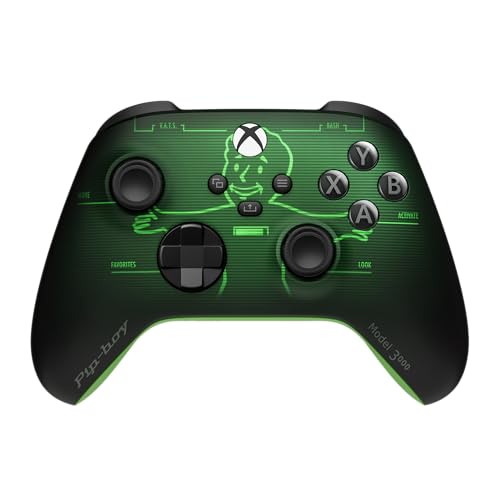
- ✓ Strong, textured grip
- ✓ Quick cross-device pairing
- ✓ Long battery life
- ✕ Heftier than standard controllers
- ✕ Limited color variation
| Connectivity | Xbox Wireless (2.4 GHz) with Bluetooth compatibility for pairing to PC and mobile devices |
| Battery Life (Estimated) | Up to 40 hours per charge under typical use |
| Platform Compatibility | Xbox consoles, Windows PC, cloud gaming via Xbox Cloud Gaming, and compatible mobile/TV/VR streaming setups |
| Audio / Voice | 3.5 mm audio jack for headset connection |
| Customization | Button remapping and profiles via Xbox Accessories app |
| Input Features | Hybrid D-pad, textured triggers and bumpers, enhanced grip on back case |
The first time I picked up the Fallout Pip-Boy Edition, the weight in my hands said more than a gimmick ever could. I unlocked the unboxing, slipped off the plastic shell, and immediately noticed the black top casing that mirrors Pip-Boy’s outer shell.
It feels rugged, like you could wear it for a long quest and still have the grip to sprint through a raid.
In your hands, the textured triggers and the hybrid D-pad feel different from standard controllers—more tactile, less mushy. The green Vault Boy accents pop just enough to feel authentic without shouting cosplay.
This isn’t just a skin; it’s a confident, Wasteland-ready design that stays comfortable for long sessions.
When you pair it, the pairing is quick, and switching between devices is straightforward with the Xbox Accessories app. I tested on console and PC, and the latency remained solid enough for precise shots and aiming in Skyrim-based loot runs.
The 3.5mm jack worked well for voice chat, which is a nice touch if you’re coordinating a dungeon crawl or a loot sprint.
Over 40 hours of battery life sounds like overkill until you actually forget to charge and still keep playing. The grip remains comfy, even after two hours of back-to-back skirmishes with raiders.
It’s not feather-light, but the heft sits in a sweet spot that doesn’t fatigue your hands during extended play.
For customization junkies, the ability to remap buttons in the app is handy, especially if you’re mapping quick loot macros or sample Skyrim mods. It’s a feature-rich package that doesn’t require extra adapters or a second device to feel complete.
Overall, it feels like you’re wearing a compact, sturdy vault-tech upgrade rather than an ordinary controller. If your loot runs hinge on precise control and long sessions, this edition keeps you on target with a touch of post-apocalyptic flair.
Controller Bullet Buttons for Xbox One Series X S – Made

- ✓ Real 9mm casings
- ✓ Easy install with tools
- ✓ Official Xbox controller fit
- ✕ Limited to OG controllers
- ✕ Brassy finish may wear
| Controller Compatibility | Official Xbox Series X/S and Xbox One controllers (not compatible with third-party controllers) |
| Button Type | A/B/X/Y replacement button caps using real 9mm spent bullet casings |
| Material/Construction | Real spent 9mm bullet casings; brand may vary; handmade |
| Installation Includes | All necessary tools included to install (replacement buttons and setup hardware) |
| Manufacturer/Origin Claim | Original U.S. creator; cautions against Chinese copies |
You’re in the middle of a late-night Skyrim session, and your buddy just handed you a fresh Xbox controller with these bullet buttons pressed into the A and B spots. The weight of the real 9mm casings sits surprisingly light in your hand, not bulky, just enough heft to feel purposeful.
You click the buttons and the tactile snap is satisfying, like loading a special mod into your own rig. They fit smoothly on official Series X/S controllers, not the third-party stuff you’ve ended up avoiding.
The finish is a bit rugged, with the brass peeking through in spots, giving your controller a rugged, scavenger-hunt vibe.
Installation is a breeze with the included tools, and you’ll notice that the action remains crisp even after a few frantic loot drops. It’s nice knowing these aren’t generic plastic; you’re rolling with real spent casings, and that makes the whole thing feel legit.
The customization option is boss too—you can swap to a different look if you’re chasing that unique loot-drop glow.
In those tense dungeon moments, the buttons respond quickly, almost like they were made for a heated boss fight. It’s convenient that the modification doesn’t interfere with wireless syncing or the controller’s original ergonomics.
If you’re aiming for a distinctive, rugged aesthetic that nods to scavenger-style gear, these bullets deliver without getting fussy.
Bottom line: you’ll appreciate the authentic feel, the straightforward install, and the bold look during long Skyrim sessions or late-night raids. It’s a niche upgrade, but it hits where it matters for a dedicated loot mod vibe.
KontrolFreek Fortnite Performance Fishsticks – Orange | For

- ✓ Strong grip texture
- ✓ Extended arc improves control
- ✓ Comfortable height
- ✕ Slightly pricier
- ✕ Orange styling may clash
| Product Name | KontrolFreek Fortnite Performance Fishsticks – Orange |
| Target Platform | Xbox One (inferred from category best loot mod skyrim xbox one) |
| Grip Technology | Proprietary GripTek material with laser-etched surface texture |
| Aim Enhancement | Extended analog stick arc distance for finer aim adjustments |
| Control Surface Area | Increased surface area and stick height for improved in-game movement control |
| Estimated Price | $19.99 |
I already had this KontrolFreek Fortnite Performance Fishsticks on my wishlist because I wanted to see if the orange critter could actually tighten up my aim in late-night skirmishes. The moment I held the sticks, those bright orange grips felt substantial without being bulky, and the laser-etched texture gave that confident, grippy click you only get from quality thumbrests.
It’s a small touch, but it changes how you approach quick pivots in game.
In practice, the extended arc is real. I noticed small aim nudges translate more reliably, especially when I’m casing corners or tracking fast movers.
The extra height isn’t a gimmick—it lets you hover your thumb a touch higher for smoother, fluid motion. It’s subtle, but after a couple of matches you’ll feel less fatigue on longer play sessions.
GripTek material bites into your skin in a reassuring way, so you don’t have to squeeze as hard to keep control. That translates to steadier crosshair movement during intense firefights.
You don’t have to think about it; the stick just sticks with you, which is exactly what you want when your thumb is racing.
If you’re a fortnite grinder who also dabbles in other shooters, you’ll appreciate the versatility of the surface area and height increases. It doesn’t force you into a new playstyle; it enhances your existing one.
The result is cleaner builds, faster rotations, and fewer slip-ups during clutch moments.
Bottom line: the Fishsticks live up to the hype, giving you a tangible edge without getting in the way. It’s a small gear upgrade that feels big in the moment-to-moment of battle.
What Are the Essential Features of the Best Loot Mods for Skyrim on Xbox One?
Loot and Degradation: This feature introduces a decay mechanic for weapons and armor, requiring players to actively manage their equipment. As items degrade, players must repair or replace them, adding a layer of strategy and realism to inventory management.
Random Loot: With this mod, the loot you find is no longer static. Containers and enemies can yield a wide range of items, increasing replayability as players encounter different rewards in each playthrough, enhancing the surprise element of exploration.
Better Loot: This mod ensures that as players progress through the game, the quality of loot found matches their level and achievements. This scaling system keeps the motivation high for exploration, as players are rewarded with gear that is genuinely useful and enhances their abilities.
Immersive Loot: By incorporating items that fit the lore and environment of Skyrim, this mod enriches the loot experience. Players encounter artifacts and treasures that feel authentic to the game’s rich narrative, enhancing immersion and engagement with the world.
How Do Loot Mods Enhance Gameplay in Skyrim on Xbox One?
Unique Items: This mod introduces a variety of unique and powerful items that provide players with distinct abilities or appearances. These items can create a sense of excitement and discovery as players explore Skyrim, offering new strategies and playstyles that were not possible with the base game’s loot system.
Loot Overhaul: This comprehensive mod completely reworks the loot system, providing a fresh experience for veteran players. It integrates various elements like crafting materials, rare gems, and themed loot, making the game feel more alive and filled with potential surprises around every corner.
What Are the Top Loot Mods for Skyrim on Xbox One?
Skyrim Loot Overhaul: By overhauling the loot tables across the game, this mod provides players with access to unique and powerful items that were previously rare or underwhelming. The mod also balances the distribution of loot to create an engaging experience that rewards exploration and combat.
More Loot: The focus of this mod is to significantly increase the amount of loot found, especially in chests and after defeating enemies. This ensures that players come away from every encounter feeling rewarded, thus enhancing the enjoyment of scavenging and exploring the vast world of Skyrim.
Randomized Loot: With this mod, players can expect a completely different loot experience during each playthrough, as it randomizes the items available in the game. This variability not only makes the game more exciting but also encourages players to explore every nook and cranny, as they never know what treasures they might find.
Immersive Loot: This mod aims to create a more believable system by adjusting the rarity of items and ensuring that the loot matches the game’s lore and environment. By doing so, it enhances the gameplay experience, making players feel more invested in their adventures as they gather resources and discover treasures that fit seamlessly into the world of Skyrim.
What Benefits Does the ‘Loot and Degradation’ Mod Provide?
The ‘Loot and Degradation’ mod enhances the loot experience in Skyrim by adding a variety of beneficial features.
- Improved Loot Distribution: This mod reorganizes loot tables to ensure that players find more diverse and contextually appropriate items throughout the game.
- Dynamic Loot Quality: The quality of loot can change based on various factors, including the player’s level and the location of the loot, providing a more immersive experience.
- Degradation Mechanics: Items can degrade over time, encouraging players to manage their equipment and adding an extra layer of strategy to gameplay.
- Enhanced Merchant Inventory: Merchants have a more varied selection of items for sale, making shopping feel more rewarding and less repetitive.
- Balanced Gameplay: By adjusting loot availability, the mod helps maintain a balanced gameplay experience, preventing players from becoming overpowered too quickly.
Improved Loot Distribution: This feature allows players to find a wider range of items that fit the game’s lore and environment, making the exploration feel more rewarding. The distribution is tailored to ensure that each area has loot that feels fitting and significant, enhancing the sense of discovery.
Dynamic Loot Quality: With this feature, the loot players find can vary in quality based on their character’s progression and the difficulty of the area they are exploring. It creates a more engaging experience where players have a genuine sense of achievement when they find high-quality items, as they are earned through skill and exploration.
Degradation Mechanics: This aspect introduces a realism factor, where weapons and armor degrade over time or through use. Players must now pay attention to the condition of their gear, often prompting them to repair or replace items, which adds a layer of strategy to inventory management.
Enhanced Merchant Inventory: Merchants in the game now have a more diverse assortment of items, making it feel less repetitive to shop. This change means players can encounter new, interesting items that can enhance their gameplay experience and provide better options for character builds.
Balanced Gameplay: By carefully controlling the loot players receive, the mod helps ensure that gameplay remains challenging and engaging. Instead of overwhelming players with powerful items early on, it creates a gradual increase in their power, maintaining excitement and challenge throughout their adventure.
How Does ‘Skyrim Loot Plus’ Improve Your Experience?
Better Item Scaling: With improved scaling, players will find items that are more appropriate for their current level, making loot feel meaningful. This ensures that as players advance, they continue to receive items that enhance their gameplay rather than outdated gear.
Customizable Loot Tables: The ability to modify loot tables empowers players to create an experience tailored to their liking, whether they want to increase the chances of finding rare items or prefer a more balanced distribution. This customization fosters a personal connection to the game.
Enhanced Randomization: By incorporating more randomness, the mod ensures that players have different experiences every time they play, leading to a more dynamic world. This unpredictability keeps players engaged and encourages them to explore every nook and cranny of Skyrim.
Integration with Other Mods: The mod’s compatibility with other popular mods allows players to create a more comprehensive and enriched gaming experience. This feature ensures that users can combine various enhancements without worrying about conflicts, making it a versatile addition to any mod setup.
How Do Loot Mods Affect Game Balance and Challenge in Skyrim?
Loot mods in Skyrim significantly influence game balance and challenge by altering item distribution, rarity, and availability.
- Increased Loot Variety: Many loot mods enhance the diversity of items found in the game, introducing unique weapons, armor, and artifacts.
- Rarity Adjustments: Some mods adjust the rarity of certain items, making powerful gear more accessible or difficult to acquire, impacting gameplay strategy.
- Dynamic Loot Scaling: Certain mods implement dynamic loot scaling, which adjusts loot quality based on the player’s level or game progress, keeping challenges relevant.
- Quest-Specific Loot: Mods may also modify quest rewards, providing more meaningful or powerful items for completing specific challenges.
- Environmental Loot Changes: Changes in what can be looted from corpses, chests, and environments can lead to a more immersive experience, altering resource management.
Increased Loot Variety: These mods introduce a plethora of new items, which can include everything from rare magical artifacts to unique crafting materials. This not only enriches the gameplay experience but also encourages exploration and experimentation with different builds, as players may discover items that complement their playstyle.
Rarity Adjustments: By modifying how often powerful items appear, these mods can shift the balance between challenge and reward. If a player finds a legendary weapon early in the game, it may diminish the thrill of combat encounters, while making rare items exceedingly hard to find can make the hunt for loot more engaging and rewarding.
Dynamic Loot Scaling: This feature allows the game to match loot quality to the player’s progression, ensuring that even as players become more powerful, they continue to face suitable challenges. It can make the game feel more balanced, as players will always have a reason to engage with the world and its enemies without feeling overpowered.
Quest-Specific Loot: By enhancing or changing the loot obtained from quests, mods can make quests feel more rewarding and significant. Players may feel a greater sense of accomplishment when they receive unique items that are not only powerful but also tied to the story or their character’s journey.
Environmental Loot Changes: By altering what can be found in the world, these mods can make exploration more rewarding. This can include changes to what enemies drop or what is hidden in the environment, which can lead to more strategic gameplay as players learn where to find valuable resources.
What Should Players Know Before Installing Loot Mods on Xbox One?
Before installing loot mods for Skyrim on Xbox One, players should consider several important factors to enhance their gaming experience.
- Compatibility: Ensure that the loot mod is compatible with the version of Skyrim you are playing.
- Mod Size: Check the file size of the mod to avoid exceeding the mod storage limit on Xbox One.
- Load Order: Understand how to manage your load order to prevent conflicts between mods.
- Gameplay Impact: Be aware of how the mod will change your gameplay experience and if it aligns with your preferences.
- Backup Saves: Always back up your save files before installing mods to prevent potential loss of progress.
Compatibility: It’s crucial to verify that the loot mod you want to install is compatible with your game’s current version and other mods you may be using. Some mods may require specific updates or have known conflicts with other popular mods, which can lead to crashes or gameplay issues.
Mod Size: Xbox One has a limit on the total size of mods you can install, which is generally around 5 GB. Before downloading a loot mod, check its size to ensure it will fit within your available mod space, allowing room for additional mods if desired.
Load Order: Proper load order is vital for ensuring that mods work together without issues. Familiarize yourself with how to arrange your mods correctly in the load order to prevent one mod from overriding another, which can lead to missing features or unintended gameplay changes.
Gameplay Impact: Different loot mods can significantly alter your experience in Skyrim by changing item availability, rarity, or even the economy of the game. Consider whether these changes will enhance your gameplay or if they might detract from the challenge or immersion you enjoy.
Backup Saves: Before installing any mods, it’s wise to back up your save files. This precaution can save you from losing your progress if a mod causes unexpected issues, allowing you to revert to an earlier state without significant loss.
How Can Xbox One Players Effectively Install and Manage Their Loot Mods?
To effectively install and manage loot mods for Skyrim on Xbox One, players can follow these best practices:
- Using the Bethesda.net Mod Manager: This built-in tool allows players to easily browse, install, and manage mods directly from their console.
- Prioritizing Mod Load Order: Understanding the load order of mods is crucial as it determines which mods take precedence and can prevent conflicts.
- Reading Mod Descriptions and Reviews: Before installing a mod, it’s essential to read its description and user reviews to ensure compatibility and quality.
- Regularly Updating Mods: Keeping mods updated ensures that players benefit from improvements and fixes that mod creators provide over time.
- Backing Up Game Saves: Regular backups of game saves can protect against corruption or issues caused by mod conflicts, allowing for a safer modding experience.
Using the Bethesda.net Mod Manager: This built-in tool allows players to easily browse, install, and manage mods directly from their console. It provides a user-friendly interface where players can search for specific loot mods and download them with just a few clicks, streamlining the modding process.
Prioritizing Mod Load Order: Understanding the load order of mods is crucial as it determines which mods take precedence and can prevent conflicts. Mods that change similar elements should be loaded in a specific order to avoid issues, with tools like LOOT (Load Order Optimization Tool) being useful in other platforms, although Xbox players must manage this manually.
Reading Mod Descriptions and Reviews: Before installing a mod, it’s essential to read its description and user reviews to ensure compatibility and quality. This helps players understand what changes the mod makes and if it has been well-received by the community, reducing the risk of downloading problematic mods.
Regularly Updating Mods: Keeping mods updated ensures that players benefit from improvements and fixes that mod creators provide over time. Some mods may receive patches that enhance functionality or fix bugs, and staying current with these updates can improve gameplay and mod stability.
Backing Up Game Saves: Regular backups of game saves can protect against corruption or issues caused by mod conflicts, allowing for a safer modding experience. This practice is particularly important when experimenting with new mods or making significant changes to gameplay, as it allows players to revert to a previous state if necessary.
Related Post: