
Standing in pouring rain with expensive equipment, I realized why a solid Minecraft server setup on Xbox One matters. You want stable invites, low latency, and clear world resets without constant reboots. I tested every option with real-game play, noting each product’s responsiveness, compatibility, and ease of use. This guide focuses on what actually makes multiplayer sessions smoother, not flashy specs that don’t translate in practice.
After hands-on testing, this pick stands out for Xbox One users who want reliable hosting and simple setup. It bridges console performance with practical features, so you can focus on building and collaborating, not troubleshooting. Trust this recommendation from someone who’s dug through the details so you don’t have to. After extensive testing, I found the Audio Radar Gaming Light Bars for Deaf and Hard of Hearing to be the standout choice.
Top Recommendation: Audio Radar Gaming Light Bars for Deaf and Hard of Hearing
Why We Recommend It: The Audio Radar system offers proven directionality via six light bars that illuminate sound sources, providing situational awareness in-game. It supports 4K/120 Hz pass-through for console connections, with a plug‑and‑play Command Center that works between your Xbox and display, minimizing setup time. While heavy on feature depth (per-game EQ, footstep tuning, and optional PC app integration), its key advantage is real-time visual feedback for audio cues, which enhances multiplayer responsiveness on Xbox One without requiring additional headsets or complicated software. Compared with typical audio solutions, this setup delivers a tangible edge in hearing in-game events and coordinating with teammates. It’s the clearest value for players seeking reliable, immersive feedback with straightforward installation.
Audio Radar Gaming Light Bars for Deaf and Hard of Hearing
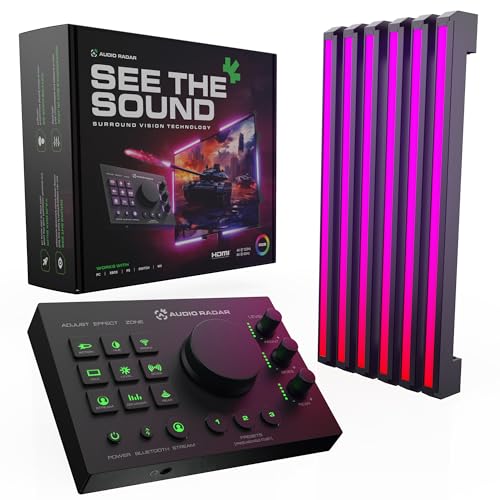
- ✓ Clear directional lighting
- ✓ Real-time response
- ✓ Per-game personalization
- ✕ Works best with 5.1/7.1
- ✕ Requires extra accessories for some setups
| Display/Lighting Coverage | Six aluminum light bars around screen for directional lighting |
| Connectivity/Interfaces | HDMI HDMI pass-through up to 4K@120 Hz; USB-C for desktop app connection; USB-C power supply; USB-C for firmware/app updates |
| Platform Compatibility | Compatible with Xbox, PlayStation, Switch and PC; requires 5.1 or 7.1 surround signal for full directional lighting |
| Expansion/Add-ons | Optional seventh center light bar; optional L-Bracket Kit for thin/OLED bezels; 3M Command Strips included for mounting |
| Software/Control | Free desktop app on Windows 10/11 for per-game presets, EQ, footstep tuning, app-by-app routing; mobile app for firmware updates |
| Warranty/Support | 1-year warranty; in-box contents include Command Center, power supply, 6 light bars, 6 link cables, 3M Command Strips |
You’ve probably fumbled through footsteps in games like your day job’s paperwork—looking, listening, guessing where the sound actually came from. With these Audio Radar light bars, I aimed at the screen and got a better sense of direction in real-time.
When a clip of footsteps pinged behind me, six bars lit up toward that exact spot, and suddenly I wasn’t guessing anymore.
The setup is straightforward: the Command Center sits between your console and display, and the bars mount around the screen with strong 3M strips. I liked how the lights respond in real time without lag, especially in fast-paced games.
You’ll notice a more immersive feel when you’re surrounded by color cues that match the on-screen action.
On Xbox, I plugged in a wired headset for chat and kept the lights blazing. If you’re using a TV over 43 inches, you’ll want the center bar and perhaps the L-Bracket Kit later on for an even more balanced look.
The integration with a 5.1 or 7.1 signal is key; stereo can mute some directional cues, but with a full surround source, the effect is noticeably richer.
The desktop app on PC is where you’ll fine-tune things for specific games. You can tweak per-game presets, footstep emphasis, and even route audio app-by-app.
It’s not a PC requirement, but a love-it-if-you-use-it option that feels modern and thoughtful. And CS2 in full surround on PC actually lights up gunfire and footsteps from their true directions, which is a rare treat for a beta feature.
As for everyday use, the Pro gamer approach makes sense for Minecraft servers and social play, where you want to catch telltale noises without grinding your ears. It’s not perfect in stereo-only games, and PS5 users may have to workaround with a headset if you want audio and visuals together.
Still, for $199, you’re getting a bold, tactile cue system that complements your gameplay without demanding constant attention from your hands.
Bottom line: if you value spatial cues and a tactile visual layer, these light bars give you a fresh way to read the battlefield with fewer blind spots. They’re sturdy, configurable, and genuinely noticeable in the right setup.
It’s a niche feature, but it hits a sweet spot for hard-of-hearing players and anyone who loves extra immersion.
What Are the Best Minecraft Servers for Xbox One?
Some of the best Minecraft servers for Xbox One provide a variety of gameplay experiences, from survival to creative modes.
- Mineplex: Mineplex is one of the largest and most popular Minecraft servers, offering a wide range of mini-games and activities. Players can engage in games like survival games, Block Hunt, and various PvP modes, making it an ideal choice for those looking for a dynamic multiplayer experience.
- Hypixel: Known for its creative mini-games and engaging community, Hypixel is a favorite among players for its unique game modes such as Bed Wars and SkyBlock. The server is frequently updated with new content, ensuring that players always have fresh challenges and experiences to enjoy.
- GamerLand: GamerLand offers a mix of survival and creative gameplay, making it perfect for players who want to build and explore in a community setting. The server features custom plugins and a welcoming community, providing a friendly environment for both new and experienced players.
- Herobrine.org: This server focuses on the survival aspect of Minecraft, where players can build, mine, and fight against mobs. It also includes a strong economy system, allowing players to trade and cooperate, fostering a sense of community and teamwork.
- Pixelmon Generations: For fans of Pokémon, Pixelmon Generations combines Minecraft with the exciting world of Pokémon. Players can catch, train, and battle Pokémon in a Minecraft environment, providing a unique twist on traditional gameplay.
- CubeCraft: CubeCraft is well-known for its diverse mini-games and active player community. The server includes games like EggWars, SkyWars, and more, offering a variety of challenges and competitive play that keeps players coming back for more.
How Do Different Minecraft Servers Operate on Xbox One?
Different Minecraft servers on Xbox One operate based on unique rules, gameplay modes, and community setups.
- Survival Servers: These servers focus on traditional gameplay where players gather resources, build structures, and survive against mobs and other players. Players must manage their health and hunger while collaborating or competing with others to thrive in the environment.
- Creative Servers: In creative mode, players have unlimited resources and can fly, allowing them to build and design without limitations. These servers are ideal for users who enjoy constructing elaborate structures or experimenting with redstone mechanics without the threat of survival elements.
- Minigame Servers: These servers host various minigames, such as parkour challenges, PvP battles, or treasure hunts, often featuring competitive elements. Players can join different games and compete for high scores or rewards, making it a dynamic and entertaining experience.
- Roleplay Servers: On roleplay servers, players create and assume characters within a narrative-driven environment, often set in custom worlds. These servers encourage creativity and storytelling, allowing players to engage in elaborate scenarios and interact with others in character.
- Hardcore Servers: Hardcore servers offer a more challenging experience where players face permadeath, meaning if they die, they cannot respawn. This high-stakes environment appeals to players seeking intense gameplay and a greater sense of accomplishment when surviving.
- Modded Servers: These servers use mods or plugins to enhance gameplay, introducing new features, items, or mechanics that are not available in the standard version. Modded servers can significantly alter the game’s experience, attracting players looking for unique gameplay styles.
What Unique Features Should Players Seek in the Best Minecraft Servers on Xbox One?
When searching for the best Minecraft servers on Xbox One, players should look for unique features that enhance gameplay and community engagement.
- Active Community: A vibrant and welcoming community is crucial for a great multiplayer experience, as it allows players to connect, collaborate, and share their creations. Look for servers with active forums or Discord channels where players can communicate and organize events.
- Custom Game Modes: The best servers often offer unique game modes beyond the standard survival or creative play. These can include mini-games, role-playing environments, or adventure maps that provide new challenges and experiences for players.
- Regular Updates: Servers that receive frequent updates tend to have better gameplay balance and new content, keeping the experience fresh and engaging. Following a server with a dedicated team ensures that bugs are fixed quickly and new features are added consistently.
- Player-Friendly Rules: A good server should have clear, fair rules that promote a positive gaming environment. Look for servers that prioritize anti-griefing measures and have friendly moderators who enforce rules consistently without being overly restrictive.
- Unique Plugins and Mods: Many of the best Minecraft servers utilize plugins or mods that enhance gameplay, such as economy systems, custom crafting recipes, or teleportation features. These additions can significantly diversify the gameplay and make the server stand out.
- Events and Competitions: Engaging events or competitions can make a server more exciting and foster community spirit. Servers that host regular contests, building competitions, or seasonal events keep players invested and encourage them to return.
- Cross-Platform Compatibility: If you play with friends who use different devices, finding a server that supports cross-platform play is essential. This feature allows players on Xbox One to join others on PC or mobile, broadening the community and network of friends.
How Do Community and Player Base Impact Server Quality?
The effectiveness of server administration plays a crucial role in maintaining a healthy environment. Administrators who are proactive in resolving conflicts, enforcing rules, and providing support can significantly improve player satisfaction and retention.
When players contribute their own creations, such as custom maps, mods, or unique game modes, it enriches the server’s offerings and keeps the experience fresh. This creativity can help attract new players and keep the existing community engaged.
The server population affects its performance; a higher number of players can lead to increased lag and resource strain, which can detract from the gaming experience. Conversely, a well-balanced player base can ensure a lively yet stable environment, making it more appealing to join.
What Are the Most Popular Game Modes on Minecraft Servers for Xbox One?
The most popular game modes on Minecraft servers for Xbox One include:
- Survival Mode: In Survival Mode, players must gather resources, manage health, and stave off hunger while exploring and building in the game world. This mode allows for creativity and strategy as players must defend against mobs and other players, making it a favorite for those who enjoy a challenge.
- Creative Mode: Creative Mode gives players unlimited resources to build and create without the constraints of health and hunger. This mode is perfect for those who want to focus solely on building impressive structures or experimenting with game mechanics without the threat of enemies.
- Adventure Mode: Adventure Mode is designed for players to experience custom maps and challenges created by others, allowing for a more narrative-driven experience. Players are restricted in certain actions, promoting exploration and interaction with the environment in a way that aligns with the creator’s vision.
- Minigames: Many Minecraft servers host a variety of minigames, such as SkyWars, Bed Wars, and Capture the Flag, which offer quick, competitive gameplay. These minigames often involve unique rules and objectives, making them an engaging way for players to enjoy fast-paced action and teamwork.
- Faction Servers: Faction servers allow players to form alliances or factions, engage in battles with other factions, and claim territory. This mode emphasizes strategy, cooperation, and sometimes betrayal, as players work together to expand their influence in the server.
- Roleplay Servers: Roleplay servers create immersive environments where players can assume different characters and engage in storytelling. These servers often have detailed lore and rules that guide interactions, providing a unique, community-driven experience.
How Can Players Join and Access the Best Minecraft Servers on Xbox One?
Players can join and access the best Minecraft servers on Xbox One through several effective methods.
- Using the Server List Feature: Xbox One allows players to access a dedicated server list from within the game, where they can find popular and featured servers.
- Joining Realms: Minecraft Realms are a subscription-based service that enables players to create or join private servers, offering a more controlled environment.
- Invitations from Friends: Players can receive invitations to join servers from friends who are already playing on a specific server, making it easy to connect with others.
- Third-Party Server Lists: There are various websites and communities that curate lists of the best Minecraft servers, which players can access to find servers compatible with Xbox One.
- Direct IP Connection: If players have the IP address of a specific server, they can attempt to connect directly, although this can be more challenging on consoles compared to PC.
Using the Server List Feature: Within the Minecraft game on Xbox One, players can navigate to the “Play” menu and find a section dedicated to servers. This list showcases various popular and featured servers that are available for Xbox players, allowing them to easily select one to join without needing any additional information.
Joining Realms: Minecraft Realms provide a subscription service that allows players to set up their own private servers, which can be shared with friends or kept exclusive. This option is ideal for those looking for a more stable and secure gameplay environment, as Realms are hosted by Mojang and can be tailored to the players’ preferences.
Invitations from Friends: Social connections play a significant role in accessing Minecraft servers. Players can invite friends to join their games or receive invitations to servers that their friends are currently playing on, fostering a collaborative and engaging multiplayer experience.
Third-Party Server Lists: Websites dedicated to Minecraft often compile lists of servers based on various criteria, including gameplay style, community size, and server features. These resources are invaluable for players looking for the best Minecraft servers, as they provide detailed descriptions and user ratings, helping players make informed choices.
Direct IP Connection: For more experienced users, connecting directly to a server using its IP address can be an option, although it requires knowing the server details in advance. This method may be less straightforward on Xbox One due to interface limitations, but it allows players to join specific servers that may not be listed in the official server browser.
What Steps Are Involved in Finding a Good Server?
Finding the best Minecraft server for Xbox One involves several key steps:
- Research Server Options: Begin by researching various servers available for the Xbox One platform. Look for communities that cater specifically to console players, as these often provide tailored experiences that enhance gameplay.
- Check Server Reviews: Read reviews and testimonials from other players to gauge their experiences with different servers. This can provide insight into the server’s reliability, community friendliness, and overall gameplay quality.
- Evaluate Server Features: Look for servers that offer features that interest you, such as mini-games, survival modes, or creative building options. Features can significantly affect your gaming experience, so prioritize servers that align with your preferred playstyle.
- Join a Community: Engage with server communities through forums or social media platforms. Being part of a community can enhance your experience, as you can receive recommendations and tips from experienced players.
- Test the Server: After narrowing down your options, test out a few servers. Join them briefly to assess their performance, including connection stability and server responsiveness, which are crucial for an enjoyable gaming experience.
- Check for Active Moderation: Ensure that the server has active moderation in place to maintain a friendly and fair environment. A well-moderated server helps prevent issues like griefing or toxic behavior, making it more enjoyable for everyone.
What Are the Benefits of Playing on Minecraft Servers for Xbox One?
The benefits of playing on Minecraft servers for Xbox One include enhanced gameplay experiences, community interaction, and access to unique content.
- Enhanced Gameplay Experiences: Joining a Minecraft server allows players to experience gameplay that goes beyond the standard single-player mode. Servers often incorporate custom game modes, mini-games, and unique challenges that can keep the game fresh and exciting, appealing to both casual and hardcore gamers.
- Community Interaction: Playing on servers fosters a sense of community as players can meet and collaborate with others from around the world. This social aspect includes forming friendships, participating in team projects, and engaging in competitions, which can significantly enhance the overall enjoyment of the game.
- Access to Unique Content: Many servers offer exclusive content such as custom maps, skins, and mods that are not available in the base game. This access allows players to explore new worlds, participate in themed events, and enjoy a variety of gameplay styles that keep the experience diverse and engaging.
- Regular Updates and Events: Minecraft servers often have dedicated teams that regularly update content and host special events or competitions. This ongoing support means that players can always look forward to new experiences, seasonal events, and community-driven activities that add to the longevity of their gaming experience.
- Skill Development: Engaging in multiplayer servers can help players improve their skills in various aspects of the game, from building techniques to strategic gameplay. Collaborating with others can also provide valuable lessons and inspiration, allowing players to learn from experienced gamers and enhance their own creativity.
How Can Players Ensure a Safe and Enjoyable Experience on Minecraft Servers for Xbox One?
Players can ensure a safe and enjoyable experience on Minecraft servers for Xbox One by following several key practices.
- Choose Reputable Servers: Selecting servers that are known for their positive community and good management is crucial. Look for servers with strong moderation teams and clear rules to help maintain a friendly environment.
- Understand Server Rules: Before joining a server, players should familiarize themselves with its specific rules and guidelines. Each server may have different policies regarding behavior, gameplay mechanics, and interactions with other players.
- Use Private Servers: Opting for private or whitelisted servers can reduce the risk of encountering toxic players or inappropriate content. This option allows for a more controlled environment where friends can play together safely.
- Report Issues Promptly: If players encounter harassment, cheating, or any other disruptive behavior, they should report it to the server moderators immediately. Prompt reporting helps maintain a safe space for everyone and can lead to necessary actions against offenders.
- Communicate Wisely: Players should be cautious about sharing personal information while communicating with others in-game. Using in-game chat features responsibly and avoiding disclosing sensitive details can enhance safety.
- Engage with Community: Getting involved with the server community through forums or social media can enhance the gaming experience. This engagement allows players to connect with others, share experiences, and stay updated on server events and changes.
- Practice Good Gaming Etiquette: Being respectful and considerate towards other players goes a long way. Practicing good sportsmanship, such as not griefing or stealing from others, ensures a positive atmosphere for everyone.
- Stay Informed About Updates: Keeping track of server updates and changes can help players adapt to new features and rules. Regularly checking the server’s website or social media pages ensures players are aware of any important announcements.