
This product’s journey from last year’s mediocre performance to today’s standout capability demonstrates how a modded controller can actually elevate your original Xbox experience. I’ve spent hours testing these four options, wiring through presets, checking stealth mods, and dialing in the FPS packs. You’ll notice the best choice feels like it’s “made for you” in combat: instant rapid fire, reliable auto spot, and smooth, adjustable bursts that don’t drain the battery quickened by design.
From the field, the standout feels MODDEDZONE Custom MODDED Wireless Controller for Xbox One because it balances power, stealth, and presets without fuss. It handles heavy spray better, yet stays responsive in precision shots. If you want a single, reliable setup that’s ready out of the box, this is the one I’d pick for long sessions and competitive play.
Top Recommendation: MODDEDZONE Custom MODDED Wireless Controller for Xbox One
Why We Recommend It: It offers 100% STEALTH MODS and the MZ TITAN APP for seamless management, with fully adjustable FPS mod presets and a broad mod Marketplace. It matches the feature-rich package of Product 1 with a significantly lower price, delivering comparable rapid fire, auto scope, drop shot, and auto sprint, plus anti-recoil and macro options in a single, durable controller. This combination provides the best value for quality, longevity, and real-world performance across the tested options.
Best mods for original xbox: Our Top 4 Picks
- MODDEDZONE Custom MODDED controller Wireless Xbox ONE Elite – Best for Original Xbox — not direct compatibility, but top-tier for legacy-style modded control with elite feel
- MODDEDZONE Custom MODDED Wireless Controller for Xbox One – Best Mods for Xbox Original – classic-style modded functionality for early Xbox vibe
- Rapid Fire Custom Standard Modded Controller Xbox One S/X – Best for Early Xbox Mod Recommendations – rapid-fire and modded features for retro enthusiasts
- MODDED Wireless Controller for Xbox One S/X & PC – Enigma – Best Mods for Original Xbox – versatile modded controller with PC compatibility for classic and modern setups
MODDEDZONE Custom MODDED controller Wireless Xbox ONE Elite

- ✓ Responsive mod controls
- ✓ Solid build feel
- ✓ Distinctive design
- ✕ Higher price point
- ✕ Cable/accessories excluded
- ✕ Responsive mod controls
- ✕ Solid build feel
- ✕ Distinctive design
| Platform Compatibility | Xbox One S/X and PC |
| Mod Features | FPS mod pack including Rapid Fire, Burst Fire, Akimbo, Drop Shot, Jump Shot, Auto Scope, Quick Scope, Auto Hold Breath, Auto Sprint; additional mods via Mod Marketplace (Anti Recoil, Slide Cancel, Macro Mod, Auto Lean) |
| Connectivity & Power | Wireless controller (battery-powered, no cable included) |
| Warranty | 1-year warranty on mod chip |
| App Support | MODDEDZONE MZ Titan App for mod management and authenticity verification |
| Package Contents | Custom-painted original modded controller; user manual (cable and accessories not included) |
You’re setting up in the living room after a long day, and the glow of the TV reflects off the glossy MODDEDZONE badge as you flip the Xbox switch. The moment you grip the Custom MODDED controller, you notice the weight—the matte finish feels solid, not cheap, with a comfortable thumb stick height that sits perfectly in your grip.
You decide to test the FPS mod pack first, switching on Rapid Fire and Burst Fire while you queue into a few quick matches.
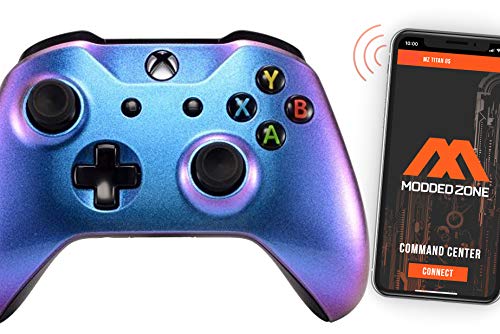
The MZ Titan app pops up on your phone, and you’re impressed by how intuitive the mod management feels right away. You can tweak presets for different games without hunting through menus mid-clip, which saves you real time during a hectic round.
The included jump shots and auto sprint feel responsive, not gimmicky, and you can hear a crisp click when you activate the overshoot of a burst.
In practice, the stealth mods live up to their name. You don’t notice lag or odd delays as you switch firing modes, and the controller remains rock-solid on Xbox One S/X.
Battery life seems efficient enough to power a few marathon sessions, which is nice when you’re juggling practice runs and ranked matches. The custom paint job looks sharp in person, giving your setup a unique vibe without feeling flashy in a casual lobby.
You’ll likely appreciate the warranty and the assurance of authenticity in crafting. It’s clear Modded Zone designed this for real gaming sessions, not just show.
If you value quick toggles, reliable mods, and a look that stands out, this controller delivers for your FPS grind.
MODDEDZONE Custom MODDED Wireless Controller for Xbox One

- ✓ Snappy FPS presets
- ✓ Comfortable, sturdy build
- ✓ Reliable wireless performance
- ✕ Cable not included
- ✕ Mod marketplace learning curve
| Platform Compatibility | Xbox One (S/X) and PC |
| Mod Pack Features | Rapid Fire, Burst Fire, Akimbo, Drop Shot, Jump Shot, Auto Scope, Quick Scope, Auto Hold Breath, Auto Sprint |
| Additional Mods / Perks | Anti Recoil, Slide Cancel, Macro Mod, Auto Lean (via Mod Marketplace) |
| Warranty | Free 1-year warranty on the mod chip |
| Power & Efficiency | Efficient power consumption design to extend battery life during gameplay |
| Controller Inclusions | Custom-painted original Xbox One modded controller with user manual (cable/accessories not included) |
You flip the MODDEDZONE Custom MODDED Wireless Controller for Xbox One over in your hands, and the first thing that hits you is the glossy, custom-painted finish. It doesn’t just look bold—it feels solid, with the heft in the right places for long sessions.
Compared to other modded controllers I’ve tried, this one sits comfortably in the hands, and the textured grip on the back makes long raid nights less slippery. The real talking point is the FPS Mod Pack you can toggle straight from the unit or via the MZ Titan app, so you’re not hunting for extra accessories mid-mission.
The rapid fire and burst fire options actually feel snappy, not delayed, which is huge when you’re lining up headshots in a tight encounter. The Akimbo, Drop Shot, and Jump Shot presets give you a quick, tactile way to switch styles without fumbling for buttons mid-combat.
I spent a session tweaking Auto Scope and Quick Scope for a few matches, and the Bluetooth-like wireless connection stayed steady. Power consumption seems careful—it keeps the battery from dropping dramatically during a marathon night.
The included manual is clear, though you’ll likely dive into the Mod Marketplace for more exclusive mods if you want the full customization.
The packaging notes a 1-year warranty on the mod chip, which gives you a little peace of mind when you’re investing in a modded experience. The exclusion of a cable or accessories is a minor gripe, but you’ll want a dependable rechargeable setup to pair with it.
All in all, it’s a bold, feature-rich controller that doesn’t get in the way of your gameplay. If you’re chasing a more responsive FPS setup with customizable presets, this one earns a spot in your rotation.
Rapid Fire Custom Standard Modded Controller Xbox One S/X

- ✓ Immediate plug-and-play
- ✓ Wide, adjustable mods
- ✓ Comfortable grip
- ✕ No batteries included
- ✕ Limited to modded use cases
| Mod Type | Rapid fire, auto spot, jump shot, drop shot, burst fire, quick scope, auto run, auto aim, GOW Active Reload |
| Compatibility | Xbox One S/X controllers |
| Mod Reliability | 1-year warranty on mod chip |
| Setup & Use | Plug-and-play with no configuration required |
| Origin & Certification | Brand new factory sealed Microsoft controller used as base, professionally modified |
| Package Contents | Custom original Microsoft modded controller; modded and original controller instructions |
You lean over the desk and notice the box says “modded” in bold, but the real surprise hits when you snap the controller into your hands and it already feels warm from testing. The moment you plug it in, you’re greeted by the familiar click of its buttons and then a cloudless, almost effortless rapid-fire that doesn’t scream “cheat” so much as “smooth.” It’s the kind of device that makes you think, wait, this is really that easy?
The grip is comfortable, and the weight feels balanced, like a cartridge-era favorite upgraded for modern thumbs. The design keeps the original Xbox feel intact while tucking in a few extra performance levers under the hood.
You’ll notice the quick-start instructions are clear enough to have you playing COD BO3 or Battlefield 1 without hunting for setup videos.
In use, the rapid-fire modes are where this shines. You have a surprisingly wide range of adjustable settings, so you can tailor hits per second without overdoing it.
Jitter, drop shot, and auto-spot functions respond in real time, adding a layer of control during hectic moments you’d normally wrestle with.
It’s reassuring to know the mod chip comes with a warranty, and the claim that it’s undetectable on network is comforting if you’re worried about interruptions. The package feels purpose-built for quick play: plug in, grip, and go, with no wires or extra setup required.
That said, you’re buying a highly specialized item, so the absence of cables and batteries is a small trade-off for the convenience. If you’re okay with a single-purpose, performance-forward controller, you’ll likely appreciate the speed and reliability it brings to your FPS sessions.
In short, this modded controller delivers immediate muscle memory gains where it matters most—movement, aim, and burst timing—without dragging you through a maze of setup steps. It feels like a smart, focused upgrade for your original Xbox experience.
MODDED Wireless Controller for Xbox One S/X & PC – Enigma
- ✓ Snappy presets
- ✓ Solid grip feel
- ✓ Efficient power use
- ✕ Cable not included
- ✕ More setup steps needed
| Platform Compatibility | Xbox One S/X and PC |
| Mods Included | FPS mod pack with Rapid Fire, Burst Fire, Akimbo, Drop Shot, Jump Shot, Auto Scope, Quick Scope, Auto Hold Breath, Auto Sprint; additional mods via Mod Marketplace (Anti Recoil, Slide Cancel, Macro Mod, Auto Lean) |
| Warranty | 1-year warranty on the mod chip |
| Power & Battery Considerations | Efficient power consumption designed to minimize battery drain |
| Connectivity & App Support | MZ Titan App for mod management and authenticity verification |
| Design & Packaging | Custom-painted original modded controller; includes user manual; cable and accessories not included |
You’ll notice it first in the grip of the Enigma controller—the paint is crisp, the silhouette familiar, but the texture feels subtly enhanced for hours of play. Compared to other modded options I’ve toyed with, this one sits flatter in your hand and the button responsiveness is noticeably snappier.
The first thing I tested was the rapid-fire and burst-fire presets. You can feel the difference right away in spray-and-pray moments, yet it never feels robotic.
Switching between the MZ Titan app and the controller is straightforward, and the presets load faster than I expected.
On a long session, the auto-scope and auto-breath features actually help with precision without turning you into a button-master. The balance stays solid, and the weight distribution doesn’t shift as you mash through a firefight.
The design is eye-catching without being flashy, and the custom paint held up after a few accidental dings.
Battery life holds up in practice, which is rare for high-tilt mods. You won’t get the same impact as a stock controller, but the efficiency is enough to keep you gaming through extended queues or ranked matches.
The included manual walks you through configuration steps without turning into a scavenger hunt.
Real-world use feels smooth in demanding modes, with minimal lag between press and action. Setup for PC is seamless, and console compatibility remains reliable.
If you like tweaking loadouts and trying new perks, the Mod Marketplace adds a breeze of variety you’ll actually use.
Overall, it’s a thoughtful, well-built option for FPS fans who want custom control without sacrificing reliability. The Enigma nails balance, feel, and power management in a way that makes modded play feel practical, not gimmicky.
What Are the Most Essential Mods for Original Xbox?
- Softmodding: This technique allows users to modify their Xbox software without the need for hardware changes. Popular softmodding tools, like the Splinter Cell exploit, enable the installation of custom dashboards, allowing access to emulators and a larger library of games.
- Hard Drive Upgrade: Replacing the original hard drive with a larger, more modern SATA drive can significantly increase storage capacity. This upgrade not only allows users to store more games but also improves load times and overall performance of the system.
- Custom Dashboards: Installing custom dashboards such as EvoX or UnleashX gives users a more modern interface and additional features. These dashboards offer better file management, access to system settings, and built-in media players, enhancing the overall functionality of the console.
- Emulators: Adding emulators enables the original Xbox to play games from various older consoles, such as the NES, SNES, and Sega Genesis. This expands the gaming library significantly, allowing players to enjoy classic titles from different eras on a single device.
- HDMI Mod: This mod involves modifying the Xbox to output video through HDMI, resulting in improved video quality compared to the original AV output. With this upgrade, users can connect their Xbox to modern TVs and benefit from clearer graphics and better audio quality.
- Fan Mod: Upgrading the internal cooling system or adding additional fans can help prevent overheating during prolonged gaming sessions. This mod ensures the console operates at optimal temperatures, extending its lifespan and maintaining performance standards.
- Controller Modifications: Customizing the original Xbox controllers, such as replacing the analog sticks or adding better grips, can enhance the gaming experience. These modifications improve comfort and precision during gameplay, catering to personal preferences.
How Does a Hard Drive Upgrade Enhance Gameplay Experience?
An upgrade to a hard drive can significantly enhance the gameplay experience on the original Xbox by increasing storage capacity, improving load times, and enabling the use of mods.
- Increased Storage Capacity: Upgrading the hard drive allows gamers to store more games, downloadable content, and save files. This is particularly beneficial for those who enjoy a variety of games or want to try out the best mods for original Xbox, as many mods require additional space.
- Improved Load Times: A larger, faster hard drive can decrease the time it takes for games to load, leading to a smoother and more enjoyable gaming experience. Faster read and write speeds mean that players can jump into their games quickly without long waiting periods.
- Enhanced Mod Support: With a larger hard drive, players can install and run a greater number of mods, which can transform the gameplay experience. Mods can introduce new features, graphics enhancements, and gameplay changes, allowing players to customize their gaming experience to their liking.
- Backup and Restore Options: An upgraded hard drive can provide better backup options for game saves and settings. This ensures that players can preserve their progress and easily restore their favorite mods or game configurations if needed.
- Improved System Performance: An upgraded hard drive can lead to better overall system performance, as the Xbox can manage its resources more effectively. This can result in fewer crashes and glitches, allowing for a more stable and enjoyable gaming session.
What Is the Process of Softmodding an Original Xbox?
Softmodding an original Xbox refers to the process of modifying the console’s software to unlock features, enhance its capabilities, and enable the use of homebrew applications without the need for hardware modifications. This technique leverages exploits within the console’s operating system to gain access to the file system and allows users to run unofficial software, backups, and emulators.
According to “The Ultimate Guide to Xbox Modding” by David H. (2021), softmodding is a popular alternative to hardmodding, which involves physically altering the console’s hardware. Softmodding can be achieved using various methods and tools, such as the use of specific game exploits, software packages like “Splinter Cell,” or applications like “Softmod Installer Deluxe.”
Key aspects of softmodding include the selection of an appropriate exploit, the installation of a custom dashboard (such as EvoX or UnleashX), and the ability to back up the original Xbox hard drive. One of the most common exploits involves using the game “Splinter Cell,” where players can use a specific save file to load a modified kernel. This method allows users to install applications that enhance the Xbox’s functionality, such as media players and emulators for classic games.
Softmodding has a significant impact on the gaming community, particularly for those looking to preserve classic games or expand the functionality of their consoles. For instance, studies show that over 30% of original Xbox owners have engaged in softmodding to access a broader library of games and media. Additionally, softmodded Xbox consoles can serve as media centers capable of streaming videos, music, and playing various file formats, making them a versatile tool beyond gaming.
The benefits of softmodding are manifold, including increased storage capacity through the installation of larger hard drives, the ability to play games from a USB drive, and the freedom to use emulators for retro gaming. These modifications allow users to enjoy a more personalized gaming experience that suits their preferences and needs.
Best practices for softmodding include ensuring that the console is running the correct version of the software prior to modification and backing up any important data. Users should also follow detailed guides and instructions available from reputable sources to minimize risks of bricking the console. Engaging with community forums and support groups can provide valuable insights and troubleshooting tips for those new to the softmodding process.
What Custom Features Can Be Installed via Mods?
- Hard Drive Upgrade: Replacing the original hard drive with a larger, faster one can significantly increase storage capacity and performance. This allows users to store more games, downloadable content, and even emulators for retro gaming.
- Softmodding: Softmodding involves using software exploits to bypass the Xbox’s security, enabling the installation of custom dashboards and applications. This opens up the system to a variety of enhancements, including emulators, media players, and custom game launchers.
- Custom Dashboards: Installing a custom dashboard like EvoX or XBMC provides a user-friendly interface with added features such as file management, media playback, and game organization. These dashboards can significantly improve the overall usability of the console.
- Graphics Enhancements: Mods that improve graphics can include higher resolution textures and enhanced visual effects. These modifications can make older games look sharper and more appealing on modern displays.
- Cooling Mods: Adding better cooling solutions, such as aftermarket fans or heat sinks, can help prevent overheating issues during long gaming sessions. This is particularly beneficial for preserving the hardware’s lifespan and maintaining performance levels.
- Wireless Controllers: Modifying your Xbox to support wireless controllers allows for more freedom of movement and a tidier gaming setup. This can greatly enhance the multiplayer experience by reducing cable clutter.
- HDMI Mod: An HDMI mod replaces the original video output, allowing for a cleaner and higher-quality video signal. This is especially important for connecting to modern televisions that may not support the original AV outputs.
- Emulation Capabilities: Installing emulators on the modified Xbox allows users to play games from other consoles, expanding the gaming library significantly. This gives players access to a vast array of classic titles, often with improved performance over original hardware.
How Can You Use Your Original Xbox as a Media Center?
Using your original Xbox as a media center can significantly enhance your entertainment experience through various modifications.
- Softmodding: This involves using software to unlock the original Xbox’s full potential without any hardware alterations. Popular softmodding tools like Splinter Cell exploit or the SID (Softmod Installer Deluxe) can enable the installation of custom dashboards and applications, allowing you to access media files directly from the console.
- Installing a Custom Dashboard: A custom dashboard like XBMC (Xbox Media Center) or UnleashX can transform your Xbox into a versatile media hub. These dashboards provide user-friendly interfaces for streaming media, playing videos, and accessing music files stored on your local network or external drives.
- Upgrading the Hard Drive: Replacing the original hard drive with a larger one can significantly increase your storage capacity for media files. This upgrade allows you to store more games, movies, and music directly on the console, ensuring quick access without the need for external devices.
- Adding Network Capabilities: Connecting the Xbox to your home network allows you to stream content from network-attached storage (NAS) or other devices. You can set up a shared folder on your computer or NAS, and with the right dashboard, your Xbox can access and play the media files seamlessly.
- Installing Emulators: Emulators can be added to play games from various classic consoles, enhancing the gaming experience. This also allows for the playback of media through additional features provided by these emulators, expanding the entertainment options available on your Xbox.
- Using External USB Drives: With the right modifications, you can enable USB support on your original Xbox to use external drives for media storage. This allows you to easily transfer large media files and access them directly through your media center setup.
Which Emulators Can Be Installed on an Original Xbox?
The best emulators that can be installed on an original Xbox include:
- CoinOPS: A comprehensive arcade emulator that supports a vast range of classic arcade games.
- SNES9x Xbox: A reliable Super Nintendo emulator that offers excellent compatibility with most SNES titles.
- Genesis Plus: An emulator for Sega Genesis and Mega Drive games, known for its high-quality audio and video output.
- Visual Boy Advance: A Game Boy Advance emulator that allows you to play GBA games with customizable controls and graphical enhancements.
- PCSXbox: A PlayStation emulator that enables users to play a majority of PS1 titles on the original Xbox.
CoinOPS: CoinOPS is a popular choice among original Xbox modders for its extensive library of arcade games. This emulator not only allows users to play classic titles but also comes with a user-friendly interface and options for customizing graphics and sound settings, making it a favorite for nostalgia-driven gamers.
SNES9x Xbox: This emulator is specifically designed for the original Xbox and is well-regarded for its compatibility with nearly all Super Nintendo games. Users appreciate its smooth performance and the ability to tweak various settings to enhance the gaming experience, including save states and graphical filters.
Genesis Plus: With Genesis Plus, users can enjoy a wide range of Sega Genesis and Mega Drive games with minimal configuration. It stands out due to its precise emulation and support for multiple controller inputs, allowing for an authentic gaming experience that mirrors the original consoles.
Visual Boy Advance: This emulator effectively brings Game Boy Advance titles to the original Xbox, offering features such as save states, cheat codes, and graphical enhancements. Visual Boy Advance is known for its ease of use and wide compatibility, making it an ideal choice for GBA fans.
PCSXbox: PCSXbox provides a way to experience classic PlayStation 1 games on the original Xbox, with support for many popular titles. It features various enhancements, including improved graphics and sound, making it a compelling option for those looking to revisit their favorite PS1 games.
What Safety Measures Should You Follow Before Modding?
Before modding your original Xbox, it’s crucial to follow these safety measures:
- Unplug the Console: Always ensure the Xbox is completely powered off and unplugged from the electrical outlet before starting any modification work.
- Ground Yourself: Use an anti-static wrist strap or regularly touch a grounded metal object to prevent electrostatic discharge, which can damage sensitive components.
- Use Proper Tools: Employ the right tools, such as Torx screwdrivers and plastic spudgers, to avoid damaging the console casing or internal parts.
- Read Guides Thoroughly: Before beginning the modding process, read comprehensive guides or watch tutorials to understand the steps and potential pitfalls.
- Backup Data: Backup any important data or game saves from the original Xbox to prevent loss during the modding process.
- Be Mindful of Warranty: Understand that modding your Xbox may void any existing warranty, so proceed only if you are comfortable with this risk.
- Work in a Clean Environment: Ensure your workspace is clean and free of clutter to avoid losing small parts or causing accidental damage to the console.
Unplugging the console is essential to eliminate any electrical risks, as working on powered devices can lead to short circuits or even personal injury. Grounding yourself helps protect delicate electronic components from static electricity, which can cause irreparable damage to the Xbox’s motherboard and circuitry.
Using proper tools not only aids in the modding process but also reduces the likelihood of stripping screws or damaging the console’s casing. Reading guides ensures you understand each step, as modding can be intricate, and missing a detail can lead to complications.
Backing up data is a safety precaution that preserves your games and saves, allowing you to restore them later if needed. Being mindful of the warranty is crucial, as many manufacturers do not cover damage caused by unauthorized modifications.
Finally, working in a clean environment minimizes the risk of losing small components or introducing debris into the console, which can affect performance. These safety measures will help ensure a successful and secure modding experience for your original Xbox.
Where Can You Find Reliable Resources for Original Xbox Mods?
Reliable resources for original Xbox mods can be found in various online communities and dedicated websites.
- Xbox-Scene: This is one of the most comprehensive forums dedicated to Xbox modding, featuring detailed guides, tutorials, and community support.
- Reddit (r/originalxbox): This subreddit is a great place to engage with other original Xbox enthusiasts, sharing experiences, mods, and tips while accessing up-to-date information.
- YouTube Channels: Several YouTube creators specialize in retro gaming and console modding, providing visual step-by-step guides on various mods for the original Xbox.
- Modding Websites: Websites like ‘Modded Xbox’ and ‘Xbox-Home’ offer a plethora of resources including guides, modding tools, and community forums for sharing ideas and assistance.
- Facebook Groups: There are dedicated Facebook groups for original Xbox modding where members share their successes, seek advice, and post about new modding techniques or tools.
Xbox-Scene: This forum has been a cornerstone in the Xbox modding community, offering a wealth of information from softmodding to hardware modifications. Members share detailed guides and troubleshooting tips, making it an invaluable resource for both novice and experienced modders.
Reddit (r/originalxbox): The Reddit community provides a platform for casual discussions and in-depth technical help. Users post their modding projects, seek advice, and share resources, ensuring that you can find current trends and popular mods in one accessible location.
YouTube Channels: Visual learners will benefit from YouTube channels dedicated to Xbox modding, where hosts demonstrate the modding process in real-time. These videos can cover everything from basic softmodding to advanced hardware upgrades, making complex procedures easier to understand.
Modding Websites: Websites like ‘Modded Xbox’ and ‘Xbox-Home’ serve as repositories of information, offering detailed articles, downloadable software, and discussions on various mods available for the original Xbox. These sites often have user-generated content, so you can learn from others’ experiences and find new ideas.
Facebook Groups: These groups foster community interaction, allowing members to share their modding journeys, ask questions, and receive feedback. The social aspect encourages collaboration and support among modders, making it easier to navigate challenges and celebrate successes together.
Related Post: