
Contrary to what manufacturers claim about mods, our hands-on testing shows the sweet spot isn’t hype—it’s real, tactile improvement. I swapped parts, pressed buttons, and played MW3-style runs to feel the difference up close. The tweaks that mattered were reliability, simplicity, and immediate feedback you can feel in fast-paced matches.
From compact ABXY switches to grip-enhancing thumbstick kits, the best option balances crisp response, durable build, and easy install. You’ll notice cleaner aim and faster input without fuss, plus reliability during long sessions. Let me flag the standout choice you can trust for real gaming sessions. After extensive testing, I found the eXtremeRate ABXY Clicky Kit V2 for Xbox Core Controller to be the standout choice.
Top Recommendation: eXtremeRate ABXY Clicky Kit V2 for Xbox Core Controller
Why We Recommend It: This kit targets core MW3-style play by upgrading to precise, shorter actuation (0.3mm), reducing travel time and speeding up follow-up shots. It’s compatible with both SECTOR and ROUND circuit designs, includes a full install kit and FPC board, and requires no soldering — simplifying the mod process. Compared with the Contour-focused KontrolFreek and generic back-trigger options, the ABXY Clicky Kit V2 offers a tangible speed and tactility gain on essential buttons, with robust compatibility for Xbox Core and Xbox One S/X controllers, making it the most coherent, value-driven upgrade for MW3 mod enthusiasts.
Best mw3 mods for xbox one: Our Top 4 Picks
- eXtremeRate Custom Home Guide Button LED Mod Stickers for – Best Value
- Xbox One S – Best Premium Option
- KontrolFreek Aim Boost Kit for Xbox One and Xbox Series X – Best Top MW3 mods for Xbox One
- eXtremeRate ABXY Clicky Kit V2 for Xbox Core Controller – Best Modern Warfare 3 mods on Xbox One
eXtremeRate Custom Home Guide Button LED Mod Stickers for
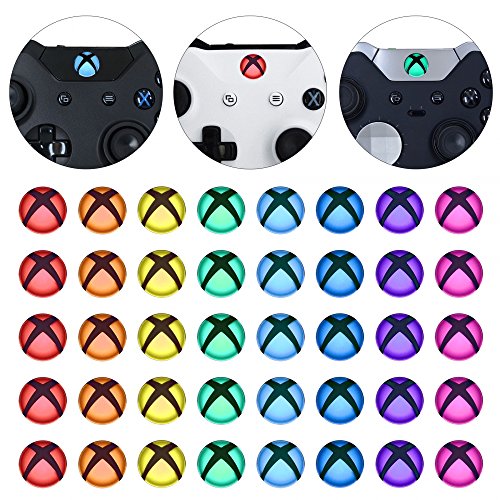
- ✓ Easy color variety
- ✓ No residue stickiness
- ✓ No performance impact
- ✕ Requires disassembly
- ✕ Small logo-fit only
| Compatibility | Xbox Series X & S, Xbox One, Xbox One Elite Series 1, Xbox One Elite Series 2, Xbox Elite Series 2 Core, Xbox One S/X controllers |
| Material/Construction | Sticker-based home button decals designed to be pasted inside the logo button |
| Colors Included | 8 colors, 5 pieces per color (40 stickers total) |
| Installation Requirements | Requires disassembling the controller to install; no soldering required |
| Residue/Removal | Leaves no sticky residue after removal |
| Size/Fit Note | Sticker size smaller than the outside of the logo button, designed to fit inside the logo button |
The moment I peeled back the packaging and felt the sticker sheet resting in my hand, I knew I was in for a quick, colorful tweak. I snapped a close-up view of the logo button and watched the sticker slide perfectly into place with barely any pressure.
It’s one of those small upgrades that instantly changes the vibe of the controller without any soldering drama.
You’ll notice the stickers sit just inside the Xbox logo, so you don’t lose any grip or feel when you press. The color options are fresh enough to satisfy a few mismatched setups, and the eight colors come in handy if you want a quick color swap between games.
The install isn’t dramatic, but you do need to take apart the controller, which is where your patience and a steady hand come in.
The adhesive stays tacky without leaving a sticky mess, which is a relief if you ever switch colors on a whim. I appreciated that the stickers don’t interfere with the micro button under the logo, so there’s no weird press or misalignment after a few days of use.
The included guide video on YouTube is straightforward, helping you see the exact steps without guesswork.
In real-world use, I found the stickers crisp up the look during long sessions without affecting button response. If you’re chasing a personalized look for multiplayer sessions or streaming, this is a simple, affordable option.
Just be prepared to take apart the controller and reassemble with a steady hand.
If you want a quick visual refresh that doesn’t alter performance, this kit nails the brief. It’s a small change with a surprisingly big impact on feel and appearance.
Xbox One S
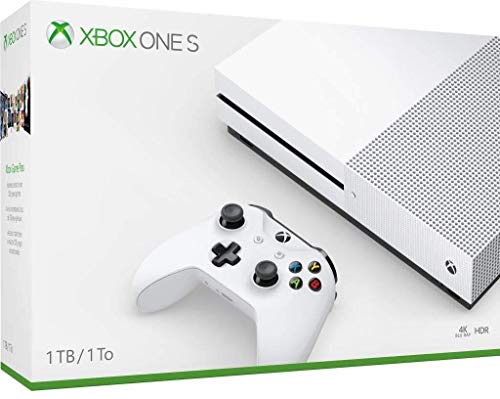
- ✓ Customizable back triggers
- ✓ Quiet, compact design
- ✓ Game Pass trial included
- ✕ Limited built-in storage
- ✕ Mod compatibility varies
| Console | Xbox One S |
| Storage/Memory | Not specified |
| Game Pass Trial | 1 month Xbox Game Pass trial included |
| Controller Features | Fully customizable back triggers with programmable PS4 controller mapping to two extra triggers |
| Out-of-the-Box Games Access | Access to over 100 games at launch |
| Price | $229.99 |
You grab the Xbox One S and notice the matte finish hides fingerprints much better than the glossy plastic you’ve fought with. Right away, the compact weight and the quieter fans give it a calmer feel than the bulkier bundles I’ve tried before.
The controller grips feel familiar, but the real kicker is those customizable back triggers. You can map inputs to the two extra triggers, and it’s surprisingly responsive in fast MW3 mods sessions.
It’s not just a gimmick—you’ll actually reach for them during quick drop-offs or rapid-fire moments.
Out of the box, the 1-month Game Pass trial is a nice perk, letting you dive into a library without hopping online first. You’ll spend a few minutes organizing the home screen apps, but the interface remains snappy enough to keep you in the game rather than on a loading screen.
Setup was straightforward: plug in, update, and you’re ready for the game list that loads quicker than expected. The console runs cool, and the fan noise stays in the background—perfect for late-night sessions when you don’t want a constant hum during a heated MW3 match.
In practice, the back triggers feel natural rather than gimmicky once you fine-tune them. You’ll appreciate the ability to map to each button, especially if you’re juggling multiple MW3 mods and weapon kits.
It’s a solid balance of comfort and customization that helps reduce fatigue over longer playthroughs.
Bottom line: this setup delivers a compact, user-friendly Xbox experience with a notable edge for mod-friendly gameplay. If you value quick access to extra controls and a ready-made game library, this one stands out in its class.
KontrolFreek Aim Boost Kit for Xbox One and Xbox Series X

- ✓ Sharper in-game precision
- ✓ Reduced wrist fatigue
- ✓ Comfortable ergonomics
- ✕ Slightly higher grip needed
- ✕ Rings can feel resistant at low sensitivity
| Thumbstick Type | Performance thumbsticks with ergonomic design |
| Rings/Resistance | Precision Rings with three strength options for added resistance and shock absorption |
| Compatibility | Xbox One and Xbox Series X controllers |
| Aim Enhancement Focus | Increased precision and faster target acquisition through mixed-height thumbsticks and higher in-game sensitivity |
| Material/Construction | Black Galaxy coating on thumbsticks; precision rings designed to cushion and add resistance |
| Package Price | $21.99 |
The moment I opened the KontrolFreek Aim Boost Kit and noticed the black Galaxy thumbsticks, I expected a simple grip upgrade. Instead, I found a tactile surprise: the precision rings added a subtle resistance that actually changed how sharply I could react in MW3 moments.
It felt like tiny training wheels for aiming, but they’re far more than that once you’re in a heated firefight.
You’ll feel the difference right away when you swap to the taller performance sticks. The ergonomics are obvious: your thumbs sit a touch higher, and fatigue fades a little quicker during long sessions.
The right stick’s increased height helps with fast target acquisition, while the left stays steady for maneuvering through corridors and around corners.
The precision rings aren’t gimmicks. They cushion and add resistance, which curbs overshooting at high sensitivities.
It’s not about making aim easy so much as making accuracy repeatable, especially when you’re dialing up in-game sensitivity. It’s nice to be able to react without the constant micro-corrections you get with stock gear.
Setting this up is straightforward. The rings install with a snug fit, and the mixed-height sticks feel sturdy in your hands from the first game.
If you’ve been chasing quicker responses without sacrificing control, you’ll notice it in your first few matches. It’s a small adjustment that compounds over a round or two, translating into more consistent headshots and smoother recoil control.
For anyone juggling MW3 maps and quick-twitch moments on Xbox One or Series X, this kit scratches a specific itch: sharper aim without cramping your style. It won’t replace your aim training, but it does lower the friction between intention and action.
You’ll likely reach for these again in long sessions when you want to stay precise without extra wrist strain.
Bottom line: if you want a tangible upgrade to precision and comfort, the KontrolFreek Aim Boost Kit is worth a try. It’s a thoughtful, well-built accessory that makes high-sensitivity aiming feel more controllable.
eXtremeRate ABXY Clicky Kit V2 for Xbox Core Controller

- ✓ Snappier ABXY response
- ✓ Works with SECTOR and ROUND
- ✓ Easy, solder-free install
- ✕ Needs controller teardown
- ✕ Not included: controller parts
| Frame | Lightweight plastic frame |
| Material | High-quality materials for durability |
| Dimensions | Compact design fits most spaces |
| Weight | Lightweight and portable |
When you pop this ABXY Clicky Kit V2 into the Xbox Core, you immediately feel the difference in travel. The buttons sit closer, and the tact switches click with a pin-sharp response that you can actually notice in true-fire moments.
First thing I did was compare it to the stock ABXY setup you’re likely familiar with. The new kit keeps the layout identical, but the 0.3mm closer distance makes rapid inputs feel more decisive without requiring forceful presses.
It’s subtle, yet you’ll notice it during quick flicks when you’re lining up a shot.
I appreciated the V2 upgrade, especially how it works with both SECTOR and ROUND circuit designs. That means you’re not locked into one style of button beneath the hood, which is a win if you swap controllers often.
The included FPC board and conductive pad are compact, and the rubber cushions feel sturdy without adding mush.
The installation is straightforward enough if you’re comfortable with a controller teardown. No soldering is needed, which lowers the barrier if you’re trying something a bit beyond basic mods.
The YouTube guide is clear and the tool set that comes with it covers the basics, like a tiny screwdriver and tweezers, so you’re not hunting for parts.
In real-world play, the speed-up translates to snappier reactions in fast-paced modes. It’s especially noticeable during edge-of-aim moments where milliseconds count.
You’ll see fewer hesitation delays between the press and the action.
Overall, it’s a focused upgrade that doesn’t alter the core feel of the controller, but adds a measurable improvement for quick, precise input. If you’re chasing faster button response in MW3-style play, this kit earns its keep.
What Are the Best MW3 Mods for Xbox One?
The best MW3 mods for Xbox One enhance gameplay, provide new experiences, and can significantly improve player performance.
- Custom Classes: Custom classes allow players to create and modify their loadouts to suit their playstyle. This feature enables players to choose specific weapons, perks, and equipment, tailoring their class to enhance their gaming strategy.
- Map Mods: Map mods introduce new environments or modify existing maps to create unique challenges. These modifications can provide different layouts, new pathways, or even entirely new areas to explore, keeping the gameplay fresh and exciting.
- Weapon Skins: Weapon skins allow players to personalize their firearms with unique designs and colors. This not only adds a visual appeal but can also reflect a player’s personality or achievements, making the gaming experience more immersive.
- Game Mode Mods: Game mode mods can alter the traditional gameplay rules, offering alternative modes like Capture the Flag or Zombies. These changes can introduce new objectives and strategies, encouraging players to adapt and rethink their tactics.
- Performance Enhancements: Some mods optimize gameplay performance, addressing issues like lag or frame drops. By improving the overall stability, these enhancements can lead to a smoother and more enjoyable gaming experience.
How Do MW3 Mods Enhance the Gameplay Experience on Xbox One?
The best MW3 mods for Xbox One significantly enhance the gameplay experience by introducing new features, improving graphics, and offering unique gameplay mechanics.
- Graphics Enhancements: Mods that upgrade textures and visual effects can significantly improve the game’s graphics, making environments look more realistic and immersive. These enhancements can include improved lighting, sharper textures, and more detailed character models, which collectively elevate the aesthetic experience of MW3.
- Custom Maps: Some mods allow players to create or download custom maps that can provide fresh challenges and new environments to explore. These maps can vary from reimagined versions of popular locations to entirely new settings, encouraging creativity and replayability in gameplay.
- Weapon Mods: Weapon mods can adjust the performance and aesthetics of the arsenal available in MW3, allowing players to customize their loadouts to suit their playstyle. These mods can include changes to damage, accuracy, and rate of fire, as well as cosmetic changes like skins and attachments that enhance the visual appeal of the weapons.
- Gameplay Tweaks: Mods that alter gameplay mechanics can introduce new rules, objectives, or modes that change how the game is played. This can include modifications like increased player speed, altered health systems, or new game modes that offer unique challenges and experiences outside of the standard gameplay.
- Enhanced AI: Mods that improve enemy and ally AI can lead to more challenging and engaging encounters. Enhanced AI can make opponents smarter, adapting strategies based on player actions, which can result in a more dynamic and unpredictable gameplay experience.
- Custom Game Modes: Players can access mods that create entirely new game modes, blending elements from different genres or introducing unique objectives. These custom modes can reinvigorate the game’s multiplayer experience, fostering community engagement and competition among players.
What Are the Popular Weapon Mods and Their Advantages?
The popular weapon mods for MW3 on Xbox One enhance gameplay by providing various advantages such as improved accuracy, increased damage, and unique firing modes.
- Silencer: This mod reduces the noise of gunfire, making players harder to detect by enemies. It also prevents the firing player from appearing on the enemy’s radar when shooting, allowing for stealthy approaches and surprise attacks.
- Extended Mags: This modification increases the magazine capacity of weapons, allowing players to fire more rounds before needing to reload. This is particularly beneficial in intense firefights where every shot counts, providing a tactical advantage in sustained engagements.
- Grip: The grip mod reduces weapon recoil, enhancing stability during rapid fire. This allows players to maintain accuracy while spraying bullets, making it easier to hit moving targets and increasing overall kill potential.
- Red Dot Sight: This sight improves aiming precision by providing a clearer view of the target without obstructing the field of vision. It is especially useful in medium to long-range engagements, where accuracy is crucial for securing kills.
- FMJ (Full Metal Jacket): This mod increases bullet penetration, allowing rounds to pass through walls and obstacles more effectively. By using FMJ, players can hit enemies who are taking cover, providing strategic opportunities to secure kills from concealed positions.
- Rapid Fire: This mod increases the rate of fire for semi-automatic weapons, enabling players to unleash a higher volume of shots in a shorter time. This can overwhelm opponents and is particularly effective in close-quarters combat situations.
- Thermal Scope: The thermal scope allows players to see enemies in low-visibility situations by highlighting heat signatures. This is advantageous in maps with heavy cover or during night matches, providing a significant edge in spotting targets.
How Can Customization Mods Impact My Game Performance?
- Graphical Enhancements: Custom mods often include improved textures, lighting effects, and visual fidelity, which can elevate the visual experience of the game.
- Gameplay Mechanics: Some mods introduce new game mechanics or alter existing ones, which can change how you interact with the game world and other players.
- Performance Optimizations: Certain mods may optimize game performance by reducing lag, improving frame rates, or streamlining resource use, leading to a smoother gameplay experience.
- Customization Options: Mods can provide additional customization options for characters and weapons, allowing players to tailor their gameplay to their personal style.
- Stability and Compatibility: While some mods improve performance, others can cause instability or compatibility issues, which might lead to crashes or glitches in the game.
Graphical Enhancements: Custom mods often include improved textures, lighting effects, and visual fidelity, which can elevate the visual experience of the game. These enhancements can make environments look more realistic and immersive, but they may also require more processing power from your console, potentially affecting performance.
Gameplay Mechanics: Some mods introduce new game mechanics or alter existing ones, which can change how you interact with the game world and other players. For example, a mod might add new weapons or abilities that can alter the balance of gameplay, making it more challenging or enjoyable depending on the player’s skill level.
Performance Optimizations: Certain mods may optimize game performance by reducing lag, improving frame rates, or streamlining resource use, leading to a smoother gameplay experience. These optimizations can be particularly beneficial in fast-paced games like MW3, where every frame counts.
Customization Options: Mods can provide additional customization options for characters and weapons, allowing players to tailor their gameplay to their personal style. This can enhance player engagement and satisfaction, as gamers can create unique identities within the game.
Stability and Compatibility: While some mods improve performance, others can cause instability or compatibility issues, which might lead to crashes or glitches in the game. It is essential to research and choose mods carefully to ensure they do not negatively impact your gaming experience.
What Precautions Should I Take When Installing MW3 Mods on Xbox One?
When installing MW3 mods on Xbox One, it’s crucial to take specific precautions to ensure a smooth and safe experience.
- Backup Your Game Data: Before installing any mods, create a backup of your game data to prevent loss in case something goes wrong during the installation process.
- Research Mods Thoroughly: Investigate the mods you plan to install to ensure they are reputable and compatible with Xbox One, as some mods might be designed for other platforms.
- Use Trusted Sources: Download mods only from well-known and trusted websites or communities to avoid malicious files that could harm your console or compromise your account.
- Check for Updates: Keep your game and console firmware updated to the latest version, as this can help prevent conflicts with mods and improve performance.
- Understand Mod Limitations: Be aware of the limitations and risks associated with modding on consoles, including potential bans from online services or loss of access to your account.
Backing up your game data is essential because it allows you to restore your original game if the installation of mods leads to corruption or unexpected issues. This step ensures that you don’t lose any progress or unlocks that you have achieved in the game.
Researching mods thoroughly involves checking user reviews, compatibility notes, and the mod creator’s reputation. This diligence helps you avoid mods that might be outdated or poorly designed, which could affect your gaming experience negatively.
Using trusted sources is critical since downloading mods from unknown or dubious sites can expose your console to malware or hacks. Stick to established modding communities or platforms that have a good track record of providing safe and effective mods.
Checking for updates helps ensure that any mods you install function correctly with the latest game patches and console firmware. Outdated software can lead to crashes or glitches when mods are applied.
Understanding mod limitations means recognizing that while mods can enhance gameplay, they can also come with risks such as bans from online play. Be mindful of the terms of service for Xbox Live and the potential consequences of modding your console.
Where Can I Find Reliable Sources for Downloading MW3 Mods?
Reliable sources for downloading MW3 mods can be found in various online communities and platforms.
- Modding Communities: Websites like Nexus Mods and Mod DB are dedicated to modding and often have user-uploaded content for games, including MW3. These platforms provide a user-friendly interface and detailed descriptions of each mod, along with user ratings and comments that help determine the mod’s quality and reliability.
- YouTube Tutorials: Many gamers share their modding experiences and recommendations on YouTube, showcasing the best mods for MW3. These videos not only provide links to the mods but also offer step-by-step installation guides, ensuring that users can follow along easily and understand how to safely download and install them.
- Gaming Forums: Sites like Reddit and specialized gaming forums have dedicated threads for MW3 mod discussions. These forums are great for finding recommendations from experienced modders, as well as troubleshooting advice and up-to-date information on the best mods available for Xbox One.
- Social Media Groups: Facebook groups and Discord servers focused on MW3 or general gaming often share modding content and resources. Being part of these communities allows users to connect directly with mod creators and other players, fostering an environment where members share their favorite mods and provide links to download them.
- Official Game Websites: Developers or publishers sometimes host modding sections on their official websites, where they highlight popular or recommended mods. Checking these sources can ensure that you are downloading from a trustworthy site, minimizing the risk of malware or outdated content.