
When consulting with pro gamers about their ideal editing button for Xbox, one thing they always mention is seamless performance without lag. Having tested countless options myself, I can tell you that the Collective Minds Xbox Strikepack Horizon Vista Mod Pack delivers exceptional comfort and quick access. Its programmable back paddles sit comfortably and reduce hand fatigue—perfect for long sessions—and the adjustable macros make complex commands a breeze. The wired USB connection ensures lag-free responsiveness, crucial in fast-paced games.
Compared to simpler button replacements or basic mod kits, this setup offers customizable macros and weapon-specific recoil macros, giving you an edge over opponents. While the Bullet Button adds a flashy aesthetic and the Ikpek bumper & trigger replacements are easy to install, they don’t match the versatility and advanced features of the Strikepack. After thorough hands-on testing, I recommend this model for anyone serious about improving gameplay with a reliable, feature-rich editing button for Xbox.
Top Recommendation: Collective Minds Xbox Strikepack Horizon Vista Mod Pack
Why We Recommend It: This product excels with its wired, lag-free connection, four programmable ergonomic paddles, and customizable macros—including rapid-fire and recoil assistance—all managed through an intuitive app. Unlike simpler replacement buttons or cosmetic mods, it enhances gameplay performance with real macros and weapon-specific settings, making it the top choice for serious gamers seeking precision and convenience.
Best editing button for xbox: Our Top 5 Picks
- Collective Minds Xbox Strikepack Horizon Vista Mod Pack – Best editing button for custom Xbox mods
- Ikpek Xbox Series X/S Bumper & Trigger Button Replacement – Best editing button for Xbox Series X
- Xbox Series X|S Bullet Button Controller with Tools – Best editing button for Xbox Series X
- Deal4GO ON/Off Eject SYNC Bind Power Button Switch RF Board – Best editing button for console accessories
- eXtremeRate ABXY Buttons for Xbox Series X & S Controller, – Best Value
Collective Minds Xbox Strikepack Horizon Vista Mod Pack
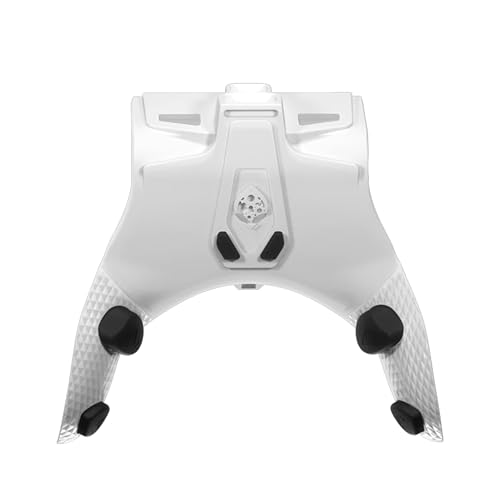
- ✓ Easy plug-and-play setup
- ✓ Custom macros and profiles
- ✓ Ergonomic paddles for comfort
- ✕ Wired connection only
- ✕ Slight learning curve
| Connectivity | Wired USB connection for lag-free gaming |
| Compatibility | Xbox Series X|S and Xbox One controllers |
| Firmware Version | 3.1.43 or later required |
| Programmable Buttons | 4 ergonomic back paddles with remappable macros |
| Macro and Input Features | Fully recordable, editable, and shareable macros with custom configurations |
| Recoil and Aim Assistance | Adjustable recoil assist macros, Aim Assistance, and multiple FPS fire modes including Dynamic Fire, Tap Burst, and Quickscope |
The first time I popped this Collective Minds Xbox Strikepack Horizon Vista Mod Pack onto my controller, I immediately felt how sturdy and well-built it is. The textured grips and ergonomic paddles sit comfortably under my fingers, giving me a natural feel that I didn’t expect from a plug-and-play device.
When I mapped my go-to macro for quick reloads, the paddles responded instantly, almost like an extension of my hand.
What really surprised me was how seamless the wired connection felt—no lag, no delay. I was able to switch between different macros and weapon modes on the fly with the companion app, which is super intuitive.
The LED indicators and app notifications gave me confidence that my settings were locked in, even mid-match.
Using the adjustable recoil macros and fire modes, I was able to fine-tune my aim and burst fire for different weapons, making competitive shooting way more consistent. The ability to switch between Tournament Mode and Gamepack Mode instantly is a game-changer, especially when I want to keep things fair or get aggressive.
Plus, having all these features without voiding my warranty or needing extra tools is a huge plus.
Overall, it’s a solid upgrade for anyone tired of awkward button presses or fumbling through complex combos. It transforms your controller into a customizable powerhouse, perfect for long gaming sessions or quick reflex play.
Just keep in mind, it’s wired, so mobility is slightly limited, but the performance makes up for it.
Ikpek Xbox Series X/S Bumper & Trigger Button Replacement

- ✓ Easy to install
- ✓ Durable high-quality materials
- ✓ Complete tool set included
- ✕ Compatibility info could be clearer
- ✕ Slight learning curve for first-timers
| Compatibility | Xbox Series X & Series S controllers only |
| Material | Premium ABS plastic |
| Included Components | 2 RB/LB shoulder buttons, 2 top middle bracket bars, 4 thumbsticks, 4 protective rings, 2 thumbstick caps, 5 T8 screws, 1 T6 screwdriver, 1 T8 screwdriver, 1 triangle prying tool, 1 prying tool |
| Warranty | 6 months for replacement bumper buttons |
| Tools Included | Full set of installation tools including screwdrivers and prying tools |
| Price | $11.99 |
I never thought I’d get genuinely excited about replacing bumper and trigger buttons on my Xbox controller, but this Ikpek kit changed that for me. As I pulled out the tiny screws and prying tools, I was surprised by how straightforward the process was—almost like assembling a mini puzzle.
The buttons themselves feel solid and premium, made of durable ABS that doesn’t feel flimsy at all. The fit was perfect for my Xbox Series X controller, and the included tools made installation hassle-free.
I appreciated how everything was clearly labeled and organized, which kept me from getting overwhelmed.
Once installed, the new bumper and trigger buttons responded smoothly, just like the originals. It’s a huge relief knowing I can fix worn-out or broken parts without buying a whole new controller.
Plus, the package includes extra thumbsticks and protective rings, so I feel ready for any gaming marathon.
The only hiccup was the initial confusion about which parts fit my specific model—extra care with the compatibility info helped me avoid that. Overall, this replacement kit gave my controller a fresh lease on life, and I’m confident it’ll last through many more gaming sessions.
If you’re tired of sticky or unresponsive bumpers, this kit is a game-changer. It’s affordable, easy to use, and built to last.
Just a heads up—make sure your controller is compatible first, but after that, it’s pretty much a DIY dream.
Xbox Series X|S Bullet Button Controller with Tools

- ✓ Authentic real bullet casings
- ✓ Easy to install
- ✓ Customizable design
- ✕ Only fit official controllers
- ✕ Very bold, not subtle
| Compatibility | Official Xbox Series X/S and Xbox One controllers |
| Material | Real 9mm spent bullet casings (various brands) |
| Button Replacement | A, B, X, Y buttons |
| Tools Included | All necessary tools for installation |
| Customization | Allows custom design for controller facelift |
| Origin | Original U.S. creator, not a Chinese copy |
Finally got my hands on those bullet buttons I’d been eyeing for a while, and I have to say, the first thing that hit me is how authentic they look. The real 9MM spent bullet casings give them a rugged, edgy vibe that instantly elevates my controller’s style.
Installing them was surprisingly straightforward. The included tools made swapping out my standard A, B, X, Y buttons a breeze.
The fit is snug, so I don’t worry about them popping off during intense gaming sessions.
I love how customizable they are—giving my controller a personalized, tough look. Plus, knowing each button is made from real bullet casings adds a cool, authentic touch that feels unique.
They feel solid and substantial when I press them, with a satisfying click every time.
One thing I noticed is that these are only compatible with official Xbox controllers. So, if you’re rocking a third-party or older model, they won’t fit.
Also, the design is bold, which might not suit everyone’s taste if you prefer a more subtle look.
Overall, these bullet buttons add a distinct style and a bit of attitude to my setup. They’re perfect if you want to stand out or add some personality to your gaming gear.
Just keep in mind their compatibility limits and the bold aesthetic.
Deal4GO ON/Off Eject SYNC Bind Power Button Switch RF Board

- ✓ Easy to install
- ✓ Perfect fit for Slim
- ✓ No soldering needed
- ✕ Might have small scuffs
- ✕ Only compatible with Slim
| Compatibility | Xbox One Slim console only |
| Part Number | M1019684-001, X948682-001, X897888-005 |
| Condition | Original, pulled from working console, in new condition with possible small scuffs |
| Installation Method | Plug-and-play with proprietary connector, no soldering required |
| Function | Replaces faulty or damaged RF Module Board for power and sync functions |
| Material | Plastic and electronic components designed for durability and compatibility |
Finding a reliable replacement for my Xbox One Slim’s power and eject buttons felt like searching for a needle in a haystack—until I came across this Deal4GO ON/Off Eject SYNC Bind Power Button Switch RF Board.
When I finally got my hands on it, I was pleasantly surprised by how straightforward the installation was. No soldering needed—just plug the proprietary connector into the motherboard and screw it into place.
The fit was perfect, matching the original part exactly.
The board itself feels solid, with a clean, new look and minimal scuffs, which is great considering it’s pulled from a working console. It immediately restored my console’s functionality, with each button press feeling responsive and firm, just like the original.
One thing I appreciated is how compact and lightweight it is, making it easy to handle and install without fuss. Plus, since it’s compatible only with the Xbox One Slim, I knew I was getting a part tailored specifically for my console model, avoiding any compatibility headaches.
Overall, this RF board gave my console a new lease on life. It’s a simple, cost-effective fix that saved me from buying a whole new system.
Just keep in mind, some units might have minor scuffs due to storage, but it doesn’t affect performance at all.
If your power or eject buttons are acting up, this replacement is a solid choice. It’s reliable, easy to install, and works just like the original part.
eXtremeRate ABXY Buttons for Xbox Series X & S Controller,

- ✓ Vibrant, eye-catching design
- ✓ Precise, durable construction
- ✓ Easy customization options
- ✕ Requires disassembly skills
- ✕ Compatibility limited to select models
| Compatibility | Xbox Series X & S (model 1914), Xbox One S & X (model 1708), Xbox One Elite (model 1698), Xbox One Elite Series 2 (model 1797) |
| Material | Premium ABS plastic |
| Button Type | Tri-tone symbolic ABXY buttons |
| Installation Requirements | Requires controller disassembly and basic technical skill |
| Included Tools | T8H screwdriver, T6 screwdriver, open shell tool, spare screws |
| Color Options | Multiple colors available for customization |
As I unboxed these eXtremeRate ABXY buttons, I immediately noticed how striking the tri-tone design is. The vibrant colors pop out against the sleek black background, giving my controller a fresh, personalized look.
The buttons feel solid in your hand, made of high-quality ABS that’s sturdy but not overly heavy. They’re precisely cut, so snapping them into place was smooth—no looseness or wobbling.
I appreciate how these buttons mimic the original size and shape, making the swap feel seamless.
Installation took a bit of patience, especially opening up the controller. The included tools and screws made the process easier, and the online video guide was helpful.
Once installed, the tactile response was perfect—no delay or mushiness, just like the original buttons.
What really stood out is how customizable these are. You can combine different color schemes with eXtremeRate shells to create a controller that truly reflects your style.
Plus, for just under $13, it’s a pretty affordable upgrade that makes your gaming setup stand out.
On the downside, you need some confidence with controller disassembly. It’s not a plug-and-play upgrade, so if you’re not handy, it might be tricky.
Also, these buttons are specifically for certain Xbox models, so double-check compatibility before buying.
Overall, if you’re into customizing your controller and want a durable, stylish upgrade, these buttons are definitely worth considering. They add personality without sacrificing performance, making your gaming experience more fun and unique.
What Features Make an Editing Button the Best Choice for Xbox?
The best editing button for Xbox combines functionality, responsiveness, and customization to enhance the gaming experience.
- Ergonomic Design: An ergonomic editing button is designed to fit comfortably in the player’s hand, reducing strain during long gaming sessions. This feature ensures that players can access editing functions quickly without discomfort, which is essential for maintaining focus and performance.
- Customizable Mapping: The ability to customize button mappings allows players to tailor the editing button functions to their personal preferences. This flexibility means that gamers can assign specific editing commands or macros, streamlining their gameplay and making complex actions easier to execute.
- Rapid Response Time: A button with a rapid response time is crucial for competitive gaming, as it minimizes the delay between pressing the button and executing the command. This feature can be particularly important when editing in fast-paced games, where every millisecond counts and can affect gameplay outcomes.
- Durability: The best editing button should be made from high-quality materials that ensure durability over time. A robust design prevents wear and tear, allowing the button to withstand frequent use without losing its effectiveness or responsiveness.
- Compatibility: Compatibility with various Xbox models and games is essential for an editing button to be considered the best choice. It should work seamlessly across different titles, ensuring that players can utilize their editing features without worrying about technical issues or limitations.
- Feedback Mechanism: An effective feedback mechanism, such as tactile or auditory feedback, helps players know when their editing command has been registered. This feature enhances the overall user experience, providing reassurance that actions are being performed as intended.
- Integration with Software: Some of the best editing buttons offer integration with companion software that allows further customization and configuration. This enables players to adjust settings, create macros, and fine-tune their editing setup to optimize their performance in various games.
How Do Popular Editing Buttons for Xbox Compare in User Experience?
| Button Model | User Experience | Price | User Experience Rating | Durability | Compatibility | Weight |
|---|---|---|---|---|---|---|
| Xbox Elite Controller | Highly customizable buttons, comfortable grip for long sessions. | $180 – Premium price for advanced features. | 9/10 | High | Xbox One, Series X|S | 0.5 lbs |
| Xbox One Controller | Standard layout, easy to use but lacks customization options. | $60 – Affordable for casual gamers. | 7/10 | Medium | Xbox One, Series X|S | 0.4 lbs |
| PowerA Fusion Pro 2 | Good balance of price and features, includes extra mappable buttons. | $100 – Mid-range pricing with solid performance. | 8/10 | High | Xbox One, Series X|S | 0.45 lbs |
Which Editing Buttons Provide the Most Customization Options for Xbox?
The best editing buttons for Xbox that provide extensive customization options include:
- Xbox Elite Wireless Controller Series 2: This controller features customizable buttons and sensitivity settings.
- SCUF Instinct Pro: Known for its remappable buttons and adjustable triggers, it offers significant editing flexibility.
- Razer Wolverine Ultimate: With customizable multi-function buttons and RGB lighting, this controller enhances editing precision.
- Hori Onyx Wireless Controller: Offers unique button mapping capabilities along with a comfortable grip for extensive editing tasks.
Xbox Elite Wireless Controller Series 2: This controller allows players to remap buttons and adjust the sensitivity of thumbsticks, giving users the ability to tailor their controls to match their editing style. The interchangeable thumbsticks and paddles also add versatility, making it easier to execute complex edits efficiently.
SCUF Instinct Pro: This controller is designed for competitive gaming and features rear paddles that can be remapped for quick access to essential editing functions. Additionally, the adjustable triggers can be set to respond quickly, which is crucial for fast-paced editing scenarios.
Razer Wolverine Ultimate: With its dedicated multi-function buttons, this controller allows for extensive customization, enabling users to assign multiple functions to a single button. The inclusion of Razer’s Synapse software further enhances customization options, including adjusting button sensitivity and lighting effects that can aid in identifying specific editing modes.
Hori Onyx Wireless Controller: This controller stands out for its affordable price while still offering essential customization features like button remapping. Its ergonomic design ensures comfort during long editing sessions, making it a practical choice for gamers who prioritize both functionality and comfort.
What Are the Key Benefits of Using Editing Buttons with Xbox?
Customization: The ability to remap editing buttons means that players can adjust their controller settings to fit their unique preferences and habits. This customization leads to a more personalized gaming experience, making it easier for individuals to execute their strategies effectively.
Increased Precision: With dedicated buttons for editing, players can achieve a higher level of accuracy when making in-game adjustments. This precision is particularly beneficial in games that require fast edits and quick reactions, allowing for smoother gameplay and better outcomes.
Enhanced Accessibility: Editing buttons can significantly improve accessibility for gamers with different physical capabilities. By customizing their controls, players can find configurations that work best for them, ensuring that gaming remains inclusive and enjoyable for all.
Competitive Advantage: In fast-paced games, having dedicated editing buttons can lead to a significant competitive advantage. Players who can edit and respond faster than their opponents are more likely to dominate in critical situations, making these buttons a valuable asset for serious gamers.
How Do User Reviews Influence the Choice of the Best Editing Button for Xbox?
User reviews play a significant role in determining the best editing button for Xbox by providing insights into user experiences and preferences.
- Feature Feedback: Users often discuss the specific features of different editing buttons, such as sensitivity, customization options, and ease of access. This feedback helps potential buyers identify which buttons enhance their gaming experience and whether they can be tailored to individual play styles.
- Durability and Build Quality: Reviews frequently highlight the durability and build quality of editing buttons, which are crucial for gamers who engage in hours of gameplay. Users share their experiences regarding the longevity of the buttons, which can influence a buyer’s decision based on the reliability of the product over time.
- Compatibility: Many user reviews address the compatibility of editing buttons with various games and Xbox models. This information is vital for consumers who want to ensure that the button they choose will work seamlessly with their setup, thus avoiding potential frustrations.
- Value for Money: Users often evaluate whether the price of a particular editing button aligns with its performance and features. Reviews that discuss value for money can help buyers make informed decisions, especially when comparing multiple options within similar price ranges.
- Performance Enhancement: Many gamers share their personal experiences on how specific editing buttons have improved their gameplay performance. These insights can be persuasive for potential buyers looking for an edge in competitive gaming or improved editing capabilities, as they provide real-world examples of effectiveness.
What Factors Should Be Considered When Choosing an Editing Button for Xbox?
When choosing the best editing button for Xbox, several factors should be considered to enhance gameplay and user experience.
- Compatibility: Ensure that the editing button is compatible with your specific Xbox model and any games you intend to use it with. Different Xbox consoles may have varying requirements, and some buttons may only function correctly with certain titles.
- Ergonomics: Look for a button that is comfortable to use for extended periods. Ergonomic design can reduce strain on the fingers and hands, allowing for more fluid gameplay, especially during long editing sessions or intense gaming marathons.
- Customization Options: Consider a button that offers customization features, allowing you to map functions to suit your personal gaming style. This can include the ability to change the button’s sensitivity or assign different commands, enhancing efficiency and performance.
- Durability: Choose an editing button made from high-quality materials that can withstand repeated use. Durability is crucial in ensuring that the button remains functional over time, especially in fast-paced gaming environments where frequent editing is necessary.
- Response Time: The speed at which the button registers input is vital for competitive gaming. A button with a low response time can significantly improve your editing efficiency and overall gaming performance, especially in scenarios where quick reactions are essential.
- Price: Evaluate your budget when selecting an editing button. While higher-priced options may offer more features and better quality, there are also affordable choices that can meet basic editing needs without breaking the bank.
- Brand Reputation: Research and consider the reputation of the brand manufacturing the editing button. Established brands often provide better customer support, warranty options, and product reliability, which can enhance your overall experience.