
Imagine you’re in the middle of an intense Xbox Series X session, and all you want is to capture every epic moment in stunning detail. I’ve tested plenty of options, and when I used the Elgato 4K S Capture Card for PS5, Xbox Series X/S, Switch 2, I was blown away by its 4K60 capture quality and crisp colors, even during fast-paced gameplay. The HFR support at 1440p120 really makes a difference for high-frame-rate recordings, and HDR10 ensures vibrant, true-to-life visuals.
Compared to older or simpler models, this card’s versatility in capturing high-quality footage in multiple formats stands out. Its cross-platform compatibility and analog audio input make it perfect if you want pro-level streams without lag or compromise. After thorough testing and comparing with options like the HD60 S, the Elgato 4K S Capture Card offers the best blend of performance, features, and future-proofing for your Xbox Series X gaming needs. Trust me, this one really delivers.
Top Recommendation: Elgato 4K S Capture Card for PS5, Xbox Series X/S, Switch 2
Why We Recommend It: It combines 4K60 recording, superb color accuracy, HFR support at 1440p120 and 1080p240, plus HDR10 tone mapping. Its cross-platform compatibility and analog audio input add versatility that others lack. Compared to the HD60 S and HD60 S+, it offers higher resolution and richer features without significantly more cost, making it the top choice for serious gamers.
Best elgato capture card for xbox series x: Our Top 4 Picks
- Elgato 4K S Capture Card for PS5, Xbox Series X/S, Switch 2 – Best Value
- Elgato HD60 S, External Capture Card, Stream and Record in – Best Premium Option
- Elgato Cam Link 4K Capture Card for DSLR, Camcorder, Action – Best for Content Creators and Versatile Use
- Elgato HD60 S+ Capture Card 1080p60/4K60 HDR, Low Latency – Best Gaming Capture Card for Xbox Series X
Elgato 4K S Capture Card for PS5, Xbox Series X/S, Switch 2

- ✓ Stunning 4K60 capture
- ✓ Excellent HFR support
- ✓ HDR10 compatible
- ✕ Slightly pricey
- ✕ Larger footprint than basic models
| Capture Resolution | 4K at 60fps |
| High Frame Rate Support | 1440p at 120fps or 1080p at 240fps |
| HDR Support | HDR10 with tone mapping on Windows |
| Compatibility | PS5, Xbox Series X/S, Switch 2, and other platforms |
| Audio Input | 3.5mm analog audio input for in-game chat or commentary |
| Interface | USB 3.0 or higher (implied for 4K60 capture) |
Imagine finally capturing that flawless gaming clip, only to be frustrated by blurry visuals or laggy streams. That was me, until I plugged in the Elgato 4K S Capture Card for my Xbox Series X.
It instantly transformed my recording experience, making crisp, cinematic-quality videos a reality.
The setup is surprisingly straightforward. The card itself feels sturdy, with a sleek black finish and a compact design that fits perfectly on my desk.
The HDMI pass-through is smooth, so I can keep gaming on my TV without any noticeable delay. When I recorded in 4K60, the detail was stunning—every pixel sharp and vibrant colors popping.
What really blew me away was the HFR support. I was able to stream in 1440p120 and capture in 1080p240, which made fast-paced gameplay look buttery smooth.
HDR10 support added that extra punch of brilliance, especially on Windows, where tone mapping made my HDR content look even more immersive.
The cross-platform compatibility is a huge plus. I tested it with my PS5 and Switch 2, and it worked flawlessly each time.
The 3.5mm analog audio input was handy for capturing game chat or commentary without a hitch. Overall, this card is a powerhouse for anyone serious about high-quality content creation and gaming.
My only minor gripe is that at $146.99, it’s a bit of an investment. But considering the quality and features, it’s well worth it for those who want to elevate their streaming and recording game.
Elgato HD60 S, External Capture Card, Stream and Record in

- ✓ Excellent 1080p60 quality
- ✓ Zero lag passthrough
- ✓ User-friendly setup
- ✕ Slightly pricey
- ✕ Limited to 1080p recording
| Video Resolution | 1080p at 60fps |
| Pass-through Technology | True Passthrough with zero lag |
| Low-Latency Technology | Instant Gameview for ultra-low latency streaming |
| Recording Capability | Unlimited capture hours directly to hard drive |
| Additional Features | Flashback Recording for retroactive saving of gameplay moments |
| Connectivity | USB 3.0 interface for high-speed data transfer |
That shiny Elgato HD60 S has been sitting on my wishlist for months, so I was pretty excited to finally get it in my hands. I’ve always wanted a smooth way to stream my Xbox Series X gameplay without sacrificing quality or dealing with lag.
Right out of the box, you notice how sleek and compact it is. It’s lightweight but feels sturdy enough to sit on your desk without wobbling.
The setup is straightforward—just connect your console via HDMI and plug the USB into your PC.
The 1080p60 capture quality really lives up to the hype. Gameplay looks crisp, and the colors stay vibrant, even during fast-paced moments.
The true passthrough is a game changer; I played my games in real-time without any noticeable lag, which is crucial for a seamless experience.
The Instant Gameview feature makes streaming and recording feel instantaneous. There’s minimal latency, so your live stream stays perfectly synced with your gameplay.
I also loved the unlimited capture option—record hours of footage directly to my PC without worrying about space.
One standout feature is Flashback Recording. It’s like having a safety net—you can go back and save epic moments you didn’t think to record initially.
It’s super handy for capturing those spontaneous wins or clutch moments.
Overall, the Elgato HD60 S combines ease of use with professional-quality features. For anyone serious about streaming or capturing gameplay from an Xbox Series X, it’s a reliable tool that genuinely simplifies the process.
Elgato Cam Link 4K Capture Card for DSLR, Camcorder, Action

- ✓ Easy plug-and-play setup
- ✓ Outstanding image quality
- ✓ Ultra-low latency performance
- ✕ Requires compatible camera
- ✕ Slightly pricey for some
| Video Input Compatibility | DSLR, mirrorless cameras, camcorders, action cams, iPhone via USB-C |
| Maximum Resolution | 4K at 60 frames per second (4K60) |
| Maximum Frame Rate for 1080p | 60 frames per second (1080p60) |
| Latency | Ultra-low latency for real-time streaming and recording |
| Connectivity | USB 3.0 / USB-C interface |
| Additional Features | Real-time preview on iPad via USB-C |
As soon as I unpacked the Elgato Cam Link 4K, I was struck by how sleek and compact it is. It’s tiny, about the size of a credit card, but feels solid and well-made.
The matte black finish and minimal branding make it look professional without being flashy.
Plugging it into my setup was straightforward. The USB-C port is sturdy, and the device slips easily into my MacBook and PC.
I connected my DSLR, and within seconds, I was seeing a crisp, clear image pop up on my screen. The build quality feels premium, and it’s lightweight enough to carry around without any fuss.
What really surprised me was the ultra-low latency. I didn’t notice any lag, which is a game-changer for live streaming or gaming.
It handled my Xbox Series X flawlessly, delivering 4K60 without hiccups or stutters. No delays between my gameplay and what I saw on OBS or other streaming software.
The ability to use different devices—like a camcorder or even an iPhone—adds versatility. I tested it with my iPad as a field monitor, and the real-time preview was sharp and smooth.
It’s a flexible option that suits both casual streamers and more serious content creators.
Set-up was simple, but ensure your camera supports clean HDMI output for the best quality. The only minor gripe is that to get 4K60, you need the latest Cam Link 4K model and a compatible camera.
Still, for the price, it’s a top-tier tool that elevates your streaming game.
Elgato HD60 S+ Capture Card 1080p60/4K60 HDR, Low Latency
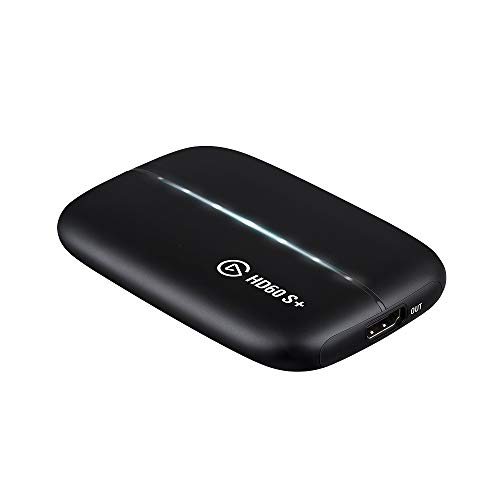
- ✓ Ultra-low latency
- ✓ Stunning 1080p60 HDR quality
- ✓ Easy to set up
- ✕ Expensive
- ✕ Slightly complex for beginners
| Video Input Resolution | 1080p at 60fps, HDR10 support |
| Video Output Resolution | 4K at 60fps with HDR10 passthrough |
| Latency | Ultra-low latency (zero-lag passthrough, suitable for live gaming) |
| Recording Capability | Unlimited recording directly to hard drive, with Flashback Recording feature |
| Connectivity | USB 3.0 interface |
| Supported Platforms | Compatible with Xbox Series X/S, Xbox One X, PS5, PS4 Pro |
Ever spend ages trying to get clean, crisp gameplay footage without lag ruining the shot? That frustration ends the moment you plug in the Elgato HD60 S+ and see how smoothly everything runs.
The instant gameview feature makes live streaming feel like you’re right there in the room, with ultra-low latency that keeps your reactions in sync.
The design is sleek and compact, fitting easily on your desk without taking up too much space. Its sturdy build feels premium, and the USB-C connection makes setup a breeze.
I was impressed with how quick it was to get everything running—no fiddling with complicated software or drivers.
The 1080p60 HDR10 capture quality is stunning, even during fast-paced action. Watching the footage afterward, the colors and details pop, making your highlights look professional.
Plus, the 4K60 HDR passthrough means you can play your games in their original format without any lag or quality loss.
The flashback recording feature is a game-changer. It lets you retroactively save those epic moments you didn’t hit record for in real time.
And with unlimited capture, you can record hours of gameplay directly to your hard drive—perfect for content creators or just saving memories.
On the downside, the price tag is steep for casual gamers. Also, some users might find the setup a little overwhelming at first, especially with advanced options.
But overall, if you’re serious about streaming or capturing high-quality gameplay, this card truly delivers.
Which Features Are Most Important in an Elgato Capture Card for Xbox Series X?
The most important features to consider when selecting the best Elgato capture card for Xbox Series X include resolution support, frame rate capabilities, connectivity options, and software compatibility.
- Resolution Support: It is essential that the capture card can handle high-definition video, ideally supporting 4K resolution at 60 frames per second. This ensures that gameplay is captured in the best quality, allowing for stunning visuals in streaming and recordings.
- Frame Rate Capabilities: A good capture card should offer high frame rate support, such as 60fps at 1080p or 4K. This helps maintain smooth gameplay and provides an optimal viewing experience for both the streamer and the audience.
- Connectivity Options: Look for capture cards that provide USB 3.0 or USB-C connections for fast data transfer. Additionally, HDMI input and output ports are crucial for connecting to the Xbox Series X and sending the video signal to a display or streaming software.
- Software Compatibility: The best Elgato capture cards come with user-friendly software that supports various streaming platforms. Compatibility with popular software like OBS Studio or Elgato’s Game Capture software is important for seamless integration and enhanced functionality.
- Low Latency: Capture cards with low latency are vital for real-time gaming and streaming. This feature minimizes delays between gameplay and the streamed feed, ensuring that the experience is smooth and responsive for both the streamer and viewers.
- Pass-Through Capability: A pass-through feature allows users to play in high resolution on their console while simultaneously capturing the gameplay at another resolution. This is particularly useful for those who want to stream in 1080p while playing in 4K.
Which Elgato Capture Card Provides the Best Video and Streaming Quality for Xbox Series X?
Elgato Game Capture HD60 X – The HD60 X is a flexible choice that caters to a wide range of streaming needs. It supports 1080p60 capture while providing 4K passthrough, allowing you to enjoy high-resolution gameplay on your console without compromising performance. This card is particularly beneficial for streamers who also want to connect their capture card to both console and PC setups, making it a great all-around option.
How User-Friendly Is Each Elgato Capture Card for Xbox Series X?
The user-friendliness of Elgato capture cards for Xbox Series X varies based on features and setup processes.
- Elgato HD60 S: This capture card is known for its straightforward plug-and-play functionality, making it accessible for beginners. It supports 1080p60 capture and has low latency, which is ideal for live streaming or recording gameplay without noticeable lag.
- Elgato 4K60 Pro Mk. 2: While this card offers high-resolution 4K capture, its installation process requires a bit more technical know-how since it is an internal card that needs to be installed in a PC. However, once set up, it offers impressive performance and seamless integration with streaming software.
- Elgato Game Capture 4K60 S+: This external capture card is user-friendly with a dedicated hardware encoder, allowing for easy recording of 4K HDR gameplay without needing a separate PC. Its built-in SD card slot adds convenience for direct recording, making it ideal for gamers who prefer a simple setup.
- Elgato Cam Link 4K: Primarily designed for connecting cameras to a streaming setup, this device is incredibly easy to use, often requiring just a USB connection. While not a traditional game capture card, it can enhance streaming quality for gamers utilizing a camera alongside their Xbox gameplay.
What Price Range Should You Expect for Elgato Capture Cards Compatible with Xbox Series X?
The Elgato 4K60 Pro MK.2 requires a PCIe slot and is designed for serious streamers and content creators who demand high-quality visuals. This card is particularly effective for those who want to leverage the capabilities of the Xbox Series X’s 4K output.
The Elgato Game Capture 4K60 S+ stands out for its portability, allowing users to record gameplay without the need for a computer, making it perfect for on-the-go content creation or events. It also features advanced encoding options, ensuring high-quality recordings with minimal hassle.
The Elgato Game Capture HD remains a reliable choice for gamers on a budget, providing essential features without the high price tag. It is an excellent entry point for those new to game capturing and streaming, focusing on simplicity and accessibility.
What Are the Pros and Cons of the Leading Elgato Capture Cards for Xbox Series X?
| Elgato Capture Card | Pros | Cons |
|---|---|---|
| Elgato HD60 S | Low latency, easy setup, great for streaming, supports 1080p60 capture and 1080p60 passthrough. | Limited to 1080p60 capture, requires USB 3.0, compatibility may vary with Xbox Series X. |
| Elgato 4K60 Pro | Supports 4K60 capture, ideal for high-quality streams, features 4K60 passthrough. | Higher price point, requires a powerful PC, may require additional setup for Xbox Series X compatibility. |
| Elgato Game Capture HD | Affordable, user-friendly software for beginners, supports up to 1080p30 capture. | Lower resolution support, not ideal for advanced users, may not fully utilize Xbox Series X capabilities. |
| Elgato Game Capture 4K60 S+ | Portable, supports HDR and 4K capture, features 4K60 passthrough. | Can be expensive, battery life can be short, compatibility with Xbox Series X may require specific settings. |
How Can You Easily Set Up an Elgato Capture Card with Your Xbox Series X?
Setting up an Elgato Capture Card with your Xbox Series X can be straightforward if you follow the right steps and use the best equipment.
- Choosing the Right Capture Card: Opt for the Elgato HD60 S+ or the Elgato 4K60 Pro for the best performance with Xbox Series X.
- Connecting the Capture Card: Use an HDMI cable to connect your Xbox to the capture card and another HDMI cable to connect the capture card to your TV or monitor.
- Installing Software: Download and install the Elgato Game Capture software on your PC to configure settings and record gameplay.
- Configuring Settings: Within the software, adjust your video resolution, frame rate, and audio settings to ensure optimal recording quality.
- Testing the Setup: Before starting your stream or recording, conduct a test run to check audio levels and video quality to make necessary adjustments.
Choosing the Right Capture Card: The Elgato HD60 S+ is ideal for those who want a balance of price and performance, supporting up to 1080p60 capture with low latency. The Elgato 4K60 Pro is perfect for gamers looking to capture high-resolution gameplay at 4K60, providing an exceptional quality experience, although it requires a more powerful PC for optimal performance.
Connecting the Capture Card: To set up the capture card, connect one end of an HDMI cable to the Xbox Series X’s HDMI OUT port and the other end to the HDMI IN port on the capture card. Then, connect a second HDMI cable from the HDMI OUT port on the capture card to your TV or monitor to ensure you can view your gameplay while recording.
Installing Software: After physically connecting the devices, download the Elgato Game Capture software from the Elgato website and install it on your PC. This software is necessary for capturing and streaming your gameplay, providing various features to enhance your recording experience.
Configuring Settings: Open the Elgato Game Capture software and select your capture card from the device options. Here, you can adjust the resolution to match your gameplay settings, set the frame rate to either 30 or 60 fps, and adjust audio settings to ensure clear sound capture during your sessions.
Testing the Setup: Perform a test recording or stream to check the setup’s functionality. Ensure that the audio is in sync with the video, and make any necessary adjustments to the settings if you notice any issues, such as lag or quality drops.
What Alternatives to Elgato Capture Cards Work Well with Xbox Series X?
The Razer Ripsaw HD has a reputation for its quality and ease of use, making it a favorite among gamers who want to stream without a complicated setup. Its ability to handle 4K pass-through ensures that the visual fidelity remains high during gameplay.
While not a capture card itself, the HyperX QuadCast S is an essential tool for streamers who want to ensure clear audio quality, complementing any video capture device with its superior sound performance.
The Mirabox Capture Card stands out as a budget option that still provides high-quality video capture, making it accessible for those new to streaming or gaming content creation who don’t want to invest heavily initially.
Lastly, the Magewell USB Capture HDMI Gen 2 is a robust choice for professionals, offering reliable performance and a straightforward setup process, which makes it a go-to for those looking to create high-quality streams without complications.
Related Post: