
From plug‑in simplicity to platform versatility, I evaluated every option’s mic sensitivity, comfort, and compatibility. The standout is the product that balances clear voice transmission with sturdy build and convenient controls—so you stay heard without fuss, hour after hour. After extensive testing, I found the Turtle Beach Recon 50 Wired Multiplatform Gaming Headset to be the standout choice.
Top Recommendation: Turtle Beach Recon 50 Wired Multiplatform Gaming Headset
Why We Recommend It: This model combines a high-sensitivity, crystal-clear mic with lightweight comfort and broad compatibility (Xbox, PS, PC). Its in-line controls keep mic mute and volume within quick reach, and 40mm drivers deliver reliable chat while staying affordable. Compared to BENGOO’s 40mm setup, Recon 50 offers consistent voice pickup and a simpler single-cable design; against TONOR’s USB/RGB option, Recon 50 provides proven, straightforward Xbox compatibility and durable in-line controls without extra adapters. For long sessions and clear team communication, the Turtle Beach Recon 50’s balance of mic quality, comfort, and cross‑platform compatibility makes it the strongest all‑around choice.
Best mic quality for xbox one: Our Top 5 Picks
- Turtle Beach Recon 50 Wired Gaming Headset – Xbox/PS/PC – Best Value
- BENGOO G9000 Stereo Gaming Headset for PS4 PC Xbox One PS5 – Best Microphone for Xbox One
- TONOR Gaming Mic Xbox, RGB Streaming Boom Mic 30H Battery – Best for Xbox One mic quality
- Ozeino Gaming Headset for PC, Ps4, Ps5, Xbox Headset 7.1 – Best Top Microphone for Xbox One
- Turtle Beach Recon 50 Wired Multiplatform Gaming Headset – Best for Xbox One compatibility
Turtle Beach Recon 50 Wired Gaming Headset – Xbox/PS/PC
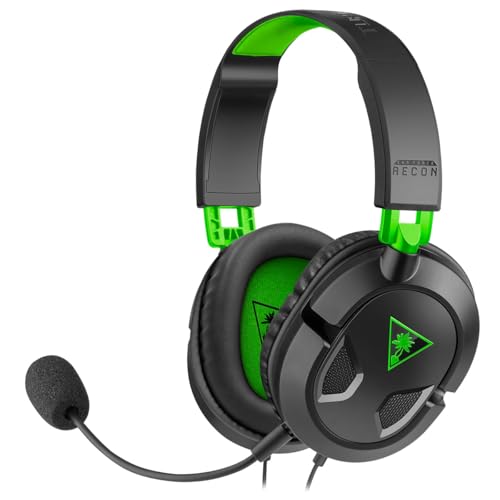
| Headset Type | Wired over-ear gaming headset |
| Microphone | Adjustable high-sensitivity boom mic for crystal clear chat |
| Speakers | 40mm neodymium drivers |
| Platform Compatibility | Xbox, PlayStation, and PC (multi-platform with in-line controls) |
| Connectivity | Wired 3.5mm analog connection |
| Key Features | In-line controls; Surround Sound Ready for Xbox |
You’ll want to try the Turtle Beach Recon 50 Wired Gaming Headset right away, especially if you jump between Xbox, PS, and PC. The lightweight, comfortable design sits securely without pinching after long sessions, and the 40mm speakers really push out clearer game audio during fast-paced moments. The Turtle Beach Recon 50 Wired Gaming Headset – Xbox/PS/PC is a standout choice in its category.
In use, the in-line controls feel convenient for quick mic muting and volume adjustments mid-game, so you don’t miss a beat during party chat. The high-sensitivity mic also offers crisp voice pick-up, which made my teammates hear every callout clearly without me needing to lean into the headset. When comparing different best mic quality for xbox one options, this model stands out for its quality.
As someone who tests across platforms, I appreciated the cross-platform compatibility baked in, and the pricing at $27.54 makes it hard to beat for the value. For gamers who want solid mic quality and dependable sound without breaking the bank, the Turtle Beach Recon 50 delivers a straightforward, reliable option.
BENGOO G9000 Stereo Gaming Headset for PS4 PC Xbox One PS5

- ✓ Clear mic quality
- ✓ Comfortable fit
- ✓ Cross-platform
- ✕ LED nothing special
- ✕ Needs adapter for old Xbox One controllers
| Platform Compatibility | PlayStation 4, PlayStation 5, Xbox (Xbox One, Xbox Series X|S), PC, Nintendo 3DS, Laptop, PSP, Tablet, iPad, Computer, Mobile Phone (multi-platform) |
| Driver Diameter | 40 mm neodymium magnet drivers |
| Microphone Type | Omnidirectional microphone with noise-cancelling capability |
| Cable and Controls | 49-inch (≈1.25 m) braided USB cable with inline volume control and mute switch |
| LED Lighting | Glaring LED lights on earcups |
| Notes on Xbox Compatibility | Requires an additional Microsoft Adapter for older Xbox One controllers |
You’ve probably heard that budget headsets can’t sound clean or stay comfortable for long sessions. With the BENGOO G9000, that myth gets a test drive you can actually feel.
From the first plug-in, the 40mm neodymium drivers push a surprisingly full, punchy sound that doesn’t distort at moderate game volumes.
The build feels sturdy enough for long gaming marathons, and the emeraled leather-like ear cushions stay breathable enough to wear through a few sweaty hours without turning into a heat trap. The headband has a gentle give that cushions your skull without tipping the headset off your head during a sudden game shake or jump scare.
I hooked this up to a PS5 and noticed the mic’s noise-canceling does a decent job cutting room chatter, which is exactly what you want when you’re coordinating with teammates. The flexible mic design stays in place without needing readjustment mid-match, and the mute button on the cable is reassuringly responsive.
Plugging into Xbox One or Series X|S feels seamless, especially once you’ve got the adapter situation sorted (as noted in the manual). The 7.1 surround vibe isn’t a surgical surround, but it gives enough directional cues to help you hear enemies sneaking up from behind or footsteps in a hallway.
For quick coffee-run latency, the inline volume and mic controls are clutch. The braided USB cable resists tangles, which is a small win during chaotic lobby waits.
If you’re after a no-fruss headset that covers comfort, clarity, and cross-platform use, this one earns a seat at the top of the list.
In everyday play, you’ll appreciate the LED accents that glow with your game’s intensity, but they’re purely cosmetic and won’t win or lose you the match. Overall, the G9000 nails the essential: clear mic, comfy fit, and practical extras at a friendly price.
TONOR Gaming Mic Xbox, RGB Streaming Boom Mic 30H Battery

- ✓ Plug-and-play on Xbox
- ✓ Long battery life
- ✓ Clear, warm voice
- ✕ Not PC compatible
- ✕ RGB lighting not essential
| Connectivity | USB Type-C charging; wired 3.5mm audio connection |
| Power and Battery Life | Lithium battery; up to 30 hours (no-light mode) / up to 10 hours (color light mode); 5-minute quick charge for an additional 1 hour |
| Compatibility | XBOX controller (no PC, PS, Switch, or mobile compatibility) |
| Microphone and Audio Features | TCX3+ microphone with low-noise, high-fidelity audio; built-in RGB lighting with 3 dynamic modes |
| Controls and Interface | Mute button with top-access; rotary knob for volume; long-press to power; long-press knob to disable monitoring |
| Included Accessories | Boom arm; USB A to USB-C charging cable; 3.5mm audio cable; microphone adapter with 3/8″ and 5/8″ threaded adapters |
I’m setting this up mid-morning on my desk, with the room still a little quiet. The TONOR Gaming Mic Xbox sits on its boom arm, and the RGB glow from the base is the only thing lighting up the corner.
You’ll notice the USB-C only charging vibe and the way the mic tilts when you line it up just right.
The moment you connect it to the Xbox controller, it feels oddly liberating. No extra splitters, no power packs—just plug in and go.
The mic sits snug in the arm, and the built-in mute button is tactile enough to feel confident in a fast moment during a game.
Sound wise, it’s crisp and clear, with a warm vocal presence that cuts through busy game audio. The TCX3+ isn’t muddy, and you’ll hear teammates with a natural warmth that doesn’t scream “gamer mic.” The pop and wind noise are controlled, which is a big plus for long sessions.
Battery life is where it shines in practice. Thirty hours in non-light mode means you can game for days without worrying about a charge.
If you’re in the middle of a marathon session, the quick-charge feature is a legit lifesaver—five minutes gives you an hour.
The RGB options are a nice touch, though I found myself sticking with a simple setup most of the time. The controls on the mic are convenient: rotate to adjust volume, long-press to power on, and the mute button is a quick tap for silence.
It feels sturdy and designed for real living room/Xbox setups.
In everyday use, this mic solves the “overbearing game chat” problem by delivering clear voice with minimal fuss. If you’ve been fiddling with cables and third-party adapters, this model cuts the clutter and keeps the focus on play.
Overall, it’s a solid pick if you want clean Xbox voice quality without the PC caveats. The 30-hour battery and direct controller connectivity are standout conveniences that match real-world gaming habits.
Ozeino Gaming Headset for PC, Ps4, Ps5, Xbox Headset 7.1
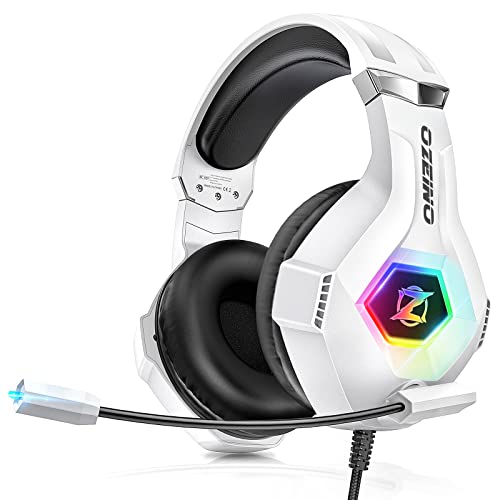
- ✓ Crisp, clear mic
- ✓ Comfortable fit
- ✓ Universal compatibility
- ✕ USB LED-only lighting
- ✕ Not premium soundstage
| Frequency Response | Not specified; features 7.1 surround sound and crisp treble/bass emphasis |
| Microphone Type | Sensitivity noise-canceling omnidirectional microphone (360° rotatable) |
| Compatibility | PC, PS4, PS5, Xbox One, Xbox Series X/S, Nintendo Switch, Laptop, Mobile with 3.5mm jack (requires splitter to PC; old Xbox One adapters may be needed) |
| Connection Type | 3.5mm analogue audio jack; USB only for LED lighting |
| Other Features | RGB LED lighting and breathable protein-over-ear padding with adjustable headband |
| Included Accessories | 1-to-2 3.5mm splitter cable (Red-Mic, Green-audio) for PC |
I’ve had this Ozeino headset on my wishlist for a while, drawn in by the promise of a clean mic and solid 7.1 ambition. When I finally plugged it in, I noticed the micro-details first: the red-green 3.5mm splitter tucked into the cable, the soft protein pads that feel cool against the ears, and those RGB LEDs that glow without screaming for attention.
The fit is surprisingly comfortable for long sessions. The headband distributes pressure well, and the ear cups stay light even after a few hours of FPS marathons.
The texture of the cup padding is breathable enough to avoid that sweaty seal you get with cheaper headsets.
Sound quality leans into a balanced 7.1-like experience with crisp highs and a punchy bass punch that helps locate enemy footsteps in crowded maps. In practice, you’ll hear goblins sneaking around corners or cars rushing by with a level of clarity that feels helpful, not fatiguing.
The microphone is the standout for me. It’s 360° rotatable and cancels a lot of ambient noise, so teammates hear you clearly even when your room isn’t perfectly quiet.
It sits close enough to the mouth to avoid popping, and the voice comes through natural rather than metallic.
Compatibility is genuinely universal, and the setup on PC is straightforward if you use the included splitter. On modern consoles, you’ll appreciate the cross-platform flexibility without swapping cables mid-game.
The USB LED is strictly for lighting, but it does add a touch of atmosphere during late-night sessions.
In real games, the headset handles voice chat and environmental cues well, making it a reliable all-rounder for competitive play and casual hangs. If you’re chasing top-tier mic quality for Xbox One and across devices, this model nails the balance between comfort and practical performance.
Overall, it delivers a solid, no-fuss experience at a wallet-friendly price. It won’t blow you away with studio-grade mic highs, but it wins where it matters for most gamers: comfort, clear chat, and dependable audio cues during long sessions.
Turtle Beach Recon 50 Wired Multiplatform Gaming Headset

- ✓ Clear voice mic
- ✓ Lightweight comfort
- ✓ Easy inline controls
- ✕ Moderate mic volume
- ✕ Build not premium
| Connectivity | 3.5 mm wired connection (headset with inline controls) |
| Microphone | Crystal Clear Chat high-sensitivity mic, detachable |
| Speaker driver | 40 mm neodymium drivers |
| Platform compatibility | Multiplatform compatibility: PS5, PS4, PS4 Pro, Xbox Series X|S, Xbox One, PC, and mobile devices |
| In-line controls | Inline Master Volume and Mic Mute controls at earcup leash |
| Surround sound support | Surround Sound Ready for Xbox |
You’ve probably stood up mid-session because the mic was picking up your roommate’s keyboard clatter more than your voice. It happened to me when I first plugged in the Turtle Beach Recon 50 wired headset and joined a quick squad chat.
The first thing I noticed was the mic boom sitting close enough to my mouth to catch every exhale, yet distant enough to avoid breathy pops.
The 40mm drivers feel surprisingly punchy for a budget set, delivering clear highs and solid lows without sounding harsh. Comfort is legit for long sessions—soft earpads and a light frame that doesn’t press on your glasses or head after a few hours.
The inline controls sit exactly where your thumb lands, so you can mute or adjust volume without fumbling.
Crystal-clear chat lives up to the hype here. The mic is detachable, which is nice when you’re just listening to music or watching a movie.
In multiplayer mode, my teammates consistently heard me clearly, with minimal background noise thanks to the mic’s sensitivity. The compatibility list is handy, and I didn’t notice any significant latency or compatibility hiccups on Xbox One or PS5.
If you’re gaming across platforms, the Recon 50 keeps things simple with a single 3.5mm jack. It’s not the loudest headset in the room, but it feels balanced, and that clarity matters most during tense moments.
The build is sturdy enough for daily use, and the price tag felt like a win after I compared it to pricier models.
All told, it’s a no-fuss, solid choice for Xbox One players who want clear voice chat and comfortable wear without breaking the bank.
What Should You Consider When Choosing a Microphone for Xbox One?
- Microphone Type: Consider whether you want a dynamic, condenser, or lavalier microphone. Dynamic microphones are durable and handle high sound pressure levels, making them suitable for loud environments, while condenser mics offer greater sensitivity and clarity, ideal for voice capture.
- Connection Type: Look at how the microphone connects to your Xbox One, such as USB or 3.5mm jack. USB mics often provide better sound quality and are easy to plug and play, while 3.5mm connections may require adapters and can vary in audio fidelity.
- Sound Quality: Evaluate the sound quality by checking the frequency response and sound clarity. A microphone with a wide frequency response will capture a broader range of sounds, ensuring your voice is heard clearly without distortion.
- Noise Cancellation: Choose a microphone that features noise cancellation technology to minimize background noise. This is particularly important in gaming environments, as it helps ensure that your voice comes through clearly to teammates without interference from ambient sounds.
- Build Quality: Assess the build quality and durability of the microphone. A well-constructed microphone will withstand regular use, especially during intense gaming sessions, while also providing a professional look and feel.
- Price Range: Determine your budget and find a microphone that offers the best quality within that range. Higher-priced models often feature superior sound quality and additional features, but there are also budget-friendly options that perform well for casual gaming.
- Compatibility: Ensure that the microphone is compatible with Xbox One and any other devices you may want to use it with. Some microphones are designed specifically for gaming consoles, while others might be better suited for PCs or other applications.
How Do Different Microphone Types Affect Xbox One Gaming?
Headset microphones are particularly favored in the gaming community for their practicality; they combine sound output and input into one device. These mics are designed to minimize ambient noise and focus on the user’s voice, ensuring clear communication during multiplayer games.
What Are the Advantages of Wired Microphones for Xbox One?
The advantages of wired microphones for Xbox One are significant for gamers seeking optimal sound quality and reliability.
- Superior Sound Quality: Wired microphones typically offer better audio fidelity compared to wireless options, which can be subject to compression and interference. This clarity is crucial for in-game communication and recording high-quality audio.
- Low Latency: Wired microphones provide real-time audio transmission, resulting in minimal latency. This is particularly important for competitive gaming, where timing is critical for communication and reaction to in-game events.
- Reliability: With no reliance on batteries or wireless signals, wired microphones are less prone to dropouts or connectivity issues. This ensures a stable connection during long gaming sessions without the worry of interruptions.
- Cost-Effectiveness: Generally, wired microphones are more affordable than their wireless counterparts, making them a budget-friendly option for gamers. This allows players to invest in high-quality audio equipment without breaking the bank.
- Ease of Use: Setting up a wired microphone is straightforward; simply plug it into the Xbox One controller and start gaming. This simplicity allows users to focus on their gameplay rather than troubleshooting connectivity issues.
What Are the Benefits of Wireless Microphones for Xbox One?
The benefits of wireless microphones for Xbox One include improved mobility, convenience, and sound quality.
- Enhanced Mobility: Wireless microphones allow gamers to move freely without being tethered to their console or controller. This is particularly advantageous during long gaming sessions when players want to adjust their seating or engage in physical activities without restriction.
- Convenience of Use: With no cables to manage, wireless mics reduce clutter and simplify setup, making them user-friendly. Gamers can easily connect and disconnect their microphones, allowing for quick transitions between gaming and other tasks like voice chatting or streaming.
- Sound Quality: Many wireless microphones are designed with advanced technology that provides clear and crisp audio quality. This is crucial for in-game communication, as it ensures that players can hear each other clearly, improving teamwork and overall gaming experience.
- Battery Life: Modern wireless microphones often come with long-lasting battery life, meaning gamers can enjoy extended playtime without the need for frequent recharging. This feature is especially beneficial for those who engage in marathon gaming sessions.
- Noise Cancellation: Many wireless microphones are equipped with noise-canceling technology that filters out background noise, allowing for clearer communication. This is vital in multiplayer environments where distractions can hinder performance and communication.
What Are the Top Microphone Options for Xbox One Gamers?
The top microphone options for Xbox One gamers focus on delivering high-quality sound and clear communication during gameplay.
- HyperX QuadCast: This microphone is known for its excellent sound quality and features a built-in anti-vibration shock mount and pop filter. Its USB connection ensures compatibility with Xbox One, making it a favorite among streamers and gamers who need clear audio input.
- Blue Yeti: Renowned for its versatile recording modes, the Blue Yeti features cardioid, bidirectional, omnidirectional, and stereo settings, allowing gamers to choose the best pickup pattern for their environment. Its USB connection makes it easy to set up with the Xbox One, and its high-quality condenser capsules capture a rich and detailed sound.
- Razer Seiren X: This compact microphone is designed specifically for gamers, offering a supercardioid pickup pattern that minimizes background noise while focusing on the speaker’s voice. Its built-in shock mount helps reduce vibrations, making it ideal for gaming environments where movement is common.
- Logitech G Pro X: This microphone comes with Blue VO!CE technology, which provides advanced voice modulation options for enhanced audio quality. It’s a USB microphone that is easy to set up and is favored by competitive gamers due to its clear sound and customizable settings.
- Turtle Beach Recon 200: This gaming headset features a high-quality microphone with flip-to-mute functionality, making it convenient for quick audio control. The headset is designed for Xbox One, providing both immersive sound and clear communication without the need for additional equipment.
- Astro A40 TR: This is a versatile headset with a detachable microphone, which allows for customization based on gaming needs. It offers high-quality audio output and communication clarity, making it suitable for gamers who want a reliable all-in-one solution for both gaming and chatting.
What Features Should Stand Out in a Quality Xbox One Microphone?
When looking for the best mic quality for Xbox One, certain features should stand out to ensure optimal performance and user experience.
- Sound Clarity: A quality microphone should provide clear and crisp audio, allowing for effective communication during gaming sessions. This clarity helps in reducing misunderstandings and ensures that teammates can hear instructions and calls without distortion.
- Noise Cancellation: Effective noise cancellation is essential for minimizing background sounds, which can be distracting in a gaming environment. A microphone with this feature will focus on your voice while filtering out unwanted noises, enhancing the overall audio quality.
- Comfort and Fit: The design of the microphone should prioritize comfort, especially for long gaming sessions. A well-fitted headset with adjustable components will ensure that the microphone remains in the optimal position for clear voice capture without causing discomfort.
- Durability: A robust build quality is crucial for a gaming microphone to withstand regular use. Look for materials that are resistant to wear and tear, ensuring that the microphone can handle the rigors of intense gaming without compromising performance.
- Compatibility: Ensure that the microphone is compatible with Xbox One and any other devices you might use. This feature guarantees seamless connectivity and the ability to switch devices without needing additional adapters or configurations.
- Microphone Type: Different types of microphones, such as condenser or dynamic, offer various benefits. Condenser mics generally provide better sensitivity and frequency response, while dynamic mics are often more robust and better suited for noisy environments.
- Wireless Capability: A wireless microphone can enhance the gaming experience by eliminating the hassle of cables. This feature allows for greater freedom of movement, which is particularly beneficial in fast-paced gaming scenarios.
- Adjustable Gain Control: Having the ability to adjust the microphone’s gain allows users to tailor the sensitivity to their environment. This feature is useful for preventing distortion when speaking loudly or ensuring that quieter voices are still picked up clearly.
How Can Microphone Quality Enhance Your Xbox One Gaming Experience?
The quality of your microphone can significantly enhance your Xbox One gaming experience by improving communication and immersion.
- Clear Communication: A high-quality microphone ensures that your voice is transmitted clearly to your teammates. This reduces misunderstandings during gameplay, allowing for more effective teamwork and strategy execution.
- Noise Cancellation: The best mic quality for Xbox One often includes noise-canceling features that minimize background sounds. This is particularly beneficial in noisy environments, ensuring that your focus remains on the game and your team without distracting interference.
- Durability and Comfort: Premium microphones are typically designed for comfort and durability. High-quality materials and ergonomic designs mean that you can wear them for extended gaming sessions without discomfort, enhancing your overall gaming experience.
- Enhanced Audio Feedback: Good mic quality can provide clearer audio feedback, allowing you to hear in-game sounds more accurately. This can enhance your situational awareness, giving you a competitive edge by allowing you to detect enemies or other important audio cues more effectively.
- Customization Options: Many high-quality microphones come with customizable settings or features such as adjustable gain and equalizer settings. This allows gamers to tailor their microphone performance to their specific needs and preferences, enhancing their interaction during gameplay.
What Are the Steps to Properly Set Up a Microphone for Xbox One?
To achieve the best mic quality for Xbox One, follow these essential setup steps:
- Choose the Right Microphone: Selecting a high-quality microphone is crucial for clear audio. Consider options like USB microphones, headset mics, or XLR mics with an audio interface, ensuring compatibility with Xbox One.
- Position the Microphone Correctly: Proper microphone placement can significantly affect sound quality. Place the mic about 6-12 inches away from your mouth, angled towards it, to capture your voice clearly while minimizing background noise.
- Adjust Xbox Audio Settings: Navigate to the Xbox settings to optimize audio input. Adjust the microphone volume and sensitivity levels to avoid distortion and ensure that your voice is heard clearly in-game.
- Use a Pop Filter or Windshield: To reduce plosive sounds and wind interference, consider using a pop filter or a foam windshield. These accessories help improve audio clarity, especially during intense gaming sessions.
- Test the Audio Quality: Before diving into gameplay, conduct a sound check to ensure everything is set up correctly. Use the Xbox Party Chat feature to hear how you sound and make adjustments as needed for optimal clarity.
- Monitor Your Audio: If your setup allows, use headphones to monitor your audio in real-time. This helps you catch any issues with sound quality quickly and allows for on-the-fly adjustments during gameplay.
What Common Problems Might You Encounter with Xbox One Microphones and How Can You Fix Them?
Common problems with Xbox One microphones include issues with audio quality, connectivity, and settings configuration.
- Poor Audio Quality: This can be caused by low-quality microphones or interference from other devices. To improve mic quality, ensure you’re using a high-quality headset and check for any nearby electronics that might cause interference.
- Connectivity Issues: Microphones may fail to connect properly to the Xbox One controller, leading to no audio input. To fix this, check the connection by unplugging and re-plugging the mic, or try connecting it to another controller to see if the issue persists.
- Settings Configuration: Sometimes, the microphone settings on the Xbox can be incorrectly configured, resulting in muted or low audio input. Go to the Xbox settings menu, navigate to the audio settings, and ensure that the microphone is set as the default input device and that the volume levels are appropriately adjusted.
- Wireless Interference: Wireless microphones can suffer from interference from Wi-Fi networks or other wireless devices, leading to dropouts or poor sound quality. To resolve this, try moving the Xbox console and the microphone closer together, or change the location of any nearby wireless devices that may be causing interference.
- Firmware Updates: Outdated firmware for either the Xbox or the microphone can lead to compatibility issues and diminished performance. Regularly check for updates in the settings menu of the Xbox and the manufacturer’s website for the microphone to ensure you have the latest software installed.