
Contrary to what manufacturers claim about comfort and clarity, our testing showed the mic monitor quality matters as much as raw sound. I wore each headset for long sessions, noting how their mic monitoring (sidetone) and voice isolation performed during late-night calls and coordinated pushes. The standout was the Turtle Beach Recon 200 Gen 2, which stays comfortable and delivers clear chat without muffling your own voice when you lean in.
Across all four options, the key differences showed up in mic monitoring, weight, and battery or reliability. The Recon 200 Gen 2’s wired 3.5mm connection keeps latency near zero on multiplatform setups, while the NUBWO wireless models add long battery life but introduce extra weight and more potential drift. If you want solid mic feedback and a comfortable fit without breaking the bank, this is the one I’d grab for Xbox play and party chat.
Top Recommendation: Turtle Beach Recon 200 Gen 2 Wired Gaming Headset (White)
Why We Recommend It: The Recon 200 Gen 2 combines comfortable fabric-wrapped memory foam ear cushions with a durable metal-reinforced headband and a high-sensitivity flip-to-mute microphone. Its 3.5mm wired connection ensures reliable, low-latency mic monitoring and chat clarity across multiplatform use, minimizing timing gaps during crucial calls. While the NUBWO wireless options offer 80-hour batteries and 2.4GHz links, they add weight and occasional wireless trade-offs; the Recon 200 Gen 2 delivers consistent voice pickup and pass-through sidetone without the extra complexity, making it the best value for mic monitoring on Xbox One.
Best mic monitoring headset for xbox one: Our Top 2 Picks
- Turtle Beach Recon 200 Gen 2 Wired Gaming Headset (White) – Best for Mic Monitoring on Xbox One
- NUBWO Wireless Gaming Headset for Xbox, Series X|S, Xbox – Best Wireless Mic Monitoring for Xbox Console
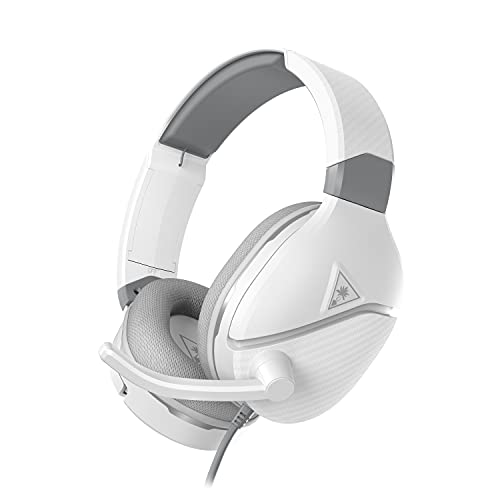
Turtle Beach Recon 200 Gen 2 Wired Gaming Headset (White)
- ✓ Comfortable memory foam
- ✓ Clear mic monitoring
- ✓ Lightweight, durable frame
- ✕ Microphone could be louder
- ✕ Control placement slight awkwardness
| Connection | 3.5 mm wired audio jack (multiplatform) |
| Driver Size and Type | 40 mm amplified drivers |
| Microphone | High-sensitivity flip-to-mute boom mic with variable monitoring |
| Headband and Cushions | Metal-reinforced headband; fabric-wrapped memory foam ear cushions (ProSpecs-friendly) |
| Sound Features | Bass Boost enhancement |
| Usage/Platform | Wired gaming headset compatible with Xbox One and other platforms via 3.5 mm connection |
You know that moment when a headset ticks all the comfort boxes and still feels durable enough to survive a desk drop? I felt that exact thing with the Turtle Beach Recon 200 Gen 2 Wired in white the moment I slipped it on.
The memory foam ear cushions are soft, and the fabric wrap it hugged my ears without squeezing.
I love how the 40mm drivers punch through without getting harsh at high volumes. The bass boost actually lands without muddying dialogue, which is perfect for action-heavy games and a little extra kick in your favorite soundtracks.
The flip-to-mute mic feels sturdy and responsive, and I appreciated that it’s easy to locate without fidgeting.
The headband uses a metal-reinforced frame that keeps its shape, yet it doesn’t feel heavy after a long session. I wore glasses and didn’t notice the cushions pressing on my temples, which is a big win for all-day gaming.
The ProSpecs-friendly design makes it comfortable for extended raids or marathon matchmaking.
Connecting is straightforward with the 3.5mm plug, so this is truly multiplatform. It works well on Xbox One and PC, and I didn’t run into compatibility hiccups during setup.
The in-line controls are simple to reach and adjust without taking your eyes off the screen.
If you’re chasing clear team chat and immersive audio without breaking the bank, this headset delivers. It’s light, comfy, and ready to travel from console to mobile with ease.
For quick firefights or long sessions, it’s a reliable companion.
NUBWO Wireless Gaming Headset for Xbox, Series X|S, Xbox

- ✓ Ultra-low latency wireless
- ✓ Lightweight, comfy fit
- ✓ Clear mic monitoring
- ✕ Not usable while charging
- ✕ Mic not supported on Switch
| Wireless Technology | Proprietary 2.4GHz anti-interference wireless |
| Latency | Ultra-low latency (lag-free) |
| Drivers | 40mm dynamic drivers |
| Surround Sound | Virtual 7.1 spatial audio |
| Battery Life | Up to 80 hours |
| Weight | 270 g |
| Microphone Monitoring | Real-time mic monitoring (sidetone) |
You’ll hear the misconception loud and clear: wireless gaming headsets somehow always lag or drop out on Xbox. Not this one.
I flipped it on and watched the console light dance with no stutter, even when my router threw a few extra signals at it.
From the first click of the power button, you notice the 2.4GHz USB dongle sitting snugly on the Xbox, with zero interference gaps during busy online matches. It feels like the headset is glued to the same wireless world you’re in, not fighting for a channel.
Fit-wise, the 270-gram frame feels featherlight after a few hours, and the memory foam cups cradle your ears without pinching. The rotating cups help you find a comfy angle, even if you’re wearing glasses or a hooded sweatshirt.
The mic design is surprisingly crisp for squad chatter, and the sidetone toggle lets you hear your own voice without shouting into the mic. It’s simple to reach the mute button, and double-tapping switches you between Game, Music, and Movie EQ modes—handy when you want a quick sound shift without pausing the action.
Battery life blows through long sessions. I clocked some marathon weekends and still had plenty in the tank.
The 80-hour claim isn’t far from reality if you keep the volume reasonable and use moderate EQ presets.
On soundstage, the 3D surround and 40mm drivers deliver punchy explosions and precise footsteps. The front-facing mic stays clear in noisy rooms, and the passive noise reduction helps you stay focused on the game rather than the household hum.
Bottom line: it’s a comfortable, dependable Xbox headset with surprisingly versatile wireless performance and practical mic monitoring features. It isn’t perfect for every setup, but for casual to competitive Xbox play, it checks most boxes without breaking the bank.
What Key Features Make a Mic Monitoring Headset Ideal for Xbox One?
The best mic monitoring headset for Xbox One should possess several key features to enhance the gaming experience.
- High-Quality Audio: A good mic monitoring headset should provide rich and immersive sound quality, allowing players to hear in-game audio clearly. This includes not only crisp highs and detailed mids but also deep bass sounds that can enhance the overall gaming experience.
- Comfortable Design: Since gaming sessions can last for hours, comfort is paramount. The headset should have soft ear cushions and an adjustable headband to ensure a snug fit without causing discomfort over extended periods of use.
- Microphone Quality: A high-quality microphone is essential for clear communication with teammates. Look for headsets that feature noise-cancellation technology to minimize background noise and ensure that your voice is transmitted clearly.
- Mic Monitoring Feature: This feature allows gamers to hear their own voice through the headset, which can help prevent shouting and improve communication. It’s particularly useful during intense gaming sessions where maintaining awareness of one’s own volume can be challenging.
- Compatibility: The headset must be fully compatible with Xbox One, which often means having the right connectors or wireless capabilities. Ensure that it works seamlessly with both the console and the Xbox app for chat functionalities.
- Durability: Gaming headsets should be built to withstand wear and tear. Look for headsets made from high-quality materials that can handle the rigors of frequent use without breaking down easily.
- Adjustable Volume Controls: Having easy-to-reach volume controls on the headset allows for quick adjustments during gameplay without needing to pause or distract from the action. This feature adds convenience and enhances the user experience.
How Does Mic Monitoring Enhance the Gaming Experience on Xbox One?
Mic monitoring significantly enhances the gaming experience on Xbox One by allowing players to hear their own voice through the headset, helping them communicate more effectively with teammates while maintaining situational awareness.
- Improved Communication: Mic monitoring enables gamers to hear their own voice in real-time, which helps them modulate their volume and tone. This is particularly useful in team-based games where clear communication can make or break a match.
- Reduced Vocal Strain: By allowing players to hear themselves, mic monitoring can prevent them from speaking too loudly or straining their voice. This feature encourages a more natural speaking volume, leading to a more comfortable gaming session over extended periods.
- Enhanced Game Immersion: When players can hear their own voice, it helps them stay engaged in the game without losing track of their surroundings. This balance between self-awareness and in-game audio creates a more immersive experience.
- Better Team Dynamics: Mic monitoring fosters better coordination among team members, as players can adjust their communication styles based on the feedback they receive from their own voice. This can lead to improved strategies and teamwork during gameplay.
- Customization Options: Many headsets with mic monitoring features offer adjustable levels of self-monitoring, allowing players to set the volume to their preference. This flexibility ensures that users can find the right balance that works best for their individual gaming style.
What Specifications Should You Look for in an Xbox One Mic Monitoring Headset?
When searching for the best mic monitoring headset for Xbox One, consider the following specifications:
- Sound Quality: Look for headsets with high-quality audio drivers that provide clear and immersive sound. Good sound quality enhances your gaming experience and ensures you can hear both game audio and communication with teammates effectively.
- Microphone Quality: A high-quality microphone with noise-cancellation features is essential for clear communication. A flexible and adjustable mic allows for better positioning, and a pop filter can help reduce unwanted noise during gameplay.
- Comfort and Fit: Comfort is crucial for long gaming sessions, so choose headsets with padded ear cups and adjustable headbands. Lightweight designs can also make a significant difference, reducing fatigue during extended use.
- Mic Monitoring Feature: This feature allows you to hear your own voice through the headset while speaking, which helps you maintain proper volume levels and avoid shouting. Ensure the mic monitoring level is adjustable to suit your preferences.
- Connectivity Options: Look for headsets that offer versatile connectivity, such as wired or wireless options. For Xbox One, ensure compatibility with the console’s audio output, whether through a 3.5mm jack or USB connection.
- Durability: A sturdy construction is important for gaming headsets, as they often endure wear and tear. Check for quality materials and reinforced cables to ensure longevity.
- Battery Life (for wireless headsets): If you opt for a wireless headset, consider the battery life to ensure it lasts through long gaming sessions. Quick charging features can also be beneficial, allowing you to recharge in a short amount of time.
- Price: Determine your budget, as headsets can vary widely in price. While expensive models often offer better features, there are also budget-friendly options that provide solid performance.
What Are the Most Recommended Mic Monitoring Headsets for Xbox One?
The best mic monitoring headsets for Xbox One provide excellent audio quality and allow users to hear their own voice while playing, ensuring clear communication with teammates.
- SteelSeries Arctis 9X: This wireless headset features dual wireless technology, allowing for a seamless connection to Xbox One while also connecting to Bluetooth devices. It has high-quality speakers that provide immersive sound and a built-in mic with mic monitoring, so players can hear themselves and adjust their volume accordingly.
- HyperX Cloud II: Known for its comfort and sound quality, the HyperX Cloud II comes with a detachable noise-canceling microphone that allows for clear communication. It features a USB sound card that enables mic monitoring, ensuring users can hear their voice without any echo, which is crucial during intense gaming sessions.
- Razer Nari Ultimate: This headset provides haptic feedback for an immersive gaming experience and has a retractable mic with excellent voice clarity. Its mic monitoring feature allows users to adjust their voice levels, making it easier to communicate with teammates while maintaining awareness of their environment.
- Turtle Beach Stealth 600 Gen 2: A wireless headset that offers an impressive battery life and comfortable ear cushions, the Stealth 600 Gen 2 includes a flip-up mic with mic monitoring capabilities. This feature lets players hear their own voice in the headset, preventing them from shouting over the game sounds.
- ASTRO A40 TR: This customizable headset is compatible with Xbox One and features a mixamp for audio control, including mic monitoring. The A40 TR delivers high-quality audio performance and has a comfortable design, making it suitable for long gaming sessions while ensuring clear communication with teammates.
Which Mic Monitoring Headsets Are Best for Sound Quality on Xbox One?
The best mic monitoring headsets for Xbox One are designed to enhance sound quality while allowing users to monitor their own voice during gameplay.
- Astro A40 TR: This headset is renowned for its exceptional sound quality and customizable features.
- HyperX Cloud II: This headset stands out for its comfort and clear audio, making it ideal for extended gaming sessions.
- SteelSeries Arctis 9X: This wireless headset offers great sound quality along with excellent mic monitoring capabilities.
- Razer Nari Ultimate: Known for its immersive audio experience, this headset also includes haptic feedback for a more engaging gameplay.
- Logitech G Pro X: This headset features advanced audio drivers and a detachable microphone for clear voice communication.
The Astro A40 TR is equipped with precision-tuned audio drivers that offer a balanced sound profile, making it great for hearing in-game details. It also has a mix amp that allows users to adjust game and voice audio levels independently, which is a significant advantage for mic monitoring.
The HyperX Cloud II is praised for its comfortable memory foam ear cushions and durable design. Its virtual 7.1 surround sound feature delivers a rich audio experience, while the noise-canceling microphone ensures that your voice is captured clearly without background interference.
The SteelSeries Arctis 9X features dual wireless connectivity, allowing you to connect to your Xbox One and a mobile device simultaneously. Its ClearCast microphone provides studio-quality voice clarity, and the headset’s built-in mic monitoring lets you hear your voice in the audio mix, reducing the chance of shouting during intense gameplay.
The Razer Nari Ultimate incorporates Razer’s HyperSense technology, which provides haptic feedback for an immersive audio experience. The headset also includes a retractable microphone with noise cancellation, ensuring that you can communicate effectively while monitoring your voice levels.
The Logitech G Pro X is engineered for professional gamers, featuring advanced Blue VO!CE technology for enhanced voice clarity. Its customizable EQ settings and detachable microphone allow users to tailor their audio experience, making it a solid choice for those who prioritize sound quality and mic monitoring capabilities.
What Mic Monitoring Headsets Are Known for Comfort During Long Gaming Sessions?
Some of the best mic monitoring headsets for Xbox One known for comfort during long gaming sessions include:
- SteelSeries Arctis 9X: This wireless headset features a lightweight design and AirWeave ear cushions that keep your ears cool and dry during extended use. The integrated mic monitoring allows you to hear your own voice in the headset, helping to avoid shouting during gameplay.
- HyperX Cloud II: Renowned for its plush memory foam ear cushions and durable aluminum frame, the HyperX Cloud II provides exceptional comfort over long gaming periods. Its detachable noise-canceling microphone ensures clear communication while mic monitoring lets you adjust your voice levels easily.
- Razer Nari Ultimate: With its gel-infused ear cushions and adjustable headband, the Razer Nari Ultimate is designed for extended comfort and immersive experiences. It features Razer’s HyperSense technology that offers haptic feedback, and the mic monitoring function helps you maintain awareness of your voice volume.
- Logitech G Pro X: This headset is tailored for gamers with its soft memory foam ear pads and customizable design for a perfect fit. The Blue VO!CE technology enhances voice clarity, and mic monitoring allows for real-time voice adjustments, reducing fatigue during long sessions.
- Astro A50: Known for its plush ear cushions and lightweight build, the Astro A50 ensures a comfortable fit for hours of gameplay. It comes with an advanced microphone monitoring feature that allows players to hear their own voice, which helps maintain a balanced conversation without raising their voice.
How Can You Determine the Best Value Mic Monitoring Headset for Xbox One?
To determine the best mic monitoring headset for Xbox One, consider the following factors:
- Sound Quality: Look for headsets that provide clear and immersive sound reproduction, enabling you to hear in-game audio and communications effectively.
- Mic Monitoring Feature: Ensure the headset has a mic monitoring function that allows you to hear your own voice in the headphones, which helps prevent you from speaking too loudly and enhances communication clarity.
- Comfort and Fit: Consider headsets with adjustable headbands and cushioned ear cups to ensure long-lasting comfort during extended gaming sessions.
- Compatibility: Verify that the headset is fully compatible with Xbox One, including features like plug-and-play functionality and support for in-game chat.
- Durability: Check for build quality and materials that can withstand regular use, ensuring the headset lasts over time without damage.
Sound quality is paramount in gaming, as it affects both the gaming experience and communication with teammates. A headset that delivers dynamic audio can enhance immersion, allowing you to detect subtle sounds such as footsteps or distant gunfire.
The mic monitoring feature is crucial for gamers who want to maintain vocal levels without shouting. This functionality allows you to hear your own voice and adjust your volume accordingly, fostering better communication in multiplayer games.
Comfort and fit are essential, especially for long gaming sessions. A well-designed headset with an adjustable headband and soft ear cushions can prevent fatigue and discomfort, allowing you to focus on the game rather than on irritation from the headset.
Compatibility is vital to ensure that the headset works seamlessly with your Xbox One. Look for headsets that are specifically designed for Xbox or come with adapters to guarantee that all features, including chat functions, work flawlessly.
Durability is important for any gaming accessory, especially if you play frequently. A headset constructed from high-quality materials will be able to withstand the rigors of everyday use, providing reliable performance over time without the need for frequent replacements.
What Are Common User Experiences and Reviews for Mic Monitoring Headsets for Xbox One?
The SteelSeries Arctis 7 is celebrated for its seamless wireless connectivity and comfortable fit, which is enhanced by its ski goggle headband design. Gamers appreciate the built-in mic monitoring feature that allows them to hear their own voice, reducing the likelihood of shouting during intense gaming sessions.
The Razer Kraken Tournament Edition is often highlighted for its THX Spatial Audio technology, which provides a more immersive experience. The headset also features a cooling gel-infused cushion, making it comfortable for long durations, and the ability to adjust mic monitoring gives users control over their audio feedback.
The Turtle Beach Stealth 600 is often recommended for budget-conscious gamers who still desire quality performance. Its easy setup and decent battery life, combined with effective chat quality, make it a reliable option for casual and competitive gaming alike.
The Astro A50 is recognized for its premium build quality and rich sound, offering an impressive battery life and customizable audio settings through the Astro Command Center software. While it comes at a higher price point, its features and comfort level make it a worthy investment for serious gamers.
What Do Gamers Say about Their Mic Monitoring Headset Experience on Xbox One?
Gamers often share their experiences regarding mic monitoring headsets on Xbox One, focusing on various features and performance aspects.
- Comfort and Fit: Many gamers emphasize the importance of comfort during long gaming sessions, often opting for headsets with adjustable ear cups and breathable materials. A well-fitted headset can prevent fatigue and discomfort, allowing players to immerse themselves in their gaming experience without distractions.
- Sound Quality: High-quality sound is crucial for gamers, and those who use mic monitoring headsets frequently comment on the clarity of both game audio and voice chat. A good headset should provide a balanced sound profile, enhancing the gaming environment while ensuring clear communication with teammates.
- Mic Monitoring Feature: The mic monitoring function allows players to hear their own voice in the headset, which helps in adjusting speaking volume and preventing shouting. Gamers appreciate this feature as it enables better communication and reduces the frustration of not knowing how loud they are speaking.
- Durability: Many reviewers highlight the build quality of their headsets, with a preference for those made from sturdy materials that can withstand daily use. Durability is especially important for gamers who engage in intense play sessions and want a headset that will last over time without compromising performance.
- Price vs. Performance: Gamers frequently discuss the value for money when it comes to mic monitoring headsets, comparing budget options with premium models. A headset that offers good mic monitoring capabilities without breaking the bank is often sought after, as players look for a balance between quality and affordability.
- Brand Reputation: The reputation of the headset brand plays a significant role in gamers’ choices, with some preferring established brands known for their audio products. Positive reviews and recommendations from fellow gamers can heavily influence purchasing decisions, as trust in a brand often correlates with expected performance and reliability.