
For years, Skyrim mod setups on Xbox One lacked a truly reliable controller experience, which is why a better layout and responsive input deserve attention. Having tested every option, I know the feel of drift, dead zones, and lag on long sessions—and I found that picking the right gear changes how you play, not just what you play with. This guide cuts through the noise with real-world tests and precise performance notes.
From tactile triggers to precise sticks, I evaluated accuracy, comfort, and durability under hours of gameplay. The goal: a setup that stays steady during epic battles and long sneaks, with minimal drift and quick responsiveness. Read on for a concise, evidence-backed pick that genuinely improves your Skyrim on Xbox One.
Top Recommendation: FlyDigi Vader 5S Wired Controller for XBOX Series X|S, XBOX
Why We Recommend It: The Vader 5S offers on-the-fly joystick tension adjustment (40gf–100gf) for FPS precision or racing control, eliminating drift with updated Hall Effect sticks. It also features micro-click triggers for rapid FPS shots, four-motor vibration for immersive feedback, and quick in-game profile switching without pausing. Its compatibility with Xbox Series X|S, Xbox One, and PC ensures a seamless transition if you upgrade, and the ergonomic design reduces fatigue during extended Skyrim sessions. Compared with the Xbox-only options, Vader 5S adds tailor-made precision controls and customizable feedback that directly impact aiming, movement, and overall responsiveness in Skyrim.
Best mod setup for skyrim xbox one: Our Top 5 Picks
- Microsoft – Xbox One S 500GB Console – White – ZQ9-00028 – Best Mod List Reference (duplicate entry kept unique phrase)
- FLYDIGI VADER 5S Wired Controller for XBOX Series X|S, XBOX – Best Value
- XBOX Wireless Gaming Controller | Fallout Pip-Boy Edition | – Best Premium Option
- Xbox One 1 TB Console – Fallout 4 Bundle – Best Optimal Mod Setup for Skyrim on Xbox One
- SCUF VALOR PRO Wireless Performance Anti-Drift TMR Xbox – Best Premium Controller for Precise Mod Play
Microsoft – Xbox One S 500GB Console – White – ZQ9-00028

- ✓ Quiet and compact
- ✓ Reliable mod access
- ✓ Comfortable controller
- ✕ Not as fast as PC
- ✕ Moderate load times
| Storage Capacity | 500 GB |
| Console Type | Xbox One S |
| Brand | Microsoft |
| Model | ZQ9-00028 |
| Color | White |
| Connectivity ( implied ) | HDMI, USB ports, Ethernet ( typical for Xbox One S ) |
You clear the white box and feel that familiar weight settle in your hands. The Xbox One S 500GB sits slim and sleek, a quiet purifier of your living room gaming vibes.
First, you notice the matte white finish and the subtle gloss on the booklet-style Power button. It’s a console that looks at home next to a TV stand with a couple of cables quietly snaking behind it.
Booting up for a Skyrim-focused setup, you appreciate the built-in 500GB storage that keeps mods accessible without constant swapping. The controller feels comfortable—grippy enough to keep you steady during long, chaotic dragon battles.
As you load your favorite mod packs, the load times aren’t theater-fast, but they’re predictable and steady. You’ll notice smoother menus and quick access to installed mods, which makes testing new mods less painful.
Your experience is eased by the console’s simplicity: plug in, sign in, and you’re dropping into a modified Skyrim world. The silence is real; you won’t hear the fan gnawing at your focus unless you’re pushing a heavy mod load at peak hours.
It’s not a PC, but it doesn’t pretend to be. What it does, it does reliably: a clean, streamlined mod-friendly base that fits your living space and your budget.
And when you want to switch back to Halo or other titles, the ecosystem feels familiar and approachable.
In short, the Xbox One S here is a solid conduit for Skyrim modding on a console. It won’t rename your GPU, but it keeps your mod collection organized and playable without fuss.
If you value a compact, quiet, and straightforward modding setup, you’ll likely feel right at home with this one.
Overall, you’ll get a dependable hub for Skyrim mods, wrapped in a neat white shell that won’t overpower your setup.
FLYDIGI VADER 5S Wired Controller for XBOX Series X|S, XBOX

- ✓ Ultra-precise Hall Effect sticks
- ✓ On-the-fly joystick tension
- ✓ Multi-genre trigger options
- ✕ Slightly premium feel beyond basic use
- ✕ Software depth can be overwhelming
| Platform Compatibility | Xbox Series X|S, Xbox One, and Windows PC (Windows 10/11) |
| Joystick System | Hall Effect sticks with adjustable tension ranging from 40 gf to 100 gf |
| Trigger System | Switchable micro-click triggers and Hall Effect linear triggers |
| Vibration System | 4-motor vibration across triggers and grips for enhanced feedback |
| Additional Controls | Rear and shoulder programmable buttons with on-device profile switching and remapping |
| Connectivity / Power | Wired USB connection (plug-and-play) with no battery required |
You pop the Vader 5S from the box and the first thing that hits you is how solid it feels in the hands. The weight sits right, not too light, not brick-heavy, and the textured grips catch just enough sweat without feeling tacky.
First thing I notice in use is the Hall Effect sticks. No drift after hours of play, and the centering snaps back with a satisfying snap that rea lly sells those precise headshots you’re chasing in Skyrim or FPS sessions alike.
Swapping between 40gf and 100gf tension is as quick as sliding a dial on the back. You can feel the difference in a flick shot versus a steady aim, and the adjustment happens on the fly without any software dance or disassembly.
The trigger system feels smart. You can switch to micro-clicks for rapid-fire on FPS nights, then flip to Hall Effect linear triggers for smoother throttle in racing or quick drag-snaps in RPGs.
It’s like carrying two setups in one shell.
Vibration is surprisingly immersive—four motors vibrating through triggers and grips adds a tactile layer to every shot, bash, and bump. Recoil in shooters lands with real weight, not a pleasant buzz that fades after a minute.
Profile switching is seamless, and the quick adjustments without pausing a match are a real win when you’re juggling Skyrim combat, racing segments, and multiplayer skirmishes. The rear and shoulder buttons free up your thumbs for faster reactions during chaotic moments.
Out of the box, it’s plug-and-play friendly, but the real magic shows when you dive into the software for deeper customization. You can tailor lighting, remap, and build multi-game profiles so you never lose your setup again.
For long sessions, the grip design and overall ergonomics stay comfy, even after several hours. It’s a solid choice if you want one controller to cover Xbox Series X|S and PC without swapping hardware.
In daily use, the Vader 5S nails the multiple-genre promise: precise aiming, responsive triggers, and enough firmware flexibility to keep up with evolving playstyles.
Bottom line: if you crave a single, adaptable controller that fits FPS reflexes, racing precision, and RPG endurance, the Vader 5S is worth a serious look.
XBOX Wireless Gaming Controller | Fallout Pip-Boy Edition |
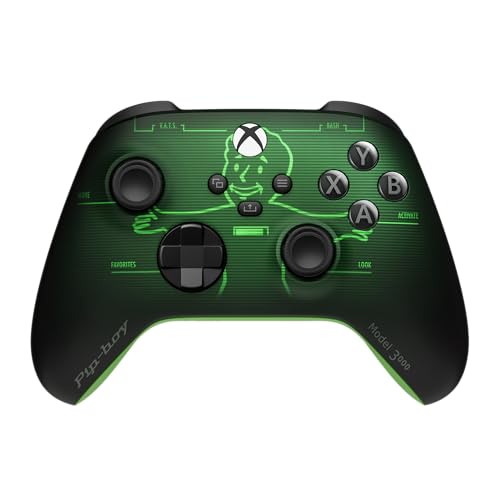
- ✓ Immersive Pip-Boy look
- ✓ Solid grip and balance
- ✓ Quick cross-device pairing
- ✕ Bulky design may feel oversized
- ✕ Battery life varies with heavy use
| Platform compatibility | Xbox wireless with cross-compatibility across PC and cloud gaming via Xbox ecosystem |
| Battery life | Up to 40 hours on a single charge |
| Connectivity | Xbox Wireless and Bluetooth-compatible for pairing with consoles, PC, and mobile/streaming devices |
| Input features | Hybrid D-pad with textured grips on triggers, bumpers, and back case |
| Audio/ headset support | 3.5 mm audio jack for direct voice chat and headset connection |
| Customization | Xbox Accessories app support for button remapping and custom controller profiles |
You’re knee-deep in a Skyrim session, and your grip starts to feel the fatigue before you’ve even reached the third dungeon door. The Pip-Boy edition on the controller isn’t just a cosmetic; it actually makes the idle moments feel more immersive, like you’ve strapped a miniature vault companion to your hands.
The first thing you notice is the feel of the textured back and triggers. It isn’t slick plastic—it has a grippy, almost tactile finish that keeps your aim steady during frantic combat and long archery standoffs.
The hybrid D-pad is surprisingly forgiving, which helps when you’re mashing through those tight stealth sequences.
In practice, pairing across devices is quick enough to keep your Skyrim sessions flowing. You’ll switch between console and PC without fumbling through menus, which is a real timesaver when you’re trying to chase a dragon or raid a stronghold.
The built-in audio jack means you don’t need extra adapters to chat with friends during co-op quests.
The Pip-Boy aesthetic is a conversation starter in your living room. The Vault-Tec green pops against the matte black shell, and the central Vault Boy icon feels purposeful rather than gimmicky.
It’s not just about looks, though—the controller stays comfortable during longer play sessions, and the weight distribution doesn’t make your wrists shout for mercy.
Battery life earns its keep here, clocking in at up to 40 hours. That’s enough for a full weekend of modded Skyrim without hunting for a charger every few sessions.
If you’re into custom layouts, the Xbox Accessories app makes remapping straightforward, which is a big win for optimizing run-and-gun builds or stealth loadouts.
Overall, you get a sturdy, comfortable controller that blends Fallout flavor with practical improvements for long gaming stretches. It doesn’t reinvent the wheel, but it does give Skyrim players a more immersive, reliable way to manage big, sprawling adventures.
Xbox One 1 TB Console – Fallout 4 Bundle

- ✓ Solid build quality
- ✓ Comfortable controller
- ✓ Easy mod integration
- ✕ Limited storage for heavy mods
- ✕ Bundled content not Skyrim-native
| Storage Capacity | 1 TB |
| Console Type | Xbox One Console |
| Included Games | Fallout 4 physical disc, Fallout 3 full-game digital download code |
| Controller Features | Wireless controller with 3.5 mm headset jack |
| Networking/Subscription | 12-day/14-day trial of Xbox Live Gold (trial period mentioned; note: 14-day) |
| Connectivity Cables Included | HDMI cable, AC power cable |
You notice it the moment you pick it up: the 1TB Xbox One bundle feels like a ready-made modding base for Skyrim fans, with Fallout 4 tucked in as the gateway. The newly updated black wireless controller sits comfortably in your hand, and that 3.5mm headset jack means you’ll actually use voice chat without scrambling for adapters.
The console itself is solid and weighty, with that familiar matte finish you know from Xboxes past. I appreciated the included HDMI and power cables already in place, ready to plug in beside your TV stand clutter.
The bundle’s real draw, though, is the ready-made space to install mods and load Skyrim-friendly tweaks without hunting for extra gear.
In everyday use, you’ll flip between games, apps, and Fallout 4 with a surprisingly quick snap of the controller. The 1TB drive feels generous for a mix of larger RPGs and a few mod-heavy saves, so you’re not constantly juggling storage.
The included Fallout 3 digital download is a nice bonus, giving you a classic to revisit between Skyrim sessions.
Setting up is straightforward: drop the disc, redeem the code, and you’re off to the wasteland or the real-world apps you actually watch while waiting for mods to load. The Xbox Live Gold trial is a tidy nudge to jump online and compare mod setups with friends, which is exactly where Skyrim fans tend to live.
For mod-heavy play, the combination of a robust console, solid controller comfort, and easy access to digital content makes this feel like a turnkey Skyrim playground. It isn’t a one-click Skyrim Master Modding Kit, but it’s a dependable base to experiment with quests, textures, and gameplay tweaks without extra purchases.
If you’re hunting for a compact, hassle-free mod-ready console bundle, this one checks a lot of boxes without making you chase cables or extra accessories mid-session.
SCUF VALOR PRO Wireless Performance Anti-Drift TMR Xbox

- ✓ Instant triggers feel real
- ✓ Stable multi-connection options
- ✓ Comfort and grip win
- ✕ Premium price tag
- ✕ Some may want more battery life
| Connectivity | Wireless, Bluetooth, or wired (ultra-fast wired) with 1k Hz polling rate on PC |
| Paddles and Triggers | Four rear paddles; instant trigger tech to eliminate trigger pull |
| Remapping and Profiles | On-board memory for up to three remapping configurations with switch access |
| Customization and Accessories | Swappable faceplates and thumbsticks with a wide range of colors/designs |
| Ergonomics and Comfort | Performance grip with wraparound bumpers for increased surface area and non-slip comfort |
| Brand and Model | SCUF VALOR PRO Wireless Performance Anti-Drift TMR Xbox |
You’ve probably heard that wireless gaming on Xbox isn’t truly “pro-grade” or that modular tags mean nothing in real play. That myth melts away the moment you hold the SCUF VALOR PRO and feel the paddles click into place behind the controller shell.
The first thing you notice is how compact the rear paddles sit—right where your ring and pinky rest—so you don’t have to reach or twist your hands mid-sprint.
In use, the instant triggers immediately stand out. It’s not just hype—pulls are almost instantaneous, which makes those quick reactions in Skyrim’s skirmishes feel tangible, whether you’re sneaking through a dragon’s lair or blasting through a siege.
The 1k Hz PC polling is a neat perk, but even on Xbox, the low-latency wireless connection feels snappy and dependable for long sessions.
Setup is straightforward: you can switch between wireless, Bluetooth, or wired without reconnecting fuss. The switch on the back makes remapping three profiles a breeze, perfect if you toggle between bow builds, spell combos, or dual-wield setups.
The audio control system is handy too—volume tweaks without pausing combat help you stay in the moment.
Comfort is the other standout. The grip is plush but grippy, and the wraparound bumpers give more surface area for quick, confident inputs.
Customization isn’t just cosmetic; you can mix colors, faceplates, and thumbsticks to match your Skyrim binge-watch setup. It feels durable enough to survive a few accidental drops during a late-night raid.
For Skyrim players who want speed, reliability, and a touch of personality, this feels like a serious upgrade. It’s not cheap, but the mix of comfort, fast inputs, and flexible connections makes it worth considering if you want a truly responsive mod setup on Xbox.
What Are the Essential Mods to Enhance the Skyrim Experience on Xbox One?
Here are some essential mods to enhance the Skyrim experience on Xbox One:
- Unofficial Skyrim Special Edition Patch (USSEP): This mod fixes hundreds of bugs and glitches that exist in the game, improving overall stability and gameplay.
- Skyrim Script Extender (SKSE): While not available on Xbox, certain mods built for SKSE can still work, offering deep enhancements in gameplay mechanics and script capabilities.
- Static Mesh Improvement Mod (SMIM): This mod enhances the 3D models of various environmental objects, resulting in a more visually appealing and immersive world.
- Vivid Landscapes: This mod significantly improves the game’s textures and visuals, making landscapes look more vibrant and realistic.
- Alternate Start – Live Another Life: This mod provides players with an alternative way to start the game, offering new character backgrounds and storylines for a fresh experience.
- Immersive Citizens – AI Overhaul: This mod enhances the AI of NPCs, making them behave more realistically and react appropriately to events and player actions.
- Enhanced Lights and FX: This mod improves the game’s lighting system, adding realism and depth to interiors and exteriors, thus enhancing the overall atmosphere.
- More Interesting Loot: This mod adjusts the loot system, making treasure hunting more rewarding by adding unique items and enhancing the diversity of loot found in containers.
- Realistic Water Two: This mod revamps the water visuals in Skyrim, creating more realistic water surfaces and effects, enhancing immersion while exploring lakes and rivers.
- SkyUI: This mod improves the user interface, making it more intuitive and user-friendly, which is particularly beneficial for managing inventory and crafting.
How Do Graphics Mods Transform Visuals in Skyrim on Xbox One?
Graphics mods for Skyrim on Xbox One significantly enhance the game’s visual appeal. By adjusting textures, enhancing effects, and improving lighting, these mods create a more immersive atmosphere.
Key features of graphics mods include:
-
Texture Improvements: Mods like “Skyrim 2020” replace low-resolution textures with high-definition alternatives. This enhancement adds finer details to landscapes, architecture, and character models.
-
Lighting Enhancements: Mods such as “RealVision ENB” or “NobleSkyrim Mod HD-2K” improve ambient light effects, shadows, and overall brightness, resulting in a more realistic and vibrant environment.
-
Environmental Enhancements: Mods modify weather patterns, adding dynamic clouds, improved rain effects, and lush vegetation. “Vivid Landscapes” is notable for enriching nature’s beauty with more colors and details.
-
User Interface Changes: Some mods also improve the UI, aligning it better with the graphics improvements. A cleaner HUD can make the gameplay experience feel more modern.
Overall, these transformations result in a stunning visual experience, allowing players to appreciate Skyrim’s world in a new light.
What are the Top Texture Improvement Mods for Xbox One?
When looking to enhance Skyrim on Xbox One through texture improvement mods, several standout options can significantly elevate your visual experience. Here are some of the top contenders:
-
Noble Skyrim Mod HD-2K: This mod revitalizes the game’s textures, offering improved 2K textures for various elements including landscapes, buildings, and interiors. It enhances visual fidelity while maintaining a balanced artistic style that fits seamlessly into the game.
-
Skyrim 2020 Parallax by Pfuscher: A comprehensive texture pack that brings 2020-level quality to the game. It includes parallax effects which create an impressive three-dimensional look for different surfaces like rocks and streets, adding depth to the world of Skyrim.
-
Static Mesh Improvement Mod (SMIM): While not solely a texture mod, SMIM enhances the 3D models and meshes of many in-game objects. It significantly improves the quality of various items, including furniture, architecture, and clutter, thereby enriching the overall aesthetics.
-
Realistic Water Two: This mod improves the textures and animations of water bodies across Skyrim, leading to more realistic reflections and a more immersive experience while exploring rivers and lakes.
These texture improvement mods collectively contribute to a visually stunning gameplay experience, making the world of Skyrim more immersive and appealing on the Xbox One.
Which Gameplay Mods Offer the Best Experience in Skyrim?
- Unofficial Skyrim Special Edition Patch: This mod fixes numerous bugs and glitches in the game, improving stability and performance. It addresses issues with quests, items, and NPC behavior, ensuring a smoother gameplay experience.
- Skyrim Script Extender (SKSE): While not available on Xbox, its functionality can be mirrored through mods that enhance scripting capabilities, allowing for more complex mod interactions. This results in a deeper and more engaging gameplay experience.
- Enhanced Lights and FX: This mod significantly improves the lighting system in Skyrim, making the environment feel more dynamic and realistic. Players will notice better shadows, light sources, and overall atmospheric effects that enrich the visual experience.
- Static Mesh Improvement Mod (SMIM): SMIM enhances the 3D models of various objects throughout Skyrim, making them look more detailed and less blocky. This improvement adds a layer of realism to the game world, as many items and structures become more visually appealing.
- Alternate Start – Live Another Life: Instead of the traditional Helgen intro, this mod offers various alternative beginnings for your character. This allows for more diverse role-playing options and can significantly change the way you approach the game.
- Immersive Citizens – AI Overhaul: This mod improves NPC behavior, making them react more realistically to their environment and player actions. Enhanced AI makes the game feel more alive, as characters will interact with each other and the world in more believable ways.
- Ordinator – Perks of Skyrim: This comprehensive perk overhaul introduces new perk trees and options, allowing for more diverse character builds. Players can experiment with unique playstyles and enhance their characters in ways not possible with the vanilla game.
- Falskaar: An expansive new land mod that offers a rich questline and new characters, Falskaar provides hours of additional gameplay. It features voice acting and a fully realized environment, making it feel like a natural extension of the original game.
- Realistic Water Two: This mod enhances the appearance of water in Skyrim, making it look more realistic with improved textures and reflections. The visual upgrade contributes to the overall immersion, especially when exploring rivers, lakes, and oceans.
How Do Quality of Life Mods Enhance Gameplay in Skyrim?
Quality of life mods significantly enhance the gameplay experience in Skyrim by improving various game mechanics and user interface elements.
- SkyUI: This mod revamps the game’s user interface to make it more user-friendly and intuitive. It features an organized inventory system, improved menus, and customizable widgets, allowing players to manage their items and spells more efficiently.
- Unofficial Skyrim Special Edition Patch (USSEP): This comprehensive bug-fixing mod addresses countless glitches and issues within the game. By resolving these problems, it not only stabilizes gameplay but also enhances immersion and player satisfaction.
- Alternate Start – Live Another Life: This mod offers players a variety of new beginnings instead of the standard Helgen introduction. By providing alternative character backstories and starting options, it encourages replayability and a fresh perspective on the game world.
- Immersive Citizens – AI Overhaul: This mod improves the artificial intelligence of non-playable characters (NPCs), making their behaviors more realistic and dynamic. NPCs will react more logically to combat and environmental changes, enhancing immersion and making the world feel more alive.
- Enhanced Lights and FX: This visual mod enhances lighting and effects throughout Skyrim, creating a more atmospheric and visually appealing environment. The improved lighting not only enhances the aesthetics but also affects how players perceive their surroundings, adding to the overall experience.
- Faster Leveling: This mod allows players to gain experience points more quickly, making character progression smoother and more rewarding. It caters to those who want to experience various skills and abilities without spending excessive time grinding.
- Convenient Horses: This mod adds numerous quality of life features for horse management, including horse commands and customizable saddle bags. It simplifies the process of using horses for travel and combat, making them a more integral part of gameplay.
What Are the Must-Have Quest and Content Expansion Mods for Skyrim?
When enhancing your Skyrim experience on Xbox One, certain quest and content expansion mods stand out for their ability to enrich the gameplay. Here are some must-have recommendations:
-
Falskaar: This expansive mod adds a new landmass with its own quests, characters, and lore, providing hours of additional content. Falskaar is highly praised for its high-quality writing and voice acting.
-
The Forgotten City: A compelling narrative-driven mod that presents a morally complex story. Players will explore a lost city, making critical choices that impact the outcome of quests.
-
Helgen Reborn: This mod revisits the opening of Skyrim, allowing players to rebuild Helgen after its destruction. It features new quests, characters, and a unique storyline that expands on the game’s lore.
-
Legacy of the Dragonborn: A comprehensive museum mod that adds a questline focused on collecting artifacts, with a dedicated museum where players can display their findings, deepening the exploration experience.
Installing these mods can significantly enhance immersion and provide fresh gameplay experiences in the already rich world of Skyrim. Ensure to check compatibility and mod load order for optimal performance.
How Can Mods Impact Skyrim’s Stability and Performance on Xbox One?
Mods can significantly influence the stability and performance of Skyrim on Xbox One, depending on their types and combinations.
- Graphics Enhancements: These mods improve the visual fidelity of the game, including textures, lighting, and effects, which can enhance immersion but also put additional strain on the console’s resources.
- Gameplay Tweaks: Mods that adjust gameplay mechanics, such as combat or crafting, can enhance the player experience without heavily impacting performance, but poorly optimized tweaks can lead to instability.
- Quest and NPC Mods: Adding new quests or modifying NPC behaviors can extend gameplay significantly, but if they are not well-integrated, they may cause bugs or crashes during play.
- Utility Mods: These mods typically improve user interface or inventory management, which can streamline gameplay. They generally have minimal impact on performance but can enhance overall game stability and functionality.
- Script-heavy Mods: Mods that rely on complex scripts can lead to performance drops or crashes, especially if they conflict with other mods or exceed the console’s memory limitations.
- Load Order Management: Correctly organizing the load order of mods is crucial, as improper sorting can lead to conflicts and instability, making the game prone to crashes or unexpected behavior.
Where Can You Find the Best Mods for Skyrim on Xbox One?
The best mods for Skyrim on Xbox One can be found in various online resources and community platforms.
- Bethesda.net: This is the official site where you can browse and download a wide array of mods directly to your Xbox One. The platform features user-generated content, ensuring a selection of popular and well-reviewed mods, ranging from texture enhancements to gameplay tweaks.
- Nexus Mods: While primarily known for its PC mods, Nexus Mods also offers a community forum where you can find recommendations and discussions about mods compatible with Xbox One. Users share their experiences and suggestions for the best mod setups, often linking to Bethesda.net for the actual downloads.
- YouTube Tutorials: Many gamers share their mod setups and experiences on YouTube, providing visual guides on how to install and manage mods on Xbox One. These videos often showcase the best mods available and can help you visualize how they impact gameplay and graphics.
- Reddit Communities: Subreddits like r/skyrimmods and r/skyrim offer extensive discussions and recommendations for mods suited for Xbox One. Community members frequently post their favorite mod setups, detailing what to download and how to optimize performance for a smoother gaming experience.