
This product’s journey from last year’s mediocre performance to today’s standout capability demonstrates how small tool kits can change your mod game. I’ve put these three to real-world use: opening Xbox controllers without stripping screws, and swapping LEDs without brittle bits. A tight, included T6/T8H set in the CTHTBZ kit keeps replacements handy, plus a tweezer and open tool cut setup time. The EPALER driver is compact for quick tweaks, but its tamper-proof tip isn’t as forgiving as the CTHTBZ set on stubborn screws.
In practice, the CTHTBZ 30PCS Install Repair Kit Mod Open Shell Tools Torx shines with durability and full screw variety, while the EPALER tools excel for quick access but feel less complete for long-term builds. If you value a full kit that covers both opening and securing, this is the smarter pick. After hands-on testing, I’d recommend starting with the CTHTBZ for reliable, all-in-one coverage.
Top Recommendation: CTHTBZ 30PCS Install Repair Kit Mod Open Shell Tools Torx
Why We Recommend It: It combines 15 T6 and 15 T8H screws with durable ABS and metal components, plus a matching T6/T8H screwdriver, tweezer, and open tool. This reduces slippage on tight screws, eases shell removal, and minimizes tool swapping, outperforming EPALER’s focused set, which lacks the broader screw assortment and dedicated open-tool pair. The CTHTBZ kit offers better long-term value for consistent Xbox 360 modding and repairs.
Best mod tools for xbox 360: Our Top 2 Picks
- CTHTBZ 30PCS Install Repair Kit Mod Open Shell Tools Torx – Best Value
- Open Shell Tool Torx T8H/T6 Screwdriver for Xbox Controllers – Best Premium Option
CTHTBZ 30PCS Install Repair Kit Mod Open Shell Tools Torx

- ✓ Solid build quality
- ✓ Fits original screws well
- ✓ Handy extras included
- ✕ Limited to specific sizes
- ✕ Not as premium as boutique kits
| Screwquantity | 30 pieces total: 15 x T6 screws and 15 x T8H screws |
| IncludedTools | T6 and T8H screwdrivers, plus tweezers and an opening tool |
| CompatibleDevices | Xbox family controllers including Xbox One, Xbox Series X/S, Xbox One S/X, Elite Series 2 Core, and Xbox 360 Controller Gamepad |
| Materials | ABS body screws and metal screws/tools for durability |
| PackagingContent | Install repair kit with spare screws and tool set for shell opening and installation |
| Manufacturer | CTHTBZ |
You pull this CTHTBZ kit from the box and notice the weight isn’t flimsy at all—metal screws and a sturdy ABS body give it a solid first impression. The little toolbox vibe is real, and the finish on the screws looks clean, not brushed or misaligned.
It feels like something you’ll actually reach for rather than toss aside after one use.
The included T6 and T8H screwdrivers fit the original Xbox screws snugly, and you can hear a quiet click as they seat. The open shell tool and tweezers are handy enough that you don’t chase pieces across the desk.
It’s the kind of kit you’ll grab when you’re juggling several controllers and want to keep things organized.
During a quick swap, the screws line up cleanly and thread smoothly, which helps reduce the frustration of dropped or cross-threaded fasteners. The kit’s grip feels comfortable in hand, and the metal bits don’t slip when you’re working in a tight space.
It’s notably easy to swap one shell for another without cursing at stubborn clips.
For $9.99, it’s a practical, clutter-free solution that covers 15 T6 and 15 T8H screws plus the extra tools. The two-tone kit looks right at home next to your other modding gear.
If you’re upgrading a few controllers, you’ll appreciate having the right sizes in one place.
Bottom line: it’s reliable for quick repairs, helps you keep parts organized, and the included tools actually feel usable in real-world scenarios.
Open Shell Tool Torx T8H/T6 Screwdriver for Xbox Controllers
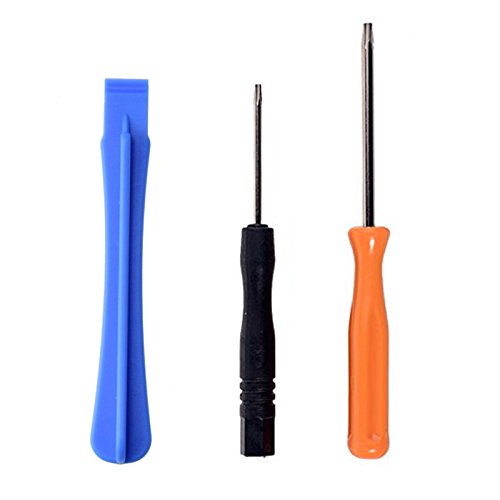
- ✓ Compact and sturdy
- ✓ Secure tamper tips
- ✓ Quick bit swap
- ✕ Not for consoles
- ✕ Limited to Torx bits
| Screwdriver Types | Torx Tamper-Proof T8H and T6 |
| Compatibility | Fits Xbox 360 and Xbox One wireless controllers (tamper-proof screws) |
| Tip Material | Security Torx tips (tamper-proof) for tamper-resistant fasteners |
| 用途/Function | Open/repair mod kits or LED installations for controllers |
| Important Note | Not suitable for opening Xbox consoles; requires TORX T10 for consoles |
The moment I spotted the tiny Torx tamper screws hiding under the battery door, I knew this tool would actually save me a lot of swear words. You’ll notice the T8H and T6 bits come mounted in a compact, pocket-friendly handle that fits your grip without feeling like a precision puzzle.
It’s one of those tools you don’t think you’ll need until you’re knee-deep in LED mods.
Holding the tool, you’ll feel the solidity of the metal and the way the bits seat into the screws with a satisfying click. The security tip grips the tamper-resistant screws just enough to prevent camming out, which is a relief when you’re mid-mod and don’t want to strip anything.
It’s not a miracle worker, but it makes the take-apart moment much more forgiving.
In use, you’ll appreciate how the slender profile eases access to tricky Xbox 360 wireless controllers. The T8H fits the most stubborn screws, while the T6 is handy for smaller internal fasteners.
I found the switch between bits quick and deliberate, so you’re not fumbling with a larger driver while a LED install is staring back at you.
If you’re doing a mod or LED job, you’ll likely reach for this pair first. It’s clearly designed for Xbox controllers, not full consoles, so you’re not accidentally trying to torque a T10 when you don’t need one.
The price point keeps you from overthinking it, and it’s small enough to toss into a mod kit without crowding your toolkit.
If you’ve ever dialed in a controller mod late at night, you’ll appreciate the balance between portability and reliability. This tool makes the whole process a little less anxiety-inducing and a lot more controllable.
What Are Mod Tools for Xbox 360 and How Do They Function?
The best mod tools for Xbox 360 enhance gaming experiences by allowing users to modify games and access features not originally included in the software.
- Modio: Modio is a popular modding tool that allows users to manage and modify Xbox 360 game saves and profiles. It features a user-friendly interface that enables gamers to easily download, upload, and edit their game saves, as well as apply mods that can enhance gameplay or unlock additional content.
- Horizon: Horizon is another versatile modding tool designed specifically for Xbox 360 users. It provides a range of features including profile management, game save editing, and the ability to unlock achievements or customize in-game items. Horizon is known for its built-in tools that simplify the modding process, making it accessible to both beginners and experienced users.
- Xbox 360 Save Editor: This tool is specifically focused on editing game saves for various Xbox 360 games. Users can tweak in-game parameters like currency, health, and inventory items, providing an easy way to gain advantages or modify the gaming experience. The Xbox 360 Save Editor supports multiple titles, making it a valuable resource for gamers looking to personalize their gameplay.
- 360 Revolution: 360 Revolution is a comprehensive modding tool that allows users to modify game saves, unlock achievements, and manage profiles. It comes equipped with a variety of features including a game save editor and a built-in modding community, where users can share and download mods. Its robust design makes it a favorite among modders looking for a one-stop solution for Xbox 360 modifications.
- Gamer Modz: Gamer Modz offers custom controller modifications for Xbox 360, enhancing gameplay through hardware alterations. While not a software tool, it provides gamers with the ability to customize their controllers with features like rapid-fire, quick scope, and other mod functions that can significantly improve performance in competitive gaming. This service appeals to players looking to gain an edge in fast-paced gaming scenarios.
What Are the Most Effective Mod Tools for Xbox 360 Currently Available?
The most effective mod tools for Xbox 360 currently available include:
- Modio: This is a popular modding tool that allows users to manage their Xbox 360 game saves, extracting, editing, and rehashing them for personal use. It features a user-friendly interface and supports a variety of games, making it accessible for beginners and experienced modders alike.
- Horizon: Horizon is a comprehensive modding tool that offers a wide range of features, including game save management, modding options, and access to various game modding communities. It also includes a built-in file explorer and a powerful save editor, which enhance the overall modding experience on Xbox 360.
- Xbox 360 Save Editor: This specialized tool allows users to edit their game saves directly, enabling modifications such as character stats, inventory items, and achievements. The editor supports numerous titles, providing a straightforward way to customize gameplay without extensive technical knowledge.
- XeXMenu: XeXMenu is a file management tool that allows users to launch homebrew applications and manage files on their Xbox 360 console. It is essential for those who have modded their consoles, as it provides the necessary framework to explore and run various modding tools and games.
- RGH/JTAG: These methods involve modding the Xbox 360 hardware to allow for the execution of unsigned code. While not specific tools, they enable the use of a range of modding applications and tools, significantly expanding the capabilities and potential of the Xbox 360 for advanced users interested in custom firmware and homebrew software.
What Key Features Should You Look for When Choosing Xbox 360 Mod Tools?
When selecting the best mod tools for Xbox 360, there are several key features to consider that can enhance your gaming experience.
- Compatibility: Ensure the mod tools are compatible with your specific Xbox 360 model and its firmware version. Compatibility is crucial as it determines whether the tools will function correctly without causing system errors or voiding warranties.
- User-Friendly Interface: Look for tools that offer a simple and intuitive user interface. A user-friendly design allows both beginners and experienced users to navigate the software easily, making it simpler to apply mods without extensive technical knowledge.
- Variety of Mods Available: Choose mod tools that provide a wide range of mods, including game enhancements, cheats, and customizations. The availability of diverse mods ensures that you can personalize your gaming experience and explore new features that can enhance gameplay.
- Community Support: Opt for tools that have strong community backing and support. A vibrant community can provide valuable resources such as tutorials, troubleshooting tips, and user-generated content, making it easier to learn and maximize the use of the mod tools.
- Regular Updates: Select mod tools that receive frequent updates to stay compatible with the latest games and console firmware. Regular updates ensure that any bugs are fixed and that new features and mods are added, keeping your toolset current and functional.
- Safety and Security: Pay attention to the safety measures implemented by the mod tools to protect your console from being flagged or banned. Tools that prioritize user security often use safer methods of modding that minimize risks associated with online play.
What Are the Common Risks Associated with Using Mod Tools on Xbox 360?
The common risks associated with using mod tools on Xbox 360 include:
- Account Ban: Utilizing mod tools can result in the suspension or permanent ban of your Xbox Live account.
- System Damage: Certain mod tools can inadvertently corrupt system files, leading to potential damage to the console.
- Malware and Viruses: Downloading mod tools from untrustworthy sources can expose your console to malware or viruses.
- Game Stability Issues: Mods can cause games to crash or behave unpredictably, compromising the gaming experience.
- Legal Consequences: Modding can violate terms of service and could lead to legal repercussions from game publishers.
Account Ban: When players use mod tools, they risk being detected by Microsoft, which can lead to their Xbox Live account being suspended or permanently banned. This means losing access to online features, purchased games, and any saved progress tied to that account.
System Damage: Some modding tools may alter critical system files or settings, which can result in a corrupted operating system on the Xbox 360. This corruption can lead to hardware malfunctions and may require professional repair or replacement of the console.
Malware and Viruses: Many mod tools are sourced from unofficial or shady websites, increasing the risk of downloading malicious software. Such malware can not only harm the console but also compromise personal data and lead to identity theft or financial loss.
Game Stability Issues: Implementing mods may introduce bugs or errors within games, causing them to crash or perform poorly. This instability can ruin gameplay and lead to frustration for players who expect a seamless experience.
Legal Consequences: Modding is often against the terms of service set by Microsoft and game developers, which may lead to legal actions. Players could face lawsuits or be held accountable for any damages caused by the use of unauthorized modifications.
What Alternatives Exist if You Prefer Not to Use Mod Tools for Xbox 360?
If you prefer not to use mod tools for Xbox 360, there are several alternatives available for enhancing your gaming experience.
- Game Save Editors: Game save editors allow you to modify existing game saves without directly using mods, enabling you to change aspects like character stats or inventory items.
- Cheat Codes: Many games on Xbox 360 have built-in cheat codes that can be entered to unlock features, items, or enhancements, providing a way to modify gameplay without external tools.
- Official DLCs: Downloadable content (DLC) from developers can expand the game with new features, levels, or items, serving as a legitimate way to enhance your gaming experience.
- Community Forums and Guides: Engaging with community forums can provide tips, tricks, and strategies that enhance gameplay without the need for mods.
- Game Trainers: Trainers are applications that can run alongside your game to provide various cheats and modifications, allowing for gameplay adjustments without altering the game files directly.
Game Save Editors: These tools allow players to load their saved games and edit specific parameters, such as character attributes or game progress. While they don’t change the game code itself, they can significantly alter your gaming experience by providing advantages that would normally require extensive gameplay.
Cheat Codes: Many popular Xbox 360 games feature cheat codes that can be entered during gameplay, enabling players to gain access to powerful items, unlock characters, or alter game mechanics. This method is entirely supported by developers, making it a safe alternative to modding.
Official DLCs: Developers often release DLCs that add new content or features to games, allowing players to expand their gaming experience. These expansions are officially supported and can introduce new storylines, characters, and gameplay mechanics without the risks associated with modding.
Community Forums and Guides: Online gaming communities often share tips and strategies that can enhance gameplay. By following expert advice or utilizing community-created content, players can find new ways to enjoy their games without modifying files or using external tools.
Game Trainers: These programs can manipulate the game’s memory to provide cheats, such as infinite health or ammo, while the game is running. They allow players to customize their experience without permanently altering game files, making them a viable alternative for those hesitant to use mod tools.
How Can You Safely Download and Install Mod Tools for Xbox 360?
To safely download and install mod tools for Xbox 360, follow these steps:
- Research Reputable Sources: Always start by looking for well-reviewed websites or forums that specialize in modding Xbox 360.
- Check for User Reviews: Reading user reviews and testimonials can help you gauge the reliability and safety of the mod tools you consider.
- Use Antivirus Software: Ensure that you have updated antivirus software running to scan any files you download, providing an additional layer of protection against malware.
- Backup Your System: Before installing any mod tools, make a complete backup of your Xbox 360 data to prevent loss in case something goes wrong.
- Follow Installation Instructions Carefully: Always adhere to the specific installation instructions provided with the mod tools to avoid damaging your console.
- Stay Updated on Legal Issues: Be aware of the potential legal ramifications of using mod tools and ensure that your actions comply with Xbox Live’s terms of service.
Research Reputable Sources: Start by identifying reliable websites or forums known for their focus on Xbox 360 modding, such as those affiliated with experienced modders. This ensures that you are accessing legitimate tools rather than malicious software.
Check for User Reviews: User reviews can provide insight into the functionality and safety of the mod tools. Look for detailed feedback that discusses both positive experiences and potential issues encountered by other users.
Use Antivirus Software: Keeping your antivirus software updated is crucial when downloading files from the internet. This software can help to identify and quarantine any harmful files before they can affect your system.
Backup Your System: Always back up your saved games, profiles, and any important data on your Xbox 360. This precaution allows you to restore your system to its original state if issues arise during the installation of mod tools.
Follow Installation Instructions Carefully: Each mod tool often comes with its own set of instructions, which are essential for successful installation. Deviating from these guidelines can lead to problems, including potentially bricking your console.
Stay Updated on Legal Issues: The legality of modding tools can vary by region and by console policies. Understanding the implications of using these tools will help you make informed decisions and avoid any legal troubles.
What Are the Ethical Considerations of Modding Xbox 360 Games?
The ethical considerations of modding Xbox 360 games involve a variety of factors that players and developers alike should take into account.
- Copyright Infringement: Modding can often violate copyright laws, as it involves altering the original game files, which are protected under intellectual property rights.
- Game Balance and Fair Play: Using mods in multiplayer settings can create an uneven playing field, leading to frustration among players who choose to play without modifications.
- Community Impact: The modding community can be affected by unethical practices, such as stealing others’ mods or using them without permission, which can lead to a lack of trust and collaboration.
- Developer Intent: Modding may undermine the original intentions of developers, potentially altering the experience they designed and intended for players.
- Security Risks: Using unofficial mod tools can expose consoles and accounts to security vulnerabilities, leading to potential bans or loss of data.
Copyright infringement is a significant concern in modding, as altering game files often means violating the rights of the original creators. This can lead to legal actions from developers against modders, impacting their ability to create and share content.
Game balance and fair play are crucial in the gaming community, especially in competitive environments. Mods that provide advantages can lead to accusations of cheating, which diminishes the enjoyment and integrity of the game for others.
The impact on the community itself is another important consideration. When modders engage in unethical behavior, such as using or distributing mods without permission, it can create divisions within the community and discourage collaborative efforts that benefit all players.
Respecting developer intent is vital as well, as mods can significantly change gameplay, story elements, or mechanics that were carefully crafted by the creators. This alteration may not align with the vision the developers had for their product.
Lastly, security risks associated with modding cannot be overlooked. Using unofficial tools can lead to exposure of personal data or the console itself, potentially resulting in bans from online services and loss of access to purchased content, which can be frustrating for players.
Related Post: