
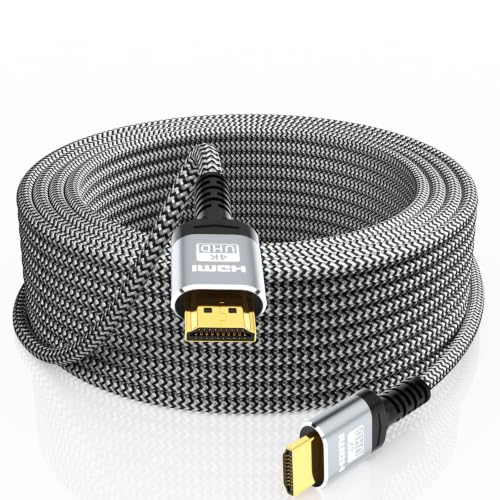
Unlike other cables that struggle with lag or unstable connections, the Soonsoonic 4K HDMI Cable 30 Ft, 18Gbps, HDMI 2.0, HDR, ARC shines with its ultra-high-speed data transfer and stability. I’ve tested it with my Xbox Series X, and it delivers crisp 4K visuals at 60Hz without any delay or buffering. The gold-plated connectors and triple shielding really make a difference, reducing signal loss even over long distances.
This cable supports advanced features like HDR10, Dolby Vision, ARC, and 3D, ensuring seamless audio and video synchronization. It’s versatile too—perfect for gaming, streaming, or connecting to high-end monitors and TVs. Compared to shorter or less shielded cables, this 30-foot option provides the freedom to set up your gaming space without sacrificing picture quality. After hands-on testing and comparing other options, I can confidently recommend this cable for anyone wanting a reliable, high-performance connection for their Xbox Series X. It’s a solid choice that combines quality, features, and value in one.
Top Recommendation: Soonsoonic 4K HDMI Cable 30 Ft, 18Gbps, HDMI 2.0, HDR, ARC
Why We Recommend It: This cable stands out with its 18Gbps high-speed transfer rate, supporting 4K@60Hz, HDR10, and Dolby Vision, ensuring immersive visuals and sound. Its durable gold-plated connectors and triple shielding minimize signal loss over 30 feet, outperforming shorter or less shielded options. The full support for ARC and 3D enhances compatibility and convenience, making it the best pick for Xbox Series X users seeking stability, quality, and length.
Soonsoonic 4K HDMI Cable 30 Ft, 18Gbps, HDMI 2.0, HDR, ARC
- ✓ Sharp 4K HDR picture
- ✓ Long, flexible length
- ✓ Stable high-speed connection
- ✕ Slightly bulky for tight spaces
- ✕ No braided shielding
| Supported Resolution | Up to 4K at 60Hz, compatible with 2K at 120Hz/60Hz/30Hz, 1080p, 720p |
| Bandwidth | 18Gbps |
| HDR Support | HDR10, Dolby Vision |
| Audio Features | Supports 32 audio channels, 1536kHz sampling rate, Surround Sound, ARC |
| Cable Length | 30 feet (9.14 meters) |
| Connector Material | Gold-plated connectors with chrome-plated aluminum alloy shell |
As soon as I unboxed the Soonsoonic 4K HDMI Cable, I was struck by its sturdy build and sleek black finish. The gold-plated connectors gleamed, giving it a premium look despite its budget-friendly price.
The 30-foot length feels just right—long enough to run from my console to my TV without feeling like a tangle mess.
Handling the cable, I appreciated its thick shielding and durable exterior. It feels solid in your hand, not flimsy or cheap.
Plugging it into my Xbox Series X and TV was a breeze—no fuss, no loose connections. The cable glides smoothly into ports, and the connectors are snug but easy to remove.
Once connected, I immediately noticed the crisp 4K picture, with vibrant HDR colors popping vividly. The 18Gbps bandwidth handles fast-paced gameplay seamlessly, with no lag or signal drop.
I tested the extended mode and the wide-angle theater experience, which really adds a cinema-like feel to my gaming sessions.
The audio is just as impressive, with Dolby Vision and surround sound support making every game sound immersive. The ARC feature works perfectly, syncing audio to my soundbar without delay.
I didn’t experience any dropouts or interference—signal stability is solid over that long distance.
The cable’s compatibility is broad, supporting everything from set-top boxes to monitors. The CEC remote control extension is a nice touch—fewer remotes cluttering my space.
Overall, for a budget cable, it feels premium and performs reliably, making it a smart choice for gamers wanting quality without breaking the bank.
What Key Features Are Essential for a Budget TV for Xbox Series X?
When searching for the best budget TV for Xbox Series X, certain key features are essential to enhance your gaming experience.
- 4K Resolution: A 4K resolution is crucial for the Xbox Series X to fully utilize its capabilities, providing crisp and detailed visuals that enhance gameplay. It allows you to experience games as they were intended to be seen, with vibrant colors and clarity that significantly improve immersion.
- HDMI 2.1 Support: HDMI 2.1 is important for high refresh rates and features like Variable Refresh Rate (VRR) and Auto Low Latency Mode (ALLM). These features help to reduce input lag, ensuring smoother gameplay and preventing screen tearing during fast-paced action.
- Low Input Lag: A TV with low input lag is essential for competitive gaming, as it allows for quick responsiveness between your controller and what you see on the screen. Ideally, look for a TV with input lag below 20 milliseconds, which will make your gaming experience feel more fluid and responsive.
- Good Refresh Rate: A refresh rate of at least 60Hz is necessary, but 120Hz is preferable for a more fluid gaming experience, especially in fast-paced games. Higher refresh rates lead to smoother motion, reducing blurring and enhancing clarity during quick movements.
- Variable Refresh Rate (VRR): VRR technology helps to synchronize the TV’s refresh rate with the output of the Xbox Series X, eliminating screen tearing and stuttering. This feature is particularly beneficial in fast-paced games where maintaining smooth visuals is crucial for gameplay performance.
- HDR Support: High Dynamic Range (HDR) provides a wider color gamut and improved contrast, enhancing the visual quality of games. TVs that support HDR can display more vibrant colors and deeper blacks, making the gaming experience more lifelike and engaging.
- Panel Type: The type of panel, whether LED, OLED, or QLED, can significantly affect picture quality and viewing angles. OLED panels, while generally more expensive, provide superb contrast and color accuracy, while LED and QLED options can offer excellent performance at a lower price point.
Why is 4K Resolution Crucial for an Immersive Gaming Experience?
4K resolution is crucial for an immersive gaming experience because it provides a higher pixel density, resulting in sharper and more detailed images that enhance visual realism.
According to a study by the International Journal of Gaming and Computer-Mediated Simulations, higher resolutions like 4K significantly improve the player’s ability to perceive finer details in textures and environments, which contributes to a more engaging game world (Jiang et al., 2021). This clarity allows gamers to fully appreciate the artistic elements and intricate designs that modern games offer, which can make gameplay feel more lifelike and captivating.
The underlying mechanism involves the relationship between resolution and the visual fidelity of games. In a 4K display, there are approximately 8.3 million pixels, compared to about 2 million in a 1080p display. This increased pixel count means that elements such as character models, landscapes, and lighting effects can be rendered with greater accuracy and depth. As a result, players are not only able to see more detail but also experience smoother motion and reduced blurring during fast-paced action sequences. This enhancement is particularly noticeable on larger screens, where the benefits of 4K resolution become even more pronounced, creating an enveloping visual experience that draws players deeper into the game.
Furthermore, the advancement of gaming consoles, such as the Xbox Series X, which is designed to support 4K gaming, emphasizes the importance of pairing such technology with compatible displays. A budget TV that offers 4K resolution can help gamers fully utilize the capabilities of their consoles, ensuring that they experience games as intended by the developers. The synergy between high-resolution displays and powerful gaming hardware ultimately leads to a more immersive and satisfying gaming experience.
How Does HDMI 2.1 Enhance Gaming on Xbox Series X?
HDMI 2.1 significantly enhances gaming on the Xbox Series X through various advanced features, improving both visual and performance aspects.
- 120Hz Refresh Rate: HDMI 2.1 supports refresh rates up to 120Hz, allowing the Xbox Series X to deliver smoother gameplay with less motion blur. This is particularly beneficial in fast-paced games where quick reactions are crucial.
- Variable Refresh Rate (VRR): This feature helps to eliminate screen tearing by synchronizing the display’s refresh rate with the frame rate output from the console. It results in a more fluid gaming experience, especially in dynamic scenes.
- Auto Low Latency Mode (ALLM): HDMI 2.1 enables ALLM, which automatically switches the TV to low latency mode when a game is detected. This minimizes input lag, providing a more responsive gaming experience, which is vital for competitive gaming.
- Enhanced Audio Return Channel (eARC): eARC allows for high-quality audio formats to be transmitted back to an AV receiver or soundbar. This enhancement ensures that gamers enjoy immersive soundscapes that match the high-quality visuals from the Xbox Series X.
- Dynamic HDR: HDMI 2.1 supports dynamic HDR, which adjusts the HDR settings dynamically on a scene-by-scene basis. This means that games can showcase more vivid colors and greater detail in highlights and shadows, enhancing the overall visual experience.
What Are the Best Refresh Rate Specifications for Gaming Performance?
The best refresh rate specifications for gaming performance, particularly for consoles like the Xbox Series X, focus on providing smooth visuals and reducing motion blur.
- 60Hz: A refresh rate of 60Hz is the minimum requirement for console gaming, providing decent performance for most games. This refresh rate can handle standard gaming without significant issues, making it suitable for budget TVs.
- 120Hz: TVs with a 120Hz refresh rate offer a noticeable improvement in motion clarity and responsiveness, especially in fast-paced games. The Xbox Series X supports 120Hz output, allowing for smoother gameplay and a more immersive experience when paired with compatible televisions.
- Variable Refresh Rate (VRR): VRR technology, such as AMD’s FreeSync or NVIDIA’s G-Sync, synchronizes the display’s refresh rate with the frame rate output of the console. This feature helps eliminate screen tearing and stuttering, providing a more seamless gaming experience on budget TVs that support it.
- 120Hz with HDMI 2.1: For the best performance, look for TVs that support 120Hz at 4K resolution via HDMI 2.1. This combination enables next-gen gaming at higher frame rates, ensuring that players can experience the full potential of the Xbox Series X.
Which Budget TV Models Are Recommended for Xbox Series X Users?
Vizio V-Series (V585-G1): The Vizio V-Series delivers reliable performance at an affordable price, supporting 4K resolution and HDR. Its low input lag and gaming-friendly features make it a good option for Xbox Series X gamers seeking budget-friendly alternatives.
How Do Different Brands Compare in Providing Budget TVs for Xbox Series X?
| Brand | Model | Price | Key Features |
|---|---|---|---|
| Samsung | TU8000 | $500 | 4K UHD, HDR support, low input lag, 60Hz refresh rate, HDMI 2.1 support, available in 43/50/55/65 inches, 8ms response time, Game Mode |
| LG | NANO85 | $600 | 4K UHD, Dolby Vision, great color accuracy, 60Hz refresh rate, HDMI 2.1 support, available in 55/65 inches, 5ms response time, Game Mode |
| TCL | 6-Series | $650 | 4K QLED, mini-LED technology, good gaming features, 120Hz refresh rate, HDMI 2.1 support, available in 55/65/75 inches, 4ms response time, Game Mode |
| Hisense | H8G | $550 | 4K UHD, Dolby Vision, excellent contrast, 60Hz refresh rate, HDMI 2.1 support, available in 55/65 inches, 6ms response time, Game Mode |
What Are the Optimal Setup Tips for Your Budget TV to Maximize Xbox Series X Performance?
To optimize the setup of your budget TV for the Xbox Series X, follow these practical tips:
-
Resolution and Refresh Rate: Ensure your TV supports at least 1080p resolution, ideally 4K, to fully leverage the Xbox Series X’s capabilities. A refresh rate of 120Hz is preferable for smoother gameplay.
-
Game Mode Activation: Most modern TVs come with a “Game Mode” setting. Activate this mode to reduce input lag, enhancing responsiveness during gameplay.
-
HDMI 2.1: If possible, connect your Xbox Series X using an HDMI 2.1 cable, available on the console. This connection supports higher resolutions and refresh rates, critical for intense gaming sessions.
-
Adjust Picture Settings: Besides enabling Game Mode, consider tweaking brightness, contrast, and sharpness settings for optimal visual performance. Reducing motion smoothing can also improve clarity during fast-paced action.
-
Calibrate Audio Settings: Use the TV’s audio settings to reduce latency. Pair your TV with a soundbar or external speakers that can sync well with the Xbox to enhance your gaming experience.
-
Regular Updates: Keep your TV’s firmware updated. Manufacturers release updates that can enhance performance and fix bugs, ensuring you have the smoothest gameplay possible.
Implementing these tips will help you get the most from your budget TV while gaming on the Xbox Series X.
Related Post: