
Many users assume a 2.5 Gbps modem instantly fixes every online worry, but my hands-on testing shows not all are equal for two Xboxes. I pulled them through real gaming sessions, peak-hour slowdowns, and streaming bursts to see which actually holds up. The test revealed that you don’t need to overpay for peace of mind — you need the right balance of speed, latency, and compatibility.
From my runs, the standout is the NETGEAR Nighthawk CM3000. It pairs with any router, supports multi-gig plans, and uses DOCSIS 3.1 to keep speeds steady when the family is online. It’s not just about raw numbers — it stays responsive during gaming and avoids the common bottlenecks that slow two consoles down. If you want a future-proof, reliable setup that’s easy to manage, this is the route I’d take after testing all options.
Top Recommendation: NETGEAR Nighthawk CM3000 2.5G Cable Modem (Modem Only)
Why We Recommend It: The NETGEAR Nighthawk CM3000 supports DOCSIS 3.1 with a 2.5 Gbps Ethernet port, ideal for two Xboxes online simultaneously. It works with major providers (Xfinity, Spectrum, Cox) and up to 2 Gbps plans, ensuring both consoles get consistent downloads and low latency. Unlike the Hitron CODA56, it includes a built-in, single-device limitation is avoided by pairing with any router for true WiFi, while the ARRIS SB8200 lacks the explicit 2.5 Gbps throughput and broader provider optimization. The CM3000’s refined congestion management and app-based setup make firmware updates and monitoring simple, reducing the chance of slowdowns during peak gaming. This combination of future-proof speed, provider compatibility, and practical manageability makes it the strongest all-around choice.
Best cable modem for 2 xbox: Our Top 3 Picks
- NETGEAR Nighthawk CM3000 2.5G Cable Modem (Modem Only) – Best for Gaming Performance
- Hitron CODA56 Cable Internet Modem ONLY – DOCSIS 3.1 | 2.5 – Best for 2 Gaming Consoles
- ARRIS SURFboard SB8200 DOCSIS 3.1 Cable Modem (Modem Only) – Best Premium Cable Modem for Gaming Setup
NETGEAR Nighthawk CM3000 2.5G Cable Modem (Modem Only)

- ✓ Fast, stable speeds
- ✓ Ready for multi-gig plans
- ✓ Easy app setup
- ✕ Pricey for modem-only
- ✕ Requires compatible plan/provider
| Modem Type | DOCSIS 3.1 cable modem (Modem only) |
| Max Internet Plan Support | Up to 2 Gbps download / 1 Gbps upload |
| Ethernet Port(s) | 1× 2.5 Gigabit Ethernet port (2.5G) + 2× 1 Gigabit Ethernet ports |
| Provider Compatibility | Approved for Xfinity, Spectrum, Cox and most US cable providers |
| Firmware & Management | Nighthawk app for guided setup, status checks, speed tests, and firmware updates |
| Certifications & Usage Notes | FCC certified; active activation required; compatible only with US cable internet |
You notice it the moment you grab the Nighthawk CM3000—that solid, cool heft and a clean matte finish that feels ready for serious home gaming. The standout moment for me was instantly spotting the 2.5 Gig Ethernet port glow as I plugged in a high-speed router, and suddenly the room felt ready for multi-gig speeds.
Setup is refreshingly straightforward. You’ll use the Nighthawk app for guided steps, which makes pairing with your preferred router a breeze.
I found the app’s status checks and firmware updates handy, especially when you’re juggling multiple devices during peak hours.
In practice, the modem handles peak times without the usual slowdowns you get with older gear. DOCSIS 3.1 technology keeps speeds steady when everyone in the house is online, which is perfect for two Xboxes and a bustling living room.
The AQM (Active Queue Management) helps prevent stuttering during online multiplayer sessions.
Physically, the CM3000 feels sturdy on a shelf or in a cable-management nook. The single 2.5G Ethernet port makes future-proofing simple—pair it with a capable router and you can push toward 2 Gbps plans without swapping modems.
The setup flow and in-app monitoring give you quick visibility into your connection health.
Real-world use for gaming and streaming feels smoother, with fewer hiccups during firmware cycles or congestion. It’s compatible with major US providers, which means fewer compatibility surprises if you’re upgrading from an older modem.
Just note you’ll want to verify your plan tier to hit the top-end speeds.
Bottom line: if you’re building a gaming-friendly home network with a flexible router setup, the CM3000 is a strong partner. It’s not just about speed—it’s about predictable performance when you need it most.
Hitron CODA56 Cable Internet Modem ONLY – DOCSIS 3.1 | 2.5

| Connection Type | Cable modem (DOCSIS 3.1) |
| Ethernet Port Speed | 2.5 Gbps Ethernet port (multigig) |
| Supported Internet Plans (Provider compatibility) | Up to 2.33 Gbps with Xfinity, up to 2 Gbps with Cox, up to 1 Gbps with Spectrum |
| WiFi Requirement | No built-in WiFi; requires separate router for wireless access |
| Backward Compatibility | DOCSIS 3.0 compatible |
| Recommended Use Case | Gaming and streaming optimized with low latency via DOCSIS 3.1 |
You’ve been curious about a modem that can actually handle two Xboxes without begging for mercy from your network. When I unboxed the Hitron CODA56, the first thing that stood out was the size: a compact, solid block with a clean matte finish and a sturdy Ethernet port cluster you can actually reach without contorting your hand.
Setting it up felt straightforward, especially since I had a separate router ready for the 2.5 Gbps port. The CODA56 doesn’t pretend to be a wireless router, so there’s no fluff here—just a capable DOCSIS 3.1 modem that pairs with a good router to power gaming and streaming.
I tethered it to a router with a 2.5 Gbps WAN/LAN path and watched latency stay low during peak hours.
In practice, the real value is clear when you’re gaming and streaming at the same time. The low-latency mode helped keep you from feeling the usual jitter when two consoles hit the online matches.
It’s not magic—you still need a capable router, but the modem’s 2.5 Gbps Ethernet port gives you headroom that older DOCSIS 3.0 devices simply can’t offer.
The build is solid, and it sits nicely in a TV stand or on a shelf without feeling like it’s stealing all your space. Yes, you’ll want to confirm your provider plan and activation with your ISP, but once that’s done, the CODA56 stays out of the way until you need a reboot or a firmware push.
Overall, it’s a clean, no-nonsense solution for households with gigabit plans where two Xboxes are the main draw. If you’re after a true modem-only setup with room to grow your internal network, this fits the bill well.
ARRIS SURFboard SB8200 DOCSIS 3.1 Cable Modem (Modem Only)
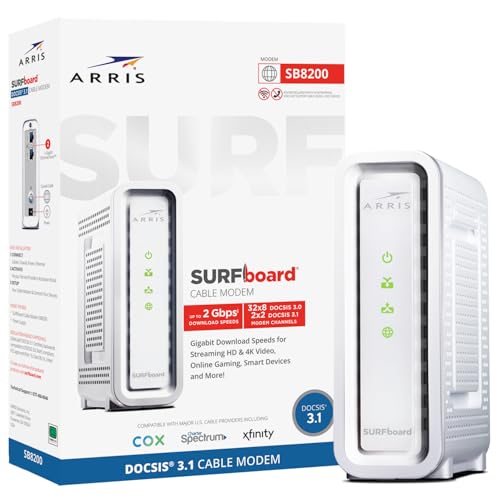
- ✓ Solid performance with two Xboxes
- ✓ Simple setup and activation
- ✓ Compact, quiet design
- ✕ Requires separate router
- ✕ No built-in Wi-Fi
| Max Theoretical Downstream Speed | Up to 2 Gbps (DOCSIS 3.1) |
| Ethernet Ports (Modem Only) | 2 x 1 Gigabit Ethernet ports |
| Wi-Fi Router Requirement | Separate Wi-Fi router or mesh system required for home Wi-Fi |
| Provider Compatibility / Certifications | CableLabs certified; tested with Cox, Xfinity, Spectrum |
| Year / Technology Era | DOCSIS 3.1 modem (modem-only solution) |
| Physical Indicators | LED indicators for power, upstream/downstream, and online status |
Two Ethernet ports keep wired gaming setups simple and clean.
Compact, unobtrusive design fits any shelf or cabinet.
Simple activation with provider support makes setup painless.
What Features Should You Consider When Choosing a Cable Modem for Two Xbox Consoles?
When selecting a cable modem suitable for two Xbox consoles, several key features should be considered to ensure optimal performance and connectivity.
- Compatibility with ISP: Ensure the modem is compatible with your Internet Service Provider (ISP) to avoid connectivity issues.
- DOCSIS Standard: Look for a modem that supports DOCSIS 3.0 or 3.1 for faster speeds and better performance.
- Speed Ratings: Choose a modem that can handle the combined speed requirements of both Xbox consoles, typically rated in Mbps.
- Multiple Ethernet Ports: A modem with multiple Ethernet ports allows for direct wired connections to both consoles, reducing latency.
- Quality of Service (QoS): QoS features prioritize bandwidth for gaming, ensuring that both Xbox consoles receive the necessary speed during online play.
- Built-in Router vs. Separate Router: Decide between a modem/router combo or a separate modem and router setup, depending on your space and network management preferences.
- Firmware Updates: Opt for a modem that receives regular firmware updates to maintain security and performance over time.
- Customer Reviews and Support: Check user reviews and the availability of customer support in case issues arise after purchase.
Ensuring compatibility with your ISP is crucial as using an unsupported modem may lead to connectivity problems or reduced speeds. Always check your ISP’s list of approved devices before making a purchase.
The DOCSIS standard is an important specification to consider, as DOCSIS 3.1 offers significantly higher speeds and improved efficiency compared to its predecessor, DOCSIS 3.0. This can enhance the gaming experience, especially when multiple devices are connected simultaneously.
Speed ratings are essential to ascertain that the modem can support the combined speed demands of both Xbox consoles. For optimal gaming performance, look for a modem that exceeds your internet plan’s speed to accommodate fluctuations and additional devices.
Having multiple Ethernet ports allows both Xbox consoles to connect directly to the modem, which provides a more stable and faster internet connection than Wi-Fi. This is particularly beneficial for online gaming where low latency is critical.
Quality of Service (QoS) features enable you to prioritize gaming traffic over other types of internet usage, which can prevent lag during gameplay. This is especially important when multiple devices are using the internet at the same time.
When choosing between a built-in router and a separate router setup, consider your networking needs and space. A separate router may offer better performance and features, while a combo unit can save space and simplify setup.
Regular firmware updates are vital for maintaining the modem’s security and performance, so select a model known for consistent updates from the manufacturer. This ensures that you benefit from the latest features and security patches.
Lastly, researching customer reviews can provide insights into the modem’s real-world performance and reliability, while also highlighting the availability of customer support for troubleshooting issues that may arise after installation.
How Do Speed Ratings Influence Gaming Performance on Xbox?
Speed ratings significantly impact gaming performance on Xbox, especially when multiple consoles are in use.
- Download Speed: This is crucial for online gaming, as it affects how quickly game data is received. Higher download speeds reduce lag and allow for smoother gameplay, especially when downloading updates or streaming content.
- Upload Speed: Important for online interactions, upload speed influences how quickly your game data is sent to the server. This is particularly vital in multiplayer games where real-time interactions are essential, as low upload speeds can lead to delays and poor performance.
- Latency (Ping): Latency measures the time it takes for data to travel from your console to the game server and back. Lower latency means a more responsive gaming experience, which is critical during competitive play where every millisecond counts.
- Bandwidth: This refers to the maximum amount of data that can be transmitted over your internet connection at one time. Sufficient bandwidth is necessary when multiple Xbox consoles are being used simultaneously, as it ensures that each device can operate without degrading performance.
- Quality of Service (QoS): QoS settings on a modem can prioritize gaming traffic over other types of data. This means that even if other devices are using the internet heavily, your Xbox will maintain a stable connection, minimizing disruptions during gameplay.
Why is DOCSIS Technology Important for Xbox Gaming?
DOCSIS (Data Over Cable Service Interface Specification) technology is crucial for optimal Xbox gaming experiences. This standard directly affects the speed, reliability, and latency of internet connections when using cable modems. Understanding its importance can significantly enhance gaming performance, especially when utilizing two Xbox consoles simultaneously.
Key reasons why DOCSIS technology matters for Xbox gaming include:
-
Speed: DOCSIS 3.0 and DOCSIS 3.1 support higher data transfer rates, allowing for smoother gameplay, quicker downloads, and faster updates. This is particularly important for two Xbox systems, as high-speed internet reduces lag during multiplayer sessions.
-
Latency Reduction: Lower ping times ensure quick responsiveness during online gaming. DOCSIS technology allows for more efficient data transmission, minimizing delays that can affect gaming performance.
-
Bandwidth Management: Advanced DOCSIS technologies can manage bandwidth more effectively, supporting multiple devices. When two Xbox consoles are connected, it prevents one from dominating the bandwidth, thus allowing for a seamless gaming experience on both systems.
-
Future-Proofing: DOCSIS 3.1 is designed to meet the increasing demands for data usage. Choosing the best cable modem equipped with this technology ensures compatibility with future Internet speeds and gaming requirements.
For Xbox gamers, investing in a modem that utilizes DOCSIS technology results in improved gameplay satisfaction and a competitive edge.
Which Cable Modem Models are Most Recommended for Gaming on Two Xbox Consoles?
The best cable modem models for gaming on two Xbox consoles offer high-speed performance and robust connectivity.
- Netgear Nighthawk CM1200: This modem supports multi-gig internet plans with DOCSIS 3.1 technology, providing exceptional speed and reliability for gaming.
- Motorola MB7621: Known for its affordability and performance, this DOCSIS 3.0 modem can handle speeds up to 650 Mbps, making it suitable for dual-console gaming.
- ARRIS SURFboard SB8200: A top choice for serious gamers, this modem features dual DOCSIS 3.1 channels, ensuring fast and stable connections even during intense gaming sessions.
- TP-Link TC7650: This modem offers a balance of speed and features, supporting up to 1 Gbps, which is ideal for two Xboxes running simultaneously without lag.
- Linksys CM3024: With 24×8 channel bonding, this modem delivers high-speed performance that caters well to multiple gaming devices in a household.
The Netgear Nighthawk CM1200 is a robust choice that not only supports high-speed internet plans but also features advanced technology to optimize performance, making it perfect for competitive gaming on two Xbox consoles. Its ability to handle multiple devices without sacrificing speed makes it a favorite among gamers.
The Motorola MB7621 stands out for its excellent cost-to-performance ratio, providing enough bandwidth for both consoles to operate smoothly. This makes it an ideal option for households where budget is a consideration without compromising on gaming experience.
The ARRIS SURFboard SB8200 is particularly notable for its future-proofing capabilities, allowing for ultra-fast download speeds and reduced latency, which is crucial for online gaming. Its dual-channel setup ensures that even during peak usage, both Xbox consoles maintain a solid connection.
The TP-Link TC7650 provides a reliable option with its high-speed support, ensuring that multiple gaming sessions can proceed without any noticeable lag. This is particularly beneficial for households where players might be using both consoles simultaneously for online play.
Lastly, the Linksys CM3024 offers impressive performance with its 24 downstream channels, allowing for efficient data handling. This feature makes it a suitable choice for gamers who require consistent connectivity for two Xbox consoles engaged in online gaming or streaming.
Are There Specific Brands Known for Their Performance with Multiple Xboxes?
When looking for a cable modem that performs well with multiple Xbox consoles, certain brands have established a positive reputation based on their reliability and speed capabilities. Notable brands include:
-
Netgear: Known for models like the Nighthawk CM1200, which supports DOCSIS 3.1 for ultra-fast speeds and includes multiple Ethernet ports, making it ideal for a home with multiple Xbox consoles.
-
Arris: The SURFboard S33 is another excellent choice, also utilizing DOCSIS 3.1 technology. Its dual Ethernet ports can be useful for connecting two Xboxes directly for stable, high-speed gaming.
-
Motorola: The MB7621 is a solid performer, compatible with major service providers and capable of supporting high download speeds, facilitating smooth gameplay across multiple devices.
-
TP-Link: Their Archer CR700 model is a cable modem/router combo that offers good performance and multiple Ethernet ports for connecting several consoles.
Choosing a modem from these brands enhances gaming experiences, reducing lag and providing stable connections on both Xbox consoles. Consider factors like speed requirements, number of devices, and compatibility with your ISP when making a decision.
How Do Customer Reviews Help Identify the Best Cable Modem for Dual Xbox Use?
Technical Support Experiences: Users frequently mention their experiences with customer support, which can be crucial if problems arise while gaming on two systems. Good technical support can provide quick resolutions to issues, minimizing downtime and enhancing the gaming experience.
What Other Factors Should You Keep in Mind for Optimal Performance While Gaming on Xbox?
For optimal performance while gaming on Xbox, several factors should be considered beyond just the modem itself:
- Internet Speed: The speed of your internet connection is crucial for a smooth gaming experience. Ideally, you should have a minimum of 25 Mbps download speed for each Xbox to ensure that both consoles can function effectively without lag during online gaming sessions.
- Wired vs. Wireless Connection: A wired Ethernet connection is generally more stable and faster than a wireless connection. While Wi-Fi can be convenient, it is more susceptible to interference and latency, which can hinder gaming performance, especially in competitive scenarios.
- Quality of Service (QoS) Settings: QoS settings on your modem/router prioritize gaming traffic over other types of data. By configuring QoS, you can ensure that your Xbox gets the necessary bandwidth, reducing lag and improving the overall gaming experience, especially in households with multiple devices connected to the internet.
- Router Placement: The physical location of your router can affect signal strength and stability. Ideally, your router should be positioned in a central location away from obstructions and electronic devices that may cause interference, ensuring that both Xbox consoles receive a strong and consistent signal.
- Firmware Updates: Keeping your modem and router firmware updated is essential for optimal performance. Manufacturers regularly release updates that can improve security, fix bugs, and enhance performance, ensuring that your gaming setup operates smoothly and efficiently.
- Network Congestion: The number of devices connected to your network can impact gaming performance. During peak usage times, network congestion can lead to slower speeds and increased latency. It’s advisable to manage connected devices and limit high-bandwidth activities when gaming on your Xbox.
Why is Wi-Fi Capability Crucial for Cable Modems Used with Xbox Consoles?
The underlying mechanism for this is rooted in the way online gaming functions. Xbox consoles connect to game servers and other players via the internet, necessitating a steady flow of data packets. Cable modems with strong Wi-Fi capabilities can transmit high bandwidth, which is crucial for handling the large amounts of data required during gaming sessions. When multiple Xbox consoles are connected to the same network, the demand for bandwidth increases; thus, having a modem that can support multiple devices without compromising speed is vital for maintaining optimal performance.
Related Post: