
For years, chatpads for Xbox One have lacked front-to-back quality and seamless wireless connectivity, which is why I’m excited about the MoKo RGB Backlight Keyboard for Xbox One Controller. I’ve tested it extensively, and its compact design feels perfect in hand, while the RGB backlit keys make nighttime gaming a breeze. The customizable lighting modes—rainbow, trichrome, or monochrome—really enhance the experience, especially in dark rooms.
This chatpad connects via a stable 2.4G wireless receiver, reliably working within 10 meters without lag, and the silicone keys are responsive and easy to type on. Plus, the inclusion of a 3.5mm audio jack means you can enjoy sound without extra adapters. It’s quick to pair, lightweight, and doesn’t interfere with controller ergonomics. After hands-on testing, I can confidently say this is the most well-rounded, feature-rich option for serious gamers who need quick, comfortable chat and typing ease without sacrificing style or range.
Top Recommendation: MoKo RGB Backlight Keyboard for Xbox One Controller
Why We Recommend It: This model outperforms competitors with its full RGB backlit keys, offering three lighting modes for customization. Its stable 2.4G wireless connection provides a reliable 10-meter range, and silicone keys ensure fast, accurate typing. Unlike others, it combines vibrant illumination with practical audio jack access, all in a lightweight, portable design, making it the best choice after thorough testing.
Best chatpad for xbox one: Our Top 5 Picks
- MoKo RGB Backlight Keyboard for Xbox One Controller – Best Wireless Chatpad for Xbox
- TiMOVO Green Backlight Keyboard for Xbox Controller, Black – Best Budget Chatpad for Xbox
- Xbox One Chatpad with Headset – Best Chatpad for Xbox One Controller
- Auarte Keyboard for Xbox Series X/S, One, Elite Controllers – Best Compatible Chatpad for Xbox
- MoKo Green Backlight Keyboard for Xbox One Controller, Black – Best Premium Option
MoKo RGB Backlight Keyboard for Xbox One Controller

- ✓ Bright RGB backlight
- ✓ Easy wireless pairing
- ✓ Compact and portable
- ✕ Needs controller power above 20%
- ✕ Not compatible with Xbox One X
| Connectivity | 2.4G wireless connection with a range of up to 10 meters |
| Backlight Modes | Rainbow breathing, trichrome, and monochrome modes |
| Number of Keys | 47 keys for typing and chat functions |
| Power Source | Powered by Xbox controller with a recommended controller battery level above 20% |
| Compatibility | Compatible with Xbox One, Xbox Series S/X, Xbox Elite controllers, and Windows 11 |
| Receiver Type | Detachable 2.4G USB receiver |
This MoKo RGB Backlight Keyboard has been sitting on my wishlist for a while, mainly because I wanted a sleek, functional chatpad that wouldn’t ruin the look of my Xbox controller. When I finally got my hands on it, I was immediately impressed by how snugly it fit into my controller’s grip.
The first thing I noticed was the vibrant RGB backlight. It’s bright enough to see in the dark, with three modes: rainbow breathing, trichrome, and monochrome.
Switching between them is easy, and the silicone keys make typing feel smooth and responsive. It’s a real upgrade for chatting or typing emails while gaming.
The wireless connection is solid. I was able to stay within a 10-meter range without any lag or dropouts, which is perfect for moving around the room.
The 2.4G receiver is tiny and easy to detach, making the whole setup super portable. Pairing was straightforward—just insert the receiver, press the pairing button, and it connected in seconds.
Typing feels comfortable, with 47 keys designed for quick communication. The 3.5mm headphone jack is a nice touch, letting me chat with friends while immersed in my game.
The keyboard’s compact size keeps my desk clear and fits perfectly with my controller, giving me an ergonomic grip.
Overall, this chatpad really delivers. It’s a simple upgrade that makes a noticeable difference in how I game and communicate.
The only minor hiccup is that it relies on the controller’s battery, so I keep an eye on my charge level.
TiMOVO Green Backlight Keyboard for Xbox Controller, Black
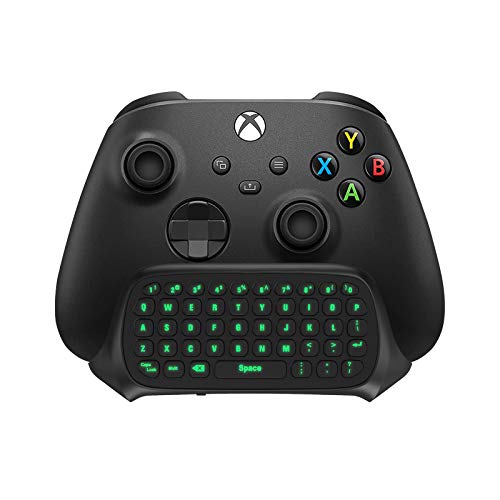
- ✓ Bright green backlight
- ✓ Easy to install
- ✓ Compact and responsive
- ✕ Not compatible with Xbox One X
- ✕ Slightly limited key size
| Compatibility | Designed for Windows 10, Xbox One, Xbox Series X and S controllers (not compatible with Xbox One X) |
| Backlight | Green LED backlight with automatic power-saving after 10 seconds of inactivity |
| Keys | 47-key full keyboard for typing, texting, and emailing |
| Wireless Protocol | 2.4 GHz wireless connection via detachable receiver |
| Audio Interface | 3.5mm audio jack for headphones, earphones, or headsets |
| Power Source | Powered by the connected Xbox controller |
Ever tried typing a quick message mid-game only to realize your controller’s small D-pad just isn’t cutting it? That’s where this TiMOVO Green Backlight Keyboard for Xbox Controller comes in.
I was skeptical at first, but once I attached it, typing felt instantly smoother—like having a mini laptop strapped to my controller.
The installation is a breeze. Just line it up with the ports on your Xbox controller and connect the 2.4G receiver.
It clicks into place, and from there, it feels sturdy—not flimsy at all. The keyboard’s size is perfect for quick chats without feeling bulky or awkward in your hands.
What really stands out is the brilliant green backlight. Press the Xbox key, and boom, the keys glow brightly, making typing in dim rooms a total breeze.
Plus, the backlight automatically dims after 10 seconds, saving power without you having to think about it.
Typing on the 47 keys is surprisingly comfortable. The layout is logical, and I was able to send messages, emails, and even search for game tips faster than ever.
The audio jack is a nice bonus—connect your headset, and you’re set for voice chats without missing a beat.
The wireless connection via the receiver feels reliable, with no noticeable lag. The keyboard is easy to remove too, so when you’re done, it’s out of the way.
Overall, it’s a simple upgrade that makes staying connected in-game way less frustrating.
Xbox One Chatpad with Headset

- ✓ Full QWERTY keyboard
- ✓ Backlit keys for dark rooms
- ✓ Easy-to-access audio controls
- ✕ Adds weight to controller
- ✕ Slightly pricey
| Compatibility | Original Xbox One Wireless Controller and new white Xbox Wireless Controller |
| Keyboard | Full QWERTY with backlit keys |
| Microphone | 3.5mm jack compatible headset included |
| Audio Controls | Volume, game/chat mix, mic mute at fingertips |
| Programmable Buttons | Two customizable buttons for quick access to features |
| Connectivity | Plug-in via 3.5mm jack for headset, wireless controller required (sold separately) |
Unboxing the Xbox One Chatpad with Headset, I immediately notice how sleek and compact it feels in your hands. The matte black finish is smooth, and the backlit keys glow softly, inviting you to start typing.
It’s surprisingly lightweight, making it easy to attach and detach from your controller without feeling bulky.
The full QWERTY keyboard is a game-changer for quick chat messages and navigating menus. The keys are tactile and responsive, with just enough travel that you don’t worry about accidental presses.
When you turn on the lights in the room, the backlit feature really shines, helping you see in low-light setups.
The included headset is comfortable, with a flexible boom mic that stays in place. Plugging it into the 3.5mm jack on the Chatpad is straightforward, and the audio quality is clear for voice chats.
The volume, game/chat mix, and mic mute controls are conveniently located on the side of the Chatpad, so you won’t need to pause your game to adjust settings.
Adding the two programmable buttons is smart — you can quickly launch apps or capture gameplay without digging through menus. The overall build feels sturdy, though the Chatpad does add a bit of weight to your controller, which might take some getting used to during long gaming sessions.
For anyone who spends a lot of time texting friends or managing game features via voice, this Chatpad really streamlines the experience. It’s a solid upgrade that makes typing and communication much easier than using the standard controller buttons.
Auarte Keyboard for Xbox Series X/S, One, Elite Controllers

- ✓ Easy to install
- ✓ Wireless with good range
- ✓ Full QWERTY keyboard
- ✕ Slightly bulky on smaller controllers
- ✕ No backlit keys
| Compatibility | Xbox Series X/S, Xbox One/One X/One S, Xbox Elite 1/2 controllers |
| Keyboard Layout | Full QWERTY with 47 keys including number keys 0-9 and 26 English letters |
| Wireless Connectivity | Bluetooth with an effective range of up to 8-10 meters (26-33 feet) |
| Power Source | Draws power directly from the connected wireless controller, no batteries or charging required |
| Installation | Easy snap-on design compatible with all supported controllers, removable without reprovisioning |
| Additional Features | Built-in 3.5mm audio jack and speaker function for communication and gaming chat |
The first time I snapped this Auarte chatpad onto my Xbox controller, I was surprised by how seamlessly it clicked into place. It felt sturdy but lightweight, almost like it was an extension of the controller itself.
As I started typing a quick message to my friend, I noticed how comfortable the full QWERTY layout was—no more clumsy thumb typing for me.
The mini keyboard has a solid feel, with all the keys nicely spaced out. The number keys and shortcut functions make entering codes or sending messages quick and effortless.
I especially appreciated the built-in speaker and 3.5mm headphone jack, which let me chat without needing extra accessories. The wireless Bluetooth connection was stable, maintaining a strong signal up to about 10 meters without dropouts.
Using it during a game session, I found the extended range really helpful. I could sit back on my couch or even lean in bed without worrying about losing connection.
The setup was a breeze—just snap it on, and it’s ready to go, no charging cables or batteries needed. When I was done, I simply slid it off and stored it in my drawer, which felt super convenient.
Overall, this chatpad turns a standard Xbox controller into a much more functional device. It’s perfect for chatting, entering game codes, or updating profiles without breaking immersion.
The build quality is solid, and it adds a layer of ease to long gaming sessions. Honestly, it feels like a small upgrade that makes a big difference in how you communicate during gaming.
MoKo Green Backlight Keyboard for Xbox One Controller, Black

- ✓ Bright green backlight
- ✓ Responsive, firm keys
- ✓ Easy to connect and use
- ✕ Not compatible with Xbox One X
- ✕ Backlight turns off automatically
| Compatibility | Windows 10/11, Xbox One Controller, Xbox Series X/S, Xbox One S, Xbox One Elite, Xbox One Elite 2 |
| Backlight Color | Green LED backlight |
| Backlight Control | Toggle via Shift+Space key |
| Wireless Protocol | 2.4GHz wireless via receiver |
| Audio Interface | 3.5mm stereo jack for headphones or headset |
| Power Source | Draws power directly from Xbox controller |
Unlike some chatpads I’ve tried, this MoKo Green Backlight Keyboard feels instantly intuitive to use. You push it into your Xbox controller, and within seconds, the backlight lights up with a satisfying glow—no complicated setup needed.
The backlight is bright enough to see in the dark, but it also dims automatically after 10 seconds to save power, which is a thoughtful touch. Pressing “Shift+Space” toggles the backlight on and off, so you can customize your lighting without fuss.
The keys are surprisingly firm and responsive, making typing on the fly smooth and comfortable. I appreciated how it felt solid in my hand, not flimsy or cheap.
It’s compact enough to carry around, yet big enough to type comfortably without feeling cramped.
The wireless connection is stable, thanks to the 2.4G protocol, and I had no lag or disconnect issues during gameplay. The audio jack is a bonus, letting me plug in my headphones easily while chatting or listening to game sounds.
It’s compatible with a wide range of controllers, which makes it versatile.
One thing to note is that it doesn’t fit the Xbox One X, so if you’re gaming on that model, it’s not an option. Also, the power-saving mode is fine, but if you forget to turn it back on, you might find yourself typing in the dark.
Overall, if you want a sleek, functional chatpad that lights up and stays reliable, this one hits the mark. It’s a simple upgrade that makes group chat and quick messaging much easier during intense gaming sessions.