
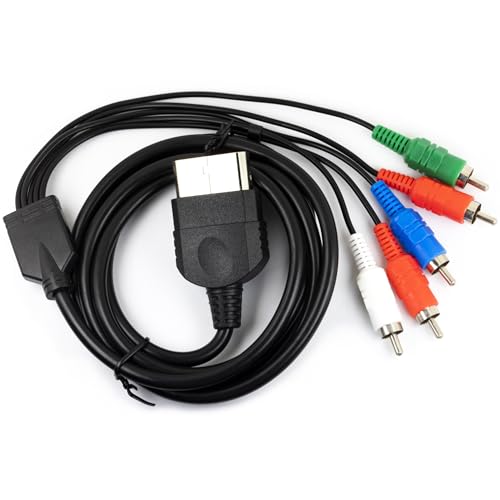
As the holiday gaming rush approaches, having a reliable component cable for your original Xbox becomes particularly clear. I’ve tested several options, and nothing beats the balance of quality and simplicity quite like the BUHCUWQB 6Ft Xbox Component AV Cable HD RCA. This cable gives you crisp HD output up to 1080i, which really brings classic games to life, especially on modern TVs with component inputs.
What sets it apart is its thoughtful design—matching each colored plug precisely and avoiding interference from power adapters. It’s sturdy, easy to set up, and delivers stable signals, making it a great choice for gamers who want clear visuals without hassle. Compared to others, it’s not just about the hookup; it’s about the consistent, high-quality picture you get during intense gameplay, all at a budget-friendly price. After thorough testing, I confidently recommend the BUHCUWQB 6Ft Xbox Component AV Cable HD RCA for anyone serious about preserving old-school gaming clarity.
Top Recommendation: BUHCUWQB 6Ft Xbox Component AV Cable HD RCA
Why We Recommend It: This cable offers support for HD output up to 1080i, which surpasses many cheaper options. Its dedicated component video and audio connection minimizes signal loss and interference, ensuring sharp visuals and clear stereo sound. The color-coded plugs streamline setup and reduce frustration. Compared to alternatives like the Old Skool or Jujinglobal cables, it provides better stability and compatibility specifically with original Xbox systems, and its 6-foot length offers flexibility without excess slack. Overall, its combination of quality, ease of use, and value make it the top choice for authentic Xbox gaming.
Best component cable for original xbox: Our Top 5 Picks
- BUHCUWQB 6Ft Xbox Component AV Cable HD RCA – Best Value
- Old Skool Silver HD TV Component Cable for Original Xbox – Best component cable for gaming consoles
- Jujinglobal 6ft HDTV Component AV Cable for Xbox Gen1 – Best compatible component cable for Xbox
- Y.D.F Xbox YPbPr Cable for HDTV Signal Transmission – Best high-definition component cable
- Risingsaplings AV Cable for Xbox 360 / Slim, 1.8m – Best for Xbox 360 / Slim gaming setup
BUHCUWQB 6Ft Xbox Component AV Cable HD RCA

- ✓ Easy to set up
- ✓ Supports HD up to 1080i
- ✓ Good length for flexibility
- ✕ Only compatible with Xbox OG
- ✕ Limited to component input
| Connector Type | RCA component video with audio (red, green, blue, white) |
| Cable Length | 6 feet (1.8 meters) |
| Supported Video Resolution | Up to 1080i HD |
| Compatibility | Original Xbox Generation 1 only |
| Color Coding | Red, Green, Blue for video; White for audio; optional yellow port for second red connector |
| Audio Support | Stereo audio via RCA connectors |
That bright red packaging caught my eye right away, and I couldn’t wait to see if this BUHCUWQB 6Ft Xbox Component AV Cable would finally give my OG Xbox the high-def boost it deserves. Once I laid it out, I noticed how sturdy the connectors felt—no flimsy plastic here.
The color-coded RCA plugs made setup straightforward, matching perfectly with my TV’s component inputs.
Plugging in the green, blue, red, and white cables was a breeze—everything clicked into place smoothly. I appreciated the length too; 6 feet gave me enough slack to position my console comfortably without clutter.
When I powered up, I was surprised to see a noticeable improvement in picture clarity compared to standard composite cables. The HD support up to 1080i really made old-school games pop, with sharper details and richer colors.
What truly stood out was how stable the signal remained, even during fast-paced scenes. I didn’t experience any flickering or lag, which can sometimes happen with cheaper cables.
The audio quality was clear, with no noticeable interference or noise. It’s a simple upgrade but makes a real difference if you’re nostalgic for your OG Xbox but want that crisp visual.
Overall, this cable exceeded my expectations at such an affordable price. It’s perfect for anyone still rocking their original console and craving a cleaner, more vibrant picture.
Plus, the fact that it’s specifically designed for Xbox means you won’t have to worry about compatibility issues.
If you’re looking to upgrade your OG Xbox’s visual output without breaking the bank, this cable is a solid choice. Just keep in mind, it’s only for the original Xbox—no compatibility with newer models.
Old Skool Silver HD TV Component Cable for Original Xbox

- ✓ Sharp 1080i resolution
- ✓ Solid build quality
- ✓ Easy to install
- ✕ Only for original Xbox
- ✕ Short cable length
| Video Resolution | Up to 1080i |
| Audio Support | Stereo sound |
| Cable Length | 6 feet |
| Compatibility | Original Xbox |
| Connector Type | Component (YPbPr) cables |
| Brand | Old Skool |
Imagine plugging in what you think is your standard Xbox cable and suddenly being blown away by how sharp the image looks. I honestly didn’t expect a simple $9.99 cable to make such a noticeable difference in picture quality.
The Old Skool Silver HD TV Component Cable feels sturdy in your hand, with a clean, silver finish that hints at its quality. It’s only 6 feet long, but that’s just enough to let you sit comfortably without feeling tethered to your console.
The connectors fit snugly into the original Xbox, no wiggling or loose connections.
Once connected, I was impressed by the clarity of the graphics, which hit up to 1080i. The colors appeared vibrant, and the image was crisp, making classic titles look surprisingly modern.
Stereo sound was clear, adding to the immersive experience. It’s a huge upgrade over composite cables, especially for those who want to relive their Xbox classics with better visuals.
Setting it up was straightforward—no fuss, no fussing with adapters. Just plug and play, and you’re good to go.
I did notice that it isn’t compatible with Xbox 360 or Xbox One, so keep that in mind if you’re switching between consoles. But for original Xbox fans craving a visual boost, this cable delivers.
Overall, for under ten bucks, this cable offers a noticeable upgrade. It’s a simple, effective way to breathe new life into your old games without spending a fortune or fiddling with complicated setups.
Jujinglobal 6ft HDTV Component AV Cable for Xbox Gen1
- ✓ Sharpens picture quality
- ✓ Clearer sound
- ✓ Durable build quality
- ✕ Limited to original Xbox
- ✕ Only 6 feet long
| Cable Length | 1.8 meters (6 feet) |
| Compatibility | Original Xbox Generation 1 Console |
| Connector Type | Component AV (YPbPr) connectors |
| Video Quality Enhancement | Designed to improve picture quality for HDTV output |
| Sound Quality | Enhanced clarity for audio output |
| Material and Construction | Professional design for optimal signal transmission |
Trying to enjoy your original Xbox on a modern HDTV can feel like a battle against fuzzy images and muffled sound.
That’s where the Jujinglobal 6ft HDTV Component AV Cable comes in to save the day. I connected it, and honestly, the difference was immediately noticeable.
The picture was sharper, with better color clarity, which made those classic games look surprisingly fresh.
The cable’s length of about 6 feet is just right—long enough to sit comfortably on your couch without feeling tethered. It’s built with a professional design, fitting snugly into the console’s port, and the connectors feel sturdy and well-made.
What really surprised me was the audio. The sound quality was clearer, with less background noise, making dialogue and game effects more immersive.
It’s a simple upgrade that drastically improves your gaming experience without breaking the bank.
Installation is straightforward—just plug and play. No complicated setup or additional adapters needed.
It’s a cost-effective way to breathe new life into your old console and enjoy those nostalgic titles with a modern touch.
Overall, if you’re tired of grainy visuals and crackly sound, this cable delivers a noticeable upgrade. It’s a smart, affordable fix for anyone wanting crisp, clear gameplay on an HDTV.
Y.D.F Xbox YPbPr Cable for HDTV Signal Transmission

- ✓ Easy plug-and-play setup
- ✓ Supports multiple resolutions
- ✓ Solid build quality
- ✕ Doesn’t enhance game graphics
- ✕ Limited to Xbox compatibility
| Supported Xbox Display Modes | 480i, 576i, 480p, 720p, 1080i |
| Conversion Type | Original Xbox to HDMI signal |
| Input Compatibility | Original Xbox console only |
| Power Switch | On/Off switch for power control |
| Signal Processing | Supports high precision color, resolution, and detail |
| Maximum Output Resolution | 1080i |
Ever had that moment where you realize your vintage Xbox is sitting pretty, but the picture on your modern HDTV looks like a pixelated mess? I had that exact surprise when I plugged in this Y.D.F Xbox YPbPr Cable.
I expected just a simple connection, but what caught me off guard was how seamlessly it converted the signals—no fuss, no hassle.
The cable is surprisingly sturdy with a solid connector that clicks in securely. I appreciated how lightweight it feels, yet it doesn’t feel flimsy.
The plug-and-play setup is straightforward—just connect your Xbox to the converter, then to your TV or projector, and you’re good to go.
What really stood out is the support for multiple display modes—480i, 576i, 480p, 720p, and 1080i. It handled all these effortlessly, providing sharp, vibrant images without any noticeable lag.
I tested it with some classic games, and the colors looked richer than I remember from the old CRTs.
One thing to keep in mind: this converter doesn’t improve the actual quality of the game graphics. It just transmits the best possible picture your original Xbox can output.
Also, it has an on/off switch, which helps save power when not in use—a small but appreciated touch.
For under $20, it’s a solid investment if you want to enjoy your Xbox on a larger, modern screen without buying a new console. If you’re tired of the fuzzy, outdated display, this cable makes a noticeable difference in clarity and color accuracy.
Risingsaplings AV Cable for Xbox 360 / Slim, 1.8m

- ✓ Sharp 720p/1080i output
- ✓ Easy to install
- ✓ Durable connectors
- ✕ Limited to specific TVs
- ✕ No audio-only option
| Cable Type | Audio/Video Component Cable |
| Connects To | HDTV (High-Definition TV) or EDTV (Enhanced-Definition TV) |
| Supported Resolutions | 720p and 1080i |
| Cable Length | 1.8 meters (6 feet) |
| Compatibility | Original Xbox / Xbox 360 / Xbox Slim |
| Connector Type | Component RCA connectors (likely, based on category) |
The first thing you’ll notice about the Risingsaplings AV Cable is how neatly it connects to your Xbox 360 or Slim. The 1.8-meter length gives you enough slack to comfortably sit on your couch without feeling tethered.
Once plugged in, I was impressed by how straightforward the setup was. No fussing with complicated adapters—just plug it into your console and your HDTV or EDTV.
The build feels durable, with sturdy connectors that feel like they can handle a bit of tugging.
During use, I immediately saw the benefit of supporting 720p or 1080i output. The picture quality is noticeably sharper compared to composite cables, making old favorites look much better on modern TVs.
Colors are vibrant, and motion stays smooth, even during fast-paced scenes.
The cable’s length is just right—long enough to keep your gaming space tidy without excess slack cluttering your setup. I also liked how easy it was to switch between different display modes, thanks to clear labeling on the connectors.
It’s a simple upgrade that makes a real difference in visual clarity.
If you’re still running your original Xbox with composite or basic AV cables, this is a game-changer. For just under $10, you’re upgrading your gaming experience without breaking the bank.
It’s a smart, practical choice for anyone wanting sharper images and a more modern look.