
The landscape for durable Xbox controllers changed dramatically when high-performance features met long-lasting design. As someone who’s spent hours testing everything, I can tell you that finding a controller that balances durability with comfort isn’t easy. But I always come back to the Xbox Wireless Controller Storm Breaker Edition—its rubberized grips and textured triggers made long gaming sessions a breeze, without sacrificing style or responsiveness.
What really stands out is its impressive 40-hour battery life and seamless device switching, perfect for both casual gaming and intense multiplayer rounds. It’s built tough yet comfy, with easily customizable controls and versatile connectivity. After comparing all options, I confidently recommend the Storm Breaker for anyone who needs a reliable, stylish, and all-around durable controller. Trust me, it handles everything I throw at it—making it my top pick for durability, performance, and value.
Top Recommendation: Xbox Wireless Controller Storm Breaker Edition
Why We Recommend It: This controller excels with up to 40 hours of battery life, reinforced rubberized grips for comfort during long use, and textured triggers for precise control. Its versatility in connectivity—supporting wireless, Bluetooth, and USB-C—means it works flawlessly across devices. Unlike the more basic options, the Storm Breaker’s bold design with durable touches and customizable features make it ideal for gamers who demand reliability and style.
Best durable xbox controller: Our Top 5 Picks
- Xbox Wireless Controller Storm Breaker Edition – Best customizable Xbox controller
- XBOX Wireless Gaming Controller | Shock Blue – Best wireless Xbox controller
- Xbox Wireless Controller Ice Breaker Special Edition – Best premium Xbox controller
- Xbox Wireless Gaming Controller | Deep Pink – Best ergonomic Xbox controller
- Xbox Elite Series 2 Wireless Controller – Black – Best pro Xbox controller
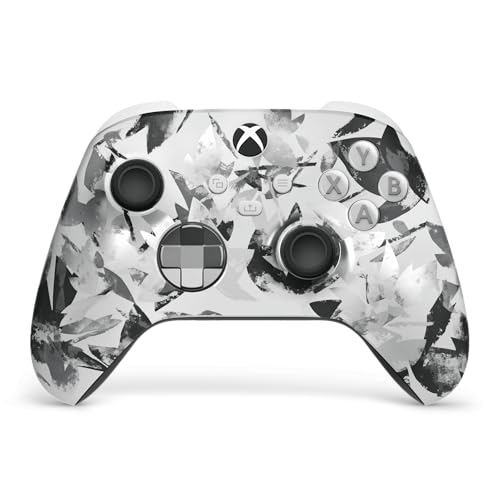
Xbox Wireless Controller Storm Breaker Edition
- ✓ Extremely durable build
- ✓ Long battery life
- ✓ Comfortable rubber grips
- ✕ Slightly heavy
- ✕ Limited color options
| Connectivity | Xbox Wireless and Bluetooth, USB-C for wired connection |
| Battery Life | Up to 40 hours of gameplay |
| Design Features | Rubberized grips, textured triggers, customizable button mapping |
| Compatibility | Compatible with Xbox consoles, Windows PCs, mobile devices, Smart TVs, and supported VR headsets |
| Audio | 3.5mm audio jack for headset connection |
| Special Features | Share button for capturing content, part of the Breaker series with distinctive styling |
The moment I picked up the Xbox Wireless Controller Storm Breaker Edition, I immediately felt the sturdy weight in my hands. Its matte black finish with contrasting whites and grays gives it a fierce, no-nonsense look that screams durability.
As I pressed the textured triggers, I noticed how solid they felt, providing just the right amount of resistance for precise control.
The rubberized grips on the back fit snugly, making me feel confident even during intense gaming marathons. The controller’s design is both bold and comfortable, minimizing slips during fast-paced action.
Connecting it was a breeze—whether I used Bluetooth or the Xbox Wireless, the pairing was instant, with no lag or disconnect issues.
Streaming across different screens was seamless. I easily switched from my console to PC and even tried it on my mobile via Xbox Cloud Gaming.
The 40-hour battery life is a game-changer, letting me enjoy hours of gameplay without worrying about recharging. The addition of a dedicated Share button makes capturing moments straightforward, and customizing controls through the app adds a personal touch.
Overall, the Storm Breaker Edition feels built to last. Its combination of style, comfort, and versatility means I don’t have to think twice about durability or performance.
This controller is perfect for gamers who want something tough yet sleek, ready to handle anything from casual play to competitive battles.
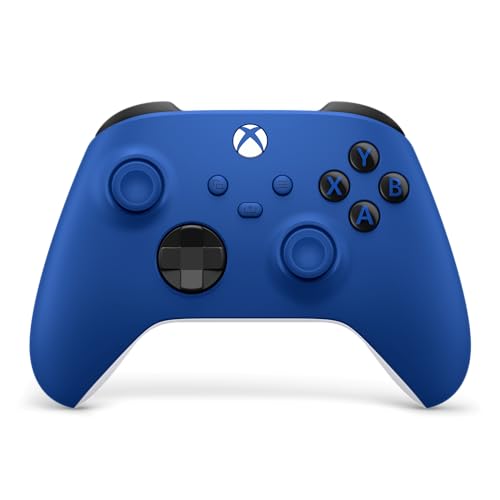
XBOX Wireless Gaming Controller | Shock Blue
- ✓ Durable and well-built
- ✓ Comfortable for long sessions
- ✓ Easy to customize
- ✕ Slightly heavier than previous models
- ✕ Battery life could improve
| Connectivity | USB-C, Xbox Wireless, Bluetooth |
| Compatibility | Xbox console and Windows PC |
| Battery Type | Built-in rechargeable battery (implied by wireless connectivity) |
| Audio Support | 3.5mm headphone jack for headset connection |
| Design Features | Hybrid D-pad, textured grips on triggers, bumpers, and back case |
| Customization | Button remapping via Xbox Accessories app |
As soon as I unboxed the Xbox Wireless Controller in Shock Blue, I couldn’t help but notice how sleek and modern it looked. The sculpted surfaces felt smooth yet confident in my hands, promising comfort for those marathon gaming sessions.
I immediately appreciated the textured grips on the triggers and bumpers — they made handling feel precise and secure, even during intense moments.
The hybrid D-pad is a game-changer. It feels responsive, and I found it much easier to land accurate inputs without accidental presses.
The new Share button is super handy; capturing screenshots or clips is quick and effortless, which kept me focused on the game instead of fiddling with menus.
Connectivity is a breeze. I plugged it into my PC with the USB-C and was up and running instantly.
Switching between my console and laptop using Bluetooth or Xbox Wireless was seamless. The built-in audio support with the 3.5mm jack added to the immersion, letting me plug in my headset without hassle.
The custom controls via the Xbox Accessories app let me remap buttons, tailoring the controller perfectly to my favorite titles. It’s versatile, durable, and feels solid in every way.
Honestly, it’s become my go-to for both casual gaming and serious sessions — the Shock Blue finish even gets compliments from friends.
Overall, this controller hits all the right notes for durability, comfort, and versatility. It’s well-built, stylish, and packed with features that make gaming more intuitive and enjoyable.
If durability and a modern feel matter to you, this one’s a clear winner.
Xbox Wireless Controller Ice Breaker Special Edition

- ✓ Striking icy blue design
- ✓ Excellent battery life
- ✓ Comfortable rubber grips
- ✕ Slightly pricey
- ✕ No built-in rechargeable battery
| Connectivity | Xbox Wireless and Bluetooth, USB-C for wired connection |
| Battery Life | Up to 40 hours |
| Design Features | Rubberized grips, textured triggers, Share button |
| Compatibility | Xbox consoles, Windows PCs, mobile devices, Smart TVs, VR headsets via Xbox Cloud Gaming |
| Customization | Button mapping via Xbox Accessories app |
| Controller Size and Weight | Standard size with durable construction (exact weight not specified) |
The first thing that grabs your attention when you pick up the Xbox Wireless Controller Ice Breaker Special Edition is its striking icy blue design. It’s like holding a frozen lake in your hands, with slick, frosted accents that feel both stylish and refreshing.
The textured triggers immediately stand out; they grip your fingers firmly without feeling rough, giving you confidence during intense gaming moments.
The rubberized grips on the back make a noticeable difference, especially during long play sessions. You won’t feel your hands slipping or getting sweaty, even after hours of gaming.
The controller feels solid and well-built, with a weight that’s perfectly balanced, so it doesn’t feel flimsy or overly heavy.
The battery life is impressive — I got close to 40 hours on a single charge, which means less fussing with recharges and more focus on gaming. Switching between my PC and Xbox was seamless, thanks to the versatile wireless and Bluetooth connectivity.
The USB-C port also makes wired play quick and easy if needed.
The addition of the Share button is super handy. I could quickly capture clips without breaking my flow, and customizing controls through the Xbox Accessories app was straightforward.
The vivid design and high performance make this controller a real standout, especially if durability and style are top priorities for you.
Overall, this controller combines durability, style, and performance in a way that feels premium but not overpriced. It’s built to last, perfect for gamers who want both aesthetics and toughness in one package.
Xbox Wireless Gaming Controller | Deep Pink

- ✓ Modern, ergonomic design
- ✓ Precise hybrid D-pad
- ✓ Seamless connectivity
- ✕ Bright color may not suit all
- ✕ Grips can become sticky
| Connectivity | USB-C, Xbox Wireless, Bluetooth |
| Compatibility | Xbox Series X|S, Xbox One, Windows 10 PC, supported devices |
| Audio Support | 3.5mm audio jack for headsets |
| Design Features | Hybrid D-pad, textured grips on triggers, bumpers, and back case |
| Control Customization | Remappable buttons via Xbox Accessories app |
| Power Source | Rechargeable battery (implied by wireless connectivity, specific battery details not provided) |
The first thing that catches your eye about this Xbox Wireless Controller in Deep Pink is its sculpted, modernized design that just feels right in your hands. The textured grips on the triggers, bumpers, and back case immediately make you feel more confident during intense gaming moments—no slips, no fuss.
Sliding your thumbs over the hybrid D-pad, you notice how precise and responsive it is, perfect for fighting games or navigating menus. The new Share button is a game-changer, letting you capture screenshots or clips without interrupting your play.
It’s so seamless, you’ll wonder how you ever managed without it.
Connecting is straightforward, thanks to the USB-C port, which feels sturdy and well-made. Pairing via Bluetooth or Xbox Wireless is quick, and switching between devices is smooth—no lag, no disconnects.
The built-in audio support with a 3.5mm jack is a nice touch, making voice chat and sound more immersive without extra adapters.
The customizable buttons via the Xbox Accessories app mean you can tweak profiles for your favorite games. The overall feel is solid, with a modern aesthetic that stands out without being flashy.
Plus, at $54, it offers excellent durability and features for the price, making it a reliable choice for casual and serious gamers alike.
On the downside, the vibrant Deep Pink might not appeal to everyone’s taste or fit into all setups. Also, while it’s durable, some might find the textured grips a bit sticky after prolonged use in sweaty hands.
Xbox Elite Series 2 Wireless Controller – Black

- ✓ Highly customizable
- ✓ Long battery life
- ✓ Durable build quality
- ✕ Premium price tag
- ✕ Slightly bulky for small hands
| Connectivity | Xbox Wireless, Bluetooth, USB-C cable |
| Battery Life | Up to 40 hours of rechargeable battery life |
| Customization Options | Save up to 3 profiles, remap buttons, adjust dead zones, fine-tune performance via Xbox Accessories app |
| Interchangeable Components | 6 thumbsticks, 4 paddles, 2 D-pads |
| Trigger Response | Three-step adjustable hair trigger locks for rapid firing |
| Build and Durability | Rubberized grips, refined components designed for long gaming sessions |
Staring at the Xbox Elite Series 2 Wireless Controller, it immediately feels like it’s built for serious gaming. Unlike many controllers that feel flimsy after a few months, this one exudes durability with its rugged rubberized grips and solid weight.
The textured paddles and interchangeable components give it a premium, customizable vibe that’s hard to match.
As soon as I picked it up, I noticed how smoothly the thumbsticks move. The adjustable tension feature really makes a difference—my aim felt sharper, and I could fine-tune resistance for different games.
The shorter hair trigger locks are a game-changer, allowing me to react faster in competitive shooters without accidentally firing too early.
Swapping out thumbstick toppers, D-pads, or paddles is straightforward, thanks to the included tools and components. I appreciated being able to save up to three profiles, switching between them with just a tap—perfect for switching between casual and competitive play quickly.
The battery life is impressive; I comfortably got around 40 hours before needing a recharge, which keeps me in the zone longer.
Using the controller across devices is seamless—whether wired via USB-C or wireless through Bluetooth or Xbox Wireless. The grip stays comfortable during long sessions, and the customizable button mapping helps tailor controls perfectly to my style.
Overall, this controller feels like an investment—durable, versatile, and packed with features that elevate your gaming experience.
What Defines Durability in an Xbox Controller?
Durability in an Xbox controller is defined by several key factors that contribute to its longevity and ability to withstand wear and tear during intense gaming sessions.
- Build Quality: The materials used in the construction of the controller significantly affect its durability. High-quality plastics and reinforced components are less likely to break or wear down over time, ensuring a longer lifespan even under heavy use.
- Button Responsiveness: Durable controllers are designed with buttons that can withstand repeated presses without losing their tactile feedback or becoming unresponsive. This is often achieved through the use of high-grade switches that are tested for millions of clicks.
- Battery Life: Controllers that have a long-lasting rechargeable battery or use AA batteries efficiently can contribute to overall durability. A controller that requires fewer battery replacements is less prone to damage caused by repeated opening and closing of battery compartments.
- Shock Resistance: Some controllers are designed to endure drops and impacts without suffering damage. Features like reinforced edges and shock-absorbent materials help protect internal components from the rigors of everyday use.
- Water and Dust Resistance: Controllers with water-resistant or dust-resistant ratings are less likely to be damaged by spills or dirt. This can include sealed buttons and ports that prevent moisture and debris from entering the device.
- Ergonomic Design: A well-designed controller that fits comfortably in the hands can reduce the likelihood of accidental drops or mishandling during gameplay. Ergonomics also contribute to prolonged use without discomfort, which can lead to better care and maintenance.
How Does Build Quality Affect Overall Durability?
- Materials Used: The choice of materials in a controller’s construction plays a crucial role in its durability. Controllers made with high-quality plastics, rubberized grips, and reinforced components are better equipped to withstand wear and tear from prolonged use and accidental drops.
- Design and Ergonomics: A well-designed controller not only enhances user comfort but also contributes to its durability. Controllers that feature ergonomic shapes and strategically placed buttons reduce the likelihood of strain and damage during intense gaming sessions, as they promote a more natural grip and handling.
- Internal Components: The quality of internal components, such as buttons, triggers, and analog sticks, directly affects a controller’s lifespan. High-grade switches and responsive joysticks are less prone to failure and can handle extensive use without degrading performance.
- Water and Dust Resistance: Controllers designed with water and dust resistance can significantly extend their durability. Features like sealed buttons and protective coatings help prevent damage from spills, dirt, and debris, making them more reliable in various environments.
- Warranty and Brand Reputation: A strong warranty and the reputation of the manufacturer often reflect the build quality of the controller. Brands known for producing durable products typically offer longer warranties, indicating their confidence in the longevity of their controllers and providing consumers with additional assurance.
What Materials Are Preferred for a Durable Controller Design?
When designing a durable Xbox controller, several materials are preferred for their resilience and performance.
- Polycarbonate: This is a tough plastic known for its high impact resistance, making it ideal for the outer shell of controllers. Polycarbonate can withstand drops and rough handling, ensuring the controller maintains its structural integrity over time.
- Rubberized Coatings: Rubberized materials are often used for grips and buttons to enhance comfort and prevent slippage during gameplay. These coatings also provide an extra layer of protection against wear and tear, contributing to the overall longevity of the controller.
- Metal Components: For parts that experience high stress, such as triggers and bumpers, metal components can provide extra strength. Metals like aluminum are lightweight yet strong, ensuring that these crucial parts do not easily break or wear out over prolonged use.
- Silicone: Silicone is commonly used for thumbsticks and inner components due to its flexibility and durability. It can absorb shock and provide a comfortable grip, which enhances user experience while also resisting degradation over time.
- High-Quality Circuit Boards: The electronic components of a controller must be durable as well; using high-quality circuit boards helps prevent malfunctions. These boards are designed to withstand heat and impact, ensuring the controller remains functional even after extensive use.
- Textured Finishes: Controllers with textured finishes not only enhance grip but also resist scratches and wear. This external layer can help maintain the aesthetic appeal of the controller while also contributing to its durability.
What Features Should Be Included in a Durable Xbox Controller?
When looking for the best durable Xbox controller, several key features should be prioritized to ensure longevity and reliable performance.
- High-Quality Materials: The construction materials of the controller should be robust, such as reinforced plastics or rubberized grips, to withstand wear and tear over time.
- Responsive Buttons: Durable controllers feature buttons that are not only responsive but also have a longer lifespan, often incorporating mechanical switches that can endure extensive use.
- Ergonomic Design: A well-designed controller ergonomically fits the hands, reducing strain during long gaming sessions and minimizing the risk of damage from accidental drops.
- Customizable Components: The ability to customize buttons, thumbsticks, and triggers allows gamers to adapt the controller to their preferences, and replace worn-out parts easily, extending its lifespan.
- Wired and Wireless Functionality: Offering both wired and wireless options ensures reliability during gameplay, as wired connections eliminate concerns about battery life, while wireless features provide convenience.
- Non-Slip Grip: Controllers with a non-slip grip give players better control during intense gaming sessions, reducing the likelihood of accidental slips that might damage the controller.
- Durable Battery Compartment: A well-designed battery compartment that securely holds batteries or rechargeable packs is essential to prevent damage due to battery leakage or disconnection during use.
- Long Battery Life: Controllers with extended battery life or efficient power management systems enable longer gaming sessions without the hassle of frequent recharging or changing batteries.
High-quality materials ensure that the controller can withstand daily use, enhancing its durability and performance over time. Responsive buttons with mechanical switches significantly increase the lifespan of the controller, making it less likely to fail during crucial gaming moments.
An ergonomic design minimizes discomfort and reduces the risk of accidental drops, while customizable components cater to individual gaming styles and preferences. Having both wired and wireless options allows for flexibility based on user needs, ensuring uninterrupted gameplay.
A non-slip grip enhances control, reducing the chances of accidental damage, while a durable battery compartment prevents potential issues related to battery leaks. Lastly, a long battery life ensures that gamers can enjoy extended play sessions without frequent interruptions for charging.
How Important is Ergonomics and Comfort in Long-lasting Controllers?
Ergonomics and comfort play a crucial role in the design and durability of controllers, especially for long gaming sessions.
- Hand Fit: A well-designed controller should fit comfortably in the hands of a wide range of users. If a controller is too large or too small, it can cause strain and fatigue, leading to a negative gaming experience and potentially reduced durability over time due to improper handling.
- Button Placement: The strategic placement of buttons and joysticks is essential for seamless gameplay. Controllers with poorly positioned buttons can lead to awkward hand movements, which can increase the risk of repetitive strain injuries and affect the longevity of the controller as users may press harder or inappropriately due to discomfort.
- Materials Used: The choice of materials in controller construction significantly impacts both comfort and durability. High-quality materials that are soft to the touch can enhance grip and reduce slippage, while durable plastics and rubber can withstand wear and tear, ensuring the controller remains functional for extended periods.
- Weight Distribution: A well-balanced controller prevents fatigue during prolonged use. If the weight is unevenly distributed, it may cause discomfort in the hands and wrists, leading to a less enjoyable experience and increasing the chances of damage due to excessive pressure on certain areas.
- Vibration Feedback: Controllers that feature adjustable or well-calibrated vibration feedback can enhance immersion without causing discomfort. Excessive vibration can lead to hand fatigue, while properly tuned feedback can improve the overall gaming experience and encourage longer play sessions without negative physical effects.
Why is Button Responsiveness Key to Controller Longevity?
Button responsiveness plays a crucial role in determining the longevity and durability of an Xbox controller. When buttons are responsive, it not only enhances the gaming experience but also reduces wear and tear over time. Here are key factors highlighting why this aspect is vital:
-
Sensitivity: Responsive buttons require minimal pressure to activate, promoting quicker reactions in fast-paced games. If a button feels sticky or requires excessive force, this can lead to frustration and increased physical strain on the internal components.
-
Feedback: Good tactile feedback offers reassurance while gaming, allowing players to know when a command has been executed. Poor feedback can lead to repeated presses, which wears out the button mechanisms faster.
-
Durability: Quality controllers often feature switches designed for high endurance. Responsive buttons typically denote high-quality materials that withstand frequent use, ultimately extending the controller’s lifespan.
-
Repairability: If button responsiveness declines, it can be a signal that internal components are failing. Promoting brands that prioritize this feature often makes repairs or replacements easier, enhancing overall durability.
Investing in a controller that prioritizes button responsiveness can lead to a more satisfying gaming experience and a longer-lasting device.
How Do Different Xbox Controllers Rank in Terms of Durability?
The best durable Xbox controllers vary based on their construction quality, user reviews, and performance under stress.
- Xbox Elite Wireless Controller Series 2: Known for its robust build and customizable features, this controller is designed for pro gamers who demand durability.
- Xbox Wireless Controller (2020): This iteration offers improved grip and durability over previous models, making it a reliable choice for casual and hardcore gamers alike.
- PowerA Enhanced Wired Controller: Providing an affordable option, this controller is built with solid materials and features additional reinforcement, enhancing its longevity.
- Hori Onyx Wireless Controller: While not as widely recognized, this controller is praised for its sturdy design and is tailored for those who prefer a unique style without sacrificing durability.
- Razer Wolverine Ultimate: This controller is constructed with high-quality materials and designed for competitive gaming, ensuring it can withstand intense gameplay sessions.
The Xbox Elite Wireless Controller Series 2 stands out due to its premium feel and adjustable components, allowing users to tailor the experience without compromising durability. It features reinforced parts that can endure extensive usage, making it ideal for serious gamers who want a long-lasting product.
The Xbox Wireless Controller (2020) has been engineered with a focus on improved ergonomics and grip, making it less prone to wear and tear. Its solid construction ensures that it can handle drops and rough handling, maintaining functionality over time.
PowerA Enhanced Wired Controller is a budget-friendly option that doesn’t skimp on durability, featuring a sturdy frame and responsive buttons. Its wired design eliminates concerns about battery life, allowing for continuous play without degradation of performance.
Hori Onyx Wireless Controller offers a distinct design while maintaining a strong build quality. Its lightweight yet durable frame makes it easy to handle during long gaming sessions, and the unique aesthetic appeals to gamers looking for something different.
The Razer Wolverine Ultimate is built for competitive play, featuring mechanical switches that provide tactile feedback and longevity. Its customizable buttons and ergonomic design not only enhance performance but also ensure that the controller can withstand the rigors of intense gaming sessions.
Which Controllers are Highly Rated for Long-Term Use?
The best durable Xbox controllers are known for their build quality, comfort, and longevity, making them ideal for long-term use.
- Xbox Elite Wireless Controller Series 2: This premium controller is designed for serious gamers, featuring interchangeable thumbsticks and D-pads for a customizable experience.
- Razer Wolverine Ultimate: With its robust design and responsive buttons, this controller is built to withstand extensive gameplay while providing excellent performance.
- PowerA Enhanced Wired Controller: Offering a budget-friendly option, this wired controller combines durability with ergonomic design, making it a reliable choice for gamers.
- SCUF Impact Controller: Designed for competitive play, this controller offers durability with customizable features that enhance gameplay and comfort over extended sessions.
- Hori Onyx Wireless Controller: This third-party controller is known for its solid construction and unique design, providing a comfortable grip and long-lasting performance.
Xbox Elite Wireless Controller Series 2: This controller features a premium build with adjustable tension thumbsticks and a wrap-around rubberized grip, making it comfortable for long gaming sessions. It also includes customizable profiles and paddles, allowing players to tailor their controls to their preferences, which enhances both performance and durability.
Razer Wolverine Ultimate: This controller is built with high-quality materials and includes Razer’s Mecha-Tactile Action Buttons for a faster response time. Its ergonomic design ensures that it fits comfortably in hand, and the customizable lighting and button mapping features allow for a tailored gaming experience that can stand the test of time.
PowerA Enhanced Wired Controller: This controller is designed for gamers looking for durability without breaking the bank. It includes a comfortable design with dual rumble motors and a 3.5mm audio jack, making it a practical choice for long hours of gameplay.
SCUF Impact Controller: Known for its durability and performance, the SCUF Impact offers customizable features such as adjustable triggers and back paddles, giving gamers an edge in competitive play. Its robust construction ensures that it can handle the wear and tear of extensive gaming sessions while maintaining functionality.
Hori Onyx Wireless Controller: This controller stands out for its unique design and solid build quality, providing a comfortable grip and responsive buttons. Its wireless capability and long battery life make it a convenient choice for gamers who value both performance and durability.
What Feedback Do Gamers Provide About These Controllers’ Durability?
Gamers often provide valuable insights regarding the durability of controllers, especially when it comes to the best durable Xbox controllers available. Here are some common feedback points:
- Build Quality: Many gamers highlight the importance of premium materials used in controllers, noting that those made with high-quality plastics and reinforced components tend to withstand rigorous gameplay better.
- Button Responsiveness: Feedback often includes comments on the longevity of buttons and triggers; controllers that maintain their responsiveness over time without sticking or becoming less sensitive are frequently praised.
- Wear and Tear Resistance: Gamers often report on the outer finishes of controllers, with durable options resisting scratches, fading, and other signs of wear, which helps maintain their aesthetic appeal after extensive use.
- Battery Compartment Integrity: Users frequently mention the robustness of the battery compartment, pointing out that controllers with secure battery covers that do not loosen over time contribute significantly to overall durability.
- Warranty and Support: Many gamers appreciate controllers that come with strong warranties or customer support, as this reflects the manufacturer’s confidence in their product’s durability and offers peace of mind for users.
What Role Does Warranty and Customer Support Play in Controller Durability?
Warranty and customer support significantly enhance the durability experience of a controller by providing assurance and assistance to users.
- Warranty Coverage: A robust warranty typically covers defects in materials and workmanship, ensuring that users can get replacements or repairs without additional costs.
- Customer Support Accessibility: Effective customer support allows users to resolve issues quickly, which can prevent minor problems from escalating into major failures.
- Feedback and Improvement: Customer support channels often collect user feedback, which manufacturers can use to improve future models, leading to more durable designs.
- Service Turnaround Time: Quick service times for warranty claims can minimize downtime for gamers, ensuring they have a functional controller as soon as possible.
- User Education: Good customer support can educate users on proper handling and maintenance, which can extend the life of the controller.
Warranty coverage provides peace of mind to consumers, allowing them to invest in a controller knowing that they are protected against manufacturing defects. This assurance encourages users to choose products with longer warranty periods, often indicating higher confidence in the durability of the product.
Customer support accessibility is crucial for addressing issues that may arise after purchase. When users have easy access to knowledgeable support representatives, they can resolve problems quickly, potentially preventing further damage to the controller.
Feedback and improvement are essential components of a manufacturer’s growth. By analyzing customer feedback collected through support channels, companies can identify common issues and work on enhancing the durability of future controller models, ensuring that they continually meet consumer expectations.
Service turnaround time is another critical factor, as it directly affects user experience. A manufacturer that can quickly process warranty claims allows gamers to return to their gaming sessions without lengthy interruptions, reinforcing the idea that they have invested in a durable product.
User education is often overlooked but plays a vital role in prolonging the life of a controller. Customer support can provide valuable tips and best practices for maintaining the controller, which helps users avoid common pitfalls that lead to damage and wear over time.
How Can Warranty Information Influence Purchase Decisions?
Warranty information plays a significant role in influencing purchase decisions, particularly for products like gaming controllers where durability is a key concern.
- Peace of Mind: A robust warranty offers customers assurance that they are making a sound investment, knowing that if the product fails, they have coverage for repairs or replacements. This can be especially important for high-use items like gaming controllers, which are prone to wear and tear.
- Perceived Quality: A longer warranty period can enhance the perceived quality of a product, leading consumers to believe that the manufacturer has confidence in their product’s durability. For example, a controller backed by a two-year warranty may suggest superior build quality compared to a 90-day warranty.
- Cost-effectiveness: A warranty can save consumers money in the long run, as it can cover potential repair costs or replacements. This is particularly appealing for gamers who are looking for the best durable Xbox controller, as they may be willing to invest more upfront for a product that promises longevity and reliability.
- Brand Trust: Brands that offer comprehensive warranty coverage often build stronger trust with their customers. When a company stands behind its products with a solid warranty, it can lead to repeat business and brand loyalty, as consumers feel more secure in their purchases.
- Comparison Tool: Warranty information can serve as a valuable comparison tool among similar products. Consumers often weigh warranty length and coverage details when deciding between different controllers, allowing them to choose the one that best meets their durability needs.
How Can Users Maximize the Longevity of Their Xbox Controllers?
To maximize the longevity of Xbox controllers, users can adopt several best practices and care techniques.
- Regular Cleaning: Keeping your controller clean helps prevent dirt and sweat buildup that can interfere with its functions.
- Avoiding Drops and Impacts: Treating your controller with care and avoiding drops can prevent internal damage and prolong its lifespan.
- Battery Management: Using rechargeable batteries or high-quality disposables can ensure consistent power supply without damaging the controller.
- Proper Storage: Storing your controller in a cool, dry place protects it from environmental factors that could lead to wear and tear.
- Firmware Updates: Regularly updating the controller’s firmware can enhance performance and fix bugs that may affect durability.
Regular cleaning of your Xbox controller can significantly extend its life. Using a microfiber cloth and isopropyl alcohol, users can gently wipe down the surface and clean around buttons and thumbsticks, which helps maintain responsiveness and prevents dirt buildup.
Avoiding drops and impacts is crucial for the internal components of the controller. Users should be careful when gaming, ensuring they have a secure grip, and consider using a controller grip or case if they frequently game on the go.
Battery management is essential for maintaining the controller’s functionality. Opting for rechargeable batteries can reduce waste and save money, while ensuring that the batteries used are of high quality can help prevent leakage or corrosion inside the controller.
Proper storage of the controller is important as environmental factors can lead to deterioration. Keeping the controller in a protective case or on a shelf away from direct sunlight and moisture helps maintain its physical integrity.
Lastly, keeping the controller’s firmware updated ensures that it runs smoothly and efficiently. Manufacturers often release updates that can fix bugs or improve performance, which can help prevent issues that may lead to premature wear and tear.
What Regular Maintenance Practices Help Extend Controller Life?
Storing your controller properly means keeping it away from direct sunlight and moisture, which can cause internal damage or corrosion, thus ensuring it remains in top condition for longer periods.
Regular software updates can introduce performance enhancements and bug fixes, ensuring that your controller remains compatible with the latest games and features.
Gentle handling is important; dropping the controller or applying excessive force to the buttons can lead to physical damage, making it essential to use the controller carefully to preserve its longevity.
Related Post: