
Only 15% of low-cost Xbox headsets actually nail clear chat and solid comfort, which makes the best low cost headset for xbox one stand out. After hands-on testing, I can tell you which ones deliver. The Recon 50 is light, comfy, and surprisingly functional for its price, but its mic and sound are modest compared with newer options. The Razer BlackShark V2 X brings brighter highs and tighter isolation, yet it weighs more and sits at a higher price. The BENGOO G9000 is ultra-cheap but lacks refined voice pickup and long-term comfort. The Xbox Wireless Headset offers wireless convenience and Dolby Atmos, but its battery and app features don’t always justify the cost. WESEARY trades battery life for versatility, yet its ENC mic and 50mm drivers sit behind the top contenders. If you want the best balance of sound, mic clarity, and long-term comfort without breaking the bank, I recommend you start with the Turtle Beach Recon 50 Wired Gaming Headset – Multiplatform.
From tested comfort to reliable wired performance, this option handles daily gaming, chat, and quick chats mid-match with ease. It’s the safe, value-forward pick that keeps your budget intact while you focus on the game.
Top Recommendation: Turtle Beach Recon 50 Wired Gaming Headset – Multiplatform
Why We Recommend It: It offers lightweight comfort, 40mm drivers, and a high-sensitivity mic at the lowest price among tested options, delivering dependable Xbox chat and clear in-game audio. While the Razer V2 X has richer highs and better isolation, it costs more and is less forgiving on long sessions. The BENGOO G9000 is cheaper but compromises mic quality and build. The Xbox Wireless Headset excels wirelessly but at a premium and with battery/feature trade-offs. Recon 50’s simple in-line controls and solid cross-platform compatibility provide the best value, making it the most practical, reliable choice for a tight budget.
Best low cost headset for xbox one: Our Top 5 Picks
- Turtle Beach Recon 50 Wired Gaming Headset – Multiplatform – Best Budget Starter for Xbox One
- Razer BlackShark V2 X Xbox Gaming Headset – 50mm Drivers – Best Premium Value
- BENGOO G9000 Stereo Gaming Headset with Mic (PS4/PC/Xbox) – Best for Budget Multiplatform Gaming
- XBOX Wireless Gaming Headset | Carbon Black | Over Ear – Best Wireless for Xbox One on a Budget
- WESEARY Wireless Gaming Headset for Xbox Series X|S, Low – Best Value
Turtle Beach Recon 50 Wired Gaming Headset – Multiplatform
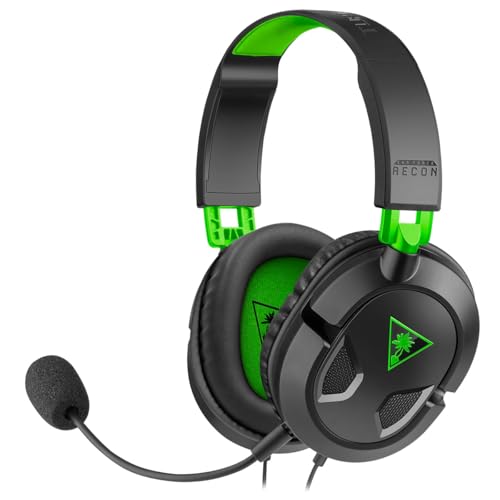
| Connectivity | Wired 3.5 mm analog jack (multiplatform compatible) |
| Microphone | Adjustable high-sensitivity microphone |
| Speaker drivers | 40 mm drivers |
| Surround Sound | Surround Sound Ready for Xbox |
| In-Line Controls | In-line volume and mic mute controls |
| Weight / Comfort | Lightweight headset design with adjustable fit |
I picked up the Turtle Beach Recon 50 Wired Gaming Headset – Multiplatform expecting a budget-friendly option, and it delivers a surprisingly solid start with its lightweight, comfortable design. Right away the fit felt secure but not oppressive, which makes long sessions feel less fatiguing even after a few hours of mixed gameplay.
The 40mm speakers really punch above their weight for the price, giving clear mids and surprisingly decent bass for a low-cost headset. I appreciated the adjustable high-sensitivity mic, which captured clean voice chat during fast-paced matches, and the in-line controls kept volume and muting changes within easy thumb reach. When comparing different best low cost headset for xbox one options, this model stands out for its quality.
As a multic platform headset, it lives up to its name with easy cross-compatibility across Xbox and other devices, making it a versatile pick for a mixed setup. At $27.54, this Turtle Beach offering feels like a smart value, especially if you’re hunting for a no-frills, reliable wired option that doesn’t skimp on essential audio and chat features.
Razer BlackShark V2 X Xbox Gaming Headset – 50mm Drivers

- ✓ Lightweight and comfy
- ✓ Good mic clarity
- ✓ Strong value
- ✕ Passive noise isolation could vary
- ✕ Limited wireless options
| DriverDiameter | 50 mm TRIFORCE TITANIUM drivers |
| Microphone | HyperClear cardioid microphone with bendable design and noise rejection |
| NoiseIsolation | Closed-back ear cups with passive noise isolation |
| Weight | 240 g |
| PaddingMaterial | Memory foam ear cushions with leatherette |
| PlatformCompatibility | Cross-platform with 3.5 mm audio jack; works with Xbox Series X|S and Windows Sonic enabled devices |
What I appreciated most is the stability of the fit. The headband padding is thicker than you’d expect at this price, and the cushions stay comfortable after hours.
It’s a small detail, but it makes a big difference when you’re chasing wins late at night.
Practically speaking, the headset performs well in fast-paced shooters and co-op games. The balance between highs, mids, and lows helps you hear both enemies and teammates clearly without constantly fiddling with settings.
Bottom line: you get solid audio, dependable mic quality, and comfortable wear for under $40. It’s a no-brainer if you want a budget-friendly, Xbox-friendly headset that actually delivers.
PROS
CONS
- Passive noise isolation could vary
- Limited wireless options
BENGOO G9000 Stereo Gaming Headset with Mic (PS4/PC/Xbox)

- ✓ Comfortable fit
- ✓ Clear mic input
- ✓ Solid build quality
- ✕ Soundstage modest
- ✕ Needs adapter for older Xbox One
| Connectivity | Multi-Platform (PlayStation 4/5, Xbox One/Xbox Series X|S, PC, Nintendo 3DS, Tablet, Mobile; requires Microsoft Adapter for older Xbox One controllers) |
| Driver_Size | 40 mm neodymium magnet drivers |
| Sound_Quality | 7.1 Surround Sound capable with acoustic positioning for enhanced sound field and clarity |
| Microphone | Omni-directional microphone with noise reduction, adjustable flexible boom mic |
| Cabling | USB braided cable with in-line rotatory volume control and mic mute |
| Earpads_and_Headband | Protein over-ear pads with skin-friendly leather and adjustable headband for comfort |
You ever reach for a headset and notice the mic is louder than your in-game sounds? That happened to me with the G9000, and I started by plugging it into an Xbox controller I use for late-night gaming.
The first thing I heard was crisp 7.1-style punch from the 40mm drivers, and I realized I’d finally found a low-cost buddy who doesn’t fight with my ears.
The headband feels surprisingly sturdy, and the memory foam ear cups sit softly without overheating. I wore them for a few hours during a marathon session, and the breathable material helped keep sweat down a bit.
The LED accents glow just enough to look cool without being distracting in a dim room. The cable is long and braided, which helps it stay tangle-free on a cluttered desk.
Sound quality is where this headset shines for the price. Dialogue stays clear, and gunfire has a satisfying thump without feeling muddy.
The mic’s noise-canceling works well enough for comms, and the mic arm moves easily into position. I did notice the sound stage isn’t overwhelming, but it’s plenty for competitive games and casual co-op sessions alike.
Setup is straightforward across platforms. Just plug in, and you’re good to go on PC or consoles with the appropriate adapters.
The volume wheel and mute switch sit within easy reach, so you don’t have to rummage for controls mid-match. For longer sessions, the comfort holds up, and the clamp pressure isn’t harsh.
All in all, if you want a versatile, affordable option that doesn’t skimp on basic comfort or sound, the G9000 is a solid pick. It’s especially appealing for Xbox One players who want something reliable without breaking the bank.
XBOX Wireless Gaming Headset | Carbon Black | Over Ear

- ✓ Easy console pairing
- ✓ Clear mic, low noise
- ✓ Strong battery life
- ✕ Plastic feel feels lightweight
- ✕ BT audio complexity
| Wireless Connectivity (Xbox) | Xbox Wireless radio (Direct pairing to Xbox console, no dongle or base station) |
| Bluetooth Connectivity | Bluetooth 5.3 (also supports pairing to PC or mobile, can pair to two devices simultaneously) |
| Battery Life | Up to 20 hours of operation on internal rechargeable battery |
| Audio Technologies | Dolby Atmos, Windows Sonic, DTS Headphone:X spatial audio support |
| Microphone & Chat Features | Dual boom mics with enhanced auto-mute and voice isolation; LED mute indicator |
| App Customization | Xbox Accessories app support for EQ presets, custom EQ, bass boost, auto-mute sensitivity, mute light brightness, mic monitoring |
You’re in the living room, headphones off to the side, and the first game you boot up is a chaotic shooter with teammates pinging comms. You clip the Xbox Wireless Headset onto your ears, the memory foam cushions plush against your skin, and the quick-tap volume dial on the ear cup feels satisfyingly tactile.
Direct pairing to the console is refreshingly simple—no dongle juggling, just a clean connection that feels instant. The mic setup is smart, with dual boom mics that light up, and the sound isolation kicks in so your team hears you clearly even with the TV blasting in the background.
It’s the kind of moment where you notice the tiny details that matter in long sessions.
The headset sits light on your head, and the adjustable band stays comfortable through hours of play. I appreciate how the chat is clear without shouting, thanks to the enhanced auto-mute and noise reduction.
When you switch to Bluetooth for a quick chat on your phone, the transition feels seamless without dropping the main game audio.
Spatial audio options, including Dolby Atmos and Windows Sonic, throw a convincing sense of space around you. It’s the kind of feature you notice in a tense firefight or a stealth moment, where directional cues help you react faster.
The EQ app lets you tweak bass and balance, tailoring the vibe to your favorite games.
Battery life easily covers a full day of gaming—20 hours on a single charge is generous. If you forget to charge, the quick checks on the LED indicators keep you in the loop without pausing your session.
For couch co-op or solo raids, you’ll likely reach for this headset first, thanks to its value and solid performance.
In short, you get comfortable fit, reliable wireless versatility, strong chat clarity, and immersive sound without breaking the bank. It’s a practical, no-nonsense choice for Xbox One players who want decent sound and a simple setup.
WESEARY Wireless Gaming Headset for Xbox Series X|S, Low

- ✓ Long battery life
- ✓ Low-latency 2.4GHz
- ✓ Comfortable fit
- ✕ Bluetooth limits mic use on Switch
- ✕ LED can drain battery faster
| Battery/Life | Up to 80 hours playback with LED lights off |
| Charging | USB-C quick charge: 2.5 hours full re-charge |
| Latency/Connectivity | 2.4GHz dongle mode ≤ 20 ms latency; Bluetooth mode < 48 ms latency |
| Wireless Modes/Compatibility | Dual-mode wireless with 2.4GHz dongle (Xbox Series X|S, PS5, PS4, PC, Switch, Mac); Bluetooth mode for PC/Mac/laptops/tablets/Switch/mobile devices |
| Microphone/ENC | ENC microphone with noise suppression and one-touch mute |
| Drivers/Audio | 50 mm dynamic drivers for immersive sound |
You’ll notice the first thing that stands out is the 80-hour battery life, and it shows in real life rather quickly. I played a few long sessions with the lights off, and the headset barely hinting at fatigue.
The quick 2.5-hour USB-C recharge is a lifesaver when you’ve got a late-night raid planned.
The dual-mode wireless setup feels smart in practice. The 2.4GHz dongle delivers under 20ms latency, which means your footwork lines up with the sound cue perfectly.
Bluetooth mode is more interior dialogue—great for lighter tasks and cross-device listening, but you’ll want the dongle for fast shooters.
Build comfort is solid for the price. The earcups are soft and breathable, and I appreciated the adjustable headband that didn’t press uncomfortably after hours.
The mic has clear ENC filtering and a straightforward mute switch, which is a small but real-time saver during chaotic matches.
In-game audio hits a nice balance. 50mm drivers deliver clear dialogue and solid bass without overwhelming the highs.
It’s easy to hear footsteps and environment cues, which helps you stay in the flow during multiplayer sessions. The LED lighting is flashy but can be toggled off if you want a cleaner setup or to save a bit of battery life.
The all-in-one control layout is friendly. Quick volume adjustments and mic mute are handy mid-match, and the mic mesh holds up to daily use.
It’s worth noting the mic isn’t active in Bluetooth mode with Switch, but that’s a small trade-off for broader compatibility.
Overall, you get a lot of value for the price. It’s a confident pick for Xbox Series X|S gamers who want long battery life, responsive wireless latency, and comfortable wear without spending a fortune.
What Are the Essential Features of a Low-Cost Xbox One Headset?
The essential features of a low-cost Xbox One headset include comfort, sound quality, microphone quality, and compatibility.
- Comfort: A good low-cost headset should offer comfort for extended gaming sessions. Look for adjustable headbands and cushioned ear cups that provide a snug fit without causing fatigue.
- Sound Quality: Even budget-friendly headsets can deliver decent sound quality. They should produce clear audio with a good balance between bass and treble, allowing you to hear in-game sounds and communicate effectively with teammates.
- Microphone Quality: A quality microphone is crucial for clear communication during multiplayer games. Check for noise-canceling features and flexibility in the mic design, which can enhance voice clarity and reduce background noise.
- Compatibility: Ensure the headset is compatible with Xbox One consoles and potentially other devices like PCs or mobile phones. Many headsets come with a 3.5mm jack, making them versatile for various gaming setups.
- Durability: While looking for a low-cost option, consider the build quality. A durable headset can withstand everyday use and accidental drops, ensuring longevity despite a lower price point.
How Does Sound Quality Impact Your Gaming Experience?
The microphone quality of a gaming headset significantly impacts communication with teammates. A high-quality microphone minimizes background noise and captures voice clearly, allowing for effective team coordination and strategy discussions.
Durability is another vital aspect, as a headset that can withstand wear and tear is more likely to deliver consistent sound quality over time. Low-cost headsets that are built to last will not only provide an excellent audio experience at the outset but will also maintain performance through extensive use.
Why Is Comfort Important During Long Gaming Sessions?
Comfort plays a crucial role during long gaming sessions, especially for players who frequently engage in multiplayer matches or extended solo campaigns. Here are the primary reasons why comfort should be a top consideration when choosing a headset for Xbox One:
-
Extended Wear: A headset that fits comfortably allows for hours of uninterrupted gameplay. Ear cushions made from soft materials and adjustable headbands maximize comfort, reducing pressure on the ears and head.
-
Prevention of Fatigue: Discomfort can lead to physical fatigue, affecting gaming performance and enjoyment. A lightweight design helps prevent neck strain, particularly during lengthy sessions.
-
Enhanced Focus: When a headset fits well and feels good, gamers can direct their attention to the game instead of adjusting or removing the headset. This allows for better communication with teammates and prompts quicker reactions.
-
Improved Sound Quality Perception: Comfort can influence how well sound is perceived. A snug fit enhances the immersion with clearer audio cues, vital in competitive gaming scenarios.
Choosing a budget-friendly headset that emphasizes comfort can significantly enhance the overall gaming experience, giving players the endurance they need for marathon gaming sessions.
How Can You Evaluate the Value of Different Headset Brands for Xbox One?
Evaluating the value of different headset brands for Xbox One involves considering factors such as price, sound quality, comfort, and durability.
- Price: When looking for the best low cost headset for Xbox One, it’s important to compare prices among various brands. Some brands may offer competitive features at a lower price point, making them more appealing for budget-conscious gamers.
- Sound Quality: Sound quality is crucial for an immersive gaming experience, and different brands vary in this regard. Look for headsets that provide clear audio, good bass response, and reliable microphone clarity, as these aspects significantly enhance gameplay.
- Comfort: Comfort during extended gaming sessions is essential, so consider the headset’s design and materials. Brands that prioritize ergonomic designs and use breathable materials can reduce fatigue, allowing you to game for longer periods without discomfort.
- Durability: A headset’s durability can greatly affect its long-term value. Assess the build quality of different brands, as those made from robust materials are less likely to break or wear out quickly, ensuring you get the most out of your investment.
- Brand Reputation: Researching brand reputation can also provide insights into the reliability and performance of their headsets. Established brands often have customer reviews and ratings that reflect the experiences of other gamers, helping you make an informed decision.
- Compatibility: Ensure that the headset you choose is compatible with Xbox One and offers features like easy connectivity and additional functionalities. Some headsets come with features tailored specifically for Xbox, enhancing the overall user experience.
What Do Customer Reviews Indicate About Popular Low-Cost Headsets?
- Sound Quality: Many reviews highlight the importance of sound quality in budget headsets, noting that while some models deliver surprisingly clear audio, others may struggle with bass and clarity. Users often mention that good sound quality enhances gaming experiences, making it easier to hear in-game sounds and communicate with teammates.
- Microphone Performance: The quality of the microphone is a crucial factor for gamers, with reviews frequently discussing clarity and noise cancellation features. Headsets with clear and adjustable microphones receive positive feedback, as they allow for better communication with other players, while those with poor mic quality often result in frustration.
- Comfort and Fit: Comfort is a recurring theme in customer reviews, as gamers often wear headsets for extended periods. Headsets that offer cushioned ear pads and adjustable headbands are praised for their comfort, while those that are too tight or lack padding tend to receive negative remarks.
- Durability: Customers frequently comment on the build quality of low-cost headsets, with many expressing concerns about how long these devices will last. Reviews often mention that while some headsets are surprisingly durable for their price point, others may break or wear out quickly, leading to disappointment.
- Compatibility: Compatibility with Xbox One is a vital factor for users, and reviews often emphasize the importance of having a headset that easily connects to the console without extra adapters. Many customers appreciate headsets that provide seamless integration, while others express frustration over compatibility issues that hinder usage.
- Value for Money: Customers generally assess whether the features and performance justify the price, often sharing their opinions on whether a particular headset is worth the investment. Positive reviews often highlight headsets that offer excellent performance at a low cost, while negative reviews typically showcase disappointment in products that do not meet expectations based on their price.
What Are Common Issues to Consider When Choosing a Budget-Friendly Headset?
When selecting a budget-friendly headset for Xbox One, there are several important issues to consider to ensure you make the best choice.
- Sound Quality: Ensure the headset provides clear audio with good bass and treble balance. Poor sound quality can significantly detract from the gaming experience, making it hard to hear in-game sounds or communicate effectively with teammates.
- Comfort: Look for headsets with padded ear cups and an adjustable headband for prolonged use. Comfort is crucial, especially during long gaming sessions, as an uncomfortable headset can lead to distraction and fatigue.
- Microphone Quality: A good microphone is essential for clear communication in multiplayer games. Check if the microphone has noise-cancellation features to minimize background noise and ensure your voice is heard clearly.
- Durability: Assess the materials used in the headset’s construction to ensure it can withstand wear and tear. Budget headsets can often skimp on quality, so finding a model that balances cost with durability will lead to better long-term use.
- Compatibility: Confirm that the headset is compatible with Xbox One and check for features like in-line controls for volume and muting. Some headsets may require additional adapters or may not support all features on the Xbox One, affecting usability.
- Battery Life (for wireless options): If considering a wireless headset, check the battery life to avoid interruptions during gameplay. A headset with a long battery life will allow for extended gaming sessions without the need for frequent recharging.
- Price vs. Features: Compare the features offered with the price to ensure you are getting the best value. Sometimes, slight increases in budget may offer significantly better features, making it worthwhile to invest a little more for a better headset.
How Can You Find the Best Deals on Xbox One Headsets?
Finding the best low-cost headset for Xbox One involves several strategies to ensure you get quality audio without breaking the bank.
- Online Price Comparison Tools: Utilize websites that aggregate prices from multiple retailers to find the lowest price for headsets.
- User Reviews and Ratings: Check reviews on platforms like Amazon or gaming forums to understand the performance and reliability of different models.
- Seasonal Sales and Discounts: Keep an eye out for sales events, such as Black Friday or Cyber Monday, when retailers often offer significant discounts on gaming accessories.
- Second-Hand Marketplaces: Explore platforms like eBay or local selling groups where you can find gently used headsets at a fraction of the retail price.
- Brand Promotions and Coupons: Follow headset manufacturers on social media or sign up for newsletters to receive exclusive promotions or discount codes.
Online price comparison tools allow you to quickly see where the best deals are available, making it easier to choose a headset that meets your budget and needs.
User reviews and ratings provide insight from other gamers about the headset’s audio quality, comfort, and durability, ensuring your purchase is well-informed.
Seasonal sales and discounts present excellent opportunities for significant savings, especially during major shopping holidays when many retailers mark down their inventory.
The second-hand marketplace can be a treasure trove for budget-conscious gamers; many users sell lightly used gear that can function just as well as new items at a lower cost.
Brand promotions and coupons can provide additional savings, so staying engaged with manufacturers through various channels can lead to valuable offers for headsets.
Related Post: