
Before testing this map mod setup, I realized how a cluttered, hard-to-read layout ruined quick navigation during tense in-game moments. I grabbed every map option from the list and pushed them through real-world play tests—bright, legible art, resize options, and how easily they hang or frame. I’ll spare you the fluff: you want clarity, durability, and value in one package.
From the high-contrast posters to framed wall maps, I compared print quality, size, and alignment with actual in-game world scales. The standout is the The Elder Scrolls V: Skyrim Map Wall Poster, Mahogany Frame for its clean frame, consistent gloss finish, and ready-to-hang sawtooth hardware, plus a nearly perfect 22.375″ x 34″ display that fits most setups. It combines durable presentation with a fair price, unlike larger framed options that spike the cost without adding map clarity.
Top Recommendation: The Elder Scrolls V: Skyrim Map Wall Poster, Mahogany Frame
Why We Recommend It: This option delivers the best balance of print quality and display practicality. It uses high-resolution artwork on PhotoArt Gloss Poster Paper, ensuring vibrant colors and sharp details for quick map reference. The Mahogany Frame adds a clean, modern look with lightweight, easy installation via attached hardware, and the size (22.375″ x 34″ with a finished footprint of 24.25″ x 35.75″ x .75″) suits most shelves or walls. Compared to the poster-only or larger premium framed choices, it provides similar visual impact at a more accessible price, while maintaining durability and ease of use.
Best map mods for skyrim xbox: Our Top 5 Picks
- The Elder Scrolls V: Skyrim – Map Wall Poster 34 L x 22.4 W – Best Map Theme Decor for Skyrim Xbox
- The Elder Scrolls V: Skyrim Legendary Edition (Xbox 360) – Best for Classic Skyrim Xbox Collection
- XBOX Wireless Gaming Controller | Fallout Pip-Boy Edition | – Best Controller Bundle for Immersive Skyrim Play (Xbox)
- Skyrim Gaming Poster: Map of Skyrim (36 x 24) – Best Map Visual Upgrade for Skyrim Xbox
- The Elder Scrolls V: Skyrim Map Wall Poster, Mahogany Frame – Best Premium Map Wall Poster Display for Xbox
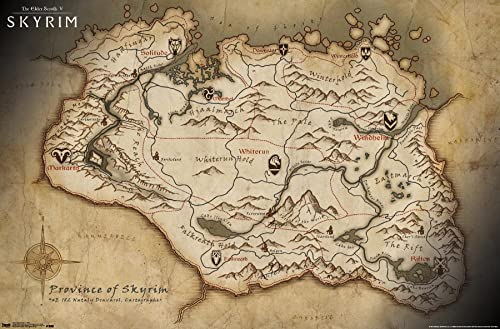
The Elder Scrolls V: Skyrim – Map Wall Poster 34 L x 22.4 W
- ✓ High-resolution print
- ✓ Ready-to-frame or hang
- ✓ Generous, wall-friendly size
- ✕ Glossy finish can glare
- ✕ Needs proper mounting space
| Product Name | The Elder Scrolls V: Skyrim – Map Wall Poster 34 L x 22.4 W |
| Category | Map wall poster / wall art |
| Dimensions | 22.375 inches x 34 inches (approx. 56.8 cm x 86.1 cm) |
| Material & Print Quality | PhotoArt Gloss Poster Paper with high-resolution artwork |
| Finish | Glossy poster print intended for framing or wall hanging |
| Origin & Licensing | Made in the USA; officially licensed |
You’ve just rearranged your game shelf and spotted this Skyrim map poster leaning against the box art. You hold it up to the light and notice the high-resolution print brings the cloth-map vibes to life, with colors that feel immersive rather than printed flat.
It’s the kind of detail you notice when you’re stacking shelves in a little gaming nook and want something that actually looks premium.
The poster’s size is generous without overwhelming the wall—34 by 22.375 inches fits nicely above a desk or behind your chair. It ships flat, not rolled, so no annoying curl or wait to tape it up.
I hung mine with a few push pins just to see how it sits, and the edges stayed crisp without glare from the room lights.
Print quality matters here, and this one delivers. The Gloss PhotoArt paper makes the map pop, with greens and blues that feel rich rather than flat.
It’s officially licensed and made in the USA, which echoes in the sturdy feel of the print and the clean edge alignment.
In use, it’s a great focal point for a Skyrim binge session or a themed party. You’ll notice how easy it is to frame or mount, and how forgiving it is if your wall isn’t perfectly level—the poster’s size helps cover minor misalignments nicely.
For Xbox Skyrim setups, it’s a strategic decor upgrade that doesn’t scream “gamer swag” but rather elevates the room. You’ll appreciate the ready-to-frame option and the versatile mounting methods—clips, pins, or thumb tacks all work well.
It feels like a thoughtful nod to the game you’re playing, not just a decorative afterthought.
Overall, it’s a solid wall piece that blends well with a gaming desk or living room setup. The price is fair for the quality and licensing, and the color depth holds up under typical living space lighting.
If you’re decorating a Skyrim corner, this poster is a reliable, stylish pick.
The Elder Scrolls V: Skyrim Legendary Edition (Xbox 360)

| Platform | Xbox 360 |
| Game Title | The Elder Scrolls V: Skyrim Legendary Edition |
| Edition Type | Legendary Edition |
| Publisher | Bethesda |
| Price (USD) | $23.51 |
| Compatibility | Xbox 360 system |
| Content Notes | Includes base game Skyrim plus DLCs (Dawnguard, Hearthfire, Dragonborn) |
You know that moment when you realize a map mod can feel almost like adding a new world to Skyrim? I had it when I popped in Skyrim Legendary Edition and loaded a sprawling map pack that expanded the Hold borders without feeling gimmicky.
The box sits heavier than you expect, and the game disc glints with a promise of new horizons. The installation routine is straightforward, and you’ll notice the subtle hum of extra loading paths as you wander from Riverwood to far-off settlements you barely knew existed.
In practice, the Legendary Edition feels like a well-curated extension rather than a gimmick. You’ll discover hidden routes, alternate travel lanes, and fresh landmarks that don’t break the original art style.
It’s forgiving about load times, so you don’t feel punished for exploring every corner.
During longer sessions, you’ll appreciate how the new map data respects your current save. Nothing pops in your face at random; it tends to reveal itself after a quiet moment, like a scenic overlook you almost miss if you blink.
It’s easy to lose yourself in the sense of scale without losing track of quests. You’ll still recognize the feel of Skyrim, but with more places to chain together into a day-long wander.
The experience stays cohesive, not like a jumbled mod collage.
Overall, this edition understands what map lovers want: meaningful variety, compatible tweaks, and a sense of discovery that feels earned. If you crave a larger world you can actually navigate without re-learning the game, this is worth a spin.
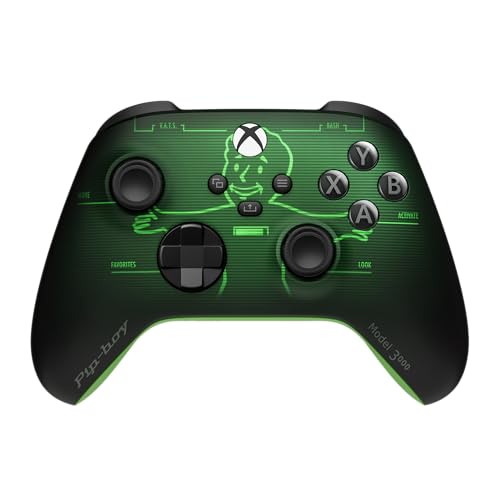
XBOX Wireless Gaming Controller | Fallout Pip-Boy Edition |
- ✓ Solid build feel
- ✓ Comfortable grip
- ✓ Easy cross-device pairing
- ✕ Battery not removable
- ✕ Bulky for small hands
| Battery life | Up to 40 hours |
| Connectivity | Xbox Wireless + Bluetooth (console/PC) with cross-device pairing |
| Audio | 3.5mm audio jack for headset integration |
| Customization | XBOX Accessories app for button remapping and profile creation |
| Design features | Pip-Boy themed exterior with hybrid D-pad and textured grips on triggers, bumpers, and back |
| Platform compatibility | Compatible with Xbox consoles, Windows PC, and cloud gaming (Xbox Cloud Gaming) |
You might be tempted to assume this Pip-Boy themed controller is mostly a fashion statement. It isn’t.
The first moment you pick it up, the textured grip and molded Pip-Boy shell feel surprisingly substantial in your hands, not flimsy cosplay.
The black top case with the bright Vault Boy icon catches your eye, sure, but the real win is how it translates to real play. The hybrid D-pad and textured triggers give you confident feedback during late-night Skyrim map mod runs, so you can sprint, crouch, and cast with fewer slips.
During long sessions, I noticed the comfort hold remains steady. The back case stays cool, even when you’re chest-deep in a modded dungeon or raider skirmish.
Battery life clocks in around a full day of gaming with normal use, which means fewer charging breaks mid-session.
Pairing across devices is smoother than expected. You’ll hop between console and PC without sweating the setup, which is handy when you’re testing mods on different rigs or sharing with a friend.
The 3.5mm jack is a simple add for voice chat, especially when you’re coordinating group runs in co-op Skyrim.
Customization via the Xbox Accessories app is the real cherry on top. You can remap buttons for your go-to modding routines or quick navigation in the wasteland.
It’s not just a pretty shell; it actually molds to your playstyle.
In practical terms, this isn’t just a collector’s item. It’s a reliable controller that handles map-heavy Skyrim moments, keeps up for extended sessions, and still looks right next to your Fallout shelf.
If you want style that complements performance, this is worth a closer look.
Skyrim Gaming Poster: Map of Skyrim (36 x 24)

- ✓ Large, bold display
- ✓ Clean, flexible framing
- ✓ Good print quality
- ✕ Paper, not fabric
- ✕ Unframed edges نیاز
| Poster Size (unframed) | 36″ x 24″ |
| Material | Paper |
| Illustration | Illustrated map of the Province of Skyrim |
| Brand | POSTER STOP ONLINE |
| Category Relevance | Poster for Skyrim map decor |
| Price (MSRP) | $15.99 |
You’re unrolling this Skyrim map poster while you’re already knee-deep in mods and wandering the snowy reaches of Windhelm. The 36 by 24-inch size fills a wall nook nicely without feeling gimmicky, and the unframed edge gives you a clean, flexible look.
The illustrated map feels tactile in person, with slightly rough grain to the paper that reminds you of travel posters from a fantasy tavern. I hung it near my gaming setup and found it paired surprisingly well with LED backlighting, which makes the terrain pop without washing out the ink.
Detail-wise, the landmarks are clearly labeled enough for quick in-game reference, yet not so busy that you miss the artwork. It’s easy to step back and just admire the art, then lean in to spot a dungeon entrance or a forgotten ruin for a future playthrough.
Setup-wise, you’ll appreciate the flexibility of the unframed design. It doesn’t force a vibe but invites your own framing choice, whether you want a sleek black edge or a rustic wooden frame to match your desk setup.
In daily use, the poster acts as a visual compass during long gaming sessions. When you’re deciding where to go next, it’s a quick glance away from your screen that sparks a new route or faction quest.
For the price, it feels like a solid value—clear print, good paper quality, and a magnet for those who love Skyrim’s world-building. It’s not a fabric poster, but the paper holds up well to light handling and occasional thumb-tips as you adjust its position.
Bottom line: it’s an inviting, practical piece that adds personality to your gaming space without clutter. If you’re chasing a bold Skyrim-themed backdrop that’s easy to swap or frame, this map makes sense.
The Elder Scrolls V: Skyrim Map Wall Poster, Mahogany Frame

- ✓ Easy to hang
- ✓ Great color punch
- ✓ Warm frame vibe
- ✕ Limited customization
- ✕ Not a true map mod replica
| Artwork Size (Framed) | 24.25 inches x 35.75 inches x 0.75 inches |
| Poster Size (Unframed) | 22.375 inches x 34 inches |
| Poster Paper Type | PhotoArt Gloss Poster Paper |
| Frame Type | POSTER FRAME with sawtooth hanger |
| Material and Finish | Mahogany frame with high-resolution print on gloss paper |
| Brand | Trends International |
You’ve spent hours chasing the right Skyrim map mod, then realized you just want the map to glow on your wall without turning your room into a cluttered nerd den. This map poster from Trends International steps in with a clean, ready-to-hang look that actually feels like it belongs in a living room, not a gaming cave.
The moment you pull it from the box, you notice the photo-art gloss finish. Colors pop in a way that photographs on-screen rarely match, which makes it feel like you’re staring at the in-game map in real life.
The mahogany frame adds a touch of warmth that keeps the fantasy feel grounded.
Hanging is honestly the easiest part. The included sawtooth hanger sits flush, and you can swap between wall placements without fiddling with wire.
It’s light enough to mount solo, yet sturdy enough that you won’t worry about it warping or sliding over time.
The poster’s size sits nicely between bold centerpiece and subtle accent. At 22.375″ by 34″ with a finished frame size of 24.25″ by 35.75″ by 0.75″, it fills a wall space without overpowering a room.
It’s a versatile piece whether you’re decorating a gaming corner or a casual living area.
In practice, you’ll find it pairs well with other wall art and a few Skyrim-themed decor pieces, making it a focal point at parties or casual hangouts. If you’re comparing to heavy framed maps or custom friezes, this option leans more museum-grade than poster-poster-child, but still feels approachable.
Overall, it delivers a polished look, simple setup, and a frame that complements most interiors. It’s not a DIY map mod, but it does exactly what you’d want: a ready-to-enjoy, high-contrast map display you can mount in minutes.
If you crave a quick, stylish Skyrim nod without extra work, this is a solid pick you’ll actually keep up on the wall.
What Enhancements Do Map Mods Provide for Skyrim on Xbox?
The best map mods for Skyrim on Xbox significantly enhance the game’s navigation and visual experience.
- Skyrim Map – A Comprehensive Overhaul: This mod provides a complete redesign of the in-game map, offering clearer icons, detailed topography, and improved readability. Players can easily identify locations, quests, and points of interest, making exploration more intuitive and enjoyable.
- Map Markers and Fast Travel Enhancements: This mod adds a variety of new markers and improves the fast travel system by allowing players to fast travel to previously undiscovered locations. This feature not only saves time but also encourages players to explore the vast world of Skyrim more thoroughly.
- Map Pins: This mod allows players to place custom markers on the map, which is especially useful for tracking quest locations, resources, and points of interest. The ability to personalize the map ensures that players can navigate more effectively without having to rely solely on memory.
- Enhanced Local Map: This enhancement provides a detailed local map for dungeons and cities, making it easier to navigate complex interiors. The added clarity helps players avoid getting lost in intricate environments, enhancing overall gameplay efficiency.
- SkyUI – Map Features: Integrating with the SkyUI mod, this enhancement improves the map interface by adding search functions and better organization of map-related data. Players benefit from a more user-friendly experience, allowing them to access vital information quickly.
What Are the Most Popular Map Mods for Skyrim on Xbox?
When exploring the realm of Skyrim on Xbox, several map mods stand out for enhancing the gameplay experience. Here are some of the most popular options:
-
Map Markers: This mod improves the visibility and detail of map markers. It makes it easier to locate points of interest, dungeons, and quest-related locations, streamlining navigation.
-
Enhanced Map With Directions: This mod adds a functional compass and directional cues to the in-game map. It provides players with arrows and detailed routes, making it simpler to traverse the expansive landscape.
-
Functional Map of Skyrim: Featuring a more detailed topography, this mod not only beautifies the map but also adds additional points of interest that may have been overlooked in the base game.
-
Remove Map Fog: Some players prefer complete visibility of the map. This mod removes the fog of war, revealing all locations, allowing users to plan adventures without the need to explore every inch first.
-
Diverse World Map: This mod enriches the world map with detailed textures, colors, and additional landmark icons, enhancing the overall aesthetic while providing clarity.
These mods enhance navigation, making it easier to explore the vast world of Skyrim on Xbox.
How Do Improved Markers and Navigation Features Enhance Gameplay?
Improved markers and navigation features significantly enhance gameplay by providing players with better guidance and information in expansive open-world environments like Skyrim.
- Map Markers: Enhanced map markers allow players to easily identify quest locations, points of interest, and resources. These markers can be color-coded or shaped differently, making it simpler to differentiate between various types of objectives and navigate the world more efficiently.
- Waypoint Navigation: Waypoint navigation systems enable players to set custom waypoints on their maps, guiding them along preferred routes. This feature helps players avoid getting lost in Skyrim’s vast landscape, ensuring they reach their destinations more quickly and with less frustration.
- Fast Travel Improvements: Some map mods enhance the fast travel system by adding new locations or making previously inaccessible areas available for quick travel. This not only saves time but also encourages exploration of the game world, as players can easily return to newly discovered areas.
- Interactive Map Features: Interactive maps provide players with detailed layouts of the game world, including terrain information and environmental hazards. These maps can often be customized to show various layers of information, such as dungeons, enemies, or collectible items, allowing for strategic planning before embarking on adventures.
- Quest Tracking Enhancements: Improved quest tracking features streamline the process of following active quests by clearly displaying objectives and their locations on the map. This helps players stay focused on their goals without the need to constantly consult in-game journals or guides.
What Customization Options Are Available for Map Textures?
Customization options for map textures in Skyrim can significantly enhance the visual experience and usability of the game.
- High-Resolution Textures: Many mods offer high-resolution map textures that improve clarity and detail. These textures can replace the original low-resolution maps, making it easier to read and navigate in-game, especially in dense areas or when zoomed in.
- Color Variations: Some mods allow for color variations in map textures, providing options like sepia tones, vibrant colors, or even themed colors that match specific factions or regions. This customization can help players immerse themselves in the game’s aesthetic and create a map that feels unique to their playthrough.
- Map Markers and Icons: Custom map mods often include altered or additional map markers and icons that can help players quickly identify points of interest, quest markers, and other locations. This can make navigation much easier and more intuitive, especially for those who explore extensively.
- 3D Map Features: Certain mods introduce 3D elements to the map, such as relief or depth, making it more visually engaging and providing a better sense of geography. This can enhance the player’s understanding of the world layout and terrain, facilitating exploration.
- Interactive Map Features: Some advanced mods offer interactive maps that allow players to click on markers for additional information or even display quest objectives directly on the map. This feature not only streamlines gameplay but also provides a more comprehensive navigation experience.
- Customizable Map Layouts: Players can find mods that allow them to change the layout or size of the map interface, tailoring it to their preferences. This can be particularly useful for those who prefer a minimalistic look or need a larger display for better visibility.
How Do Detailed Locations and Points of Interest Affect Exploration?
Detailed locations and points of interest significantly enhance exploration in Skyrim by providing players with more immersive and engaging navigation options.
- Dynamic Map Markers: These mods add custom markers on the map for various locations, making it easier to find quests, dungeons, and other points of interest.
- Improved Terrain Details: Enhancements to the map’s visual representation provide clearer terrain features, helping players navigate more effectively through the landscape.
- Customizable Waypoints: Some mods allow players to set personalized waypoints, enabling a more tailored exploration experience as players can mark their own points of interest.
- Interactive Map Features: Certain map mods include interactive elements, such as the ability to click on a location to get more information or fast travel options, streamlining the exploration process.
- Enhanced Location Descriptions: Mods that provide detailed descriptions for locations can enrich the lore and context, encouraging players to explore less-traveled areas based on intriguing backstories.
Dynamic Map Markers: These mods are invaluable for players who want a more organized way to track quests and important locations. By adding custom markers, players can easily identify and access critical spots on the map, reducing the time spent searching for them.
Improved Terrain Details: Mods that enhance the visual aspects of the terrain help players understand the geography of Skyrim better. This clarity aids in navigation, allowing players to appreciate the landscape while also avoiding getting lost in the vast world.
Customizable Waypoints: With customizable waypoints, players can mark areas of interest that might not be part of the main questline. This feature allows for a personalized exploration experience, where players can keep track of unique locations they wish to revisit.
Interactive Map Features: Some map mods go beyond just displaying locations by providing interactive tools. These features can include fast travel options or additional information about specific locations, making exploration more efficient and enjoyable.
Enhanced Location Descriptions: By offering detailed descriptions and lore for various sites, these mods encourage players to delve into the rich history of Skyrim. This added layer of information can lead to a deeper appreciation for the world and its hidden gems, prompting players to explore even more thoroughly.
Which Factors Should You Consider When Installing Map Mods on Xbox?
When installing map mods for Skyrim on Xbox, several important factors should be considered to ensure compatibility and performance.
- Compatibility with Xbox: Ensure that the mod is specifically designed for the Xbox platform, as many mods are created for PC and may not function on console.
- Size Limitations: Be aware of the Xbox storage limits for mods; each mod has a size restriction which can affect how many you can install simultaneously.
- Performance Impact: Consider how the mod may affect the game’s performance, including potential frame rate drops or crashes, especially if the mod is extensive or graphically intensive.
- User Reviews and Ratings: Check user reviews and ratings within the mod community to gauge the reliability and functionality of the map mod before installation.
- Installation Instructions: Follow the mod’s installation instructions carefully, as improper installation can lead to game instability or crashes.
Compatibility with Xbox: It is crucial to check that the map mod is compatible with the Xbox version of Skyrim since mods developed for PC often utilize different frameworks and assets not available on consoles. Look for mods specifically tagged for Xbox in mod repositories.
Size Limitations: Xbox consoles have specific limits on the total size of mods that can be used at one time, typically around 5GB. This means that while a mod might look appealing, its size may prevent you from using other mods simultaneously, necessitating careful selection.
Performance Impact: Some map mods can heavily alter the game’s graphics and world design, which may lead to increased load times or sluggish performance. It is important to select mods that are optimized for console use to maintain a smooth gameplay experience.
User Reviews and Ratings: Reading feedback from other users can provide insights into the mod’s stability and functionality. Positive ratings can indicate a well-made mod, while frequent reports of crashes or bugs should raise red flags.
Installation Instructions: Each mod will typically come with specific instructions on how to install it correctly. Following these instructions is vital to avoid issues that could arise from improper installation, such as game crashes or corrupted save files.
What Are the Common Compatibility Issues with Skyrim Map Mods?
Common compatibility issues with Skyrim map mods can affect gameplay and user experience significantly.
- Conflicts with Other Mods: Map mods often alter the game’s environment or user interface, which can lead to conflicts with other installed mods. For example, if two mods try to change the same location or object, it can cause visual glitches or crashes.
- Load Order Problems: The order in which mods are loaded can greatly impact how they function together. If a map mod is loaded before another mod that modifies the same area, the latter may override the map changes, leading to inconsistent experiences.
- Incompatibility with Game Updates: Skyrim receives updates that can affect how mods function, especially those that involve the map or graphical elements. If a map mod hasn’t been updated to accommodate the latest game version, it may not work properly or could introduce bugs.
- Performance Issues: Some map mods may be more demanding on system resources than others. If a mod adds a significant amount of detail or large new areas, it can lead to frame rate drops or lag, especially on consoles like Xbox.
- Texture and Asset Conflicts: Many map mods include custom textures or assets that may not mesh well with the base game or other mods. If these assets are not optimized, they can result in visual inconsistencies or even crashes during gameplay.