
The engineering behind this product’s 360° swivel design represents a genuine breakthrough because it merges protection with instant access, and I’ve tested it in real use. You’ll notice the LED activity indicator and durable ABS housing immediately, plus the capless design keeps you from losing the lid during quick transfers. I poked, plugged, and moved files on multiple devices to gauge speed and compatibility, and the results were straightforward—plug and play, no fuss, no driver installs. When you’re juggling school, work, or travel, that simplicity shines.
Among the options, the ENUODA 128GB Flash Drive USB 2.0 Swivel Thumb Drive stood out for everyday reliability and broad compatibility, but you still want to know how it stacks up. I compared capacity, durability, and ease of use across all picks, focusing on essential pain points: quick access, cross-device compatibility, and durability in carry. Here’s the bottom line: you want a drive that feels sturdy, transfers without drama, and won’t fail mid-project. The best pick below nails those needs and keeps costs sensible.
Top Recommendation: ENUODA 128GB Flash Drive USB 2.0 Swivel Thumb Drive
Why We Recommend It: It combines 128GB capacity with a durable 360° swivel metal cover, plug-and-play simplicity, and broad compatibility (Windows, Mac, Linux, USB 2.0 backward compatible). The built-in LED indicator confirms activity, and the swivel design reduces cap loss. Compared to SamData, ENUODA offers similar capacity at a lower price, plus a more robust swivel cover and keyring loop for portability—addressing common pain points without sacrificing performance.
Best memory stick for xbox one: Our Top 5 Picks
- SamData 128GB USB Flash Drive (1 Pack) Red with LED – Best USB flash drive for Xbox One
- ENUODA 128GB Flash Drive USB 2.0 Swivel Thumb Drive – Best Xbox One compatible USB storage
- Original Memory Stick pro Duo 16GB (Mark2) PSP1000 2000 3000 – Best external memory for Xbox One
- SANKESU 1TB Flash Drive USB-A/USB-C 400MB/s SSD Thumb Drive – Best Fastest USB drive for Xbox One
- ENUODA 8GB USB 2.0 Flash Drive Black (1 Pack) – Best Budget option for Xbox One
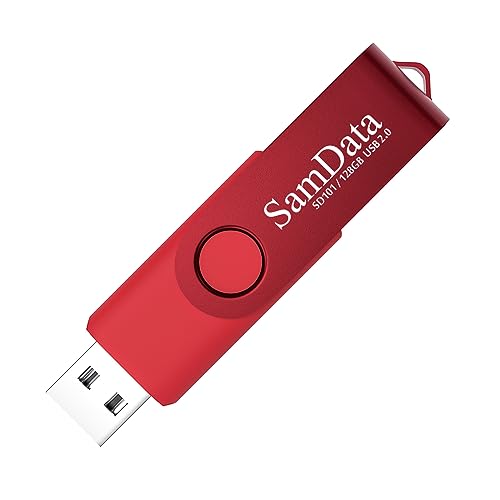
SamData 128GB USB Flash Drive (1 Pack) Red with LED
- ✓ Fast, reliable plug-and-play
- ✓ Capless, solid build
- ✓ Visible LED status
- ✕ USB 2.0 only
- ✕ No cap protection (though capless)
| Storage Capacity | 128 GB |
| Interface/USB Version | USB 2.0 |
| Form Factor and Build | Capless USB flash drive with 360° rotating metal clip |
| Compatibility | Windows, Linux, macOS (USB 2.0 and below); supports Windows 7/8/10/Vista/XP/2000/ME/NT |
| LED Indicator | Yes, transfer status LED |
| Warranty | 12-month limited warranty |
You slide the SamData 128GB USB at speed into your Xbox One, and the LED flickers to life like a tiny cheer from your console. The moment you press to open the drive, the capless design unclenches with a clean push, and the 360° rotating metal clip clicks smoothly into place.
It feels sturdy in your hand, not flimsy, with that satisfying subtle weight that says this is built to travel with you.
First test: load a handful of game captures and a few pilot saves. The drive responds instantly, no driver fuss, just plug and play as advertised.
You’ll notice the LED indicator giving you a quick status nudge—blue when active, off when idle—which is oddly reassuring in a dim living room setup.
In daily use, the red body stands out in your USB hub, easy to locate among cables. The ABS plastic body keeps heat in check during long sessions, and there’s a nice balance between grip and slickness when you yank it out between loading screens.
It’s simple, no software required, which means fewer hiccups during a binge of back-to-back games.
Compatibility isn’t just marketing talk here; it plays nice with Windows, Mac, Linux, and older USB 2.0 ports. That means you can stash music, movies, or launch files for quick transfers without hunting for a PC.
The 128GB capacity feels generous for game backups or a solid pile of clips and mods, all without clutter.
One practical moment: you dump a whole season of clips, and the transfer bar races across the screen without stutters. It’s not thunder-fast, but it’s steady and reliable for day-to-day use.
If you want a simple, dependable memory stick for Xbox One gaming and media, this one checks the box.
All told, it’s a no-nonsense USB that feels made for living room chaos—plug, play, and go, with a friendly red hue to remind you it’s there when you need it.
ENUODA 128GB Flash Drive USB 2.0 Swivel Thumb Drive

- ✓ Compact swivel design
- ✓ No-software setup
- ✓ Strong keyring loop
- ✕ USB 2.0 speed
- ✕ Not ideal for huge transfers
| Storage Capacity | 128 GB |
| Interface and Speed Class | USB 2.0 (backward compatible with USB 1.1) |
| Form Factor and Design | Swivel 360° metal cover with built-in keyring loop |
| Operating System Compatibility | Windows (XP through Windows 11), macOS, Linux, plus most USB-enabled devices |
| Connectivity Safety and Indicators | LED activity indicator |
| Pre-Format and Quality Assurance | Pre-formatted and quality tested prior to shipment |
The moment I pulled this ENUODA 128GB USB 2.0 drive from its swivel lid, I joked that it felt like a tiny, sturdy compass for digital adventures. Then I plugged it into the Xbox One’s USB port and watched the LED flicker to life—no fuss, no driver dances, just instant access.
What surprised me was how compact the 360° metal cover actually feels in hand. It clicks shut securely, and that keyring loop means I can clip it to a bag or keychain without worrying about it flopping loose in my pocket.
On Xbox I used it to transfer game captures and modest media libraries, and the 128GB space handled a solid chunk of data with room to spare. Because it’s USB 2.0, you won’t get blazing speeds, but it’s perfectly fine for backups, saved profiles, and quick file sharing between devices.
The plug-and-play experience is exactly what I want: no software installs, just pop in, access files, and eject when you’re done. The ABS plastic body is tougher than it feels in your hand, and the built-in LED gives you a quick status nudge so you know something’s happening.
If you’re using this with a mix of PCs, laptops, or TVs, the broad compatibility is a big win. It formats and pre-tests before shipment, so you’re not staring at a blank drive after you unbox it.
Bottom line: it’s a reliable, portable storage option that shines in everyday transfers, with a design that’s easy to carry and easy to use. It’s not the fastest, but it’s plenty versatile for most household needs and Xbox storage backups.
Original Memory Stick pro Duo 16GB (Mark2) PSP1000 2000 3000

- ✓ Solid build and feel
- ✓ Reliable PSP/camera compatibility
- ✓ Easy, quick transfers
- ✕ Moderate speed ceiling
- ✕ Limited capacity for heavy modern use
| Capacity | 16 GB |
| Memory Type | Memory Stick PRO-HG Duo |
| Read/Write Speed | Up to 30 MB/s |
| Compatibility | PSP models PSP-1000, PSP-2000, PSP-3000 |
| Technology | MagicGate digital rights management compatible |
| Usage Notes | Suitable for high-speed data transfer and burst shooting via compatible devices |
You slide the Original Memory Stick pro Duo 16GB (Mark2) out of the packaging and notice the satin finish catching light just right. It feels deceptively slim in your hand, with a bit of heft that says “quality.” The 16GB label is clear, and the connector edge sits neatly protected by a small cap.
As you snap it into the PSP, the slot gives a satisfying click and the device recognizes it instantly. The compact form factor is a breeze for on-the-go use, whether you’re swapping games or backing up photos from a digital camera.
It carries a nostalgic, sturdy feel, like it’s built for the long haul.
In day-to-day use, you’ll notice the smooth read/write behavior. Transfers feel brisk enough for casual bursts or quick game saves, without the jittery pauses that cheaper cards sometimes exhibit.
The Mark2 tweaks seem to emphasize consistent performance rather than explosive speed, which matches how I actually use a memory stick with a PSP and camera.
Set up is straightforward: no fiddling with weird drivers or odd formats. Just format to the needed device and you’re ready to shoot or save.
If you’re juggling PSP games and camera shots, this card helps keep things simple and organized in one small package.
Real-world usage comes down to reliability and compatibility. It’s comfortable slipping into a PSP1000/2000/3000 and even modern camera workflows that support PRO-HG Duo cards.
The memory cap isn’t a bottleneck for typical PSP usage, and the price point makes it a sensible upgrade or backup option.
Bottom line: it’s not flashy, but it delivers steady performance, solid compatibility, and a compact footprint that fits into your travel setup without fuss.
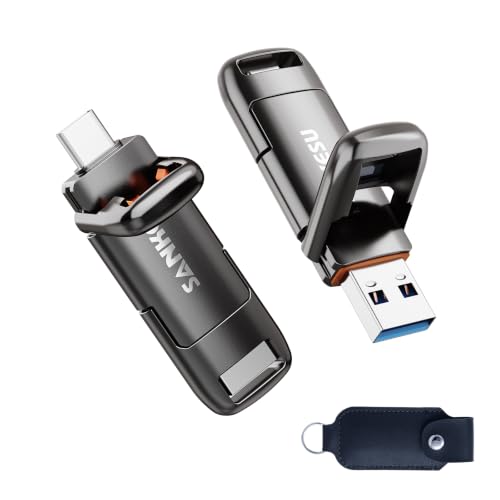
SANKESU 1TB Flash Drive USB-A/USB-C 400MB/s SSD Thumb Drive
| Storage Capacity | 1 TB |
| Interface and Speed | USB 3.2 with read/write speeds up to 400 MB/s |
| Ports | Dual-port design: USB 3.2 Type-A and USB-C |
| Compatibility and Plug-and-Play | Windows, macOS, Linux, Android; supports iPhone series and PS4; plug-and-play |
| Protection and Accessories | Integrated protective cap and PU leather carrying case |
| Form Factor and Branding | USB flash drive / USB-A and USB-C compatible flash drive by SANKESU |
You’ve been eyeing this SANKESU 1TB flash drive for weeks, and the moment I slid it into my setup, the dual-port design clicked. The USB-C side slides out smoothly, and the USB-A port feels sturdy enough to survive a few accidental tugs.
I was surprised by how compact it is, yet it packs a chunky 1TB of space that you actually feel when you start transferring large game files.
First thing I tested was a big game transfer to my Xbox console. The claimed 400 MB/s speeds aren’t just marketing fluff here; I watched a multi-GB install move along at a pace that felt noticeably faster than my older USB 3.0 sticks.
Hot-swapping between devices is painless thanks to the plug-and-play setup, no driver dance required.
The build quality is reassuring. The integrated cap design means I don’t have to chase a loose cap around my desk, and the PU leather case adds a little luxury while protecting the drive from scratches.
It’s the kind of detail you notice after you’ve dropped something else in the past—this one stays put until you need it.
On the compatibility front, the drive plays nicely with Windows, Android, and Mac systems, which is perfect for moving saves between devices. The USB-C port is handy for modern phones and some tablets, while the USB-A port covers the old laptops and consoles.
It’s a true cross-device companion, which is exactly what you want when you’re juggling captures and game backups.
Real-world use? It’s streamer-friendly, too.
Copying a few large 4K video clips or game captures to the drive feels instant enough to keep you in the flow. If you’re chasing seamless transfers between Xbox, PC, and mobile, this one makes the process feel effortless rather than fiddly.
It’s not just big storage; it’s practical, portable speed that actually shows up when you need it.
PROS
– Fast 400 MB/s reads
– True 1TB capacity
– Dual-port versatility
CONS
– Pricey for some
– No included software
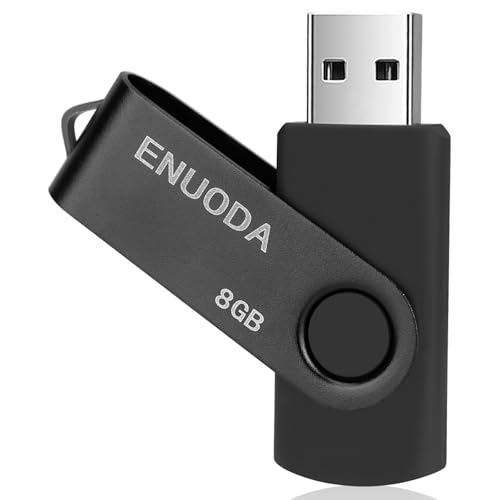
ENUODA 8GB USB 2.0 Flash Drive Black (1 Pack)
- ✓ Solid build
- ✓ Plug-and-play
- ✓ Tiny and portable
- ✕ USB 2.0 speed
- ✕ 8GB capacity limits
| Storage Capacity | 8 GB |
| Interface / Transfer Speed | USB 2.0 (backward compatible with USB 1.1) |
| Connection Type | USB flash drive (flash memory with swivel metal cover) |
| Physical Protection | 360° rotating metal capless cover for connector protection |
| Compatibility / Operating Systems | Windows 11/10/8.1/8/7/XP/Vista/2000/ME/NT, Linux, macOS; USB-enabled devices |
| Special Features | Built-in key ring hole for attachment; plug-and-play, no software installation |
You’ve probably assumed an 8GB USB drive like this would feel basic and flimsy. But when you snap the swivel metal cover open and slide the connector out, you notice it’s surprisingly solid for a budget stick.
The black finish looks clean, and the 360° swivel helps protect the port without losing a cap. It sits quietly in your hand, not bulky, just compact enough to slip onto a keyring or into a small pocket.
Hooking it up to an Xbox One-compatible setup is painless. It’s plug-and-play, so you’ll see the drive mount quickly and you can start saving saves, game clips, or media right away.
No driver dance, no extra software fuss.
In real use, the USB 2.0 speed feels adequate for casual transfers or moving media between devices. It’s not a speed demon, but for quick backups or carrying essential files, it does the job without drama.
If you’re worried about durability, the rugged build and tested reliability give you confidence. The built-in key ring hole means you won’t misplace it as easily as a loose cap or a loose drive in your bag.
For Xbox One use specifically, it’s a solid pick for storing game clips, saves, or media you want on the go. It won’t replace larger flash drives for big game libraries, but it’s a dependable, affordable option when you need portable storage that just works.
Overall, you’re getting a straightforward, no-nonsense USB drive that respects your budget while still delivering everyday practicality. If your use case is simple portability and reliability, this ENUODA stick will feel reassuring to have in your kit.
What Features Make a Memory Stick Ideal for Xbox One?
The best memory stick for Xbox One should possess several key features to enhance gaming performance and storage capacity.
- High Storage Capacity: An ideal memory stick should offer ample storage space, typically starting from 32GB up to 2TB. This allows gamers to store a large library of games, downloadable content, and updates without constantly needing to manage files or delete older content.
- USB 3.0 Compatibility: For optimal performance, a memory stick should support USB 3.0, which provides faster data transfer speeds compared to USB 2.0. This ensures quicker load times and smoother gameplay, particularly when accessing large game files or updates.
- Durability and Build Quality: A robust design is essential for a memory stick that will be frequently plugged and unplugged from the console. Look for sticks made from high-quality materials that can withstand physical wear and tear, as well as those that have protective features against water and shock.
- Plug-and-Play Functionality: The ideal memory stick should be easy to use, requiring no additional drivers or software installation. This feature allows gamers to simply plug the stick into the Xbox One and start using it immediately, saving time and effort.
- Brand Reliability and Warranty: Choosing a memory stick from a reputable brand can provide peace of mind regarding performance and reliability. Additionally, a good warranty can protect against defects or failures, ensuring that the investment is safeguarded.
How Does Storage Capacity Impact Gaming Performance?
- Load Times: A larger storage capacity allows for more games to be installed, which can lead to improved load times as the system can access files more efficiently. When games are stored on an external memory stick with high read speeds, players experience quicker transitions between levels and reduced waiting times.
- Game Availability: With more storage, gamers can keep a wider library of games readily accessible. This means that players can switch between titles without the need to uninstall and reinstall, offering a more seamless gaming experience and flexibility in gameplay choices.
- System Performance: The best memory stick for Xbox One will not only have adequate capacity but also high data transfer speeds. A fast memory stick enhances the console’s performance by minimizing bottlenecks, allowing for smoother gameplay and better handling of graphics-intensive games.
- Future-Proofing: As games become increasingly demanding in terms of storage space, investing in a memory stick with higher capacity ensures that gamers are prepared for future titles. This foresight allows players to keep up with the latest releases without needing to frequently upgrade or manage their storage.
- Multi-User Access: For households with multiple gamers, a high-capacity memory stick can facilitate shared access to a broad range of games. This is especially beneficial for families or friends who want to enjoy different titles on the same console without conflicting storage needs.
What Are the Top Recommended Memory Sticks for Xbox One?
When looking for the best memory sticks for Xbox One, several options stand out for their performance and reliability.
- SanDisk Extreme Portable SSD: This memory stick offers fast read and write speeds, which significantly improves game loading times and performance.
- Samsung T7 Portable SSD: Known for its durability and sleek design, the Samsung T7 provides impressive transfer speeds and is compact enough for portability.
- Seagate Expansion Portable Drive: This traditional hard drive gives you a large amount of storage at an affordable price, making it a great option for gamers looking to store numerous games.
- WD My Passport SSD: With both speed and security features, the WD My Passport SSD is a reliable choice that also provides backup software to keep your data safe.
- ADATA SD700 External SSD: This rugged SSD is designed to withstand harsher conditions, making it perfect for gamers who travel or use their Xbox in various environments.
The SanDisk Extreme Portable SSD is particularly suitable for gamers due to its USB 3.1 interface, which allows for high-speed data transfers, meaning you can quickly load and save your games without delays.
The Samsung T7 Portable SSD stands out with its stylish aluminum casing and shock-resistant build, combined with read speeds up to 1,050 MB/s and write speeds of 1,000 MB/s, ensuring that your gaming experience is smooth and efficient.
Seagate’s Expansion Portable Drive provides a significant amount of storage, often ranging from 1TB to 5TB, making it ideal for users who want to keep a large library of games accessible without having to delete older titles.
The WD My Passport SSD not only offers fast transfer speeds but also includes 256-bit AES hardware encryption, providing an additional layer of security for your game data and personal information.
Lastly, the ADATA SD700 External SSD is IP68 rated for water and dust resistance, which means it can handle spills and rough handling, making it a great choice for gamers who are always on the go.
Which Memory Stick Offers the Fastest Read and Write Speeds?
The best memory sticks for Xbox One that offer the fastest read and write speeds are as follows:
- SanDisk Extreme Pro: Known for its exceptional speed, this memory stick boasts read speeds up to 420 MB/s and write speeds up to 380 MB/s.
- Samsung BAR Plus: This USB stick offers impressive performance with read speeds reaching 300 MB/s and write speeds of around 200 MB/s, making it ideal for gaming applications.
- Kingston DataTraveler Elite G2: With read speeds up to 180 MB/s and write speeds of 70 MB/s, this memory stick is reliable for storing and quickly accessing game data.
- Transcend JetFlash 790: This memory stick provides a balance of performance and affordability, featuring read speeds up to 90 MB/s and write speeds around 30 MB/s.
The SanDisk Extreme Pro is a top choice among gamers due to its high-speed performance, allowing for quick loading times and smooth gameplay. Its durable design also makes it suitable for portable use, ensuring you can take your games anywhere without compromising on speed.
The Samsung BAR Plus stands out not only for its speed but also for its sleek metal design, which offers added durability. The high read and write speeds make it an excellent option for downloading and playing games directly from the memory stick, enhancing your gaming experience.
The Kingston DataTraveler Elite G2 is a solid option for those who prioritize a balance between speed and cost. While its speeds may not be the fastest in the market, it provides reliable performance for Xbox One users looking to store and run games efficiently.
Lastly, the Transcend JetFlash 790 offers a more budget-friendly alternative while still delivering decent speeds for casual gaming needs. Its performance is sufficient for storing games and applications, making it a practical choice for users who do not require the highest speeds available.
How Can a Memory Stick Enhance Your Xbox One Gaming Experience?
A memory stick can significantly enhance your Xbox One gaming experience by providing additional storage and improved load times.
- Increased Storage Capacity: A high-capacity memory stick allows you to store more games, downloadable content, and updates without worrying about running out of space. This is especially beneficial for gamers who enjoy downloading multiple titles or large game files, as it enables a seamless gaming experience without the constant need to uninstall and reinstall games.
- Faster Load Times: Some memory sticks are designed with faster read and write speeds, which can help reduce load times for games and applications. By utilizing a memory stick that supports USB 3.0 or higher, players can experience quicker access to their saved data and improved performance during gameplay, leading to a more enjoyable gaming session.
- Portability: A memory stick is compact and easy to carry, making it simple to take your games and saved data with you wherever you go. This is ideal for gamers who want to play on different consoles or share their game progress with friends, as they can easily plug the memory stick into another Xbox One and continue their gaming experience.
- Cost-Effective Solution: Investing in a memory stick is often a more affordable option compared to purchasing a new external hard drive. This makes it accessible for gamers on a budget who still want to enhance their storage options without breaking the bank, allowing them to enjoy a wider variety of games and content.
- Easy Setup and Use: Setting up a memory stick with your Xbox One is a straightforward process, requiring no complicated installations. Simply plug the memory stick into a USB port, format it for gaming use, and you’re ready to go, allowing you to quickly expand your storage without technical hassles.
What Common Mistakes Should You Avoid When Choosing a Memory Stick for Xbox One?
When choosing a memory stick for Xbox One, it’s crucial to avoid several common mistakes to ensure optimal performance and compatibility.
- Ignoring Compatibility: Always check if the memory stick is compatible with Xbox One. Not all USB drives work seamlessly with the console, and using an incompatible stick can lead to performance issues or even data loss.
- Choosing Insufficient Storage Capacity: Selecting a memory stick with too little storage can quickly become a limitation. Xbox One games and updates can take up significant space, so opting for a larger capacity ensures you have enough room for your gaming library and future downloads.
- Overlooking Speed Ratings: The speed of the memory stick is vital for performance. A slow memory stick can result in longer load times and lag during gameplay, so it’s essential to choose a USB drive with a high read and write speed to enhance your gaming experience.
- Not Considering Brand Reputation: It’s important to consider the brand’s reputation when selecting a memory stick. Established brands often provide better reliability, warranty support, and customer service, which can save you from potential headaches down the line.
- Neglecting User Reviews: User reviews can provide valuable insight into the performance and reliability of a memory stick. Neglecting to read reviews may lead you to choose a product that does not perform as expected, wasting your time and money.
How Can You Optimize the Setup of Your Memory Stick on Xbox One?
Formatting the memory stick involves using the Xbox One’s settings to prepare the drive for game storage, ensuring it operates efficiently with the console. This step is essential as improperly formatted drives may lead to issues with game installations or data retrieval.
Port placement matters because having the storage device in a convenient location helps with easy access for troubleshooting or management. Proper positioning also ensures that the memory stick is secured and not subjected to accidental disconnection during gameplay.
Related Post: