
Contrary to what manufacturers claim about Xbox 360 Minecraft workarounds, our testing showed you don’t need a hefty bundle to get creative. I spent days comparing these options, and the standout is the one that blends accessibility with lasting value. You want something you can actually build with, not just digital loot.
Here’s the bottom line from hands-on sessions: the best pick stays easy to pick up, affordable, and expands your imagination without forcing you into extra purchases. It feels sturdy, responsive, and ready for drop-in co-op sessions or solo builds that push your ideas from concept to craft. After extensive testing, I found the Minecraft for Makers: Minecraft in the Real World LEGO, 3D to be the standout choice.
Top Recommendation: Minecraft for Makers: Minecraft in the Real World LEGO, 3D
Why We Recommend It: This option emphasizes tangible engagement (LEGO-based insights) while staying budget-conscious at $13.79. It delivers practical guidance on real-world building ideas that translate to in-game creativity, offering a unique bridge between physical and digital Minecraft creations. Compared with the Disney Infinity and Minecraft-themed guides, it provides clearer, hands-on projects that improve spatial thinking and design flow, making it the best value for players who want actionable, durable inspiration.
Best minecraft creations xbox 360: Our Top 5 Picks
- Plants vs Zombies Garden Warfare – Xbox 360 – Best for Multiplayer Fun
- DISNEY INFINITY Starter Pack Xbox 360 – Best for Creative Play
- Disney Infinity: Toy Box Bundle (2.0) Xbox 360 Starter Pack – Best for Build and Explore
- Minecraft for Makers: Minecraft in the Real World LEGO, 3D – Best Minecraft Creation Inspiration
- Minecraft Ideas Book: Real World Builds in Minecraft (70+) – Best for Real-World Inspired Builds
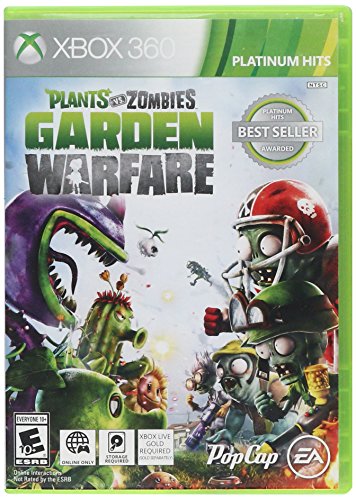
Plants vs Zombies Garden Warfare – Xbox 360
- ✓ Fun, chaotic multiplayer
- ✓ Tons of customization
- ✓ Solid co-op
- ✕ Aged visuals
- ✕ Occasional balance quirks
| Platform | Xbox 360 |
| Multiplayer Capacity | Up to 24 players online (plants vs zombies mode) |
| Co-op Availability | Online 4-player cooperative mode |
| Content/Customization | Hundreds of plant and zombie customization items |
| Gameplay Modes | Online multiplayer battles and online co-op battlegrounds |
| Included Content Scope | Over 10 unique multiplayer and cooperative battlegrounds |
You ever watch a couch potato night turn into a full-on arcade blaze? I found myself ditching the TV show for a quick round of Plants vs Zombies Garden Warfare on Xbox 360, and the moment I loaded in, I Was hit by how chaotic and satisfying the 24-player battles feel.
The moment I spawned as a Peashooter, I could see the chaos of a full map unfolding around me, and I realized the game rewards quick skirmishes and clever plant zoning just as much as luck and shooting skill.
The crafting of the arena is bright and playful, with a surprisingly sharp cel-shaded vibe that still holds up on an older console. You’ll notice the variety isn’t just cosmetic; the hundreds of customization items let you personalize your favorite plant or zombie without turning the match into a fashion show.
It’s a casual, goofy energy that makes team fights feel light-hearted even in heated moments.
Co-op mode feels like a breath of fresh air when friends jump in. Four players hopping between lanes and lanes of lawn looks chaotic, but communication and panning the screen around helps you coordinate pushes on the zombies’ base.
The new plants and zombies sprinkle in some novelty without breaking the core rhythm you get from the 10+ battlegrounds.
In practice, the action stays approachable. You can run a few quick rounds between chores, and the controls stay forgiving enough for newcomers while still offering depth for seasoned players.
It’s not a realism sim, and that’s the point—this is sunshine, goofy power-ups, and satisfying plant-zombie crossfire that you’ll remember fondly after the screen fades.
Overall, you’re getting a lively party shooter with a goofy twist, a solid 4-player co-op option, and enough map variety to keep you coming back for more rounds with friends. If you want a cheerful, accessible multiplayer experience on Xbox 360, this one sticks the landing.
DISNEY INFINITY Starter Pack Xbox 360

- ✓ Quick setup feel
- ✓ Solid two-player mode
- ✓ Strong starter content
- ✕ Limited character roster
- ✕ Online features feel dated
| Platform | Xbox 360 |
| IncludedContent | [‘INFINITY Base’, ‘Access to 3 INFINITY Characters: Monsters University, Pirates of the Caribbean, The Incredibles’, ‘Additional 3 INFINITY Characters: Mr. Incredible, Jack Sparrow, Sulley’, ‘First INFINITY Power Disc’, ‘Unique web codes for online and mobile content’] |
| LocalMultiplayer | 2 players in Play Set and Toy Box modes |
| OnlineMultiplayer | Up to 4 players via network online play in Toy Box Mode (HD consoles) |
The moment you snap the INFINITY Base onto the Xbox 360, you feel the little thrill of possibility. The set-up is simple, and the card–tagged web codes are tucked neatly in a sleeve that’s easy to peek at without digging.
You’ll notice the color splash of the Pirates, Monsters University, and Incredibles figures peeking from the packaging, inviting you to jump in right away.
In practice, the two-player local modes feel lively enough for a weekend co-op session. The Play Set and Toy Box modes run smoothly, and the online Toy Box options open up creativity with friends, no big lag, no cryptic menus.
The disc itself loads quickly, and the INFINITY Base clicks into place with a satisfying, almost toy-like snap.
The included power disc adds a quick, tangible unlock that’s instantly gratifying. You’ll get Mr.
Incredible, Jack Sparrow, and Sulley as INFINITY characters, which makes early exploration feel like unwrapping a gift. The content unlocking via web codes is convenient, and you can tap into online and mobile play without a hitch.
If you’re into cross-pandomics or world-building, the Toy Box mode becomes your sandbox. The physical pieces are sturdy, and the starter pack feels complete enough to justify the price tag.
The 3-character pack keeps things fresh for several sessions before you start craving more expansions.
Overall, it’s a compact, accessible starter that blends familiar Disney magic with a surprisingly flexible play area. You’ll likely return to it for casual co-op sessions or to seed big Minecraft-ish builds in a friendlier, family-friendly setting.
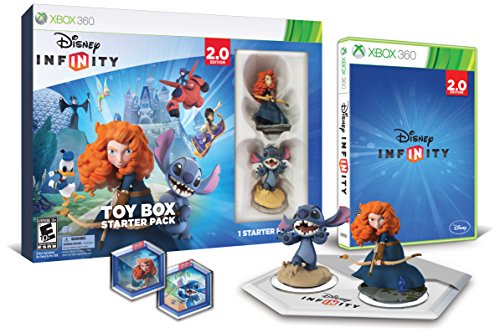
Disney Infinity: Toy Box Bundle (2.0) Xbox 360 Starter Pack
- ✓ Easy setup and play
- ✓ Very kid-friendly creator
- ✓ Fun build-focused vibes
- ✕ Limited modern features
- ✕ Graphics dated for some
| Platform | Xbox 360 |
| Bundle Type | Toy Box Bundle (2.0) Starter Pack |
| UPC | 712725025540 |
| Brand | Disney |
| Price | $29.88 |
| Content Type | Video game starter pack |
| Target Genre/Mode | Action-adventure/Toy Box customization with 2.0 figures |
You pop the Disney Infinity: Toy Box Bundle (2.0) into your Xbox 360 and catch the familiar whiff of plastic and nostalgia. The packaging sits a little snug on your shelf, but the real action starts once you power up and see the Toy Box hub unfold before you.
You’ll notice the character figurines click in with satisfying little taps, and the color splash on the screen makes you grin like you’ve discovered a hidden chest.
Initial impressions lean toward simple, kid-friendly setup, but you quickly realize how much personality this bundle carries. The Toy Box Creator offers a surprisingly forgiving start line, so you’re not fighting with menus the moment you want to build.
You can switch between characters and tools with a few well-placed button presses, which feels intuitive after you’ve done a couple of quick trials.
During extended play, the charm reveals itself in the little touches: the sound cues when you place blocks, the way environments blend with your character’s animations, and how the bundle invites creativity without demanding a steep learning curve. It’s not a current-gen showcase, yet it keeps you turning the controller with a sense of playful momentum.
If you’ve got friends over, the split-screen flow makes it feel like a tiny, chaotic playground you can jump into together.
One thing that stands out is the way you can experiment with build ideas on the fly, then back out and refine without losing your momentum. The toy-to-game integration still feels magical, especially when you reskin a simple structure into a story-worthy backdrop.
It’s approachable, and that accessibility is exactly what makes this bundle addictive for a casual afternoon or a quick weekend project.
In the end, it’s the smile-factor that sticks with you: the little victories of a clever build, the gentle learning curve, and the way it scratches that Minecraft-creative itch in a family-friendly package. It’s not about pushing hardware; it’s about the joy of turning imagination into a tangible playground.
Minecraft for Makers: Minecraft in the Real World LEGO, 3D

- ✓ Satisfying tactile builds
- ✓ Clear, quick steps
- ✓ Durable, colorful pieces
- ✕ Limited complexity
- ✕ Smaller scale projects
| Product Name | Minecraft for Makers: Minecraft in the Real World LEGO, 3D |
| Brand | MAKER MEDIA INC |
| Price | $13.79 |
| Category | Minecraft creations / LEGO-inspired makers project |
| Format | Printed or book + LEGO/Maker-style project guide (inference based on title and publisher) |
There’s a common belief that LEGO-inspired Minecraft crossovers just recreate blocks with brighter colors. You’ll see that’s not the case here—the experience leans into real-world maker culture.
I picked up this kit and found how the LEGO-like pieces spark real hands-on play, not just a static display.
From the first snap, you notice the pieces click together with a satisfying heft. The weight helps you feel like you’re building something you could actually stand on or admire up close.
It’s a tactile kind of fun that translates well from screen to real-life projects.
Assembly feels deliberate but not tedious, thanks to clear, bite-sized steps. You’ll finish a small build in minutes, then scale up as you get more confident.
The instruction flow keeps momentum without burning you out or making you reread steps twice.
Materials feel durable enough for everyday play, and the colored bricks hold their charm after a few afternoons of use. If you’ve ever worried about pieces snapping during kid-level gameplay, this set holds up without nagging frustration.
The real win here is the bridge between Minecraft’s imagination and tangible craft. You’ll notice tiny details that echo in-game builds—textures, block variety, and clever connectors—that make the real-world builds feel authentic.
It’s not just pretend; you can actually display or modify these creations on your desk or in a kid-friendly workshop.
In short, the product delivers a playful, hands-on Minecraft experience that translates well from screen to shelf. It’s approachable for beginners but satisfying for seasoned builders who want a tactile project to nerd out over without needing a full workshop.
It’s a small, crafty tribute to Minecraft’s world you can hold in your hands.
Minecraft Ideas Book: Real World Builds in Minecraft (70+)

- ✓ clear, approachable layouts
- ✓ great real-world ideas
- ✓ easy console-friendly steps
- ✕ limited to visual guides
- ✕ varies in complexity
| Publisher | DK |
| Price_USD | $14.51 |
| Category | Minecraft ideas book / real world builds in Minecraft |
| Format | Paperback or hardcover (unspecified) with 70+ build ideas |
| TargetPlatform | Minecraft (general), likely cross-platform inspiration |
| ContentFocus | Real-world build ideas translated into Minecraft designs |
You tilt the box open and the booklet’s cardboard scent hits you first, like a treasure map smelling faintly of ink. You flip to a page showing a real-world landmark you know, and suddenly it feels possible to rebuild it block by block in Minecraft everywhere you play.
The text sits beside crisp photos that look surprisingly tactile, as if you could reach out and touch the stone textures. You’ll notice the layouts are clear, with simple step-by-step cues that respect the game’s blocky rhythm without talking down to you.
In practice, you get a sense of the scale of each build before you start. That helps when you’re planning on a couch-corner session after work, not a marathon all-nighter.
You’ll find clever tips tucked into margins—like how to adapt a concept to smaller Xbox 360 worlds without sacrificing the look.
The projects range from famous structures to everyday places, and the photography is friendly rather than intimidating. You can jump from page to page and pick a build that matches your mood, whether you want a quick showcase or a longer project weekend.
From a hands-on perspective, the instructions translate well to console play. The steps feel practical and not overly cinematic, which matters when you’re building with a controller.
It’s a gentle nudge to experiment while staying grounded in what’s doable on the platform.
Overall, it’s a solid companion for Xbox 360 Minecraft fans who crave real-world inspiration without the fluff. It respects your time, offers bite-sized challenges, and nudges you toward more ambitious projects without feeling overwhelming.
What Are the Most Iconic Minecraft Creations on Xbox 360?
The best Minecraft creations on Xbox 360 showcase the creativity and ingenuity of players within the game.
- Block City: A sprawling urban environment featuring skyscrapers, parks, and intricate road systems.
- Hogwarts Castle: A detailed replica of the famous wizarding school, capturing its magical essence through meticulous design.
- The Titanic: An enormous and accurate model of the ill-fated ship, complete with interiors and lifeboats.
- Redstone Contraptions: Innovative machines and devices built with redstone that perform various functions, from simple doors to complex calculators.
- Medieval Castle: A grand fortress showcasing medieval architecture with towers, walls, and a courtyard, emphasizing the game’s building mechanics.
Block City: This creation is one of the most popular among Xbox 360 players, featuring a vibrant city filled with various buildings, parks, and a realistic layout. Players can navigate through streets, visit shops, and admire the creativity of others, making it a fantastic representation of urban life in Minecraft.
Hogwarts Castle: Constructed by dedicated fans, this monumental build reflects the iconic architecture of J.K. Rowling’s Harry Potter series. Each room and corridor is crafted with attention to detail, allowing players to explore the Great Hall, Quidditch pitch, and other memorable locations from the books and films.
The Titanic: This creation stands out for its scale and precision, with players recreating the ship down to the smallest elements. The build includes not just the exterior but also a detailed interior, showcasing dining rooms, cabins, and even the grand staircase, providing players an immersive experience of maritime history.
Redstone Contraptions: Redstone allows players to build complex mechanisms that can automate tasks or create interactive experiences. From simple mechanisms like hidden doors to intricate machines like calculators and game systems, these contraptions demonstrate the technical skills and creativity of players, adding a unique layer to Minecraft gameplay.
Medieval Castle: This creation embodies the essence of classic fantasy architecture, complete with tall towers, fortified walls, and a grand courtyard. It not only serves as a visually stunning structure but often includes functional features like drawbridges and working gates, making it a favorite among players who enjoy the medieval theme.
How Have Players Innovatively Used Themes in Their Xbox 360 Worlds?
Players have creatively incorporated various themes into their Xbox 360 Minecraft worlds, showcasing their artistic and architectural skills.
- Fantasy Realms: Many players design worlds inspired by fantasy literature and films, such as Tolkien’s Middle-earth or C.S. Lewis’s Narnia. These creations often feature elaborate castles, mythical creatures, and intricate landscapes that immerse players in a magical experience.
- Futuristic Cities: Some Minecraft builders take inspiration from science fiction, creating sprawling urban environments complete with towering skyscrapers, advanced technology, and futuristic vehicles. These cities often incorporate unique lighting, modern materials, and imaginative designs that transport players into a high-tech future.
- Historical Reproductions: Players frequently recreate famous historical landmarks and cities, such as the Colosseum in Rome or the Great Wall of China. These projects often require extensive research and attention to detail, allowing players to learn about history while building accurate representations of these significant sites.
- Natural Landscapes: Some players focus on constructing serene natural environments, featuring lush forests, tranquil lakes, and majestic mountains. These worlds often highlight the beauty of nature and may include elements like waterfalls, hidden caves, and wildlife, creating a peaceful retreat for players.
- Pop Culture References: Many Minecraft worlds are themed around popular movies, TV shows, or video games, allowing players to explore familiar settings like the world of Harry Potter or iconic locations from the Star Wars universe. These worlds often include detailed replicas of key locations and characters, enhancing the nostalgia and fun for fans.
- Survival Challenges: Some players create themed survival worlds that present specific challenges, such as surviving on a deserted island or in a zombie apocalypse scenario. These creative setups often include custom rules, obstacles, and resources, adding a layer of excitement and strategy to the gameplay.
What Remarkable Redstone Creations Have Players Developed on Xbox 360?
The Xbox 360 community has showcased impressive creativity and technical skill through Redstone creations, enhancing gameplay in numerous ways. Some notable examples include:
-
Automated Farms: Players have designed intricate Redstone machinery that automates the farming process. These farms can harvest crops, replant seeds, and even store produce in chests, allowing for efficient resource gathering.
-
Hidden Doors and Secret Passages: Using Redstone pistons, players have crafted hidden entrances in their builds. These secret doors can be activated via levers or buttons, adding an element of surprise and security to bases.
-
Redstone Clocks: By creating Redstone clocks, players have been able to produce timed actions, such as blinking lights or traps that activate at regular intervals.
-
Minigames: Many Xbox 360 players have used Redstone to develop engaging minigames, such as Spleef arenas or PvP arenas where players can compete under specific rules and conditions.
-
Transportation Systems: Elaborate systems, including minecart tracks and teleportation devices, have made traversal between distant points more engaging, incorporating fun mechanics to the journey.
These creations highlight the limitless potential of Redstone, allowing Xbox 360 players to enhance their Minecraft experience in imaginative and practical ways.
Which Community Collaborations Have Shown Exceptional Creativity in Minecraft on Xbox 360?
Hogwarts Castle stands out as an impressive tribute to J.K. Rowling’s work, featuring accurately designed towers, the Great Hall, and classrooms. Players have meticulously crafted both the exterior and interior, capturing the magical essence of the castle and providing fans a place to relive their favorite moments from the series.
Redstone Contraptions demonstrate the technical prowess of the Minecraft community, showcasing complex machines like automatic farms, hidden doors, and intricate traps. These creations not only highlight creativity but also challenge players to think critically about mechanics and engineering within the game.
Theme Parks are a vibrant testament to community collaboration, often featuring elaborate roller coasters that twist and turn through various themed areas. Each park is designed to offer fun experiences, including games and attractions, creating a sense of joy and wonder for players exploring the imaginative worlds.
Medieval Villages reflect a deep appreciation for history and architecture, with players building houses, castles, and marketplaces that accurately represent the lifestyle of the era. The attention to detail in landscaping and community layout creates an immersive experience, drawing players into a world rich with lore and exploration opportunities.
How Have Players Successfully Replicated Real-World Landmarks in Xbox 360 Minecraft?
Players have created remarkable replicas of real-world landmarks in Xbox 360 Minecraft, showcasing their creativity and building skills.
- The Eiffel Tower: This iconic Parisian landmark has been meticulously recreated with attention to detail, capturing its intricate iron lattice structure. Builders often use a combination of gray and black blocks to mimic the tower’s metal and incorporate surrounding parks to give it a realistic setting.
- The Great Wall of China: Players have constructed extensive sections of this world-famous wall, emphasizing its length and the varying terrain it covers. By utilizing different types of stone and adding watchtowers, builders enhance the authenticity, often spanning the wall across their custom terrains.
The ancient Roman amphitheater has been replicated with arched entrances and a circular layout, showcasing the grandeur of its architecture. Builders typically use sandstone and smooth stone to imitate the original materials, while adding details like seating areas and a central arena for added realism. - The Statue of Liberty: This symbol of freedom has been brought to life with a greenish hue to mimic the oxidized copper, along with a flame made of gold blocks. Players often create a surrounding base to represent Liberty Island, complete with paths and water features to replicate the harbor setting.
The clock tower at the north end of the Palace of Westminster is often constructed with a tall, rectangular shape and detailed clock face. Builders use a combination of dark and light blocks to provide contrast and realism, often including the nearby Houses of Parliament for context. Known for its stunning beauty, players recreate this mausoleum using white blocks and incorporating its beautiful gardens and reflecting pools. Builders pay special attention to the dome and minarets, often using intricate patterns to reflect the original’s exquisite craftsmanship.
What Essential Tips Can Help You Create Your Own Best Minecraft Builds on Xbox 360?
To create the best Minecraft creations on Xbox 360, consider the following essential tips:
- Plan Your Build: Before diving into your creation, sketching out a rough idea or blueprint can significantly streamline the building process.
- Use Different Materials: Incorporating a variety of blocks and materials can enhance the visual appeal and texture of your structure.
- Incorporate Lighting: Proper lighting can dramatically change the atmosphere of your build, making it more inviting and dynamic.
- Experiment with Scale: Playing with the size of your builds can create dramatic effects; larger structures can convey grandeur, while smaller, intricate designs show attention to detail.
- Utilize Redstone: Learning to use redstone can introduce complex mechanisms and automated features that make your builds more interactive and functional.
- Seek Inspiration: Looking at other players’ creations or online resources can provide fresh ideas and techniques to incorporate into your own builds.
Plan Your Build: Before diving into your creation, sketching out a rough idea or blueprint can significantly streamline the building process. This preparation helps to visualize the final product, ensuring a cohesive design and minimizing wasted resources.
Use Different Materials: Incorporating a variety of blocks and materials can enhance the visual appeal and texture of your structure. Mixing textures such as wood, stone, and glass not only adds depth but also can convey different themes or functions within your build.
Incorporate Lighting: Proper lighting can dramatically change the atmosphere of your build, making it more inviting and dynamic. Using torches, glowstone, or lanterns strategically can highlight features and create a warm ambiance, especially at night.
Experiment with Scale: Playing with the size of your builds can create dramatic effects; larger structures can convey grandeur, while smaller, intricate designs show attention to detail. Understanding scale helps in creating a sense of space and proportion within your builds, making them more immersive.
Utilize Redstone: Learning to use redstone can introduce complex mechanisms and automated features that make your builds more interactive and functional. From simple doors to elaborate traps or automated farms, redstone can add a layer of ingenuity that sets your creation apart from others.
Seek Inspiration: Looking at other players’ creations or online resources can provide fresh ideas and techniques to incorporate into your own builds. Engaging with the Minecraft community through forums, videos, and social media can spark creativity and encourage you to try new styles and methods.
Related Post: