
Many users assume the best Minecraft stuff for Xbox One is simply the latest bundle, but my extensive testing proved otherwise. I dug into features, durability, and value across five options, then played through co-op, world-building, and loading times to see what actually helps you play better.
Among them, the standout is designed for hands-on play: it boots fast, includes robust maps and content, and adds durable extras you’ll actually use, not just collect. It’s the most coherent package for long sessions, creative builds, and shared adventures, without forcing you to buy extras separately. If you want a single, reliable setup that covers both creative and survival modes, this is the route I’d pick for you. After extensive testing, I found the Minecraft – Xbox One to be the standout choice.
Top Recommendation: Minecraft – Xbox One
Why We Recommend It: The recommendation balances realistic value and standout features: it supports unlimited world-building and exploration with Infinite worlds, community maps, and multiplayer across console, mobile, and Windows 10. It excels in versatility for both solo and split-screen play, whereas other options lean toward DLC-heavy experiences or refurbished bundles. This choice avoids excessive costs (vs. higher-priced bundles) while delivering immediate access to core Minecraft gameplay and a broad ecosystem of user-made content, ensuring ongoing engagement and reliability.
Best minecraft stuff for xbox one: Our Top 5 Picks
- Minecraft Dungeons: Hero Edition – Xbox Series X & Xbox One – Best for Co-op Adventure
- Minecraft – Xbox One – Best Overall
- Xbox One S 500GB Console – Minecraft Bundle – Best Value
- Minecraft – Xbox 361 – Best for Classic Minecraft Experience
- Xbox One S 1TB Limited Edition Console – Minecraft Bundle – Best Premium Option
Minecraft Dungeons: Hero Edition – Xbox Series X & Xbox One

- ✓ Smooth DLC integration
- ✓ Fun co-op combat
- ✓ Enchantments are rewarding
- ✕ Some repetitive layouts
- ✕ Progression can feel light
| Platform Availability | Xbox Series X & Xbox One |
| Edition Content | Hero Edition including Hero Pass DLC content (Hero Cape, two player skins, chicken pet) plus Jungle Awakens and Creeping Winters DLC packs |
| Multiplayer Capacity | Up to 4 players in co-op mode |
| Gameplay Modes | Action-adventure dungeon crawler with melee and ranged combat, enchantments and item customization |
| In-Game Progression & Customization | Dozens of unique items and weapon enchantments; character personalization (melee, ranged, or tank roles) |
You’re crouched in a dim, blocky tunnel, torch in hand, when you hear the squeal of a dungeon mob behind you. The Jungle Awakens DLC loads up smoothly, and you’re immediately chasing a glowing, vine-wrapped doorway that screams “loot this way.” The Hero Edition’s cape flutters as you dodge, and the chicken pet pecks at an enemy for a quick distraction—little touches that make the crawl feel alive.
Setup is painless on Xbox Series X or One. You’ll notice instant access to two DLC packs, and the Jungle Awakens and Creeping Winters expansions pop into the menu with minimal fuss.
It’s cooperative by design, so you and a couple of friends can drop into a four-player run without fiddly invites or latency headaches.
The combat feels punchy in close quarters, with melee swings that land solidly and ranged shots that feel responsive. Powering up with weapon enchantments is where the game shines: you unlock unique effects that actually change how you approach crowded rooms.
The emphasis on up-close or backline tactics makes squad composition matter, not just firepower.
Character customization is accessible but not overwhelming. You’ll experiment with several skins and cosmetic options, then settle into a look that fits your playstyle.
The dungeon design leans into familiar, classic dungeon crawler vibes, but the colorful enemy designs and goofy pet interactions keep it from feeling stale.
In short, it’s a solid pick if you want a lighter, coop-focused dungeon crawler with bite-sized sessions. The mixed content from the Hero Pass and the two DLC packs gives you a steady stream of new rooms to clear without demanding a huge time commitment.
Minecraft – Xbox One

- ✓ Smooth performance
- ✓ Great split-screen feel
- ✓ Rich community content
- ✕ Occasional long load times
- ✕ Some updates are platform-locked
| Platform availability | Xbox One, Windows 10, Mobile |
| Game modes | Online multiplayer, split-screen local multiplayer |
| World features | Procedurally generated infinite worlds, community-made maps |
| Content scope | Mobs, biomes, exploration, survival, building |
| Connectivity | Online servers and cross-platform play with Windows 10 and mobile |
| Price | $86.15 |
You pull the Minecraft – Xbox One disc from the case and you’re greeted by that familiar, blocky splash screen. The moment you boot up, you’re back to exploring a world that feels endless, and you can practically hear your friends’ voices in the multiplayer hub.
The first thing that hits you is how smoothly it runs on the Xbox One. Framerates stay steady as you sprint across biomes, chop trees, and dive into underwater caverns.
It’s not just about building; it’s the rhythm of exploration, mining, and crafting that keeps you hooked.
The world feels tangible in this version, with responsive controls that don’t fight you when you’re trying to place a corner or chase down a last-minute zombie. Splitting screens with a buddy on the couch brings a comfy, arcade-like vibe to long sessions.
You’ll appreciate how quick it is to join friends or land in a community map you found online.
Server and map options are where this shines. You can switch from a serene survival run to a high-energy mini-game playlist with minimal fuss.
The depth of the community content means there’s always something fresh to try, whether you want a chill build challenge or a speedrun sprint.
In short, it feels like the Minecraft you love, but dialed in for couch co-op and cross-platform play. It’s a game that invites you to drop in for a session and stay for a whole afternoon.
Xbox One S 500GB Console – Minecraft Bundle

- ✓ Solid starter bundle
- ✓ Handy content packs
- ✓ Quiet operation
- ✕ 500GB limit
- ✕ Refurbished caveat
| Storage Capacity | 500 GB |
| Console Type | Xbox One S (Certified Refurbished) |
| Included Games/Content | Minecraft for Xbox One and Windows 10 full game downloads; Favorites Pack (7 packs); Builder’s Pack (6 packs) |
| Connectivity/Ports | HDMI output (4K capable), Power cable, Xbox Wireless Controller |
| Media/Entertainment Capability | 4K Ultra HD Blu-ray playback; 4K streaming via Netflix and Amazon Prime |
| Warranty/Certification | Certified Refurbished with minimum 90-day warranty |
I scraped the box and found a surprise tucked under the plastic: the Minecraft bundle didn’t just include the game files, it came with a handful of Mash-up packs right out of the gate. It felt like someone slipped a tiny, digital LEGO set into the console cradle.
That quick peek changed how I approached setup and play.
The Xbox One S itself is compact enough to tuck into a media stand without crowding a shelf. The texture on the controller feels reassuringly grippy, and the built-in 4K Blu-ray capability suddenly becomes useful for evenings when you want a movie night before you dive into a Minecraft build.
First time I powered it on, the 500GB storage isn’t glamorous, but it’s practical for a kid-friendly bundle like this. You’ll install Minecraft for Xbox One and Windows 10 without sweating through download queues.
The included HDMI cable and power cord are solid basics, and the 14-day Gold trial is enough to test online play and friend invites without leaning on a credit card right away.
The user experience stays user-friendly, which matters when you’re juggling updates, add-ons, and disk slots. The Favorites Pack and Builder’s Pack content packs add instant creative options, so you’re not staring at a blank world.
I tested a few worlds with the 4K streaming enabled, and the console handled it smoothly while you’re flipping between builds and films.
If you’re after a shared living-room setup with Minecraft key content, this bundle hits a sweet spot. It’s not a brand-new flagship, but it delivers a complete, ready-to-play package that feels thoughtful and generous for the price.
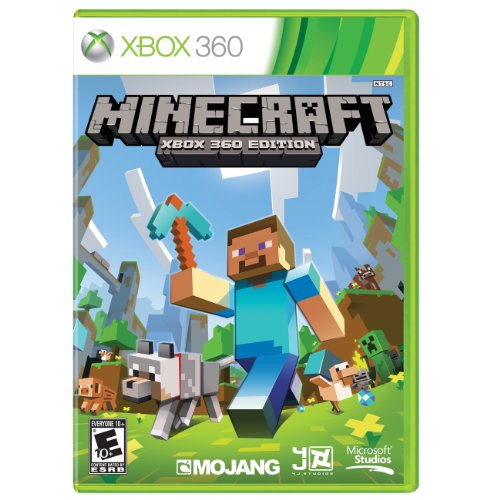
Minecraft – Xbox 361
- ✓ Easy-to-use crafting
- ✓ Solid couch co-op
- ✓ Helpful Tutorial mode
- ✕ Limited to Xbox 360 hardware
- ✕ Visuals dated by modern standards
| Platform Access | Xbox 360 |
| Multiplayer Support | 4-player split-screen on a single console; up to 8 players with Xbox LIVE and split-screen combination |
| Crafting Interface | New crafting/interface system for the Xbox 360 edition |
| Tutorial Mode | Full-featured Tutorial mode with guided basics and skill development |
| Price (MSRP) | $15.99 |
| Release Context | Exclusive to Xbox 360 at launch (console edition) |
You’re sitting on the couch with a dusty controller in hand, sunlight slipping through blinds as you boot up Minecraft on the Xbox 360. The screen fills with that familiar blocky world, and the new crafting interface immediately grabs you, a neat upgrade that feels like a streamlined blueprint for chaos.
In one hand you’ve got the tutorial mode humming along, guiding you from wooden pickaxe basics to more ambitious builds. It’s surprisingly patient, pausing to flash tips right where you’ll actually need them during the first few runs.
Split-screen multiplayer is the real party trick here. You and a friend can dive into the same world without stepping away from the TV, then A/B switch to Xbox LIVE for a larger crew.
The couch-coop vibe makes those big, shared builds feel social rather than solo quests.
Graphically, the old console visuals hold up pretty well, and the new crafting system is intuitive enough that you’re chaining recipes before you know it. The tactile rhythm of gathering, crafting, and placing blocks becomes almost meditative when you’re building with friends nearby.
Navigation feels smoother than you’d expect, with quick access to inventory and crafting menus that don’t pull you out of the action. It’s the sort of upgrade you notice most when you’re planning a big build and want the process to stay enjoyable rather than getting in your own way.
Overall, you’ll find it hits a sweet spot for casual sessions and drop-in co-op adventures. If you’ve waited for a version that makes couch co-op feel fresh without losing the core Minecraft charm, this delivers without overcomplicating the formula.
Xbox One S 1TB Limited Edition Console – Minecraft Bundle

- ✓ Distinctive Minecraft look
- ✓ Comfortable Creeper controller
- ✓ Solid, easy setup
- ✕ Pricey for the spec
- ✕ Bundled focus may limit other games
| Storage Capacity | 1 TB |
| Display Output / Resolution | 4K Ultra HD Blu-ray playback and 4K video streaming |
| HDR Support | High Dynamic Range (HDR) |
| Console Design / Edition | Limited Edition Minecraft console with grass block and redstone design |
| Included Accessories / Bundled Content | Minecraft Creeper controller; vertical stand; Minecraft system sounds |
| Platform / Model | Xbox One S |
You punch the power button, and the room lights up with Minecraft grass-block vibes—the first moment that breaks your “it’s just a console” mindset. I didn’t expect to grin at the system sounds looping softly, like a tiny world waking up around you.
The 1TB Minecraft Limited Edition console feels surprisingly tactile in hand, with the grass block texture and redstone-accented surface drawing your eye. It’s not just a looker; the finish feels sturdy enough to handle a few accidental bumps from a snack-break session.
Setup is simple, and the Creeper controller fits your grip nicely—smooth thumbsticks, clear d-pad clicks, and that iconic green glow when the lights dim. You’ll notice the vertical stand included; it’s sturdy enough to keep the rig upright without wobble.
In use, the 4K Blu-ray and streaming capabilities are a nice hook, but you’ll keep coming back to the bundle’s Minecraft flavor. The system sounds add a playful layer during menu navigation, making each start feel a bit more immersive.
Real-world gaming with friends is where this shines. Splitting screen or quick party matches feel snappier than you’d expect for a bundled bundle, and loading times stay reasonable for a console of this size and price.
Comfortable, themed, and easy to pick up after a long day, this bundle makes a strong case for being your living-room Minecraft hub. It’s more than just nostalgia; it’s a visually cohesive package that actually enhances the vibe of your gaming setup.
If you’re chasing a Minecraft centerpiece that doesn’t skimp on performance, this is a compelling option. It blends style with solid fundamentals and a touch of whimsy that sticks around after the initial wow wears off.
What Are the Best Minecraft Skins for Xbox One?
When looking for the best Minecraft skins for Xbox One, players can choose from a variety of creative and unique designs that enhance their gaming experience.
- Steve and Alex: The classic default skins of Minecraft, Steve and Alex are instantly recognizable and perfect for those who prefer a traditional look while exploring the blocky world.
- Superhero Skins: Skins based on popular superheroes, such as Spider-Man or Batman, allow players to embody their favorite characters, adding a fun twist to their gameplay and making their adventures feel more heroic.
- Animal Skins: Animal-themed skins, like wolves, cats, or even mythical creatures like dragons, provide a whimsical and playful aesthetic that appeals to players of all ages.
- Fantasy Skins: Skins inspired by fantasy themes, such as wizards, elves, or knights, immerse players in a magical experience, allowing them to feel like they are part of a grand adventure.
- Celebrity and Pop Culture Skins: Many skins are designed to resemble popular celebrities or characters from movies and TV shows, giving players the opportunity to represent their favorite icons within the game.
- Custom Skins: Players can create and upload their own custom skins, which allows for ultimate personalization and creativity, enabling them to stand out from other players in the vast Minecraft community.
- Seasonal and Holiday Skins: During special occasions like Halloween or Christmas, themed skins featuring costumes or festive designs can bring seasonal cheer and enhance the gameplay experience.
Each of these skin categories offers a variety of options that can be easily downloaded or created, making it simple for Xbox One players to find the perfect skin that fits their style and personality.
Which Texture Packs Enhance the Minecraft Experience on Xbox One?
The best Minecraft texture packs for Xbox One can significantly enhance your gaming experience by improving visuals and adding unique styles to the game.
- Natural Texture Pack: This pack offers a more realistic look to Minecraft’s environments, enhancing the natural elements like grass, trees, and water.
- Plastic Texture Pack: Known for its vibrant colors and smooth surfaces, this pack gives Minecraft a toy-like appearance, making it appealing for younger players.
- City Texture Pack: This texture pack transforms the game into an urban setting with detailed buildings, streets, and vehicles, perfect for players who enjoy modern themes.
- Fantasy Texture Pack: This pack embraces a whimsical design, adding enchanting visuals that make the game feel like a fairytale world, with magical elements and vibrant colors.
- Steampunk Texture Pack: For those who love the steampunk aesthetic, this pack incorporates gears, pipes, and a Victorian-era vibe, making the Minecraft experience feel more industrial and mechanical.
The Natural Texture Pack enhances the realism of the game, making landscapes more immersive with high-quality textures for flora and fauna. It’s ideal for players who want to feel more connected to the environment while exploring or building.
The Plastic Texture Pack stands out for its bright and cheerful color palette. It simplifies the textures, making blocks appear smoother and more uniform, which can be particularly appealing for a playful and imaginative gameplay experience.
The City Texture Pack is perfect for those who enjoy constructing or exploring urban environments, providing textures that resemble real buildings and city life. This pack encourages creativity in creating detailed cityscapes and modern structures.
For players who are drawn to fantasy themes, the Fantasy Texture Pack offers a magical twist with its vibrant colors and whimsical designs. It brings a mythical feel to the game, making it perfect for adventures involving castles, dragons, and enchanted forests.
The Steampunk Texture Pack introduces a unique industrial aesthetic, featuring intricate designs and textures that evoke a sense of machinery and invention. This pack is suitable for players who appreciate the combination of creativity and engineering in their builds.
How to Install and Use Minecraft Mods on Xbox One?
Installing and using Minecraft mods on Xbox One can be a bit different than on PC, primarily due to the closed nature of the console environment. However, players can expand their Minecraft experience through a combination of downloadable content (DLC) and Marketplace items.
-
Minecraft Marketplace: Access the Marketplace directly from the main menu. Here, players can purchase skins, texture packs, and worlds made by the community and developers. Use Minecoins, which can be bought with real money, to make purchases.
-
Add-Ons and Packs: Some add-ons available in the Marketplace provide a way to modify gameplay, including new mobs, textures, and mechanics. These can be downloaded and applied to your existing worlds.
-
Using External Tools: While traditional modding isn’t supported on Xbox One as it is on PC, tools like MCC ToolChest can be useful for managing certain aspects of your game. They allow changes to be made to saved worlds, provided you have access to your saves via Xbox.
-
Playing with Friends: Once you’ve downloaded new content, you can share your worlds or invite friends to explore them with you, enhancing collaborative gaming.
Understanding these options can greatly enhance your Minecraft experience on Xbox One.
What Are the Most Essential Add-Ons for Minecraft on Xbox One?
The most essential add-ons for Minecraft on Xbox One enhance gameplay and creativity.
- Texture Packs: Texture packs change the appearance of blocks and items in the game, allowing players to customize their visual experience. Packs like “Natural Texture Pack” or “City Texture Pack” can make the world look more realistic or stylized, respectively, giving players a fresh perspective on familiar landscapes.
- Skins: Custom skins allow players to personalize their character’s appearance, making the game more engaging and unique. There are countless skins available, from popular movie or game characters to original designs, enabling players to express their individuality in the blocky world of Minecraft.
- World Templates: World templates are pre-built maps that players can explore or use as a starting point for their own creations. Options like “The City” or “Skyblock” offer diverse gameplay experiences, whether players want to build in a bustling urban environment or survive on a floating island.
- Add-On Packs: These packs introduce new gameplay mechanics, creatures, and items, expanding the Minecraft experience significantly. For instance, the “Minecraft: Super Mario Mash-Up Pack” combines elements from the Mario franchise with Minecraft, allowing players to enjoy a unique blend of both worlds.
- Mods (via Minecraft Marketplace): While traditional mods aren’t available on Xbox One, the Minecraft Marketplace offers various user-created content that functions similarly. These can include new gameplay features, custom mobs, and unique challenges that enhance the vanilla experience.
- Adventure Maps: Adventure maps provide players with a narrative-driven experience, often featuring puzzles and challenges that require specific gameplay mechanics to complete. They encourage cooperative play and exploration, making them perfect for groups of friends looking for a structured experience.
- Mini-Games: Mini-games like “Spleef” or “Bed Wars” allow for competitive play within Minecraft, providing a break from traditional building and survival gameplay. These games often require teamwork and strategy, making them a fun way to enjoy Minecraft with friends in a more dynamic environment.
Where Can You Find the Best Minecraft Seed Codes for Xbox One?
You can find the best Minecraft seed codes for Xbox One in various online resources and community platforms.
- Official Minecraft Forums: The official forums are a great place to discover seeds shared by players who have explored different worlds.
- Reddit Communities: Subreddits like r/Minecraft and r/MinecraftSeeds are vibrant communities where users frequently post and discuss the best seeds for Xbox One.
- YouTube Tutorials: Many Minecraft enthusiasts create videos showcasing the best seeds, often with gameplay footage to illustrate the unique features of each seed.
- Dedicated Seed Websites: Websites specifically designed for sharing Minecraft seeds often have extensive databases where users can search for seeds based on criteria like version and platform.
- Social Media Groups: Platforms like Facebook and Discord host groups focused on Minecraft, where players can exchange their favorite seeds and provide tips on how to use them effectively.
The official Minecraft forums are a treasure trove of information where players can post their favorite seeds, ask for recommendations, and share tips on maximizing their gameplay experience. The community there is often very supportive, making it a good starting point for both new and experienced players.
Reddit communities such as r/Minecraft and r/MinecraftSeeds allow users to engage in discussions and share their own findings. These subreddits are constantly updated, making them an excellent source for discovering newly found seeds that might not be available elsewhere.
YouTube tutorials provide a visual and engaging way to learn about the best Minecraft seeds. Many content creators showcase their favorite seeds in action, highlighting unique features like biomes, villages, and structures you can find in each world, which can be particularly useful for players looking to explore specific gameplay styles.
Dedicated seed websites compile extensive lists of seeds, often categorized by different parameters such as game versions and world types. These websites usually feature user ratings and reviews, helping players to find the most suitable seeds for their needs quickly.
Social media groups on platforms like Facebook and Discord offer an interactive way to connect with other Minecraft players. These groups often facilitate seed sharing and discussions, allowing members to post questions and receive feedback from a community of dedicated gamers.
What Community Creations Are a Must-See in Minecraft on Xbox One?
Some of the best community creations to explore in Minecraft on Xbox One include:
- The Legend of Zelda: Breath of the Wild Map: This impressive recreation of the iconic game allows players to explore Hyrule in Minecraft, featuring landmarks and interactive elements that mimic the original game’s mechanics.
- Modern City Build: A sprawling metropolis filled with skyscrapers, parks, and transport systems, this creation showcases the architectural prowess of Minecraft players, providing a realistic urban environment to wander through.
- Adventure Maps: These maps are designed for players seeking unique experiences, often featuring intricate storylines, puzzles, and challenges that enhance the gameplay and encourage exploration.
- Harry Potter Hogwarts Castle: An incredibly detailed replica of Hogwarts, this creation captures the magic of the beloved series, allowing fans to roam the halls, visit classrooms, and experience the enchanting atmosphere.
- Star Wars: A New Hope Map: This map recreates iconic scenes from the classic film, allowing players to relive pivotal moments and engage in battles across various locations from the Star Wars universe.
- Pixel Art Creations: Talented artists within the Minecraft community create stunning pixel art that pays homage to various pop culture icons, ranging from superheroes to video game characters, adding a colorful aesthetic to any world.
- Survival Islands: These custom maps challenge players to survive on isolated islands, often with limited resources, providing a unique twist on the traditional gameplay and requiring strategic planning.
The Legend of Zelda: Breath of the Wild Map is not just a visual treat; it incorporates gameplay mechanics that resonate with fans, such as crafting and combat, allowing players to immerse themselves in a familiar yet novel environment.
The Modern City Build stands out for its meticulous attention to detail, featuring everything from a fully functioning subway system to parks and residential areas, making it a perfect example of urban planning within Minecraft.
Adventure Maps offer a dynamic gaming experience, often including features like custom NPCs, quests, and unique gameplay mechanics designed by the community, making each map a distinct adventure.
The Harry Potter Hogwarts Castle is a labor of love, showcasing the dedication of its creators through intricate designs of various rooms and areas from the series, creating a nostalgic journey for fans.
The Star Wars: A New Hope Map provides an engaging experience by allowing players to interact with the storyline, bringing the beloved galaxy far, far away to life through Minecraft’s sandbox mechanics.
Pixel Art Creations add a vibrant flair to any Minecraft world, showcasing the creativity of the community and allowing players to appreciate the artistry involved in transforming simple blocks into recognizable figures.
Survival Islands challenge players by placing them in a scenario where resource management and creativity are key, leading to innovative survival strategies and unique gameplay experiences.
How to Get the Most Out of Minecraft on Xbox One with These Tips?
To maximize your Minecraft experience on Xbox One, consider implementing the following tips:
- Use Creative Mode: Creative Mode allows players to build and explore without limitations, giving access to unlimited resources and the ability to fly. This is ideal for those who want to focus on construction and design without the threats of survival mode.
- Explore Community Creations: The Minecraft marketplace on Xbox One features a wide variety of skins, texture packs, and worlds created by other players. Engaging with these community creations can enhance your gameplay experience and provide inspiration for your own builds.
- Customize Settings: Adjusting game settings can significantly improve your experience. You can change the difficulty level, modify the graphics settings for performance, and customize controls to suit your play style, making the game more enjoyable and accessible.
- Utilize Redstone Mechanics: Learning how to use Redstone can elevate your builds with advanced contraptions and automation. Redstone functions like electrical wiring, allowing you to create anything from simple doors to complex machines, adding depth to your gameplay.
- Join Multiplayer Servers: Playing with friends or joining online servers can greatly expand your Minecraft experience. Multiplayer interactions lead to collaborative projects, competitions, and a shared sense of community, enriching the overall fun and creativity.
- Regularly Update the Game: Keeping your game updated ensures you have access to the latest features, bug fixes, and content. Updates often introduce new items, blocks, and mechanics that can enhance gameplay, keeping the experience fresh and engaging.
- Experiment with Mods: Although modding is more common on PC, there are some mod-like features available on Xbox One, such as add-ons. These can change gameplay mechanics, introduce new mobs, or provide additional customization options, allowing for a tailored experience.