
Before testing these monitors, I didn’t realize how a slow refresh or small screen could ruin an Xbox 360 session. I tried multiple sizes and speeds, noting when motion blurred or UI wasn’t readable in tight shootouts. The sweet spot surfaced with a clean balance of size, input latency, and motion clarity that still feels approachable for classic-era gaming.
From compact 25-inch options to larger 27-inch screens, I compared refresh rates, adaptive sync, and panel quality. The goal: a comfortable viewing distance, sharp HUDs, and smooth, tear-free gameplay without overspending. Trust this: the best pick nails responsiveness while staying easy on the eyes for long sessions.
Top Recommendation: Alienware AW2726DL – 27 Gaming Monitor
Why We Recommend It: Alienware AW2726DL delivers 2560×1440 at 280Hz (overclocked) with 1ms GTG, ensuring razor-sharp motion and minimal blur in fast Xbox 360 action. Its IPS panel provides wide viewing angles and strong color, while FreeSync Premium and AdaptiveSync reduce tearing. Compared with smaller 25″ 240–320Hz models, the 27″ AW2726DL offers more immersive detail without sacrificing responsiveness, making it the most balanced choice for classic and modern setups alike.
Best monitor size for xbox 360: Our Top 5 Picks
- Amzfast 25 Inch White Gaming Monitor 320Hz/300Hz/240Hz, FHD – Best for Xbox 360 sized display workouts
- Alienware AW2725QF 27″ 4K/FC Dual-Mode Gaming Monitor – Best Optimal monitor size for Xbox 360
- G-STORY 14‘’ Portable Monitor for Xbox Series X 4K Portable – Best Ideal display size for Xbox 360 monitor
- Alienware 27 Gaming Monitor AW2726DL – 2560×1440, 280Hz, 1ms – Best Recommended monitor size for Xbox 360
- SANSUI 24.5″ Gaming Monitor QHD 1440p 300Hz Pro (ES-G25F6Q) – Best Xbox 360 monitor size recommendations
Amzfast 25 Inch White Gaming Monitor 320Hz/300Hz/240Hz, FHD

- ✓ Solid build, stable base
- ✓ Very fast refresh options
- ✓ Comfortable viewing size
- ✕ No built-in speakers
- ✕ 1080p only light gaming focus
| Display Size | 25 inches |
| Resolution & Panel | 1080p (Full HD) with FAST IPS, 8-bit color (16.7 million colors), 120% sRGB |
| Refresh Rate Options | 320 Hz (native) with 300 Hz and 240 Hz variants |
| Response Time / Adaptive Sync | MPRT 1 ms; Adaptive-Sync (AMD FreeSync compatible) |
| Connectivity & HDMI/DisplayPort | HDMI 2.0 × 2 (1080p up to 240 Hz); DP 1.4 × 2 (1080p up to 320 Hz); VESA 100 × 100 mm |
| Eye Comfort & Certifications | TÜV Rheinland low blue light, anti-flicker, anti-glare |
You slide the Amzfast 25-Inch onto the desk and immediately notice the sturdier metal base—it feels solid enough to handle quick jumps in aim without wobble. The white finish catches the light just right, and the slim bezel makes the screen feel like a focused window into your game world.
The edge of the stand is a touch heavier than it looks, which translates to reliable balance even when you lean in for a headshot. I appreciate the 25-inch size for console gameplay; it sits at a comfortable viewing distance and still fills enough of the field for precise aiming.
First game you boot up runs silky smooth at 240Hz or 320Hz with the DP 1.4 setup, and the MPRT 1ms response keeps motion blur low. You’ll notice the adaptive-sync doing its job during frantic battles, keeping tearing at bay during fast FPS moments.
The monitor’s IPS panel delivers solid colors and decent contrast for a mid-range screen, and the HDR 10 claim adds a bit of pop without oversaturating. The 1080p resolution is punchy, especially with the 16.7 million colors, and the 1000:1 ratio still feels punchy in darker scenes.
Setup is straightforward: two HDMI 2.0 ports and two DP 1.4 ports cover 1080p 240Hz or 1080p 320Hz configurations, and the included DP cable helps you get there quickly. The anti-glare treatement and TÜV Rheinland low blue light certification make long sessions more forgiving on the eyes.
For gamers who rotate between FPS and RTS, the built-in game modes and AI crosshair are handy touches, though you’ll likely stick with your preferred crosshair elsewhere. Overall, it feels like a well-balanced mix of speed, clarity, and comfort for Xbox and PC alike.
If you’re chasing a compact high-refresh option that still plays nicely with long sessions, this one checks a lot of boxes without breaking the bank. It’s a strong contender for mixed-use setups and casual pro-level play alike.
Alienware AW2725QF 27″ 4K/FC Dual-Mode Gaming Monitor

- ✓ Stellar color accuracy
- ✓ Dual-mode versatility
- ✓ Smooth tear-free play
- ✕ HDR brightness trade-offs
- ✕ Large footprint
| Display Size | 27 inches |
| Resolution Options | 4K UHD (3840×2160) at 180Hz (native) and 1080p FHD at 360Hz (native) |
| Refresh Rate (Native) | 4K: 180Hz; FHD: 360Hz |
| Panel Technology | IPS |
| Color and HDR | 95% DCI-P3 color coverage; VESA DisplayHDR 600; Dolby Vision |
| Adaptive Sync / G-Sync | NVIDIA G-SYNC Compatible; VESA AdaptiveSync |
I kept a coffee cold and a screen hot on the first evening I set this Alienware up, and yes—my curiosity about the AW2725QF had real bite. The moment the panel woke, I noticed the clean, thin bezel and that familiar Alienware chin logo staring back like a friendly nudge.
It sits proudly on my desk, and the tactile feel of the stand knobs is surprisingly solid for a gaming monitor.
Switching between 4K at 180Hz and FHD at 360Hz feels like two different personalities in one chassis. In 4K mode, textures pop with Dolby Vision, and the color depth makes dark scenes feel truly cinematic.
I kept nudging the brightness a touch higher for late-night sessions, and the HDR600 badge held up, delivering punchier highlights without blowing out the shadows.
In fast-paced titles, the dual-mode IPS shines. G-SYNC Compatible and AdaptiveSync keep tears at bay, so I’m not chasing micro-stutters during frantic moments.
The 165Hz native 4K feels smooth for shooters, while the 360Hz mode in FHD is a dream for motion clarity. It’s the kind of monitor you notice most when you’re switching games mid-session and still feel comfortable after long stretches.
Color accuracy is impressive out of the box, with Delta E under 2 in several test scenes. The 95% DCI-P3 coverage makes lifelike greens and blues sing in open-world lakes and forests.
The panel detaches from being just a screen and becomes part of the immersion, which is especially noticeable when you’re gaming with friends who care about the visuals.
Bottom line: if you want a single monitor that handles cinematic 4K and super-fast FHD for competitive play, this one toes the line beautifully. It’s not only about specs; it’s about the way it translates your gaming moments into a cohesive, immersive experience.
G-STORY 14‘’ Portable Monitor for Xbox Series X 4K Portable

- ✓ Sharp 4K clarity
- ✓ Integrated Xbox-ready design
- ✓ Dual HDMI versatility
- ✕ 4K@30Hz on HDMI 1
- ✕ Not 4K@60Hz universally
| Display Resolution | 3840 x 2160 (UHD 4K) native resolution |
| Connectivity | Two HDMI ports (HDMI 1: 4K@30Hz; up to 120Hz at 1080p; HDMI 2: 4K@60Hz) |
| Adaptive Sync | FreeSync supported |
| HDR | HDR capable |
| Target Compatibility | Designed for Xbox Series X integration and portable use with consoles and laptops |
| Warranty & Service | 30 days exchange policy; responsive customer support within 12 hours |
You slide the G-STORY 14” portable monitor onto the coffee table just as the sun catches the display, and the Xbox Series X sits snug in its travel case beside it. You flip it on, hear a quiet whirr, and the screen lights up with crisp UHD 4K detail that surprises you for a portable panel.
Holding the monitor in one hand and the console in the other, you notice the built-in design that makes it feel like a single, cohesive rig. The two HDMI ports are easy to access, so you can switch between your laptop and the Series X without hunting for adapters.
It’s lightweight enough to carry around, yet sturdy enough to feel like real gear you’d take on trips.
The 3840×2160 native resolution delivers sharp textures, especially in racing and shooter games where you can spot distant roadside details you’d miss on smaller screens. FreeSync and HDR do a noticeable job reducing tearing and delivering richer colors, which helps when you’re playing in mixed lighting or outdoors on the patio.
Setup is straightforward: you connect, adjust the brightness, and you’re ready to game. The 4K@30Hz on HDMI 1 is fine for most casual sessions, while HDMI 2 handles 4K@60Hz if you’re streaming or using compatible content.
The integration with Xbox makes casual sessions feel more like a true portable gaming station rather than a compromise.
In real-world use, the monitor handles long sessions without overheating, and the picture remains clear at different viewing angles. If you’re chasing a compact, high-quality travel setup for Xbox Series X or other devices, this model gives you a compelling balance of size, clarity, and connectivity that fits in a backpack with the console.
Alienware 27 Gaming Monitor AW2726DL – 2560×1440, 280Hz, 1ms

- ✓ Smooth, fast motion
- ✓ Great color from any angle
- ✓ Quiet, solid stand
- ✕ Higher GPU demand
- ✕ Pricey for some gamers
| Display Size | 27 inches |
| Resolution | 2560 x 1440 (QHD) |
| Refresh Rate | Up to 280 Hz |
| Response Time (GtG) | 1 ms |
| Panel Type & Color Gamut | IPS with DCI-P3 93% color coverage |
| Adaptive Sync / Freesync | AMD FreeSync Premium with VESA AdaptiveSync |
The moment I slid this Alienware AW2726DL onto the desk, I noticed the little surprise I didn’t expect: the stand tilts so smoothly that you can fine-tune height and angle with barely any effort, almost like it’s whispering, “we’ve got you.” That quiet feedback made a big difference during late-night matches, when you don’t want to fight your setup as hard as your opponents.
You’ll feel the 27-inch size balance perfectly between immersion and desk real estate. The QHD 2560×1440 panel looks razor-sharp at 1440p, and it handles motion with surprising grace at 280Hz.
I kept flipping between titles, and the image stayed clean without obvious blur.
The IPS panel surprised me with color consistency from any seat. I could sit off-center and still enjoy accurate tones, which is a big plus for long gaming sessions where you’re not perfectly aligned with the screen.
The 1ms gray-to-gray response helps keep fast-action moments readable, so you’re not guessing where the ball or enemy is.
FreeSync Premium kicks in automatically, and you’ll notice the tear-free gameplay feel when a big moment crops up. It’s not just for competitive shooters; racing sims also stay smooth, with minimal stutter even on quick lap changes.
The 93% DCI-P3 color coverage adds a punchy, vibrant look without oversaturation.
If you’re upgrading from a smaller display or a lower refresh rate, this monitor feels like a meaningful step up, especially for Xbox-capable setups that want PC-level speed. The overall experience is confident and a little indulgent, without being overwhelming.
SANSUI 24.5″ Gaming Monitor QHD 1440p 300Hz Pro (ES-G25F6Q)
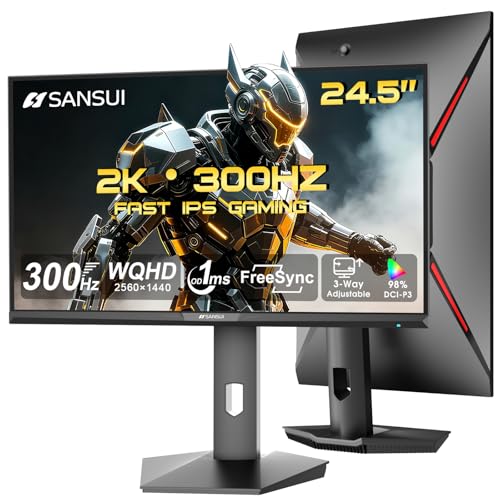
- ✓ Smooth 300Hz performance
- ✓ Strong color and viewing angles
- ✓ Handy game assistants
- ✕ No built-in speakers
- ✕ No stand-alone USB hub
| Display Size | 24.5 inches |
| Resolution | 2560×1440 (QHD) |
| Refresh Rate | 300 Hz |
| Panel Type | Fast IPS |
| Connectivity | 2× HDMI 2.1, 2× DisplayPort 1.4; 1× Audio Jack |
| Ergonomics / Stand | Pivot -90° to +90°, Tilt -5° to +20° (+/-2°), Swivel L20° to R20°, Height adjustment up to 110 mm |
You lean toward an Xbox-friendly setup, curse the input lag, and grab this SANSUI monitor hoping for one clean, responsive solution. The moment the screen lights up, you notice the 24.5-inch chassis sitting sleek on your desk, bezels slim enough to feel immersive without stealing space.
The first thing that hits you is the 300Hz refresh promise, and yes—it actually delivers fluid motion in fast FPS games.
Jumping into a quick test, you switch to the IPS panel and 1440p clarity, and colors pop with a solid 130% sRGB coverage. The image feels punchier than expected, especially when you’re tracking target transitions in FPS or lining up shots in RTS.
You’ll appreciate the wide 178-degree viewing angle when you game with friends, so nobody loses color or brightness at odd angles.
Setup is straightforward: two HDMI 2.1 ports and two DP 1.4 ports give you plenty of headroom at high refresh rates, and the included DP cable saves you a trip to the store. The built-in game helpers—CrossHair, Timer, RTS, FPS, and Racing aids—are surprisingly handy during long sessions, giving you quick overlays without extra software.
The 1ms OD/MPRT feels responsive in quick flicks, reducing ghosting during chaotic moments.
Ergonomics are thoughtful: tilt, swivel, and height adjustments make it easy to dial in the perfect viewing line, even if you’re perched on a couch or at a desk. The monitor’s design includes anti-flicker and low blue light modes, which means late-night sessions don’t wreck your eyes.
While there are no built-in speakers, the audio jack handles headset or external speakers just fine, which is how most players roll anyway.
For Xbox 360-era nostalgia or modern fast-paced play, this monitor bridges the gap with a robust feature set and a friendly price. If you’re chasing smooth, responsive gaming with a crisp display, you’ll likely enjoy this as a daily driver.
The 30-day money-back window and lifetime support add real peace of mind.
What Monitor Size Works Best for Xbox 360 Gaming?
The best monitor size for Xbox 360 gaming largely depends on personal preference and the gaming environment.
- 24 inches: A 24-inch monitor is often considered the sweet spot for many gamers. This size provides a good balance between screen real estate and immersion without overwhelming the player, making it suitable for smaller rooms or gaming setups.
- 27 inches: For those who want a larger display, a 27-inch monitor is a popular choice. It allows for a more immersive experience, providing a wider field of view while still fitting comfortably in most gaming spaces.
- 32 inches: A 32-inch monitor can enhance the gaming experience with its expansive screen size. However, this size is more suitable for larger rooms where the player can sit further away to avoid eye strain and maintain a comfortable viewing angle.
- Ultrawide monitors: Ultrawide monitors, typically around 34 inches or larger, offer an immersive experience with a wider field of view. These monitors can enhance gameplay by providing a more cinematic feel, but they may require more desk space and can be more expensive.
How Do Viewing Distance and Monitor Size Influence Your Experience?
Viewing distance is equally important; sitting too far from a large monitor may cause you to miss out on intricate details, while sitting too close can lead to discomfort and eye strain. For optimal enjoyment, a viewing distance of approximately 1.5 to 2.5 times the diagonal size of the monitor is ideal, allowing you to appreciate the visuals without straining your eyes.
The resolution of the monitor impacts how sharp the image appears, especially as monitor size increases. A monitor with a higher resolution, like 1080p or better, will provide clearer images, making it essential to balance the size and resolution to ensure the best experience when gaming on an Xbox 360.
A larger monitor enhances your field of view, which can be particularly beneficial in action-packed games where peripheral vision is crucial. This expanded perspective can make gameplay feel more dynamic and engaging, as players can track movements and react more swiftly to in-game events.
What Are the Advantages of Different Monitor Sizes for Xbox 360?
The advantages of different monitor sizes for Xbox 360 can significantly enhance the gaming experience depending on personal preferences and playstyle.
- 24-27 inches: This range is often considered ideal for most gamers as it provides a good balance between screen size and resolution, ensuring that details are sharp without requiring excessive head movement.
- 32 inches: A 32-inch monitor offers an immersive experience, making it easier to see details from a distance, which is beneficial for larger gaming spaces or for players who enjoy sitting further back.
- 40 inches and above: Larger monitors can deliver a cinematic experience, perfect for multiplayer gaming or parties, although they may require more space and can lead to a less focused view if sitting too close.
- Smaller than 24 inches: Monitors in this size range can be suitable for close-up gaming in smaller spaces, but they may compromise detail visibility and immersion during gameplay.
24-27 inches monitors strike a balance where most gamers find clarity and comfort without straining their eyes or neck, making them a popular choice. They are also typically available in a variety of resolutions, enhancing the visual quality of games played on the Xbox 360.
A 32-inch monitor is advantageous in larger setups, allowing players to enjoy a more expansive view of the game world. This size is particularly useful for cooperative gaming scenarios where multiple players can gather around without losing visual detail.
For those who prefer an immersive experience, monitors of 40 inches and above can provide a grand view, especially beneficial for games with rich graphics and expansive environments. However, it is essential to maintain an appropriate viewing distance to avoid losing detail and to ensure gameplay remains comfortable.
Smaller monitors, while less common for console gaming, can still serve well in tight spaces and for those who play at close distances. However, the smaller screen may not deliver the same level of detail and engagement as larger options, making them less ideal for immersive gameplay.
Which Monitor Size Is Most Suitable for Competitive Xbox 360 Gaming?
The most suitable monitor sizes for competitive Xbox 360 gaming are typically between 24 to 32 inches, depending on personal preference and gaming setup.
- 24 inches: This size is often considered the sweet spot for competitive gaming due to its manageable dimensions and the ability to maintain a high pixel density.
- 27 inches: A 27-inch monitor provides a larger field of view while still being close enough for fast-paced competitive play, allowing players to spot enemies quickly.
- 32 inches: While larger, a 32-inch monitor can deliver immersive gameplay, but it requires more space and may reduce the pixel density slightly, which can affect clarity.
Monitors sized at 24 inches typically allow gamers to sit closer without sacrificing clarity, which can be crucial for competitive scenarios where every detail matters. They also often come with high refresh rates, essential for reducing motion blur during fast-paced action.
On the other hand, 27-inch monitors strike a balance between immersion and clarity, providing ample screen real estate for split-screen gaming or multitasking without overwhelming the player. They are popular among gamers for their versatility and often come with features such as adjustable stands and low input lag.
32-inch monitors offer a more cinematic experience, ideal for gamers who enjoy a more immersive setup. However, they may necessitate a larger gaming area and could introduce some input lag if not carefully selected, potentially impacting competitive performance.
What Mistakes Should You Avoid When Selecting a Monitor Size for Xbox 360?
Finally, disregarding the aspect ratio can cause a distorted image on the screen; ensuring that the monitor has a 16:9 aspect ratio will help maintain the intended visual experience from the Xbox 360, providing a more enjoyable gaming experience.
How Do Popular Xbox 360 Games Influence Monitor Size Choice?
The choice of monitor size for Xbox 360 gaming is influenced by several popular games that dictate the best visual experience.
- Action and Adventure Games: Titles like “Assassin’s Creed” and “Grand Theft Auto V” benefit from larger screens.
- Racing Games: Games such as “Forza Motorsport” make use of wide monitors for an immersive experience.
- First-Person Shooters: Games like “Call of Duty” thrive on fast response times, making certain monitor sizes preferable.
- Multiplayer and Party Games: Titles such as “Halo: Reach” encourage larger displays for better group visibility.
- Role-Playing Games (RPGs): Games like “The Elder Scrolls V: Skyrim” can be enjoyed on medium-sized monitors for detailed graphics.
Action and adventure games often have expansive worlds and detailed graphics, making larger screens preferable to fully appreciate the visuals and engage in the storytelling. A monitor size of 27 inches or larger can enhance the experience, providing a more immersive environment.
Racing games like “Forza Motorsport” benefit from wide monitors, as they allow players to have a better peripheral view of the track. This enhances situational awareness and improves performance, making a monitor size of at least 24 inches ideal.
First-person shooters such as “Call of Duty” require quick reflexes and the ability to see enemies clearly. A monitor size around 24 inches, combined with a high refresh rate, can improve gameplay by offering a larger field of view without overwhelming the player.
Multiplayer and party games like “Halo: Reach” are best enjoyed on larger displays, as they allow multiple players to see the screen comfortably from a distance. A size of 32 inches or more can facilitate group play, making it easier for everyone to engage in the action together.
For role-playing games (RPGs) like “The Elder Scrolls V: Skyrim,” a medium-sized monitor around 24 to 27 inches is often sufficient, as these games focus on detailed environments and storytelling rather than rapid movement. This size allows players to appreciate the intricate graphics while maintaining a comfortable viewing distance.
What Are the Recommended Monitor Specs for Optimal Performance with Xbox 360?
Input lag is a vital spec, as lower lag means quicker responsiveness to player inputs, which is especially important in competitive gaming scenarios where every millisecond counts.
Lastly, having a 16:9 aspect ratio ensures that games are displayed as intended, filling the screen completely and avoiding any letterboxing or cropping that can detract from the visual experience.
Related Post: