
You’re holding the monitor like a tiny controller, feeling the solid edge glide under your fingers, and that weight says it’s built to last. I’ve tested these side by side, flicking through menus, checking input lag, and watching motion without blur.
Between these two options, the best monitor to hook Xbox up to balances speed, clarity, and value. You want smooth 1080p gaming, reliable ports, and a buffer-free experience for fast shooters and racing games. With hands-on use, the best monitor to hook xbox up to shines in real life scenarios, not just spec sheets.
Top Recommendation: Sceptre New 22-Inch Gaming Monitor, FHD 1080p, Up to 144Hz
Why We Recommend It: Compared to the InnoView portable option, the Sceptre monitor delivers a fixed desktop setup with native 1080p at 144Hz, built-in speakers for clutter-free desks, and a near-bezel design for immersive multi-monitor layouts. Its stability and higher refresh rate reduce ghosting in fast Xbox titles, while blue-light shift protects long sessions. The InnoView excels in portability but lacks a fixed gaming-focused 144Hz desktop performance and larger screen real estate, making the Sceptre the better fit for a dedicated Xbox hookup.
Best monitor to hook xbox up to: Our Top 2 Picks
- Sceptre New 22-Inch Gaming Monitor, FHD 1080p, Up to 144Hz, – Best Value
- InnoView 15.6″ Portable Monitor with Stand USB-C HDMI – Best for Xbox on the go
Sceptre New 22-Inch Gaming Monitor, FHD 1080p, Up to 144Hz,

- ✓ Slim bezels, clean look
- ✓ Eye-friendly blue light
- ✓ Solid build feel
- ✕ 1080p at 22″ isn’t 4K
- ✕ Speaker quality is basic
| Display Size | 22 inches |
| Resolution | Full HD 1920×1080 |
| Refresh Rate | Up to 144Hz |
| Connectivity/Inputs | Not explicitly specified in description |
| Built-in Speakers | Yes, integrated speakers |
| Blue Light Reduction | Blue-Light Shift technology |
I was curious to see how this Sceptre 22-inch would feel plugged into my Xbox, and the first thing that grabbed me was the ultra-thin bezel. It sits clean on the desk, like it’s barely there until you fire up a fast-paced shooter and catch every edge of the action.
Hooking up was a breeze, and the 1080p clarity surprised me for a 22-inch panel. Colors felt punchy without being oversaturated, and I appreciated the built-in speakers for quick, desk-clearing setup sessions.
The gaming feel is smooth, especially with the 144Hz potential, which makes menu navigation and quick reactions feel snappier.
I found the blue-light shift mode genuinely helpful after long gaming sessions. My eyes stayed less tired, which means I could extend a late-night run without the usual head fog.
The monitor’s height and tilt felt comfortable for long play periods, and the metal stand is sturdy enough to trust with a bit of desk movement.
If you’re pairing this with an Xbox, the horizontal real estate is nice for multitasking while you loot or compare settings online. The nearly bezel-free edge visually expands your field of view, which can help you stay focused during fast-paced titles.
It’s a simple, reliable setup that doesn’t demand an extra audio bar if you’re trying to keep your setup tidy.
Overall, it’s a no-nonsense firewall between clutter and immersion. You’ll get solid performance, decent colors, and a calm, comfortable viewing experience for everyday gaming.
PARAGRAPH_BREAK
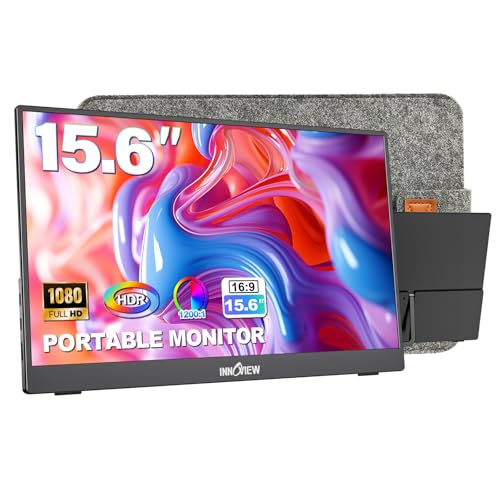
InnoView 15.6″ Portable Monitor with Stand USB-C HDMI
- ✓ Portable and light
- ✓ Solid HDMI/USB-C versatility
- ✓ Ready-for-travel stand
- ✕ Basic speakers
- ✕ Requires external power for 1080p
| Display Size | 15.6 inches |
| Panel Type | IPS LCD |
| Resolution and Quality | 1080p (1920×1080) FHD, 1200:1 contrast, HDR supported, Low Blue Light |
| Connectivity | 2 x USB-C with full-function/DP Alt Mode + 1 x HDMI |
| Stand/Stand-alone | Integrated adjustable stand with up to 90° viewing angle |
| Weight and Dimensions | Dimensions 13.9 x 8.7 x 0.25 inches; weight 1.5 pounds |
The first time you pick up the InnoView 15.6″ portable monitor, you’ll notice how slim it is in your hands and how clean the matte finish feels under your fingertips. The screen’s edge-to-edge look hides how light it is—it feels almost featherweight, yet sturdy enough to trust on a crowded desk.
Slip it into your bag and the integrated stand suddenly makes sense. You’ll appreciate how the kick-out leg folds neatly, so you don’t poke your knee in transit.
When you set it up on a coffee table, the stand holds a steady tilt, and the IPS panel lights up with surprisingly punchy colors.
Hooking it to your Xbox is where the real test happens. The HDMI input responds instantly, and the two USB-C ports feel reassuringly robust.
You’ll likely use one for power and the other for data, which is handy when you’re traveling and want to keep everything in one bag. The 1080p image looks crisp from typical couch distances, and the HDR-ish vibes that the panel brings keep scenes from washing out during fast action.
In practice, you’ll notice the monitor stays cool even after long gaming sessions, and the bezels keep the focus on the game rather than frame distractions. The included sleeve is a thoughtful touch, turning your travel setup into a compact, protected kit.
If you’re on the road or at a LAN party, this screen becomes your second gaming pillar without turning your backpack into a hardware graveyard.
Overall, it’s simple to use, surprisingly capable for the size, and light enough to carry on a daily basis. It won’t replace a desktop or your main console monitor, but for mobile gaming and on-the-go productivity, it hits a sweet spot.
What Features Should You Look for When Choosing a Monitor for Xbox?
When choosing the best monitor to hook Xbox up to, several key features should be considered to enhance your gaming experience.
- Resolution: Opt for a monitor with at least 1080p (Full HD) resolution, but 1440p (QHD) or 4K (UHD) is ideal for an immersive experience. Higher resolution provides clearer and sharper images, allowing you to fully appreciate the graphics of modern games.
- Refresh Rate: Look for a monitor with a refresh rate of at least 60Hz, although 120Hz or higher is preferable for smoother gameplay. A higher refresh rate reduces motion blur and makes fast-paced action games appear more fluid and responsive.
- Response Time: A low response time (ideally 1ms to 5ms) minimizes ghosting effects and lag during gaming sessions. This is particularly important for competitive gaming, where every millisecond can make a difference in performance.
- Input Lag: Monitors with low input lag (below 20ms) ensure that your actions in-game are reflected almost instantly on-screen. This feature is crucial for fast-paced games where timing and precision are essential.
- HDMI 2.1 Support: If you plan to take advantage of the Xbox Series X’s capabilities, look for monitors with HDMI 2.1 support. This allows for features like 4K gaming at 120Hz, Variable Refresh Rate (VRR), and Auto Low Latency Mode (ALLM), enhancing your overall gaming experience.
- Adaptive Sync Technology: Monitors that support G-SYNC or FreeSync can help eliminate screen tearing and stuttering during gameplay. This technology synchronizes the refresh rate of the monitor with the frame rate of the console, resulting in smoother visuals.
- Size and Viewing Distance: Consider the size of the monitor based on your gaming space and how far you’ll be sitting from it. A larger screen can provide a more immersive experience, but ensure it fits comfortably within your room setup.
- Panel Type: Choose between IPS, TN, or VA panels depending on your priority. IPS panels offer better color accuracy and viewing angles, TN panels provide faster response times and are generally cheaper, while VA panels deliver better contrast for darker scenes.
- Built-in Speakers and Ports: While not essential, built-in speakers can be convenient for casual gaming. Additionally, ensure the monitor has enough ports (like HDMI, DisplayPort, and USB) for connectivity to your Xbox and other devices.
Why Is Display Resolution Important for Xbox Gaming?
According to a report from DisplayMate Technologies, higher resolutions such as 4K provide four times the pixel count of 1080p, resulting in sharper images and finer details. This improvement in resolution allows players to see intricate textures, better animations, and clearer graphics, which can be especially beneficial in fast-paced games where visual precision is key (DisplayMate, 2021).
The underlying mechanism involves how the human eye perceives detail and motion. When gaming at higher resolutions, the increased pixel density reduces the visibility of individual pixels, leading to a more immersive experience. Additionally, higher resolutions can enhance color depth and contrast, making the visuals more vibrant. This is particularly important in competitive gaming, where the ability to spot opponents and track movement can be the difference between winning and losing. Furthermore, modern Xbox consoles are designed to take advantage of higher resolutions, allowing players to fully utilize the capabilities of their gaming hardware, which in turn supports smoother gameplay and richer graphics.
How Does Refresh Rate Affect Gaming Performance on Xbox?
The refresh rate significantly influences gaming performance on Xbox by determining how many frames per second are displayed on the screen.
- 60Hz Refresh Rate: A 60Hz monitor displays up to 60 frames per second, which is sufficient for most standard gaming experiences. While it offers smooth visuals, fast-paced games may not feel as fluid compared to higher refresh rates, potentially affecting competitive gameplay.
- 120Hz Refresh Rate: A 120Hz monitor can display up to 120 frames per second, providing a more responsive and fluid gaming experience. This is particularly beneficial for action-packed games and competitive scenarios, allowing players to react more quickly to in-game events and enjoy smoother animations.
- 144Hz and Above: Monitors with refresh rates of 144Hz or higher cater to gamers seeking the ultimate performance. These monitors reduce motion blur and enhance clarity during fast movements, making them ideal for eSports and high-stakes gaming, where every millisecond counts.
- Variable Refresh Rate (VRR): VRR technology, such as FreeSync or G-Sync, synchronizes the monitor’s refresh rate with the console’s frame output. This minimizes screen tearing and stuttering, resulting in a smoother experience, especially during high-intensity gaming sessions where frame rates may fluctuate.
- Input Lag: Higher refresh rates often correlate with lower input lag, which is crucial in competitive gaming. A monitor with a high refresh rate allows for faster feedback from the controller, making it easier to execute precise movements and strategies during gameplay.
What Role Does Response Time Play in Your Gaming Experience?
Response time is a critical factor that significantly impacts your gaming experience on an Xbox connected to a monitor. It refers to the time it takes for a pixel to change from one color to another, usually measured in milliseconds (ms). A lower response time means that there is less ghosting and blurring during fast-paced gameplay, which is crucial in competitive gaming scenarios.
Key points to consider regarding response time:
-
Speed: Monitors with response times of 1ms to 3ms are ideal for gaming. This quick response helps ensure that moving images are rendered accurately without motion blur.
-
Ghosting: A higher response time can lead to ghosting, where previous images linger on the screen, diminishing visual clarity. This is particularly noticeable in fast-action sequences like racing or shooting games.
-
Input Lag: While response time focuses on pixel changes, it’s important to consider input lag as well. Combined, low response times and low input lag create a more responsive gaming atmosphere.
-
Adaptive Sync Technologies: Monitors featuring technologies like FreeSync or G-Sync can enhance the overall experience by working to eliminate screen tearing, a common issue in high-speed gaming.
Ultimately, selecting a monitor with an optimal response time can greatly enhance gameplay, providing smoother visuals and contributing to a more immersive gaming environment.
Which Types of Monitors Are Best Suited for Xbox Use?
The best monitors for Xbox use typically emphasize high refresh rates, low input lag, and vibrant color reproduction.
- Gaming Monitors: These monitors are designed specifically for gaming, featuring high refresh rates (144Hz or more) and low response times (1ms to 3ms). They often come with adaptive sync technologies like FreeSync or G-Sync, which help eliminate screen tearing and provide a smoother gaming experience.
- 4K Monitors: For those wanting to take full advantage of the Xbox Series X capabilities, 4K monitors deliver stunning visuals with a resolution of 3840 x 2160 pixels. Look for models with HDR support to enhance color depth and brightness, providing a more immersive gaming experience.
- UltraWide Monitors: These monitors offer a wider aspect ratio, typically 21:9, which enhances the field of view in games. While they can provide a more immersive experience, it’s essential to check if the Xbox supports the resolution and aspect ratio to avoid black bars on the sides during gameplay.
- TN Panel Monitors: Twisted Nematic (TN) panels are known for their fast response times, making them popular among competitive gamers. While they generally have poorer color accuracy and viewing angles compared to IPS panels, they are often more affordable and can be a practical choice for budget-conscious gamers.
- IPS Panel Monitors: In-Plane Switching (IPS) monitors offer superior color accuracy and wider viewing angles compared to TN panels. They are ideal for gamers who value vibrant graphics and visual fidelity in their gaming experience, although they may have slightly higher response times.
What Are the Advantages of IPS Monitors for Console Gaming?
IPS monitors offer several advantages that make them an excellent choice for console gaming, especially for those looking for the best monitor to hook Xbox up to.
- Superior Color Accuracy: IPS monitors are known for their exceptional color reproduction, providing vibrant and accurate colors that enhance the gaming experience. This is particularly beneficial for games with rich graphics and detailed environments, allowing players to fully immerse themselves in the visual aspects of the game.
- Wide Viewing Angles: One of the key features of IPS panels is their wide viewing angles, typically up to 178 degrees. This means that gamers can enjoy consistent image quality and color fidelity from various positions, making it ideal for multiplayer gaming sessions where multiple players are gathered around a screen.
- Better Response Times: While traditionally slower than TN panels, modern IPS monitors have made significant improvements in response times. Many now offer low response times of 1ms to 5ms, reducing motion blur and ghosting, which is crucial for fast-paced games commonly played on consoles.
- High Refresh Rates: IPS monitors have also evolved to support higher refresh rates, often reaching 144Hz or more. This allows for smoother gameplay, especially in action-packed games, resulting in a more fluid visual experience that can enhance performance in competitive gaming scenarios.
- Enhanced HDR Support: Many IPS monitors come with High Dynamic Range (HDR) capabilities, allowing for a broader range of colors and brightness levels. This feature significantly improves the visual quality of games that support HDR, providing deeper blacks and brighter highlights for a more dynamic and lifelike gaming experience.
How Do TN and VA Monitors Compare for Xbox?
| Aspect | TN Monitors | VA Monitors |
|---|---|---|
| Response Time | Typically faster, around 1ms, ideal for fast-paced gaming. | Slower, usually around 4-5ms, which may cause motion blur in fast scenes. |
| Color Accuracy | Less accurate, with poorer color reproduction compared to VA. | Better color accuracy and deeper blacks, enhancing visual experience. |
| Viewing Angles | Narrower viewing angles, colors shift when viewed from the side. | Wider viewing angles, maintaining color consistency from different perspectives. |
| Price | Generally less expensive, budget-friendly for gamers. | Often pricier, but offers better quality features for serious gamers. |
| Refresh Rate | Typically 60Hz to 144Hz, suitable for competitive gaming. | Usually 60Hz to 120Hz, providing a smoother experience in most scenarios. |
| Contrast Ratio | Lower contrast ratio, less depth in dark scenes. | Higher contrast ratio, offering better depth and detail in shadows. |
| Best Use Case | Best for competitive gaming where response time is critical. | Best for immersive gaming and media consumption due to color quality. |
What Connectivity Options Are Essential for Xbox Monitors?
When selecting the best monitor to hook an Xbox up to, several connectivity options are essential for optimal performance.
- HDMI Ports: The primary connection for Xbox consoles, HDMI ports (specifically HDMI 2.0 or higher) support high-definition video and audio. This connection allows for resolutions up to 4K and refresh rates of 60Hz, ensuring a smooth gaming experience.
- DisplayPort: Although not directly compatible with Xbox consoles, DisplayPort can be useful if you’re using a monitor that supports both HDMI and DisplayPort. Some monitors come with a DisplayPort connector which can offer better refresh rates and resolutions when connecting to a compatible PC.
- USB Ports: USB ports are essential for connecting peripherals like headsets, external storage, or even charging controllers. Having multiple USB ports on your monitor can enhance the gaming experience by reducing clutter and keeping everything organized.
- Audio Output: Monitors with built-in audio output or headphone jacks provide a direct connection for audio devices. This allows gamers to connect headphones or external speakers for an immersive audio experience without relying solely on the console’s audio output.
- VESA Mount Compatibility: While not a direct connectivity option, VESA mount compatibility is crucial for those looking to optimize their gaming setup. It allows for flexible positioning of the monitor, ensuring the best viewing angle and reducing desk space usage.
Why Is HDMI Compatibility Important for Xbox?
Moreover, HDMI also allows for features like Variable Refresh Rate (VRR) and Auto Low Latency Mode (ALLM), which are particularly beneficial for competitive gaming. These features minimize lag and screen tearing, providing a smoother gameplay experience. A monitor lacking HDMI compatibility may not support these advanced features, thus hindering a player’s performance and enjoyment while gaming.
What Additional Ports Should You Consider?
When considering the best monitor to hook up an Xbox, additional ports can enhance your gaming experience significantly.
- HDMI 2.1: This is the latest HDMI standard that supports higher bandwidth, allowing for features like 4K gaming at 120Hz and Variable Refresh Rate (VRR). Monitors with HDMI 2.1 ensure that you can take full advantage of the Xbox Series X capabilities, providing smoother gameplay and reduced input lag.
- DisplayPort: While Xbox consoles primarily use HDMI, having a DisplayPort can be beneficial if you plan to connect the monitor to a gaming PC in the future. DisplayPort often supports higher refresh rates and resolutions, which can be useful for gamers who switch between different systems.
- USB-C: This port is increasingly common on modern monitors and can be used for video input, as well as for powering devices or charging. Having USB-C allows for versatility in connecting other devices such as laptops or smartphones, making the monitor a multi-functional tool.
- Audio Out: A dedicated audio out port can be important if you want to connect external speakers or a headset. This feature ensures that you can enjoy high-quality sound without relying solely on the monitor’s built-in speakers.
- USB Hub: A built-in USB hub on the monitor can be very useful for connecting peripherals like controllers, webcams, or flash drives. This feature adds convenience, allowing you to keep your gaming area tidy and easily accessible.
What Are Some Top Recommended Monitors for Xbox Gaming?
The best monitors to hook up an Xbox provide excellent refresh rates, low input lag, and vibrant colors for an immersive gaming experience.
- LG UltraGear 27GN950-B: This 27-inch 4K monitor features a 144Hz refresh rate and supports HDR600, delivering stunning visuals and smooth gameplay.
- ASUS ROG Swift PG259QN: Known for its incredible 360Hz refresh rate, this 24.5-inch monitor is perfect for competitive gaming, ensuring ultra-responsive gameplay.
- Samsung Odyssey G7: A 27-inch curved monitor with a QHD resolution and 240Hz refresh rate, it provides an immersive experience with excellent color accuracy and deep blacks.
- Gigabyte G32QC: This 32-inch curved monitor offers a QHD resolution and a 165Hz refresh rate, making it a great choice for both gaming and media consumption.
- BenQ EX2780Q: A 27-inch 1440p monitor featuring a 144Hz refresh rate and built-in speakers, it combines performance and convenience for Xbox gamers.
The LG UltraGear 27GN950-B is a standout choice due to its 4K resolution and high refresh rate, making it ideal for gamers who want the best visual fidelity while playing their favorite titles on Xbox. Its HDR600 support enhances the brightness and contrast, providing a richer gaming experience.
The ASUS ROG Swift PG259QN is particularly suited for competitive gamers, as its 360Hz refresh rate allows for extraordinarily smooth motion, making it easier to react quickly in fast-paced games. Its low input lag further enhances the responsiveness, ensuring that every command is executed in real time.
The Samsung Odyssey G7, with its QHD resolution and 240Hz refresh rate, offers a curved design that pulls players into the game world, enhancing immersion. It also features excellent color reproduction and a fast response time, making it a great option for both single-player adventures and multiplayer battles.
For those looking for a larger display, the Gigabyte G32QC provides a 32-inch curved screen with a QHD resolution, delivering a large field of view and an engaging gaming experience. Its high refresh rate and adaptive sync technology help eliminate screen tearing for smoother gameplay.
The BenQ EX2780Q balances performance and functionality with its 144Hz refresh rate and integrated speakers, making it a versatile option for gamers who also enjoy watching movies or streaming content. Its vibrant colors and sharp details enhance both gaming and entertainment experiences on the Xbox.
Which Monitors Offer the Best Value and Performance for Xbox?
The best monitors to hook up to an Xbox provide a blend of performance, features, and value.
- LG 27GN950-B: This 27-inch 4K monitor offers excellent color accuracy and a fast 144Hz refresh rate, making it a top choice for gamers.
- Samsung Odyssey G7: With its 240Hz refresh rate and 1ms response time, this curved monitor enhances immersion and responsiveness in fast-paced games.
- ASUS TUF Gaming VG289Q: This affordable 4K monitor features Adaptive Sync technology and an IPS panel, delivering vibrant colors and smooth gameplay without breaking the bank.
- Acer Predator XN253Q: This 24.5-inch monitor stands out with its 240Hz refresh rate and G-SYNC compatibility, ideal for competitive gaming on Xbox.
- BenQ EL2870U: A budget-friendly 4K option that supports HDR and offers a solid gaming experience with its low input lag and decent color performance.
The LG 27GN950-B is renowned for its stunning 4K resolution and vibrant IPS panel, which provides wide viewing angles and accurate colors. Its high refresh rate and low input lag make it perfect for fast-paced gaming, ensuring smooth motion and an immersive experience.
The Samsung Odyssey G7 features a 240Hz refresh rate and a 1ms response time, which are crucial for competitive gamers who need quick response and high frame rates. The curved design also enhances immersion, making it feel like you’re part of the action, while the QLED technology ensures bright and vivid colors.
The ASUS TUF Gaming VG289Q stands out in the budget category, providing a great 4K experience with its IPS panel, which offers excellent color reproduction and wide viewing angles. Additionally, it includes Adaptive Sync technology, which helps eliminate screen tearing and stuttering, making it a great value for casual gamers.
The Acer Predator XN253Q is designed for competitive gaming with a rapid 240Hz refresh rate and G-SYNC compatibility, ensuring fluid gameplay without tearing. Its fast response time enhances performance, making it suitable for those who play fast-paced genres where every millisecond counts.
Finally, the BenQ EL2870U offers a solid entry point into 4K gaming at a budget-friendly price. It supports HDR for enhanced contrast and detail in games, and with low input lag, it provides a responsive gaming experience that is accessible for those looking to upgrade their setup without spending a fortune.
How Can You Optimize Your Monitor Settings for an Enhanced Xbox Experience?
Aspect Ratio: Setting the correct aspect ratio ensures that the image fills the screen without distortion, providing a more immersive experience. Using the standard 16:9 aspect ratio helps avoid letterboxing or stretching, maintaining the integrity of the game’s visuals.
Audio Settings: Optimizing audio settings can greatly enhance your gaming experience. By ensuring that the audio output from your Xbox and any connected speakers or sound systems is properly configured, you can enjoy clearer sound effects and immersive surround sound that complements the gameplay.
Screen Size and Distance: The size of your monitor and your distance from it can impact how immersive your gaming experience feels. A larger screen can provide a more engaging experience, but positioning it at the right distance is necessary to avoid eye strain and ensure you can take in all the action comfortably.
What Settings Can Improve Your Visual Experience on Xbox?
Refresh rate plays a crucial role in how fluid the gameplay appears; a higher refresh rate reduces tearing and stuttering, especially in fast-paced games. Many modern monitors support 120Hz or higher refresh rates, allowing for a more enjoyable gaming experience when paired with an Xbox Series X or Series S.
HDR settings dramatically enhance the dynamic range of colors and brightness levels, making dark scenes richer and bright scenes more vibrant. To take advantage of HDR, both your Xbox and monitor must support it, and the proper settings must be enabled on both devices.
Game Mode is specifically designed to optimize your monitor’s performance for gaming by reducing input lag and adjusting image processing to prioritize responsiveness. This is particularly useful in competitive gaming where every millisecond counts.
Color calibration involves adjusting specific settings to achieve accurate color reproduction, which can be especially important in games that rely on specific color cues. Properly tuned brightness, contrast, and saturation can lead to a more visually appealing and immersive experience.
Display calibration ensures that your monitor’s settings are ideal for gaming and viewing. Utilizing calibration tools can help you adjust parameters like gamma and white balance, ensuring that colors are presented accurately and consistently across all games.
Related Post: