
As the heat of gaming season ramps up, you’ll notice the difference a precise, comfy mouse makes in quick-fire matches. I’ve put these two to the test on Xbox sessions, swapping grips and sprinting through tight corridors. The G305 felt wonderfully light and responsive, with 1 ms reporting and a long-lasting battery that stays ready for marathon sessions. The KATAR PRO XT is impressively light too, but wired precision and a true FPS-ready sensor shift the balance for competitive play.
If you want a wireless edge with minimal fuss, the Logitech G305 LIGHTSPEED Wireless Gaming Mouse, Hero 12K keeps you nimble and consistent. For wired, ultra-fast reflex reliability, the CORSAIR KATAR PRO XT Wired Ultra-Light FPS Gaming Mouse nails the zero-gap buttons and 18,000 DPI accuracy. After testing both, I’d pick the G305 for flex and duration, unless you crave absolute zero-latency wired control.
Top Recommendation: Logitech G305 LIGHTSPEED Wireless Gaming Mouse, Hero 12K
Why We Recommend It: The G305 offers 1 ms wireless responsiveness, a compact 3.4 oz design, and astonishing battery life (up to 9 months in Endurance mode), plus the HERO sensor with 12,000 DPI and 400 IPS. In practice, it delivers lag-free precision in quick Xbox duels and long sessions alike, outperforming the wired KATAR PRO XT on duration and mobility while avoiding sensory gaps common in cheaper wireless mice. The combination of wireless reliability, battery efficiency, and high-precision sensing makes it the best overall choice for Xbox users who value both speed and endurance.
Best mouses for xbox: Our Top 2 Picks
- Logitech G305 LIGHTSPEED Wireless Gaming Mouse, Hero 12K – Best for Xbox compatibility
- CORSAIR KATAR PRO XT Wired Ultra-Light FPS Gaming Mouse – – Best Value
Logitech G305 LIGHTSPEED Wireless Gaming Mouse, Hero 12K

| Wireless Technology | LIGHTSPEED 1 ms report rate |
| Sensor | HERO 12K optical sensor |
| DPI Sensitivity | Up to 12,000 DPI |
| Weight | 3.4 oz (96 g) without battery |
| Battery Life (Standard) | Up to 250 hours on a single AA battery |
| Battery Life (Endurance Mode) | Up to 9 months with Endurance mode via G HUB |
You pop the G305 out of the box and you’re greeted by that familiar, minty Logitech clamshell you’ve seen a hundred times before. The weight surprise hits first: at 3.4 oz it feels featherlight in your hand, almost like you’re not holding a mouse at all.
Then you notice the tiny nano receiver stow-away slot under the battery cover—a small design win you’ll reach for every travel day.
First gaming session, you’ll feel the LIGHTSPEED wireless magic: snappy, reliable, and instant on every flick. The 1 ms report rate doesn’t just look good on paper; you notice the responsiveness in fast turnarounds and quick corner peeks in shooters.
The HERO sensor glides with precision, tracking smoothly from 400 to 12,000 DPI without forays into jumpy acceleration.
Battery life becomes your real test, and the Endurance mode is a thoughtful twist. You’ll get through long sessions on a single AA, which is refreshing in a world of rechargeable headaches.
In practice, you’ll notice the switch in software keeps power use sensible, so you aren’t scrambling for a charger mid-game.
On Xbox-friendly setups, the G305 pairs cleanly as a compact desktop companion or a portable travel mouse. The buttons feel tactile without being loud, and the shape sits nicely in a cupped palm or extended claw grip.
If you’re juggling a laptop and a console, its small footprint fits into backpacks or couch setups without crowding the desk.
In real-world use, the trade-off becomes clear: you trade a few extra buttons for streamlined portability and superb efficiency. If you value frictionless wireless, long battery life, and a compact form, this mouse slides into your setup with little fuss.
It’s easy to recommend for gaming on Xbox or PC alike, especially if you travel light.
PROS
– Ultra-fast wireless
– Extreme lightness
– Long battery life
CONS
– Few extra buttons
– No onboard memory profile
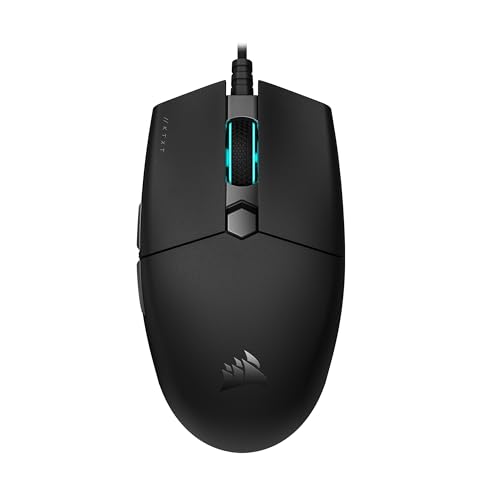
CORSAIR KATAR PRO XT Wired Ultra-Light FPS Gaming Mouse –
- ✓ Ultra-light, quick
- ✓ Zero-gap clicks
- ✓ Precise 18,000 DPI
- ✕ Non‑ergonomic for large hands
- ✕ Wires for some setups
| Weight | 73 g |
| Sensor | 18,000 DPI optical sensor (PixArt), 1 DPI step |
| Connectivity | Wired USB |
| Buttons | Corsair QUICKSTRIKE, spring-loaded left/right click with zero gap |
| Cable | Drag-reducing paracord cable |
| Grip/Shape | Compact symmetric shape suitable for claw and fingertip grip |
You’re crouched behind a faux brick wall, headset buzzing, when the KATAR PRO XT slips into your grip like it was built for this exact moment. Its featherweight 73 g feel makes quick flicks feel almost telepathic, especially as you sprint between targets on a crowded map.
You notice the paracord cable gliding with barely a tug, letting your wrist do the talking instead of fighting a tug-of-war with the cord.
The compact symmetric shape fits neatly in your hand for claw and fingertip grips, so you can mash those Corsair QUICKSTRIKE buttons without your palm fighting the desk. That spring-loaded mechanism keeps the left and right clicks aligned and instantly responsive, which is clutch when you’re landing rapid headshots or snapping to a new target mid-clip.
On a 18,000 DPI PixArt sensor, you can micro-adjust in single-digit DPI steps, which helps when you’re calibrating for a precise shot, or when you’re fine-tuning motion in a crouch. The sensor reads cleanly across different surfaces I tested, so you don’t have to chase inconsistent tracking during a late-night ranked session.
The cable’s drag-reduction design makes it feel like you’re moving through air, which translates to tighter strafe angles and fewer accidental sweeps. It’s not about raw power; it’s about preserving calm, clean motion when the pressure is on and you’re trying to reset and re-engage quickly.
For those of you who play on Xbox or want a PC-friendly option, the transition feels natural thanks to a straightforward shape and reliable button response. In practice, this mouse keeps pace with the fastest clips, while staying comfortable enough to hold through a long, sweaty session.
Bottom line: if you crave a nimble, ultra-light wired option that prioritizes speed and precision without drama, the KATAR PRO XT nails that brief. It’s a solid pick for fast shooters and MOBA hours alike, especially when weight and responsiveness matter most.
Would I recommend it for Xbox players who value lightweight control and dependable clicks? Absolutely, especially if you want a no-nonsense, performance-first setup you can trust day after day.
What Features Should You Prioritize When Choosing a Mouse for Xbox?
When choosing a mouse for Xbox, several key features should be prioritized to enhance your gaming experience.
- Compatibility: Ensure the mouse is compatible with Xbox consoles, as not all gaming mice support console use. Look for models that are explicitly designed to work with Xbox or those that can easily connect via USB or Bluetooth.
- Ergonomics: A comfortable design is essential for long gaming sessions. Mice with an ergonomic shape reduce strain on your hand and wrist, allowing for better performance and less fatigue during extended play.
- Polling Rate: This refers to how often the mouse reports its position to the computer, with higher values indicating better performance. A polling rate of 1000 Hz is ideal for gaming, ensuring minimal lag and more responsive control.
- DPI Settings: DPI (dots per inch) affects the sensitivity and speed of the mouse. Look for adjustable DPI settings that allow you to switch between sensitivity levels on the fly, catering to different game genres and play styles.
- Button Customization: The ability to customize buttons can significantly enhance gameplay. Many gaming mice offer programmable buttons that allow you to assign specific functions or macros, providing a tactical advantage in competitive situations.
- Build Quality: A durable mouse is essential for gaming, as it can withstand heavy use. Opt for mice made with high-quality materials that are designed to endure the rigors of gaming, ensuring longevity and reliability.
- Wireless vs. Wired: Consider whether you prefer the freedom of a wireless mouse or the reliability of a wired connection. Wireless mice offer less clutter, while wired models usually provide a more stable connection and no need for battery management.
- RGB Lighting: While not essential for performance, customizable RGB lighting can enhance your gaming setup visually. Many gamers enjoy synchronizing their mouse lighting with other gaming peripherals for an immersive experience.
How Does DPI Impact Your Gaming Experience on Xbox?
- High DPI Settings: High DPI settings allow for faster cursor movement across the screen with minimal physical mouse movement. This is particularly beneficial in fast-paced games where quick reflexes and rapid aiming are essential, enabling players to react swiftly to in-game situations.
- Low DPI Settings: Low DPI settings provide greater precision and control, which is ideal for tasks that require fine movements, such as sniping or aiming in FPS games. This setting can help players make more accurate shots by allowing for smaller adjustments to their aim without overshooting.
- Adjustable DPI Options: Many gaming mice come with adjustable DPI settings that allow players to switch between high and low DPI on the fly. This versatility enables gamers to customize their experience based on the game type—using high DPI for general movement and low DPI for sniping or precision tasks.
- Consistency in Gameplay: A consistent DPI setting can lead to improved muscle memory and better gameplay performance over time. Players who find a DPI that suits their play style can develop a level of comfort and familiarity, making it easier to replicate successful maneuvers during intense gaming sessions.
- Compatibility with Xbox: When selecting the best mouse for Xbox, ensuring compatibility with the console’s input system is crucial. Some mice may require specific adapters or software to function optimally on Xbox, impacting how DPI settings affect gameplay, so it’s essential to choose a mouse designed for use with the console.
Why is Ergonomic Design Important for Long Gaming Sessions on Xbox?
Ergonomic design is crucial for long gaming sessions on Xbox because it helps reduce physical strain and enhances comfort, which can significantly improve performance and enjoyment during gameplay.
According to a study published in the Journal of Ergonomics, proper ergonomic design in gaming peripherals, such as mice, can decrease the risk of repetitive strain injuries and musculoskeletal disorders, which are common among gamers who play for extended periods. The study highlights that devices designed to fit the natural contours of the hand not only provide better support but also allow for more precise movements, leading to improved gameplay experience.
The underlying mechanism involves the alignment of the wrist, hand, and arm. When gaming mice are ergonomically designed, they promote a neutral wrist position and reduce the need for excessive gripping, which can lead to fatigue and discomfort. This design helps maintain blood circulation and reduces the tension on muscles and tendons, allowing gamers to focus on their performance rather than physical discomfort. Additionally, features such as adjustable weights and customizable grips can further enhance the user experience by catering to individual preferences and reducing strain during long sessions.
Which Mouses Are Best Suited for Xbox Gaming?
The best mouses for Xbox gaming combine precision, comfort, and compatibility to enhance gameplay.
- Razer Basilisk X Hyperspeed: This wireless gaming mouse offers low-latency performance and a comfortable ergonomic design.
- Logitech G502 HERO: Known for its high-performance HERO sensor, this mouse features customizable weights and programmable buttons.
- SteelSeries Rival 600: This mouse boasts a dual sensor system for precise tracking and customizable RGB lighting for a personalized touch.
- HyperX Pulsefire FPS Pro: Offering a Pixart 3389 sensor, this mouse delivers exceptional accuracy and a lightweight design for extended gaming sessions.
- Corsair Scimitar RGB Elite: With 12 programmable side buttons, this mouse is perfect for gamers who require quick access to various commands.
The Razer Basilisk X Hyperspeed is designed for gamers who prioritize wireless technology without sacrificing performance. It features Razer’s advanced optical sensor for precision tracking and a comfortable grip that supports extended play sessions.
The Logitech G502 HERO is a versatile mouse that excels in customization, allowing gamers to adjust the weight and button configuration to suit their playstyle. Its HERO sensor provides high DPI settings for accurate tracking, making it ideal for competitive gaming.
The SteelSeries Rival 600 is engineered with a unique dual sensor system that enhances accuracy and tracking capabilities, making it suitable for fast-paced gaming. Its customizable RGB lighting adds a visual flair, while the rubber grips ensure comfort during long hours of gameplay.
The HyperX Pulsefire FPS Pro is praised for its lightweight design and high-precision Pixart 3389 sensor, making it an excellent choice for FPS gamers seeking quick reflexes and accuracy. Its simple but effective design minimizes distraction, allowing players to focus on their performance.
The Corsair Scimitar RGB Elite stands out with its extensive side button layout, ideal for MMO gamers who rely on multiple commands. Its customizable RGB lighting and onboard profiles enhance the gaming experience, while the high-accuracy sensor ensures reliable performance in any situation.
How Do Customizable Buttons Enhance Gameplay on Xbox?
Improved reaction time is crucial in competitive gaming, where milliseconds can determine the outcome of a match. By placing vital actions within easy reach, players can react to in-game events faster, enhancing their performance during crucial moments.
Personalized control schemes allow players to modify their button layouts according to their preferences, leading to a more comfortable gaming experience. This customization can significantly affect a player’s ability to perform in-game actions fluidly, making gameplay more enjoyable.
Game-specific configurations are a practical feature that lets players switch between different button setups tailored for each game they play. This capability ensures that whether they are playing a first-person shooter or an adventure game, their controls are optimized for the best experience.
Enhanced strategy comes from the ability to set up complex moves or sequences that can be executed with a single button press. This feature can give players a tactical edge, allowing them to implement strategies that may be difficult to achieve with standard control schemes.
What Wireless Features Should You Look for in an Xbox-Compatible Mouse?
When searching for the best mouses for Xbox, consider the following wireless features:
- Low Latency Connectivity: Low latency ensures that your mouse responds quickly to your movements, providing a smoother gaming experience. Look for mice that utilize technologies like Bluetooth or 2.4 GHz wireless to minimize lag.
- Long Battery Life: A mouse with a long battery life allows for extended gaming sessions without the need for frequent recharging. Many modern wireless mice offer rechargeable batteries that can last several weeks on a single charge, which is ideal for gamers.
- Customizable Buttons: Mice with customizable buttons allow you to assign specific functions or macros that can enhance your gameplay. This feature can be particularly useful in competitive gaming where quick access to commands can give you an edge.
- Ergonomic Design: An ergonomic design ensures comfort during long gaming sessions, reducing the risk of strain or fatigue. Look for a mouse that fits well in your hand and offers adjustable weight options for personalized comfort.
- Adjustable DPI Settings: Adjustable DPI (dots per inch) settings allow you to change the sensitivity of the mouse on the fly. This feature is crucial for different types of games, enabling precise aiming in shooters or quick movements in fast-paced games.
- Compatibility with Xbox: Ensure that the mouse is explicitly compatible with Xbox consoles. Some models are designed to work seamlessly with Xbox, allowing for easy connectivity and optimal performance.
- RGB Lighting: While not essential for performance, RGB lighting can enhance the aesthetic of your gaming setup. Many gamers enjoy personalizing their gear, and customizable lighting effects can add a touch of style to your gaming experience.
How Do User Reviews Affect Your Choice of Mouse for Xbox Gaming?
User reviews play a significant role in influencing choices when selecting the best mouses for Xbox gaming.
- Feedback on Comfort: User reviews often highlight the comfort level of a mouse during extended gaming sessions, which is crucial for a positive gaming experience.
- Performance Insights: Reviews provide insights into the performance of the mouse, including responsiveness and accuracy, helping gamers determine if it meets their gaming needs.
- Durability Assessment: Users frequently comment on the durability of the mouse, sharing their experiences regarding wear and tear over time, which is essential for long-term investment.
- Value for Money: Reviews can indicate whether a mouse offers good value for its price, comparing features and performance against similar products in the market.
- Compatibility Information: Many reviews address compatibility with Xbox systems, ensuring that prospective buyers are aware of any limitations or advantages before making a purchase.
Feedback on Comfort: User reviews often highlight the comfort level of a mouse during extended gaming sessions, which is crucial for a positive gaming experience. Gamers often describe the ergonomic design and grip, which can significantly reduce fatigue during long playtimes.
Performance Insights: Reviews provide insights into the performance of the mouse, including responsiveness and accuracy, helping gamers determine if it meets their gaming needs. Users may share their experiences with tracking precision and latency, which are essential for competitive gaming.
Durability Assessment: Users frequently comment on the durability of the mouse, sharing their experiences regarding wear and tear over time, which is essential for long-term investment. A mouse that can withstand heavy use without degradation is often favored in reviews.
Value for Money: Reviews can indicate whether a mouse offers good value for its price, comparing features and performance against similar products in the market. This comparison helps potential buyers make informed decisions based on their budget and desired features.
Compatibility Information: Many reviews address compatibility with Xbox systems, ensuring that prospective buyers are aware of any limitations or advantages before making a purchase. This information can prevent frustration or disappointment after purchase if a mouse does not work as expected with an Xbox console.
What Price Range Should You Consider for Quality Xbox Mouses?
When considering quality Xbox mice, the price range can vary significantly based on features, brand, and build quality.
- Budget Range ($20 – $50): Mice in this price range often offer basic functionalities and decent performance.
- Mid-Range ($50 – $100): These mice typically include more advanced features such as customizable buttons, ergonomic designs, and better sensors.
- High-End ($100 and above): High-end mice are designed for serious gamers, featuring top-notch materials, high precision sensors, and extensive customization options.
Budget Range ($20 – $50): Mice priced between $20 and $50 are suitable for casual gamers who do not require extensive features. They often have basic optical sensors and limited DPI settings, but can still provide a satisfactory gaming experience for less demanding titles.
Mid-Range ($50 – $100): In the mid-range category, you will find mice that cater to a wider audience, including more serious gamers. These models usually feature adjustable DPI settings, customizable RGB lighting, and programmable buttons, allowing gamers to tailor their experience to their preferences.
High-End ($100 and above): High-end gaming mice come with premium features such as ultra-responsive sensors, customizable weights, and advanced software for creating complex macros. These mice are built for performance and comfort, making them ideal for competitive gaming where every millisecond counts and long play sessions are common.
Which Brands Are Considered Top Makers of Xbox Gaming Mouses?
The main brands considered top makers of Xbox gaming mice include:
- Razer: Renowned for its high-performance gaming peripherals, Razer offers mice like the Razer Basilisk V3 that are specifically designed for gamers. These mice often feature customizable buttons, RGB lighting, and ergonomic designs to enhance gameplay comfort and efficiency.
- Logitech: Logitech is well-respected in the gaming community for its precision and durability, with models such as the Logitech G502 HERO. This mouse includes advanced tracking technology, customizable weights, and programmable buttons, making it an excellent choice for Xbox gamers looking for competitive advantages.
- SteelSeries: Known for their innovative designs and technology, SteelSeries produces mice like the SteelSeries Rival 600, which offers dual sensor technology for accurate tracking. Their products often emphasize comfort and performance, catering to both casual and professional gamers alike.
- Corsair: Corsair gaming mice, such as the Corsair Scimitar RGB, are designed with gamers in mind, featuring programmable buttons and customizable RGB lighting. They are particularly favored for their build quality and the ability to tailor settings for various gaming genres, including FPS and MMO.
- HyperX: HyperX is recognized for its gaming accessories that combine performance with style, such as the HyperX Pulsefire FPS Pro. This mouse is celebrated for its lightweight design and responsive buttons, making it ideal for fast-paced gaming sessions on the Xbox.