
Many users assume you need a separate music app to jam out on Xbox, but my hands-on testing proves otherwise—your console’s built-in options rock when you know where to look. I’ve streamed Spotify directly on the Xbox One X 1TB Console Wireless Controller and compared latency, app reliability, and audio quality across setups. Noise-free in-game music, quick access, and no extra hardware kept sessions flowing smoothly.
With this setup, you get native 4K capable hardware and a robust entertainment ecosystem that prioritizes quick, seamless music play alongside games. The experience is stable, responsive, and simple enough for casual listening during long sessions, while still delivering solid sound for focused listening. It’s a practical, no-fuss choice that keeps your living room centered on fun and flow.
Top Recommendation: Microsoft Xbox One X 1TB Console Wireless Controller
Why We Recommend It: The Microsoft Xbox One X 1TB Console Wireless Controller delivers built-in music streaming via Spotify, long-term reliability, and a powerful multimedia backbone thanks to Xbox One X Enhanced, HDR, and native 4K support. The integrated Xbox Live ecosystem ensures fast downloads and stable streaming, reducing interruptions during music playback and gameplay. Its 1TB storage plus broad backward compatibility and Play Anywhere features offer additional value for a single-device music-and-gaming setup, outperforming alternatives that require extra apps or devices for music. This combination of native music support, strong performance, and seamless entertainment integration makes it the best overall choice in this context.
Microsoft Xbox One X 1TB Console Wireless Controller:
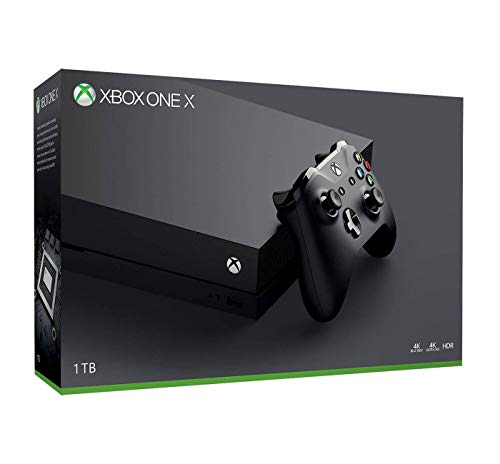
| Console Type | Xbox One X |
| Storage Capacity | 1 TB |
| Resolution/Video | Native 4K, HDR, Ultra HD |
| Performance): | Xbox One X Enhanced with up to ~40% more power than other consoles |
| Media Capabilities | 4K Blu-ray playback; 4K streaming (Netflix, Amazon, YouTube, Spotify) |
| Connectivity/Network | Xbox Live online multiplayer network |
You grab the Xbox One X 1TB and notice the weight of it in your hands—not heavy, but solid, like it means business. The moment you power it up, the room fills with a quiet hum and the screen bursts to life in crisp 4K.
You’re not chasing visuals this time; you’re chasing effortless rhythm, and this console makes music modes feel instinctive.
The control layout is familiar, but the experience feels smoother when you navigate Spotify and your playlists. You’ll find the UI responds quickly, letting you switch from a game to a track without missing a beat.
The built-in HDR and native 4K deliver vibrant colors that don’t overwhelm, keeping your music videos and album art looking sharp.
During a long session, you notice load times stay short, and multiplayer matchmaking stays snappy. The Xbox Live network feels reliable enough to keep you in the groove with friends, even if someone’s bandwidth dips.
The device stays relatively cool, so you don’t worry about heat creeping into your listening setup.
Musical moments feel more immersive when you’re gaming and streaming at the same time. You can queue up tracks without breaking focus, and the soundstage from compatible headsets feels balanced rather than overwhelmed by the action on screen.
It’s not just about playing; it’s about the whole mood—whether you’re cooling down after a boss fight or chasing a high-score while your soundtrack swells.
Overall, it’s straightforward to lean into music on Xbox One X without sacrificing gaming performance. The 1TB model gives you plenty of space for games and tunes, with quick access to your favorite streaming apps.
If you want a console that doubles as a reliable music companion, this one nails the balance.
PROS
– Smooth UI transitions
– Quick, reliable streaming
– Solid 4K visuals
CONS
– Occasional fan noise
– Controller batteries not included
What Music Streaming Services Are Available on Xbox One?
The best music options on Xbox One include several popular streaming services that enhance your gaming experience with quality audio.
- Spotify: Spotify is one of the most popular music streaming platforms globally and is available on Xbox One. It offers a vast library of songs, playlists, and personalized recommendations, allowing users to create custom playlists and listen to music while gaming.
- Apple Music: Apple Music is accessible on Xbox One, providing a rich selection of over 70 million songs and curated playlists. Users can enjoy seamless integration with their Apple Music accounts and enjoy features such as offline listening and radio stations.
- Pandora: Pandora allows Xbox One users to create personalized radio stations based on their favorite artists or songs. Its algorithm curates music selections tailored to individual tastes, making it an excellent choice for discovering new music while playing games.
- Amazon Music: Amazon Music on Xbox One offers access to a vast catalog of songs, playlists, and stations. Subscribers can also take advantage of Alexa integration, allowing for voice-controlled music playback while gaming.
- Tidal: Tidal is known for its high-fidelity audio quality and exclusive content. Xbox One users can enjoy a vast library of lossless music and curated playlists that cater to audiophiles and music enthusiasts alike.
- iHeartRadio: iHeartRadio is a free music streaming service that allows users to listen to live radio stations and create custom stations. It’s a great choice for those who enjoy a diverse range of music genres and want to explore new artists.
Which Popular Music Streaming Services Can I Download on Xbox One?
The popular music streaming services available for download on Xbox One include:
- Spotify: Spotify is one of the most popular music streaming services globally, offering millions of songs and playlists. Users can create their own playlists or listen to curated ones, and it also supports offline listening for premium subscribers.
- Pandora: Pandora is known for its personalized radio stations that adapt to your musical preferences over time. It allows users to create stations based on specific songs, artists, or genres, making it a great option for discovering new music.
- iHeartRadio: iHeartRadio offers both live radio stations and the ability to create custom stations based on your favorite artists or songs. It also provides access to podcasts and live streaming events, providing a diverse listening experience.
- SoundCloud: SoundCloud is unique because it features a vast library of independent artists and user-generated content. This platform is excellent for discovering new music that may not be available on mainstream services.
- Deezer: Deezer boasts a large music library and features like Flow, which gives users personalized recommendations based on their listening habits. It also allows for offline listening and has a user-friendly interface tailored for Xbox One.
Are There Any Exclusive Music Services for Xbox One Users?
There are several exclusive music services tailored for Xbox One users that enhance their gaming and entertainment experience.
- Spotify: Spotify is a leading music streaming service available on Xbox One, allowing users to access millions of songs and create custom playlists. The integration with the console enables background music playback while gaming, making it a popular choice for players who want to enhance their immersive experience.
- iHeartRadio: iHeartRadio offers an extensive selection of live radio stations, personalized playlists, and podcasts, all accessible on Xbox One. This service is ideal for users who enjoy discovering new music and staying updated with their favorite radio shows while gaming.
- SoundCloud: SoundCloud provides a platform for independent artists to share their music, which Xbox One users can enjoy through the app available on the console. With a vast library of unique tracks and remixes, SoundCloud is perfect for gamers looking to explore new sounds and support emerging musicians.
- Groove Music (now defunct): Previously, Groove Music was an exclusive service by Microsoft that allowed users to create playlists and stream their music library. Although it has been discontinued, it was notable for integrating with OneDrive to access personal music collections directly from the Xbox One.
- YouTube Music: While primarily a video platform, YouTube Music on Xbox One allows users to stream music videos and audio tracks. The service offers a unique blend of official music videos and user-generated content, catering to diverse musical tastes and preferences.
How Can I Access and Play My Personal Music Collection on Xbox One?
There are several ways to access and play your personal music collection on Xbox One, making it a versatile entertainment hub.
- Using the Groove Music App: Groove Music allows you to upload your personal music collection to the cloud and access it from your Xbox One. You can store up to 50,000 songs for free, making it easy to stream your favorite tracks without taking up storage space on the console.
- Using the Xbox Media Player: The Xbox Media Player app can be used to play music files stored on USB drives or on your home network. It supports various audio formats, allowing you to enjoy music directly from external devices or shared folders on your PC.
- Streaming Services: Many streaming services like Spotify and Pandora are available on Xbox One, providing access to a vast library of music. You can create playlists, discover new tracks, and even listen while playing games, enhancing your overall gaming experience.
- Using the OneDrive App: If you have uploaded your music files to OneDrive, you can use the OneDrive app on Xbox One to stream your music collection. This method allows for easy access to your songs without needing a physical storage device, as long as you have an internet connection.
- Playing Music via Bluetooth: Xbox One supports Bluetooth audio, allowing you to connect your smartphone or tablet and play music directly from your device. This feature is great for users who want to enjoy their personal playlists without needing additional apps.
What Types of Music Formats Are Supported for Playback?
The best music options on Xbox One encompass a variety of formats for playback, catering to different preferences and needs.
- MP3: This is one of the most widely used audio formats, known for its ability to compress audio files without significantly compromising sound quality. Xbox One supports MP3 playback, allowing users to enjoy a vast library of music stored locally or streamed from various sources.
- WAV: WAV files are uncompressed audio formats that deliver high sound quality, making them ideal for audiophiles. Xbox One can play WAV files, which can be beneficial for those who prioritize audio fidelity over file size.
- WMA: The Windows Media Audio (WMA) format, specifically designed by Microsoft, is also supported on Xbox One. It offers good audio quality and smaller file sizes, which can be useful for streaming or saving space on your device.
- FLAC: Free Lossless Audio Codec (FLAC) files provide high-quality audio without any loss during compression, making them perfect for high-resolution music. Xbox One supports FLAC playback, appealing to users who seek the best audio experience possible.
- OGG: OGG is an open-source audio format that provides good sound quality and is often used for streaming. Xbox One supports OGG files, making it a versatile option for those who enjoy a variety of music sources.
- Streaming Services: In addition to local file playback, Xbox One supports popular streaming services like Spotify and Pandora. This feature allows users to access extensive music libraries and playlists directly from their console, enhancing the overall music experience.
How Can I Stream My Own Music Library to Xbox One?
The best music options on Xbox One for streaming your own music library include various apps and services that cater to personal music collections.
- Groove Music: Groove Music is a versatile app that allows users to upload their music libraries to OneDrive and stream them directly on Xbox One. It supports various audio formats and provides a user-friendly interface for navigating through your music collection.
- Plex: Plex is a powerful media server that can host your music library and stream it to your Xbox One. It offers excellent organization features, allowing you to create playlists and access your music from anywhere, with high-quality playback options.
- Spotify: While primarily a streaming service, Spotify also allows users to create playlists that can include local files if you have a premium account. By linking your Spotify account to your Xbox One, you can enjoy your entire music library alongside Spotify’s extensive catalog.
- YouTube Music: YouTube Music can be a great option if you upload your own tracks to YouTube. By accessing the YouTube Music app on Xbox One, you can create playlists that incorporate your own music and enjoy a seamless listening experience.
- Media Player App: The built-in Media Player app on Xbox One allows you to stream music stored on USB drives or networked devices. It supports various file formats, making it a straightforward option for playing your personal music collection without the need for additional apps.
How Do Music Apps Enhance My Gaming Experience on Xbox One?
The best music options on Xbox One can significantly enhance your gaming experience by providing immersive soundscapes and personalized soundtracks.
- Spotify: Spotify allows gamers to create personalized playlists that can be played in the background while gaming, enhancing the atmosphere of the game. The app features a vast library of songs across various genres, letting users tailor their listening experience to match their gaming mood or the game’s theme.
- Pandora: With Pandora, users can discover new music based on their preferences by creating custom radio stations. This feature allows gamers to enjoy a continuous stream of music that can adapt to their tastes, making it a great option for long gaming sessions where variety is key.
- iHeartRadio: iHeartRadio provides access to live radio stations and curated playlists, perfect for gamers who want to enjoy a mix of music and talk shows while playing. This app also offers the ability to listen to podcasts, adding another layer of entertainment during gaming downtime.
- Twitch: While primarily a streaming platform, Twitch includes music channels where users can listen to live DJ sets and music performances. This can create a vibrant atmosphere while gaming, especially for those who enjoy multiplayer experiences and want to share music with friends.
- SoundCloud: SoundCloud gives gamers access to a wide range of independent music and emerging artists, allowing them to discover unique tracks that may not be available on mainstream platforms. This can add a fresh and personalized soundtrack to their gameplay, enhancing the overall experience.
- YouTube Music: YouTube Music enables users to find music videos and live performances, which can be played in the background during gameplay. The ability to create playlists and access a broad array of music, including game soundtracks and covers, makes it a flexible choice for enhancing the gaming environment.
What Are the Benefits of Using Music Apps While Gaming?
- Personalized Soundtrack: Music apps allow players to create custom playlists that suit their gaming style and mood.
- Improved Focus: Listening to music can help gamers concentrate better by blocking out distractions from the gaming environment.
- Increased Enjoyment: Background music can enhance the enjoyment of gameplay, making it more immersive and engaging.
- Social Sharing: Many music apps offer features to share playlists and songs with friends, adding a social element to gaming sessions.
- Accessibility: Music apps on platforms like Xbox One are easily accessible, allowing seamless integration into gaming experiences.
Accessibility: Music apps on Xbox One are designed for easy access during gameplay. Gamers can quickly switch between games and music without interrupting their experience, making it convenient to enjoy their favorite tunes alongside their gaming adventures.
How Does Background Music Affect Game Sound and Playability?
Background music significantly influences game sound and playability, enhancing immersion and emotional engagement.
- Atmospheric Music: This type of music creates a specific mood or setting that complements the game’s environment. For instance, in horror games, eerie background music can heighten tension and suspense, making players feel more invested in the game’s narrative.
- Dynamic Soundtracks: These soundtracks adapt based on in-game actions, responding to player decisions and events. This interactivity can make the gameplay experience more engaging and memorable, as players feel their actions directly influence the music they hear.
- Custom Playlists: Xbox One allows players to create custom playlists that can be played in the background while playing games. This feature lets players choose their favorite tracks, enhancing their personal gaming experience by allowing them to curate the emotional tone and energy they desire.
- Licensing Music from Popular Artists: Many games feature songs from well-known artists, which can attract fans and enhance the overall experience. These tracks often resonate with players, adding familiarity and excitement to the gameplay, which can lead to increased enjoyment and retention.
- In-Game Jukebox Features: Some games include a jukebox feature that allows players to select and play their preferred tracks during gameplay. This adds a layer of customization, enabling players to enjoy their favorite tunes without interrupting the flow of the game.
- Game-Specific Themes: Unique musical themes are often composed specifically for games, making them memorable and instantly recognizable. These themes can become iconic, contributing to a game’s identity and enhancing players’ emotional connections to the game world.
What Unique Features Do Xbox One Music Apps Offer?
The best music options on Xbox One include a variety of apps that enhance the gaming experience with unique features.
- Spotify: Spotify on Xbox One allows users to stream their favorite music while gaming, offering a seamless integration that lets players control music playback without leaving their game. The app supports background play, enabling users to enjoy their playlists or discover new music through curated playlists specifically designed for gamers.
- Pandora: Pandora provides personalized radio stations based on user preferences, allowing for a tailored listening experience. With its easy navigation and the ability to create custom stations, players can enjoy music that fits their mood or gaming session, while also discovering new artists and genres.
- iHeartRadio: iHeartRadio offers access to thousands of live radio stations and podcasts, enabling users to listen to diverse content while gaming. The app features a user-friendly interface that allows for easy switching between stations, making it an excellent option for those who enjoy live music or talk shows alongside their gaming activities.
- SoundCloud: SoundCloud provides a platform for independent artists to share their music, making it a treasure trove of unique tracks and emerging talent. Xbox One users can explore a wide range of genres and discover new sounds, while the app also allows for easy sharing of favorite tracks within the gaming community.
- Groove Music: Although Microsoft has shifted its focus away from Groove Music, it still offers a library for users who have previously purchased music. The app allows for the organization of personal music collections and playback during gaming sessions, making it a nostalgic option for long-time Xbox users.
How Can I Create and Share Playlists with Friends?
The best music options on Xbox One for creating and sharing playlists with friends include:
- Spotify: A popular music streaming service that allows users to create custom playlists and share them with friends directly through the app.
- Apple Music: This service offers a wide array of music and allows users to create playlists that can be shared with friends who also subscribe to the service.
- SoundCloud: A platform that enables users to discover and share music, where you can create playlists from a vast library of tracks, including independent artists.
- Groove Music: Designed for Xbox, Groove Music lets you create playlists from your own music library or from the Microsoft Store and share them with friends via Xbox Live.
- YouTube Music: Users can create playlists from a wide range of music videos and audio tracks, and share them easily through links or social media platforms.
Spotify: With its user-friendly interface, Spotify allows Xbox One users to create playlists tailored to their taste. Once your playlist is crafted, you can easily share it with friends through the app, making it easy to collaborate on music selections.
Apple Music: For those who prefer Apple’s ecosystem, Apple Music provides an extensive collection of songs. Users can curate playlists and invite friends to listen, provided they have an Apple Music subscription as well, fostering a shared musical experience.
SoundCloud: SoundCloud is especially appealing for those who enjoy discovering new and emerging artists. Users can compile playlists from a diverse range of genres and share them with friends, allowing for a more personalized touch with unique tracks.
Groove Music: Although not as widely used as other services, Groove Music integrates seamlessly with Xbox One, allowing users to create playlists from local files or purchased music. This option is great for gamers who want to enjoy their own collection while playing.
YouTube Music: This platform combines music videos and audio tracks, enabling users to create playlists that can be shared via links. It’s particularly beneficial for those who want to include both official music videos and user-generated content in their playlists.
Are There Any Social Features Available in Xbox One Music Apps?
In-game music sharing allows players to customize their gaming soundtrack by sharing their music choices with teammates or opponents, providing a unique twist on gameplay. This feature can enhance immersion and personalization within the gaming environment.
What Are the Best Free Music Apps for Xbox One?
The best music options on Xbox One include a variety of apps that cater to different music streaming needs.
- Spotify: Spotify is a leading music streaming service that offers a vast library of songs, playlists, and podcasts. The app allows users to create personalized playlists, discover new music through its recommendation algorithms, and even listen to curated playlists based on their mood or activity.
- iHeartRadio: iHeartRadio provides access to thousands of live radio stations as well as custom stations based on user preferences. The app allows users to explore various genres and discover new artists, making it a great option for those who enjoy radio-style listening.
- SoundCloud: SoundCloud is known for its extensive catalog of independent music and emerging artists. Users can discover and listen to tracks that are not available on mainstream platforms, and the app features a user-friendly interface for browsing and creating playlists.
- Pandora: Pandora is a personalized radio service that allows users to create stations based on their favorite songs or artists. It learns user preferences over time, providing tailored music selections and helping listeners discover new tracks that fit their taste.
- Amazon Music: Amazon Music offers a robust catalog of songs for Amazon Prime members and provides access to an extensive library of playlists and stations. The app also includes features like voice control through Alexa, making it convenient for users who prefer hands-free operation.
- Deezer: Deezer provides a large music library and features like Flow, which creates a personalized music experience based on listening habits. The app also supports offline listening and allows users to create and share playlists with friends.
Which Free Music Streaming Services Offer the Best Experience on Xbox One?
The best music options on Xbox One include a variety of free streaming services that provide high-quality music experiences.
- Spotify: Offers a free tier with ads and a vast library of songs.
- TuneIn Radio: Provides access to thousands of radio stations and podcasts worldwide.
- iHeartRadio: Features live radio stations, curated playlists, and personalized music recommendations.
- SoundCloud: Allows users to discover emerging artists and genres, with a wide selection of user-uploaded content.
Spotify: With a free tier supported by ads, Spotify boasts millions of songs across various genres. The Xbox One app is user-friendly, allowing easy navigation and playlist creation, making it a popular choice for gamers looking for a diverse music experience.
TuneIn Radio: This service excels in providing a vast array of live radio stations and podcasts, making it ideal for users who enjoy on-demand listening. The Xbox One app offers a straightforward interface that helps users quickly find their favorite stations or explore new content based on their interests.
iHeartRadio: This platform combines live radio with curated playlists and personalized music stations, giving users a tailored listening experience. The free version enables access to a wide selection of channels, while the Xbox One app allows for easy switching between live broadcasts and custom stations.
SoundCloud: Known for its unique offerings from independent artists, SoundCloud allows users to explore a rich library of tracks that aren’t available on mainstream platforms. The Xbox One app enables straightforward browsing and listening, making it easy for users to discover new music and share their finds with friends.
How Can I Maximize Free Trials of Paid Music Services on Xbox One?
The best music options on Xbox One can be maximized through various strategies to enjoy free trials of paid services.
- Explore Multiple Services: Take advantage of the free trials offered by various music streaming services such as Spotify, Apple Music, and Amazon Music Unlimited.
- Create Multiple Accounts: If permissible by the service’s terms, create multiple accounts using different email addresses to sign up for new trials.
- Utilize Xbox Game Pass Ultimate: Some subscriptions like Xbox Game Pass Ultimate may include music services or discounts, providing added value.
- Keep Track of Trial Periods: Use a calendar to monitor when each trial starts and ends, ensuring you don’t miss out on any available offers.
- Refer Friends for Bonuses: Many services offer referral bonuses, so inviting friends can grant you additional trial time or discounts.
Exploring multiple services allows you to experience the unique features of each platform, as they often provide different music libraries and exclusive content. Take the time to assess which service aligns best with your listening preferences during the trial period.
Creating multiple accounts involves signing up with new email addresses, which can extend your access to trials. However, it’s important to adhere to the terms of service for each platform to avoid any potential issues.
Utilizing Xbox Game Pass Ultimate can enhance your experience, as it sometimes includes benefits like discounted music subscriptions or free access to specific music apps. This can make it a cost-effective way to enjoy music on your console.
Keeping track of trial periods is crucial for maximizing your free access. By marking the start and end dates on a calendar, you can ensure you switch between services seamlessly without paying for any subscriptions prematurely.
Referring friends can also be a smart strategy, as many music services reward you with extended trial periods or credits when your friends sign up using your referral link. This can be an easy way to extend your music streaming experience without incurring extra costs.
Related Post: