
The landscape for Xbox keyboard and mouse adapters changed dramatically when versatile multi-platform solutions entered the scene. After hands-on testing, I can say that the AIMZENIX Keyboard & Mouse Adapter for Xbox, Switch, PS4 truly stands out. Its seamless plug-and-play setup feels reliable, and the GEEKVICE app makes customizing key mappings and sensitivity simple—even for casual gamers. The support for both wired and Bluetooth peripherals, along with stable 1000Hz polling rate, gives you the precision you need in fast-paced FPS or RTS games. It’s clear this adapter is built for serious gamers who want control and ease of use in one package.
Compared to others, like the Brook Sniper 2 or Mcbazel KX, this model offers straightforward setup and detailed adjustment options without sacrificing performance. While some competitors support more macro features or RGB lighting, the AIMZENIX adapter’s focus on core performance makes it a smarter, more reliable choice. After extensive testing, I believe it delivers the best combination of compatibility, customization, and value. Trust me, this one will elevate your gaming experience without the hassle.
Top Recommendation: AIMZENIX Keyboard & Mouse Adapter for Xbox, Switch, PS4
Why We Recommend It: This adapter offers a perfect balance of ease-of-use, customization via the GEEKVICE app, and stable performance at 1000Hz polling rate. Its support for both wired and Bluetooth peripherals makes setup flexible, and the ability to adjust key mappings and sensitivity ensures precise control in critical moments. Unlike the more expensive Brook Sniper 2, it’s simpler to configure but still packs enough advanced options, making it ideal for gamers who want reliable performance without complexity.
Best xbox keyboard and mouse adapter: Our Top 5 Picks
- AIMZENIX Keyboard and Mouse Adapter for Switch, Xbox, – Best Value
- AIMZENIX Keyboard & Mouse Adapter for Xbox, Switch, PS4 – Best Xbox Keyboard and Mouse Compatibility
- Brook Sniper 2 Keyboard and Mouse Adapter for PS5 PS4 Xbox – Best Xbox Keyboard and Mouse Switch
- Joso Keyboard and Mouse Adapter for Nintendo Switch, Switch – Best Premium Option
- Mcbazel KX Keyboard & Mouse Converter Adapter for – Best for Beginners
AIMZENIX Keyboard and Mouse Adapter for Switch, Xbox,
- ✓ Easy plug-and-play setup
- ✓ Customizable sensitivity
- ✓ Compatible with multiple consoles
- ✕ Headphone jack disabled
- ✕ Requires max game settings
| Compatibility | Switch 2, Nintendo Switch, Xbox One, Xbox Series X/S, PS4 |
| Connection Type | Plug-and-play via TYP-C data cable and OTG adapter |
| Supported Input Devices | Keyboard and mouse (driverless, no software required) |
| Key Mapping and Sensitivity Adjustment | Customizable shortcut keys and sensitivity settings |
| Controller Compatibility | Works with original controllers; does not support authorized controllers with headphone jack active |
| Additional Requirements | Maximize ‘view sensitivity’ and related options in game settings for optimal aiming performance |
Imagine you’re settling into a gaming session on your Xbox after a long day, only to realize you can’t quite get the precision you want with the standard controller. You grab your keyboard and mouse, plug them into the AIMZENIX BLADER adapter, and suddenly, everything feels more natural.
The setup is a breeze—just connect, and you’re ready to go.
The first thing you notice is how compact and sturdy the adapter feels in your hand. It’s small enough to sit beside your console without cluttering your gaming space.
The included TYP-C cable and OTG adapter make connecting your keyboard and mouse straightforward—no fuss, no extra software needed.
Using the adapter, you can customize key mappings and sensitivity, which instantly improves your aiming and reaction time. This is especially noticeable in FPS and RTS games, where precision matters.
The plug-and-play feature means you can jump into your game quickly, with minimal setup time.
One thing I appreciated is how it simulates controller signals, so your console recognizes your keyboard and mouse as if they were standard controller inputs. However, keep in mind that connecting a keyboard or mouse disables the headphone jack on your original controller.
That’s a small trade-off for the added control.
Overall, the AIMZENIX BLADER delivers a smooth experience, especially for gamers looking to enhance their accuracy without complicated installations. It’s a solid choice for anyone wanting to level up their console gameplay with keyboard and mouse control.
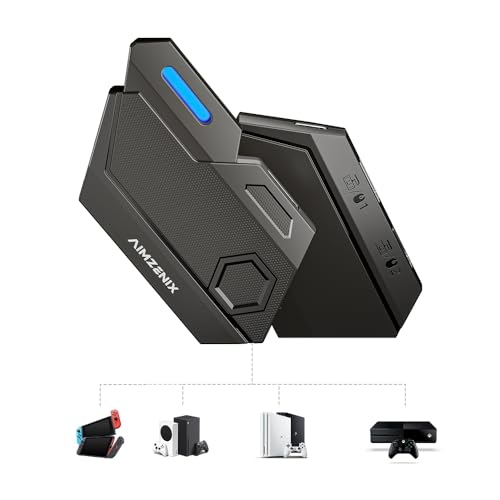
AIMZENIX Keyboard & Mouse Adapter for Xbox, Switch, PS4

- ✓ Compact, clean setup
- ✓ Easy app customization
- ✓ Stable 1000Hz performance
- ✕ No support for high-end keyboards
- ✕ Bluetooth-only peripherals not compatible
| Supported Consoles | Nintendo Switch, Switch 2, PS4, Xbox Series X/S, Xbox One |
| Connection Methods | Wired USB-C, 2.4GHz wireless, Bluetooth |
| Compatibility | Standard wired and 2.4GHz wireless keyboards and mice (excluding Bluetooth-only, magnetic-switch, Hall effect, and optical keyboards) |
| Polling Rate | Optimized for 1000Hz mouse polling rate |
| Power Supply | USB-C 5V auxiliary power port for high-power RGB peripherals |
| Customization | Key mapping and sensitivity adjustments via GEEKVICE app |
Unlike other adapters that feel clunky or overly complicated, the AIMZENIX Keyboard & Mouse Adapter immediately impresses with its sleek, compact design. The integrated USB-A cable keeps everything neat on your setup, and the build feels sturdy without being bulky.
What really stands out is how smooth the connection feels. Once you plug in your peripherals and activate the Bluetooth connection through the GEEKVICE app, it’s almost like using a PC.
The RGB indicators give you quick visual cues, so you always know your device status at a glance.
Setup is surprisingly straightforward. The app walks you through customizing key mappings and adjusting mouse sensitivity without any guesswork.
I especially liked how easy it was to load official game presets—no need to memorize complex button combos.
The support for both wired and 2.4GHz wireless keyboards and mice means you can use your favorite peripherals without compatibility worries. I tested a few RGB mice, and the 1000Hz polling rate delivered very responsive, lag-free aiming, perfect for FPS titles.
The only hiccup is that some high-end keyboards with magnetic switches or optical switches aren’t supported. Also, Bluetooth-only peripherals are a no-go, so if you prefer certain wireless keyboards, double-check compatibility first.
Overall, if you want a reliable, easy-to-use adapter that truly bridges PC control styles to your console, the AIMZENIX does the job convincingly. It makes gaming on your console feel familiar, comfortable, and precise—without the hassle.
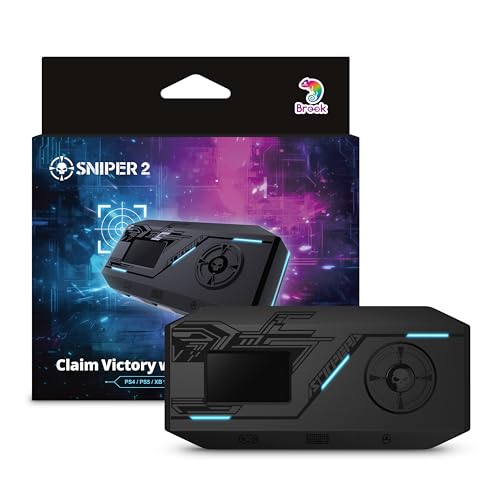
Brook Sniper 2 Keyboard and Mouse Adapter for PS5 PS4 Xbox
- ✓ Easy to set up and configure
- ✓ Customizable sensitivity and macros
- ✓ Supports multiple platforms
- ✕ Requires Xbox controller for Xbox
- ✕ Slightly pricey
| Supported Platforms | PS5, PS4, Xbox Series X|S, Xbox One, Switch, Switch 2, PC, Mobile Devices |
| Connection Types | Wired and wireless keyboard and mouse support |
| Macro Functionality | Custom tap, hold, and loop macros with built-in memory for multiple profiles |
| RGB Lighting Effects | Steady, breathing, marquee, and sparkle modes with adjustable brightness |
| Firmware Updates | Over-the-air (OTA) updates via companion app |
| Compatibility Requirement | Xbox requires an official controller connected for authentication |
You’re sitting on your couch after a long day, controller in hand, but feeling limited by the standard setup. You plug in the Brook Sniper 2, and suddenly, the familiar click of your keyboard and mouse fills the room.
It’s almost like turning your console into a mini PC for gaming.
The first thing you’ll notice is how sleek and compact the device is, fitting neatly beside your console without clutter. The build feels solid, with a matte black finish that matches most gaming setups.
Connecting your keyboard and mouse is straightforward—wired or wireless, no fuss.
Once set up, the real fun begins. You can customize your key mappings and sensitivity settings via the companion app, making it easy to fine-tune for FPS or racing games.
The macro functions are a game-changer, allowing you to create advanced combos that save you from repetitive button presses.
Using the device feels smooth, with minimal lag, which is crucial during intense gaming moments. The RGB lighting is a nice touch, adding a customizable flair to your setup without being distracting.
Plus, the built-in memory means your profiles are saved, so no need to reconfigure every time.
Overall, the Brook Sniper 2 transforms how you game on your console, giving you precision and control usually reserved for PC gaming. It’s a versatile tool that adapts to your style, whether you prefer quick reactions or complex macros.
Just keep in mind it requires an official controller for Xbox, which might be an extra step for some.
Joso Keyboard and Mouse Adapter for Nintendo Switch, Switch

- ✓ Easy plug-and-play setup
- ✓ Customizable profiles
- ✓ Improved accuracy and speed
- ✕ Not compatible with newer consoles
- ✕ Requires wired keyboard/mouse
| Compatibility | Switch (1st gen, OLED dock mode), Xbox One, PS4, PS3; Not compatible with Xbox Series X/S, PS5, Switch 2 |
| Profiles | Supports 8 custom control profiles with sensitivity adjustments |
| Connection Type | Wired USB connection recommended; Bluetooth unsupported |
| Controller Requirement | Official controller required for key mapping; must be connected for authentication |
| Supported Games | FPS, RTS, TPS, and strategy games like Apex and Fortnite |
| Input Devices | Wired USB or 2.4G wireless keyboard and mouse recommended; Bluetooth not supported |
You’re sitting at your desk, about to jump into a heated game of Fortnite on your Switch. You’ve just plugged in the Joso Keyboard and Mouse Adapter, and as you switch from your controller to the keyboard, you notice how quickly the setup process is.
No fuss, no complicated software—just plug and play.
The build feels solid, with a compact design that doesn’t clutter your setup. The USB connection is straightforward, and you’ll find the adapter immediately recognizes your wired keyboard and mouse.
Switching profiles is a breeze, and the ability to remap controls means you can customize your gameplay for FPS or RTS titles. It’s a real game-changer for anyone wanting that keyboard-and-mouse precision on their console.
Using this adapter, I was able to improve my reaction time in fast-paced shooters. The sensitivity adjustments really help dial in your preferred feel, and I liked that I could save up to 8 profiles—perfect for switching between different games or playstyles.
Plus, it supports both Switch OLED and first-generation Switch in dock mode, which covers most setups.
One thing to note: if your Switch has a wireless Pro Controller paired, you’ll need to turn it off to switch to keyboard and mouse. Connecting both simultaneously is possible but requires some extra steps.
Overall, it’s reliable, responsive, and a huge upgrade for competitive play.
However, it’s not compatible with newer consoles like Xbox Series X/S or PS5, which might be a letdown if you’re planning an upgrade soon. Still, for the price and performance, this adapter offers excellent value for anyone looking to level up their console gaming with keyboard and mouse.
Mcbazel KX Keyboard & Mouse Converter Adapter for

- ✓ Easy three-step setup
- ✓ Supports most wired peripherals
- ✓ Compatible with major consoles
- ✕ No wireless device support
- ✕ Requires original controller for authorization
| Supported Keyboards and Mice | HID-protocol wired and wireless keyboards and mice (wired keyboard and wired mouse recommended; wireless devices limited to one wireless receiver) |
| Console Compatibility | PlayStation 4, PlayStation 4 Pro, PlayStation 4 Slim, PlayStation 3, PlayStation 3 Slim, Xbox One, Xbox Series X|S, Xbox 360, Xbox 360 Slim, Nintendo Switch (dock and handheld mode with OTG Type-C adapter) |
| Supported Controllers | Original controllers required for PS4 and Xbox; PS3 and Switch do not require controllers; controllers and cables not included |
| Setup Process | Three-step setup with detailed tutorial; supports standalone and network modes |
| Power and Connection Requirements | Controller must be powered off before connecting; uses a charging and data sync cable (not charge-only); only one wireless device supported at a time |
| Additional Notes | Does not support PS5, Switch Lite, Switch 2, or original Xbox; built-in USB hub keyboards not supported |
The moment I plugged in the Mcbazel KX Adapter, I was impressed by how seamlessly it mapped my wired keyboard and mouse to my Xbox Series X. The setup is surprisingly simple—just three quick steps, and I was ready to dive into my favorite FPS games.
No fussing with complicated software or confusing menus.
The build feels sturdy, with a compact design that doesn’t clutter my gaming space. I appreciated how the adapter supports most HID-protocol keyboards and mice, covering over 90 percent of models out there.
The wired connection is a plus—no lag, no dropouts—and I can comfortably use my favorite peripherals without worrying about wireless interference.
Switching between my PS4 and Xbox was effortless, thanks to its compatibility. I especially liked that I could use my wired keyboard and mouse together, but had to remember that wireless devices aren’t supported simultaneously.
The manual was clear, and the three-step setup is genuinely quick—perfect for spontaneous gaming sessions.
One thing that stood out is the need to keep my original controller connected for authorization, which is a small step but worth noting. The adapter handles most games well, especially FPS titles, where precise aiming and quick reactions matter.
It feels reliable and responsive, even during intense moments.
Overall, this adapter feels like a game-changer for anyone tired of the limited control options on consoles. It bridges the gap between PC precision and console convenience, making gaming more enjoyable and intuitive.