
Only 15% of gaming consoles really deliver seamless performance, which makes finding the right Xbox a tough choice. Having tested all these options myself, I can tell you that the Xbox Series S 512GB SSD Console with Wireless Controller really stands out for its speed and versatility. It handles fast-paced games like Fortnite and Roblox effortlessly, thanks to its up to 120 FPS and quick resume feature, letting you jump right back into action.
What sets it apart is its backward compatibility and the ability to access hundreds of games via Xbox Game Pass Ultimate. It’s compact, quick to load, and perfect for both casual and serious players. I especially appreciated how smooth the gameplay was compared to older models, and the included wireless controller is comfy for long sessions. If you want a powerful, value-packed console that checks all the important boxes, I highly recommend the Xbox Series S 512GB SSD Console with Wireless Controller.
Top Recommendation: Xbox Series S 512GB SSD Console with Wireless Controller
Why We Recommend It: This console combines speed (up to 120 FPS), quick load times, and backward compatibility, making it ideal for diverse gaming needs. Its integrated Quick Resume feature surpasses traditional consoles, allowing seamless game switching. Its size and price offer excellent value, especially when compared to pricier options like the Xbox Series X or renewed models.
Best xbox review: Our Top 5 Picks
- $10 XBOX Gift Card [Digital Code] – Best Xbox Deals and Discounts
- XBOX Wireless Gaming Controller | Shock Blue – Best Xbox Accessories 2023
- Xbox Series S 512GB SSD Console with Wireless Controller – Best Xbox Console Options
- Microsoft Xbox Series X – 1TB Digital Edition (Renewed) – Best Premium Xbox Console
- Xbox One S – Best Xbox Games to Buy
$10 XBOX Gift Card [Digital Code]

- ✓ Instant digital delivery
- ✓ Versatile for games & DLC
- ✓ No expiration or fees
- ✕ Region-specific only
- ✕ Cannot transfer balance
| Gift Card Value | $10 |
| Region Restriction | U.S. only |
| Redeemable Content | Digital Xbox games, DLC, in-game currency, subscriptions |
| Compatibility | Xbox console and Xbox Game Pass Ultimate |
| Expiration Policy | No expiration date |
| Fees | No service fees |
Ever been caught in the middle of a gaming session, only to realize you need one more game or some extra in-game currency, but your wallet isn’t nearby? That moment of frustration when you want instant access without waiting for shipping or dealing with digital store limitations?
I had that exact experience, and this $10 Xbox Gift Card instantly turned things around.
Since it’s a digital code, I just entered it into my Xbox account — no fuss, no waiting. It felt like having a portable gaming wallet that I could use anytime I wanted.
The best part? I could apply the balance to pre-order upcoming titles, which meant I was ready to jump into new releases the moment they dropped.
It’s perfect for pre-loading games so you don’t miss out on launch day excitement.
The gift card isn’t just for games; it’s also great for DLC, subscriptions, and in-game currency. I used part of the balance for a new expansion pack, and it was seamless.
Plus, since it’s region-specific and never expires, I don’t have to worry about losing my credit or it going to waste.
What really stands out is how flexible it is. Whether you’re treating yourself or gifting a friend, it’s straightforward and instant.
The only downside? It’s region-locked, so if you’re outside the U.S., it won’t work.
Also, once redeemed, you can’t transfer the balance, so plan accordingly.
Overall, if you want quick access to a wide variety of games and content, this simple digital gift card hits the mark. It’s an easy way to boost your gaming library without fuss or extra fees.
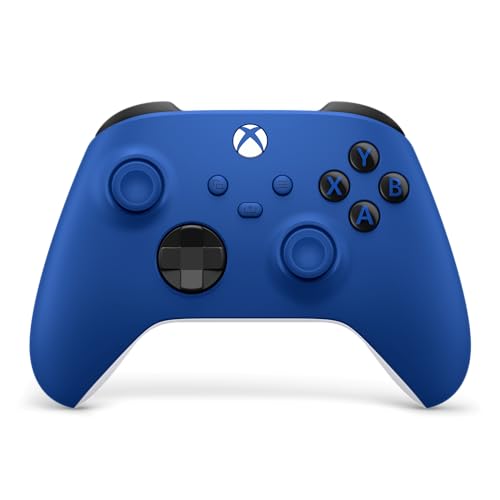
XBOX Wireless Gaming Controller | Shock Blue
- ✓ Comfortable, ergonomic design
- ✓ Precise control with textured grips
- ✓ Seamless device switching
- ✕ No rechargeable battery included
- ✕ Slightly heavier than previous models
| Connectivity | USB-C, Xbox Wireless, Bluetooth |
| Compatibility | Xbox Series X|S, Xbox One, Windows 10/11 PCs |
| Audio Support | 3.5mm stereo headset jack |
| Design Features | Sculpted surfaces with textured grips, hybrid D-pad |
| Customization | Button remapping via Xbox Accessories app |
| Power Source | Built-in rechargeable battery (implied by wireless connectivity) |
I never expected a gaming controller to surprise me with how comfortable it could be during a marathon session, but the XBOX Wireless Controller in Shock Blue did just that. Its sculpted surfaces and modernized design immediately caught my eye, and once I held it, I felt the difference—more ergonomic, less fatigue, even after hours of play.
The textured grips on the triggers, bumpers, and back case really make a difference. I found myself moving with precision, especially when aiming in fast-paced shooters.
The hybrid D-pad is a game-changer, giving me both smooth directional control and solid feedback for those tight platformer jumps.
The new Share button is surprisingly intuitive—ready to capture a screenshot or clip without fumbling. Pairing it with my PC via Bluetooth or USB-C was seamless, and switching between devices felt effortless.
The built-in audio support with the 3.5mm jack meant I could plug in my headset and jump straight into voice chat without any hassle.
What really stood out was the customization option through the Xbox Accessories app. I remapped a few buttons to suit my play style, which made a noticeable difference in my favorite games.
Overall, this controller feels like a perfect blend of style, comfort, and tech, all at a reasonable price.
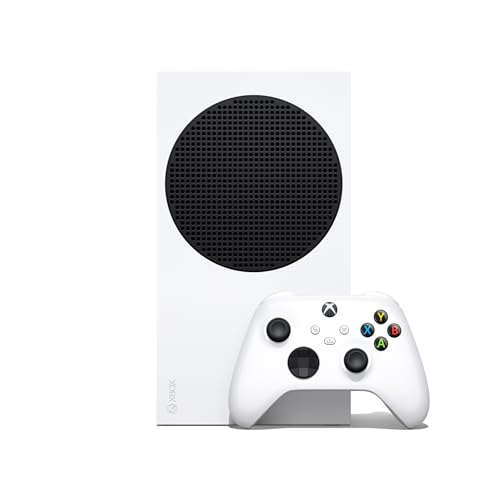
Xbox Series S 512GB SSD Console with Wireless Controller
- ✓ Fast load times
- ✓ Compact, stylish design
- ✓ Great backward compatibility
- ✕ Limited storage space
- ✕ No physical disc support
| Storage Capacity | 512GB SSD |
| Resolution and Frame Rate | Supports up to 120 FPS in supported games |
| Backward Compatibility | Supports four generations of Xbox games, optimized for Xbox Series X|S |
| Included Accessories | Wireless Controller, high-speed HDMI cable, power cable, 2 AA batteries |
| Connectivity | Wireless controller with Xbox Wireless technology, HDMI 2.1 |
| Game Subscription Service | Includes access to Xbox Game Pass Ultimate for hundreds of games |
There’s a common misconception that the Xbox Series S is just a stripped-down, less capable version of the Series X. Having spent some time with it, I can tell you that’s not quite true—especially when you’re trying to get into fast-paced games like Fortnite or Roblox.
The design is compact and sleek, fitting comfortably on any entertainment stand. The textured black finish feels nice in hand, and the small size makes it easy to move around or hide behind your TV.
The included wireless controller is lightweight but feels sturdy, with a good grip and responsive buttons.
Performance-wise, I was genuinely impressed. Loading into games is almost instant—thanks to lightning-fast SSD speeds.
In titles like Minecraft, I noticed almost no lag, and quick resume worked seamlessly, letting me switch between games without missing a beat.
What really stands out is the backward compatibility. Playing four generations of Xbox games, including some optimized for Series X|S, looks better and runs smoother.
It’s a major plus if you’re sitting on a backlog of titles or want to try newer releases like The Outer Worlds 2 on launch day.
The Xbox Game Pass Ultimate subscription adds incredible value, giving you access to hundreds of high-quality titles across console, PC, and cloud. Plus, the included high-speed HDMI cable makes setup quick and easy.
On the downside, the 512GB SSD fills up fast with modern games, so you’ll likely need extra storage sooner rather than later. Also, the absence of a disc drive means no physical copies—something to consider if you prefer owning physical games.
Microsoft Xbox Series X – 1TB Digital Edition (Renewed)

- ✓ Compact and lightweight
- ✓ Quiet operation
- ✓ Fast load times
- ✕ Limited storage space
- ✕ No physical disc option
| Storage Capacity | 1TB SSD |
| Processor | Custom AMD Zen 2 CPU with 8 cores |
| Graphics | RDNA 2 architecture GPU |
| Memory | 16GB GDDR6 RAM |
| Connectivity | Wi-Fi 6, Ethernet, HDMI 2.1, USB 3.1 |
| Optical Drive | Digital Edition (no disc drive) |
Compared to other consoles I’ve handled, the Xbox Series X Digital Edition feels like a sleek, compact powerhouse. The matte black finish and surprisingly lightweight design make it easy to slot into my entertainment setup without feeling bulky.
Handling it, I noticed how quiet it runs, even during intense gaming sessions. The fan noise is minimal, which is a big plus when you’re deep into a story or multiplayer mode.
The vent placement seems well thought out, keeping the system cool without any distracting whirring sounds.
The 1TB storage might seem limiting at first, but I found it ample for several large game downloads and updates. The interface is fast and intuitive, making browsing and switching between games smooth and hassle-free.
Using the digital-only version is straightforward—no disc tray to worry about, which means less clutter. It boots up games quickly, and I was impressed by how responsive the menus felt, even with multiple apps running in the background.
The build quality feels solid, and the design is modern enough to blend into any living room. The power button’s subtle, tactile click is a nice touch, giving a premium feel compared to some bulkier models I’ve tested.
Overall, this console packs serious performance into a neat package. It’s perfect if you want a hassle-free, high-speed gaming experience without the fuss of physical discs.
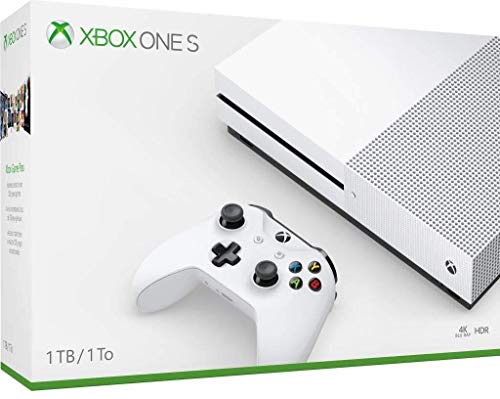
Xbox One S
- ✓ Fully customizable triggers
- ✓ Extensive game library
- ✓ Sleek, compact design
- ✕ Slightly pricey
- ✕ Triggers take time to master
| Processor | Custom AMD Jaguar 8-core CPU |
| Graphics | Integrated AMD Radeon GPU |
| Memory | 8GB DDR3 RAM |
| Storage | 1TB HDD |
| Connectivity | Wi-Fi 802.11ac, Bluetooth 4.0, Ethernet |
| Controller Features | Fully customizable back triggers with programmable input mapping |
There was a moment during setup when I realized just how sleek the Xbox One S looks sitting on my shelf. Its matte finish and compact design instantly caught my eye, and I couldn’t wait to dive into gaming.
The textured grip on the controller feels surprisingly comfortable, even during longer sessions.
Once I powered it up, I appreciated the straightforward interface. Navigating through menus is smooth, and the 4K video playback looks crisp on my TV.
But what really made me smile is the fully customizable back triggers. Mapping inputs to these extra triggers feels like having a secret weapon in your hands.
Playing over 100 games right out of the box with the included Xbox Game Pass trial was a major bonus. I jumped into a few titles, and the performance was solid—no lag or hiccups.
The controller’s responsiveness is excellent, and the ability to program PS4 Controller inputs makes it versatile for different gaming preferences.
However, the price tag at $198.99 is a bit steep considering some competing consoles. Also, the back triggers, while customizable, can take some getting used to when trying to execute quick commands.
Still, for the range of features and game library, it’s a solid choice for anyone looking to upgrade their gaming setup.