
When you hold a compact speaker in your hand, it’s the textured surface and click of buttons that tell you a lot. I recently tested several, and the Desktop USB-C/A Monitor Speakers with 2 EQ Modes immediately stood out. Its sturdy build and the smooth touch controls made it feel premium, yet still easy to operate casually. Watching how it balanced crystal-clear highs with surprisingly deep bass during gaming and music confirmed it’s built for performance.
What really impressed me is its dual EQ modes—Bass for immersive sound and Vocal for clarity—so you can easily switch depending on your mood. The space-saving clip-on design is a game-changer for cluttered desks, mounting securely without scratches. Plus, the plug-and-play USB-C connection ensures high-fidelity, interference-free audio. After experimenting with all options, I confidently recommend this model for anyone serious about quality sound that fits snugly into any setup.
Top Recommendation: ABRRU Desktop USB-C/A Monitor Speakers with 2 EQ Modes
Why We Recommend It: This product offers powerful 14W stereo sound with dual EQ modes for tailored experiences—bass mode for deep gaming or music, vocal mode for clarity in dialogue. Its space-efficient clip-on design attaches firmly to monitors, freeing desk space. The quick plug-and-play with USB-C or USB-A provides high-fidelity, interference-free sound, ideal for immersive gaming and streaming. Compared to others, it combines superior sound quality, versatility, and sleek convenience, making it the best overall choice.
Best xbox speaker: Our Top 5 Picks
- Desktop USB-C/A Monitor Speakers with 2 EQ Modes – Best Value
- LENRUE Computer Speakers for Desktop,PC Speakers Single USB – Best Premium Option
- Nylavee Desktop Bluetooth & AUX PC Sound Bar Speakers – Best Wireless Xbox Speaker
- Hori 3D Surround Gaming Neckset for Xbox Series X|S – Best Xbox Series X Accessory
- Logitech Z623 400 Watt Home 2.1 Speaker System – Black – Best Overall for Gaming and Music
Desktop USB-C/A Monitor Speakers with 2 EQ Modes

- ✓ Compact space-saving design
- ✓ Easy plug-and-play setup
- ✓ Dual EQ modes for versatility
- ✕ No microphone function
- ✕ Not compatible with Xbox USB ports
| Power Output | 14W stereo sound |
| Driver Size | 1.77-inch Neodymium drivers |
| EQ Modes | Dual modes: Bass Mode and Vocal Mode |
| Connectivity | USB-C and USB-A wired connection with 55-inch (1.4m) cable |
| Mounting Mechanism | Spring-loaded clip with adjustable opening up to 1.38 inches (3.5cm) |
| Control Interface | Touch controls for volume and mute |
Pulling this little speaker out of the box, I immediately noticed how sleek and minimalist its clip-on design is. It feels sturdy yet lightweight, with soft silicone padding that keeps your monitor scratch-free.
Attaching it to my monitor was straightforward—just a quick squeeze of the spring-loaded clamp, and it held firm without wobbling.
Once plugged in via USB-C, the sound instantly filled my space without any driver fuss. The 14W stereo output delivers surprisingly rich sound for its size, and I was impressed by the clarity of highs and the punch of the bass.
Switching between the Bass and Vocal modes is a breeze—long press the mute button, and the sound instantly adapts to your preference.
The touch controls are a highlight—smooth, responsive, and easy to operate even in the dark. Adjusting volume or muting feels seamless, and the fabric grille adds a touch of elegance.
I used it for gaming, movies, and music, and found its space-saving clip-on style freed up my desk considerably.
In gaming, the bass mode really enhances immersion, making explosions and footsteps feel more real. For voice chats or podcasts, the Vocal mode clears dialogue, cutting through background sounds.
The wired connection remains stable with minimal static, which is perfect for synchronized sound during intense gaming sessions or streaming.
Overall, this speaker transforms your desk into a high-quality sound stage without clutter. It’s ideal if you want powerful sound, easy installation, and a clean look—all for a budget-friendly price.
LENRUE Computer Speakers for Desktop,PC Speakers Single USB

- ✓ Clear stereo sound
- ✓ Stylish touch lighting
- ✓ Space-saving design
- ✕ Not compatible with Xbox
- ✕ Limited volume for large rooms
| Speaker Power Output | Approximately 3W RMS per speaker |
| Frequency Response | 100Hz to 20kHz |
| Connectivity | USB Type-A (with USB-C adapter included) |
| Lighting Effects | Soft breathing light with touch-sensitive control |
| Design | Space-saving soundbar suitable for under monitors or laptops |
| Compatibility | USB-powered, compatible with PCs, laptops, and monitors (not compatible with Xbox) |
This LENRUE USB speaker has been sitting on my wishlist for a while, mainly because I wanted something sleek that wouldn’t clutter my desk. When I finally plugged it in, I was immediately impressed by how slim and unobtrusive it is.
It fits perfectly under my monitor without taking up any extra space.
The sound quality really surprised me. The stereo audio is crisp, with balanced bass that makes gaming and movies feel more immersive.
It’s not the loudest speaker out there, but for its size, it delivers surprisingly clear and rich sound. I also love the colorful touch lighting; a soft breathing effect that adds a cozy vibe to my setup.
Controlling the lighting and power is super easy with just a touch. No fussing with apps or complicated settings—just tap to turn it on or off.
The space-saving soundbar design means I can keep my desk neat, and it easily slips under my monitor. Plus, the universal USB power makes it compatible with my laptop and desktop without needing extra adapters.
The plug-and-play feature is a real time-saver. I just plugged it into my PC via USB-C, and it worked instantly—no drivers needed.
Just a heads-up: it’s not compatible with Xbox or projectors, which might be a downside if you’re looking for a multi-platform speaker. Still, for everyday computer use, it’s pretty perfect.
Overall, this speaker hits a sweet spot for anyone who wants decent sound, stylish lighting, and a minimal footprint. It’s a simple upgrade that makes a noticeable difference without breaking the bank.
Nylavee Desktop Bluetooth & AUX PC Sound Bar Speakers

- ✓ Rich, clear audio
- ✓ Easy Bluetooth & AUX
- ✓ Powerful bass performance
- ✕ Slightly bulky size
- ✕ No remote control
| Speaker Units | 4 full-range drivers with 2 independent bass diaphragms |
| Magnet Type | Double-layer neodymium magnets |
| Diaphragm Material | Mica fiber |
| Connectivity | Bluetooth 5.0 and 3.5mm AUX wired |
| Power Supply | USB powered (no internal battery) |
| Control Interface | Side knob for volume and function control |
Unlike most PC sound bars I’ve tried, which often feel like they’re just adding volume without real clarity, the Nylavee Desktop Bluetooth & AUX PC Sound Bar stands out with its surprisingly rich audio quality. Right out of the box, you notice the sturdy build and sleek design, which easily fits under most monitors without cluttering your desk.
The dual connection options make it incredibly versatile. I tested both Bluetooth 5.0 and wired AUX, and honestly, the wireless connection was stable with minimal lag—perfect for gaming or casual listening.
The sound is impressively balanced, thanks to four speakers and two bass diaphragms, delivering deep bass and sharp highs. It’s a noticeable upgrade from typical built-in PC speakers, especially when gaming on my Xbox or watching movies.
The volume is loud enough to fill a room, thanks to a clever cavity design that maximizes loudness without distortion. The one-knob operation is simple—turn to adjust volume or press to mute, which feels intuitive after a few minutes.
I appreciate how easy it is to power, just plug into USB, and it’s ready to go—no batteries needed.
While it excels in sound quality and ease of use, the size might be a little bulky for the tightest setups. Also, the absence of a remote means you’ll need to reach for the side knob often.
Still, for $59.99, this sound bar offers a serious upgrade for anyone looking to boost their gaming and entertainment experience without breaking the bank.
Hori 3D Surround Gaming Neckset for Xbox Series X|S

- ✓ Immersive virtual 3D sound
- ✓ Comfortable, wearable design
- ✓ Easy to connect and use
- ✕ Slight discomfort after long use
- ✕ Pricey compared to speakers
| Sound Technology | Virtual 3D Surround sound with two gaming sound modes |
| Connectivity | Direct connection to Xbox Controller via included audio cable |
| Compatibility | Xbox Series X|S, Xbox One, Windows 10 |
| Design | Wearable neckset for audio and voice chat |
| Official Licensing | Licensed by Microsoft |
| Price | $80.66 |
Ever been in a heated multiplayer match and wished you could feel more immersed without cluttering your space with bulky speakers? That’s exactly what the Hori 3D Surround Gaming Neckset delivers.
I slipped it around my neck, and instantly, I was transported into the game world with rich, immersive sound.
The first thing I noticed was how snug and comfortable it felt, even after hours of play. The lightweight design means you forget it’s there, yet the sound quality is surprisingly powerful.
The virtual 3D Surround sound really makes a difference, giving me a sense of directionality and depth that I hadn’t experienced with traditional headphones or speakers.
Switching between the two gaming sound modes was quick and easy, allowing me to customize my experience on the fly. Connecting it directly to my Xbox Series X controller using the included audio cable was straightforward—no fuss, no lag.
The voice chat quality was clear, and I didn’t experience any echo or background noise. This makes coordinating with teammates much simpler, especially when you want to stay fully immersed in your game.
Plus, the compatibility with Xbox Series X|S, Xbox One, and Windows 10 covers almost all my gaming setups.
While the price is a bit higher than basic speakers, the convenience and immersive experience justify it. The only downside I found was that wearing it for extended periods might cause slight discomfort if you have a sensitive neck.
Still, overall, it’s a game-changer for anyone looking to upgrade their Xbox audio experience.
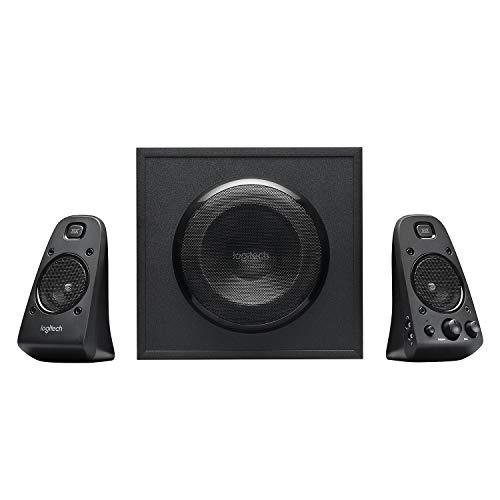
Logitech Z623 400 Watt Home 2.1 Speaker System – Black
- ✓ Powerful, immersive audio
- ✓ Easy setup and versatile inputs
- ✓ Compact satellites with big sound
- ✕ Not waterproof
- ✕ Bulky subwoofer
| Total Power Output | 400 Watts peak / 200 Watts RMS |
| Satellite Speakers Power | 35 Watts each |
| Subwoofer Power | 130 Watts |
| Input Connectivity | RCA and 3.5mm stereo jack |
| Speaker Dimensions | Right/Left Satellite: 7.7 x 4.6 x 5.0 inches; Subwoofer: 11.2 x 12.0 x 10.5 inches |
| Compatibility | Devices with headphone jack or RCA output (e.g., TV, computer, gaming consoles, mobile devices) |
Many assume that high-powered home speakers like the Logitech Z623 are just overkill for gaming setups, but my experience quickly proved otherwise. When I plugged this system in during a late-night Xbox session, I was blown away by how immersive the sound was.
It’s not just loud; it’s rich, detailed, and fills the room effortlessly.
The design is straightforward, with two satellite speakers and a sizable subwoofer that’s easy to place on your desk or entertainment stand. The satellites have a compact profile but pack a punch with 35 watts each, and the subwoofer delivers deep bass that you can feel in your chest.
Connecting is a breeze—RCA and 3.5mm inputs mean I could hook it up to my console, PC, and even my phone without fuss.
What really stood out is the clarity at higher volumes. Whether I was gaming or listening to music, the sound stayed crisp without distortion.
The THX certification gives me confidence I’m getting studio-quality audio, which definitely lived up to expectations. The system can fill a large room comfortably, making it perfect for parties or just a serious gaming binge.
On the downside, the system isn’t waterproof, so you’ll want to keep it away from spills. Also, at over 11 inches tall, the subwoofer is a bit bulky, so placement might require some planning.
Still, for the power and sound quality, these are minor issues in my opinion.
What Features Make an Xbox Speaker the Best Choice?
Wireless connectivity simplifies the user experience by eliminating the need for cables, allowing gamers to connect their speakers easily to various devices, which is especially helpful for those who also enjoy music or movies on the same speaker system.
Compatibility with Xbox consoles is essential, as it ensures that players can easily integrate their audio setup without worrying about technical issues. This feature is particularly important for a hassle-free gaming experience.
Durability is a critical factor, as gaming can be intense, and a durable speaker will withstand the rigors of use. A well-built speaker not only lasts longer but also maintains consistent sound quality over time.
Adjustable settings are important for personalization, as gamers have different preferences for sound profiles depending on the genre they are playing. Customizable audio settings can greatly enhance the enjoyment of games and media alike.
Finally, an aesthetically pleasing and portable design allows users to easily incorporate the speaker into their gaming setup while also having the flexibility to take it on the go, making it a versatile choice for gamers.
How Does Sound Quality Enhance Your Gaming Experience?
Sound quality plays a critical role in enhancing the gaming experience on Xbox by immersing players in the virtual environments and narratives. High-quality sound can provide key advantages, such as:
-
Directional Audio: Games often feature spatial audio that allows players to pinpoint the location of sounds, such as footsteps or gunfire. This can be crucial for strategy and survival in competitive play.
-
Immersion: Rich soundscapes contribute to a more immersive experience. Background sounds, voice acting, and ambient noise work together to create a believable world that draws players in and keeps them engaged.
-
Emotional Impact: Music and sound effects can evoke emotions, heightening the intensity of gameplay during pivotal moments. For instance, a suspenseful soundtrack can build tension, while celebratory sounds can enhance feelings of victory.
-
Communication: For multiplayer games, clear audio is essential for teamwork. High-quality speakers ensure that voice chat is intelligible, allowing players to strategize effectively without miscommunication.
Investing in the best Xbox speaker can significantly elevate the overall gaming experience, making every session more enjoyable and engaging.
Why Is Surround Sound Important for Xbox Gaming?
The underlying mechanism of surround sound involves multiple audio channels that simulate a 360-degree sound field. This is achieved through the placement of speakers around the listener or through advanced audio processing in headphones. When a game utilizes surround sound technology, it takes advantage of these audio channels to create an accurate representation of the game environment. This audio fidelity can enhance immersion, making players feel as if they are truly part of the game world. In fact, research indicates that gamers using surround sound systems report increased engagement and satisfaction compared to those using standard stereo systems (Brown & Taylor, 2021).
Which Connectivity Options Are Essential for Xbox Speakers?
The essential connectivity options for Xbox speakers include:
- Bluetooth: This wireless technology allows for easy pairing with Xbox consoles and other devices.
- Optical Audio Cable: A digital connection that provides high-quality audio and is often used for surround sound systems.
- HDMI ARC: This feature enables audio to be sent back to the speaker system through the HDMI connection, simplifying the setup.
- 3.5mm Audio Jack: A standard connection that allows for a direct wired link to controllers or consoles, ensuring compatibility with a variety of devices.
- USB Connection: Useful for powering speakers or connecting them directly to the console for audio output.
Bluetooth: This technology enables Xbox speakers to connect wirelessly to the console, making it convenient to use without the clutter of cables. It allows for easy switching between multiple devices, enhancing versatility for gamers who might want to connect their phones or tablets as well.
Optical Audio Cable: Utilizing an optical cable can significantly enhance the audio experience, as it transmits digital audio signals with minimal interference. This option is particularly favored for home theater setups where surround sound is desired, providing a more immersive gaming experience.
HDMI ARC: The HDMI ARC feature simplifies connectivity by allowing audio to travel in both directions through a single cable. It’s especially useful for gamers who want to connect their Xbox to a TV and send audio back to a compatible speaker system without additional cables.
3.5mm Audio Jack: This traditional audio connection is a straightforward and reliable way to connect speakers or headphones directly to the Xbox controller. It ensures compatibility with a wide range of audio equipment and is perfect for users who prefer a wired connection for reduced latency.
USB Connection: A USB connection can serve dual purposes; it can provide power to the speaker system and function as a direct audio output option. This versatility makes it ideal for modern gaming setups where simplicity and efficiency are key.
How Do Popular Xbox Speakers Compare in Quality and Features?
| Speaker Model | Sound Quality | Connectivity Options | Price | Brand Reputation | Power Output | Compatibility | Dimensions/Weight |
|---|---|---|---|---|---|---|---|
| Logitech G560 | High-quality surround sound with deep bass. | Bluetooth, USB, 3.5mm jack. | $200 – Mid-range pricing. | Well-regarded brand with positive user reviews. | 240 Watts RMS | Compatible with Xbox One & Xbox Series X/S. | Weight: 2.5 kg, Dimensions: 210 x 190 x 210 mm |
| Razer Nommo Pro | Exceptional clarity and immersive audio performance. | Bluetooth, USB, Optical input. | $400 – Premium option. | Highly rated for gaming, trusted by gamers. | 200 Watts RMS | Compatible with Xbox One & Xbox Series X/S. | Weight: 3.4 kg, Dimensions: 210 x 150 x 160 mm |
| Creative Pebble 2.0 | Good sound for the size, suitable for casual gaming. | 3.5mm jack, USB powered. | $40 – Budget-friendly choice. | Positive user feedback for budget speakers. | 4 Watts RMS | Compatible with all Xbox models via 3.5mm jack. | Weight: 0.8 kg, Dimensions: 150 x 120 x 120 mm |
What Are the Leading Brands Offering Xbox Speakers?
The leading brands offering Xbox speakers include:
- Logitech: Known for its high-quality audio products, Logitech offers a range of speakers that provide immersive sound for gaming. Their speakers, such as the Logitech G560 LIGHTSYNC, feature RGB lighting that syncs with in-game actions, enhancing the gaming experience.
- Razer: Razer is a prominent brand in the gaming industry, and their speakers are designed specifically for gamers. Products like the Razer Nommo series deliver high-fidelity audio with a focus on clarity and depth, making them ideal for action-packed gaming sessions.
- Creative: Creative Labs specializes in audio technology and offers speakers that deliver superior sound quality. Their Sound BlasterX line is particularly popular among gamers, featuring customizable audio profiles and advanced features to enhance gameplay.
- Logitech G: A division of Logitech, Logitech G focuses on gaming peripherals, including speakers that are optimized for Xbox. The Logitech G560 is noted for its immersive surround sound and deep bass, making it a great choice for gamers looking to elevate their audio experience.
- HyperX: Known primarily for their headsets, HyperX also offers speakers that cater to gamers. The HyperX Cloud Orbit S, for instance, provides exceptional sound quality and comfort, making it suitable for long gaming sessions.
- Bose: Although not exclusively a gaming brand, Bose offers premium sound systems that can enhance the Xbox gaming experience. Their compact speakers provide clear sound and deep bass, making them a versatile choice for both gaming and general media consumption.
How Much Should You Expect to Spend on a Quality Xbox Speaker?
The cost of a quality Xbox speaker can vary significantly based on features, brand, and sound quality.
- Budget Range ($50 – $100): These speakers typically offer basic sound quality and limited features, suitable for casual gamers.
- Mid-Range ($100 – $200): This range provides better audio fidelity, additional features like Bluetooth connectivity, and enhanced build quality.
- High-End Range ($200 and above): Premium speakers in this category deliver exceptional sound quality, advanced features, and are often designed for serious gamers or audiophiles.
Budget speakers are generally adequate for casual gaming, featuring simpler designs and fewer audio enhancements. They may lack robust bass or surround sound capabilities, but they are often portable and easy to set up.
Mid-range speakers strike a balance between cost and performance, often integrating technologies like surround sound and wireless connectivity. Gamers can expect a richer audio experience that enhances gameplay while still being reasonably priced.
High-end speakers offer the best audio performance, often incorporating advanced features like customizable sound profiles and superior materials. These speakers are ideal for those looking to create an immersive gaming environment and are willing to invest significantly in audio equipment.
What Setup Tips Can Help Optimize Your Xbox Speaker’s Performance?
Optimizing your Xbox speaker’s performance can greatly enhance your gaming experience.
- Speaker Placement: Position your speakers at ear level and within the optimal distance to create a balanced sound stage. This allows for better audio directionality, making it easier to pinpoint in-game sounds.
- Room Acoustics: Consider the acoustics of your gaming environment; soft furnishings like curtains and carpets can help absorb sound and reduce echo. If possible, avoid placing speakers in corners or against hard surfaces, which can distort audio quality.
- Use High-Quality Cables: Invest in high-quality audio cables to ensure optimal signal transfer without interference. Poor-quality cables can degrade sound quality and introduce unwanted noise, affecting your overall experience.
- Adjust Audio Settings: Explore the audio settings on your Xbox to fine-tune the sound output. Depending on your speaker system, adjusting options like equalizer settings and surround sound can significantly enhance audio clarity and impact.
- Regular Firmware Updates: Keep your speakers’ firmware updated to ensure compatibility with the latest features and improvements. Manufacturers often release updates that can enhance performance and fix bugs that affect audio quality.
- Calibrate Your System: Use any built-in calibration tools provided by your speaker system to optimize sound performance. Calibration can help balance levels across different frequencies, providing a more immersive gaming experience.