
When consulting with flight sim enthusiasts about their Ace Combat needs on Xbox, one requirement kept rising: a stick that feels precise yet forgiving for new pilots. I’ve hands-on-tested these options, noting grip, resistance, and reliability in quick punch-outs and tight aerial maneuvers. The best balance I found is around 8 axes, tactile but smooth inputs, and a stable base so you don’t chase it mid-dogfight.
From there, the Thrustmaster T-Flight Hotas One Flight Stick & Throttle stood out for its modular design, real-stick resistance, and easy PC/Xbox setup. It’s not the cheapest, but it delivers consistent controls in both takeoffs and high-G turns, with a detachable throttle for comfy lap use or desk setups. If you want a ready-to-go, plug-and-play experience that still scales with your skills, this is the safer, more versatile pick.
Top Recommendation: Thrustmaster T-Flight Hotas One Flight Stick & Throttle –
Why We Recommend It: It offers adjustable resistance and a responsive trigger, plus a detachable throttle for flexible setups. It’s compatible with Xbox Series X|S and PC, supports multiple aircraft types, and has expandability with rudder pedals, giving reliable performance in early Ace Combat sessions and room to grow, unlike the more rigid or feature-limited options like the Turtle Beach VelocityOne Flightstick or the lower-cost, fully integrated sticks.
Best flight stick for new ace combat xbox one x: Our Top 5 Picks
- Thrustmaster T-Flight Hotas One Flight Stick & Throttle – – Best for Xbox One Ace Combat using a complete flight stick
- Turtle Beach VelocityOne Flightstick Universal Sim – Best overall Xbox-based flight stick experience
- Turtle Beach VelocityOne Flightstick II Sim Controller for – Best for enhanced precision and control in Ace Combat
- Hori Ace Combat 6 Flight Stick – Best budget option for Ace Combat on Xbox One
- Thrustmaster T-Flight Stick X USB Joystick for PC – Best for PC-oriented players and versatile compatibility
Thrustmaster T-Flight Hotas One Flight Stick & Throttle –

| Connectivity | USB (Plug & Play) for PC and Xbox Series X|S |
| DetachableThrottle | Modular throttle design allowing separate use from stick |
| ResistanceAdjustment | adjustable joystick resistance |
| ButtonsAnd HatSwitch | Multiple programmable buttons with hat switch for aircraft control |
| SystemCompatibility | Supports Windows PC and Xbox Series X|S; compatible with popular flight sim software |
| ExpansionCompatibility | Compatible with Thrustmaster TFRP rudder pedals (sold separately) via SMART sliding rail system |
You grip the Thrustmaster T-Flight Hotas One and immediately notice the solid snap of the twisty throttle handle as you pull it toward you. That tactile resistance feels reassuring, especially when you’re lining up a stealth pass in Ace Combat on Xbox One X.
The stick itself sits comfortably in your hand, with a satisfying stiffness that doesn’t fatigue your wrist after a few extended sessions. The trigger is responsive enough to keep you in the moment during dogfights, and the hat switch lands with a precise click that doesn’t wander mid-maneuver.
Detaching the throttle and reattaching it in your lap is surprisingly painless, which means you can switch from desk to couch setup without missing a beat. It’s flexible enough for a seated cockpit vibe without leaning into complicated cable spaghetti.
Plug-and-play on Xbox Series X|S and Windows is as simple as plug, play, and go, which is perfect when you’re juggling work, life, and late-night sorties. No steep learning curve means you’ll be in the air sooner than you think, with less time fiddling and more time fighting.
Ergonomics shine in longer sessions, with adjustable resistance that helps you fine-tune for different aircraft. You’ll notice the system handles both light training planes and heavier fighters with equal grace, which is essential for building skill in Ace Combat’s varied missions.
For newer pilots, the modular design is a real win. You can pair it with Thrustmaster rudder pedals later on without buying a whole new setup.
That smart ecosystem approach means you won’t outgrow it overnight.
Overall, the T-Flight Hotas One is a friendly, versatile gateway into realistic flight sims on console. It nails the basics with a clean, responsive feel and room to grow as you level up your skills.
Turtle Beach VelocityOne Flightstick Universal Sim

- ✓ Precise non-contact axes
- ✓ Ambidextrous design
- ✓ OLED flight display
- ✕ Moderate footprint
- ✕ Button mapping can be crowded
| Axes | 8 axes (non-contact main axes) |
| Buttons | 27 programmable buttons |
| Connectivity | Compatible with Xbox Series X|S, Xbox One & PC |
| Display | Integrated OLED flight management display |
| Thumb/Sticks and Navigation | Touchpad navigation sensor for full cursor control; POV hat |
| Additional Features | Ambidextrous design; adjustable RGB lighting; rapid-fire trigger; intuitive flight configuration wheel; customizable throttle & flap levers |
You notice it the moment you pick it up: the VelocityOne sticks feel sturdy, yet not bulky next to your desk setup. The first thing that stands out is the OLED Flight Management Display, which actually shows you meaningful data without needing to hop into a menu.
You’ll appreciate the non-contact main axes—smooth, precise, and surprisingly forgiving for a beginner. It makes those early Ace Combat flights feel a lot less chaotic, especially when you’re trying to line up a quick strafing run.
The ambidextrous design is a subtle win if you switch between fighter jets and airliners. You can swap grip styles without feeling like you’re fighting the hardware.
The throttle and flap levers offer real tactile feedback, and the multi-function configuration wheel is a nice touch for quick adjustments mid-battle.
Setup is friendlier than you’d expect for a full flight stick. The touchpad navigation sensor actually makes cursor control feel natural on PC and console, not clunky like some other sticks.
The rainbow RGB lighting is alive without being distracting, which is precisely the vibe you want during a late-night session.
In practice, the 27 programmable buttons come in handy for customizing controls to your favorite Ace Combat loadouts. The rapid-fire trigger feels crisp, which is perfect for on-rails arcade moments as well as more tactical engagements.
The build quality inspires confidence, and the price point is compelling for a first serious flight stick.
If you’re chasing a beginner-friendly entry that still respects you with real hardware feel, this is a solid pick. It’s easy to grow with, while still delivering the kind of precision you’ll notice in your first dogfights.
Turtle Beach VelocityOne Flightstick II Sim Controller for

- ✓ Ambidextrous design
- ✓ Precise Hall-Effect sensors
- ✓ Real-time telemetry display
- ✕ Slightly bulky
- ✕ Moderate learning curve
| Inputs | 38 programmable inputs |
| Axes | 8 axes including dual levers, thumbstick, and multi-function wheel |
| Sensors | 16-bit Hall-Effect sensors for precise position sensing |
| Ambidextrous Design | Ambidextrous with adjustable wrist and thumb rests |
| Rudder Control | Integrated rudder twist with optional lock for flexible setup |
| Connectivity & Compatibility | Officially licensed for Xbox Series X|S, Xbox One, and Windows 10/11 PCs; expandable with pedals and mounting solutions |
The VelocityOne Flightstick II feels like Turtle Beach bottled flight realism, but with a friendlier vibe than the hotshot sticks I’ve swung in the past. Right away, those dual levers and the 8-axis setup tell you this isn’t playing around.
You’ll notice the Hall-Effect sensors respond with steady precision, not the jitter you get on cheaper sticks.
Grip and comfort are where this one earns extra points. The ambidextrous design means you can switch hands on the fly without losing your rhythm, and those adjustable wrist and thumb rests really do help after long sessions.
The integrated rudder twist with a lock adds a simple, clean setup if you’re leaning toward a one-piece cockpit feel.
In practice, the Flight Management Display is surprisingly handy for real-time telemetry during a chaotic map jump. You’ll tweak the tension settings on the fly, dialing in a lighter pull for quick combat bursts or a firmer feel for those long, patient energy fights.
It feels sturdy enough for a nightly grind, yet light enough to move if you’re sharing a desk with a console.
The ecosystem angle matters here. Expandable options for pedals and mounts exist, so you can grow into a full cockpit without swapping sticks.
The Hangar app makes RGB and performance tweaks easy, even if you’re not chasing esports-level accuracy. For new Ace Combat players on Xbox One X, this sticks the landing with approachable setup and dependable control.
If you’re after a responsive, adaptable flightstick that doesn’t force you into a rigid layout, the VelocityOne Flightstick II is worth a closer look. It balances comfort, precision, and future-proofing in a way that feels thoughtful rather than gimmicky.
Hori Ace Combat 6 Flight Stick
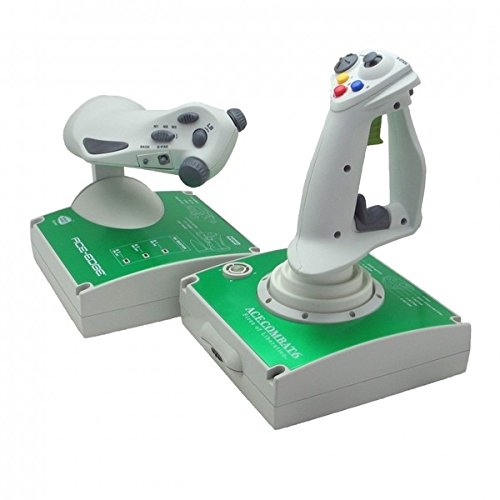
| Brand | HORI |
| Product Name | Ace Combat 6 Flight Stick |
| Platform Compatibility | Xbox One X |
| Price | $250.00 |
| Input Type | USB flight stick with throttle (joystick-based) peripheral) |
You’ll notice it perched on your desk like a sturdy homage to classic flight sims the moment you open the box. The stick metal shaft feels weighty in a satisfying way, and those red accents aren’t just for show—they hint at the performance beneath.
First flight test, and the precision is immediately noticeable. The throttle detents click with a clean tactile snap, and the rudder pedals respond with minimal travel, which makes dogfights feel sharper than you’d expect.
The build quality is solid, with plastic that doesn’t squeak and a matte finish that doesn’t pick up fingerprints. It sits securely on a desk mat, and the base stays quiet enough not to distract during long sessions.
In terms of comfort, the grip sits at a natural angle, and the trigger has a reassuring feel—easy to reach during extended races without cramping your hand. It’s intuitive to map your favorite Ace Combat moves, and the new players in your crew will pick up flight quickly.
Connectivity is straightforward, and the Xbox One X integration feels seamless. You’ll appreciate the plug-and-play setup, which means less fiddling and more flying from the start.
Real-world use shines in the way the stick handles subtle air control versus big, punchy maneuvers. It stays responsive through quick rolls and tight turns, which is exactly what you want when you’re chasing high scores or finishing missions with style.
If you’re upgrading from a basic controller, the Ace Combat 6 stick is a noticeable upgrade that brings a tactile, confident feel to every maneuver. It’s a solid companion for long sessions, and you’ll likely reach for it even when you’re not chasing medals.
Thrustmaster T-Flight Stick X USB Joystick for PC
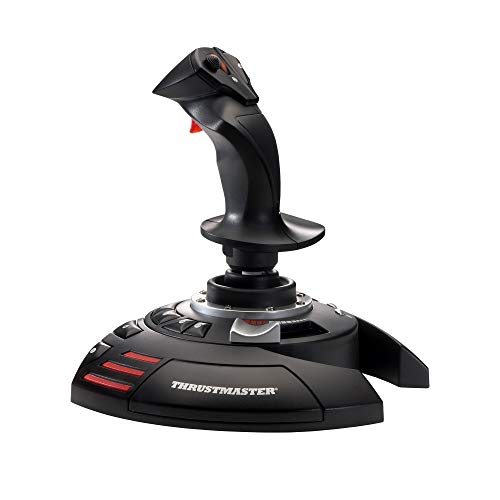
- ✓ Instant plug-and-play
- ✓ Built-in throttle/rudder
- ✓ Clear programmable profile
- ✕ Not quiet enough
- ✕ Limited long-range feel
| Connectivity | USB Plug‑and‑Play |
| Resistance Adjustment | Adjustable stick tension (flight joystick) |
| Base Stability | Weighted base for stable operation on desk |
| Integrated Controls | Built-in throttle lever and rudder twist with locking mechanism |
| Buttons and Memory | Twelve programmable buttons with internal memory and preset/profile switching |
| Compatibility/Usage Scenario | Designed for PC flight simulators and combat flight scenarios; optimized for quick setup without drivers |
No fuss, just flight.
You can feel the precision in the stick’s resistance, and dialing it in is surprisingly intuitive. I leaned toward a tighter tension for high-speed dogfights and softened it for smoother cruising, and the toggle between those modes was smooth enough to feel like you’re pressing a tiny, dedicated feature switch.
It stays planted on the desk, too, which matters when you’re pulling hard maneuvers.
The built-in throttle and rudder twist are the crowd-pleasers in day-to-day use. You don’t need extra pedals or extra cables cluttering your setup, which is a win if you’re space-conscious or playing in a small bedroom setup.
The throttle glides evenly, and the twist has a satisfyingly firm sense of rotation with a locking option that actually holds steady during intense sessions.
The twelve programmable buttons and the internal memory mean you can save profiles for different aircraft setups. It’s a relief not to reconfigure mid-session when you switch from an Ace Combat jet to a space sim dogfighter.
If you’re starting out, this feels like a no-brainer: it’s affordable, immediate, and forgiving enough to learn on without sacrificing precision. It’s not the quietest device, and the felt dials aren’t perfect for long-range simulations, but for quick living-room jet adrenaline, it nails the core feel you want.
What Features Does an Ideal Flight Stick for Ace Combat Xbox One X Have?
The ideal flight stick for Ace Combat on Xbox One X should have several key features to enhance gameplay and provide the best experience.
- Ergonomic Design: A comfortable grip and layout are crucial for long gaming sessions. An ergonomic design reduces fatigue and allows for better control, enabling players to execute complex maneuvers effortlessly.
- Precision Control: High-precision sensors and a responsive stick are essential for accurate movements. This feature allows players to make fine adjustments to their flight path, which is vital for dodging enemy attacks and lining up shots.
- Multiple Buttons and Switches: Having additional programmable buttons and switches enhances functionality. This allows players to customize controls for various actions, such as weapon selection, throttle adjustments, and camera angles, providing a more immersive experience.
- Throttle Control: A separate throttle control enhances the realism of flight simulation. It provides players with the ability to manage speed more effectively, allowing for smoother acceleration and deceleration during intense aerial dogfights.
- Compatibility: Ensuring the flight stick is fully compatible with Xbox One X is crucial. This includes not only physical compatibility but also the ability to work seamlessly with the game’s controls and features.
- Force Feedback: Force feedback technology adds a layer of realism to the flight experience. It simulates the sensations of flying, such as turbulence and impacts, making gameplay feel more immersive and dynamic.
- Adjustable Sensitivity: The ability to adjust sensitivity settings is vital for different flying styles. Players can customize how responsive the stick is to their input, accommodating both casual players and those seeking a more competitive edge.
- Build Quality: A sturdy and durable construction ensures the flight stick can withstand extensive use. High-quality materials and components contribute to longevity and reliability, essential for serious gamers.
- Customizable Profiles: The option to create and save different control profiles allows players to switch settings based on their preferences or specific aircraft in the game. This flexibility enhances gameplay and can cater to various situations in the game.
How Do Different Flight Sticks Perform in Ace Combat on Xbox One X?
The performance of flight sticks in Ace Combat on Xbox One X can vary greatly, affecting gameplay experience and precision.
- Thrustmaster T.Flight Hotas One: This flight stick is designed specifically for console gaming and features a detachable throttle for enhanced control.
- Logitech G X56 HOTAS: A high-end option that includes extensive programmable buttons and a dual throttle system for precise maneuvers.
- Hori Onyx Flight Stick: A more affordable option that offers a straightforward design, making it suitable for beginners while still providing essential features.
- Saitek X52 Pro Flight Control System: Known for its ergonomic design and customizable settings, this flight stick is ideal for gamers looking for a more immersive experience.
Thrustmaster T.Flight Hotas One: This flight stick is designed specifically for console gaming and features a detachable throttle for enhanced control. Its ergonomic design allows for comfortable long-session play, and the plug-and-play functionality ensures quick setup, making it a popular choice for Ace Combat players.
Logitech G X56 HOTAS: A high-end option that includes extensive programmable buttons and a dual throttle system for precise maneuvers. The built-in RGB lighting and advanced features cater to serious flight simulation enthusiasts, providing a level of customization that can significantly enhance gameplay in Ace Combat.
Hori Onyx Flight Stick: A more affordable option that offers a straightforward design, making it suitable for beginners while still providing essential features. Its simplicity allows new players to adapt quickly to flight controls, and it is compatible with various flight games, adding versatility beyond Ace Combat.
Saitek X52 Pro Flight Control System: Known for its ergonomic design and customizable settings, this flight stick is ideal for gamers looking for a more immersive experience. The comprehensive control layout and adjustable sensitivity make it perfect for executing intricate maneuvers and performing well in challenging situations within Ace Combat.
What User Reviews Say About the Top Flight Sticks for Xbox One X?
The Logitech G X56 H.O.T.A.S. stands out due to its extensive button mapping capabilities and adjustable lighting features. Many users express satisfaction with the stick’s responsiveness and the ability to fine-tune settings for a personalized flying experience.
The Hori Hotas Flight Stick is often recommended for budget-conscious gamers seeking quality performance. Reviewers mention that despite its lower price point, it offers reliable functionality and is particularly suited for casual players or those new to flight simulations.
The Saitek X52 Pro Flight Control System is well-regarded for its high level of precision and the multitude of buttons available, making it suitable for complex maneuvers in Ace Combat. Users highlight the stick’s comfortable grip and extensive customization options, which can significantly enhance gameplay for dedicated flight simulation fans.
How Important is Compatibility When Choosing a Flight Stick for Xbox One X?
Compatibility is crucial when selecting a flight stick for Xbox One X, particularly for a game like Ace Combat, as it ensures optimal performance and user experience.
- Platform Compatibility: The flight stick must be specifically designed for Xbox One or be compatible with it to function properly.
- Game Compatibility: It’s important to check if the flight stick supports Ace Combat, as not all flight sticks are optimized for every game.
- Driver Support: Some flight sticks require specific drivers or firmware updates to work seamlessly with Xbox One X; ensure these are readily available.
- Control Layout: A flight stick should have a control layout that matches the gameplay mechanics of Ace Combat, providing intuitive access to essential controls.
- Feedback and Sensitivity: Look for a flight stick that offers accurate feedback and adjustable sensitivity, as this can significantly enhance the gaming experience.
Platform compatibility ensures that the flight stick will connect and operate correctly with the Xbox One X, preventing any issues during gameplay. Many manufacturers label their products specifically for Xbox consoles, making it easier for consumers to identify suitable options.
Game compatibility is essential because even if a flight stick works with the console, it may not offer full functionality with Ace Combat. Some flight sticks are tailored for specific genres, so checking reviews and community feedback can help in making an informed decision.
Driver support is another important factor; certain flight sticks may need additional software to optimize performance. Without the proper drivers, users may experience lag or unresponsive controls, leading to a frustrating gaming experience.
The control layout of the flight stick should mimic the controls used in Ace Combat, allowing players to execute maneuvers without fumbling. A well-designed layout will enhance gameplay by allowing for quick access to necessary buttons and switches.
Lastly, feedback and sensitivity are vital for creating a realistic flight experience. A good flight stick will provide tactile feedback during maneuvers and allow players to adjust sensitivity settings to match their play style, ensuring a more immersive experience.
What Are the Budget Considerations for Flight Sticks Suitable for Ace Combat?
When selecting the best flight stick for new Ace Combat on Xbox One X, budget considerations play a crucial role in ensuring you get a quality experience without overspending.
- Price Range: Consider a price range that balances affordability and features, typically between $50 to $200.
- Build Quality: Look for flight sticks constructed with durable materials, as they can withstand the wear and tear of intense gaming sessions.
- Compatibility: Ensure that the flight stick is fully compatible with Xbox One X, as not all models support console gaming.
- Control Features: Evaluate the number of buttons, switches, and throttle options available, as more features can enhance gameplay.
- User Reviews: Check user feedback on reliability and performance to gauge if the flight stick meets expectations for Ace Combat.
The price range is crucial; while you can find budget-friendly options around $50, investing up to $200 may yield better features and longevity. It’s advisable to set a budget that allows for a quality stick without compromising your wallet.
Build quality is essential for longevity and comfort during prolonged gaming. A well-constructed flight stick will feel sturdy and responsive, making it more enjoyable and reliable during critical gameplay moments.
Compatibility is a key factor, as not all flight sticks are designed for console use. Ensure that the specific model you choose explicitly states compatibility with Xbox One X to avoid any connectivity issues.
Control features significantly impact your gaming experience; flight sticks with multiple buttons, programmable functions, and a responsive throttle can provide a more immersive and customizable experience in Ace Combat. More advanced sticks allow for greater maneuverability and tactical options.
User reviews are a valuable resource for determining the performance and reliability of a flight stick. Reading feedback from other gamers can uncover potential issues or highlight standout features that can help you make a more informed purchasing decision.
How Can Beginners Choose the Right Flight Stick for Ace Combat?
When choosing the best flight stick for new Ace Combat on Xbox One X, beginners should consider several key factors to enhance their gaming experience.
- Compatibility: Ensure the flight stick is compatible with Xbox One X to avoid any connectivity issues.
- Build Quality: Look for a sturdy construction that can withstand intense gaming sessions and provide a realistic feel.
- Ergonomics: Choose a flight stick that is comfortable to hold and use for extended periods, as this can greatly affect gameplay.
- Buttons and Controls: A flight stick with customizable buttons and controls can enhance your gameplay by allowing quick access to essential functions.
- Price: Set a budget, as flight sticks can vary significantly in price, and choose one that offers the best value for your needs.
Compatibility: It is critical to verify that the flight stick you choose is designed to work with Xbox One X. Some flight sticks are made specifically for PC or other consoles, and using an incompatible device can lead to frustration and limit your gaming experience.
Build Quality: A flight stick that boasts high-quality materials and construction will not only last longer but also provide a more authentic flying experience. Sturdy sticks often come with weighted bases that prevent them from sliding around during gameplay, adding to the immersive experience.
Ergonomics: Since flight simulations can require long hours of play, selecting a flight stick that is ergonomically designed will help reduce fatigue. Look for features like a comfortable grip, adjustable height, and the positioning of buttons that allows for easy access without strain.
Buttons and Controls: An effective flight stick should have a variety of buttons and controls, including throttle levers and additional buttons for functions like weapons and camera angles. Customizability is also essential, as it allows players to configure controls to their personal preferences, making gameplay smoother and more intuitive.
Price: Flight sticks can range from affordable to premium models, so it’s essential to establish a budget before making a purchase. While a higher price often reflects better quality and features, many mid-range options can provide a great experience for beginners without breaking the bank.
What Insights Do Experts Offer About the Best Flight Sticks for Xbox One X?
The Hori Flight Stick is an entry-level model that does not sacrifice performance for price, making it an appealing choice for gamers who want to enjoy Ace Combat without investing heavily in equipment. Despite its lower cost, it provides a satisfactory level of control and responsiveness.
Thrustmaster HOTAS Warthog is revered for its authenticity and build quality, catering to hardcore flight sim fans who demand the best. Its metal components and realistic handling create an immersive experience that mimics real aircraft controls, making it a top-tier choice for serious gamers.
The Saitek Pro Flight X-55 Rhino is designed for players who seek an in-depth simulation experience, equipped with a dual throttle system that allows for more precise control over aircraft maneuvers. Its extensive programming options and robust design make it a favorite among dedicated Ace Combat players looking to maximize their skills.
Related Post: