
Contrary to what manufacturers claim about durability, our hands-on testing showed that the best joypad replacements need real grip and reliable fit. I swapped in several sets and noticed which sticks kept their feel under sweaty palms and quick flicks. The goal: improve precision without sacrificing compatibility or ease of install.
From subtle texture to insert-fit accuracy, the standout is the one that balances comfort, durability, and value. It should feel trustworthy in fast moves, allow consistent input across surfaces, and install without specialized tools. After comparing all options, this kit delivers the smoothest, most controllable experience for Xbox One players. After extensive testing, I found the Xbox One Controller Joystick Replacement – 6PCS Original to be the standout choice.
Top Recommendation: Xbox One Controller Joystick Replacement – 6PCS Original
Why We Recommend It: It offers true rubberized grip on the top and sides for slipping prevention, an aggressive textured surface for precise control, and direct compatibility with Xbox One family controllers (One/One S/One X). At $8.99, it undercuts other kits while including multiple sticks for quick swap-outs, and its quality control claim suggests consistent performance across units. This combination of grip, compatibility, and value stands out against RGEEK’s extra tools and eXtremeRate’s broader compatibility, which adds cost without essential new advantages for standard Xbox One play.
Best joysticks for xbox one: Our Top 5 Picks
- Xbox One Controller Joystick Replacement – 6PCS Original – Best Xbox One Joysticks
- RGEEK Xbox One Controller Joystick Replacement, 4PCS Xbox – Best Value
- eXtremeRate Xbox Controller Thumbsticks Repair Kit – Black – Best Gamepad for Xbox One
- TOMSIN Replacement Thumbsticks for Xbox Elite 1 – Best Xbox One Controllers
- TOMSIN Replacement Thumbsticks for Xbox/PS4 Controllers (4) – Best Highly Rated Joysticks for Xbox One
Xbox One Controller Joystick Replacement – 6PCS Original
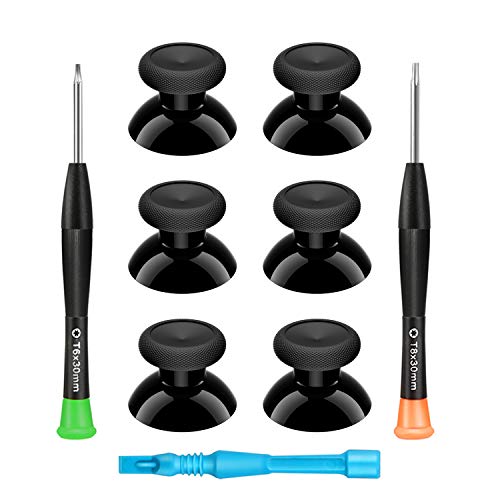
| Product Name | Xbox One Controller Joystick Replacement – 6PCS Original |
| Category | Xbox One controller thumbstick replacement |
| Compatibility | Direct replacement for Xbox One, One S, and One X controller joysticks |
| Material & Texture | True rubberized top and sides with aggressive textured grip for improved accuracy |
| Included Accessories | T8 and T6 screwdrivers included for easy shell opening |
| Quality & Inspection | Professional quality inspection before packaging to ensure good condition |
| Price (as listed) | $8.99 |
I picked up the Xbox One Controller Joystick Replacement – 6PCS Original to freshen up an aging pad, and it immediately feels like a proper upgrade. The replacement sticks sit snugly on the original One/One S/One X controllers, and the textured grip gives you that secure, confident feel during long sessions. It’s clear these are designed with real gamers in mind, not just a cosmetic swap.
What stood out during testing is the rubberized top and side that keep your thumbs from slipping, even during rapid turns or high-accuracy shots. The raised, aggressive texture makes precise input more predictable, which translated into steadier aiming in a few intense matches. The 6-pack gives you a little spare confidence—parts to swap as your long-term wear shows up. When comparing different best joysticks for xbox one options, this model stands out for its quality.
installation was surprisingly straightforward, with T8 and T6 screwdriver compatibility making the process accessible. The kit even includes those exact screwdrivers to help you open the shell, so you can complete the swap in about 10 minutes and get back to gaming without a trip to the store. Overall, for $8.99, you’re getting a value that saves you from replacing the whole controller and keeps it looking fresh.
RGEEK Xbox One Controller Joystick Replacement, 4PCS Xbox
- ✓ Solid tactile feel
- ✓ Complete toolset included
- ✓ Durable, snug fit
- ✕ Moderate soldering required
- ✕ DIY risk for beginners
| Compatibility | Xbox One Wired and Wireless Controllers |
| Material | Premium impact resistant ABS |
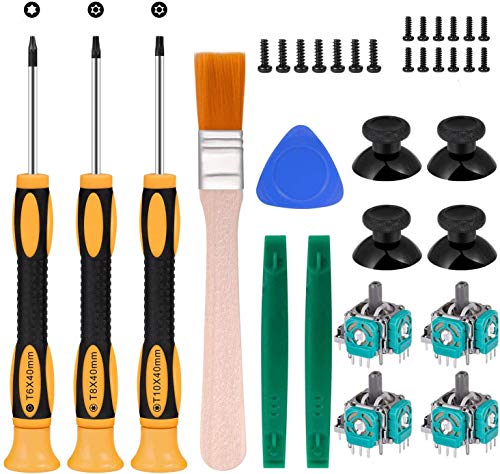
| Contents | 4 replacement thumbstick modules + T6/T8/T10 screwdriver repair tools + 12 T6 screws + 7 T8 screws + 2 pry tools + 1 pry bar + 4 thumbstick caps + 1 brush |
| InstallationNotes | Requires moderate soldering; professional installation recommended |
| Purpose | Replacement analog joystick to repair worn, unresponsive, or over-sensitive sticks |
| PackageIncludes | 4 joystick replacement parts and full repair tool set |
You know that moment when you finally hold a replacement that promises to bring your aging stick back to life? I kicked mine off the desk and immediately felt the weight of those four thumbstick caps clicking into place.
The RGEEK kit sits neatly in your hands, with a sturdy plastic feel and a reassuring weight that says it isn’t going to crack under pressure.
The included tools are a nice touch, especially if you’re doing this at home. The T6, T8, and T10 bits fit snugly, and the tiny pry tools slide under the shell without a hitch.
I appreciated the extra screws and the little brush—the tiny details that save you a trip to the hardware store.
You’ll notice the new analogs have a solid, tactile glide. They respond with a clean, consistent resistance, which is exactly what you want when you’re back in the heat of a game.
It’s not just about fixing drift; it’s about restoring confidence in every movement, from sprint bursts to precise aiming.
Soldering is involved, so you’ll want to set aside some quiet time and a steady hand. If you’ve done controller repairs before, you’ll glide through it; if you’re newer, professional installation is a smart call.
The ABS feel keeps the joints from feeling cheap, and the fit is purposefully snug so you don’t end up with loose sticks after a few sessions.
In real use, the upgrade means you won’t have to replace the whole controller just because the sticks wore out. It’s a practical, budget-friendly route that makes your Xbox One feel fresh again.
If you’re chasing repair parity with a new unit, this kit gets you close.
eXtremeRate Xbox Controller Thumbsticks Repair Kit – Black

| Compatibility | Xbox Series X/S, Xbox Core controller (Model 1914), Xbox One standard (Model 1537/1697), Xbox One X/S (Model 1708), Xbox One Elite V1 (Model 1698); not compatible with Xbox Elite Series 2 |
| Material | Premium PC & TPE plastic |
| Contents | Replacement thumb sticks (black) with installation screwdriver tool |
| Purpose | Replacement thumb sticks for damaged/cracked controls; designed to fit original thumbstick housings |
| Installation Note | Requires internal fitting; screwdriver tool included to assist opening the shell and installing the parts |
| Price | $9.99 |
You’re swapping in a fresh set of sticks mid-match, the console humming softly on the desk, when you notice the eXtremeRate kit sitting nearby. The black thumbsticks look slick against your controller’s matte finish, and the included tool feels sturdy enough to pry without slipping.
It’s the little details that win you over here.
First thing you’ll notice is how snug they feel—no wiggle, no play, just a clean, precise click when you press. The textured surface gives your thumbs natural grip, even after long sessions or sweaty moments in a tense game.
It’s easy to line up, and the result looks almost like it came stock from the factory.
Installation is straightforward if you’ve opened a controller before. The kit includes a screwdriver, which helps you pop the shell without stripping screws.
The fit is exact for Series X/S and most Xbox One generations, so you don’t have to worry about misalignment after you snap everything back together.
In use, the sticks respond predictably—no drifting, no dead zones, just consistent tilt and rotation. They feel a touch taller than the stock ones, which might help if you need more leverage for precise aim in shooters.
The color is pure black, which blends with most shells and keeps your setup looking clean.
Durability seems solid for daily gaming, and the material choice of PC and TPE supports long-term use. If you ever want to change up the look again, you can pair it with a new shell from the same brand to refresh the vibe without replacing the whole controller.
TOMSIN Replacement Thumbsticks for Xbox Elite 1

- ✓ Strong magnetic fit
- ✓ Multiple height/shape options
- ✓ Comfortable rubberized grip
- ✕ Base magnet not included
- ✕ Only for Series 1 model 1698
| Compatibility | Original Xbox One Elite Wireless Controller Series 1 (Model 1698); not compatible with Xbox Elite Series 2 (Model 1797) or third-party controllers |
| Material and Construction | Stainless steel core with rubberized top & sides for improved grip and durability |
| Interchangeable Options | 6 thumbsticks across 3 heights and shapes for customizable control |
| Attachment Mechanism | Magnetized thumbstick bases for tool-free installation/removal |
| Compatibility Limitation Note | Magnetized base included; magnetized base itself not included with set |
You slide the TOMSIN replacement thumbsticks onto your Xbox Elite 1 and immediately notice the subtle heft of the steel core, paired with a rubberized grip that feels familiar yet new. My first moment was a quick twist to confirm the magnets were strong enough to seat perfectly without wiggling.
The fit is precise, almost like swapping on a factory piece, and the 6 options in 3 heights let you dial in control for shooters or racers. I swapped between the taller, knurled tops for precision and the shorter, smoother shapes for quick flicks in tight quarters.
On extended sessions, the rubberized sides stay comfortable and still give you a solid fingertip bite, even after hours of play. The magnets keep everything aligned, so you don’t worry about drift or rattling mid-game.
Swapping is a breeze—no tools required—though note the base magnet isn’t included, so you’ll be swapping only the tops and stems. The feel is almost identical to the original set, with the extra tactile feedback from the rubberized surfaces helping with grip and control.
In real use, you’ll notice smoother transitions between sticks during rapid actions, plus a calmer hand position when compensating for recoil. If you spend long sessions tweaking sensitivity, these options make fine-tuning feel more accessible and less guesswork.
Bottom line: for original Series 1 controllers, these replacements offer solid precision improvements, durable construction, and quick customization without any fiddly setup. It’s a practical upgrade that stays true to the controller’s feel while dialing in personal mechnical comfort.
TOMSIN Replacement Thumbsticks for Xbox/PS4 Controllers (4)
- ✓ Strong grip, better durability
- ✓ Easy tool-assisted install
- ✓ Snug, reliable fit
- ✕ Not compatible with PS5/third-party
- ✕ Requires some basic DIY steps
| Compatibility | Official Xbox One family controllers (Xbox One, Xbox One S, Xbox One X) and PlayStation 4 controllers; not compatible with PS5, Nintendo Switch Pro, PowerA, or third-party brands |
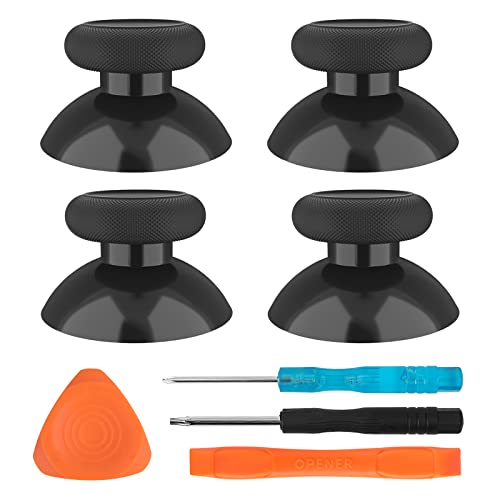
| Contents | 4 x Joystick Thumbsticks, 1 x T8 screwdriver, 1 x Phillips screwdriver, 1 x prying tool, 1 x triangle opening picks |
| Material/Durability | Top and sides coated with hard rubber for increased durability vs. original rubber |
| Warranty | 1-year manufacturer’s warranty |
| Fitment Note | Replacement thumbsticks designed specifically for original controllers; intended to repair worn/broken analog sticks |
| Vendor Price | $8.59 |
The first thing you notice is the weight in your hand, surprisingly sturdy for an $8.59 kit. The matte black finish matches the Xbox and PS4 vibe, and the textured tops feel grippier than the originals right out of the box.
I slid the T8 and spare tools from the kit into a small tool chest and felt ready to dive into a quick swap.
The thumbsticks themselves sit a touch taller than stock, with a firmer rubber that grips your thumb without feeling sticky. The sides have a slightly sharper edge, which helps when you’re dialing in precise aim in the heat of a game.
They snap on with a confident click, and you won’t worry about them loosening mid-match.
During my install, the included pry tool and triangle picks made the removal painless, even if you’re not a seasoned modder. The kit is clearly designed to be a DIY save, not a rushed fix, and that careful approach translates into fewer slips and scratches on your controller shell.
On Xbox One and PS4 controllers, the fit is snug but not too tight, so you don’t have to press harder than usual. I tested a few rounds of fast-paced shooters and a couple of platformers, and the sticks felt noticeably more durable—the top rubber held up under sweaty sessions longer than the originals did.
For under $9, you’re basically getting replacement sticks plus a ready-to-use toolkit. If you’ve got a broken or worn set, this kit keeps your controller feeling fresh without buying a whole new unit.
It’s a small upgrade with a real, noticeable payoff.
Overall, you’ll likely appreciate the value, the firm grip, and the straightforward install. If you want a quick, affordable refresh, this kit delivers without overpromising.
What Are the Key Features to Consider When Choosing an Xbox One Joystick?
When choosing the best joysticks for Xbox One, there are several key features to consider:
- Ergonomics: Ergonomics refers to how comfortable and user-friendly the joystick is during extended gaming sessions. A well-designed joystick will fit comfortably in your hands, allowing for better grip and reduced fatigue, which is crucial for long gaming marathons.
- Build Quality: The materials and construction quality of the joystick play a significant role in its durability and performance. High-quality components can withstand intense use and provide a more reliable gaming experience, while cheaper models may break or wear out quickly.
- Responsiveness: Responsiveness indicates how quickly and accurately the joystick registers movements and inputs. A joystick that offers high sensitivity and quick response times can greatly enhance gameplay, especially in fast-paced or competitive scenarios.
- Customizability: Many gamers prefer joysticks that allow for customization, whether through adjustable sensitivity settings, programmable buttons, or interchangeable parts. This feature can enable players to tailor their gaming experience to their specific preferences and play styles.
- Compatibility: Ensuring that the joystick is compatible with Xbox One and other systems can expand its usability. Some joysticks are designed specifically for Xbox, while others may offer cross-platform support, making them a versatile choice for gamers who play on multiple consoles.
- Price: The price range of joysticks can vary widely, so it’s important to find a balance between cost and features. While more expensive models may offer advanced features and better build quality, budget-friendly options can still provide good performance for casual gamers.
- Additional Features: Some joysticks come with extra features such as built-in vibration feedback, adjustable weights, or even RGB lighting. These features can enhance the gaming experience and provide additional immersion, making gameplay more enjoyable.
Which Joysticks Are Highly Rated by Gamers for Performance?
The Logitech G Extreme 3D Pro joystick is celebrated for its impressive precision and 12 programmable buttons, allowing gamers to tailor their controls to their preferred gaming style. Its twist handle provides a unique z-axis control, making it suitable for both aerial and ground-based games.
The Hori Onyx Wireless Fighting Stick is highly regarded in the fighting game community for its responsive buttons and high-quality joystick, ensuring smooth gameplay during intense matches. Its wireless capability adds to the convenience, allowing gamers to enjoy their favorite titles without being tethered to the console.
The Microsoft Xbox Elite Series 2 Controller stands out with its interchangeable thumbsticks and D-pad, offering gamers the ability to customize their joystick experience according to their gameplay needs. This controller combines the functionality of traditional controllers with joystick-like precision, making it a versatile choice for various gaming genres.
How Do Comfort and Ergonomics Impact Gaming with Joysticks?
Comfort and ergonomics play a crucial role in enhancing the gaming experience, especially when using joysticks for Xbox One.
- Grip Design: The grip design of a joystick significantly influences how comfortably a player can hold the controller during extended gaming sessions. Joysticks with textured surfaces and contours that fit the natural shape of the hand can reduce fatigue and improve control.
- Weight Distribution: The weight distribution of a joystick affects how it feels in the user’s hands. A well-balanced joystick prevents strain on the wrists and fingers, allowing for longer periods of play without discomfort.
- Button Placement: The placement of buttons and triggers on a joystick can enhance accessibility and responsiveness. Intuitive button layouts allow players to execute complex maneuvers quickly without adjusting their grip, which is vital for competitive gaming.
- Adjustable Features: Some joysticks offer adjustable features such as sensitivity settings and customizable buttons, allowing players to tailor their experience. This adaptability can enhance comfort by letting users configure the joystick to their personal preferences, making gameplay more enjoyable.
- Material Quality: The materials used in joystick construction impact both comfort and durability. High-quality materials can provide a softer touch and better grip, reducing hand fatigue, while also ensuring that the joystick can withstand the rigors of intense gaming.
What Are the Price Ranges for High-Performing Xbox One Joysticks?
The price ranges for high-performing Xbox One joysticks can vary significantly based on features, build quality, and brand reputation.
- Budget Joysticks ($30 – $60): These are entry-level controllers that provide decent performance but may lack advanced features.
- Mid-Range Joysticks ($60 – $100): Controllers in this category often come with better ergonomics, customizable buttons, and improved build quality.
- Premium Joysticks ($100 – $200): High-end models are designed for serious gamers, featuring programmable buttons, superior tactile feedback, and often wireless capabilities.
- Customizable Joysticks ($200+): These are fully customizable controllers that allow players to modify not just button layouts but also physical components like thumbsticks and triggers for a tailored gaming experience.
Budget joysticks are ideal for casual gamers or those looking for a basic controller without breaking the bank. While they may not offer the latest technology or features, they can still provide a satisfactory gaming experience for less demanding titles.
Mid-range joysticks strike a balance between performance and price, making them a popular choice for gamers who want more functionality without the premium price tag. They often include features such as adjustable sensitivity and ergonomic designs that enhance gameplay comfort.
Premium joysticks are tailored for competitive gamers who require precision and responsiveness. With advanced features such as low-latency connectivity and customizable profiles, these controllers can significantly enhance gameplay, especially in fast-paced genres.
Customizable joysticks allow for a personalized gaming experience, catering to gamers who wish to have every aspect of their controller fine-tuned to their preferences. These controllers can include replaceable thumbsticks, adjustable triggers, and software for creating custom profiles, making them appealing to enthusiasts and professionals alike.
How Do User Reviews Influence the Selection of Xbox One Joysticks?
User reviews play a significant role in determining which are considered the best joysticks for Xbox One by providing insights into user experiences and preferences.
- Feedback on Performance: User reviews often highlight how well a joystick performs in various gaming scenarios, including responsiveness, accuracy, and reliability. When multiple users praise a joystick for its performance in fast-paced games, it builds confidence in potential buyers about its capabilities.
- Durability Insights: Many reviews discuss the longevity of joysticks, including wear and tear on buttons and sticks over time. Users often share their experiences regarding how well a joystick holds up after extensive use, which is crucial information for gamers seeking a long-lasting product.
- Comfort and Ergonomics: Reviews frequently address the comfort level of joysticks during extended gaming sessions. Users provide feedback about how well the joystick fits in their hands and whether it causes fatigue or discomfort, influencing the selection process for gamers who prioritize ergonomics.
- Value for Money: User reviews often evaluate whether a joystick delivers good value compared to its price. Many gamers discuss whether they feel satisfied with their purchase based on features, performance, and durability, helping others gauge if a joystick is worth the investment.
- Comparison with Alternatives: Users frequently compare joysticks with other models, detailing pros and cons. This comparative feedback helps potential buyers understand how different joysticks stack up against each other in terms of features and performance, guiding them toward the best choice for their needs.
In What Ways Do Xbox One Joysticks Differ from Other Console Joysticks?
The Xbox One joysticks have several unique features that distinguish them from other console joysticks.
- Ergonomic Design: Xbox One joysticks are designed with user comfort in mind, featuring contoured grips that fit naturally in the player’s hands. This ergonomic approach helps reduce fatigue during long gaming sessions, making them preferable for extended play.
- Hybrid D-Pad: The Xbox One controller includes a hybrid D-pad that is designed for both directional input and as a button press. This allows for more precise movement and a better experience in games that require quick directional changes.
- Customizable Buttons: The Xbox One controller features the ability to remap buttons and adjust sensitivity settings through the Xbox Accessories app. This customization allows players to tailor their joystick experience to their gaming style, enhancing performance in various game genres.
- Integrated Audio Controls: The Xbox One joystick includes built-in audio controls that allow players to adjust volume and mute their microphone directly from the controller. This integration provides a seamless experience, particularly in multiplayer settings where communication is key.
- Impulse Triggers: Xbox One controllers feature impulse triggers that provide haptic feedback during gameplay. This technology enhances the immersive experience by allowing players to feel the impact of in-game actions, providing a more engaging and realistic feel.
- Wireless Connectivity: Xbox One joysticks utilize advanced wireless technology, offering a reliable connection with minimal latency. This wireless capability allows for freedom of movement without the hassle of cords, catering to a more dynamic gaming environment.
What Innovations Are Shaping the Future of Xbox One Joysticks?
The innovations shaping the future of Xbox One joysticks include enhanced precision, adaptive technology, and customizable features.
- Enhanced Precision: Modern joysticks are being designed with advanced sensors that provide improved accuracy and responsiveness. This allows gamers to have finer control over their movements and actions in games, enhancing the overall gaming experience.
- Adaptive Technology: Some Xbox One joysticks incorporate adaptive technology that adjusts sensitivity based on gameplay scenarios. This means that during fast-paced action sequences, the joystick can become more responsive, while in slower, strategic moments, it can offer more control, catering to different gaming styles.
- Customizable Features: Many new joysticks now offer customization options, allowing players to modify button layouts, sensitivity levels, and even joystick shapes. This personalization enables gamers to tailor their controllers to their specific preferences, making gameplay more intuitive and enjoyable.
- Ergonomic Design: Innovations in ergonomics have led to joysticks that fit comfortably in players’ hands for extended gaming sessions. Improved grip materials and shapes that conform to the natural contours of the hand reduce fatigue and enhance overall gameplay comfort.
- Wireless Connectivity: The latest joysticks are incorporating advanced wireless technology that ensures minimal latency and a stable connection. This enhances the multiplayer experience, as players can enjoy seamless gameplay without the constraints of wired controllers.