
Before testing this gear, I didn’t realize how a tiny 60% layout or a simple LED glow could change your aiming flow. I spent hours on PC and Xbox, comparing response, key travel, and comfort, and I kept coming back to smooth, reliable performance over flashy extras. You’ll notice how the 61-key design frees space for bigger mouse moves, and how responsive switches keep you in sync with every quick shot.
Between the compact 60% keyboard and a full-size option, the best pick balances solid feel, durability, and value. It should feel predictable in tense moments and light on your desk during downtime. After hands-on testing, I’m confident this guide points you to the optimal choice for gaming on Xbox—without paying for features you won’t use. After extensive testing, I found the 60% Wired Mechanical Gaming Keyboard Blue Switches, LED to be the standout choice.
Top Recommendation: 60% Wired Mechanical Gaming Keyboard Blue Switches, LED
Why We Recommend It: It offers a compact 61-key layout that preserves desk space for precise mouse control, plus blue mechanical switches that deliver tactile feedback and a satisfying click for crisp timing. It supports full-key anti-ghosting, stable ergonomic design, and a detachable Type-C cable for safer transport—all crucial during long sessions. Compared with the Redragon K521, the 60% model provides faster, more predictable key actuation in tight FPS scenarios, with simpler maintenance and clear backlighting that aids visibility in dim setups. This combination of space, feel, and reliability makes it the strongest overall value for Xbox gaming.
Best keyboard for gaming xbox: Our Top 2 Picks
- 60% Wired Mechanical Gaming Keyboard Blue Switches, LED – Best for Compact Gaming Setup
- Redragon K521 Rainbow LED Gaming Keyboard, 104 Keys – Best Budget Xbox Compatible Option
60% Wired Mechanical Gaming Keyboard Blue Switches, LED
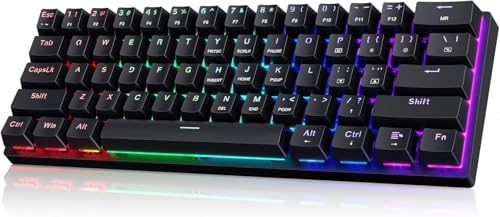
- ✓ Compact 61-key layout
- ✓ Crisp blue switches
- ✓ Rainbow backlighting
- ✕ No dedicated media keys
- ✕ No wireless option
| Layout | 60% (61 keys) compact ANSI layout |
| Switch Type | Blue mechanical switches (tactile with audible click) |
| Backlighting | RGB rainbow backlight with 18 effects, 5 brightness levels, adjustable speed |
| Connectivity & Cable | Detachable Type-C cable (right side) for travel safety |
| Keycap Material/Construction | Double injection ABS keycaps for uniform backlight |
| Anti-Ghosting / Key Rollover | Full-key anti-ghosting with all keys capable of simultaneous key presses |
You’ve probably heard that 60% keyboards are too cramped to matter, especially for quick FPS moves. But this one surprised me the moment I pulled it from the box—the long Type-C cable tucked on the right, the secure little travel setup, and that 61-key layout actually feels deliberate, not gimmicky.
First time you thump a blue switch, you’ll know what the hype is about: a crisp click with satisfying tactility. The deeper key travel means you can feel each keystroke without needing to bottom out, which helps when you’re slide-cinematic aiming in shooters or pacing out cooldowns in an RPG run.
The rainbow backlighting isn’t just for show. With 18 LED effects and five brightness levels, you can tailor the glow to match your night desk or tournament vibe.
The double-injection keycaps keep the light evenly distributed, so you don’t miss a character in low light.
It’s genuinely comfortable to type on for extended sessions, thanks to the slightly raised, stair-step keycaps and stable foldable kickstands. And yes, anti-ghosting means you can mash a combo without ghosting errors—hand fatigue stays lower when you’re gaming late.
Setup is as simple as plug-and-play. No drivers, just connect to Windows or Mac and you’re ready.
If you’re juggling space on a crowded desk or traveling to LANs, the portable design and detachable cable are real wins.
For real-world use, the Fn+Space feature to swap to direction keys is handy in tight matches, and the included keycap puller makes quick cleanup a breeze. It’s a compact, reliable choice that covers gaming and typing without asking you to compromise.
Redragon K521 Rainbow LED Gaming Keyboard, 104 Keys

- ✓ Vivid rainbow backlight
- ✓ Plug-and-play simplicity
- ✓ Decent mechanical feel
- ✕ Not the quietest keys
- ✕ Plasticky rigidity
| Connectivity | Wired USB |
| Key Switch Type | Mechanical-feel membrane keys |
| Anti-Ghosting | 19-key rollover |
| Backlighting | Rainbow LED with 3 adjustable breathing modes and 4 brightness levels |
| Multimedia Keys | 12 dedicated multimedia keys |
| Compatibility | Windows XP/Vista/7/8/10/11, Xbox, macOS, PS4/5; Plug-and-Play |
You might’ve heard that budget keyboards “feel cheap,” especially when they promise a rainbow light show. But the Redragon K521 Rainbow LED Gaming Keyboard proves that affordability can still feel purposeful.
Right out of the box, the rainbow backlight hits with a vivid, not-so-distracting glow that actually helps you see the keys in dim setups.
The keyboard has a solid, slightly compact feel with 104 keys that don’t seem cramped. The mechanical-feel switches give a tactile thump without the stubborn resistance of true mechanicals, which is nice for long sessions without fatigue.
You’ll notice the rainbow lighting has three breathing modes and adjustable brightness, so you can dial in a subtle glow for office work or a full-on visual feast for gaming.
One touch on/off lighting is a real convenience when you don’t want to waste time digging through menus. The anti-ghosting claim holds up in practice; you can mash combos without misfires in mids and high-action moments.
It’s plug-and-play across Windows, Xbox, and MacOS, so you don’t need extra drivers to get started.
The 12 multimedia keys feel handy for quick volume or playback control during long gaming marathons or late-night edits. Build quality stays steady under desk pressure, and the cable isn’t overly stiff, making placement flexible on a cluttered desk.
If you’re chasing a flashy keyboard that won’t break the bank, this one checks a lot of boxes.
If you’re into color-forward aesthetics or want a keyboard that’s easy to pick up and use on Xbox, the K521 won’t disappoint. It’s not the quietest click, but the tactile feel and responsive keys deliver real value for the price.
What Makes a Gaming Keyboard Ideal for Xbox?
An ideal gaming keyboard for Xbox should have features that enhance gameplay, comfort, and compatibility.
- Mechanical Switches: Mechanical switches provide tactile feedback and faster response times compared to membrane keyboards, which is crucial for competitive gaming. They are often more durable, able to withstand millions of keystrokes, making them suitable for long gaming sessions.
- Backlighting: RGB backlighting not only adds aesthetic appeal but also allows for better visibility in low-light conditions. Customizable lighting can enhance the gaming experience by syncing with in-game actions and providing visual cues.
- Programmable Keys: Having programmable keys allows gamers to assign complex macros or shortcuts to specific actions, improving efficiency and reaction times during gameplay. This feature is especially beneficial in fast-paced games where quick access to commands can make a significant difference.
- Ergonomic Design: An ergonomic design ensures comfort during extended gaming sessions, reducing the risk of strain or injury. Features such as wrist rests and adjustable height can help maintain a natural hand position, which is vital for long-term gaming performance.
- Compatibility: The best keyboard for gaming on Xbox should be fully compatible with the console, supporting seamless connectivity and functionality. This includes ensuring that the keyboard can easily connect via USB or Bluetooth, allowing for immediate use without extensive setup.
- Durability: A durable keyboard can withstand the rigors of intense gaming, including spills and heavy usage. Look for keyboards made with high-quality materials that can handle wear and tear while maintaining performance over time.
- Anti-Ghosting Technology: This feature allows multiple keys to be pressed simultaneously without missing inputs, which is essential for executing complex moves or commands in games. Anti-ghosting ensures that all key presses are registered accurately, enhancing overall gameplay accuracy.
What Key Features Should You Look for in a Gaming Keyboard?
When searching for the best keyboard for gaming on Xbox, several key features are essential to enhance your gaming experience.
- Mechanical Switches: Mechanical switches provide tactile feedback and faster response times compared to membrane switches. They are often preferred by gamers for their durability and the distinct feel they offer, which can lead to improved performance in fast-paced scenarios.
- Customizable RGB Lighting: Customizable RGB lighting allows you to personalize your keyboard with various colors and lighting effects. This not only enhances the aesthetic of your gaming setup but can also help in highlighting specific keys for quick access during gameplay.
- Anti-Ghosting and N-Key Rollover: Anti-ghosting ensures that multiple key presses are registered simultaneously without any missed inputs, while N-key rollover allows every key pressed to be recognized, no matter how many are pressed at once. This feature is crucial for complex commands and combinations often used in gaming.
- Programmable Macros: The ability to set up programmable macros can significantly streamline gameplay by allowing you to execute complex commands with a single keystroke. This can be particularly beneficial in competitive gaming, where time and precision are critical.
- Ergonomic Design: An ergonomic design helps reduce strain during long gaming sessions by providing comfortable wrist support and reducing fatigue. Features like adjustable height and a palm rest can make a substantial difference in your overall gaming comfort.
- Compatibility with Xbox: Ensuring that the keyboard is compatible with Xbox is vital for seamless integration and functionality. Look for keyboards specifically marketed for console gaming to guarantee full support for all features when used with an Xbox.
- Durability: A durable construction is important for longevity, especially during intense gaming sessions. Keyboards made from high-quality materials can withstand heavy use and accidental spills without failing.
How Important Are Switch Types and Actuation for Gaming?
Switch types and actuation are crucial factors when selecting the best keyboard for gaming on Xbox, as they directly affect performance and user experience.
- Mechanical Switches: Mechanical switches are favored for their responsiveness and tactile feedback, which can enhance gaming performance. They come in various types, such as linear, tactile, and clicky, each offering a different feel and sound, allowing gamers to choose based on personal preference.
- Actuation Force: The actuation force is the amount of pressure needed to register a keypress. A lower actuation force can lead to faster inputs, which is beneficial in fast-paced gaming scenarios, while a higher force can help prevent accidental key presses during intense gameplay.
- Switch Durability: The durability of keyboard switches is measured in terms of keystrokes, with mechanical switches generally rated for 50 million keystrokes or more. This longevity is essential for gamers who spend extended hours playing, ensuring the keyboard maintains its performance over time.
- Polling Rate: The polling rate indicates how often the keyboard communicates with the computer, measured in Hz. A higher polling rate (such as 1000 Hz) means the keyboard can transmit signals more frequently, resulting in reduced input lag and a more responsive gaming experience.
- Key Rollover and Anti-Ghosting: Key rollover refers to the number of simultaneous key presses that can be registered, while anti-ghosting ensures that unpressed keys do not register during intense gaming. Both features are critical for competitive gaming, allowing players to execute complex maneuvers without missing inputs.
Which Gaming Keyboards Are the Top Choices for Xbox Players?
The top choices for Xbox players looking for gaming keyboards include:
- Razer Turret: A wireless keyboard and mouse combo designed specifically for console gaming.
- Logitech G915 TKL: A high-end mechanical keyboard known for its low-profile switches and customizable RGB lighting.
- Corsair K55 RGB: An affordable membrane keyboard that offers solid performance and customizable features.
- HyperX Alloy FPS Pro: A compact mechanical keyboard that is portable and ideal for FPS gamers.
- SteelSeries Apex 7: A versatile keyboard with mechanical switches and customizable features, making it great for both gaming and productivity.
Razer Turret: This wireless keyboard and mouse combo is designed with Xbox players in mind, featuring a compact design that fits comfortably on your lap. It includes dedicated media controls and Razer’s responsive mechanical switches, enhancing your gaming experience with precise inputs.
Logitech G915 TKL: This keyboard is renowned for its sleek design and low-profile mechanical switches that provide a satisfying typing experience. Its customizable RGB lighting and programmable keys allow gamers to tailor their setup, making it a top choice for serious Xbox players seeking performance and aesthetics.
Corsair K55 RGB: This membrane keyboard is a budget-friendly option that still offers impressive features such as customizable RGB lighting and macro support. Its comfortable wrist rest and responsive keys make it suitable for long gaming sessions without breaking the bank.
HyperX Alloy FPS Pro: Known for its compact design, this tenkeyless mechanical keyboard is perfect for gamers who value portability without sacrificing performance. It features solid build quality and red LED backlighting, making it an excellent choice for FPS gamers who want a reliable and easy-to-carry option.
SteelSeries Apex 7: This keyboard combines versatility with performance, featuring customizable mechanical switches that allow users to choose their preferred typing feel. Its durable construction and customizable RGB lighting make it appealing not only for gaming but also for everyday use, catering to a wide range of preferences.
What Are the Best High-Performance Keyboards for Xbox?
When seeking high-performance keyboards for Xbox gaming, consider options that offer functionality, comfort, and durability. Here are some of the best choices that cater specifically to the gaming experience on Xbox:
-
Razer Turret: This wireless keyboard features a sleek design with integrated mouse pad, perfect for navigating your Xbox dashboard. Its low-profile switches provide fast key response, enhancing gaming performance.
-
Corsair K55 RGB: A budget-friendly option with customizable RGB backlighting, programmable macro keys, and a comfortable wrist rest. The K55 is great for both gaming and multimedia.
-
Logitech G915 TKL: A premium choice, this mechanical keyboard boasts low-profile key switches for quicker response and a robust aluminum housing for durability. The customizable RGB lighting syncs with in-game actions.
-
HyperX Alloy FPS Pro: Compact and portable, this tenkeyless design focuses on essential gaming keys, providing a solid response and red LED backlighting. Ideal for competitive gaming scenarios.
-
SteelSeries Apex Pro: Featuring adjustable actuation points on each key, this keyboard allows for personalized key sensitivity. It also comes with customizable RGB lighting and a detachable wrist rest for extended gaming sessions.
Selecting any of these keyboards will enhance your gaming experience on Xbox, ensuring you have the tools needed for performance and comfort.
Which Ergonomic Keyboards Offer Comfort During Long Gaming Sessions?
There are several ergonomic keyboards designed to enhance comfort during long gaming sessions on Xbox:
- Logitech G915 TKL: This low-profile mechanical keyboard features a sleek design with customizable RGB lighting and programmable keys.
- Microsoft Sculpt Ergonomic Keyboard: Designed with a split layout and cushioned palm rest, this keyboard promotes a natural hand, wrist, and forearm position.
- Kinesis Advantage2: This keyboard uses a concave key well and split layout to reduce strain, making it ideal for extended use.
- Razer BlackWidow Lite: Combining a tenkeyless design with mechanical switches, it provides a compact form factor while ensuring comfort during long gaming sessions.
- Goldtouch V2 Adjustable Keyboard: This keyboard allows users to adjust the angle and position to suit their ergonomic needs, ideal for personalized comfort.
The Logitech G915 TKL is favored for its low-profile mechanical switches that reduce finger fatigue and its wireless capabilities, allowing gamers to move freely. The customizable RGB lighting enhances the gaming experience by providing visual feedback and aesthetic appeal.
The Microsoft Sculpt Ergonomic Keyboard features a separate number pad, allowing for a more comfortable wrist position while typing. Its cushioned palm rest supports the wrists, minimizing discomfort during long hours of gameplay.
Kinesis Advantage2 is designed with an ergonomic concave layout that reduces the distance fingers travel, which decreases fatigue. Its mechanical switches provide tactile feedback, which many gamers appreciate for both typing and gaming precision.
The Razer BlackWidow Lite offers a compact, tenkeyless design that saves desk space while providing the comfort of mechanical switches. This keyboard is known for its durability and responsiveness, making it suitable for fast-paced gaming.
Goldtouch V2 Adjustable Keyboard stands out for its ability to be customized to fit individual user preferences. By adjusting the split and tenting angles, it helps alleviate strain on the wrists and forearms, which is crucial during long gaming sessions.
How Do Prices Vary for Gaming Keyboards Compatible with Xbox?
- Entry-Level Keyboards: These keyboards typically range from $30 to $70 and are designed for casual gamers.
- Mid-Range Keyboards: Priced between $70 and $120, these offer better build quality, customizable features, and enhanced performance.
- High-End Keyboards: These can cost anywhere from $120 to $250 or more, featuring premium materials, advanced mechanical switches, and extensive customization options.
- Wireless Keyboards: Wireless gaming keyboards can range from $60 to $200, depending on battery life and connectivity options, providing flexibility for gamers.
- Specialized Keyboards: Keyboards designed specifically for Xbox may have unique layouts or additional features such as programmable keys, generally priced between $80 and $180.
Entry-level keyboards are ideal for those who are new to gaming or play casually, offering basic functionality without breaking the bank. They usually come with membrane switches and limited RGB lighting, focusing more on affordability than performance.
Mid-range keyboards strike a balance between cost and quality, often featuring mechanical switches that provide a tactile feel and improved responsiveness. They may also include customizable RGB lighting and programmable keys, appealing to gamers looking for a more immersive experience.
High-end keyboards are tailored for serious gamers, offering features like customizable macros, dedicated gaming modes, and high-quality key switches. These keyboards are often built with durable materials and provide a premium typing experience, making them a worthwhile investment for dedicated players.
Wireless keyboards add convenience and reduce cable clutter, which many gamers appreciate. While they may come at a premium price, advancements in battery technology have improved their performance, making them a viable option for those who prefer a tidy setup.
Specialized keyboards for Xbox often include features specifically designed for console gaming, such as a layout that accommodates Xbox controls or additional buttons for in-game commands. These keyboards cater to gamers who want a seamless integration of their keyboard and console experience.
What Price Range Should You Consider for Quality Gaming Keyboards?
- Under $50: Keyboards in this range typically offer basic features and decent build quality, making them suitable for casual gamers or those on a budget.
- $50 to $100: This mid-range category usually includes mechanical switches, customizable RGB lighting, and additional programmable keys, enhancing the gaming experience significantly.
- $100 to $150: Keyboards in this price range often feature high-end mechanical switches, advanced anti-ghosting technology, and robust construction, providing both performance and longevity for serious gamers.
- Above $150: Premium gaming keyboards often include customizable macros, superior build quality, and extensive software support, catering to professional gamers or those seeking the best performance and aesthetics.
Keyboards priced under $50 generally offer membrane or entry-level mechanical switches, which can be satisfactory for light gaming but may lack the responsiveness and durability needed for competitive play. They often come with limited features, making them ideal for users who do not require extensive customization or advanced functionalities.
In the $50 to $100 range, you can find keyboards with mechanical switches that provide a more tactile response, ideal for gaming. These keyboards often include customizable RGB lighting and programmable keys, allowing for personalized setups that can enhance gameplay and aesthetics.
When you move into the $100 to $150 category, the focus shifts to performance and build quality. These keyboards typically feature premium mechanical switches, durable materials, and advanced anti-ghosting technology, ensuring that your key presses are accurately registered even during intense gaming sessions.
For those willing to invest above $150, you can expect a range of features designed for the most serious gamers. These keyboards often come with customizable macros, elaborate lighting effects, and software that allows for extensive personalization, all while providing superior durability and performance for competitive environments.
What Do User Reviews Say About Popular Xbox Gaming Keyboards?
User reviews are invaluable for understanding the performance and suitability of keyboards for Xbox gaming. Here’s a snapshot of what gamers are saying about some popular models:
-
Razer Turret: Users appreciate the integrated mouse pad and wireless connectivity, praising its seamless performance in both casual and competitive gaming. Many highlight its comfort and compact design, making it a favorite for living room setups.
-
Logitech G915 LIGHTSPEED: Reviewers often commend its low-profile keys and customizable RGB lighting. Gamers report that the tactile feedback improves precision and comfort during long gaming sessions. The battery life is also noted positively, allowing extended playtime without frequent recharges.
-
Corsair K55 RGB: Many find it to be an excellent budget option, offering RGB lighting and macro capabilities. Customers mention that it provides great value without compromising performance, especially for gamers new to keyboard-centric gaming.
-
HyperX Alloy FPS: Users highlight its durability and responsive key action, making it ideal for fast-paced games. The solid build quality and anti-ghosting feature receive strong endorsements as well.
Overall, feedback indicates that choice depends on personal preference regarding features like price, design, and performance.
How Can User Feedback Guide Your Gaming Keyboard Choice?
User feedback plays a critical role in selecting the best keyboard for gaming on Xbox, as it provides insights into real-world performance and user satisfaction.
- Performance Ratings: When users share their experiences with a gaming keyboard, they often highlight performance aspects such as responsiveness, key rollover, and anti-ghosting features. These ratings help potential buyers understand how well a keyboard performs during intense gaming sessions, especially in competitive scenarios.
- Comfort and Ergonomics: Feedback often includes personal experiences regarding the comfort level of a keyboard during long gaming sessions. Users may comment on the key travel distance, the tactile feel of the switches, and overall ergonomics, which can greatly influence how enjoyable a keyboard is for extended use.
- Compatibility with Xbox: Many gamers specifically look for keyboards that seamlessly integrate with Xbox consoles. User reviews frequently provide information on how well certain keyboards function with Xbox, including ease of setup and any necessary software, ensuring that buyers choose a keyboard that enhances their gaming experience.
- Durability and Build Quality: User feedback often touches on the longevity of a gaming keyboard, with comments on the materials used and how well the keyboard holds up over time. This information is crucial for gamers who want to invest in a product that can withstand the rigors of frequent use.
- Customizability and Features: Many gaming keyboards come with customizable features like programmable keys, RGB lighting, and macro functionalities. Feedback often highlights how useful these features are in practice, helping gamers understand if these extras are worth considering based on their gaming style.
What Alternatives to Keyboards Should Xbox Gamers Consider?
The Razer Tartarus Pro is particularly noteworthy as it combines the advantages of a traditional keyboard with the compact design of a gamepad. It includes customizable keys, allowing players to set up specific functions for various games, which can greatly improve response times and accessibility.
Mouse and keyboard adapters are ideal for those who prefer the precision of a mouse for aiming and movement in first-person shooters. These devices translate mouse movements and keyboard inputs into console-compatible signals, giving players the edge they seek without sacrificing their familiar setup.
Gaming laptops equipped with game mode features can also serve as versatile alternatives. They allow players to enjoy console-quality gaming with the added benefit of a full keyboard and trackpad, making it easy to switch between gaming styles.
Lastly, touchscreen interfaces on mobile devices can provide a unique way to control games, especially for those who enjoy casual or competitive gaming on the go. These apps can often be configured to replicate console controls, making it a flexible option for gamers who prefer not to use traditional peripherals.
Are Gaming Mice or Controllers Better for Xbox Gaming?
When considering the best input devices for Xbox gaming, the debate often centers around gaming mice and controllers.
- Gaming Mice: Gaming mice offer high precision and customizable features that can enhance gameplay, especially in first-person shooters and strategy games.
- Controllers: Controllers provide a more intuitive and comfortable experience for many gamers, particularly in action and sports games, and are typically designed to work seamlessly with Xbox consoles.
Gaming Mice: One of the main advantages of gaming mice is their ability to offer high DPI (dots per inch) settings, which translates to greater sensitivity and accuracy. Many gaming mice come with customizable buttons that allow for quick access to in-game commands, which can provide a competitive edge. Additionally, the ergonomic design of many gaming mice can lead to better hand positioning and comfort during long gaming sessions.
Controllers: Controllers, especially those designed for Xbox, are built to fit the hand comfortably and are optimized for ease of use with the console. They feature analog sticks and triggers that allow for precise movements and actions, which can be particularly beneficial in fast-paced games. Moreover, with the integration of haptic feedback and motion controls in modern controllers, players can experience a more immersive gaming environment.
Related Post: