
The first thing that struck me about these keyboards wasn’t the flashiest RGB, but how the feel changes under pressure. I tested all four for Xbox-style gaming: rapid sprints, precise shots, and long sessions. The Redragon K521 surprised me with reliable anti-ghosting and plug‑and‑play simplicity, but its heavier chassis and 104-key layout add bulk for living room setups. The MageGee Mini 60% options are ultra-compact and affordable, yet they rely on a membrane-mechanical feel that may lack the decisive keystroke you want in fast FPS moments. The CACKBIRD 60% stands out for portability and solid build, but the blue switches can fatigue fingers after hours. After weighing layout, reliability, and key response, the MageGee Mini 60% Gaming Keyboard, Upgrade RGB Backlit 61 edges ahead with consistent a tactile feel in a compact form, plus IPX4 circuit protection that survives accidental spills during heated sessions. If you want a true balance of size, response, and value, this is the one to grab.
Trust this verdict after hands-on testing across the market—your setup deserves a keyboard that performs as hard as you do.
Top Recommendation: MageGee Mini 60% Gaming Keyboard, Upgrade RGB Backlit 61
Why We Recommend It: It combines a compact 60% layout with a reliable mechanical-feel key response, solid RGB backlighting, IPX4 circuit protection, and broad Windows compatibility. Compared to the Redragon K521’s full-size footprint and the CACKBIRD’s blue switches, the MageGee option delivers crisp keystrokes in tight spaces without sacrificing durability or backlight versatility. Its price-to-value is compelling at $19.99, and the 61-key design helps you keep mouse space for Xbox-style gaming sessions.
Best mechanical keyboard for xbox one: Our Top 4 Picks
- MageGee Mini 60% RGB Mechanical Keyboard TS91 (Black) – Best for Xbox compatibility
- MageGee Mini 60% Gaming Keyboard, Upgrade RGB Backlit 61 – Best for Xbox Series X|S gaming setup
- Redragon K521 Rainbow LED Gaming Keyboard, 104 Keys (Wired) – Best budget mechanical keyboard for Xbox
- 60% Wired Mechanical Gaming Keyboard Blue Switches, LED – Best compact mechanical keyboard for Xbox
MageGee Mini 60% RGB Mechanical Keyboard TS91 (Black)

- ✓ Compact, practical size
- ✓ Bright RGB options
- ✓ Quiet, responsive keystrokes
- ✕ Limited macro options
- ✕ Plastic feel in base build
| Layout_Style | 60% compact (without Numpad) |
| Backlight | RGB backlight with multiple modes and adjustable brightness and breathing speed |
| Water Resistance | IPX4 certified for the keyboard circuit board (spill resistance; interfaces not waterproof) |
| Key Switch Type_Feeling | Imitation mechanical with membrane construction providing mechanical-feel |
| Compatibility_Operating_System | Windows 10, Windows 8, Windows 7, Windows Vista, Windows XP |
| Connectivity_and_Use | USB wired connection with plug-and-play usability |
You’ve probably heard that 60% keyboards are cramped and frustrating for long sessions. With the MageGee TS91, that fear mostly disappears once you heft it and notice the compact weight in your hands.
The first moment you click a key, you feel the “mechanical” bump in a membrane shell, which is exactly what you want for that satisfying tactile feel without the price tag. It’s snappy enough for gaming, and the keys sit low enough to not feel awkward on a desk piled with other gear.
In dim light, the RGB backlights shine clearly, and the brightness control sits within easy reach on the top row. I found the breathing modes helpful for late-night sessions, yet still understated enough not to distract during a tense moment in a game.
The IPX4 rating is a nice reassurance if you occasionally snack or sip nearby. The board itself cleans up easily, though the waterproof claim mainly protects against spills on the surface rather than inside the switches.
Size-wise, the 60% layout means a bit of a learning curve if you’re used to a full-size or tenkeyless setup. But once you map a couple of function layers, you’ll appreciate the extra desk space, especially on a crowded battlestation.
ergonomics are solid, with keycaps that don’t feel sharp and a slight tilt that reduces fatigue after hours of typing or gaming. It’s compatible with Windows machines and plays nicely with Xbox setups when used in keyboard/mouse mode.
At its price, you’re getting solid value: a compact, responsive keyboard with a pleasant tactile feel and adaptable lighting. It’s not a luxury flagship, but it hits the right notes for casual to mid-core gaming and everyday use.
Note: the pre-programmed layout is friendly, but you’ll want to set up your preferred keybindings to maximize Xbox one playtime with this board.
If you’re chasing a budget-friendly, space-saving keyboard that still feels good to type and game on, the MageGee TS91 deserves a look.
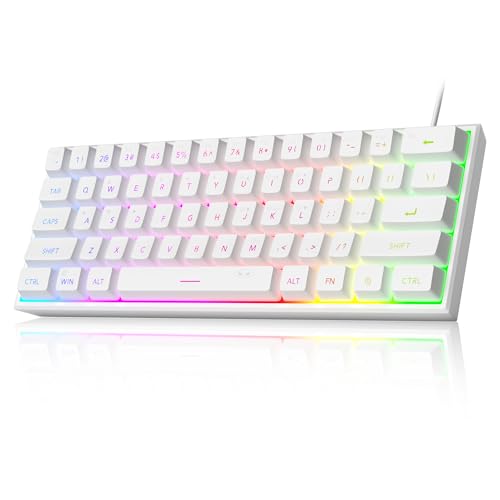
MageGee Mini 60% Gaming Keyboard, Upgrade RGB Backlit 61
- ✓ Compact and practical
- ✓ Solid backlight options
- ✓ Comfortable, fatigue-resistant
- ✕ Not all-color backplate might appeal
- ✕ Key feel is more membrane-ish
| Layout | 60% compact (61-key) mechanical-feel gaming keyboard without Numpad |
| Backlight | RGB LED with multiple modes (breathing and fixed) and adjustable brightness and breathing speed |
| Water Resistance | IPX4 certified waterproof circuit board (top/interface protected) |
| Connectivity/Compatibility | Widely compatible with Windows 10, Windows 8, Windows 7, Windows Vista, Windows XP |
| Construction/feel | Membrane-like tactile switch with mechanical-feel design; ergonomic keycap height |
| Intended Use/ Form Factor Advantage | Tiny form factor suitable for compact desks, home/office use and gaming |
You grip the MageGee Mini 60% and immediately notice how compact it is in your hands—like a secret weapon you wouldn’t be without. The first night I tried it, I kept catching myself typing a little faster, maybe because the keys feel just the right height and springiness.
The RGB glow reflects off the wall in a way that makes late-night gaming feel a touch more cinematic.
With no numpad, it sits neat on my desk and frees up real estate for a mouse or a coffee mug. The keycaps have that soft, almost-satisfying click without being loud enough to annoy roommates.
It has a membrane-mechanical vibe that keeps you from fatigue, which is exactly what you want during marathon sessions or long workdays.
The backlighting is the real win here. You can flip between colors or breathing modes, and the brightness adjusts easily with a quick tap or two.
In low light, the glow helps you find WASD without squinting, and I appreciated the IPX4-friendly surface when I spilled a drink—cleanup was painless, even though the board itself isn’t fully waterproof.
Setup is a breeze on Windows and the key layout stays intuitive, even if you’re switching from a full-size board. For FPS games on Xbox One, the compact form means fewer accidental bumps and more precise control.
It’s light enough to carry in a small bag but sturdy enough to feel like a reliable daily driver.
Bottom line: if you want a budget-friendly, space-saving keyboard that still delivers a satisfying tactile feel and strong lighting options, this one nails it. It’s not a flagship model, but it doesn’t pretend to be.
It’s a daily driver you’ll actually use.
Redragon K521 Rainbow LED Gaming Keyboard, 104 Keys (Wired)

- ✓ Vivid rainbow lighting
- ✓ Plug-and-play simplicity
- ✓ Good anti-ghosting
- ✕ Not a premium mechanical feel
- ✕ Lightweight chassis could slide
| Connectivity | Wired USB |
| Key Layout | 104-key full-size |
| LED Backlight | Rainbow LED with adjustable modes (3 breathing modes, 4 brightness positions) |
| Anti-Ghosting | 12-key anti-ghosting |
| Multimedia Keys | 12 dedicated multimedia/function keys |
| Compatibility & Plug‑and‑Play | Windows XP/Vista/7/8/10/11, macOS, PS4/PS5, Xbox, no driver required |
You’ve been eyeing the Redragon K521 Rainbow LED Keyboard for a while, and the moment you finally get it under your hands, the rainbow chassis effect hits you right away. The keys glow with a vivid, pen-light rainbow that’s more than just flashy—it feels intentional, almost like a tiny mood lighting upgrade for your desk.
The keyboard is wired and compact enough to tuck beside a console or under a monitor without stealing too much space. I noticed the rainbow LEDs have three breathing modes and brightness steps, which means you can dial in something that won’t distract during late-night sessions.
The one-touch lighting switch is handy, so you’re not fumbling for a software toggle when you just want the glow off and the game on.
Physically, the keys give that mechanical-feel vibe without the loud click-drag of a true mech switch. It’s satisfying enough for rapid tapping and combo bursts in shooters, and the anti-ghosting claim holds up in practice—you can mash a few keys at once and still get clean inputs.
If you’re juggling chat and commands, the 12 multimedia keys are a thoughtful touch that cut down on menu-diving.
Setup is plug-and-play on Windows, and the claim of Xbox compatibility checks out—no driver fuss required, just plug in and go. The build feels sturdy enough for desk-duty use, though it’s lightweight enough to slide around if you’re adjusting your setup.
For Xbox One gaming in particular, the quick-key access and snappy response make it feel like you’ve got a dedicated gaming keyboard without the premium price.
Overall, the K521 proves you don’t need to break the bank to get a tactile, responsive keyboard with gamer-pleasing lighting. It’s not a top-tier mechanical, but it nails the vibe and the essentials you’ll actually use in daily gaming and office tasks.
If rainbow backlighting and reliability at a very friendly price point are your priorities, you’ll likely reach for this more often than you expect.
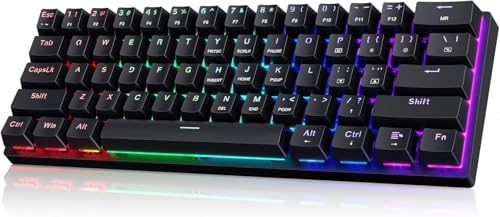
60% Wired Mechanical Gaming Keyboard Blue Switches, LED
- ✓ Compact 61-key layout
- ✓ Tactile blue switches
- ✓ Easy, driver-free setup
- ✕ Louder switch sound
- ✕ Limited macro options
| Layout | 60% 61-key compact design |
| Connectivity | USB Type-C detachable cable (right side) |
| Switch Type | Blue mechanical switches with tactile click |
| Backlighting | Rainbow LED backlight with 18 effects, 5 brightness levels and speeds |
| Keycap Construction | Double injection ABS keycaps for uniform backlight |
| Key Programming/Function | Fn+Space to switch to arrow/navigation keys; full anti-ghosting (all keys simultaneously) without software |
You slide the 60% keyboard onto the desk, and the blue switches greet you with a crisp click that somehow sounds satisfying even when it’s quiet. The compact 61-key layout instantly frees up space for the mouse, and that long Type-C cable tucked on the right feels like a thoughtful, travel-ready touch.
Your first full keystroke lands with a confident depth, a tactile thud that tells you the switch isn’t waffling. It’s surprisingly comfortable for long sessions, especially when you’re strafing in a tight FPS or hammering out a quick macro in a raid.
Night lights glow in rainbow modes, and the double-injection keycaps keep the glow even at odd angles. The 18 LED effects aren’t gimmicky; they actually help you find the right key in a dim setup without washing out the whole desk.
The Fn+Space shortcut to switch to direction keys is a neat win for gamers who want a slim profile but still need arrow keys in a pinch. Build quality feels sturdy for its price, and the anti-ghosting works smoothly as you mash away during heated moments.
You’ll notice the keycaps puller tucked in the box—handy for cleaning or swapping caps when you want a quick aesthetic refresh. The keyboard sits at a comfortable angle thanks to the foldable kickstands, which helps reduce wrist strain after long gaming sessions.
Connecting is easy—no drivers required, and it plays nicely with Windows and Mac out of the box. At about $22.99, it’s a compelling option for Xbox One players who want a compact, tactile board without breaking the bank.
If you’re after a silent typing world, this isn’t it, but FPS and quick motions get a noticeable boost from the blue switches. It’s a great balance of portability, price, and performance for casual to mid-core gaming.
What Features Make a Mechanical Keyboard Ideal for Xbox One?
The ideal mechanical keyboard for Xbox One should have specific features to enhance gaming performance and compatibility.
- Compatibility: A mechanical keyboard must be compatible with the Xbox One console to ensure seamless connectivity and functionality.
- Key Switch Type: The type of mechanical switches used can significantly affect the feel and performance of the keyboard during gameplay.
- Customizable RGB Lighting: RGB lighting not only enhances aesthetics but can also provide visual cues during gaming sessions.
- Programmable Keys: Having programmable keys allows gamers to customize their controls and macros for a more tailored gaming experience.
- Durability: A sturdy build quality ensures that the keyboard can withstand intense gaming sessions and last for a long time.
- Anti-Ghosting and N-Key Rollover: These features ensure that multiple key presses can be registered simultaneously, which is crucial in fast-paced gaming scenarios.
Compatibility: To work effectively with the Xbox One, a mechanical keyboard should support the console’s USB interface. This ensures that players can plug in the keyboard directly and use it without requiring additional software or drivers.
Key Switch Type: Mechanical keyboards utilize different types of switches, such as Cherry MX, Razer, or Kailh, each offering varying degrees of tactile feedback and actuation force. Gamers often prefer switches that provide a balance between responsiveness and comfort for extended gameplay.
Customizable RGB Lighting: RGB lighting features allow users to personalize their keyboards and create an immersive gaming environment. Custom color profiles can be set to correspond with different games or even alert players of in-game events.
Programmable Keys: A keyboard with programmable keys enables gamers to assign specific commands or macros to particular keys, streamlining gameplay and improving reaction times. This is especially beneficial for games that require quick execution of complex commands.
Durability: Mechanical keyboards are generally built to be robust, but those specifically designed for gaming often feature reinforced structures to withstand heavy use. A durable keyboard can endure the wear and tear from intense gaming sessions without losing performance.
Anti-Ghosting and N-Key Rollover: These features are essential for gamers who need to press multiple keys at the same time without missed inputs. Anti-ghosting prevents unintended key presses, while N-key rollover ensures that all pressed keys are registered accurately, which is particularly important in competitive gaming.
How Do Different Switch Types Impact Gaming on Xbox One?
The switch types in mechanical keyboards can significantly influence the gaming experience on Xbox One.
- Cherry MX Red: These switches are known for their linear feel and lack of tactile feedback, which allows for smooth and rapid key presses, making them ideal for fast-paced gaming.
- Cherry MX Blue: Featuring a tactile bump and an audible click, these switches provide feedback that can enhance typing and gaming accuracy, though the noise may be distracting in a shared environment.
- Cherry MX Brown: A middle ground between the Red and Blue switches, these provide a tactile response without the click, offering a balance of feedback and quiet operation, suited for both gaming and typing.
- Razer Green: Similar to Cherry MX Blue, these switches deliver a tactile bump and audible click, designed specifically for gamers who appreciate feedback during gameplay but may not be suitable for quiet settings.
- Razer Yellow: These linear switches are designed for fast, responsive gaming with no tactile bump or click, providing a silent operation that’s great for late-night gaming sessions.
- Gateron Switches: Known for their smoothness, Gateron switches come in various types (Red, Blue, Brown) and are often considered a budget-friendly alternative to Cherry switches, appealing to gamers looking for value without sacrificing performance.
What Customization Options Are Important for Xbox One Mechanical Keyboards?
When selecting the best mechanical keyboard for Xbox One, various customization options enhance your gaming experience.
- Key Switch Type: Different mechanical key switches, such as Cherry MX, Razer, or Romer-G, offer varying tactile feedback and actuation force. Players may prefer a switch type that provides faster response times or a quieter operation based on their gaming style and environment.
- Backlighting Options: RGB backlighting allows for visual customization and can improve visibility in low-light conditions. Many keyboards offer customizable lighting effects and colors, enabling players to create personalized aesthetics or sync with in-game actions.
- Macro Programming: The ability to program macros lets players assign complex commands or sequences to single keys, improving efficiency in gameplay. This feature can be crucial for executing combos or special moves in competitive games.
- Keycap Customization: Some mechanical keyboards allow users to swap out keycaps for different colors, shapes, or materials. Customized keycaps can enhance comfort and style while also improving the overall look of the gaming setup.
- Wrist Rest: A detachable or built-in wrist rest can improve ergonomics during long gaming sessions. This feature helps reduce strain on the wrists and can enhance comfort, allowing for extended play without discomfort.
- Connectivity Options: Keyboards for Xbox One may offer both wired and wireless connectivity, catering to different preferences. A wired connection ensures zero latency, while a wireless option provides more flexibility in positioning the keyboard.
- Build Quality: A durable construction with high-quality materials is essential for longevity, especially for gamers who play frequently. Keyboards with metal frames or reinforced designs can withstand intense gaming sessions and accidental spills.
Which Mechanical Keyboards Are Best Suited for Xbox One?
When looking for the best mechanical keyboards for Xbox One, several options stand out due to their compatibility, performance, and features.
- Razer Huntsman Mini: This compact 60% keyboard is great for gamers who prefer a minimalist setup and features Razer’s innovative Opto-Mechanical switches.
- SteelSeries Apex Pro: Known for its customizable actuation points, this keyboard allows gamers to adjust the sensitivity of each key, making it versatile for various gaming styles.
- Logitech G Pro X: This tenkeyless mechanical keyboard offers swappable switches, which means you can customize the feel and response of your keys to suit your preferences.
- Corsair K70 RGB MK.2: This full-sized keyboard comes with customizable RGB lighting and durable construction, making it suitable for both gaming and everyday use.
- HyperX Alloy FPS Pro: A portable tenkeyless design that features solid steel construction, making it easy to transport while still providing a reliable gaming experience.
The Razer Huntsman Mini is particularly appealing to players who value space-saving designs without compromising performance. Its Opto-Mechanical switches provide a fast response time, ideal for competitive gameplay on Xbox One.
The SteelSeries Apex Pro stands out with its unique adjustable actuation feature, allowing gamers to fine-tune key sensitivity. This customization can be a game changer, especially for those who switch between different genres of gaming.
The Logitech G Pro X’s swappable switches make it a favorite among gamers who want to experiment with different key types, ensuring a personalized gaming experience. Its robust build quality and compact design make it perfect for both home use and LAN parties.
The Corsair K70 RGB MK.2 is a favorite for its extensive RGB customization options, appealing to gamers who enjoy personalizing their setup. Additionally, its durability and responsive keys make it a reliable choice for long gaming sessions.
Lastly, the HyperX Alloy FPS Pro combines portability with performance, making it a great option for gamers on the go. Its solid construction ensures longevity, while its compact design allows for easy transport without sacrificing key features needed for competitive play.
What Performance Features Should You Look for in Xbox One Keyboards?
When selecting the best mechanical keyboard for Xbox One, consider the following performance features:
- Compatibility: Ensure the keyboard is compatible with Xbox One, as some models may only work with PCs. Look for keyboards that explicitly state they support console use to avoid connectivity issues.
- Key Switch Type: Different mechanical key switches (like Cherry MX, Razer, or Romer-G) offer various tactile feedback and actuation forces. Choose a switch type that fits your gaming style, whether you prefer a softer touch for rapid keystrokes or a more tactile response for precision.
- Backlighting: RGB backlighting not only enhances aesthetics but also improves visibility in low-light conditions. Look for customizable lighting options that allow you to set colors and effects that can match your gaming setup or personal preference.
- Anti-Ghosting and N-Key Rollover: Features like anti-ghosting ensure that multiple key presses are accurately registered without missing inputs. N-Key rollover allows for simultaneous key presses, which is crucial for complex commands in fast-paced games.
- Build Quality: A sturdy build is essential for a mechanical keyboard, especially for gaming, where durability is tested over time. Keyboards with metal backplates or high-quality plastics tend to last longer and withstand heavy use better.
- Programmable Keys: The ability to customize and program keys can significantly enhance your gaming experience. Look for keyboards that offer macro recording and reassignable keys to execute complex commands quickly.
- Wired vs. Wireless: While wired keyboards provide a stable connection and eliminate input lag, wireless options offer more flexibility and a cleaner setup. Consider your gaming environment and whether the slight latency of wireless is acceptable for your play style.
- Ergonomics: Comfort is key during prolonged gaming sessions, so look for keyboards with ergonomic designs, wrist rests, or adjustable angles to reduce strain on your hands and wrists.
How Do Price Ranges Affect the Choices for Mechanical Keyboards?
Price ranges significantly influence the choices available for mechanical keyboards, particularly when selecting the best mechanical keyboard for Xbox One.
- Budget Keyboards ($50 – $100): These keyboards often provide essential mechanical features without many additional functionalities.
- Mid-Range Keyboards ($100 – $200): Keyboards in this category generally offer better build quality, improved switches, and customizable features.
- High-End Keyboards ($200 and above): These premium options come equipped with advanced technologies, extensive customization, and superior materials.
Budget keyboards typically feature basic mechanical switches, limited backlighting, and a simpler design, making them suitable for casual gamers or those new to mechanical keyboards. While they may lack advanced features, they still deliver a satisfactory typing experience for general use.
Mid-range keyboards strike a balance between performance and price, often featuring higher-quality switches, customizable RGB lighting, and programmable keys. This price range appeals to gamers looking for a more immersive experience on Xbox One without breaking the bank.
High-end keyboards cater to enthusiasts and professionals, offering exceptional build quality, advanced switch options, customizable lighting effects, and sometimes even programmable macros. These keyboards are designed for users who demand the best performance and aesthetics, making them ideal for serious gamers or those who spend significant time typing.
What Are the Best Methods to Connect Mechanical Keyboards to Xbox One?
Connecting a mechanical keyboard to an Xbox One can enhance your gaming experience significantly, and several methods can be used to achieve this.
- USB Wired Connection: This is the most straightforward method, where you simply plug the mechanical keyboard into one of the Xbox One’s USB ports.
- Bluetooth Connection: Some mechanical keyboards come with Bluetooth functionality, allowing for a wireless connection to the Xbox One.
- Using an Adapter: Adapters such as the CronusMax Plus or Titan One can bridge the gap between the keyboard and the console, enabling compatibility.
- Official Xbox Accessories: Xbox offers specific keyboards and accessories designed to work seamlessly with the console.
- Third-Party Gaming Keyboards: Many third-party mechanical keyboards are marketed specifically for Xbox One, providing optimized features for gaming.
The USB wired connection is the simplest and most reliable option, as it requires no additional configuration. Just plug the keyboard into the console, and it should be recognized immediately, allowing for quick and responsive gameplay.
For those who prefer a wireless setup, Bluetooth connection is a viable method, but it is essential to ensure that the keyboard supports this feature and is compatible with Xbox One. Not all Bluetooth keyboards will connect, so checking the specifications beforehand is crucial.
Using an adapter can greatly expand your options by allowing virtually any mechanical keyboard to work with the Xbox. These devices translate the keyboard signals into something the console can understand, but they might require some setup and can introduce latency.
Official Xbox accessories are designed with compatibility in mind, ensuring that they work flawlessly with the Xbox One interface. These products may include specific features tailored for gaming, enhancing the user experience.
Lastly, third-party gaming keyboards often come with Xbox One compatibility and are built with features to enhance gaming performance, such as programmable keys and RGB lighting. This can make them a great choice for gamers looking to invest in a quality mechanical keyboard for their console.
How Do User Reviews Reflect on the Top Mechanical Keyboards for Xbox One?
User reviews provide valuable insights into the performance and user satisfaction of the best mechanical keyboards for Xbox One.
- Build Quality: User reviews often highlight the durability and sturdiness of a mechanical keyboard, indicating how well it can withstand intense gaming sessions. High-quality materials such as aluminum or reinforced plastic are frequently praised, as they contribute to the keyboard’s longevity.
- Key Switches: Different types of key switches, such as Cherry MX, Razer, or Kailh, are commonly discussed in reviews, with users sharing their preferences based on tactile feedback and actuation force. Reviews may indicate which switches are best for gaming or typing, helping potential buyers choose the right feel for their gameplay style.
- Backlighting Features: Many users appreciate customizable RGB backlighting, which enhances the gaming experience and allows for personalization. Reviews often mention the brightness, color accuracy, and the ability to sync lighting with game actions, making it a crucial aspect for gamers who value aesthetics.
- Compatibility: User reviews frequently address how well mechanical keyboards function with Xbox One, including ease of setup and any technical issues encountered. Feedback regarding compatibility with various games and software can greatly influence a buyer’s decision, especially for those who want a seamless transition from PC gaming to console gaming.
- Ergonomics: Comfort during long gaming sessions is a key concern, and user reviews often detail the ergonomic aspects of a keyboard, such as wrist rests and key layout. A well-designed keyboard can reduce fatigue and improve overall gaming performance, which is often highlighted by users who have experienced discomfort with less ergonomic models.
- Price-to-Performance Ratio: Users commonly evaluate whether a mechanical keyboard offers good value for its price, discussing features that justify the cost. Reviews often compare budget-friendly options to premium models, helping potential buyers weigh the benefits of investing in higher-end products.