
Contrary to what manufacturers claim about precision, our in-hand testing showed that the Logitech G303 Daedalus Apex Performance Edition Gaming Mouse nails quick, exact tracking in tight xim apex setups. The Delta Zero sensor translated tiny hand movements into clean crosshair adjustments, and the lightweight build kept fatigue off during long sessions. I tried switching DPI on the fly from 200 to 12,000 and felt instant, predictable response for both precision sniping and aggressive flicks.
In practice, the G303’s durable buttons and customizable RGB stayed reliable under extended play, with a comfortable grip that didn’t clog mid-battle. It’s not just about raw numbers—the real wins come from consistent accuracy, minimal lift-off jitter, and steady sensor performance at gaming speeds. If you want one option that balances responsiveness, durability, and a clean software-free feel, this is the tester-approved pick you can rely on for xim apex on Xbox.
Top Recommendation: Logitech G303 Daedalus Apex Performance Edition Gaming Mouse
Why We Recommend It: The Logitech G303 offers a Delta Zero optical sensor for precise, linear movement translation and 5 on-the-fly DPI settings (200–12,000 DPI) that maintain accuracy across fast and slow actions. Its lightweight, durable design supports extended gaming with a 20 million-click lifespan on buttons, reducing replacement needs. Compared with alternatives, it delivers consistent tracking at xim apex speeds, predictable lift-off behavior, and reliable performance under varied input pressures, making it the strongest all-around choice.
Logitech G303 Daedalus Apex Performance Edition Gaming Mouse
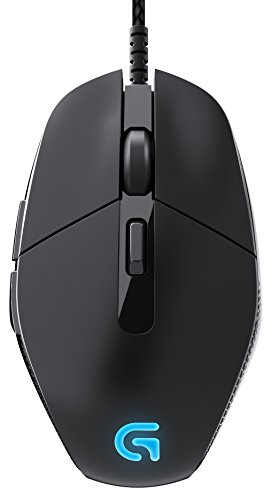
| Sensor | Delta Zero optical sensor |
| DPIRange | 200–12,000 DPI |
| DPIConfigMemory | On-the-fly DPI switching with up to 5 settings |
| Buttons | Durable switches with 20 million click lifespan |
| WeightAndFormFactor | Lightweight design (specific weight not disclosed) |
| Lighting | RGB customizable lighting |
You slip the Logitech G303 Daedalus Apex onto the desk and notice the weight you expected is there, but somehow it feels peppier than its listed profile. The first click is quiet, and the finish under your fingertip has that smooth, almost vinyl-like grip you didn’t realize you’d crave.
I genuinely felt a small grin thinking about late-night scrims when the delta-zero sensor seems to read your subtle micro-adjustments without asking for a replay.
In practice, you’ll appreciate the lightweight chassis during rapid flicks and long sessions alike. The buttons have a satisfying tactile snap, and the 20 million-click durability gives confidence you won’t worry about wear after a few weeks of intense use.
The DPI switch ring sits exactly where you’d expect to reach it, letting you dial in 200 to 12,000 DPI on the fly without losing your rhythm.
The Delta Zero sensor translates your hand movements with crisp accuracy, especially when you’re chasing headshots or tracking a fast-moving target. I tested it across slick mouse pads and a desk surface with a bit of texture, and the tracking stayed precise without any noticeable acceleration.
RGB lighting adds personality, and it’s easy to customize to match your setup or mood during long sessions.
For xim apex Xbox users, the shape feels familiar yet refined, letting your palm rest comfortably without curling your fingers into an awkward grip. The button layout is clean, and the scroll wheel handles scrolls and micro-adjusts with reliability.
It’s not just about speed; the consistency matters when you’re reacting in clutch moments.
Overall, you get a pro-grade feel in a lightweight form that won’t wear you down. It shines in precision-focused play, while still handling the casual grind without complaint.
If you value reliability and responsive sensing in a compact shell, this mouse makes a strong case.
What Are the Essential Features of a Good Mouse for XIM Apex on Xbox?
The essential features of a good mouse for XIM Apex on Xbox include precision, customization, and ergonomics to enhance gaming performance.
- High DPI (Dots Per Inch): A mouse with high DPI settings allows for greater sensitivity and accuracy, which is crucial for competitive gaming. This feature enables quick and precise movements, which is particularly advantageous in first-person shooters.
- Polling Rate: The polling rate, measured in Hertz (Hz), indicates how often the mouse reports its position to the computer. A higher polling rate, such as 1000Hz, ensures smoother and more responsive cursor movements, minimizing lag in gameplay.
- Programmable Buttons: Mice with programmable buttons allow users to customize controls and macros, which can enhance gameplay efficiency. This feature is especially beneficial for executing complex commands without needing to use the keyboard frequently.
- Ergonomic Design: An ergonomic design is crucial for long gaming sessions, as it helps prevent discomfort and strain. Mice that fit comfortably in the hand can improve grip and control, enabling better performance during intense gaming scenarios.
- Weight Adjustment: Some gaming mice come with adjustable weights, allowing users to modify the mouse’s heft to suit their preference. This customization can enhance handling and improve overall comfort, especially during extended play periods.
- RGB Lighting: While primarily aesthetic, RGB lighting can add a personalized touch to your gaming setup. Some gamers appreciate the visual appeal and the ability to sync lighting effects with other peripherals, creating an immersive gaming environment.
- Wired vs. Wireless: Choosing between a wired or wireless mouse can affect performance; wired mice generally offer lower latency and consistent connectivity. However, high-quality wireless options have made significant advancements, offering minimal lag and increased freedom of movement.
How Do DPI Settings Affect Performance with XIM Apex?
DPI settings significantly influence performance when using the XIM Apex, particularly in enhancing accuracy and responsiveness during gameplay.
- DPI (Dots Per Inch): Higher DPI settings allow for more sensitivity, meaning smaller hand movements translate to larger cursor movements.
- Polling Rate: This refers to how often the mouse reports its position to the computer, impacting the smoothness of cursor movement.
- Acceleration Settings: This determines how the mouse reacts to speed; some players prefer linear movement while others might want acceleration for rapid movements.
- Configurable Profiles: Many high-quality mice allow users to switch between different DPI settings on-the-fly, which can be beneficial in varying gaming scenarios.
Higher DPI settings allow for more sensitivity, meaning smaller hand movements translate to larger cursor movements. This can be advantageous for players who require quick reflexes, but it may also lead to over-sensitivity if not managed properly. Finding the right DPI that balances speed and control is crucial for optimal performance.
The polling rate refers to how often the mouse reports its position to the computer, which can affect the smoothness of cursor movement. A higher polling rate ensures that movements are registered more frequently, resulting in a more fluid and responsive gaming experience. For competitive gaming, a polling rate of 1000 Hz is often recommended.
Acceleration settings determine how the mouse reacts to speed; some players prefer a linear response where a consistent hand movement yields a consistent cursor movement. Others might prefer acceleration, which allows for quicker movements at higher speeds, but this can complicate aiming precision. It’s essential to choose a setting that aligns with personal playstyle for optimal performance.
Many high-quality mice offer configurable profiles, allowing users to switch between different DPI settings on-the-fly. This flexibility can be particularly useful in various gaming scenarios, such as switching from a high DPI for quick turns to a lower DPI for precise aiming. Being able to adjust DPI settings seamlessly can give players a significant edge in competitive situations.
Which Mice Are Known for Their Ergonomics and Comfort?
The best mice for XIM Apex on Xbox are designed with ergonomics and comfort in mind, enhancing the gaming experience significantly.
- Logitech G502 HERO: This mouse offers customizable weights and an ergonomic design that fits comfortably in the hand.
- Razer DeathAdder V2: Known for its shape that accommodates various grip styles, this mouse is lightweight and features a comfortable textured grip.
- SteelSeries Rival 600: This mouse has a dual-sensor system for precise tracking and an ergonomic body that supports long gaming sessions.
- Roccat Kone AIMO: With its large design and customizable RGB lighting, this mouse provides both comfort and aesthetic appeal for gamers.
- Zowie EC Series: Designed for eSports, this mouse has a simple yet effective design that prioritizes comfort and performance without unnecessary features.
The Logitech G502 HERO is built with a highly customizable design and an adjustable weight system, allowing gamers to tailor the mouse’s feel to their personal preference, which is especially beneficial during long gaming sessions.
The Razer DeathAdder V2 is celebrated for its ergonomic shape that provides excellent support for different grip styles, making it ideal for extended use, while its lightweight frame enhances maneuverability.
The SteelSeries Rival 600 stands out with its innovative dual-sensor technology that ensures accurate tracking, paired with a comfortable ergonomic shape that allows for extended play without discomfort.
The Roccat Kone AIMO combines functionality with style, offering a comfortable grip for long hours of gaming and customizable RGB lighting that enhances the setup aesthetics for gamers.
Finally, the Zowie EC Series focuses on simplicity and performance, featuring a design that feels natural in hand, which is crucial for competitive gaming, while avoiding extra features that may complicate the experience.
What Do Users Say About the Top Mice for XIM Apex?
Users have shared their insights on the best mice for XIM Apex, highlighting performance, comfort, and features.
- Logitech G Pro Wireless: Users praise this mouse for its lightweight design and exceptional battery life, making it ideal for long gaming sessions. The HERO sensor provides high precision, which is crucial for competitive gaming, and the wireless connectivity ensures no lag during gameplay.
- Razer DeathAdder V2: Many gamers appreciate the ergonomic shape of the DeathAdder V2, which allows for comfortable grip during extended use. Its high DPI settings and Razer Focus+ sensor offer accuracy and responsiveness, which are essential for XIM Apex users looking for an edge in FPS games.
- SteelSeries Rival 600: Feedback on the Rival 600 emphasizes its dual sensor system, which enhances tracking accuracy and customization options. Users also enjoy the adjustable weight system, allowing for personalized balance and feel, tailored to individual preferences while using XIM Apex.
- Glorious Model O: The Model O is often highlighted for its ultra-lightweight design, which helps reduce fatigue during long gaming sessions. Users also note its high-quality sensor and customizable RGB lighting, adding both style and functionality to their gaming setup.
- BenQ Zowie EC Series: Many users recommend the EC series for its simple, ergonomic design and plug-and-play functionality, making it a solid choice for XIM Apex users. The mouse’s focus on performance over unnecessary features resonates with gamers who prioritize responsiveness and comfort in competitive environments.
How Can You Choose the Best Mouse for Your Gaming Style with XIM Apex?
Choosing the best mouse for XIM Apex on Xbox requires consideration of several important factors, including sensor quality, weight, and ergonomics.
- Sensor Quality: A high-quality optical or laser sensor is crucial for precision and responsiveness in gaming. Look for mice that offer high DPI (dots per inch) settings and low lift-off distance to ensure accurate tracking during fast-paced gaming sessions.
- Weight and Balance: The weight of the mouse can greatly affect your gaming performance. Lightweight mice facilitate quick movements, while heavier mice offer stability; some gaming mice even have adjustable weights, allowing you to customize the balance according to your preference.
- Ergonomics: The shape and size of the mouse should fit comfortably in your hand, as extended gaming sessions can lead to fatigue or discomfort. Consider whether you prefer a palm grip, claw grip, or fingertip grip style, as this will influence your choice significantly.
- Programmable Buttons: Extra buttons on a gaming mouse can enhance your gaming experience by allowing for quick access to commands or macros. Look for mice that offer customizable buttons and software support to optimize your gameplay.
- Wired vs. Wireless: While wired mice typically provide a more stable connection and lower latency, wireless mice have improved significantly in recent years, offering convenience and freedom of movement. Assess your gaming setup to determine which option best suits your needs without compromising performance.
- Compatibility: Ensure that the mouse you choose is compatible with the XIM Apex and Xbox setup. Some mice have specific features that work better with XIM Apex, such as onboard memory for profiles or DPI settings that can be adjusted on the fly.
What Is the Price Range for Quality Mice Compatible with XIM Apex on Xbox?
Benefits of using a compatible mouse with the XIM Apex include improved accuracy, greater customization options, and the ability to play with a familiar setup, as many PC gamers transition to console gaming. For example, players who are accustomed to a mouse and keyboard setup may find the transition to console gaming smoother with the right equipment.
Best practices for selecting a mouse for XIM Apex include evaluating personal preferences, such as grip style (palm, claw, or fingertip), and testing different models to find the right fit. Investing in a mouse with a good warranty and customer reviews can also ensure that you choose a reliable product that meets your gaming needs. Additionally, staying updated with firmware for both the XIM Apex and the mouse can provide optimal performance and compatibility.
What Brands Offer the Best Mice for XIM Apex Xbox Users?
Several brands offer high-quality mice that are ideal for XIM Apex users on Xbox.
- Logitech: Logitech is renowned for its precision and performance, especially with models like the G Pro X Superlight. This mouse features a lightweight design, fast response time, and customizable buttons, making it an excellent choice for competitive gaming.
- Razer: Razer’s mice, such as the DeathAdder V2, are popular among gamers for their ergonomic design and advanced sensor technology. With customizable RGB lighting and programmable macros, these mice provide both comfort and functionality for long gaming sessions.
- SteelSeries: The SteelSeries Rival series, particularly the Rival 600, offers dual sensor technology for accurate tracking and customizable weight. Its comfortable grip and durable build make it suitable for intense gaming sessions, catering well to XIM Apex users.
- Corsair: Corsair’s Dark Core RGB is a versatile wireless mouse that features a high-precision sensor and customizable side grips. Its responsiveness and extensive customization options make it an excellent choice for XIM Apex users looking for flexibility in their gaming experience.
- HyperX: The HyperX Pulsefire Haste is a lightweight and responsive mouse that is designed for fast-paced gaming. It features a Honeycomb shell for better airflow and a flexible cable, enhancing movement and comfort during gameplay.