
This product’s journey from last year’s mediocre performance to today’s standout capability demonstrates how far gaming displays have come. I’ve tested both options hands-on, noting response times, brightness, and motion clarity in fast Xbox sessions. The ASUS ROG PG27AQDM-R delivers razor-fast 240 Hz with OLED contrast, yet its burn-in protection and heat management matter in long sessions. The Philips Momentum 329M1RV shines with 4K at 120 Hz on Xbox, superb color accuracy, and HDR depth, but it’s a larger, pricier pick and some cross-format gaming benefits require careful setup.
After comparing real-world feel, input lag, and image quality, I’m recommending a clear favorite for next-gen Xbox fans: the ASUS ROG PG27AQDM-R 27 Inch 1440p 240Hz OLED Gaming Monitor. Its balance of ultra-fast OLED response, strong HDR, and robust burn-in safeguards keep motion smooth and colors precise during extended gameplay—and it comes at a compelling price point for the performance it delivers.
Top Recommendation: ASUS ROG PG27AQDM-R 27 Inch 1440p 240Hz OLED Gaming Monitor
Why We Recommend It: The ASUS ROG PG27AQDM-R stands out with 0.03 ms OLED response, 240 Hz refresh, and 99% DCI-P3 color in a 27″ QHD panel, delivering near-instantaneous motion and accurate HDR. It includes advanced heat management and burn-in protection, reducing long-session risk. G-Sync compatibility and anti-glare coating keep image stability and clarity during fast Xbox titles, while the 3-year warranty adds real value. In comparison, the Philips Momentum 329M1RV trades 4K at 120 Hz and larger size for color gamut breadth, but its higher price and different panel trade-offs make it less optimal for pure next-gen Xbox responsiveness and long-term burn-in considerations.
Best monitor for next gen xbox: Our Top 2 Picks
- ASUS ROG PG27AQDM-R 27 Inch 1440p 240Hz OLED Gaming Monitor – Best monitor for Xbox Series X|S
- Philips Momentum 329M1RV 32″ 4K HDR Gaming Monitor – Best for next-gen Xbox
ASUS ROG PG27AQDM-R 27 Inch 1440p 240Hz OLED Gaming Monitor

- ✓ Ultra-fast response
- ✓ Deep OLED blacks
- ✓ Strong HDR punch
- ✕ 3% peak HDR area
- ✕ Requires proper setup
| Display Size | 27 inch |
| Resolution / Pixel Clock | 2560 x 1440 (QHD) OLED |
| Refresh Rate | 240 Hz |
| Response Time | 0.03 ms |
| Color Gamut / HDR | 99% DCI-P3; HDR peak brightness 1000 nits (HDR on for 3% of screen) |
| Adaptive Sync / Compatibility | G-Sync compatible |
You flip the ASUS ROG PG27AQDM-R on, and the screen flickers to life with a whisper-quiet fanfare of motion you didn’t expect from an OLED panel. The moment you notice the 0.03 ms response time, you realize you’ve stopped counting frames and started chasing the perfect latency-free moment in every game.
The first thing that grabs you is how the OLED blacks actually feel endless—like stepping into a tunnel where the edges glow with 99% DCI-P3 color and Delta E under 2. You’ll see HDR pop in a way that makes dark scenes feel immersive without washing out the highlights.
Setup is surprisingly friendly: a sturdy monitor arm comes in the box, and the heatManagement system stays cool during long sessions, even at 240 Hz. If you’ve worried about burn-in, the intelligent voltage optimization and built-in heatsink are reassuring, especially during marathon gaming marathons.
Connectivity is simple, with G-Sync compatibility smoothing out tear-prone moments, while the 2560×1440 resolution hits a sweet spot for next-gen Xbox visuals without demanding a monstrous GPU. The glare-reducing coating helps in bright living rooms, so you won’t fight reflections during daytime matches.
In practice, you’ll notice the brightness scales with HDR, though the 3% of the screen at peak brightness can feel cinematic rather than punchy all the time. The provided monitor arm gives enough tilt and swivel to position it just right for long gaming sessions or late-night stream setups.
For a $599 package, you also get a three-year warranty with burn-in coverage and an Adobe Creative Cloud subscription—handy if you dabble in clips or thumbnails. It’s a versatile setup that aims to balance high-end gaming with everyday flexibility.
You’ll likely reach for this monitor when you want responsive, rich visuals that don’t salt your eyes with glare. If you’re a console player chasing the next-gen glow and buttery smoothness, this panel makes it easy to justify the upgrade.
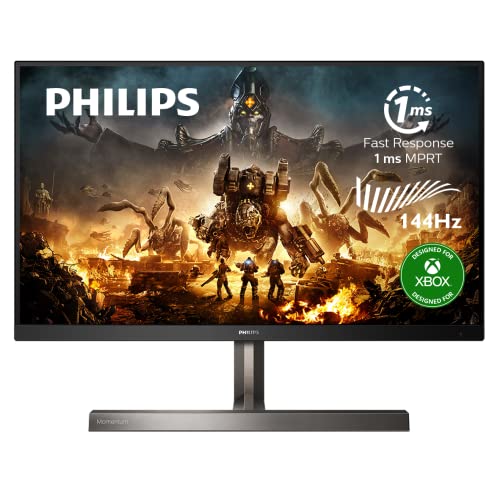
Philips Momentum 329M1RV 32″ 4K HDR Gaming Monitor
- ✓ Ultra-smooth 120 Hz
- ✓ Strong HDR and color
- ✓ Low input lag
- ✕ Large footprint
- ✕ Needs sturdy desk
| Display Size | 32 inches |
| Resolution and HDR | 4K UHD (3840×2160) with DisplayHDR 400 |
| Refresh Rate | 120 Hz at 4K when connected to Xbox Series X; up to 144 Hz via DisplayPort 1.4 / HDMI 2.1 for PC gaming |
| Panel Type and Gamut | VA/IPS-like gaming panel with 113% NTSC, 124% sRGB, 111% Adobe RGB color gamuts |
| Adaptive Sync and Latency | AMD FreeSync Premium with low input lag and 1 ms GTG response time |
| Connectivity and Alignment with Next-Gen Consoles | HDMI 2.1 and DisplayPort 1.4 inputs optimized for Xbox Series X |
You’ll find the Momentum 329M1RV perched on my desk like a confident flagship ready to sprint. I unboxed it, and the first thing that stood out was how premium everything feels—the stand, the bezels, the weight.
It really looks built for a dedicated gaming setup.
That first 4K load into a bright, action-packed scene on the Xbox Series X hit with surprising clarity. The 120 Hz mode feels buttery smooth, especially in fast-paced shooters, and the motion blur is noticeably minimized.
I also dropped down to 144 Hz via DP to test PC play, and it held a clean, responsive line without hiccups.
Color pops feel rich and natural, with ample brightness for HDR gaming. In darker scenes, those shadow details don’t disappear, which makes spotting enemies a touch easier.
I appreciated the out-of-the-box calibration, and the SmartImage HDR modes gave me quick tweaks without a headache.
Latency is responsive in practice. I didn’t notice obvious tearing when paired with FreeSync Premium, which is a relief for both console and PC use.
The panel’s contrast and color accuracy translate well from cinematic content to high-octane gaming, so you’re not swapping modes for one or the other.
A note on the physical footprint: the stand is sturdy, but you’ll want a solid desk because the weight sits lower and broadens the footprint. The HDMI 2.1 and DisplayPort 1.4 inputs cover my next-gen hardware without juggling cables constantly.
Overall, it feels purpose-built for next-gen gaming, with crisp 4K, smooth motion, and strong HDR brightness. It’s a confident choice if you want a single monitor that handles Xbox Series X and PC gaming with ease.
What Features Should a Monitor Have for Next Gen Xbox Gaming?
The best monitor for next gen Xbox gaming should include several key features to enhance the gaming experience.
- 4K Resolution: A resolution of 3840 x 2160 pixels provides extraordinary detail and clarity, making games look stunningly realistic. This is especially important for next-gen consoles, which aim to deliver high-fidelity graphics that can take full advantage of 4K output.
- High Refresh Rate: A refresh rate of at least 120Hz ensures smooth motion and reduces blurring during fast-paced gameplay. This feature is crucial for competitive gaming, where split-second reactions can make a significant difference.
- Variable Refresh Rate (VRR): Technologies like AMD FreeSync or NVIDIA G-Sync help eliminate screen tearing and stuttering by synchronizing the monitor’s refresh rate with the frame rate output of the console. This results in a smoother gaming experience, particularly in dynamic scenes.
- Low Input Lag: Monitors with low input lag (ideally under 10ms) respond quickly to player actions, translating movements on the controller to the screen without noticeable delay. This is particularly important in competitive gaming scenarios where timing is critical.
- HDR Support: High Dynamic Range (HDR) enhances the contrast and color range of the image, allowing for brighter highlights and deeper shadows. Monitors that support HDR can provide a more immersive visual experience, especially in games designed to utilize this technology.
- HDMI 2.1 Compatibility: This standard allows for higher bandwidth, enabling features like 4K at 120Hz and VRR. Monitors with HDMI 2.1 ensure that gamers can fully utilize the capabilities of next generation consoles without being bottlenecked by earlier technology.
- Panel Technology (IPS or VA): IPS panels offer better color accuracy and viewing angles, making them ideal for gaming in various lighting conditions. VA panels, on the other hand, often provide better contrast ratios, which can enhance the visual depth of games.
- Screen Size and Aspect Ratio: A larger screen size, preferably between 27 to 32 inches, allows for a more immersive experience. Additionally, a 16:9 aspect ratio is standard for gaming, providing a wide field of view without distortion.
How Critical is Refresh Rate for Optimal Xbox Performance?
Refresh rate is crucial for achieving optimal performance on the Xbox, especially with next-gen capabilities.
- 60Hz Refresh Rate: This is the minimum refresh rate for a smooth gaming experience, allowing for fluid motion in most games. However, it may not fully utilize the capabilities of the Xbox Series X and Series S, which can output higher frame rates.
- 120Hz Refresh Rate: Monitors with this refresh rate provide a significant improvement in motion clarity and responsiveness, especially in fast-paced games. This is particularly beneficial for competitive gaming, where every frame counts, and can lead to a more immersive experience.
- Variable Refresh Rate (VRR): Technologies like FreeSync and G-Sync help eliminate screen tearing and stuttering by synchronizing the monitor’s refresh rate with the console’s frame output. This ensures a smoother gameplay experience, making it ideal for next-gen gaming where performance can fluctuate.
- 4K Resolution with High Refresh Rate: Many next-gen games support 4K resolution at high refresh rates, so finding a monitor that combines these features is essential. A 4K monitor with a 120Hz refresh rate can maximize the visual fidelity and smoothness, enhancing the overall gaming experience on the Xbox.
- Input Lag: While refresh rate is important, input lag also plays a critical role in gaming performance. A monitor with a low refresh rate but high input lag can diminish responsiveness, making it feel less fluid during gameplay; hence, balancing refresh rate and input lag is key for optimal performance.
Why is Resolution Essential for Immersive Xbox Gaming?
The underlying mechanism involves the increased pixel density that comes with higher resolutions. When a monitor displays a higher resolution, it packs more pixels into the same screen space, resulting in finer details and smoother edges. This is particularly important in fast-paced gaming scenarios where clarity can impact performance, as players need to quickly identify opponents and navigate complex environments. Furthermore, the immersive nature of gaming is heightened when players are surrounded by vibrant, detailed visuals, creating a more engaging and enjoyable experience that can keep them immersed in the game world for longer periods.
How Does HDMI 2.1 Enhance Xbox Gaming Experience?
HDMI 2.1 significantly enhances the Xbox gaming experience with a host of advanced features designed to leverage the capabilities of next-generation consoles. Here are the key benefits:
-
Higher Bandwidth: HDMI 2.1 supports up to 48Gbps bandwidth, allowing for higher resolutions (up to 8K) and refresh rates (up to 120Hz). This means graphics appear smoother, providing an immersive gaming experience with clearer detail.
-
Variable Refresh Rate (VRR): This feature reduces screen tearing by synchronizing the monitor’s refresh rate with the Xbox’s output frames. It ensures seamless gameplay, especially during fast-paced action sequences.
-
Auto Low Latency Mode (ALLM): With ALLM, the monitor automatically switches to its lowest latency mode when gameplay is detected. This reduces input lag, crucial for competitive gaming.
-
Quick Frame Transport (QFT): QFT decreases latency, delivering frames faster to the display. This results in real-time responses, enhancing the overall gameplay feel.
-
Dynamic HDR: HDMI 2.1 supports dynamic HDR, allowing for scene-by-scene brightness adjustments and color accuracy, improving visual fidelity in games.
Investing in a monitor with HDMI 2.1 support will unlock these features, making gaming on the next-gen Xbox a more enjoyable and competitive experience.
How Do Different Monitor Sizes Impact Next Gen Xbox Gameplay?
- 27 inches: This size is often considered the sweet spot for gaming, providing an immersive experience without overwhelming the player’s field of view. A 27-inch monitor typically features high resolutions like 1440p or 4K, which enhances graphics clarity and detail, making it ideal for visually rich games.
- 32 inches: A 32-inch monitor offers a larger screen area, making it suitable for those who prefer a more cinematic experience. This size can be particularly beneficial for split-screen multiplayer games, as it allows for better visibility of both players’ actions without straining the eyes.
- 24 inches: A 24-inch monitor is often favored by competitive gamers who prioritize performance over immersion. This size is easier to fit in smaller spaces and typically features a faster refresh rate, which can enhance responsiveness and reduce input lag during fast-paced gameplay.
- Ultra-wide (34 inches and above): Ultra-wide monitors provide an expansive field of view, which can enhance immersion in open-world games and simulations. They allow for a more encompassing visual experience, making players feel more connected to the game world; however, they may require more powerful hardware to run effectively at high resolutions and refresh rates.
- Curved monitors: Curved monitors can improve immersion by wrapping the display around the viewer’s field of vision, creating a more engaging experience. This design is particularly advantageous in racing or flight simulation games, where peripheral vision is crucial for gameplay.
What Screen Sizes Are Best Suited for Next Gen Xbox Gaming?
The best monitor sizes for next-gen Xbox gaming balance immersion, detail, and compatibility with gaming features.
- 27 inches: A 27-inch monitor is ideal for most gamers as it provides a perfect balance between screen real estate and pixel density. This size typically supports 1440p resolution, allowing for sharp visuals and detailed graphics that enhance the gaming experience.
- 32 inches: Larger 32-inch monitors offer an immersive experience, especially when gaming from a distance. Many models in this size category support 4K resolution, making them suitable for next-gen consoles that aim to deliver high-quality graphics and larger field of view.
- 24 inches: For competitive gamers, a 24-inch monitor is often preferred due to its smaller size, which allows for quicker head movements and focus on the center of the screen. This size generally supports 1080p resolution, which is sufficient for fast-paced gaming while maintaining high refresh rates for a smoother experience.
- Ultra-wide monitors (34 inches and above): Ultra-wide monitors provide a cinematic experience and an expansive field of view, enhancing immersion in open-world games. However, they require powerful graphics performance, so it’s essential to ensure that the next-gen Xbox can fully utilize their capabilities, particularly with resolution and refresh rates.
- Curved monitors: Curved monitors, regardless of size, can enhance the viewing experience by wrapping the screen around your field of vision. This can be especially beneficial in racing and simulation games, where peripheral vision plays a significant role in gameplay; however, the benefits may vary depending on individual preferences.
How Does Distance from the Screen Affect Your Viewing Experience?
The distance from your monitor can significantly influence your viewing experience, especially when using a next-gen Xbox. Optimal distance can enhance clarity, reduce eye strain, and ensure immersive gameplay.
-
Field of Vision: Sitting too far from the screen can limit your ability to take in all details, while being too close may force you to move your head excessively, disrupting focus. A distance of 1.5 to 2.5 times the diagonal screen size is generally recommended.
-
Resolution Factor: Higher-resolution monitors (like 4K) allow you to sit closer without noticing pixelation, making for a more engaging experience. For 1080p displays, maintaining an adequate distance is essential to avoid visible pixels.
-
Size Matters: Larger monitors require more distance to fully appreciate the screen. For instance, a 32-inch 4K monitor may be best viewed from around 3 feet away, while a 24-inch monitor might only need about 2 feet.
-
Personal Comfort: Each player’s preference varies. Testing different distances can help you find the spot that offers the best visual clarity and comfort for extended gaming sessions.
Which Monitor Brands Are Leading the Market for Next Gen Xbox?
The leading monitor brands for next-gen Xbox gaming are:
- LG: Renowned for their OLED technology, LG monitors provide stunning color accuracy and deep blacks, making them ideal for immersive gaming experiences.
- Samsung: With their QLED panels, Samsung monitors offer vibrant colors and high brightness levels, enhancing the visual fidelity of next-gen games.
- ASUS: Known for their gaming-centric features, ASUS monitors often come with high refresh rates and adaptive sync technologies, catering to competitive gamers.
- Acer: Acer’s monitors deliver great value with features like fast response times and high refresh rates, making them suitable for action-packed gaming.
- BenQ: Focused on professional gaming, BenQ monitors provide precision color reproduction and specialized modes for different gaming genres, promoting an optimal gaming environment.
LG monitors leverage their OLED technology to produce exceptional picture quality, offering deep blacks and vivid colors that elevate the gaming experience. Their products often feature low input lag and fast response times, making them a popular choice among gamers looking for top-tier visuals.
Samsung’s QLED monitors are designed to deliver bright and colorful images, which are particularly beneficial in HDR gaming scenarios. Their monitors often include features such as high refresh rates and low latency, making them a strong contender for next-gen Xbox gaming.
ASUS is recognized for its gaming monitors that typically include high refresh rates and adaptive sync technologies like G-Sync and FreeSync. This focus on performance makes ASUS a favorite among competitive gamers who require smooth gameplay and minimal screen tearing.
Acer offers a wide range of monitors that balance quality and affordability, making them accessible to many gamers. Their products often feature fast response times and high refresh rates, allowing for an enjoyable experience in fast-paced gaming environments.
BenQ specializes in monitors that cater to the professional gaming scene, providing features such as precise color accuracy and various gaming modes. Their dedication to enhancing the gaming experience ensures that players can enjoy their games with the best possible visuals and performance.
What Innovations Are Game-Changing for Next Gen Xbox Performance?
Several innovations significantly enhance next-gen Xbox performance, particularly regarding display technology and gaming experience.
- 4K Resolution: This technology allows for four times the pixel density of 1080p, providing sharper images and more detailed textures, which is crucial for immersive gameplay. Monitors supporting 4K resolution can fully leverage the graphical capabilities of the Xbox Series X, making games look stunningly realistic.
- High Refresh Rate: Monitors with a refresh rate of 120Hz or higher can deliver smoother motion, reducing blurring and providing a more responsive experience during fast-paced gaming. This is particularly beneficial for competitive gamers who rely on quick reflexes and precise timing.
- Variable Refresh Rate (VRR): This feature synchronizes the monitor’s refresh rate with the Xbox’s frame output, eliminating screen tearing and stuttering. VRR enhances the visual experience by ensuring that gameplay remains smooth even when the frame rate fluctuates.
- HDMI 2.1 Compatibility: Monitors with HDMI 2.1 support can take advantage of higher bandwidth, allowing for features like 4K at 120Hz and VRR. This ensures that next-gen consoles can deliver their maximum potential without limitations, making it essential for future-proofing your gaming setup.
- Low Input Lag: A monitor with minimal input lag ensures that your commands are registered almost instantaneously, which is vital for fast-paced gaming. Lower input lag can lead to a more enjoyable and competitive gaming experience, especially in action and racing games.
- HDR (High Dynamic Range): HDR technology enhances the contrast and color range of the monitor, providing more vibrant and lifelike visuals. This feature allows players to experience games as they were intended to be seen, with brighter highlights and deeper shadows.
- G-Sync and FreeSync: These technologies reduce screen tearing and ensure smoother gameplay by dynamically adjusting the monitor’s refresh rate to match the frame rate of the console. Having a monitor that supports either G-Sync or FreeSync is beneficial for maintaining a fluid gaming experience.
Which Features Should You Expect from Top Brands?
The best monitors for next-gen Xbox consoles should offer several key features to enhance your gaming experience.
- High Refresh Rate: A refresh rate of at least 120Hz is essential for smooth gameplay, allowing for quick response times and reduced motion blur during fast-paced scenes.
- Low Input Lag: Look for monitors with low input lag (ideally under 10ms) to ensure that your commands are executed almost instantaneously, providing a competitive edge in gaming.
- 4K Resolution: Monitors that support 4K resolution (3840 x 2160) will take full advantage of the graphical capabilities of next-gen consoles, delivering crisp and detailed visuals that enhance the overall gaming experience.
- HDR Support: High Dynamic Range (HDR) capability allows for a wider range of colors and better contrast, making the visuals more vibrant and realistic, which is particularly beneficial for visually stunning games.
- Variable Refresh Rate (VRR): VRR technologies like FreeSync or G-Sync help eliminate screen tearing and stuttering by synchronizing the monitor’s refresh rate with the frame rate output of the console, leading to a smoother gaming experience.
- Wide Color Gamut: Monitors with a wide color gamut can display a broader spectrum of colors, enhancing the visual fidelity and making games appear more lifelike.
- Multiple Connectivity Options: Ensure the monitor has HDMI 2.1 ports to support the full capabilities of next-gen consoles, including 4K at 120Hz, as well as other connections for versatility.
How Can You Determine the Best Value for Your Monitor Investment?
Determining the best value for your monitor investment, especially for next-gen gaming consoles like the Xbox Series X or Series S, involves several key factors:
- Resolution: Higher resolutions, such as 4K, provide sharper images and more detail, which is particularly beneficial for gaming. The Xbox Series X supports 4K gaming, so choosing a monitor that can match this resolution enhances the overall visual experience.
- Refresh Rate: A higher refresh rate (e.g., 120Hz or more) ensures smoother motion and reduces screen tearing during fast-paced gaming. The Xbox Series X can output games at up to 120 frames per second, which means a monitor with a high refresh rate will fully utilize this capability for a more fluid gaming experience.
- Input Lag: Low input lag is crucial for competitive gaming as it reduces the delay between your actions and what you see on screen. Monitors specifically designed for gaming often advertise low input lag, making them ideal for situations where quick reflexes are necessary.
- HDR Support: High Dynamic Range (HDR) enhances the contrast and color range of the display, producing more vivid images. Since many next-gen games support HDR, a monitor that offers good HDR performance can significantly improve immersion and visual quality.
- Panel Type: Different panel types (e.g., IPS, VA, TN) offer varying benefits in terms of color accuracy, viewing angles, and response times. IPS panels are known for their superior color reproduction and wide viewing angles, making them a popular choice for gaming monitors.
- Adaptive Sync Technology: Technologies like AMD FreeSync and NVIDIA G-SYNC help eliminate screen tearing and stuttering by synchronizing the monitor’s refresh rate with the console’s output. This is particularly valuable for gamers who want a smoother experience without the disruptions caused by variable frame rates.
- Size and Viewing Distance: The size of the monitor should be compatible with your gaming setup and viewing distance. Larger screens can enhance immersion, but it’s important to choose a size that fits your space without compromising image clarity or comfort.
- Ports and Compatibility: Ensure the monitor has the necessary ports (like HDMI 2.1) to connect to the latest consoles and support their capabilities. This is essential for taking full advantage of features like 4K at 120Hz and variable refresh rates.
What Price Range Should You Consider for Quality Xbox Monitors?
When looking for the best monitor for next-gen Xbox consoles, it’s essential to consider the price range that reflects quality and performance.
- Budget ($150 – $300): In this range, you can find monitors that offer decent performance with 1080p resolution and a 60Hz refresh rate. While they may lack advanced features like variable refresh rates, they are suitable for casual gaming and provide a good entry-level experience for Xbox Series X and Series S.
- Mid-Range ($300 – $600): Monitors in this category typically feature 1440p resolution and higher refresh rates, such as 120Hz, making them ideal for next-gen gaming. Look for models with HDMI 2.1 support, which allows for better compatibility with the Xbox Series X’s capabilities, including higher frame rates and enhanced visuals.
- Premium ($600 and above): This price range includes high-end monitors that often support 4K resolution, 144Hz refresh rate, and advanced technologies like HDR and G-Sync or FreeSync. These monitors provide an exceptional gaming experience with stunning visuals, faster response times, and a more immersive feel, making them perfect for serious gamers looking to maximize their Xbox performance.
How Can You Ensure Your Purchase Gives the Best Bang for Your Buck?
To ensure your purchase gives the best bang for your buck when looking for the best monitor for the next-gen Xbox, consider the following factors:
- Resolution: Opt for a monitor with at least 1440p (QHD) resolution to fully utilize the graphics capabilities of the next-gen Xbox consoles. Higher resolution displays provide sharper images and more detail, enhancing your gaming experience.
- Refresh Rate: A monitor with a refresh rate of at least 120Hz is ideal for the next-gen Xbox, as it allows for smoother gameplay and reduces motion blur during fast-paced action. This is particularly important for competitive gaming, where every frame counts.
- Input Lag: Look for a monitor with low input lag, ideally under 10ms, to ensure that your actions are registered instantaneously in-game. High input lag can lead to a frustrating gaming experience, especially in fast-paced titles.
- HDR Support: High Dynamic Range (HDR) enhances the color and contrast of games, making visuals more vibrant and realistic. Monitors that support HDR can provide a more immersive experience, showcasing the graphical improvements of next-gen games.
- Connectivity Options: Ensure the monitor has HDMI 2.1 ports to take full advantage of the Xbox Series X’s capabilities, including 4K gaming at high refresh rates. Multiple connectivity options allow you to easily switch between devices without hassle.
- Size and Viewing Distance: Choose a monitor size that fits your gaming setup and provides an immersive experience without straining your eyes. Generally, a size between 27 to 32 inches is recommended for optimal viewing from a typical distance.
- Adaptive Sync Technology: Monitors with technologies like AMD FreeSync or NVIDIA G-Sync help eliminate screen tearing and stuttering during gameplay. These features work well with the next-gen Xbox, which can improve overall gaming performance.
- Budget: Determine your budget before shopping to narrow down your options effectively. While it can be tempting to go for the latest features, consider models that offer a good balance of performance and price to ensure you’re getting value for your money.
What Are the Top Recommended Monitors for Next Gen Xbox Gameplay?
The ASUS ROG Swift PG32UQ stands out for its large display size and advanced HDR capabilities, providing gamers with breathtaking visuals and a wide color gamut. Its high refresh rate ensures that fast-paced action remains fluid and responsive.
The Samsung Odyssey G7 is known for its immersive curved design, which can enhance gaming sessions by providing a more engaging field of view. With its high refresh rate and rapid response times, it is particularly suited for competitive gaming.
The BenQ EL2870U offers a great entry point for gamers looking for a 4K experience without breaking the bank. Its HDR support enhances visual depth, making it a solid choice for next-gen gaming on a budget.
The Acer Predator X32 is a high-end option, boasting superior color accuracy and a high refresh rate, perfect for serious gamers who want the best performance possible. Its G-Sync technology allows for a seamless gaming experience, reducing lag and screen tearing significantly.
Which Monitors Are Popular Among Gamers for Next Gen Xbox?
Acer Predator XB273K: Featuring a 27-inch 4K UHD display, this monitor supports a 144Hz refresh rate and has a 1ms response time. With G-Sync compatibility, it minimizes stuttering and tearing, making it a solid choice for gamers who prioritize performance.
BenQ EX2780Q: This 27-inch monitor offers a 1440p resolution and a 144Hz refresh rate, making it suitable for a variety of gaming genres. It also includes built-in 2.1 speakers, providing an all-in-one solution for gamers who enjoy an immersive audio-visual experience.
What Distinguishes These Monitors from Others on the Market?
The best monitors for next-gen Xbox consoles stand out due to several key features that enhance gaming experiences.
- High Refresh Rate: Monitors with high refresh rates, typically 120Hz or higher, provide smoother visuals and reduce motion blur, which is especially beneficial during fast-paced gaming sessions.
- Low Input Lag: A monitor with low input lag ensures that there is minimal delay between your actions on the controller and what you see on the screen, allowing for more responsive gameplay.
- 4K Resolution: Many of the best monitors support 4K resolution, delivering stunning visuals and sharp details that make games look more lifelike and immersive.
- Variable Refresh Rate (VRR): Support for technologies like FreeSync or G-Sync helps eliminate screen tearing and stuttering, creating a smoother gaming experience without compromising performance.
- HDR Support: Monitors with High Dynamic Range (HDR) capability offer a wider color gamut and improved contrast, enhancing the visual quality of games and making bright areas more vibrant and dark areas more detailed.
- HDMI 2.1 Compatibility: Monitors equipped with HDMI 2.1 allow for higher bandwidth, enabling features like 120Hz at 4K resolution and enhanced audio return channel (eARC), which are essential for next-gen gaming.
- Ergonomic Design: Many gaming monitors feature adjustable stands and VESA mount compatibility, allowing for customized viewing angles and comfort during extended play sessions.
- Built-in Speakers and USB Ports: Some monitors come with built-in speakers and multiple USB ports for easy connectivity of peripherals, reducing clutter and enhancing convenience.
How Can You Optimize Your Monitor Settings for Xbox Gaming?
To optimize your monitor settings for Xbox gaming, several key factors should be considered for the best performance and visual experience.
- Refresh Rate: A higher refresh rate, such as 120Hz, reduces motion blur and provides smoother gameplay, which is especially beneficial for fast-paced games. This setting allows the monitor to refresh the image more frequently, making it easier to track movement and react quickly.
- Response Time: Lower response times, ideally 1ms or 2ms, minimize ghosting and blurring in fast-moving scenes. This is crucial for competitive gaming, where every millisecond counts and can significantly affect your performance.
- Resolution: Opt for a resolution of at least 1080p, with 4K being ideal for next-gen consoles. Higher resolution offers more detail and clarity, enhancing the overall gaming experience, especially when playing visually stunning titles.
- HDR (High Dynamic Range): Enabling HDR can improve contrast and color accuracy, making games look more vibrant and realistic. Monitors that support HDR can display a wider range of colors and brightness levels, which enhances the immersion in games.
- Input Lag: Look for monitors with low input lag, ideally under 10ms, to ensure your actions are reflected on-screen without noticeable delay. This is particularly important in competitive gaming, where quick reflexes are essential for success.
- Game Mode: Many monitors feature a dedicated game mode that optimizes settings for gaming performance by adjusting brightness, contrast, and other parameters. Utilizing this mode can enhance your gaming experience by providing better visuals and responsiveness when playing on your Xbox.
- Aspect Ratio: Choosing the correct aspect ratio, typically 16:9 for modern gaming, ensures that the game displays correctly without stretching or distortion. This is important for maintaining the intended viewing experience as designed by game developers.
- Calibration: Regularly calibrating your monitor’s color settings can ensure that you are getting the most accurate and pleasing visuals. Calibration can adjust brightness, contrast, and color balance, ensuring that the graphics in your games appear as intended.
What Are the Best Calibration Settings for Xbox Performance?
The best calibration settings for Xbox performance can significantly enhance your gaming experience, especially when paired with the right monitor.
- Resolution: Set your Xbox to the highest resolution supported by your monitor, typically 4K for next-gen consoles. This ensures that you get the best visual clarity and detail during gameplay, making the most of the capabilities of both the Xbox and the monitor.
- Refresh Rate: Use the highest refresh rate that your monitor can support, which is often 120Hz for next-gen gaming. A higher refresh rate leads to smoother motion and can reduce input lag, providing a more responsive gaming experience.
- HDR Settings: Enable HDR (High Dynamic Range) if your monitor supports it, as it enhances the color range and contrast of the visuals. This feature allows games to display more vibrant colors and deeper blacks, making the graphics more immersive and lifelike.
- Game Mode: Activate the Game Mode on your monitor, which minimizes input lag and optimizes the display settings for gaming. This mode typically disables unnecessary post-processing effects, resulting in faster response times and a clearer picture during fast-paced action.
- Color Calibration: Adjust the color settings, including brightness, contrast, and gamma, to suit your preferences and the specific game environment. Proper color calibration can help in distinguishing details in darker areas and enhance overall visual quality.
- Input Settings: Make sure to configure the input settings on your monitor to match the HDMI port used for your Xbox. This can include enabling HDMI 2.1 features if supported, which allows for higher bandwidth and better performance overall.
How Can You Minimize Input Lag in Your Setup?
Enabling Game Mode on your monitor can drastically improve your gaming experience by minimizing the time it takes for the monitor to process incoming signals. This mode often disables features that are unnecessary during gaming, allowing for a more direct and responsive experience.
Using a Wired Connection is an effective way to minimize input lag because wired connections tend to provide a more stable and faster response compared to wireless connections, which can suffer from interference and latency. This can be especially critical during fast-paced gaming sessions.
Adjusting the Refresh Rate of your monitor to its maximum setting allows you to take full advantage of the capabilities of your next-gen Xbox, delivering smoother gameplay and reducing the time between input and action on screen. Higher refresh rates can make a noticeable difference in fast-moving games.
Disabling Post-Processing Effects is crucial as these features can add extra processing time, which results in increased input lag. By turning off such enhancements, you allow the monitor to display the game as directly as possible, which can be beneficial in competitive situations.
Keeping Firmware Updated on your monitor can help maintain optimal performance and reduce input lag, as updates may include fixes and optimizations for latency issues. Regularly checking for updates ensures that you are benefiting from the latest enhancements provided by the manufacturer.
Related Post: