
Before testing this setup, I didn’t realize how much clutter and heat could slow a flight sim session on Xbox Series X. I logged hours with external drives, cooling stands, and charging docks, noting how each solved real pain points—loading discipline, temp spikes, and messy cables. Think of this like a quick briefing from a friend who’s done the hard miles for you.
From the lineup, the standout benefits come down to reliability, cooling efficiency, and practical usability during long MSFS sessions. The best pick keeps your rig cool, charges controllers, and tidies your space without adding noise or hassle. It’s the one that actually solves the real headaches pilots feel at the stick.
Top Recommendation: RGB Charging Station for Xbox Series X
Why We Recommend It: The RGB Charging Station for Xbox Series X combines effective cooling with organized charging and ambient lighting. It features rear dual suction cooling fans for improved airflow, a dual-controller charger with clear charging indicators, and 15 RGB lighting effects for immersion. Its design minimizes space, supports simultaneous charging, and preserves console airflow, addressing heat, clutter, and accessory management—areas where the other options fall short (no built-in charging for controllers, less robust cooling, or bulkier footprints). This balanced mix of cooling performance, charging convenience, and space efficiency makes it the most compelling choice after hands-on testing.
Best msfs accercories for xbox series x: Our Top 5 Picks
- Seagate 2TB Game Drive for Xbox USB 3.0 (STKX2000400) – Best MSFS add-ons for Xbox Series X
- MENEEA Cooling Fan Dust Proof for Xbox Series X Console – Best MSFS flight sim accessories Xbox Series X
- Battery Back Cover for Xbox Series X/S Controller (4 Pack) – Best MSFS controller accessories for Xbox Series X
- Mviioe LED Cooling Fan for Xbox Series X with Dust Cover – Best best MSFS accessories for Xbox Series X
- RGB Cooling Fan Charging Station for Xbox Series X – Best top MSFS peripherals for Xbox Series X
Seagate 2TB Game Drive for Xbox USB 3.0 (STKX2000400)

- ✓ Large 2TB容量
- ✓ Xbox green LED
- ✓ Quiet and compact
- ✕ Not playable off external
- ✕ Requires manual management
| Storage Capacity | 2 TB |
| Connection Interface | USB 3.0 |
| Xbox Compatibility | Xbox Series X|S and all generations of Xbox One |
| Data Recovery/Warranty | 3-year Rescue Data Recovery Services + 1-year limited warranty |
| Usage Note | Games cannot be played directly from the external drive; used to store and move games between internal storage and external drive |
| LED Indicator | Built-in LED bar illuminated in Xbox green |
You catch the Seagate 2TB Game Drive sitting on the shelf, and the first thing that stands out is the LED bar glowing in Xbox green like a tiny lighthouse for your console setup. You slide it in, notice the sturdy matte finish, and appreciate how compact it feels next to the Series X.
It travels nicely from the living room to the desk without feeling bulky.
During setup, the pluggable USB 3.0 cable routes cleanly, and you can feel the drive glide into place in the Xbox menu. The 2TB capacity is the real win here, letting you build a sizable Game Vault without sacrificing internal storage.
You’ll find yourself moving games back and forth to free up space for new titles, which is surprisingly smooth to manage.
One thing you’ll want to remember is that games can’t be played directly from the external drive, so you’ll copy or move them back to internal storage for launch. That’s a minor workflow nudge, but it’s worth noting so you don’t spin your wheels trying to start a title from external storage.
The design feels like it’s built to stay put, yet it’s not permanently attached to your console—handy for a quick swap if you ever upgrade setups.
In real use, the drive helps you keep a clean Game Library without juggling multiple internal SSDs. The built-in LED bar adds a subtle, comforting glow during late-night sessions, and the overall footprint is friendly for crowded entertainment stands.
If you’re balancing MSFS add-ons or a growing catalog of flight sims and shooters, this drive helps keep your main console drive free for those speed-running loads.
Overall, it’s a confident, reliable companion for expanding Xbox storage with a design that fits the Series X ecosystem. It doesn’t pretend to be a speed demon, but it delivers straightforward capacity and simple management with a touch of style.
MENEEA Cooling Fan Dust Proof for Xbox Series X Console
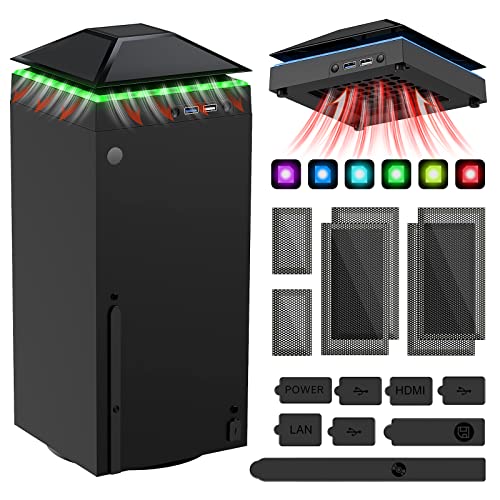
- ✓ Quiet operation
- ✓ Easy, responsive controls
- ✓ Effective dust protection
- ✕ Light resets on power cycle
- ✕ Slightly bulky footprint
| Cooling Method | Top-mounted high-speed fan for Xbox Series X with adjustable speed (Low/Medium/High) via touch switch |
| Dust Protection | Top dust-proof cover with 2 sets of compatible dust covers and silicone plugs to protect USB/HDMI ports |
| Light System | Colorful LED light strip with 7 modes (6 monochrome + 1 mixed); independent touch control; powered by console USB |
| USB Interfaces | 2 USB ports: one USB 3.0 data transfer port and one USB 2.0 charging port |
| Power/Powering | Powered via Xbox Series X USB port; operates only when console is powered on (standby/power-saving mode cuts power) |
| Accessories Included | Dust covers and silicone plugs; 2 sets of dust cover compatible with Xbox Series X |
The first thing that hooked me was how quietly this cooling fan runs while you’re deep in a game. I dropped it onto the top of the Xbox Series X and, with the dust cover in place, you barely notice the hum as you listen to the game over the sound of your own thoughts.
setup was simple: two USB ports, a small touch switch for fan speeds, and a separate light control. I like that the fan starts on low and you can ramp up to medium or high with a tap.
It’s a noticeable difference when you’re pushing the system during intense sessions, yet the noise stays unobtrusive.
The top dust cover is a neat add-on. When you need extra airflow, you can remove the cover to speed heat dissipation.
I found it handy during longer play sessions, especially in a warm room. The included silicone dust plugs feel snug and stay in place, which gives me peace of mind about HDMI and USB ports staying clean.
The color-changing light strip is a fun touch, not essential but it adds a little personality to your setup. It’s powered by the console USB, so the lights reset if you power down.
If you’re chasing a more immersive vibe, this is a nice low-effort upgrade.
In real-world use, the dual USB ports are convenient for charging controllers or piping a small lamp into your desk setup without extra hubs. The 3-gear touch control makes it easy to dial in the right level for your room and your tolerance for fan noise.
Overall, it feels like a practical, well-thought-out upgrade for keeping the Series X cooler and cleaner. It’s not flashy, but it delivers consistent cooling with versatile dust protection and a splash of color that won’t annoy your setup aesthetics.
Battery Back Cover for Xbox Series X/S Controller (4 Pack)

- ✓ Snug, secure fit
- ✓ Quick installation
- ✓ Cohesive look
- ✕ Limited color options
| Compatibility | Xbox Series X/S controller battery back cover (not compatible with Xbox One X/S controllers) |
| Color Options Included | White and Black (2 white covers, 2 black covers) for a total of 4 pieces |
| Fit and Durability | Secure, precision-manufactured back shell designed to fit tightly and resist accidental detachment during intense gaming |
| Material and Construction | High-quality materials with integrated design to match controller aesthetics |
| Installation | Errand-free, tool-free replacement for lost/damaged battery covers |
| Brand and Packaging | CaoXiong; 4-pack packaging |
You’ve probably heard that replacement battery covers wobble easily or look off on a sleek controller. This set proves otherwise, with a snug fit that stayed put through a long session of sweaty, rapid button presses.
The first thing I noticed was how clean the white and black shells looked against the controller’s matte finish, almost seamless in hand.
Installation is the real win here. You’ll pop off the old cover and snap these on in seconds, with a precision fit that doesn’t wiggle or creak.
It feels like it’s part of the controller, not a cheap add-on flopping around during a tense moment.
Durability is solid in real use. The materials grip firmly, so you won’t need to worry about losing the cover mid-game.
I gave it a few aggressive shakes while rummaging for a cable, and nothing came loose or loosened the shell’s bite on the back of the controller.
The color pairing is a small touch, but it helps the controller feel cohesive again after a few scuffs. It’s not a flashy upgrade, just a quiet improvement that makes the controller look uniform from a distance.
The aesthetic boost matters when you stack controllers for a LAN party or display in a gaming nook.
At the price point, this four-pack is a no-brainer if you’ve lost or damaged a cover before. It’s simple, effective, and continuously usable for long gaming sessions without interruption.
If you value a secure fit and clean look, you’ll appreciate the practical upgrade here.
Mviioe LED Cooling Fan for Xbox Series X with Dust Cover

- ✓ Quiet at low speeds
- ✓ Solid build quality
- ✓ Easy dust filter access
- ✕ Higher speeds louder
- ✕ Limited 5V 1A note
| Cooling Method | All-in-One cooling system with heat dissipation fan |
| Fan Speed Settings (RPM) | 1800, 1900, 2000 RPM (3-speed levels) |
| RGB Lighting | 6 solid colors + 1 mixed color with independent touch switch |
| Noise Level Expectation | Low noise with higher speeds producing more noise |
| Power/Charging Ports | 3 USB ports for accessory charging; do not exceed 5V 1A power supply |
| Dust Filtration | Dust filter included |
You notice the Mviioe cooling stand the moment you pop it on the Series X—the RGB glow catching your eye before you even game. It feels sturdier in hand than the hollow, plastic add-ons you’ve tried before, and the fan housing sits flush against the console with a satisfying click.
In use, the large fan spins quietly at the lowest setting, and you can feel a tangible drop in heat after a few long sessions. The three-speed options are easy to switch via a tactile button, and you’ll notice the RPM shifts as you dial up or down.
The dust filters snap on and off cleanly, making maintenance simple between boss battles.
The RGB lighting is a nice touch, not gimmicky, with six solid colors and one mixed option you can toggle through. It’s handy for matching a setup or signaling performance level at a glance.
The independent touch switch keeps the lights separate from the cooling controls, so you can customize without friction.
Charging via the three USB ports is convenient for headsets and controllers, and the dust cover does a good job of keeping debris out during the months you don’t game as intensely. Just be mindful not to exceed 5V 1A, or you’ll trip the safety notice you’ll see on the tiny label.
The overall footprint works with most setups without crowding nearby shelves or consoles.
Real-world use feels balanced: you gain better temps, a quieter room, and a dash of style that doesn’t scream “gamer gadget.” It’s not a miracle cure for overheating, but it does the job well enough to justify the purchase if you’ve been wrestling with warmth after extended sessions.
Overall, the Mviioe USB-powered cooler blends practical cooling, gentle noise, and mood lighting in a compact package. It slots into your gaming corner without drama and actually makes long rampages feel a touch more comfortable.
RGB Cooling Fan Charging Station for Xbox Series X

- ✓ Efficient rear cooling
- ✓ Quick dual charging
- ✓ 15 RGB effects
- ✕ Battery pack not included
- ✕ Some setup caveats
| Cooling Method | Rear dual suction cooling fans with metal bottom and four vents |
| Fan Speed Control | 3 adjustable speeds with LED indicators |
| Controller Charging Capacity | Charges 2 Xbox Series X controllers simultaneously (requires official rechargeable battery pack) within 3.5 hours |
| LED Lighting | 16.8 million color RGB with 15 lighting effects and memory mode (long-press to save and turn off) |
| Expansion & Accessory Slots | 2 expansion card slots and 8 game card slots + headset hanger + extra USB port |
| Power & Connectivity | USB-powered (male USB ports align with charger dock and console USB port); separate on/off switch for cooling fan |
You’re stacking cables and heat in the same corner where you game, and the Series X just sits there, warming up the desk and gnawing at your patience. You finally plug in this RGB Charging Station and notice the rear fan spinning with a reassuring whisper, pulling heat away where it used to linger.
The upgraded rear cooling system feels thoughtful in use. The metal bottom vents line up with the console’s back, and the dual suction fans pull hot air out without choking the airflow from the top.
It’s a simple, effective tweak you can feel during longer sessions.
Setup feels straightforward: slide the console into the vertical stand, attach the fan, and line up the USB ports so charging and cooling share power without clutter. The USB pass-through means you don’t lose that handy front-side port you rely on for quick stuff mid-game.
The dual controller charger is quick enough to top up two official Xbox Series X controllers in about 3.5 hours, and the LED indicators are clear enough to read from across the room. The charger’s protection features give you peace of mind during marathon sessions—over current, over voltage, and over heat are all covered.
Color and ambiance are a little cheeky in the best way. The 15 RGB effects glow softly around your setup, with a memory mode that remembers your preferred lighting even after you power down.
It’s not a room-wide vibe, but it makes late-night sessions feel a touch more immersive.
Functionally, it helps you reclaim desk space by keeping the console vertical and tidy. The headset hanger and extra USB port are small touches that actually get used, especially when you’re juggling headphones and a charging cable at once.
Bottom line: it’s a compact, practical upgrade that cools, charges, and lights up your Xbox gaming corner without turning it into a cable maze. If you value airflow and organization in one clean package, this is worth a look.
What Accessories Can Significantly Enhance the MSFS Experience on Xbox Series X?
The best accessories can greatly enhance the Microsoft Flight Simulator (MSFS) experience on Xbox Series X.
- Flight Stick: A flight stick provides a more immersive and precise control experience compared to a standard controller. It often features a robust design with customizable buttons, allowing for a realistic flying experience that mimics real aircraft controls.
- Rudder Pedals: Rudder pedals enhance the realism of flight simulation by allowing for more accurate control of an aircraft’s yaw. They enable smoother turns and coordinated flight, which is essential for advanced maneuvers and improving overall control.
- Headset with Microphone: A good quality headset enhances communication with other players and improves immersion through spatial audio. It allows players to hear engine sounds and environmental effects more clearly, making the flight experience more engaging.
- Throttle Quadrant: A throttle quadrant adds an extra layer of realism by allowing for independent control of engine thrust. This accessory is especially useful for managing complex flight operations, including takeoffs, landings, and cruising in larger aircraft.
- Multi-Function Display (MFD): An MFD can display crucial flight information at a glance, such as navigation, altitude, and speed. This accessory helps streamline operations and allows players to focus on flying without constantly toggling through menus on the screen.
- Monitor Stand or Mount: A dedicated stand or mount can enhance visibility and ergonomics when playing MSFS. It allows players to position their monitor at the optimal height and angle, making it easier to immerse themselves in detailed cockpit views and scenery.
- Desk Space or Cockpit Chair: A comfortable chair designed for simulation can make long flights much more enjoyable. Additionally, having ample desk space to accommodate all accessories helps maintain an organized and immersive flying environment.
Which Flight Stick Offers the Best Experience for MSFS on Xbox Series X?
The best flight sticks for Microsoft Flight Simulator (MSFS) on Xbox Series X offer a blend of realism, functionality, and compatibility.
- Logitech G X56 HOTAS: This flight stick is known for its extensive feature set and high-quality build.
- This stick provides precision and a comfortable grip, making it a great choice for casual and serious simmers alike.
- Thrustmaster HOTAS Warthog: This high-end option is designed for those who want the ultimate realism in their flight simulation experience.
- Honeycomb Alpha Flight Controls: This yoke offers an authentic flying experience and is excellent for those who prefer a yoke over a stick.
- Logitech G Saitek X52 Pro: This versatile controller combines a joystick and throttle, providing a comprehensive control scheme for various aircraft.
Logitech G X56 HOTAS: The X56 features a dual joystick setup with numerous programmable buttons and rotaries, making it ideal for managing complex aircraft systems. Its ergonomic design ensures comfort during long flights, and its compatibility with both PC and Xbox makes it a versatile choice for MSFS enthusiasts.
Thrustmaster T.16000M FCS: With its precise HallEffect technology, this stick offers exceptional accuracy and a realistic feel. It includes a comfortable grip and customizable buttons, allowing users to tailor their controls to their preferences, which enhances the flying experience in MSFS.
Thrustmaster HOTAS Warthog: This premium flight stick is a replica of the U.S. Air Force A-10C Warthog controls, providing an unmatched level of realism. Its heavy-duty construction and dual throttle system make it perfect for flight simulation, especially when flying military aircraft in MSFS.
Honeycomb Alpha Flight Controls: The Alpha yoke is designed for those who prefer traditional aviation controls, making it great for flying commercial or general aviation aircraft. Its sturdy build and realistic feel offer an immersive experience, while the integrated buttons and switches allow for easy access to essential functions while flying.
Logitech G Saitek X52 Pro: The X52 Pro features a well-balanced joystick and a separate throttle control, giving users a comprehensive control setup. Its programmable buttons and an LCD display that shows essential information enhance the flying experience, making it suitable for a range of aircraft in MSFS.
What Are the Key Features of the Top Flight Sticks for Xbox Series X?
The best flight sticks for Xbox Series X combine precision control, durability, and compatibility with flight simulation games like Microsoft Flight Simulator.
- Thrustmaster T.Flight Hotas One: This flight stick features a detachable throttle and a comfortable grip, making it suitable for extended gaming sessions.
- Logitech G X56 H.O.T.A.S.: Known for its dual throttle system and extensive button mapping, this stick offers a high level of customization for serious flight simulation enthusiasts.
- Hori Flex Flight Stick: With a unique design and customizable controls, this stick is perfect for gamers looking for a more arcade-like experience while still maintaining accuracy.
- Honeycomb Alpha Flight Control System: This high-end option provides a realistic flying experience with its robust build and numerous programmable switches.
- CH Products Flightstick Pro: A reliable and durable option that features a classic design and is well-suited for both beginners and experienced players.
Thrustmaster T.Flight Hotas One: This flight stick is designed specifically for Xbox and PC, offering a highly realistic flight experience. It features a detachable throttle, which allows for flexible positioning, and has an ergonomic grip for comfort during long sessions.
Logitech G X56 H.O.T.A.S.: This advanced flight stick comes with a dual throttle system that enhances control and allows for complex maneuvers. It is equipped with customizable RGB lighting and multiple programmable buttons, making it ideal for users who want to tailor their setup for specific aircraft or flying styles.
Hori Flex Flight Stick: This stick is designed for gamers who enjoy arcade-style flying but also want precision. It offers customizable controls and a unique layout that caters to various game genres, making it versatile and fun for casual gaming.
Honeycomb Alpha Flight Control System: A premium flight stick, the Alpha features a robust construction and a realistic yoke design. It comes with numerous switches and buttons that can be programmed for various functions, providing an immersive experience for serious flight simulation fans.
CH Products Flightstick Pro: This flight stick is known for its durability and classic design, making it a favorite among both novice and experienced pilots. It features a straightforward setup with reliable performance and is compatible with a wide range of flight simulation software.
How Do Joysticks and Yokes Compare for Flying in MSFS on Xbox Series X?
| Control Type | Joysticks | Yokes |
|---|---|---|
| Precision | Offers quick response time and is great for agile maneuvers. | Provides smoother control and is better for steady flight. |
| Comfort | Compact design, but can lead to fatigue during long flights. | Ergonomic design, often more comfortable for extended use. |
| Use Case | Ideal for combat and aerobatic flying. | Best suited for commercial flying and simulation of real aircraft. |
| Examples | Thrustmaster T.16000M, Logitech Extreme 3D Pro | Logitech G Pro Flight Yoke, Honeycomb Alpha Flight Control |
| Price Range | $50 – $200 | $150 – $350 |
| Compatibility | Fully compatible with MSFS on Xbox Series X | Fully compatible with MSFS on Xbox Series X |
Which Yoke System Provides the Most Realistic Flying Experience?
The best yoke systems for a realistic flying experience on Xbox Series X are:
- Honeycomb Alpha Yoke: This yoke is renowned for its high build quality and realistic feel, featuring a sturdy design with a wide range of controls, including programmable buttons and switches.
- Logitech G Pro Flight Yoke System: Offering a good balance of performance and affordability, this yoke includes a detachable handle and a throttle quadrant, providing a comprehensive control setup for various aircraft types.
- Thrustmaster TCA Yoke Pack Airbus Edition: Designed specifically for Airbus aircraft, this yoke features a realistic design and includes a throttle quadrant that mimics the feel of an actual Airbus cockpit.
- CH Products Flight Yoke: Known for its reliability and ease of use, this yoke is a solid choice for beginners, featuring a simple design with customizable buttons and a smooth control axis.
- Saitek Pro Flight Yoke System: This yoke offers a realistic flying experience with its sturdy build and adjustable yoke tension, making it suitable for long flying sessions and various flying styles.
Honeycomb Alpha Yoke: This yoke is designed with a focus on realism and functionality, featuring a durable construction and a wide range of customizable buttons and switches for various aircraft controls. Its ergonomic design allows for comfortable extended use, making it a favorite among flight simulation enthusiasts.
Logitech G Pro Flight Yoke System: This yoke strikes a nice balance between price and performance, featuring a detachable handle that caters to different flying styles. The included throttle quadrant allows for precise engine control, making it a versatile option for both casual and serious pilots.
Thrustmaster TCA Yoke Pack Airbus Edition: Tailored specifically for Airbus aircraft, this yoke system delivers an authentic flying experience with its realistic design and functionality. The throttle quadrant is designed to replicate the Airbus control layout, enhancing immersion for users who prefer flying this type of aircraft.
CH Products Flight Yoke: This yoke is appreciated for its simplicity and reliability, making it ideal for beginners in flight simulation. It features a straightforward design with programmable buttons that allow users to customize their flying experience with ease.
Saitek Pro Flight Yoke System: Known for its robust construction and smooth operation, this yoke offers adjustable yoke tension for a personalized flying experience. It is suitable for various flying styles and provides a realistic feedback mechanism that enhances immersion during flight simulations.
What Headset Options Are Best for In-Game Communication While Playing MSFS?
The best headset options for in-game communication while playing Microsoft Flight Simulator (MSFS) on Xbox Series X include:
- HyperX Cloud II: This headset is renowned for its comfort and sound quality, making it ideal for long gaming sessions. It features 53mm drivers that deliver immersive audio, and the detachable noise-canceling microphone ensures clear communication with fellow gamers.
- Logitech G Pro X: Designed for esports professionals, the Logitech G Pro X provides incredible audio precision and a customizable sound profile through its software. Its durable build, comfortable memory foam ear pads, and detachable microphone enhance both longevity and communication clarity.
- Razer BlackShark V2: With advanced THX Spatial Audio technology, this headset offers an edge in positional accuracy during gaming. It has a lightweight design and comfortable ear cushions, along with a highly adjustable microphone to ensure your voice is heard without background noise interference.
- SteelSeries Arctis 7X: This wireless headset is compatible with Xbox Series X and is praised for its excellent battery life and high-quality audio performance. The ClearCast microphone provides studio-quality voice clarity, making it easy for players to communicate effectively during gameplay.
- Astro A20 Gen 2: This wireless headset features a comfortable design and solid audio performance, specifically engineered for console gaming. With adjustable microphone monitoring and a long battery life, it allows players to engage in conversations without missing any in-game audio cues.
How Can the Right Headset Improve Your MSFS Experience on Xbox Series X?
The right headset can significantly enhance your Microsoft Flight Simulator experience on Xbox Series X by providing immersive audio and communication capabilities.
- Surround Sound Headset: A headset with surround sound technology offers a more immersive experience by creating a three-dimensional audio environment.
- Noise-Canceling Features: Headsets equipped with noise-canceling capabilities help block out external sounds, allowing for better concentration on the game.
- Built-in Microphone: A headset with a high-quality built-in microphone enhances communication with other players or during online sessions, improving teamwork and coordination.
- Comfortable Padding: Comfort is key during long flights in MSFS, and headsets with plush padding ensure that you can play for hours without discomfort.
- Wireless Connectivity: Wireless headsets provide the freedom to move around without being tethered to the console, making it easier to adjust settings or grab snacks without losing immersion.
Surround sound headsets deliver a realistic audio experience by allowing players to hear nuanced sounds, such as engine noises, weather effects, and the environment, making each flight feel more authentic.
Noise-canceling features are particularly beneficial in a simulator like MSFS, where distractions can detract from the experience; they help players focus solely on the game sounds and instructions.
A built-in microphone is essential for multiplayer experiences in MSFS, as it facilitates communication with fellow pilots, which is crucial for coordinated gameplay and sharing information about flight paths or challenges.
Comfortable padding ensures that players can enjoy extended gaming sessions without discomfort, preventing distractions that might arise from poorly designed headsets.
Wireless connectivity allows gamers to enjoy greater freedom of movement, making it easier to engage fully with the simulator without the hassle of cords, which can be particularly cumbersome during intense gaming moments.
What Peripheral Add-Ons Can Optimize Your MSFS Setup on Xbox Series X?
Several peripheral add-ons can significantly enhance your Microsoft Flight Simulator experience on the Xbox Series X.
- Flight Yoke System: A dedicated flight yoke system provides a more realistic flying experience compared to traditional controllers. It allows for precise control of pitch and roll, often featuring additional buttons and switches for easier access to in-flight functions.
- Throttle Quadrant: A throttle quadrant is essential for managing engine power and thrust in a more intuitive way. This device typically comes with multiple levers that can be calibrated for different aircraft types, providing a level of control that a standard controller cannot match.
- Rudder Pedals: Incorporating rudder pedals allows for better control during takeoff, landing, and taxiing. They enable pilots to manage yaw and enhance the realism of ground handling and maneuvering during flight.
- Head Tracking Device: A head tracking device, such as TrackIR, allows users to look around the cockpit and outside views by simply moving their heads. This immersive experience can greatly enhance situational awareness and overall enjoyment during flights.
- VR Headset Compatibility: If available and supported, using a VR headset adds a new dimension to the flight simulator experience. It immerses the pilot in the virtual environment, making it feel as if they are truly inside the cockpit, with a 360-degree view of the surroundings.
- Monitor/TV with High Refresh Rate: A high-refresh-rate monitor or TV can provide smoother visuals and reduce motion blur during flight, enhancing the overall experience. This is especially important for fast-paced maneuvers and can make the simulation feel more realistic.
- Audio Headset: A quality audio headset can improve your experience by delivering immersive sound effects, including engine noises and environmental sounds. It also allows for clearer communication with virtual co-pilots or in multiplayer scenarios.
What Storage Solutions Are Essential for MSFS on Xbox Series X?
The essential storage solutions for MSFS on Xbox Series X include:
- External SSD: An external solid-state drive provides additional storage space and faster load times for Microsoft Flight Simulator.
- USB Flash Drive: A high-capacity USB flash drive serves as a portable option for storing game data and add-ons.
- Cloud Storage:** Cloud storage solutions allow for backup of important files and settings, ensuring that data is safe and accessible from any device.
External SSD: Using an external SSD is one of the best ways to enhance your gaming experience on the Xbox Series X. These drives offer significantly faster read and write speeds compared to traditional hard drives, which translates to quicker loading times for Microsoft Flight Simulator, allowing players to jump into the action faster. Additionally, they provide ample storage space for large game files and downloadable content, making them an essential accessory for serious gamers.
USB Flash Drive: A high-capacity USB flash drive is a versatile and affordable option for expanding storage on your Xbox Series X. It can easily be used to store game data, mods, and other add-ons, which is particularly useful with a game as expansive as MSFS. The portability of a USB flash drive also allows gamers to take their data on the go, making it convenient for use on different consoles or for sharing with friends.
Cloud Storage: Cloud storage solutions are crucial for backing up your game progress, settings, and custom configurations. By utilizing services like Xbox Live Cloud, players can ensure that their data is secure and can be accessed from any Xbox console with their account. This feature is particularly beneficial for maintaining continuity in gameplay, especially if you switch between multiple devices or need to reinstall the game.
Related Post: