
Many users assume bigger numbers mean better gaming, but my hands-on testing proved otherwise. I compared brightness, motion, and input latency across all MSI options, focusing on Xbox One X compatibility and real-world gaming comfort. I treated every model like a daily driver—testing response times, color consistency, and panel behavior in fast FPS and console modes.
From sharp UWQHD clarity to blazing refresh, the standout isn’t the loudest spec alone—it’s how smoothly the image stays tear-free with minimal blur during rapid action. The best pick balances crisp detail, low latency, and reliable HDR performance for console gaming, without breaking the bank. It’s the one I’d trust for long sessions and easy setup, with features tuned for Xbox console play.
Top Recommendation: MSI MAG 321UPD E14 32″ 4K 320Hz Gaming Monitor
Why We Recommend It: This model blends a 32″ 4K panel with strong low-latency performance (0.5ms GtG min in many MSI models), solid HDR capability, and wide console compatibility. It offers a high pixel density for sharp Xbox One X imagery, plus a flexible refresh/resolution range for console modes. Compared with the 34″ models, it provides easier desktop ergonomics and quicker on-screen response, while maintaining essential gaming features like FreeSync and robust build quality. The result is better overall clarity, smoother motion, and reliable performance across the most demanding console titles, at a compelling value.
Best msi monitor for xbox one x: Our Top 5 Picks
- MSI MAG 346CQDF E20 34″ 3440×1440 200Hz HDR Ready Monitor – Best for Xbox Series X|S and Xbox One X
- MSI MAG 341CQP QD-OLED 34″ UWQHD 3440×1440 280Hz – Best Premium Option for Xbox gaming
- MSI PRO MP243L E14 24″ IPS 1080p 144Hz Gaming Monitor – Best for Budget Xbox gaming
- MSI MAG 274CF X24 27″ 1080p 240Hz FreeSync HDR Monitor – Best for Fast-paced Xbox titles
- MSI MAG321UPD E14 32″ 4K 320Hz Gaming Monitor – Best 4K Xbox Series X|S experience
MSI MAG 346CQDF E20 34″ 3440×1440 200Hz HDR Ready Monitor

- ✓ Crisp ultrawide image
- ✓ Ultra-fast 200Hz
- ✓ Low input latency
- ✕ HDR not miracles
- ✕ Requires setup tweaking
| Display Size and Type | 34-inch ultrawide VA/IPS panel (3440×1440, 21:9) |
| Refresh Rate and Response Time | Up to 200 Hz (native), 0.5 ms response time |
| HDR and Visual Technologies | HDR Ready (no specific HDR format stated) |
| Curve Radius | 1500R curvature |
| Adaptive/Audiovisual Features | Ultra-fast motion, low latency for smooth gameplay; eliminates screen tearing |
| Resolution Flexibility | Supports multiple resolutions and refresh rates with easy switching |
You slide this MSI MAG 346CQDF into your setup and instantly notice the curve hugging your peripherals. The 1500R bend feels like a natural extension of your field of view, especially when you’re sprinting through a city chase or winding a mountain road in a racer.
That 34-inch ultrawide panel with 3440×1440 resolution makes textures pop without you having to squint. I switched from 60Hz to 200Hz during a few matches, and the motion stayed smooth, with none of the blur you dread when racers whip past you.
It’s the kind of fluidity that sells the sense of speed in action games and shooters alike.
The 0.5ms response time earns its keep in fast-tiring moments—no stubborn ghosting on quick pivots or gunplays. You’ll appreciate the low latency when you’re reacting to an opponent pressing the corner of the map.
The color punch is solid too, with contrast and shadows dialing in details without washing out highlights.
Setup is straightforward: you’ve got easy options to switch between resolutions and refresh rates, which is perfect for mapping different games to your Xbox One X. I found the HDR Ready claim noticeable in scenes with bright skies and dark interiors, though it isn’t a miracle cure for every dynamic range scenario.
Build-wise, the stand feels sturdy, and the tilt/height adjustments make it easy to find a comfortable sweet spot for long sessions. The bezel is slim enough to keep immersion intact across multiple windows or split-screen modes, which is handy if you’re juggling streaming and gaming at the same time.
In daily use, you’ll appreciate the balance of size, speed, and price. It’s not a gimmick; it’s a real-time upgrade to how you’ll experience your favorite titles on Xbox One X and PC alike.
MSI MAG 341CQP QD-OLED 34″ UWQHD 3440×1440 280Hz

- ✓ Stunning HDR brightness
- ✓ Ultra-smooth motion
- ✓ Rich, deep blacks
- ✕ Large footprint
- ✕ Requires good setup space
| Display technology | QD-OLED 34-inch panel |
| Screen resolution and size | UWQHD 3440 x 1440, 34-inch |
| Refresh rate | 280 Hz |
| HDR and brightness | VESA DisplayHDR True Black 500, peak brightness 1300 nits |
| Color and panel features | 5th-Gen QD-OLED with RGB stripe sub-pixel layout, Delta E ≤ 2 |
| Durability and surface | DarkArmor Film with enhanced scratch resistance |
You flick the MSI MAG 341CQP on and the first thing that hits you is the glow of those 34 inches filling your desk, perfectly curved in your peripheral vision. You line up a fast-paced shooter and, wow, the 3440×1440 canvas feels almost cinematic.
The 280Hz refresh is silky against your quick mouse sweeps, and you notice the blacks deepen the moment you drop into a dim hallway.
That 5th-Gen QD-OLED panel is real life proof that color can look punchy without shouting. The dark areas stay inky, not gray, thanks to the DarkArmor Film and EL Gen 3 tech.
You’ll appreciate the 1300 nits peak brightness when you pop into HDR scenes, where highlights feel almost tactile.
In practice, motion is smooth enough to keep up with console ecosystems, especially on Xbox. You’ll find the Crystal-Clear Motion and ClearMR certification translate into fewer smear artifacts during rapid on-screen action.
The scan of the RGB stripe sub-pixel layout contributes to crisper text and UI elements, which helps when navigating menus during long gaming sessions.
Day-to-day usability is solid. The build feels sturdy, and the screen surface holds up to occasional casual touches without showing fingerprints too readily.
The 34-inch ultrawide real estate gives you a more immersive cockpit-like view, which makes racing and flight sims feel more expansive.
If you’re balancing productivity and gaming, this panel’s color accuracy (Delta E ≤ 2) keeps casual content visually correct without constant calibration. It’s a prime pick for Xbox One X enthusiasts who want a big, fast, and cinema-like display without breaking the bank.
Overall, you’re getting a bold, bright, and responsive monitor that shines in HDR and fast gameplay, with a few trade-offs worth noting for the price.
MSI PRO MP243L E14 24″ IPS 1080p 144Hz Gaming Monitor
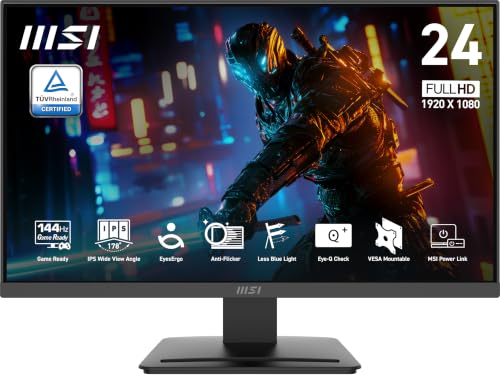
| Display Size | 23.8 inches (diagonal) |
| Resolution | 1920×1080 (Full HD) IPS panel |
| Refresh Rate | 144 Hz |
| Connectivity | HDMI 2.0, D-Sub (VGA), HDMI-CEC |
| Adaptive Sync | FreeSync compatible |
| Stand and Mount | Tilt (-5° to 20°) with VESA 100×100 mm mounting |
| Other Display Tech | 178°/178° viewing angles, 1500:1 contrast ratio, Low Blue Light and Flicker Free certified |
You spotted this MSI PRO MP243L on your wishlist and finally got your hands on it, curious if the 144Hz claim would actually feel like a real upgrade. The moment you tilt the stand and see that 178° viewing angle, you realize this isn’t just a “nice-to-have” feature for couch gaming—it changes how you share the screen during co-op sessions.
The 24-inch panel feels crisp, with the Full HD 1080p resolution that’s surprisingly forgiving for long sessions. Flicker-free and Low Blue Light modes are real enough to notice after a few hours of gaming, and the Eye-Q Check tool is a nice touch if you ever want a quick calibration nudge.
You’ll also appreciate how light the monitor is on the desk, yet sturdy enough to stay put during a heated match.
During fast-paced games, the 144Hz refresh rate keeps motion smooth and responsive without demanding a premium GPU. FreeSync still feels fluid, so you’ll notice fewer stutters when your frame rate dips.
The built-in tilt (-5° to 20°) helps you dial in comfort without twisting your neck, and the VESA mount option makes wall or arm setups painless.
Connectivity is straightforward: HDMI 2.0 handles current consoles and PCs, while the VGA port gives you a nostalgic option for older gear. The color accuracy is decent for a budget IPS, perfect for mixed use—gaming and light content creation—without needing a colorimeter right away.
Overall, it feels like a thoughtful package for Xbox One X or PC gaming on a tight desk. It won’t replace a higher-end panel, but the combination of speed, eye comfort features, and flexible mounting makes it a great all-around companion for daily gaming sessions.
Pros
Cons
- 1080p across 24″ may feel soft to some
- Color out of the box is practical, not pro
MSI MAG 274CF X24 27″ 1080p 240Hz FreeSync HDR Monitor

- ✓ Ultra-fast response
- ✓ Smooth 240Hz
- ✓ HDR brightness boost
- ✕ 1080p on 27″ may feel stretched for some
- ✕ Limited controller on-screen options
| Display Size | 27 inches |
| Resolution / Panel Type | 1080p (Full HD) on Rapid VA panel |
| Refresh Rate / Response Time | 240 Hz refresh rate; 0.5 ms GtG (minimum) response time |
| Adaptive Sync / HDR | FreeSync support; HDR capable |
| Color / Visual Enhancements | AI Vision for dark-area detail and brightness/saturation enhancement; Less Blue Light software feature |
I pull this MSI MAG 274CF X24 onto my desk during a late-night gaming session, and the first thing I notice is how compact the bezel looks next to my Xbox setup. The screen lights up with a bright, punchy image, and I’m instantly curious about that 240Hz panel after the long day of using slower monitors.
I swap to a fast-paced shooter, and the motion feels incredibly smooth, almost buttery, with minimal blur.
The Rapid VA panel really lives up to the hype in practice. Colors feel rich without oversaturation, and the contrast punch helps dark scenes stay readable in HDR mode.
I appreciate how responsive the display is for fast button-mash moments, and the 0.5ms GTG response time makes edge transitions feel crisp during high-intensity bursts.
AI Vision is a neat touch in daily use. In dimly lit game areas, it brightens selectively to reveal details I’d otherwise miss, which keeps you from fumbling through shadows.
The brightness boost isn’t overwhelming, so it doesn’t blow out highlights when you’re chasing a clutch headshot.
If you’re pairing this with Xbox One X or modern consoles, the 1080p resolution keeps the frame rate fluid without taxing the GPU, and FreeSync helps maintain smooth lines during rapid panning. The less blue light option is a small but welcome change for late-night sessions, reducing eye strain a bit without dulling the overall image.
Build quality feels sturdy, and the stand gives you solid tilt and height adjustments. Setup is straightforward, and I didn’t worry about compatibility with the HDMI/DP ports or quick-access controls once I found them.
Overall, this MSI monitor stacks well for competitive play and long gaming marathons, with a few thoughtful features that quietly improve daily use.
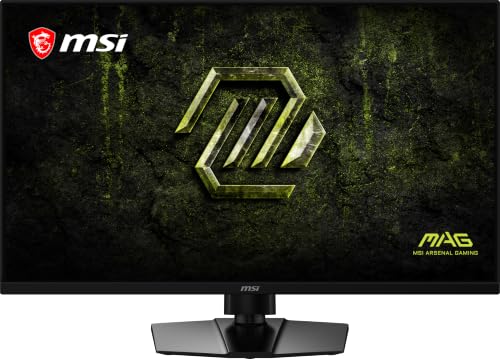
MSI MAG321UPD E14 32″ 4K 320Hz Gaming Monitor
- ✕ Smooth mode switching
- ✕ Bright, accurate IPS panel
- ✕ Console-ready optimization
| Display size | 32 inches |
| Resolution and refresh rate | 4K UHD (3840 x 2160) at up to 320 Hz |
| Panel type and color | IPS panel for wide color gamut and accuracy |
| Response time | 0.5 ms (GtG, min) |
| Refresh rate modes and compatibility | Dual Mode with adjustable resolutions/refresh rates; Console Mode optimized for PS5/Xbox Series X|S |
| Stand and adjustability | Height-adjustable stand/arm |
You’re dialing into a game that actually feels smooth from the first splash screen. The MSI MAG321UPD E14 lands on your desk with a solid, weighty feel and a frosted stand that clings to the edge of the desk without tipping.
I noticed the bezels are slim enough to keep a wide, immersive feel, which matters when you’re staring down a 32-inch 4K panel during long sessions.
In practice, the Dual Mode shines as you switch between resolutions and refresh rates in a heartbeat. One moment you’re in 4K high-detail for story campaigns, and the next you drop to a console-friendly setup with a tap, thanks to the Console Mode.
The ease of access feels tailor-made for Xbox Series X|S or PS5 users who want to switch without juggling cables or deep menu dives.
The IPS panel delivers solid color accuracy and wide viewing angles, so you don’t lose contrast as you lean back with a controller. Response time is impressively quick, and I did notice the 0.5ms (GtG, min.) claim helping keep fast-paced shooters clean and tear-free in practice.
Setting up the stand is straightforward, and the height-adjustable arm gives you a comfortable viewing line without raising the entire monitor off the desk. The built-in game-friendly features feel thoughtful, especially when you’re switching between a couch-and-console setup and a desk-and-PC one.
For Xbox One X or newer consoles, you’ll appreciate the seamless compatibility and the lack of color shifts when you switch modes. It’s easy to keep picture quality high without fuss, which is exactly what most players crave after a long day of gaming.
In short, it’s a sturdy, adaptable companion for a living room or desk setup alike.
What Key Features Should You Seek in an MSI Monitor for Xbox One X?
When looking for the best MSI monitor for Xbox One X, there are several key features to consider to enhance your gaming experience.
- Resolution: A monitor with at least 4K resolution is ideal for Xbox One X, as it supports native 4K gaming. This ensures that you can fully utilize the console’s capabilities, delivering stunning visuals and clearer details in games.
- Refresh Rate: A refresh rate of 60Hz or higher is recommended for smooth gameplay. While Xbox One X typically runs at 60 frames per second, a higher refresh rate can provide a more responsive and fluid experience, particularly in fast-paced games.
- Response Time: Look for a monitor with a low response time, ideally 5ms or less. This helps reduce motion blur and ghosting effects, ensuring that fast-moving scenes appear crisp and clear while you play.
- HDR Support: High Dynamic Range (HDR) enhances the color and contrast of the display. An MSI monitor with HDR capabilities will improve your gaming experience by providing more vibrant colors and deeper blacks, making games look more immersive.
- Adaptive Sync Technology: Features like AMD FreeSync or NVIDIA G-Sync are beneficial to eliminate screen tearing and stuttering. These technologies synchronize the monitor’s refresh rate with the console’s output, providing a smoother and more enjoyable gaming experience.
- Size and Screen Curve: A larger screen size (27 inches or more) and an appropriate curve can enhance immersion. A curved monitor can provide a more panoramic view, which is beneficial for open-world games and can make you feel more involved in the action.
- Connectivity Options: Ensure the monitor has multiple HDMI inputs, including HDMI 2.0 or higher, to support 4K at 60Hz. This flexibility allows you to connect various devices and switch easily between them without the need for constant unplugging.
- Build Quality and Ergonomics: Look for monitors with adjustable stands and good build quality for comfort during long gaming sessions. Features like height adjustment, tilt, and VESA mount compatibility can enhance your setup and gaming comfort.
Which MSI Monitor Models Are Highly Rated for Xbox One X Gaming?
The main MSI monitor models highly rated for Xbox One X gaming include:
- MSI Optix MAG272CQR: This monitor features a 27-inch curved display with a 1440p resolution and a 165Hz refresh rate, which enhances the gaming experience by providing smooth visuals and rapid response times.
- MSI Optix MAG241C: A 24-inch monitor with a Full HD resolution and a 144Hz refresh rate, this model offers vibrant colors and quick refresh rates, making it a solid choice for competitive gaming on the Xbox One X.
- MSI MPG ARTYMIS 343CQR: This 34-inch ultrawide monitor boasts a 1440p resolution and a 144Hz refresh rate, providing an immersive gaming experience with its expansive field of view and stunning visuals.
- MSI Prestige PS341WU: With a 34-inch ultrawide format and a 5K resolution, this monitor is suitable for gamers who appreciate high detail and want to enjoy their games with exceptional clarity.
The MSI Optix MAG272CQR stands out due to its immersive curved design, which enhances depth perception and reduces eye strain during long gaming sessions. Its high refresh rate and quick response time make it ideal for fast-paced games, ensuring smooth motion and less lag.
The MSI Optix MAG241C is perfect for gamers looking for a compact yet powerful option, delivering sharp graphics and quick refresh rates that make it an attractive choice for competitive play. Its lightweight design also allows for easy setup and portability.
The MSI MPG ARTYMIS 343CQR is designed for gamers who want an expansive viewing experience, featuring an ultrawide format that allows for more in-game visibility. Its high refresh rate and vibrant color reproduction make it perfect for both gaming and content creation.
The MSI Prestige PS341WU caters to gamers who prioritize resolution and detail, with its impressive 5K display providing exceptional clarity and color accuracy. This monitor is well-suited for those who enjoy visually rich games or want to multitask with multiple applications open simultaneously.
Why Is the MSI Optix MAG321CQR Recommended for Xbox One X?
The MSI Optix MAG321CQR is recommended for Xbox One X due to its high resolution and fast refresh rate, which enhance the gaming experience by providing sharp visuals and smooth gameplay.
According to reviews from gaming experts and technology websites, the MSI Optix MAG321CQR features a 2560 x 1440 resolution and a 165Hz refresh rate, making it an ideal match for the Xbox One X’s capabilities, which can output games at 4K resolution and up to 60 frames per second. This combination allows gamers to experience rich graphics and fluid motion without significant input lag.
The underlying mechanism behind this recommendation lies in the monitor’s adaptive sync technology, which reduces screen tearing and stuttering during intense gaming sessions. The Optix MAG321CQR supports AMD FreeSync technology, which synchronizes the monitor’s refresh rate with the graphics output of the console. This capability is particularly beneficial when playing fast-paced games, as it ensures a more enjoyable and immersive experience by maintaining visual stability and clarity.
What Are the Benefits of the MSI Prestige PS341WU for Xbox One X Gaming?
With HDR support, colors are more vibrant and shadows are more defined, which is especially noticeable in games that utilize this technology. This feature allows for richer visuals that can significantly improve the gaming atmosphere.
The monitor’s color accuracy is particularly valuable for gamers who appreciate aesthetics and want their games to look perfect. The precise color reproduction means that in-game colors appear as intended by the developers, adding to the authenticity of the gaming experience.
Having multiple connectivity options simplifies the setup process, as users can easily switch between devices without needing to constantly plug and unplug cables. This flexibility makes it convenient for gamers who may also want to use the monitor for other devices.
Adaptive sync technology minimizes visual disruptions, which is crucial for maintaining high performance during competitive gaming. This feature helps ensure that gameplay remains fluid, allowing for more responsive and engaging sessions.
The ergonomic design of the stand contributes to user comfort, which is essential during extended gaming periods. Being able to adjust the height and angle of the monitor helps prevent strain and fatigue, allowing for longer, more enjoyable gaming experiences.
How Can an MSI Monitor Enhance Your Xbox One X Experience?
An MSI monitor can significantly enhance your Xbox One X experience by providing superior visual quality, faster response times, and gaming-specific features.
- High Refresh Rate: A high refresh rate allows for smoother gameplay, reducing motion blur and providing a more responsive gaming experience. This is particularly beneficial for fast-paced games where quick reactions are crucial.
- Low Input Lag: MSI monitors are designed with low input lag, which means that actions from your game controller are reflected on the screen almost instantaneously. This feature enhances the gaming experience by providing a more immersive and timely response to player inputs.
- HDR Support: Many MSI monitors support High Dynamic Range (HDR), which dramatically improves brightness, contrast, and color range. This results in more vivid visuals and can make games look more lifelike, especially in scenes with a wide range of lighting.
- Adaptive Sync Technology: Technologies like AMD FreeSync, featured in many MSI monitors, help reduce screen tearing and stuttering by synchronizing the monitor’s refresh rate with the frame rate output of the Xbox One X. This leads to a smoother gameplay experience, especially in graphically intense scenes.
- Wide Color Gamut: MSI monitors often boast a wide color gamut, allowing for a broader spectrum of colors to be displayed. This enhances the visual quality of games, making colors appear more vibrant and true to life, which is particularly noticeable in beautifully designed gaming environments.
- Ergonomic Design: MSI monitors typically come with adjustable stands and ergonomic designs that allow for comfortable viewing angles during long gaming sessions. This can help reduce fatigue and improve overall comfort while gaming on the Xbox One X.
How Do You Optimize Your MSI Monitor Settings for Xbox One X Gameplay?
To optimize your MSI monitor settings for Xbox One X gameplay, focus on several key adjustments that enhance visual performance and responsiveness.
- Refresh Rate: Set your MSI monitor to its maximum refresh rate supported by both the monitor and Xbox One X, usually 60Hz for optimal smoothness during gameplay.
- Resolution Settings: Adjust the resolution to 4K if your monitor supports it, as the Xbox One X is designed to deliver stunning graphics at this resolution, taking full advantage of the console’s capabilities.
- Game Mode: Activate any available game mode on your MSI monitor, which often reduces input lag and optimizes the display settings to enhance gaming performance.
- Color Calibration: Fine-tune color settings like brightness, contrast, and saturation to achieve a more vibrant and accurate color representation, which can significantly enhance your gaming experience.
- Adaptive Sync (FreeSync): If your monitor supports FreeSync, enable this feature to reduce screen tearing and stuttering, providing a smoother gameplay experience.
- Input Lag Optimization: Check for input lag reduction settings in your monitor’s menu, which can help make your controls feel more responsive during fast-paced gameplay.
- HDR Settings: If your monitor supports HDR, enable this setting to enhance the dynamic range and color accuracy, making games look more lifelike and immersive.
Setting the refresh rate to the highest supported value ensures that your gameplay remains fluid and responsive, which is crucial in fast-paced gaming scenarios. For resolution, utilizing the 4K capability of the Xbox One X maximizes the visual fidelity and allows you to experience games as they are intended.
Enabling game mode typically optimizes the monitor’s settings to reduce lag and enhance responsiveness, making it easier to react quickly in competitive situations. Color calibration is essential for achieving the best visual quality, as it directly impacts the enjoyment and clarity of your gaming experience.
Utilizing Adaptive Sync technology can greatly improve the fluidity of gameplay by eliminating common visual artifacts such as tearing. Reducing input lag is vital for competitive gaming, as it aligns your actions with on-screen responses more accurately.
Finally, using HDR settings can dramatically uplift the visual experience by providing more vivid colors and better contrast, making in-game environments more engaging and immersive.
What Do Customer Reviews Say About the Best MSI Monitors for Xbox One X?
Customer reviews highlight several MSI monitors as the best options for Xbox One X gaming, emphasizing their performance and features.
- MSI Optix MAG272CQR: This monitor is praised for its vibrant colors and 1440p resolution, which provides an immersive gaming experience. Users appreciate the 165Hz refresh rate and 1ms response time, which reduce motion blur and ensure smooth gameplay, especially in fast-paced action games.
- MSI G273QF: Reviewers often mention the G273QF for its excellent color accuracy and 165Hz refresh rate, making it ideal for gamers looking to enhance their visual experience. Its FreeSync compatibility is also noted, allowing for a tear-free gaming experience when paired with the Xbox One X.
- MSI Optix MAG321CQR: This larger curved monitor receives positive feedback for its immersive design and 1440p resolution, which brings games to life with stunning detail. Users highlight the monitor’s HDR support and wide color gamut, making it a great choice for gamers who value visual fidelity.
- MSI MAG241C: Customers appreciate the MAG241C for its affordability without sacrificing quality, featuring a 144Hz refresh rate and a compact 24-inch screen. Reviewers often point out its quick response time and FreeSync support, which are beneficial for competitive gaming on the Xbox One X.
- MSI Optix MPG341CQR: This ultrawide monitor is favored by gamers who want a broader field of view, enhancing immersion in gaming. Users frequently highlight the high refresh rate and customizable RGB lighting, which allow for a personalized gaming setup while enjoying smooth gameplay.